Preferences
Privacy is important to us, so you have the option of disabling certain types of storage that may not be necessary for the basic functioning of the website. Blocking categories may impact your experience on the website. More information
Privacy is important to us, so you have the option of disabling certain types of storage that may not be necessary for the basic functioning of the website. Blocking categories may impact your experience on the website. More information

Learn how to build an ecommerce website without code: choose a platform, domain and theme, add products, set up payments, shipping, taxes and launch.
In short
To build an ecommerce website, you pick a platform (hosted like Shopify, or open source like WooCommerce), connect a domain name, choose a theme, add your products, then set up payments, shipping, taxes and legal pages before launch. Without code, a small store can go live in a few days.
Want to go further? Ask
Quick quiz
Where should your online shop find its next customers?
Sorank matches your answers


Test it for 3 days on your own site and see where you stand on Google, ChatGPT and the other AIs.
Start 3-day free trial3 days free, then stop whenever you want. 90-day results guarantee, conditions apply.
Before you open any website builder, answer four questions: what you sell, who buys it, how it gets to them and how much time you can spend on the technical side. These answers choose your platform for you. Skip them and you risk rebuilding the store in six months.
Put the answers in a short document: product list with prices, target country, shipping method, payment methods you want to accept, monthly budget and launch date. This plan is also what you will hand to a freelancer if you hire help later. It keeps every decision tied to a real constraint instead of a feature you saw in a demo.
Your store plan before you build
On the technical side, note one more thing now: how your products will be found. Most stores get their first buyers from Google, from marketplaces or from ads. Planning your categories around what people actually type (see our guide to keyword research for online stores) is much easier before the site exists than after.
There are four main ways to build an online store: a hosted platform, an open source platform you host yourself, a headless or custom build, and a marketplace or social shop. For most small businesses, a hosted platform is the fastest path. Open source wins when you need full control. Headless is for teams with developers and high traffic.
Principle: you rent a complete store. Hosting, security, the checkout and updates are handled by the provider. You pay a monthly fee and, depending on the plan and payment provider, a fee per transaction.
When to use it: you want to launch fast, you have no developer and your catalog fits standard product pages.
Advantages: no server to manage, a secure checkout from day one, a large app store, themes ready for mobile.
Limits: recurring fees grow with your plan and your apps, some technical settings are locked (for example, parts of the URL structure), and moving away later takes work.
Example: a candle brand with 40 products in one country can launch on Shopify's Basic plan with a free theme in a weekend.
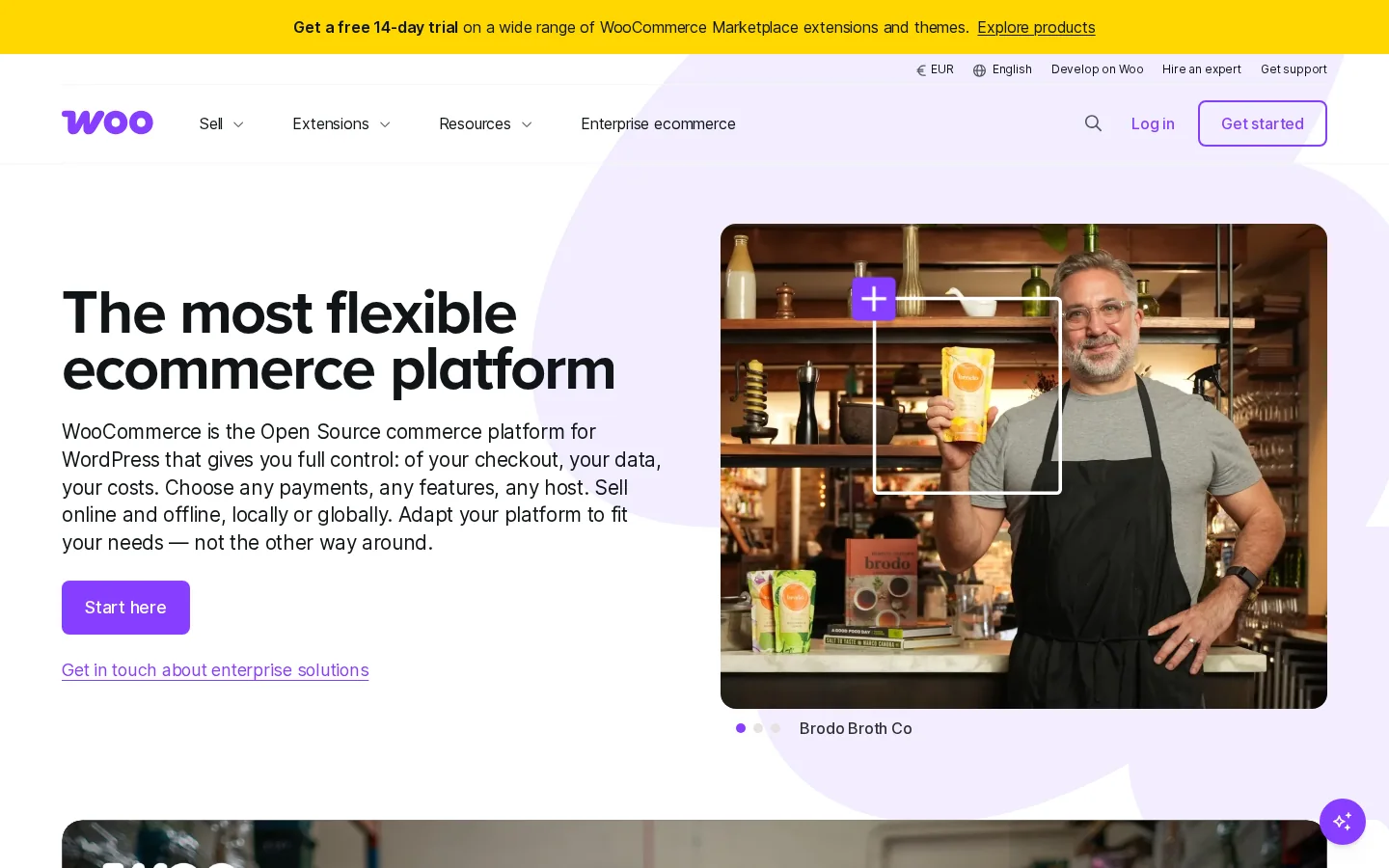
Principle: the software is free, but you install it on hosting you pay for and you are responsible for updates, backups and security. WooCommerce, for example, presents itself on its homepage as "the Open Source commerce platform for WordPress" and says it powers more than 4 million stores.
When to use it: you already run a WordPress site with traffic, you sell content-heavy products, or you need features that hosted platforms do not allow.
Advantages: full control of the code, the URLs and the data; no platform fee; thousands of extensions.
Limits: you pay for hosting, premium extensions and often a developer. A plugin conflict or a missed update can take the store down.
Example: a food blog with 50000 monthly readers adds WooCommerce to sell its recipe books and spice kits, without moving its articles anywhere.
Principle: the commerce engine (products, cart, orders) is separated from the front end (what the visitor sees). Developers build the front end in a framework of their choice and connect it through an API.
When to use it: you have a development team, high traffic, several sales channels (site, app, kiosks) or design needs that no theme can meet.
Advantages: total freedom on design and performance, one catalog for every channel.
Limits: high build and maintenance cost, and SEO basics (rendering, canonical tags, sitemaps) are no longer handled for you. A badly rendered JavaScript front end can hide your products from search engines.
Example: a fashion retailer with stores, an app and a site uses one headless engine so stock and prices are the same everywhere.
Principle: you list your products on someone else's platform, which already has buyers.
When to use it: you want to test demand before investing in your own site, or as a second channel once your store runs.
Advantages: traffic from day one, trust built in, almost no setup.
Limits: commissions on every sale, strict rules, no ownership of the customer relationship, and your brand is one listing among many. It does not replace a website: it complements one.
Example: a ceramics maker sells on Etsy first, then opens a Shopify store once repeat buyers start asking for a direct site (more in our Etsy vs Shopify comparison).
| Method | Setup time | Technical skill | Control over SEO | Main costs | Best for |
|---|---|---|---|---|---|
| Hosted platform | Days | None | Good, some settings locked | Monthly plan, apps, transaction fees | Most small and medium stores |
| Open source | Days to weeks | Medium | Full | Hosting, extensions, developer time | Content-led brands, existing WordPress sites |
| Headless or custom | Months | High (developers) | Full, but nothing is automatic | Development and maintenance | Large catalogs, multi-channel retailers |
| Marketplace or social shop | Hours | None | Very limited | Commission per sale | Testing demand, second channel |
Hosted platform vs open source, for a first store
To go further on this choice, read our comparison of Shopify and WooCommerce for SEO and AI visibility and our ranking of the ecommerce platforms that rank best on Google. If you are still unsure what a content management system does under the hood, our CMS definition explains it in plain words.

A small store on a hosted platform costs a monthly plan, a domain name, a few apps and payment fees. The biggest costs often come later: apps, ads and your own time. Budget for the full year, not the first month.
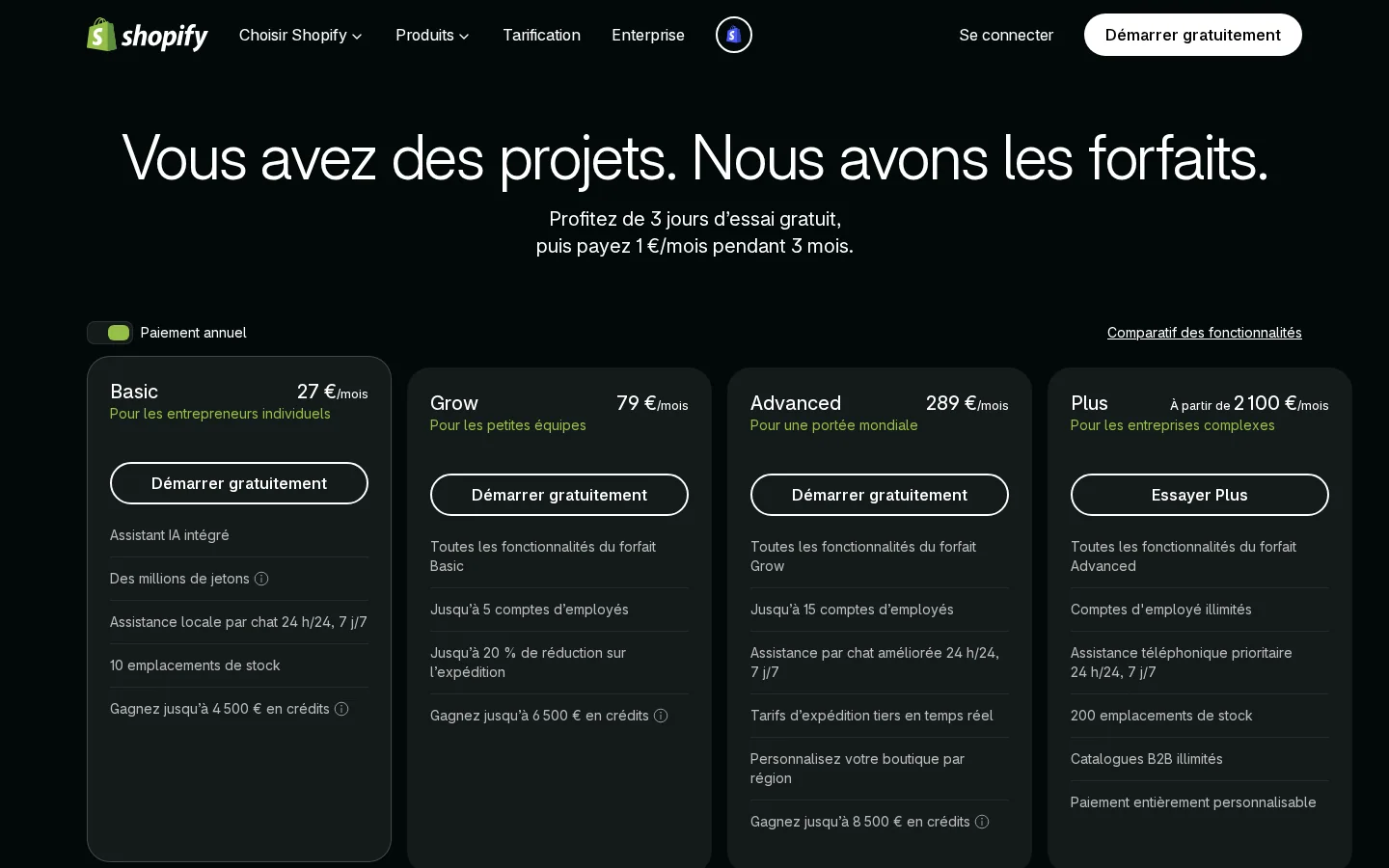
On Shopify's pricing page, viewed from Europe in November, the plans read as follows: Basic at €27 per month paid yearly (€36 monthly), Grow at €79 (€105 monthly), Advanced at €289 (€384 monthly) and Plus from €2100 per month. With Shopify Payments, the online card rate goes from 1.5% + €0.25 on Basic to 1% + €0.25 on Plus. If you use a third-party payment provider instead, Shopify adds its own fee of 2% on Basic, 1% on Grow and 0.6% on Advanced. Prices differ by country and change over time, so check the page for your market.
| Cost line | Hosted platform | Open source | Tip |
|---|---|---|---|
| Platform or software | Monthly plan | Free software | Start on the smallest plan that has the features you need today |
| Hosting | Included | Paid separately | Pick a host with daily backups and staging |
| Domain name | Yearly renewal | Yearly renewal | Check the renewal price, not only the first-year price |
| Theme | Free or one-time fee | Free or one-time fee | A fast free theme beats a heavy premium one |
| Apps and extensions | Often monthly | Often yearly licences | List them before you install: each one adds cost and load time |
| Payment fees | Per transaction | Per transaction | Compare the full rate including fixed fees per order |
| Developer or designer | Optional | Often needed | Pay for a fixed scope, not open hours |
To see whether organic traffic can pay for these costs over time, our free ecommerce SEO ROI calculator projects revenue from your traffic, conversion rate and average order value.
Here is the full process, in the order that avoids rework: account, domain, theme, pages, products, payments, shipping, taxes, legal, tests, launch. Each step takes from 15 minutes to a few hours on a hosted platform.
Build your store in 7 stages
Your domain name is your brand's address. Keep it short, easy to spell out loud, without hyphens or numbers, and on the extension your buyers trust (.com for international, the country extension for a single market). Our guide on choosing a domain name for SEO lists the tests to run before you buy.
You can buy the domain through your platform or through a separate registrar. A separate registrar keeps the domain independent of the store, which makes a future platform change easier. Then point it to your store with two DNS records. On most hosted platforms, it looks like this:
Type    Name    Value
A       @       (IP address given by your platform)
CNAME   www     (store address given by your platform)
Choose one main version (with or without www) and redirect the other to it. Make sure the store runs on HTTPS with a valid SSL certificate: hosted platforms issue one for free, and no buyer should ever see a security warning at checkout.
Pick the theme for speed and structure, not for the demo photos. Before you install it, check three things: the demo store loads fast on a phone, the product page shows price, variants and the add-to-cart button without scrolling, and the theme supports filters on category pages. Our list of free and paid Shopify themes compares them on these points.
Then set your brand once, in the theme settings: logo, two or three colors, two fonts at most. Build the header menu from your categories, in the words your buyers use. Put shipping, returns, contact and legal pages in the footer.
A good product page answers every question a buyer would ask in a shop: what it is, what it costs, whether it fits, when it arrives and what happens if it does not suit. Fill every field your platform offers, and give each product a clean URL.
For the full list, our breakdown of an ecommerce product page and its 15 elements shows what ranks on Google and what gets picked by AI models.
A product URL should describe the product in words. /products/linen-sheet-set-sage-green is better than /products/3243. Keep URLs lowercase, use hyphens, and avoid session IDs or tracking codes in the links you place on your own site. Each variant that people search for separately (a color, for example) can have its own URL, with a canonical tag pointing to the main product URL. Our free URL slug generator turns a product title into a clean slug in one click, and our definition of a URL slug explains the rules.
Structured data tells Google the price, currency and availability of a product in a format it reads without guessing. Most themes add it automatically; check that it is there and correct. According to Google's merchant listing documentation, a product needs at least name, image and offers, and the offer needs a price above zero and a priceCurrency. Google also reads shipping details and your return policy from the same markup. A minimal example:
<script type="application/ld+json">
{
  "@context": "https://schema.org/",
  "@type": "Product",
  "name": "Linen bed sheet set, king size, sage green",
  "image": "https://www.example.com/images/linen-sheet-set-sage.jpg",
  "sku": "LIN-KS-SAGE",
  "brand": { "@type": "Brand", "name": "Example Home" },
  "offers": {
    "@type": "Offer",
    "price": 149.00,
    "priceCurrency": "EUR",
    "availability": "https://schema.org/InStock",
    "hasMerchantReturnPolicy": {
      "@type": "MerchantReturnPolicy",
      "applicableCountry": "FR",
      "returnPolicyCategory": "https://schema.org/MerchantReturnFiniteReturnWindow",
      "merchantReturnDays": 30
    }
  }
}
</script>
Tip
If your theme does not output product markup, or outputs it with errors, our free schema markup generator builds a valid JSON-LD block you can paste into your product template. Our glossary entry on schema markup explains each property.
Your checkout is where most sales are lost. According to the Baymard Institute's cart abandonment list (updated October 2026), the average documented cart abandonment rate is 70.22%, across 50 studies. Many of the reasons are things you fix during the build: hidden costs, forced account creation, a long form and too few payment methods.
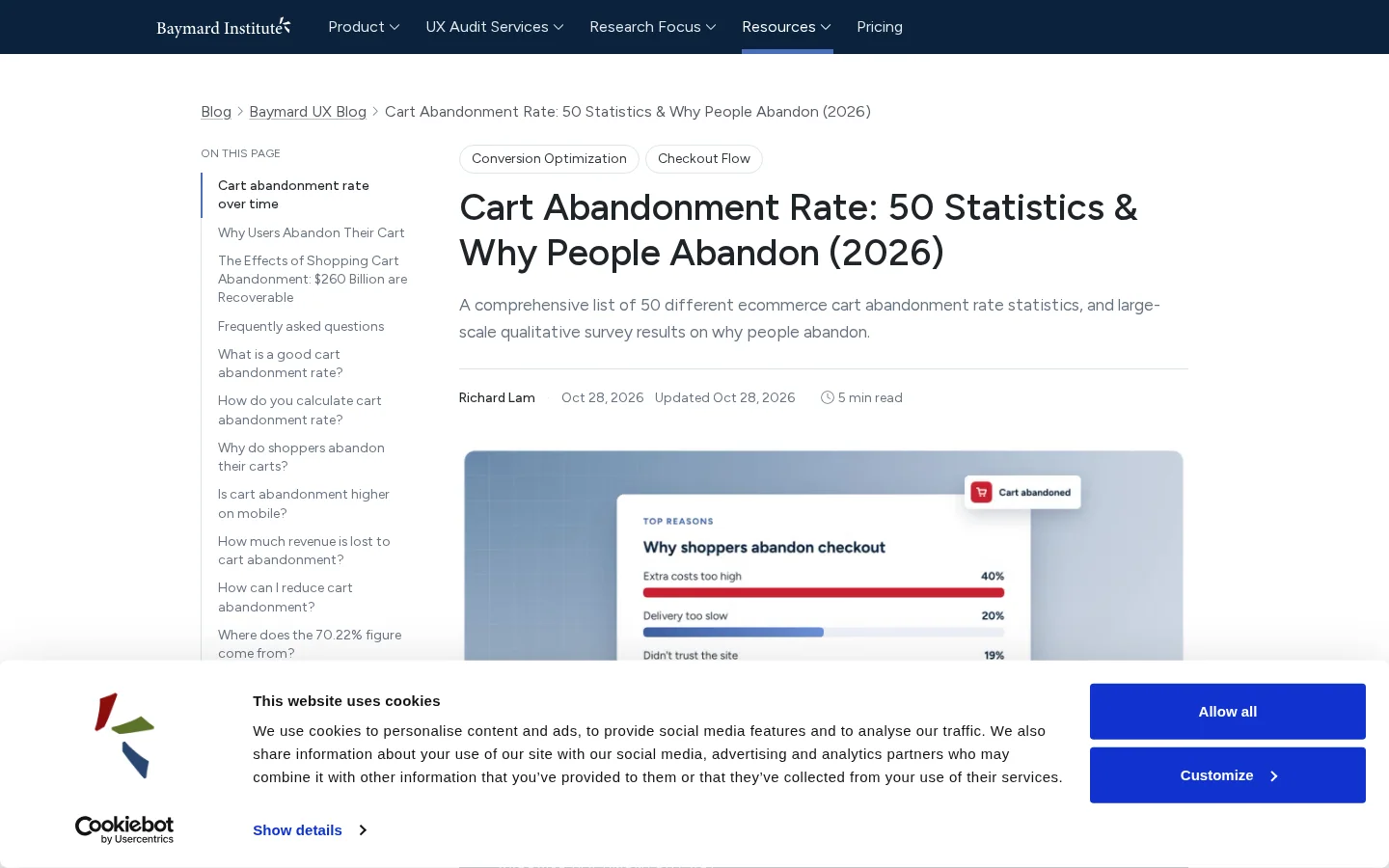
Start with the platform's own payment service if it is available in your country: it is the fastest to set up and, on Shopify, it avoids the extra third-party transaction fee. Then add the methods your buyers expect: cards, digital wallets (Apple Pay, Google Pay), PayPal, and local methods in some countries. Buy-now-pay-later can help for higher-priced items. Every payment method you add should be tested with a real order before launch.
Card data security is regulated by the PCI DSS standard. On a hosted platform or with a hosted payment page, the provider handles most of it. On a self-hosted store, never store card numbers yourself: use a payment provider whose form or redirect takes the card data off your server.
The Baymard Institute's checkout benchmark (June 2024) found an average of 11.3 form fields in the checkouts it tested, while most sites need only 8 in total. In practice:
Checkout numbers to know before you build
Sources: Baymard Institute, cart abandonment list (October 2026) and checkout form fields benchmark (June 2024)
Shipping and taxes decide your final price, so they must be set before launch. Legal pages are not optional: in most countries, an online store must show its identity, terms of sale, privacy policy and returns rules before the buyer pays.
Turn on the tax settings of your platform for each country you sell to, and decide whether your displayed prices include tax. In the European Union, consumer prices are usually shown with VAT included. In the United States, sales tax depends on the state of the buyer and on whether you have a tax obligation there. Tax rules are local: confirm your setup with an accountant before your first sale.
The European Commission's Your Europe page on ecommerce and distance selling sets out what an online seller must do when selling to consumers. Among the main points: the order button must clearly say that ordering means paying (for example "Order & Pay"), the customer has 14 days to withdraw without giving a reason, you must refund within 14 days of being told about the withdrawal, and you must deliver within 30 days unless agreed otherwise. If you never informed the customer of the withdrawal right, the period is extended by one year.
EU distance selling rules in four numbers
Source: European Commission, Your Europe, ecommerce and distance selling
The pages to publish before launch:
Warning
Copying another store's terms is a common shortcut and a risky one: their rules (return window, who pays return shipping, countries served) may not match yours. Your legal pages must describe what you actually do. When in doubt, have them reviewed by a lawyer in your main market.
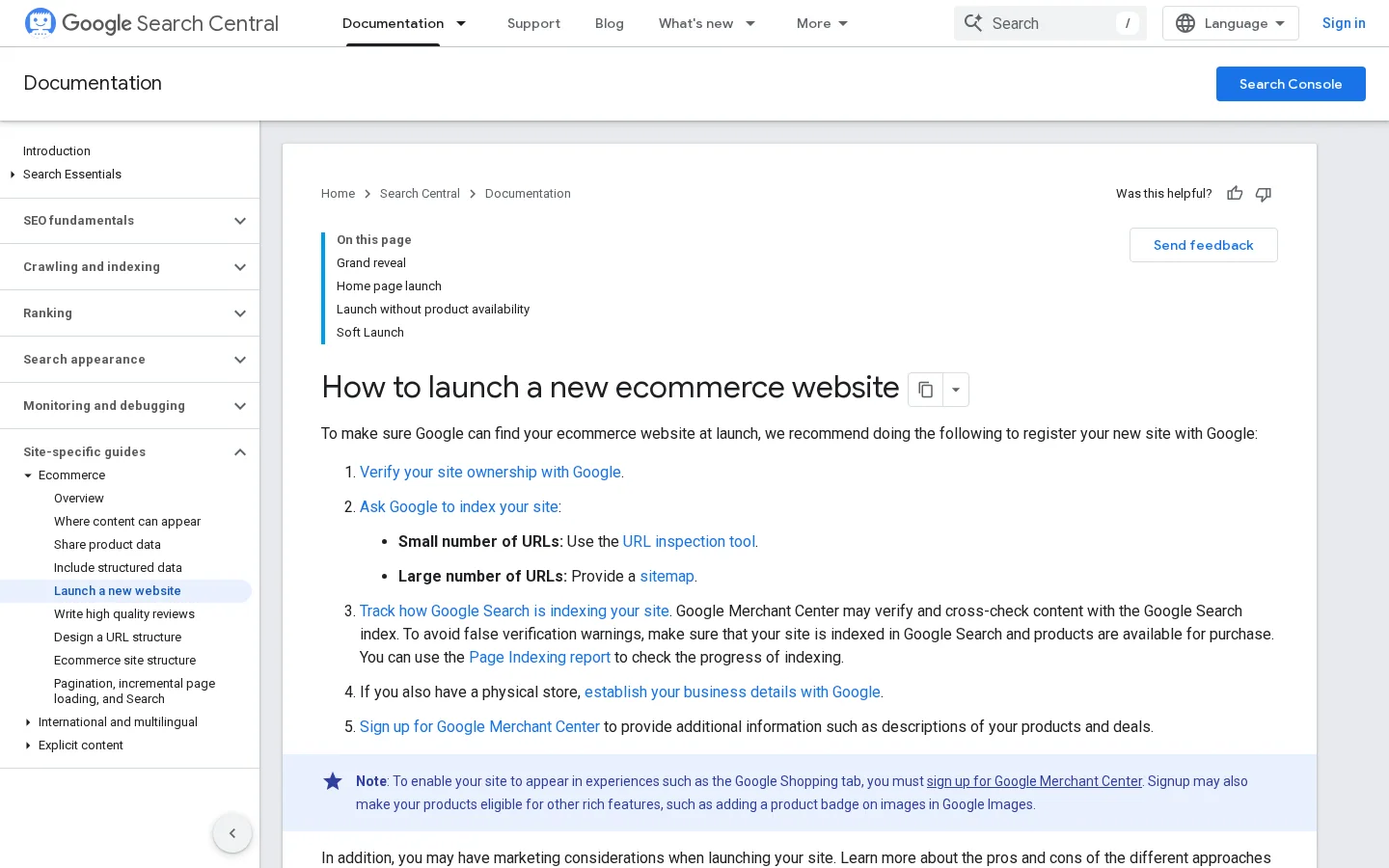
Launching means making the store public, telling Google it exists and checking that every product can be bought. Google's own guide describes several launch approaches and the exact steps to get indexed.
In its guide on how to launch a new ecommerce website, Google Search Central describes four approaches: a grand reveal (the whole site stays password protected until launch day), a home page launch (a placeholder home page goes live first so the store name can appear in Search early), a launch without product availability (the full site goes live with products marked out of stock) and a soft launch (the site goes live when ready, the marketing event comes later). Google also warns not to disable the add-to-cart button to stop purchases, as it may use it to check final prices.
Cart, checkout and account pages have no value in search results. Hosted platforms like Shopify already block them in their default robots.txt file. On a self-hosted store, check that your file contains rules like these:
User-agent: *
Disallow: /cart
Disallow: /checkout
Disallow: /my-account
Sitemap: https://www.example.com/sitemap.xml
Our free robots.txt checker validates the syntax and shows whether AI crawlers can read your product pages.
/sitemap.xml). Test it first with our free XML sitemap checker.From launch to first organic sale
Before you open the doors
A new store has no traffic by default. Ads bring visits as long as you pay; search brings visits that keep coming. The base is simple: one page per real search intent, good product and category pages, helpful articles, and links from other sites.
Each category page targets a broad search ("linen bed sheets"), each product page a precise one ("king size linen sheet set sage green"), and each article a question ("how to wash linen sheets"). Do not create two pages that target the same search: they compete with each other. Our ecommerce SEO strategy guide details this mapping, and our article on technical SEO fixes for online stores covers filters, variants and out-of-stock pages.
Buying guides, comparisons and care guides bring visitors who are not ready to buy yet, and they are the pages AI models quote when someone asks "what is the best linen for summer". This is where most small stores give up, because it takes time every week. Sorank's automated keyword research finds the searches your store can win, and its blog article generator writes and publishes the articles on your site, so the content keeps coming without blocking your week.
More and more buyers ask ChatGPT, Gemini or Claude which product to buy. These AI models favor stores with clear product data, detailed answers and mentions on other sites. Our guide to GEO for ecommerce explains how to get your products recommended, and Sorank's GEO optimization tracks whether these AI models name your brand and what to change when they do not. For a store-specific view, see Sorank for ecommerce.
From the first week, track sessions, conversion rate, average order value, cart abandonment and revenue by channel. Our list of ecommerce KPIs with their formulas shows where to find each one.
Most failed stores did not fail on design. They failed on a few build decisions that are easy to avoid when you know them.
What it is: picking a platform because of one impressive feature in a demo, then hitting its limits on what you really need (multi-currency, B2B prices, subscriptions).
How to spot it: you install more than three apps just to cover basic needs from your store plan.
How to fix it: go back to your one-page plan, list the must-have features, and test them on a free trial before you add products.
What it is: shipping, taxes or fees appear only on the payment page.
How to spot it: in your analytics, many visitors reach the shipping step and leave there.
How to fix it: show shipping prices on the product page and in the cart, add a free shipping threshold, and display prices with tax included where that is the norm.
What it is: the buyer must create an account before paying.
How to spot it: your checkout opens on a login or sign-up screen.
How to fix it: turn on guest checkout and offer account creation on the order confirmation page.
What it is: pasting the supplier's text on every product page.
How to spot it: paste a sentence of your description into Google between quotation marks; if dozens of stores show up, your page has nothing unique.
How to fix it: rewrite descriptions starting with your best sellers: use cases, sizes, materials, real photos and the answers to customer questions.
What it is: product URLs like /p/3243 or URLs that change when you rename a product.
How to spot it: open a few product pages and read the address bar.
How to fix it: set readable slugs before launch. If you change a URL after launch, add a 301 redirect from the old address to the new one.
What it is: the store is public for buyers but still blocked for search engines.
How to spot it: the URL inspection tool in Search Console reports the page as excluded by a noindex tag, or Google shows no page at all for your brand name after two weeks.
How to fix it: remove the password page and the noindex setting, then request indexing of the home page and main categories.
What it is: each app adds scripts to every page, and the store gets slow on phones.
How to spot it: run your product page in a speed test on mobile; check the list of scripts loaded.
How to fix it: uninstall what you do not use, remove leftover code from uninstalled apps, and prefer the platform's built-in features. Our Core Web Vitals definition explains which speed numbers Google measures.
What it is: categories with no text, or with one product, or empty after a stock-out.
How to spot it: list your categories with their number of products.
How to fix it: merge small categories, add a short helpful introduction, and set empty categories to noindex until they are restocked.
A first store, before and after fixing the build mistakes
Building an ecommerce website is a sequence of clear decisions: plan, platform, domain, theme, pages, products, payments, shipping, taxes, legal, tests, launch. Do them in that order and you avoid most rework.
Today, write your one-page store plan and open a free trial on the platform that fits it. Add three products with full descriptions, clean URLs and real photos, then place a test order. Once the store is live, connect Search Console and start publishing the content your buyers search for, on Google and in AI models.
Yes. Hosted platforms like Shopify, Wix or Squarespace let you build a full store with themes and settings, without writing code. Open source tools like WooCommerce also work without code, but you manage hosting and updates yourself.
On a hosted platform, a small store with a few dozen products can go live in a few days if your products, photos and policies are ready. A custom or headless build usually takes months. Most of the time goes into product content, shipping rules and testing, not design.
For most small and medium stores, a hosted platform such as Shopify is the fastest and safest start. WooCommerce suits brands that already run a WordPress site and want full control. Large multi-channel retailers often choose a headless build.
We analyse your competitors, your website and your AI visibility to create a tailored content plan for free.
 Website Value Calculator
 Website Accessibility Checker
 Google Analytics Checker
 Duplicate Content Checker
 Mobile-Friendly Test
 Website Speed Test
 Subdomain Finder
 Domain Age Checker
 CMS Detector
 Googlebot Simulator
 Nofollow Link Checker
 Meta Tag Checker
 Keyword Cannibalization Checker
 Keyword Intent Checker
 Keyword Extractor
 Google Ads Cost Calculator
 CPC Calculator
 Local Citation Finder
 Reddit Threads Finder
 Disavow File Generator
 Redirect Generator
 Canonical Tag Generator
 Passive Voice Checker
 Google Location Changer
 Google Review Calculator
 Google Review Link Generator
 Keyword Combiner
 Podcast Show Notes Generator
 AI Content Rewriter
 AI Text Humanizer
 ChatGPT Prompt Generator
 Twitter Thread Generator
 Tweet Generator
 Landing Page Copy Generator
 Google Ads Copy Generator
 Pinterest Pin Description Generator
 Anchor Text Generator
 Social Media Post Generator
 LinkedIn Post Generator
 Free AI Writer
 Review Response Generator
 LSI Keyword Generator
 YouTube Video Ideas Generator
 YouTube Tag Generator
 YouTube Description Generator
 Product Description Generator
 CTA Generator
 Blog Introduction Generator
 Conclusion Generator
 Hook Generator
 AI Content Brief Generator
 FAQ Schema Generator
 AI Blog Post Ideas Generator
 Structured Data Validator (Schema Validator)
 Alt Text Checker
 Internal Link Analyzer
 Backlink Challenge
 AI Meta Description Generator
 AI Blog Title Generator
 Google Indexability Checker
 AI Blog Outline Generator
 UTM Link Builder
 Keyword Clustering Tool
 Canonical Tag Checker
 XML Sitemap Generator
 Broken Link Checker
 AI SEO Title Generator
 Headline Analyzer
 SERP Preview Tool
 Redirect Checker
 Hreflang Tag Generator
 Heading Structure Analyzer
 HTTP Headers Checker
 Favicon Extractor
 SERP CTR Calculator
 SEO vs Paid Search Savings Calculator
 SEO Share of Voice Calculator
 SEO ROI Calculator
 SEO Traffic and Revenue Forecast Calculator
 SEO Budget Calculator
 SEO Break-Even Calculator
 SaaS SEO ROI Calculator
 ROAS Calculator
 Reading Time Calculator
 Ranking Gain Simulator
 Organic Traffic Value Calculator
 Organic Traffic Estimator and Website Traffic Checker
 LTV to CAC Ratio Calculator
 Local SEO ROI Calculator
 Link Building Cost Calculator
 Keyword Value Calculator
 Keyword Opportunity Score Calculator
 Keyword Density Calculator
 GEO ROI Calculator
 GEO Content Investment Calculator
 Ecommerce SEO ROI Calculator
 Customer Lifetime Value Calculator
 Customer Acquisition Cost Calculator
 CTR Calculator
 Cost Per Article Calculator
 Conversion Rate Calculator
 Content Marketing ROI Calculator
 ChatGPT Referral Traffic Estimator
 Bounce Rate Calculator
 Backlink ROI Calculator
 AI Visibility Score Calculator
 AI Traffic Value Calculator
 AI Share of Voice Calculator
 Cost of AI Invisibility Calculator
 AI Citation Rate Calculator
 llms.txt Validator
 AI Overview Checker and AI Overviews Rank Checker
 Robots.txt Checker
 AI SEO Audit
 LLM Readability Checker
 SearchGPT Readiness Checker
 Structured Data LLM Audit
 Website Crawlability AI Audit
 Why ChatGPT Is Not Recommending My Website
 Gemini Ranking Tool
 Perplexity Ranking Checker
 LLM Citation Checker
 Answer Engine Optimization Audit
 GEO Audit
 AI Search Visibility Test
 ChatGPT Visibility Checker
 llms.txt Generator
 URL Extractor
 Webpage to Markdown
 Sitemap Checker
 SERP Volatility Sensor
 Page Size Checker
 Word Counter
 Slug Generator
 Schema Generator
 Robots Generator
 OG Preview
 Meta Tags Generator
 Image Compressor
 Favicon Generator
 On-Page SEO Audit: SEO Checker and SEO Analyzer
 Backlink Analysis Tool
 Keyword Research Tool
 Domain Authority Checker
 “I tested Sorank on a real client site and it's insane. It does everything an agency would bill you $1500 a month for. It's going into production on that client now.”

 Guillaume Guersanguersanguillaume.com“We are an Ads agency and we wanted to get our SEO back on track once and for all. Sorank gave us a clear view of our site, helped us prioritize optimizations, and properly structure our content. The tool is easy to use, well designed for a team, and very practical for centralizing tracking without having to juggle multiple platforms. A very solid foundation to start fresh with our SEO.”
 Gaspard MadouiAds Agency
 “I just let the Sorank software do its thing, and now my DR is 25 and my page is ranking higher.”
 Lucas Flandrefoundertrace.fr“I specialized in GEO thanks to Sorank. The GEO Leaderboard allows me to show my clients their position vs competitors on ChatGPT. It’s a real commercial differentiator.”
 MélanieSEO Freelance“Great service, works well for our website and helps us understand how to improve it to rank better on Google and elsewhere. Congrats, keep going, I recommend it.”
 Hugo T.E-commerce merchant