

When should you choose webhook publishing?
The webhook connects Sorank to a custom site or an automation that knows how to receive an article and publish it. It is the right choice when you already have such a publishing system in place or when your team can build one. The process has three steps: Sorank prepares the article, sends it to your integration, and then your integration publishes it on your site. Once this flow is configured, you can send articles from Sorank or use the scheduler to automate their generation and delivery. With the update contract described on this page, you can also send a new version to an existing article. For example, a revision prepared in the editor is sent to your site when you click Send article update. If you want Sorank to also handle blog hosting, choose the hosted blog instead. If your CMS has a native connector, use the flow described in publish and export.Upgrading an existing webhook
After you update your server, Sorank automatically detects update support on the next publish or resend, if your integration is still recognized as legacy. Sorank sendswebhook.test; a detection failure does not prevent normal delivery.
To trigger detection immediately without disconnecting your webhook:
- Open the webhook integration settings in Sorank.
- Keep the same URL and the same secret.
- Click Save.
webhook.test with an HTTP 2xx status and this JSON at the root:
article_url alone does not prove that your server accepts article.updated. Detection does not retroactively retrieve missing URLs: each completed publication must return its own article_url according to the contract below.
Do not have a native Sorank integration for your CMS? The Webhook connector lets you send your generated articles to any URL, Zapier, Make, n8n, or a custom endpoint on your own developed site, so you can publish your content wherever you need it.
How it works
When you publish an article in Sorank, we send a POST request with a structured JSON payload to the URL you have configured. Your endpoint or automation tool can then process the payload and create the post on your blog, your custom site, or any other tool that accepts incoming HTTP requests.Important: the webhook only sends data, you are responsible for publishing it
This is the most important thing to understand about the Webhook connector. On our side, Sorank bundles everything you need in the JSON (title, slug, full HTML body, meta description, images, language, and more) and sends it to your URL. As soon as that JSON is successfully sent, Sorank marks the delivery as successful. This “success” status confirms one thing only: the data has left Sorank and your endpoint has accepted it. A simple historical acknowledgement does not confirm publication. With the version 2 contract below, a completed response containingarticle_url immediately confirms publication in Sorank; your code remains responsible for the actual publishing in your CMS.
In other words, the webhook is only a data delivery mechanism. Receiving it, parsing it, and publishing it to your CMS is entirely your responsibility. If the article does not appear despite a successful delivery, check reception, processing, publishing, and the response returned. The delivery status alone does not identify the cause.
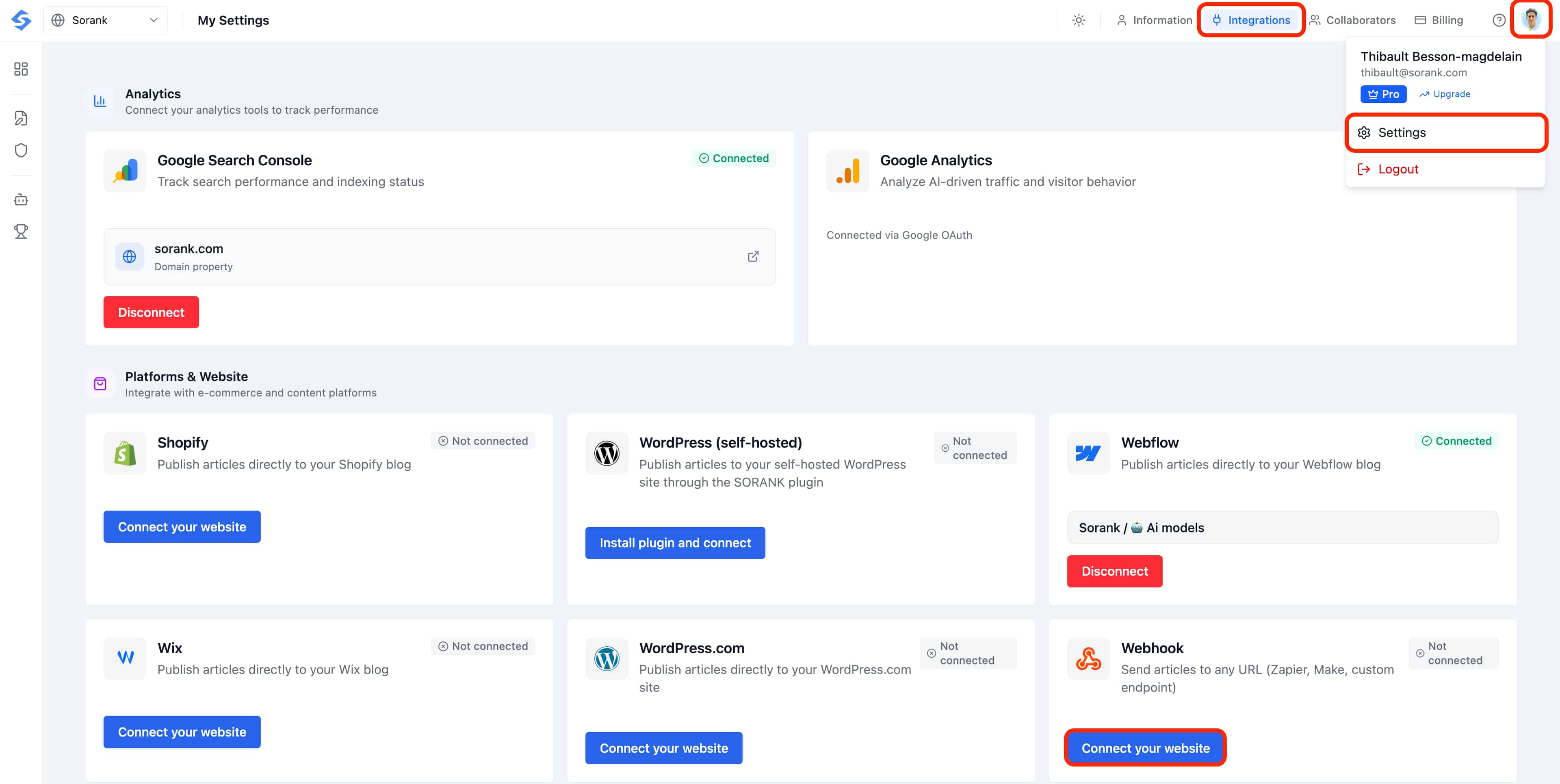
Step 1: open the Webhook integration
- In the left menu, open Settings, then Publishing platforms.
- Scroll to the Webhook card and click Connect your website.
Step 2: configure your endpoint
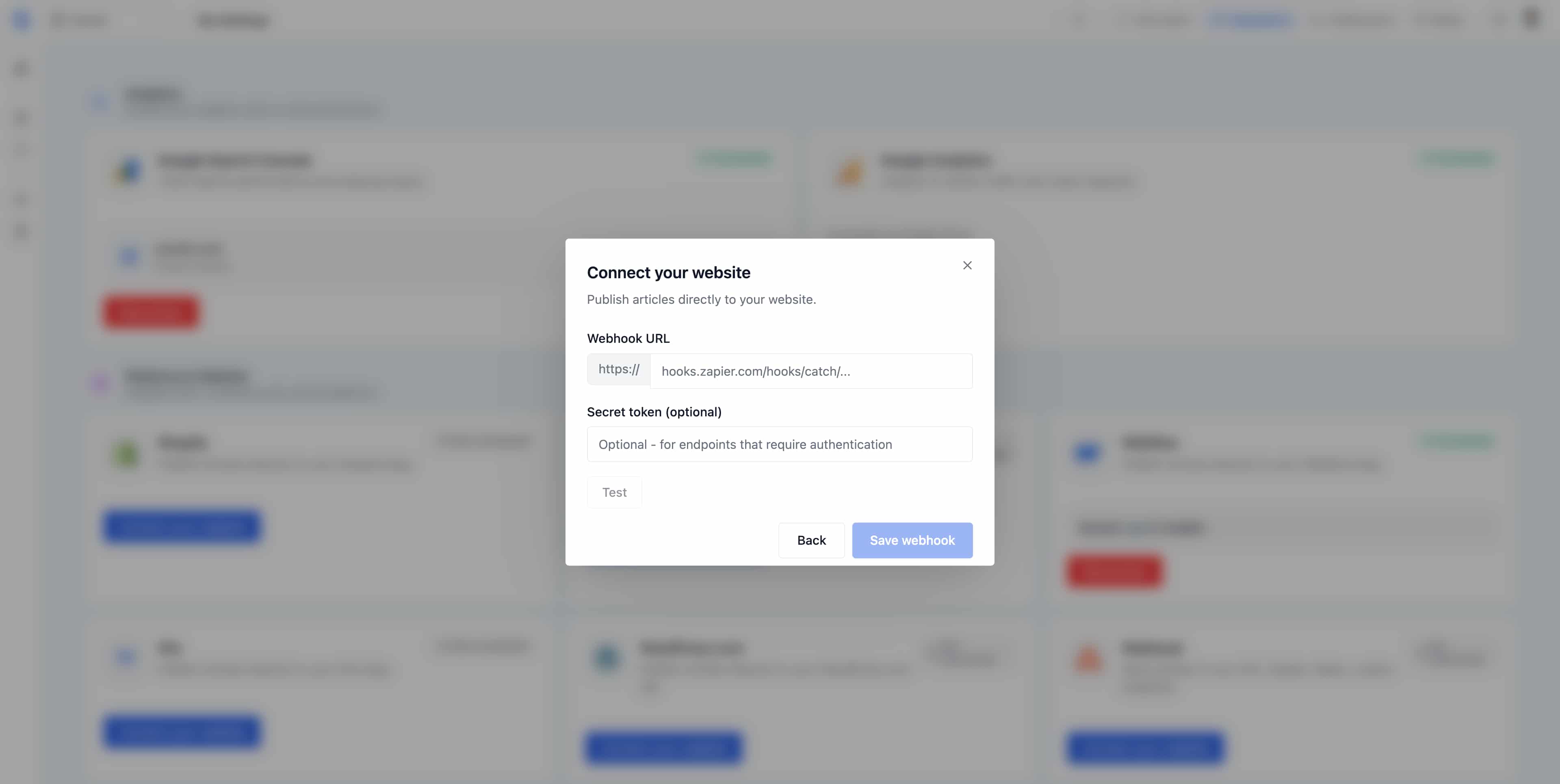
- Paste your destination URL into the Webhook URL field (for example, a Zapier catch hook, a Make webhook, or your own server endpoint).
- Optionally, add a Secret token if your endpoint requires authentication. Sorank will include it as a
Bearertoken in theAuthorizationheader so your server can verify that the call comes from Sorank. - Click Test to send a sample payload (event type
webhook.test) and confirm that your endpoint responds correctly. - Click Save webhook to activate the integration.
HTTP request details
Every webhook Sorank sends to your endpoint follows the same HTTP contract. Here is what your server will receive:- Method:
POST - Content-Type:
application/json - User-Agent:
SORANK-Webhook/1.0 - Authorization:
Bearer {webhook_secret}(optional, sent only if you have configured a secret in your integration settings)
User-Agent header to identify Sorank traffic in your logs, and verify the Authorization header on your side to make sure the request comes from Sorank and not from an unknown caller.
Webhook payload structure
Sorank uses three events with the same envelope (event, delivery_id, timestamp, article). A single POST HTTPS route (for example /sorank-webhook) is enough: handle each event value on that route and verify the Authorization token if you have configured a secret.
Version 2: publish, update, and return the URL
To enable updates, your route must respond towebhook.test without creating any content, with an HTTP 200 and this JSON:
article.published, create the article and store the mapping between article.id and its identifier in your CMS. If that mapping already exists, do not create a duplicate. For article.updated, look up that mapping and replace the content of the existing article. If the article cannot be found, return an error, for example HTTP 404: an update must never create a new article.
After a publication is fully complete, return HTTP 200 or 201 with:
"status": "updated" and the current public URL. Only article_url is required, not the sitemap URL. Provide an absolute HTTPS URL on the site associated with the Sorank profile, not the URL of your automation. The response must be a JSON object smaller than 16 KiB; the URL must not exceed 2,048 characters.
Return the published article’s exact canonical HTTPS URL in
article_url, matching its <link rel="canonical"> tag. Preserve the presence or absence of www and the trailing slash. For example, if the canonical URL is https://example.com/blog/my-article, return it without www. If it is https://www.example.com/blog/my-article/, keep both www and the trailing slash. Sorank uses this URL to track indexing in Google Search Console. Do not return an alternative URL simply because it redirects to the article or displays the same content.status: published or status: updated and a valid article_url immediately records the URL and displays Published with its link, even without a backlink exchange. The URL must belong to the profile’s site. These completed responses do not wait for the periodic checker. Only accepted receipts or HTTP 202 responses remain pending verification. Backlinks are verified separately: confirming publication does not prove the presence of links and does not validate their credits. If an update fails, the last verified URL is kept. Editing text in the editor does not send it automatically: click Send article update.
Retries and asynchronous processing
Use theIdempotency-Key header to deduplicate the same operation on the same article snapshot and return the memoized response. delivery_id identifies each attempt only. Also keep the article.id mapping to prevent duplicate creations across different operations. The X-Sorank-Article-Revision header lets you reject an older version received after a more recent one.
If processing is not yet complete, respond with HTTP 202 with "sorank_webhook_version": 2, "status": "accepted", and, if known, "article_url". A 202 never confirms publication. To allow Sorank to later verify this asynchronous operation, add the following tag to the public HTML of the article only after it has been effectively applied:
Idempotency-Key header you received. Do not add it upon receipt: the old page does not prove the new update. Without this proof, verification remains pending and then expires. If your tool cannot publish this tag, complete the publication before returning the 200/201 response.
Migrating an existing integration
An empty or text 200 response remains compatible with legacy delivery but does not enable updates. Update your route, click Test, then Save webhook: Sorank retests server-side capabilities on save. Changing the URL or secret invalidates any ongoing verifications. To update already-published articles, reconstruct theirarticle.id mapping on the CMS side; Sorank cannot infer it.
Event: article.published
Triggered every time you publish an article from Sorank. This is the event your production endpoint must handle to create the post in your CMS or trigger your automation flow.Event: webhook.test
Triggered when you click the Test button in Sorank to verify that your endpoint is reachable. The payload uses placeholder values (id contains only zeros, featured_image is omitted, images is empty) so your integration can safely ignore it or use it to confirm connectivity without creating a real post.Field reference
- event,
article.published,article.updated, orwebhook.test. Use this field to route the payload. - delivery_id, unique UUID to trace each delivery attempt. To deduplicate an operation, use the
Idempotency-Keyheader. - timestamp, ISO 8601 UTC timestamp of when the event was emitted.
- article.id, unique identifier of the article in Sorank.
- article.title, the H1 / article title.
- article.slug, URL-friendly slug, lowercase with hyphens.
- article.meta_description, SEO meta description, ready to insert into your
<meta name="description">tag. - article.focus_keyphrase, primary target keyphrase used for the article.
- article.content, full article body in HTML, including headings, paragraphs, lists, and inline image tags.
- article.featured_image, cover image object with
url,alt, andplacement. May be present onarticle.publishedandarticle.updated. - article.images, array of additional images in the body. Each entry has
url,alt, andplacement. May be empty. - article.word_count, total word count of the article body.
- article.keyword, identical to the target keyphrase, kept as a separate field for backwards-compatible integrations.
- article.language, BCP 47 language tag (for example
en-US,fr-FR).
Common use cases
- Zapier: use a Catch Hook trigger to forward articles to thousands of apps such as WordPress, Notion, Airtable, or Google Sheets.
- Make: use a Webhooks module to build custom multi-step publishing automations.
- n8n: connect a Webhook node to a flow that creates the post in your headless CMS or back office.
- Custom backend: send articles directly to your own API to publish on a hand-built site, a headless CMS such as Sanity or Strapi, or any internal tool.
Tips
- Always click Test before saving to confirm that your endpoint accepts the request and returns a 2xx response.
- Check the
eventfield on the server side so thatwebhook.testcalls never create real posts. - Use
Idempotency-Keyto deduplicate an operation andarticle.idto look up the same article in your CMS. - Keep your Secret token private, verify the
Authorizationheader on every request, and rotate the secret regularly. - Use an HTTPS endpoint to keep article data secure in transit.
- Once connected, every article published in Sorank will automatically be sent to your webhook URL.
Why your articles may not appear (failure causes)
Because the webhook only delivers data, a “success” in Sorank does not guarantee that the article is live on your site. Check each step to locate the blockage. Here are the points to examine.Causes on your integration side
- Your CMS API key is read-only instead of read and write, this is one of the most common issues. If the credentials your code uses to write to your CMS (Sanity, Strapi, Contentful, or any headless backend) only have read / view permissions, your endpoint will receive the JSON but will silently fail to create the post. Generate a key with write access and update it in your integration.
- Your code receives the JSON but never sends it to your CMS, receiving the payload is only half the work. Make sure your endpoint actually maps the Sorank fields and creates the post in your CMS or database. Log the incoming payload and confirm that your publish call runs and succeeds.
- The field mapping is incorrect, if your code expects different field names from those present in the payload, the post may be created empty or rejected. Make sure you are reading
article.title,article.slug,article.content, etc., exactly as documented above. - Your endpoint returns a 2xx but throws an error afterwards, if you acknowledge the request before processing it asynchronously, a later failure in your publishing logic will not be visible to Sorank. Check your own server logs to catch these.
Causes on the delivery side
- Your webhook endpoint is no longer responding (server offline), bring your server back online and verify that the URL responds normally.
- The webhook URL has changed but has not been updated in Sorank, update the URL in the Sorank integration settings.
- You have regenerated your webhook secret on your side, update the secret in Sorank so it matches what your server now expects in the
Authorizationheader. - Your endpoint returns an error that Sorank cannot interpret, check your server logs to identify the problem, then fix it on your webhook side.
- A firewall on your server is blocking our requests, add Sorank IP addresses to your firewall allowlist, or allow the
SORANK-Webhook/1.0User-Agent. - Your endpoint takes more than 30 seconds to respond, optimize your endpoint to respond faster, or acknowledge the request immediately and process it asynchronously.