
How the Framer connection works
Sorank has no native Framer connector, and that is intentional. Framer ships a CMS that can be filled programmatically. Instead of maintaining a plugin, Sorank sends each finished article to your automation tool, Make.com or the open-source n8n, which writes it into your Framer CMS collection.- Sorank generates the article: title, body, images, internal links, FAQ.
- A webhook fires as soon as the article is ready.
- Make.com or n8n creates a new entry in your Framer CMS blog collection.
Step 1: Open the Integrations page in Sorank
In the left menu, open Settings, then Publishing platforms. Select Webhook.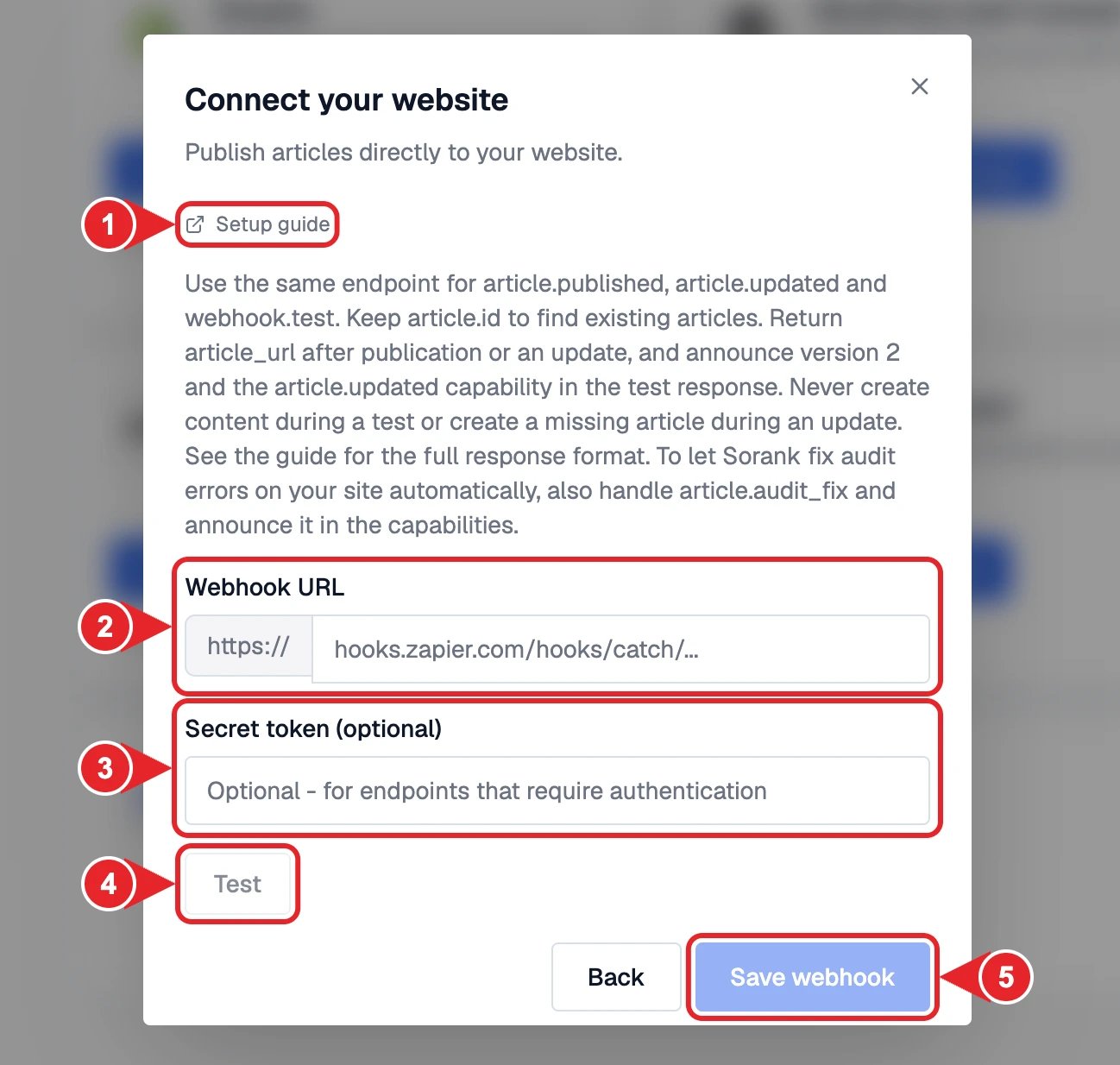
- Setup guide with the full payload format.
- Paste the Webhook URL from Make.com, n8n or Zapier.
- Add a Secret token if your endpoint requires one.
- Test to send a sample article.
- Save webhook to finish.
Step 2: Build the scenario in Make.com or n8n
- In Make.com or n8n, create a scenario that starts with a Webhook trigger and paste the Sorank URL.
- Add an HTTP request module. Framer has no dedicated app, so use the generic HTTP module both tools provide.
- Target your Framer CMS collection following the Framer developer documentation, with the required authentication.
- Map the Sorank fields to your Framer CMS fields and switch the scenario on.