
Where to find quests
Open Quests in the main sidebar. You can also click Get free credits on the credits card of the Backlinks page. Quests apply to the site selected in Sorank. If you manage several sites, select the right one first: each site has its own quests and its own wallet.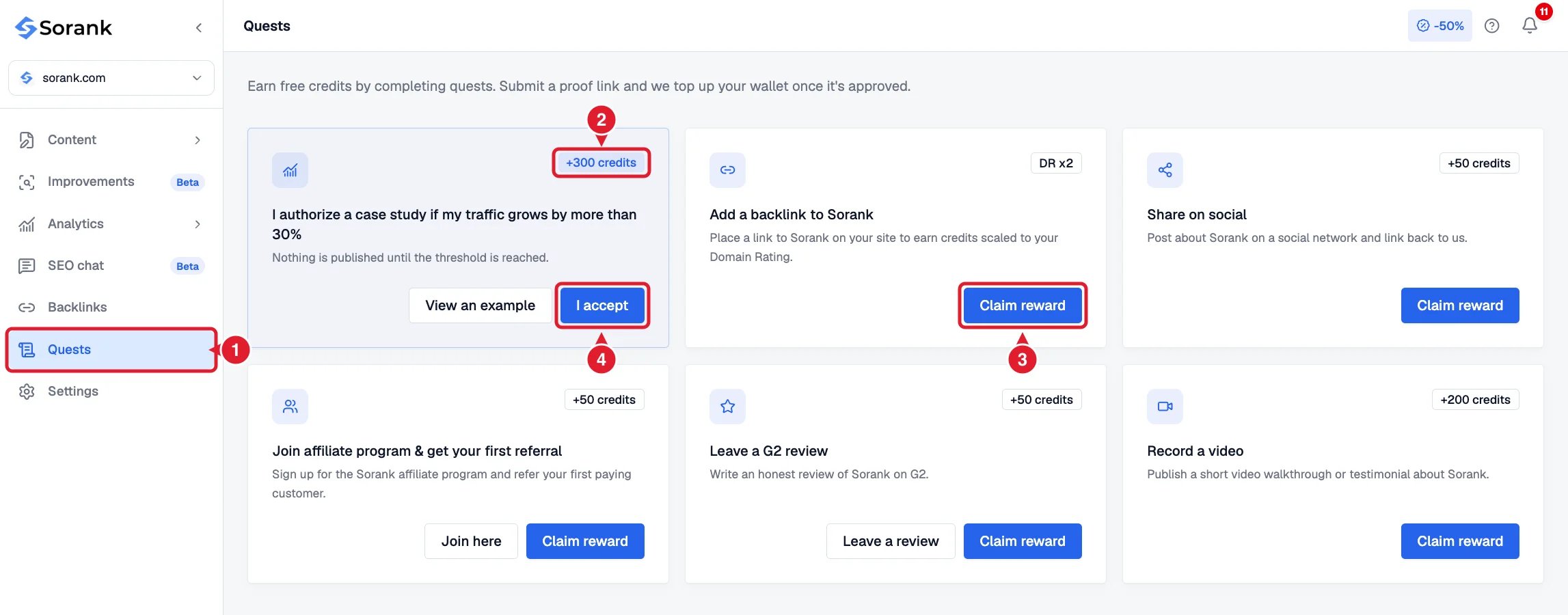
- Quests in the main sidebar.
- The reward of each quest.
- Claim reward: send the proof of a completed quest.
- I accept: the case study authorization, with no proof to send.
Available quests
The amounts shown on each quest card in the app are the ones that apply.
Example for the backlink quest: if your site has a Domain Rating of 35, you earn 50 credits. With a Domain Rating of 60, you earn 120 credits (60 x 2). The Domain Rating used is the one of your site when the claim is approved.
Claim a reward
- Complete the action described on the quest card.
- Click Claim reward.
- Paste the proof link (or your affiliate email for the referral quest).
- Click Submit claim.
Follow your claims
Each quest card shows its status:- Pending review: your claim is being checked.
- Claimed: the claim is approved and the credits are in your wallet.
- Rejected: the claim was declined. The reason is shown on the card. Fix what is missing, then click Claim again.
The case study authorization
This quest works differently: there is no proof to send. Click I accept on the card, read what is published and what is not, then confirm. The 300 credits are added as soon as the authorization is recorded. Nothing is published while your traffic has not grown by more than 30%. Once this threshold is reached, Sorank prepares a case study with your results and emails you the complete preview before anything is published.
You can withdraw the authorization at any time from the quest with Withdraw. Withdrawing removes up to 300 credits granted for this quest from your wallet. If you authorize again later, no additional credits are given.