

Opening your results
- Select the site to track in SORANK.
- Open the AI Visibility space in the analyses.
- Review the history: it lists the dates, market, visibility, citations, competitors, prompts sent and the status of each analysis.
- Click View to open an analysis and see the detailed responses by assistant.
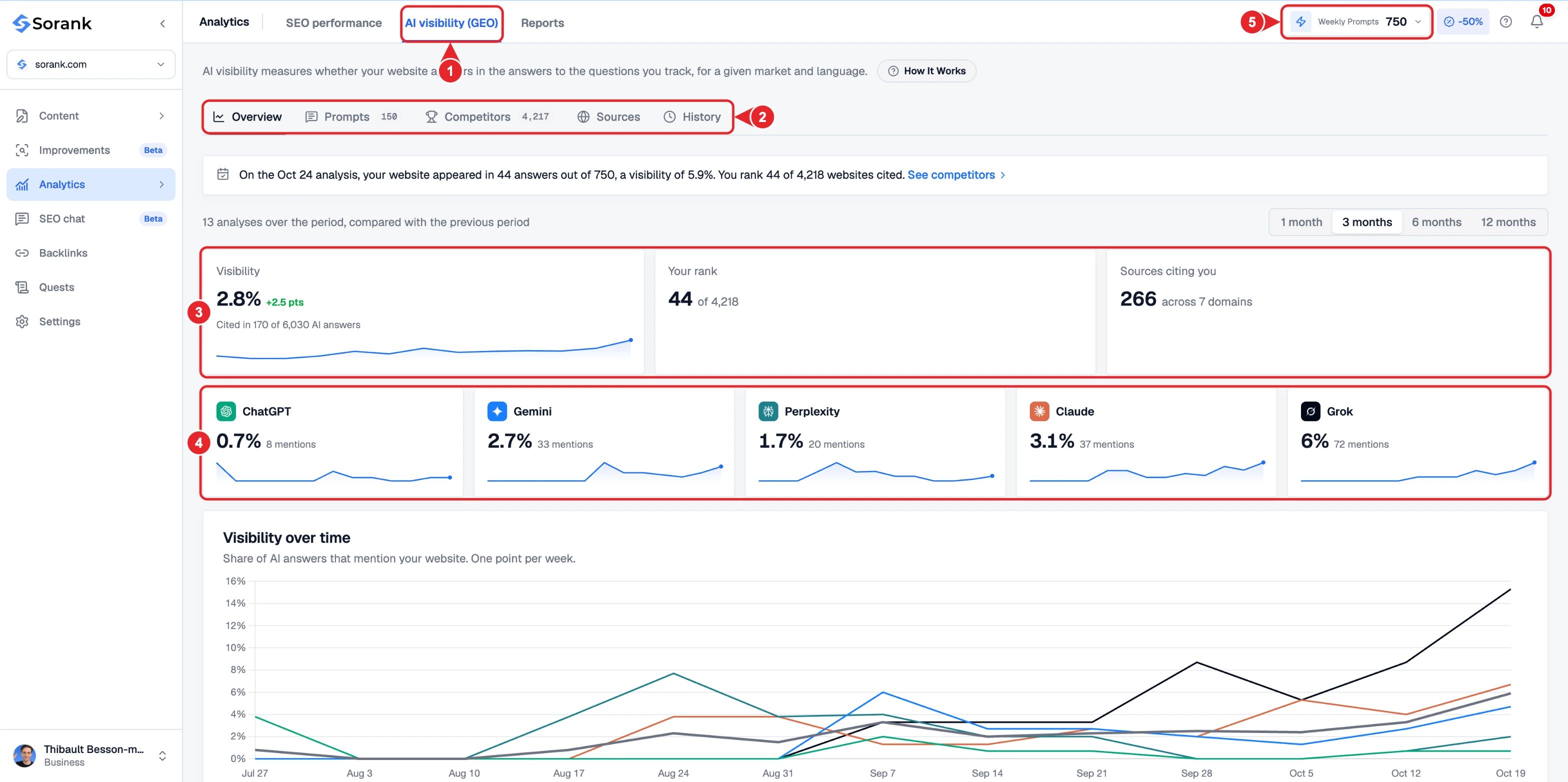
- AI visibility (GEO) in Analytics.
- Overview, Prompts, Competitors, Sources and History.
- Your visibility, rank and the sources citing you.
- Visibility for each AI assistant.
- Number of prompts sent in each analysis.
What are prompts for?
A prompt is a question sent to the assistants. For example: “Which solution should I choose to manage appointments for a practice?” Prompts define what you are measuring. A question about choosing a solution and a question about the benefits of a product explore two different situations. Use topics that match your business and the questions your audience is asking. A tracked prompt is not automatically a published article. Its primary purpose is to measure the assistants’ responses. You can then use those observations to choose topics for your editorial strategy.Adding and editing your questions
Open Manage prompts to access the questions for the selected site. You can search for prompts, filter them, add new ones, edit them or delete them. To add questions:- Click Add a prompt to open the Import prompts window.
- Enter a question or paste several questions, with one question per line.
- The counter shows how many prompts are ready to be imported.
- Confirm with Import prompts.
What happens to previous analyses?
Analyses retain the questions that were used when they were launched. Editing or deleting a prompt affects future analyses, not the content of historical results. Example: today you replace a general question with one focused on a specific offer. The previous analysis keeps the old question; a new analysis uses your updated selection, within the limits of your plan.Questions and analysed responses: why two numbers?
The same question can be submitted to several assistants. The number of expected responses equals the number of selected questions multiplied by the number of assistants queried. For example, 10 questions sent to 3 assistants represent 30 expected responses. This is neither 30 different questions nor 30 articles to generate. The number of questions and the assistants available depend on your plan.Refreshing or launching a new analysis
Refresh reloads the data and their status on screen. This action does not resubmit the questions to the assistants. Launching an analysis creates a new measurement using the questions selected for the site. Your space shows the limits of your plan and the next available date. The new measurement appears in the history. SORANK also has automatic scheduling of analyses for eligible sites: setup complete, valid paid subscription, active questions and the required interval between analyses elapsed. Automatic analyses run once a month, 30 days apart. The number of tracked questions and the point at which a new analysis is permitted are two separate limits. Check the dates and history for your site to follow the analyses that have been carried out.Understanding the indicators
Example: a completed analysis has 30 expected responses. If your domain is detected in 9 completed responses, the visibility score is 30%. Multiple appearances within the same response do not count as multiple responses mentioning your site.
A mention and a source are not the same piece of information: an assistant can talk about a company while drawing on a third-party page. Review the responses and their sources to understand what is being cited.
The comparison with competitors covers the questions in this analysis. It does not represent a general ranking of all Google results or all possible assistant responses.