

How does an exchange work?
When an article on your site hosts a partner link, you earn credits. When another site publishes a link to yours, you spend credits. The amount depends in particular on the Domain Rating of the site hosting the link, so one credit does not equal one backlink. Sorank finds matches and organises placements automatically. You do not need to select each opportunity or negotiate directly with partner sites. The system takes into account site compatibility, exchange settings and your available balance. Example: your site may receive a link from an article on a partner site, while one of your own articles hosts a link to a third site. The received links table describes the first case; the hosted links table describes the second.Joining the network
- Select your site in Sorank and open Backlinks.
- The site must have an active paid subscription and a publishing destination: a connected CMS or a Sorank-hosted blog.
- In the exchange settings, Network participation shows Active when participation is enabled and the destination is configured.
- Check your credit balance and settings. Exchanges are then organised automatically based on network availability.
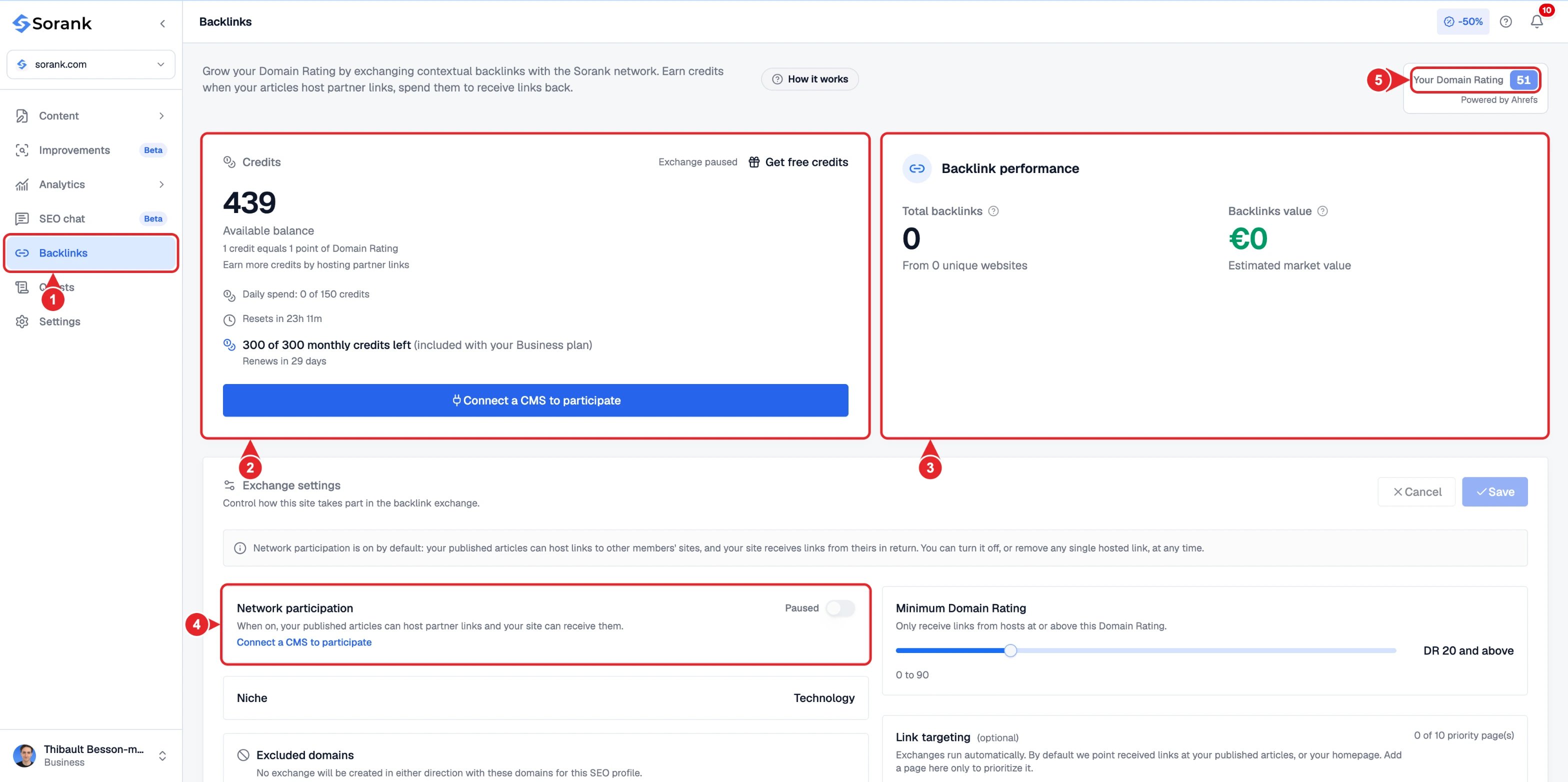
- Backlinks in the main sidebar.
- Your credit balance and daily and monthly limits.
- Backlinks received and their estimated value.
- Network participation status.
- Your current Domain Rating.
Choosing which pages to highlight
Link targeting is optional. Without any specific setting, received links automatically target your published articles or your homepage. If your plan allows it, click Add a priority page, enter its URL and set its priority. This setting is used to direct targeting towards a page that matters to your business; it does not trigger a manual backlink order. Example: if you want to highlight a service page, add it to the priority pages. If you want Sorank to distribute links across your content, keep automatic targeting. The controls available depend on your plan. The Minimum Domain Rating setting lets you define the minimum level of sites from which you want to receive links. A more restrictive selection reduces the pool of compatible sites.Understanding your balance
Your wallet can receive credits from several sources: hosted partner links, the monthly allowance included in your plan, the Backlink Booster, or one-off purchases available on your account. Monthly credits form an allowance that renews each cycle. Any unused portion of this allowance is not carried over to the next cycle. One-off purchased credits are retained beyond the monthly cycle. When credits are spent, Sorank uses available monthly credits before the permanent balance. For example, if you have 20 monthly credits and 50 purchased credits, spending 12 credits leaves 8 monthly credits and 50 purchased credits. If the 8 remaining monthly credits are unused when they expire, they are not carried over; the purchased balance remains separate. The Backlink Booster adds a monthly allowance and gives access to the associated controls. It is distinct from a one-off credit purchase. Check the amounts, options and dates shown in your wallet before choosing an offer. The Quests space, when available, also lets you request credits by completing the described actions. Credits are awarded after the required proof has been validated. See quests. Backlink credits are separate from the article generation quota. See credits and quotas.Reading the tracking tables
The anchor is the clickable text of the link. The source page carries the link; the target page is the one it points to.
The Published status indicates a published placement. Verified indicates that Sorank has also confirmed its presence on the public page. You can use the Verified only filter to view these placements. The Removed status keeps a record of a placement that has been withdrawn from active link tracking.
An available balance represents your capacity to participate, not a number of links already received. The availability of compatible sites and publishing opportunities determine the pace of placements; no fixed number of links per day is associated with the balance.