Top 10 Free SEO Extension chrome Onpage Audit in 2026

Doing SEO without Chrome extensions is like running a marathon in flip-flops. I have tested, installed, uninstalled, and re-tested dozens of extensions to put together this list. Just the 10 extensions that actually make a difference in your daily workflow. Whether you are a freelance SEO consultant, working at an agency, or managing your own website, this list will transform the way you work.
Let's dive in.

Rated 5/5 ★ with 250+ daily users

Sorank SEO dashboard showing a 90 SEO score, keyword analysis, phrase length distribution, image analysis, and structured data status on a website audit.

Trusted by 20+ SEO Agencies

Maison Leverage company seo agencyovirank logo seo agencylogo offbound agencyA wooden platform with four vertical wooden pegs and a horizontal brass rod, resembling a training or deployment tool.Infographic of an avocado cut in half, showing seed illustration with arrows pointing to text blocks below.
seo extension Sorank

1. Sorank – The All-in-One Extension for SEO Agencies

We start with the one I know best, since it is mine.

Sorank is not just an SEO audit extension. It is a complete tool designed for agencies and freelancers who need to audit a website quickly, whether to close a prospect or deliver results to a client.

What the extension does:

The Sorank extension provides a complete SEO audit of any page in one click. You get the overall SEO score, heading tag analysis, image audit (including missing alt texts and potential size savings), internal and external link analysis, metadata and Open Graph preview, technical analysis with robots.txt, sitemap and llms.txt verification, readability score, and most importantly a GEO section to evaluate your visibility in AI search engines.

Why it is different:

Most SEO extensions focus solely on traditional SEO. Sorank integrates GEO analysis, which stands for Generative Engine Optimization — the optimization for AI search engines like ChatGPT, Claude, and Perplexity. It is the only extension that shows you whether your website is ready for the future of search.

Additionally, you can export the complete audit as a PDF in one click. Perfect for sending a report to a prospect before the first call.

Who it is for:

SEO agencies, freelancers, and anyone who wants a tool that goes beyond traditional SEO.

Price: Free

Sorank SEO dashboard showing technical analysis for www.sorank.com including robots.txt and sitemap status, CSS and JavaScript coverage, and Core Web Vitals loading.

Dashboard

Get a complete overview of your page's SEO health in seconds. The dashboard displays your SEO score, heading structure, top keywords, image analysis, and structured data status — all in one glance. Monitor both mobile and desktop performance without switching between multiple tools.

This bird's-eye view helps you quickly identify what's working and what needs attention. Instead of running separate audits for each SEO element, you get everything consolidated in a single interface. Perfect for agencies who need to assess a client's website during a discovery call or before sending a proposal.

HN (Heading Structure)

Analyze your heading hierarchy from H1 to H6 instantly. Check if your title tag and meta description fit the recommended character limits. A clean heading structure helps search engines understand your content and improves your ranking potential.

Proper heading hierarchy is one of the most overlooked SEO fundamentals. Many websites have multiple H1 tags, skip heading levels, or use headings purely for styling purposes. This feature lets you spot these issues immediately and explain to your clients why fixing their content structure matters for both SEO and accessibility.

Sorank website technical audit dashboard showing status of robots.txt and sitemap as Yes, and llms.txt as No, CSS analysis with 9 stylesheets, JavaScript coverage with 26 total scripts, and a loading Core Web Vitals section.
Sorank metadata dashboard showing Open Graph recommendation: 'Recommended by AI, Ranked on Google, Chosen online', and SEO software description for agencies.

Images

Audit every image on your page for SEO optimization. Identify missing alt texts, check file formats, and discover potential size savings. The extension also flags images with lazy loading issues above the fold that could hurt your Core Web Vitals.

Images often represent the biggest opportunity for quick SEO wins. Missing alt attributes hurt accessibility and keyword relevance. Oversized images slow down page load times. Wrong formats waste bandwidth. This feature quantifies exactly how much data could be saved and shows you which images need immediate attention — making it easy to prioritize fixes for your clients.

Links

Map all internal and external links on any page. See the total count, nofollow attributes, sponsored tags, and UGC markers at a glance. Spot broken links and optimize your internal linking strategy to distribute page authority effectively.

Internal linking is how you control the flow of authority across a website. External links signal trust and relevance to search engines. This feature gives you a complete picture of how a page connects to the rest of the web. Use it to find orphan pages, identify link equity leaks, and build a smarter content architecture for your clients.

Sorank SEO dashboard showing technical analysis for www.sorank.com including robots.txt and sitemap status, CSS and JavaScript coverage, and Core Web Vitals loading.
Sorank technical analysis dashboard showing status of robots.txt and sitemap files, CSS stylesheets and JavaScript coverage, with a sidebar menu and export PDF button.

Technical

Verify essential technical SEO elements in one click. Check for robots.txt, sitemap availability, and llms.txt for AI crawlers. Analyze CSS stylesheets, JavaScript coverage, and get your Core Web Vitals scores for both mobile and desktop.

Technical SEO is the foundation everything else is built on. If search engines can't crawl and index your pages properly, no amount of content optimization will help. This feature surfaces critical technical issues that are often invisible to non-technical clients. Show them exactly what's blocking their site from performing at its best — and prove your expertise in the process.

Metadata

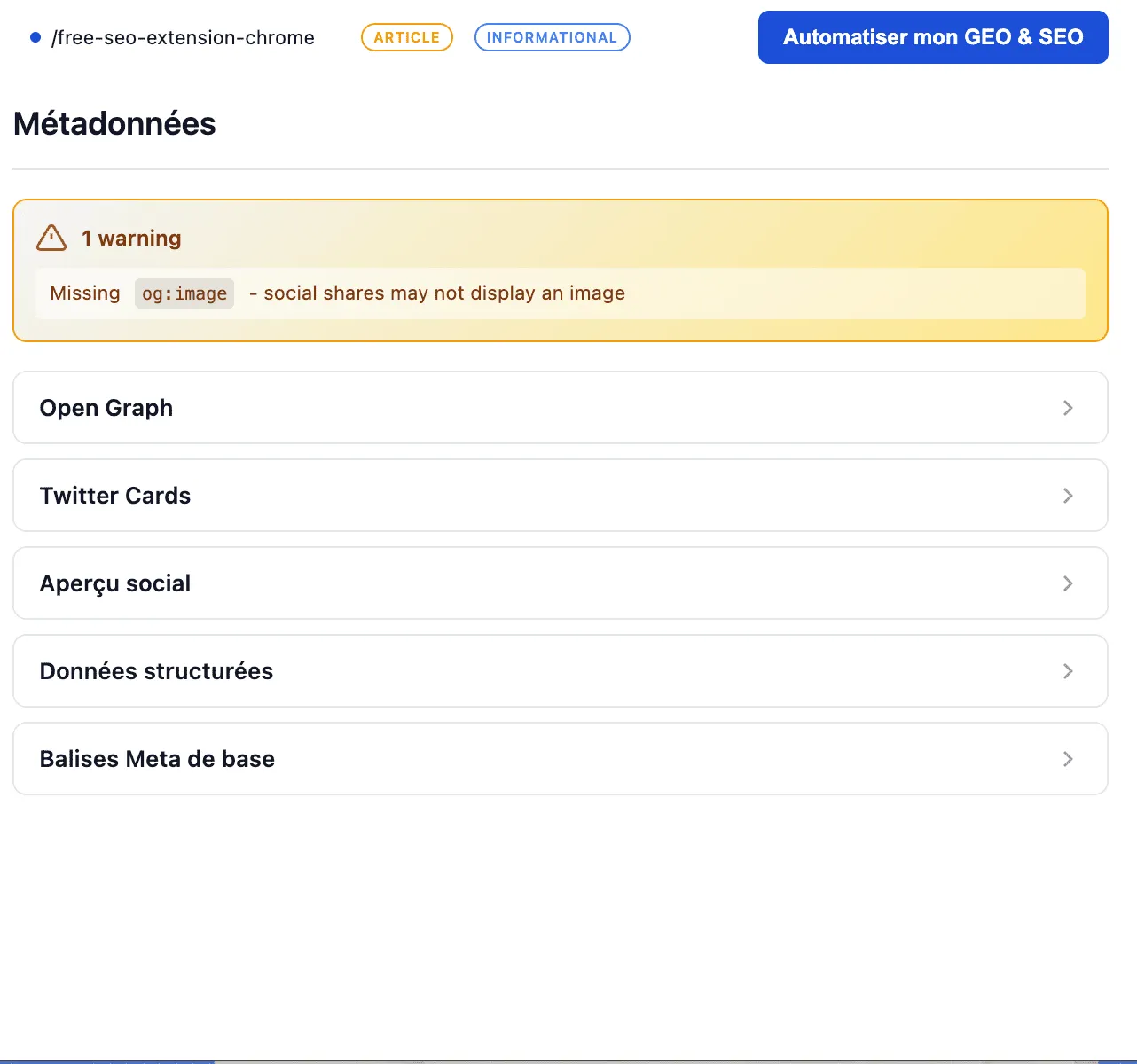
Preview exactly how your page appears when shared on social media. Inspect your Open Graph tags including og:title, og:description, and og:image. Ensure your content looks professional and clickable across all social platforms.

First impressions matter. When someone shares a link on LinkedIn, Twitter, or Facebook, the Open Graph data determines what people see. Broken images, truncated titles, or missing descriptions can kill engagement before it starts. This feature lets you preview and fix these issues before your clients' content goes live — protecting their brand image everywhere it appears.

Sorank dashboard showing metadata section with Open Graph preview stating Recommended by AI, Ranked on Google, Chosen online, and SEO software details in French.
Sorank readability analysis dashboard showing word count of 1757, 48 sentences, average sentence length of 32 words, and readability score of 47, with a phrase length distribution chart.

Readability

Measure how easy your content is to read and understand. Track word count, sentence length distribution, and your overall readability score. Optimize your writing for better user engagement by balancing short and long sentences.

Content that's hard to read doesn't convert. If your sentences are too long or your vocabulary too complex, visitors will bounce before they reach your call to action. This feature analyzes the linguistic structure of any page and gives you a clear score to work with. Use it to guide content briefs for writers or to show clients why their existing copy might be underperforming.


But wait, there’s more…

Export PDF

Turn any audit into a professional, white-label PDF report with one click. Share your findings with clients, stakeholders, or team members in a polished format that reflects your agency's credibility. No more screenshots or manual report building.

This is where Sorank saves you hours every week. Instead of copying data into slides or documents, you get a ready-to-send audit report that looks like you spent hours creating it. Use it during sales calls to impress prospects, or send it after onboarding to show clients exactly what you'll be working on. Professional reporting builds trust — and trust builds long-term retainers.

report seo audit on page

Your reviews on our extensions

Extension très pratique pour les freelances SEO.Elle permet de faire un audit rapide d’une page directement pendant un appel ou une analyse express, sans multiplier les outils.
Magnifying glass icon with an intricate knot pattern inside, symbolizing search or investigation.
Agence-seo-ia
★★★★★
Efficace, simple et ergonomique, je conseille fortement cette application très lisible
Man with short dark hair and beard wearing a black and pink shirt, looking slightly to the side against a plain light background.
Gwenaël Fusy
★★★★★
Une extension simple à utiliser ET efficace pour réaliser de rapides audits SEO, merci !
Man with short dark hair and beard wearing a black and pink shirt, looking slightly to the side against a plain light background.
Olivier Salesse
★★★★★
Une extension complète, propre et qui fait le job sans blabla inutile!  Très belle découverte
Close-up of a golden brown chocolate croissant on a wooden surface.
Sandrine Bertrand
★★★★★
Super extension. Bien pratique pour étudier les données SEO des sites que je visite.
Close-up of a golden brown chocolate croissant on a wooden surface.
Adrien
★★★★★
Bravo pour cette extension c'est un véritable travail de qualité qui permet d'auditer les sites internet et notamment les sites e commerce
Lowercase letter 'd' in white on a solid brown square background.
David photiade
★★★★★
seo extension Detailed SEO Extention

2. Detailed SEO Extension – The Free Swiss Army Knife

Created by Glen Allsopp, an SEO professional who has lived and breathed search engine optimization for years, Detailed has become a reference in the industry.

What the extension does:

One click and you see the complete SEO structure of a page. Title tag, meta description, heading tags, canonical URL, hreflang, structured data. Everything is there, clean and readable.

The strengths:

It is fast, free, requires no account creation, and has no aggressive upsells. The interface is clean and gets straight to the point. You can also right-click on any text to search for duplicates online.

The limitations:

No backlink data, no search volume, no competitor analysis. It is an on-page audit tool, nothing more.

Who it is for:

Anyone who wants to quickly analyze the SEO structure of a page without unnecessary complexity.

Price: Free

TRY THIS EXTENSIONseo extension SEOquake

3. SEOquake – The Power of Semrush in Your Browser

SEOquake is the official extension from Semrush. If you already use Semrush, it is a must-have.

What the extension does:

You get SEO metrics directly in Google SERPs. Number of indexed results, keyword density, complete on-page analysis, and CSV data export.

The strengths:

The extension displays metrics directly in search results, allowing you to compare competitors without opening each page. You can also run a complete SEO audit of any page.

The limitations:

To unlock all features like Domain Authority and backlink data, you need a Semrush account. Without it, the extension remains useful but limited.

Who it is for:

Semrush users who want to leverage their data directly in Chrome.

Price: Free (advanced features with Semrush)

TRY THIS EXTENSIONseo extension Keyword Surfer

4. Keyword Surfer – Keyword Research Without Leaving Google

Keyword Surfer is probably the most underrated free extension on the market.

What the extension does:

When you search on Google, the extension automatically displays the search volume of the keyword, estimated CPC, and similar keyword suggestions. Directly in the SERP, without opening another tool.

The strengths:

It is free, truly free. No "freemium" version that limits you to 3 searches per day. You can also see the estimated traffic of ranking websites, which gives you an idea of the potential for each position.

The limitations:

Search volumes are estimates, not exact data. For in-depth analysis, you will need a more comprehensive tool.

Who it is for:

Anyone who does keyword research regularly and wants quick data without switching tabs.

Price: Free

TRY THIS EXTENSIONseo extension ahrefs SEO Toolbar

5. Ahrefs SEO Toolbar – For Ahrefs Enthusiasts

If Ahrefs is your primary tool, this extension will become your best friend.

What the extension does:

The extension provides an instant on-page SEO report for every page you visit. You can also use it as a broken link checker and redirect tracer.

The strengths:

With an Ahrefs account, you unlock advanced metrics like Domain Rating, Page Rating, and backlink count. You see this data directly in the SERPs, which facilitates competitive analysis.

The limitations:

Without an Ahrefs account, the extension remains basic. And Ahrefs is not cheap.

Who it is for:

Ahrefs users who want their data accessible everywhere.

Price: Free (advanced features with Ahrefs)

TRY THIS EXTENSIONseo extension Mozbar

6. MozBar – The Timeless Classic

MozBar has been around for years, and there is a reason for that. It is reliable, simple, and it works.

What the extension does:

The extension displays Domain Authority and Page Authority for each website directly in search results. You can also perform basic on-page analysis and check a page's links.

The strengths:

Moz's DA and PA remain reference metrics in the industry. Even if they are not perfect, they provide a good indication of a domain's strength. The extension is stable and does not slow down your browser.

The limitations:

The interface is starting to show its age. And like the others, advanced features require a Moz Pro account.

Who it is for:

Those who want a quick domain authority metric without complications.

Price: Free with Moz account

TRY THIS EXTENSIONseo extension SEO minion

7. SEO Minion – The Versatile Assistant

SEO Minion is the kind of extension that does a bit of everything, and does it well.

What the extension does:

On-page analysis, broken link checking, SERP preview, hreflang analysis, and local search simulation. It is a true Swiss army knife.

The strengths:

The SERP preview function is excellent for optimizing title tags and meta descriptions. You see exactly what your result will look like in Google. Broken link checking is also very practical for technical audits.

The limitations:

The interface is not the prettiest, and some functions may seem redundant if you already have other extensions.

Who it is for:

SEO professionals who want a versatile tool without multiplying extensions.

Price: Free

TRY THIS EXTENSIONseo extension keywords everywhere

8. Keywords Everywhere – Keyword Data Everywhere

Keywords Everywhere transforms your browser into a permanent keyword research tool.

What the extension does:

The extension displays search volume, CPC, and competition for keywords on Google, YouTube, Amazon, Bing, and other platforms. You also see related keywords and trends.

The strengths:

Multi-platform coverage is a real advantage. If you do YouTube or Amazon SEO, it is particularly useful. You can also create keyword lists and export them.

The limitations:

Unlike Keyword Surfer, Keywords Everywhere works on a credit system. You purchase credits that are consumed with each search. This can add up quickly if you do a lot of research.

Who it is for:

Those who do keyword research across multiple platforms and are willing to pay for reliable data.

Price: Starting at $10 for 100,000 credits

TRY THIS EXTENSIONseo extension Lighthouse

9. Lighthouse – Technical Audit by Google

Lighthouse is developed by Google itself. It is a reliable source for knowing what Google thinks of your website.

What the extension does:

The extension audits any page on performance, accessibility, best practices, and basic SEO. You get a score out of 100 for each category with detailed recommendations.

The strengths:

It is free, it is from Google, and it is brutally honest. If your website is slow or your mobile UX is poor, Lighthouse will tell you without sugarcoating it. Core Web Vitals are included.

The limitations:

The SEO audit remains basic. It checks fundamental technical elements but does not perform content or backlink analysis.

Who it is for:

Anyone who wants to ensure their website meets Google's technical standards.

Price: Free

TRY THIS EXTENSIONseo extension redirect path

10. Redirect Path – The Redirect Tracer

Redirect Path is a simple extension that does one thing, but does it perfectly.

What the extension does:

The extension displays the HTTP code of each visited page, whether it is a 200, 301, 302, 404, or other. It also shows redirect chains and loops.

The strengths:

When you are doing a site migration or cleaning up old URLs, this extension saves your life. You immediately see if a redirect works correctly or if you have created a problematic redirect chain.

The limitations:

It is a single-function tool. If you are looking for an all-in-one solution, this is not it.

Who it is for:

Technical SEO professionals working on migrations or who need to audit redirect structures.

Price: Free

TRY THIS EXTENSIONseo extension Wappalyzer

Bonus: Wappalyzer – To Know What Powers a Website

Wappalyzer is not strictly an SEO extension, but it is indispensable for technical audits.

What the extension does:

The extension identifies the technologies used by any website. CMS, framework, hosting provider, analytics tools, e-commerce solutions — everything is covered.

Why it is useful for SEO:

Knowing that a client uses WordPress, Shopify, or a custom CMS completely changes your approach. You can anticipate technical issues, limitations, and adapt your strategy accordingly.

Price: Free

TRY THIS EXTENSION

How to Choose the Right Extensions?

Before installing them all and turning your browser into a Christmas tree, ask yourself these questions.

What do you actually need?

If you mainly do keyword research, Keyword Surfer is sufficient. If you do technical audits, Sorank and Lighthouse are your allies. If you work at an agency and need to impress prospects, Sorank with its PDF export will change your life.

What tools do you already use?

If you pay for Semrush, SEOquake is essential. If you are on Ahrefs, get their toolbar. There is no point in multiplying data sources.

Will your browser survive?

Too many extensions slow down Chrome. Choose 3 to 5 maximum and disable those you do not use daily.

These extensions will not replace a proper SEO stack. But for daily work, quick analysis, and real-time decisions, they are indispensable. Install 2 or 3, test them for a week, and keep the ones that naturally integrate into your workflow. And if you manage an SEO agency and want to go beyond simple extensions, take a look at Sorank. It is designed to turn your audits into clients.