

Open the Integrations page in Sorank
In the left menu, open Settings, then Publishing platforms. 🚨 Important information: 99% of errors reasoned are from plugins or applications that disallow connections from password-protected applications. Please read carefully this article to solve your problem really fast. Is your WordPress site self-hosted and you want to publish articles from Sorank? Connect your WordPress.org site to publish blog posts in one click.WordPress.org or WordPress.com?
- WordPress.org: you host your site independently with a hosting provider (Bluehost, Hostinger, etc.). This is the integration you need.
- WordPress.com: your site is created and hosted directly on the WordPress.com platform. Use the “WordPress.com” integration instead.
Connect WordPress.org to Sorank
- Go to Publishing platforms on Sorank.
- Click WordPress > Connect your CMS.
- Follow the steps to install the Sorank plugin on your WordPress site.
- Authorize access from your WordPress dashboard.
- Select the desired blog category and confirm.
Publish an Article
Go to SEO Article on Sorank, click Publish and confirm.Adjust the Layout
If the layout doesn’t suit you, open the article in the WordPress editor. Select the body text and click Convert to Block to adapt the content to the page width.⚠️ Troubleshooting Connection Issues (99% of Error Reasons)
Application Passwords (Wordfence)
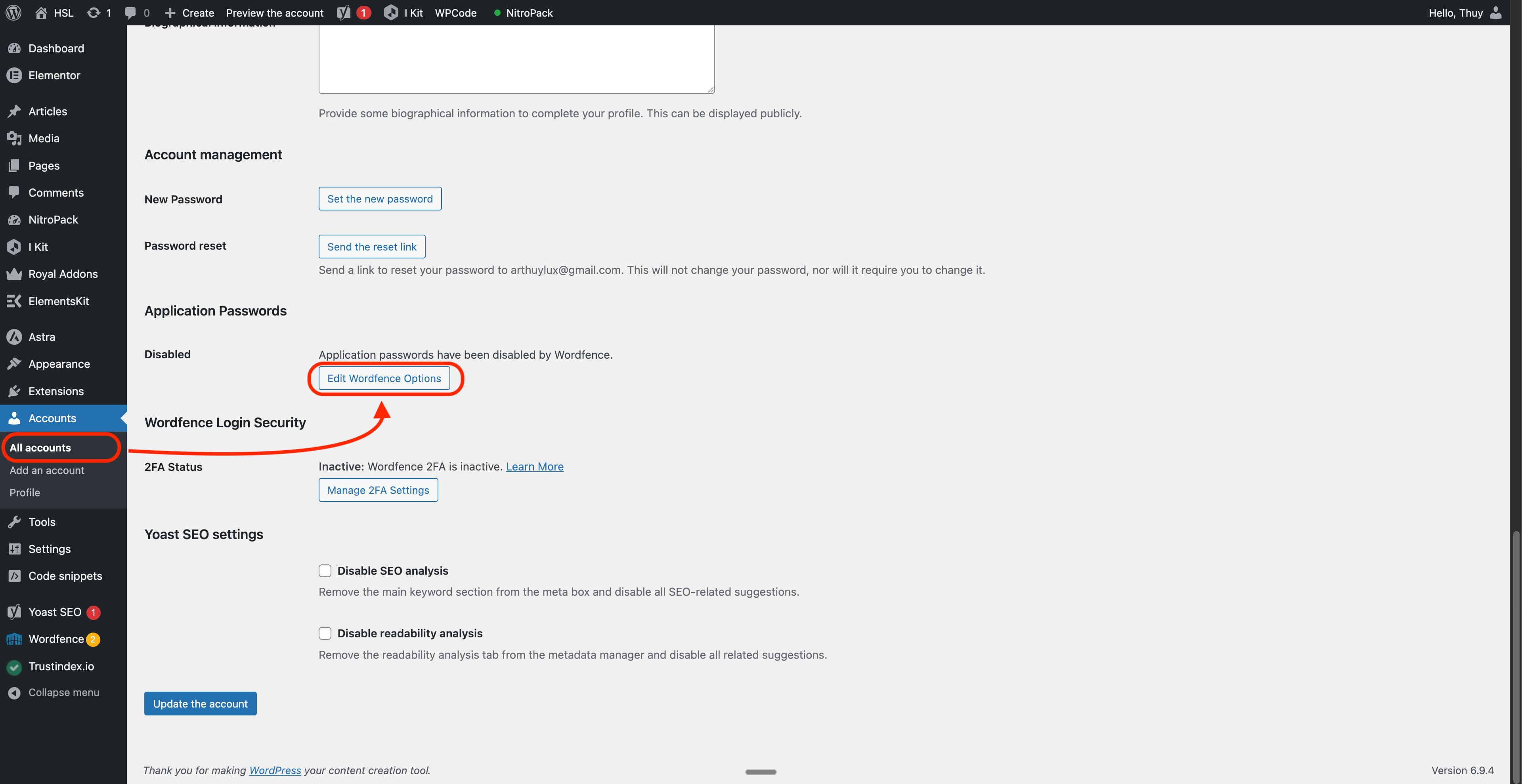
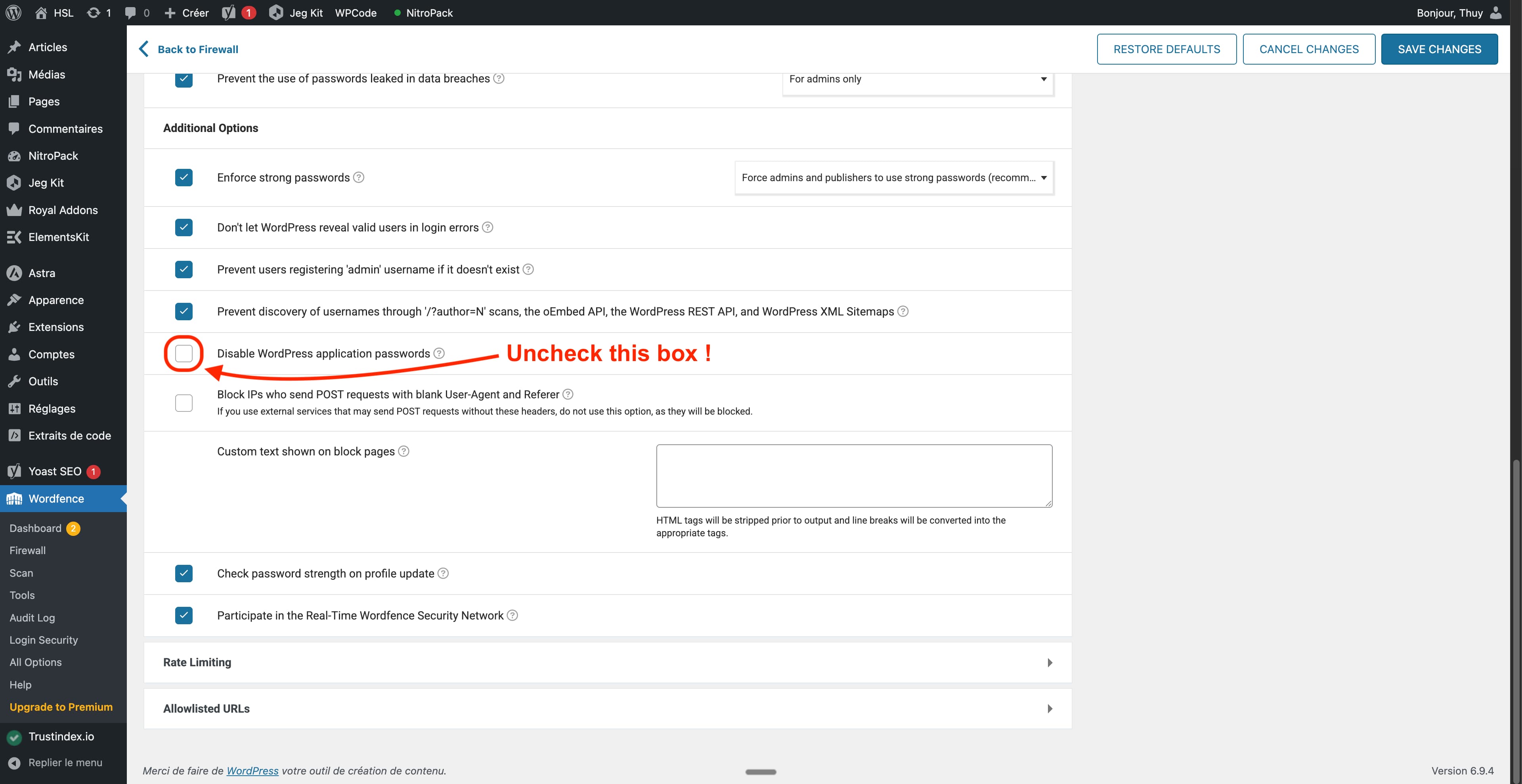
Some security plugins, like Wordfence, disable WordPress Application Passwords by default. This feature is required for Sorank to connect automatically.To fix this:
- Go to your WordPress admin
- Navigate to Wordfence > Login Security
- Find Application Passwords section
- Click Edit Wordfence Options
- Enable Application Passwords
Or follow the instructions in the images below.
Hostinger (Application Passwords disabled)
If your WordPress site is hosted on Hostinger, the Hostinger plugin disables WordPress Application Passwords by default, which blocks Sorank’s connection.To fix this:
- Log in to your WordPress admin.
- Open the Hostinger plugin in the left sidebar, then go to the Tools tab (direct URL:
https://yourdomain.com/wp-admin/admin.php?page=hostinger-tools). - Find the Application Passwords setting and disable the block / enable Application Passwords.
- Save, then retry the connection from Sorank.
Other Security Plugins
If you use Sucuri, iThemes Security, or any similar plugins, ensure they haven’t disabled the WordPress REST API or application authentication features.Still Having Issues?
If the connection fails after enabling Application Passwords:- Clear your browser cookies for Sorank
- Try connecting again
- Contact Sorank support if the issue persists
🔄 Why automatic publishing can stop
When Sorank can’t publish an article, your scheduler is automatically paused and you’ll receive an email. Here are the possible causes and how to resolve them. As soon as you fix the issue and reconnect your CMS in Sorank, your scheduler resumes on its own. Your article is already generated and safely stored, nothing is lost.Common causes and fixes
- The Sorank plugin is deactivated on your site, Log in to your WordPress admin, go to Plugins, and reactivate the Sorank plugin.
- The Sorank plugin was deleted (e.g. after a failed update), Reinstall the Sorank plugin from your WordPress admin, then reconnect your site in Sorank.
- A security plugin (Wordfence, iThemes, Sucuri) is blocking our requests, In your security plugin settings, allow requests to URLs under
/wp-json/or whitelist the Sorank IPs. - Your application password has expired or been revoked, Reconnect WordPress in Sorank to generate a new application password.
- Your WordPress site is temporarily unreachable (maintenance, host outage), Wait until your site is back online, then reconnect your CMS in Sorank.
- The target category was deleted or renamed in WordPress, Recreate the category or select another one in your Sorank scheduler settings.
- Your host (Cloudflare, etc.) is rate-limiting our requests, Contact your host to whitelist the Sorank IPs.