Summary
The website value calculator multiplies your monthly net profit by a range of multiples that depends on your business model, then adjusts it for the site's age and trend. You get a low, midpoint and high estimate, plus your profit margin, the value of each monthly visitor and the value as a multiple of yearly revenue.
Want to go further? Ask


A website value calculator gives you a first price before you sell, buy or plan the future of a site. This one works from profit, not from traffic or domain metrics. A site with 40000 visitors and no profit gets no estimate here. Use the number to frame a discussion, then test it against real offers and an audit of the accounts.
What does the website value calculator do?
It turns one month of net profit into a value range. The tool takes a starting range of multiples for your business model, adjusts it for the trend and the age of the site, and multiplies your monthly net profit by the low and the high end. The midpoint between the two is the main result.
Four inputs change the range: monthly net profit, business model, trend and site age. Two inputs only add checkpoints. Monthly revenue gives your profit margin and the value as a multiple of yearly revenue. Monthly visitors gives the value of each visitor. You type every number yourself: the tool does not read your site or connect to your analytics.
The four models match the four ways most sites earn money. If you are not sure which one describes your site, the guide to content monetization models explains how ads, affiliate links, product sales and subscriptions differ.
How do you use the calculator, step by step?
- Enter your monthly net profit: what is left after all costs, including your own time if you pay for it. Use an average of recent months rather than your best month.
- Add your monthly revenue to see your margin and the revenue multiple. It does not move the range.
- Add your monthly visitors to see the value per visitor. It does not move the range either.
- Type the site age in months: 30 for a site launched two and a half years ago, not 2.5.
- Pick the business model: content and ads, affiliate, ecommerce or SaaS (software subscription).
- Pick the trend: growing, stable or declining.
- Choose the currency at the top: dollar, euro or pound. It changes the symbol only; amounts are not converted.
The result updates as you type. If profit is empty or zero, the tool asks you to fill in the fields: a site without profit gets no estimate.
How do you read the result?
Read the midpoint as your starting figure, and the low and high estimates as the room for negotiation. A bar chart shows the three amounts side by side.
- Estimated value (midpoint): monthly profit times the average of the two multiples.
- Low and high estimates: monthly profit times the low and the high multiple.
- Low and high multiples: how many months of profit the range represents. A multiple of 32 is 32 months of profit, about 2.7 years.
- Profit margin: profit divided by revenue. A margin above 100% means you typed a profit higher than your revenue: check your inputs.
- Value per monthly visitor: the midpoint divided by monthly visitors. Use it to compare two sites of the same model.
- Value as a multiple of yearly revenue: the midpoint divided by 12 months of revenue.
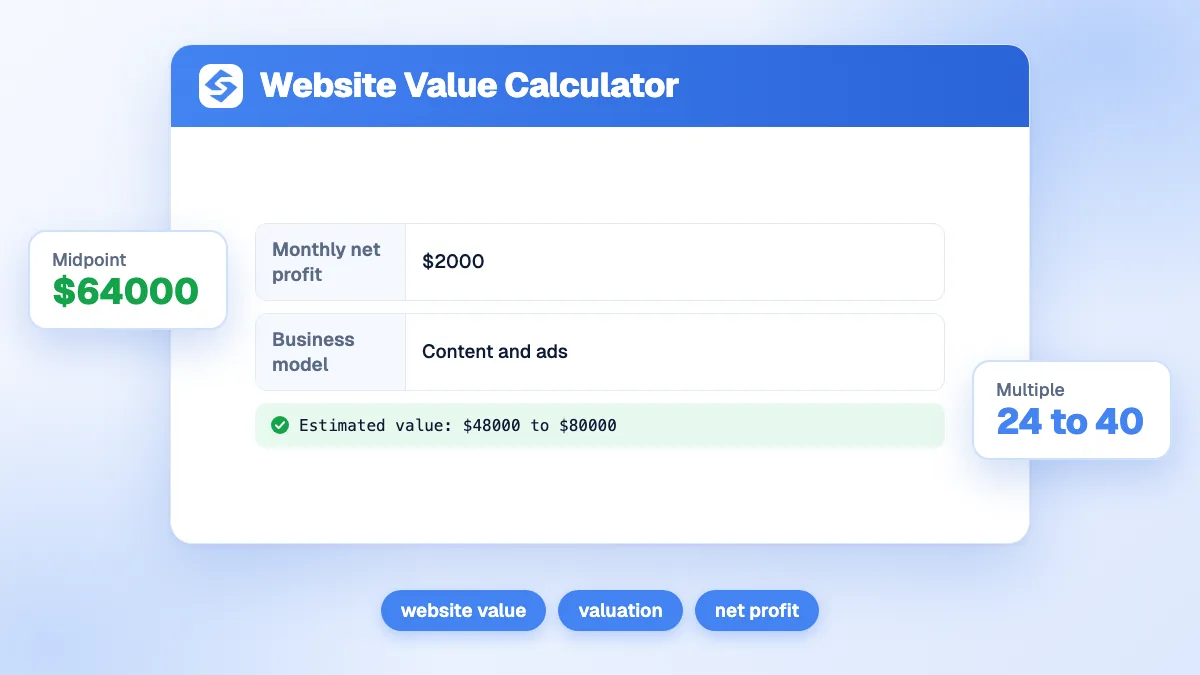
With the default inputs ($2000 profit, $3500 revenue, 40000 visitors, 30 months, content and ads, stable), you get $48000 low, $64000 midpoint and $80000 high, a 57% margin, $1.60 per visitor and 1.5 times yearly revenue.
Which multiples does the calculator use?
The starting multiples depend on the business model, then the trend moves them: plus 15% for a growing site, minus 25% for a declining one. Sorank states in the tool that these are editorial assumptions, not market data. The table shows the multiples of monthly profit for a site aged 24 to 35 months, where age changes nothing.
| Business model | Stable | Growing | Declining |
|---|---|---|---|
| Content and ads | 24 to 40 | 27.6 to 46 | 18 to 30 |
| Affiliate | 22 to 36 | 25.3 to 41.4 | 16.5 to 27 |
| Ecommerce | 18 to 34 | 20.7 to 39.1 | 13.5 to 25.5 |
| SaaS | 30 to 50 | 34.5 to 57.5 | 22.5 to 37.5 |
How age changes the multiples
| Site age | Factor applied to both multiples |
|---|---|
| Under 12 months | times 0.8 |
| 12 to 23 months | times 0.9 |
| 24 to 35 months | times 1 |
| 36 months and more | times 1.05 |
The trend and age factors multiply each other. A growing site of 18 months gets 1.15 times 0.9, so its multiples rise by 3.5%.
Examples: three sites run through the calculator
These cases show how much the model, trend and age weigh against profit alone.
A growing affiliate site
Monthly profit $1000, 18 months old, trend growing. The multiples become 22.8 to 37.3, so the range is $22770 to $37260, with a midpoint of $30015. To keep that trend real, the owner needs rankings that last; the affiliate SEO guide covers how to rank review content on Google.
A declining ecommerce store
Monthly profit $5000, revenue $25000, 48 months old, trend declining. The factor is 0.75 times 1.05, so the multiples fall to 14.2 to 26.8. The range is $70875 to $133875, midpoint $102375. The margin shows 20% and the value is 0.3 times yearly revenue.
A young SaaS
Monthly profit $3000, 8 months old, trend stable. The age factor of 0.8 brings the SaaS multiples down to 24 to 40, exactly those of a mature content site. The range is $72000 to $120000, midpoint $96000.
Common mistakes that skew the estimate
Most wrong results come from the inputs, not from the formula.
- Typing revenue in the profit field: the range is built on profit only, so this inflates every amount.
- Forgetting your own time: if you run the site full time without paying yourself, the profit a buyer would keep is lower than what you see.
- Using your best month: a seasonal peak multiplied by 32 gives a value no buyer will pay.
- Typing the age in years: 3 means 3 months to the tool, which applies the under 12 months penalty.
- Calling a one-month spike growing: the growing trend adds 15% to the range. Choose it only for a steady rise.
- Expecting visitors to raise the value: they do not. Organic traffic counts only through the profit it brings.
What the calculator does not check
It gives an estimate, not an appraisal or an offer. Keep these limits in mind before you quote the number.
- Risk: one traffic source, one platform or one supplier can cut the price, and the tool cannot see them. Google says that "several times a year" it makes broad changes to its ranking systems (Google Search Central, core updates), and a site that lives on Google traffic carries that risk. The core update glossary entry explains how they roll out.
- Proof: the tool trusts your numbers. A buyer will audit the accounts and the traffic, often in the Search Console Performance report, which shows clicks, impressions, click-through rate and average position from Google Search (Search Console Help, Performance report).
- Separate assets: the domain, backlinks, an email list, stock or a brand are not valued on their own.
- Domain tricks: the tool ignores domain metrics. If you plan to buy an old domain only for its rankings, note that Google lists repurposing an expired domain "primarily to manipulate search rankings" as spam (Google spam policies, expired domain abuse).
- Nuance: the trend has three choices only, and the multiples are fixed assumptions. The real price depends on the buyer and the negotiation.
When to move from an estimate to Sorank
Move to Sorank when you want to raise the number, not just measure it. In this model the value follows profit, and for content, affiliate and many ecommerce sites profit follows search traffic. To see what that traffic would cost in ads, run the organic traffic value calculator.
The Sorank GEO and SEO dashboard puts Google traffic and visits from AI assistants in one view, and sorts your pages into popular, growing, declining and lost. Your trend input becomes a fact instead of a guess. When pages decline, content optimization rewrites your old pages on autopilot, so the traffic behind your profit holds up.