Preferences
Privacy is important to us, so you have the option of disabling certain types of storage that may not be necessary for the basic functioning of the website. Blocking categories may impact your experience on the website. More information

Privacy is important to us, so you have the option of disabling certain types of storage that may not be necessary for the basic functioning of the website. Blocking categories may impact your experience on the website. More information

Shopify vs WooCommerce in 2026: verified prices, URL rules, speed data, SEO settings compared point by point, AI visibility and a verdict per store.
Tools

In short
Shopify is the safer choice for most stores in 2026: hosting, speed, security and the SEO basics are handled for you, and its main constraint is the fixed /products/ and /collections/ URL folders. WooCommerce gives full control over URLs, templates and structured data with no platform fee, but its speed and security depend on your hosting and plugins. Both can rank on Google and be cited by ChatGPT or Gemini; the deciding criterion is how much technical work your team is willing to own.
Want to go further? Ask
Quick quiz
Where should your online shop find its next customers?
Sorank matches your answers


Test it for 3 days on your own site and see where you stand on Google, ChatGPT and the other AIs.
Start 3-day free trial3 days free, then stop whenever you want. 90-day results-or-refund guarantee.
The Shopify vs WooCommerce choice concerns the two biggest ecommerce platforms on the web: according to the HTTP Archive Web Almanac 2024, WooCommerce powers 36% of detected online stores and Shopify 20%. One is a hosted platform you rent, the other a free WordPress plugin you run on your own server. This guide compares them only on what changes your organic traffic and your presence in AI answers: URL structure, SEO settings, duplicate pages, apps and plugins, speed, structured data, prices checked on the official pages, AI shopping and migration, with a verdict for each type of store.
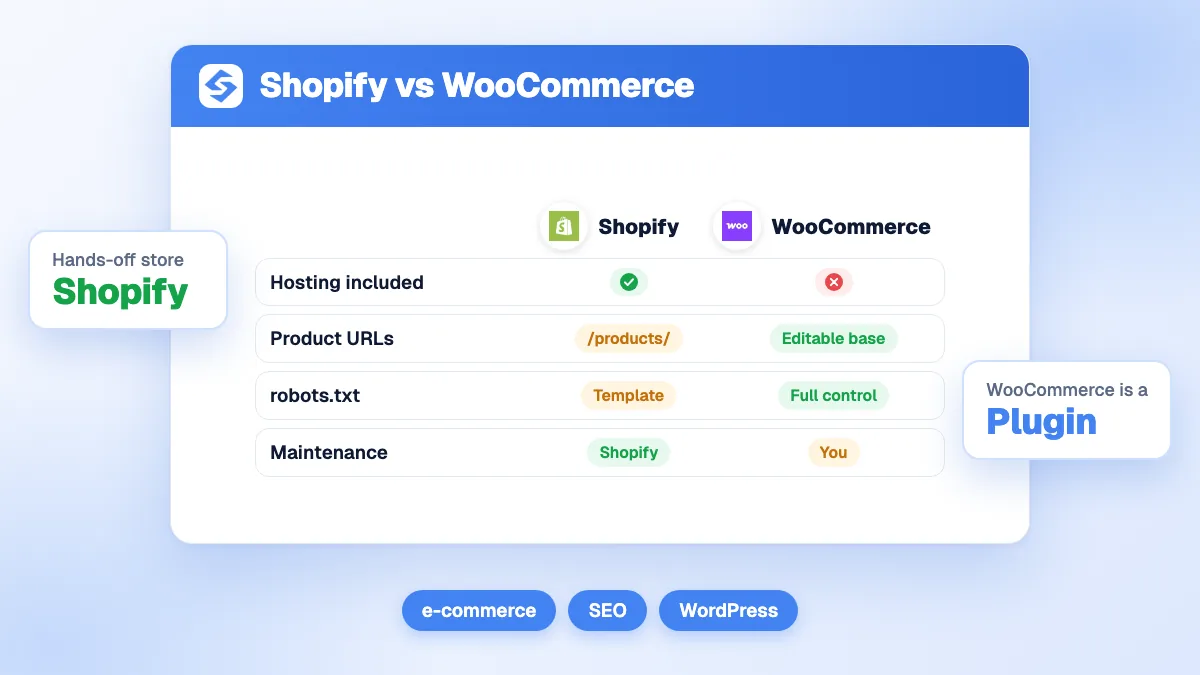
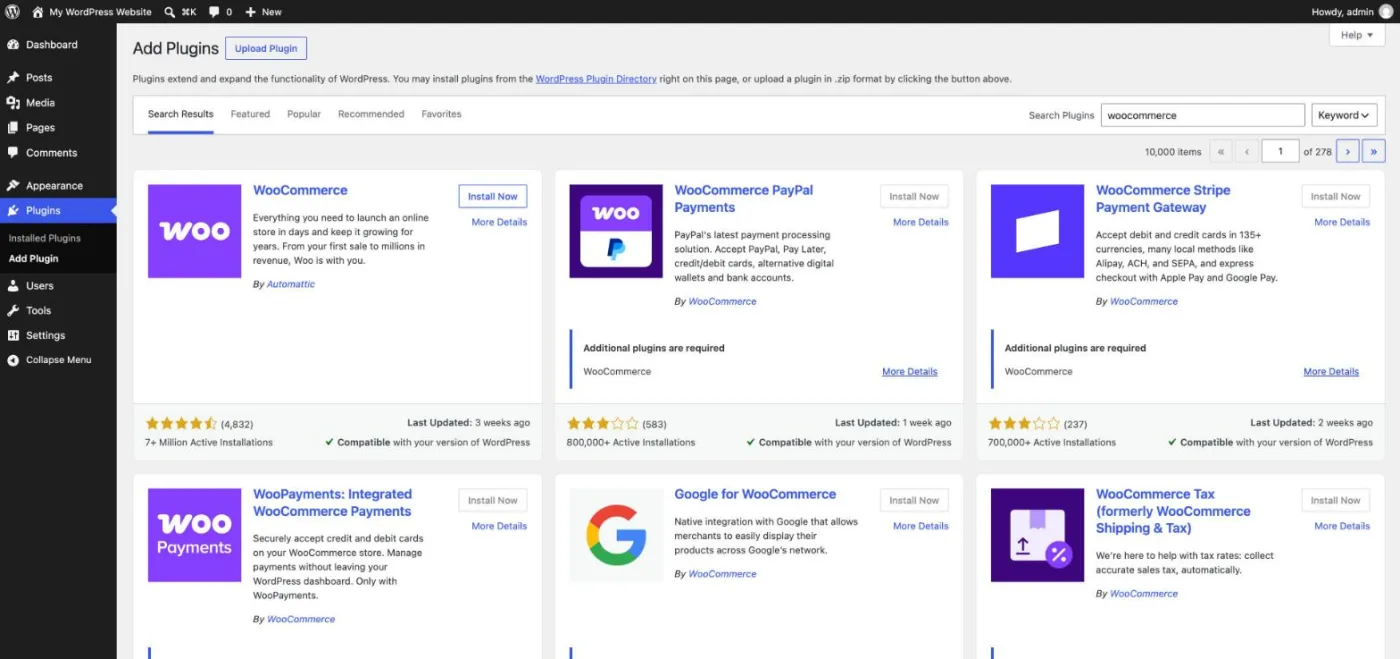
Shopify is a hosted, subscription-based platform: you pay a monthly plan and Shopify runs the servers, the checkout, the security updates and the CDN. WooCommerce is a free, open-source plugin for WordPress: you install it on a WordPress site, choose your own hosting and keep full access to the code and the database.
The scale of WooCommerce is visible in the official WordPress plugin directory: the WooCommerce plugin page shows 7+ million active installations (checked October 2026), far ahead of any other ecommerce plugin for WordPress.
| Criterion | Shopify | WooCommerce |
|---|---|---|
| Type | Hosted platform, monthly plan | Free plugin for self-hosted WordPress |
| Setup | Minutes, no server to manage | Hosting, WordPress, theme and plugins to install |
| Code access | Theme code (Liquid), no server access | Full access to code, database and server |
| Maintenance and security | Handled by Shopify | Your responsibility (updates, backups, security) |
| Content and blog | Basic built-in blog | Full WordPress editor and blog |
| Platform fee | Monthly plan, plus a fee on third-party payment providers | None; you pay hosting and extensions |
Both platforms cover the essential SEO settings, but not in the same way: Shopify ships them natively with fixed rules, while WooCommerce relies on WordPress core plus an SEO plugin such as Yoast SEO or Rank Math. The table lists the ten settings that matter most for a store.
| SEO setting | Shopify | WooCommerce |
|---|---|---|
| URLs | Fixed folders /products/, /collections/, /pages/, /blogs/; editable handle only | Editable product and category bases through WordPress permalinks |
| Title tag and meta description | Native fields on every product, collection, page and article | Through an SEO plugin (Yoast SEO, Rank Math, All in One SEO) |
| 301 redirects | Native URL redirect tool, bulk CSV import; automatic redirect when you change a handle | Through an SEO plugin or a redirection plugin |
| XML sitemap | Generated automatically at /sitemap.xml | WordPress core sitemap, usually replaced by the SEO plugin's sitemap |
| robots.txt | Sensible default, editable through the robots.txt.liquid template | Fully editable (file or SEO plugin) |
| Structured data | Product markup from the theme, extended by apps | Product markup from WooCommerce core, extended by SEO plugins |
| Canonical tags | Added automatically, pointing to the /products/ version | Added by WordPress and the SEO plugin |
| Speed | Managed hosting and CDN; depends on theme and apps | Depends on hosting, caching, theme and plugins |
| Multilingual | Shopify Markets with subfolders and automatic hreflang | Translation plugin (often paid) that manages hreflang |
| Blog | Simple built-in blog under /blogs/news/ | Full WordPress blog, categories, authors, custom templates |
On a small catalog, these differences rarely decide rankings. They start to matter on large catalogs, international stores and sites where content drives a large share of traffic. Before choosing, an ecommerce SEO audit of your current site shows which of these settings you use today.
URL structure is the most discussed SEO difference between the two platforms, and it matters most when you migrate or build a deep catalog with many categories.
Shopify imposes its folders: products under /products/, categories under /collections/, static pages under /pages/ and articles under /blogs/blog-name/. You choose the handle (the end of the URL), never the folder. A shirt store cannot have /mens/shirts/blue-oxford; it gets /collections/mens-shirts and /products/blue-oxford. Google ranks those URLs without trouble, so the impact on rankings is small, but you lose keyword-rich hierarchies, and every migration from another platform changes almost every URL.
WooCommerce, built on WordPress permalinks, is far more flexible: a /product/ base by default, a shop base (/shop/hoodie), a shop base with the category (/shop/hoodies/hoodie) or a custom base, plus an editable /product-category/ base. The one rule: product and category bases must differ, so WordPress can tell them apart. Removing the base completely requires an extra plugin, which adds a risk of URL conflicts.
Watch out
On WooCommerce, the "shop base with category" option can change a product's URL when you move it to another category. On a live store, set the structure once and keep it, or add a 301 redirect every time a product changes category.
Every store produces near-identical URLs: the same product reached through several paths, filtered and sorted collection pages, pagination. What matters is how each platform signals the main version to Google.
On Shopify, a product can be reached through /products/blue-shirt and /collections/shirts/products/blue-shirt. Shopify adds a canonical tag pointing to the /products/ version, but many themes still link to the longer URL internally, which wastes crawl budget. Shopify's default robots.txt blocks filtered and sorted collection URLs, which removes a large source of duplicates without any setup.
On WooCommerce, each product has a single URL, and SEO plugins add canonical tags. Duplicates mostly come from filter parameters (?filter_color=, ?orderby=) and tag archives, which you must noindex or block yourself. Our guide to category page SEO explains how to keep filters and pagination under control on both platforms.
Neither platform covers advanced SEO alone. On WooCommerce, an SEO plugin is mandatory in practice: Yoast SEO, Rank Math or All in One SEO add titles, meta descriptions, XML sitemaps, redirects, breadcrumbs and schema in one install, most of them with a free version.
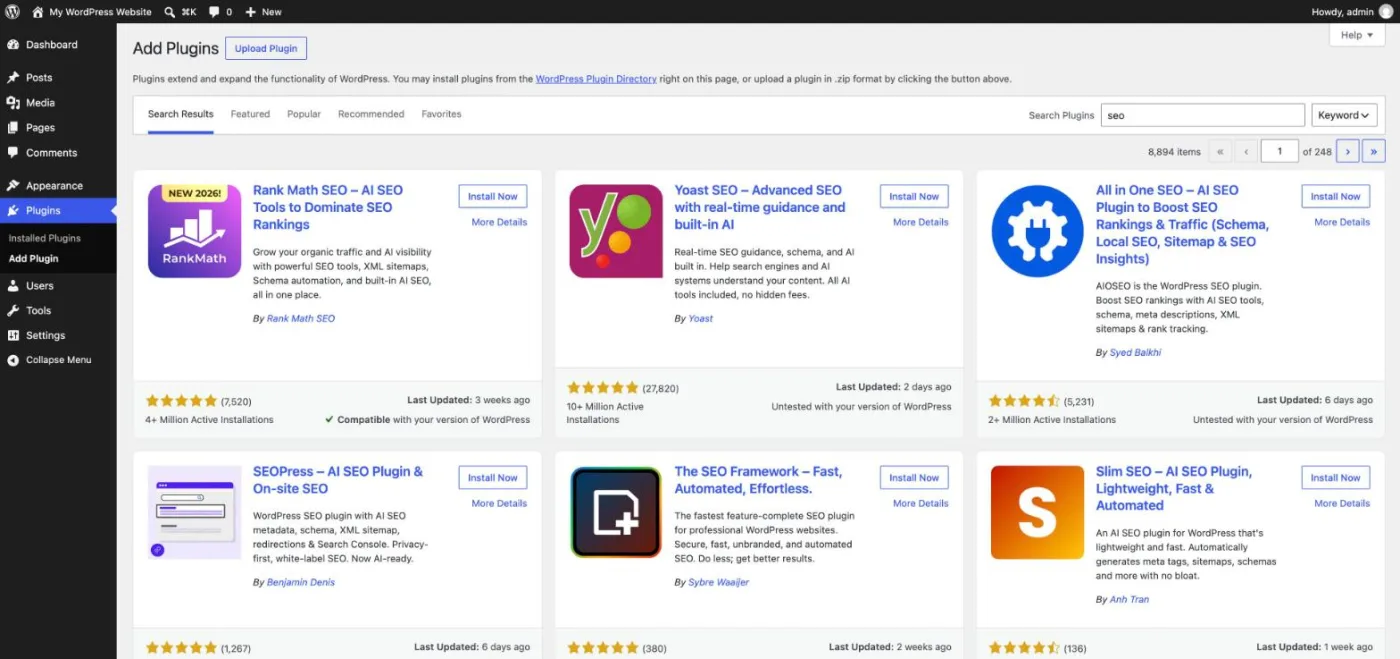
Our comparison of the best WordPress SEO plugins covers these options and their WooCommerce add-ons. Shopify covers titles, metas, sitemaps and redirects natively, so apps are needed for the next layer: bulk metadata, image compression, richer structured data, broken link checks. See our selection of the best Shopify SEO apps; most of them are billed monthly, and their cost adds up over the years.
The risk is the same on both sides: every app or plugin adds code. A Shopify store with 25 apps and a WooCommerce site with 50 plugins share the same symptom, slow pages on mobile.
On average, yes. Google measures speed through the Core Web Vitals, and the Web Almanac 2024 ecommerce chapter reports that Shopify has consistently had good loading (LCP) pass rates since 2022, while only 34% of WooCommerce stores pass the LCP threshold on mobile.
The gap comes from the hosting model. Shopify serves every store from the same optimized infrastructure and CDN. A WooCommerce store runs on whatever hosting its owner picked: a well-configured WooCommerce site on managed hosting with page caching and a lightweight theme can match Shopify, but a cheap shared server with dozens of plugins rarely does. On Shopify, the main levers are the theme and the number of apps that inject scripts.
Tip
Test your three most important templates (home, a collection and a product page) in PageSpeed Insights rather than the home page alone. Product pages carry the review widgets, galleries and upsell apps that slow a store down.
Product structured data lets Google show price, availability and ratings in results, and it gives AI assistants clean facts to read. WooCommerce core outputs Product markup on product pages, and SEO plugins extend it with brand, GTIN, reviews and breadcrumbs. On Shopify, the markup comes from the theme; most recent themes output it correctly, and apps fill the gaps. In both cases, check that only one Product block appears per page: a theme and an app that each add their own markup are a frequent error.
For international stores, Shopify Markets creates language and country versions in subfolders and adds hreflang tags automatically. WooCommerce needs a translation plugin, often paid, which then handles hreflang and translated URLs with more freedom but more configuration.
AI assistants now answer buying questions with product recommendations, a shift described in our glossary entry on AI shopping. Shopify pushes this channel directly: its pricing page lists "Sell in AI chats" among the features of the Basic plan, and an Agentic plan for brands that only want to list products in AI channels (checked October 2026). In January 2026, Shopify announced checkout features for Copilot and for AI Mode in Google Search and the Gemini app. WooCommerce reaches the same channels through product feeds and extensions you configure yourself.
"It's a new way for our story and product details to show up at the exact moment someone is asking real questions with real intent, in a format that feels helpful, not intrusive."
Victor Tam, CEO and Co-Founder of Monos (a Shopify brand), Shopify news
For organic citations, the platform matters less than the pages. AI crawlers read the HTML the server sends, and both platforms render product pages on the server. What gets a store cited is precise product information (materials, sizes, use cases, honest limits), answers to buyers' questions and mentions of the brand on other sites. Our study of how AI assistants cite Shopify stores shows how often they appear in answers, and AI mention tracking tells you whether ChatGPT recommends your brand or a competitor.
Note
Copied manufacturer descriptions hurt you twice: Google sees duplicate content across every store selling the same product, and AI assistants find nothing specific to quote. Unique product copy matters more than the platform choice.
Shopify charges a subscription; WooCommerce is free software with costs elsewhere. Below are Shopify's US prices from the official Shopify pricing page and the cost ranges WooCommerce publishes on its own pricing page (both checked October 2026; Shopify prices vary by country).
| Cost item | Shopify | WooCommerce |
|---|---|---|
| Platform | Basic $29, Grow $89, Advanced $359 per month billed yearly ($39, $105, $399 billed monthly); Plus from $2,300 a month | Free, no monthly subscription |
| Hosting | Included | $25 to $350 per month for most stores, according to WooCommerce |
| Extensions | Apps, many billed monthly | $29 to $299 per year per paid extension |
| Payments | Shopify Payments online card rates of 2.9% (Basic), 2.7% (Grow), 2.5% (Advanced) or 2.25% (Plus) + 30¢, or an extra 2% (Basic), 1% (Grow) or 0.6% (Advanced) with a third-party provider | About 2.5% to 2.9% + 30¢ per transaction with WooPayments, or another provider |
| Maintenance | Included | Updates, backups and security: your time or a developer's |
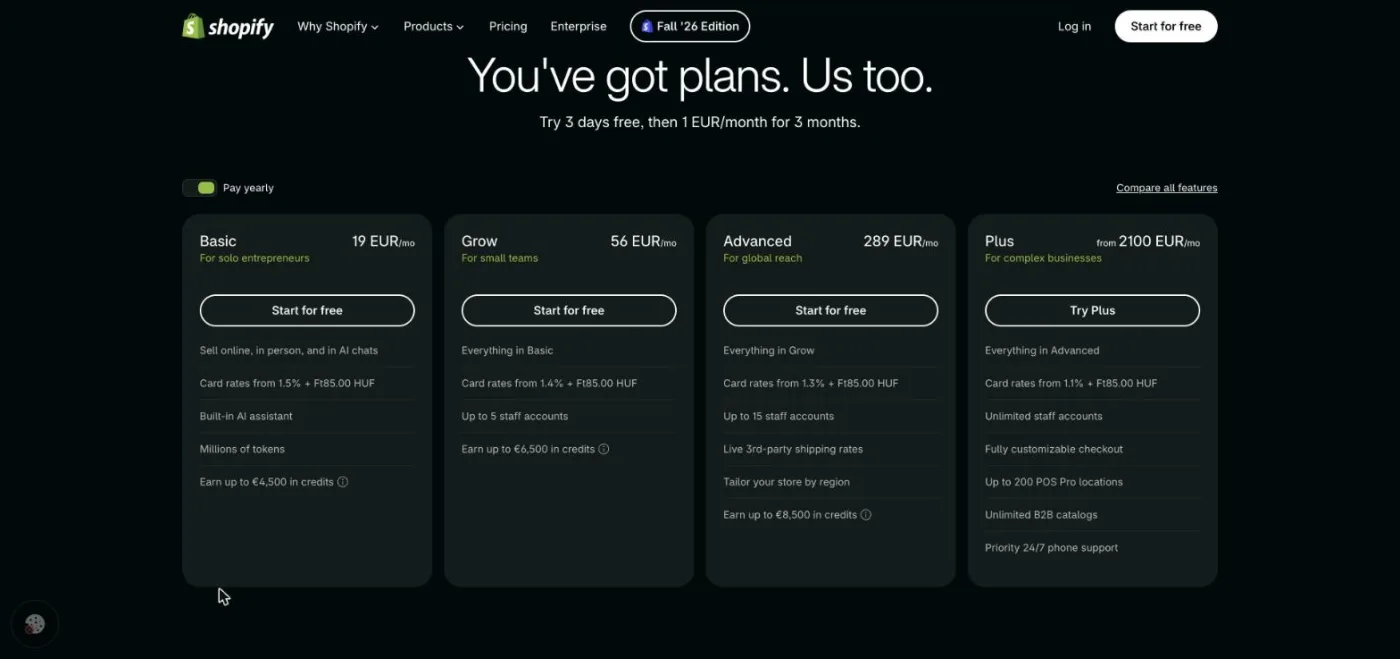
For a small store, the totals are often close once hosting, a premium theme and a few extensions are added to WooCommerce. Shopify's own comparison page claims that WooCommerce costs 41% more to operate on average; treat this vendor figure as a starting point and run your own numbers. The real difference is maintenance time, which Shopify removes and WooCommerce leaves with you.
WooCommerce to Shopify is a frequent move when a team wants to stop managing servers. Because Shopify imposes its folders, nearly every URL changes, so redirects decide the outcome:
The reverse move, Shopify to WooCommerce, follows the same steps, with redirects managed by your SEO plugin. Follow our SEO migration checklist for the details.
The right platform depends on your team, your catalog and the role content plays in your growth. The table gives a verdict for the most common profiles.
| Your profile | Best choice | Why |
|---|---|---|
| Store that is just starting, no developer | Shopify | Hosting, speed, security and SEO basics included from day one |
| Large or fast-growing catalog, several countries | Shopify | Markets, hreflang and a checkout built for scale |
| Store with a strong content strategy | WooCommerce | WordPress blog, editable URLs and mature SEO plugins |
| Existing WordPress site adding a shop (creator, local business) | WooCommerce | Same site, same domain, no migration |
| Agency or in-house developer, custom products and rules | WooCommerce | Open code and no fixed folders |
| Brand betting on AI shopping channels | Shopify | Selling in AI chats included in the plans |
Whichever you pick, content brings the informational searches product pages cannot rank for, as our guide to SEO for ecommerce businesses explains. Sorank, our product, connects to Shopify and to WooCommerce in a few minutes, finds the keywords your store can rank for and publishes optimized articles linked to your products with the blog article generator, automatically or as drafts.
Choose Shopify to sell without managing servers, WooCommerce to control every URL and template, and invest in product pages and content either way. Sorank starts at $49 a month billed yearly: see the plans and the 3-day free trial.

The WooCommerce plugin is free, but a store still pays for hosting, a domain, often a premium theme and paid extensions. WooCommerce itself estimates hosting at 25 to 350 dollars a month for most stores and paid extensions at 29 to 299 dollars a year each. Shopify starts at 29 dollars a month billed yearly with hosting included, so small stores often end up with similar totals; the difference is maintenance time.
Shopify handles hosting, security updates and payment compliance for every store, so the merchant has little to maintain. WooCommerce can be just as secure, but security depends on the owner: hosting quality, regular updates of WordPress, themes and plugins, backups and strong passwords. Stores without a technical person usually find Shopify safer in daily practice.
Yes. Shopify offers ways to sell on a WordPress site, such as its Buy Button, so you keep WordPress for content and use Shopify for products, checkout and payments. This keeps your blog where it is, but products then live on Shopify, so check which domain hosts the product pages you want to rank on Google.
We analyse your competitors, your website and your AI visibility to create a tailored content plan for free.
 AI Content Brief Generator
 FAQ Schema Generator
 AI Blog Post Ideas Generator
 Structured Data Validator (Schema Validator)
 Alt Text Checker
 Internal Link Analyzer
 Backlink Challenge
 AI Meta Description Generator
 AI Blog Title Generator
 Google Indexability Checker
 AI Blog Outline Generator
 UTM Link Builder
 Keyword Clustering Tool
 Canonical Tag Checker
 XML Sitemap Generator
 Broken Link Checker
 AI SEO Title Generator
 Headline Analyzer
 SERP Preview Tool
 Redirect Checker
 Hreflang Tag Generator
 Heading Structure Analyzer
 HTTP Headers Checker
 Favicon Extractor
 SERP CTR Calculator
 SEO vs Paid Search Savings Calculator
 SEO Share of Voice Calculator
 SEO ROI Calculator
 SEO Traffic and Revenue Forecast Calculator
 SEO Budget Calculator
 SEO Break-Even Calculator
 SaaS SEO ROI Calculator
 ROAS Calculator
 Reading Time Calculator
 Ranking Gain Simulator
 Organic Traffic Value Calculator
 Organic Traffic Estimator and Website Traffic Checker
 LTV to CAC Ratio Calculator
 Local SEO ROI Calculator
 Link Building Cost Calculator
 Keyword Value Calculator
 Keyword Opportunity Score Calculator
 Keyword Density Calculator
 GEO ROI Calculator
 GEO Content Investment Calculator
 Ecommerce SEO ROI Calculator
 Customer Lifetime Value Calculator
 Customer Acquisition Cost Calculator
 CTR Calculator
 Cost Per Article Calculator
 Conversion Rate Calculator
 Content Marketing ROI Calculator
 ChatGPT Referral Traffic Estimator
 Bounce Rate Calculator
 Backlink ROI Calculator
 AI Visibility Score Calculator
 AI Traffic Value Calculator
 AI Share of Voice Calculator
 Cost of AI Invisibility Calculator
 AI Citation Rate Calculator
 llms.txt Validator
 AI Overview Checker and AI Overviews Rank Checker
 Robots.txt Checker
 AI SEO Audit
 LLM Readability Checker
 SearchGPT Readiness Checker
 Structured Data LLM Audit
 Website Crawlability AI Audit
 Why ChatGPT Is Not Recommending My Website
 Gemini Ranking Tool
 Perplexity Ranking Checker
 LLM Citation Checker
 Answer Engine Optimization Audit
 GEO Audit
 AI Search Visibility Test
 ChatGPT Visibility Checker
 llms.txt Generator
 URL Extractor
 Webpage to Markdown
 Sitemap Checker
 SERP Volatility Sensor
 Page Size Checker
 Word Counter
 Slug Generator
 Schema Generator
 Robots Generator
 OG Preview
 Meta Tags Generator
 Image Compressor
 Favicon Generator
 On-Page SEO Audit: SEO Checker and SEO Analyzer
 Backlink Analysis Tool
 Keyword Research Tool
 Domain Authority Checker
THEY TRIED SORANK BEFORE YOU
 “I tested Sorank on a real client site and it's insane. It does everything an agency would bill you $1500 a month for. It's going into production on that client now.”
 Guillaume Guersanguersanguillaume.com“We are an Ads agency and we wanted to get our SEO back on track once and for all. Sorank gave us a clear view of our site, helped us prioritize optimizations, and properly structure our content. The tool is easy to use, well designed for a team, and very practical for centralizing tracking without having to juggle multiple platforms. A very solid foundation to start fresh with our SEO.”
 Gaspard MadouiAds Agency
 “I just let the Sorank software do its thing, and now my DR is 25 and my page is ranking higher.”
 Lucas Flandrefoundertrace.fr“I specialized in GEO thanks to Sorank. The GEO Leaderboard allows me to show my clients their position vs competitors on ChatGPT. It’s a real commercial differentiator.”
 MélanieSEO Freelance“Great service, works well for our website and helps us understand how to improve it to rank better on Google and elsewhere. Congrats, keep going, I recommend it.”
 Hugo T.E-commerce merchant