Preferences
Privacy is important to us, so you have the option of disabling certain types of storage that may not be necessary for the basic functioning of the website. Blocking categories may impact your experience on the website. More information

Privacy is important to us, so you have the option of disabling certain types of storage that may not be necessary for the basic functioning of the website. Blocking categories may impact your experience on the website. More information

Shopify vs Wix in 2026: verified prices, SEO settings point by point, speed data, AI visibility, migration and the right choice for each type of store.
Tools

In short
Shopify is the better choice for a business whose main job is selling products online: its checkout, catalog tools, international selling and app store are built for commerce, and it now sells directly in AI chats. Wix is the better choice for a service business, a content-led brand or a small catalog: it is easier to design, cheaper at entry level, has the stronger blog and gives more control over URLs. On SEO, both cover the essentials; Shopify's fixed URL folders and Wix's lighter catalog features are the main trade-offs.
Want to go further? Ask
Quick quiz
Where should your online shop find its next customers?
Sorank matches your answers


Test it for 3 days on your own site and see where you stand on Google, ChatGPT and the other AIs.
Start 3-day free trial3 days free, then stop whenever you want. 90-day results-or-refund guarantee.
The Shopify vs Wix question usually comes down to one thing: is your website a store that publishes some content, or a website that also sells? Both platforms are among the most used in the world: according to W3Techs (October 2026), Shopify runs 5.3% of all websites and Wix 4.2%, behind only WordPress. This comparison focuses on what drives organic traffic and sales: SEO settings point by point, speed, structured data, blogging, visibility in ChatGPT, Gemini and Perplexity, real costs with verified prices, migration, and a verdict for each type of business.
Shopify is an ecommerce platform first: every plan is built around products, orders, payments, shipping and inventory, and the website is the storefront around them. Wix is a website builder first: you design pages freely with a drag-and-drop editor, then add a store, bookings, events or a blog as modules on paid plans. Both are hosted, so you never manage servers, security updates or backups.
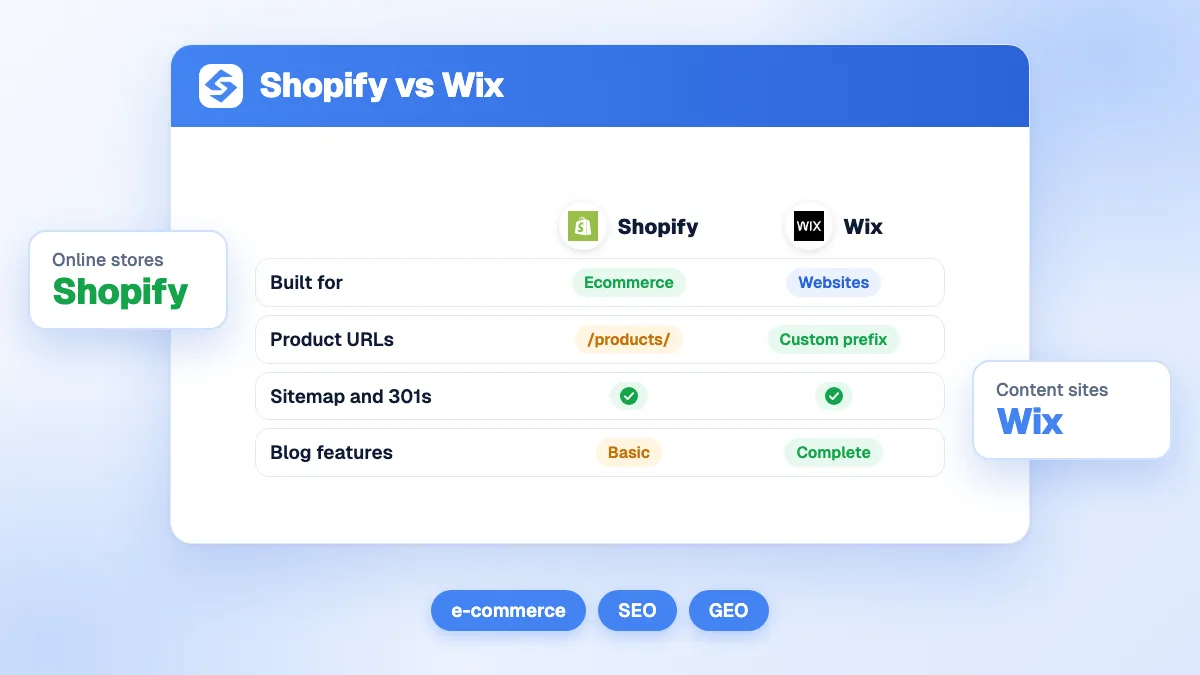
| Criterion | Shopify | Wix |
|---|---|---|
| Built for | Ecommerce first | Websites first, ecommerce on paid plans |
| Editor | Theme-based, sections and blocks | Free drag-and-drop design |
| Entry paid plan that sells | Basic, $29/month billed yearly | Core, $29/month billed yearly |
| Catalog and variants | Built for large catalogs and many variants | Comfortable for small and medium catalogs |
| Apps and extensions | Very large app store | Smaller app market, more built-in features |
| Selling in AI chats | Included in plans (Agentic Storefronts) | No equivalent claim on its plans page |
| Blog | Basic | More complete |
| Services, bookings, events | Through apps | Built-in modules |
The rest of this guide details each line, starting with what most store owners ask first: which one ranks better.
Neither platform gives a ranking advantage by itself: both let you edit title tags, meta descriptions, headings, alt text and slugs, both generate a sitemap and both handle 301 redirects. The differences sit in the structure around your pages: URL folders, canonical control, robots.txt access and the depth of the blog. The table below compares the SEO settings point by point.
| SEO setting | Shopify | Wix |
|---|---|---|
| URL structure | Fixed folders: /products/, /collections/, /pages/, /blogs/blog-name/; slug editable | Slug editable; product (/product-page/) and blog (/post/) prefixes can be changed or removed |
| Title tag and meta description | Editable on every product, collection, page and article | Editable per page, plus SEO patterns to set rules in bulk |
| 301 redirects | Built-in URL redirect tool, CSV import, automatic redirect when a slug changes | URL Redirect Manager, bulk import, automatic redirect when a slug changes |
| XML sitemap | Automatic sitemap.xml with child sitemaps | Automatic sitemap, with options to exclude pages |
| robots.txt | Editable through a robots.txt.liquid theme template (advanced) | Editable in the SEO settings |
| Structured data | Product markup output by most themes, extendable with apps | Default markup on products and posts, editable, custom JSON-LD allowed |
| Canonical tags | Automatic self-referencing canonicals; custom canonicals need theme code | Automatic canonicals, custom canonical editable per page |
| Speed | Depends mainly on theme and apps | Strong progress on Core Web Vitals since 2024 |
| Multilingual | Shopify Markets and Translate & Adapt, subfolders and hreflang | Wix Multilingual, subdirectories and hreflang |
| Blog | Basic: tags, no categories, fixed /blogs/ path | Complete: categories, tags, authors, SEO settings per post |
Shopify imposes folders: products live under /products/, categories under /collections/, static pages under /pages/ and articles under /blogs/blog-name/. You choose the slug, never the folder. This is rarely a ranking problem, but it rules out keyword-rich hierarchies such as /running-shoes/trail/ and it complicates migrations from platforms with different paths. Wix is more flexible: the product page prefix (default /product-page/) and the blog prefix (default /post/) can be changed or removed in the SEO settings, with redirects created for the old URLs.
On Shopify, a product can be reached through several URLs, for example /products/blue-shirt and /collections/shirts/products/blue-shirt. Shopify adds a canonical tag pointing to the /products/ version, so Google consolidates the signals, but many themes still link to the longer URL internally. Filters and sorting parameters on collection pages create more variants, a problem covered in our guide to category page SEO for online stores. Wix catalogs are usually smaller and its product URLs do not nest inside categories, so the issue is less frequent.
Wix lets you edit robots.txt directly from its SEO settings, which is convenient for blocking internal search pages or test sections. Shopify allows it through a robots.txt.liquid template in the theme code, which it describes as an unsupported customization that can cost traffic if misused. For redirects, both offer a manager with bulk import; follow the rules in our guide to 301 redirects for SEO to avoid chains and loops.
Tip
On either platform, test one product page in Google's Rich Results Test after any theme change or app installation. Themes and apps sometimes output two conflicting Product blocks, and Google may then ignore both.
Product markup lets Google show price, availability and reviews in results, and gives AI assistants clean facts about your products. Most Shopify themes output Product markup, and apps can extend it with reviews, FAQ or breadcrumbs. Wix adds default structured data to product and blog pages, lets you edit it and accepts custom JSON-LD per page. On both, the markup is only as good as the data behind it: missing prices, out-of-date stock or empty reviews weaken it.
Both are hosted platforms with a content delivery network, so you never manage servers or caching. On Wix, the measurable progress is large: the HTTP Archive Web Almanac 2025 found that 74% of Wix sites passed all Core Web Vitals on mobile in 2025, up from 55% in 2024, while WordPress stood at 45%. The same chapter credits platforms with tightly managed environments, led by Wix, for the largest year-over-year gains. Shopify is not broken out in that comparison.
On Shopify, speed depends mostly on the theme and the apps. Each app can inject its own scripts on every page, and stores running 20 or 30 apps are often slow on mobile. On Wix, heavy animations, videos, pop-ups and third-party widgets play the same role. On both, the fix is the same: fewer scripts, compressed images and a lean theme or template.
Watch out
Uninstalling a Shopify app does not always remove the code it added to your theme. After removing an app, check the theme files for leftover snippets that still load on every page.
This is where Shopify pulls ahead. Its checkout is built for conversion (including Shop Pay), it handles large catalogs with variants, multiple currencies and markets, B2B catalogs on higher plans, point of sale for physical shops and a large network of shipping, tax and fulfillment integrations. Its app store covers almost every need, including SEO: see our selection of the best Shopify SEO apps.
Wix Stores handles small and medium catalogs well and suits businesses that sell services, appointments, events or courses from the same site as their products. Its Core plan already accepts payments, and the Business and Business Elite plans add standard and advanced ecommerce features. Where Wix falls behind is depth: fewer specialized apps, fewer options for complex shipping or tax rules and a less extensive ecosystem of agencies and developers.
For organic traffic, what matters most in any store is the quality of each product page: unique descriptions, real photos, specifications and answers to buyers' questions. Neither platform writes that content for you.
For design, yes. Wix's editor lets you place any element anywhere on the page, and its AI creation tools generate a first version of a site from a prompt. That freedom suits brands that care about a distinctive look, but it also makes it easy to build heavy pages. Shopify's theme editor is more structured: you assemble sections and blocks inside a theme, which limits creativity but keeps pages consistent and fast to update across hundreds of products.
For running a store day to day, Shopify is usually simpler: orders, inventory, discounts, returns and customer accounts are the center of the admin, with a mobile app to manage everything. On Wix, the store is one module among others in the dashboard, which is convenient when the business also takes bookings or sells services.
Wix offers more guidance out of the box. Its SEO Setup Checklist walks beginners through connecting Google Search Console, submitting the sitemap and writing the home page title, and its Site Inspection tool shows how Google sees each page without leaving the dashboard. SEO patterns let you write title and description rules once for all products or posts, which saves hours on a growing site.
Shopify keeps the native settings lean and relies on its ecosystem. The free Search & Discovery app manages on-site search, filters and product recommendations, and the Google & YouTube app syncs the catalog with Google Merchant Center for free product listings. Everything else (bulk metadata editing, image compression, advanced schema, broken link checks) comes from third-party apps, which adds flexibility but also monthly fees and scripts. In practice, a small team gets started faster on Wix, while an experienced team can go further on Shopify.
Content brings the informational searches that product pages cannot rank for, and it is what AI assistants quote when they explain how to choose. Wix has the stronger built-in blog: categories, tags, multiple authors, layouts, scheduling and SEO settings per post. Shopify's blog is functional but basic: tags without categories, fixed /blogs/ URLs and limited formatting, which is why many Shopify stores rely on apps or external tools for content.
Both connect to external publishing tools. Sorank, our product, connects to Shopify and to Wix in a few minutes, finds the keywords your store can rank for and publishes optimized articles with internal links to your products through its blog article generator, automatically or as drafts for review.
AI assistants increasingly answer shopping questions with product recommendations, and Shopify has made this channel part of its offer. Its official pricing page lists selling "in AI chats" among the features of every plan, and it now shows an Agentic plan at no monthly fee "for selling in AI channels", where merchants only pay when they make a sale. Wix makes no equivalent claim on its plans page. Shopify's president describes the shift this way:
"Agentic is fundamentally merit-based as opposed to, if you go to a search engine, you type sneakers, you're going to see Footlocker."
Harley Finkelstein, president of Shopify, TechCrunch
Merit, for an AI assistant, means facts it can read and trust. Beyond integrations, three things decide whether a store gets cited: product pages with precise specifications and honest answers, crawlable HTML that AI crawlers can read without running JavaScript, and mentions of the brand on other sites. Our study of how AI assistants cite Shopify stores shows how often stores appear in answers, and AI mention tracking tells you whether your brand is recommended or replaced by a competitor.
Note
The platform opens the door; the content gets you cited. A store with 500 products and copied manufacturer descriptions gives AI assistants nothing to quote, on Shopify as on Wix.
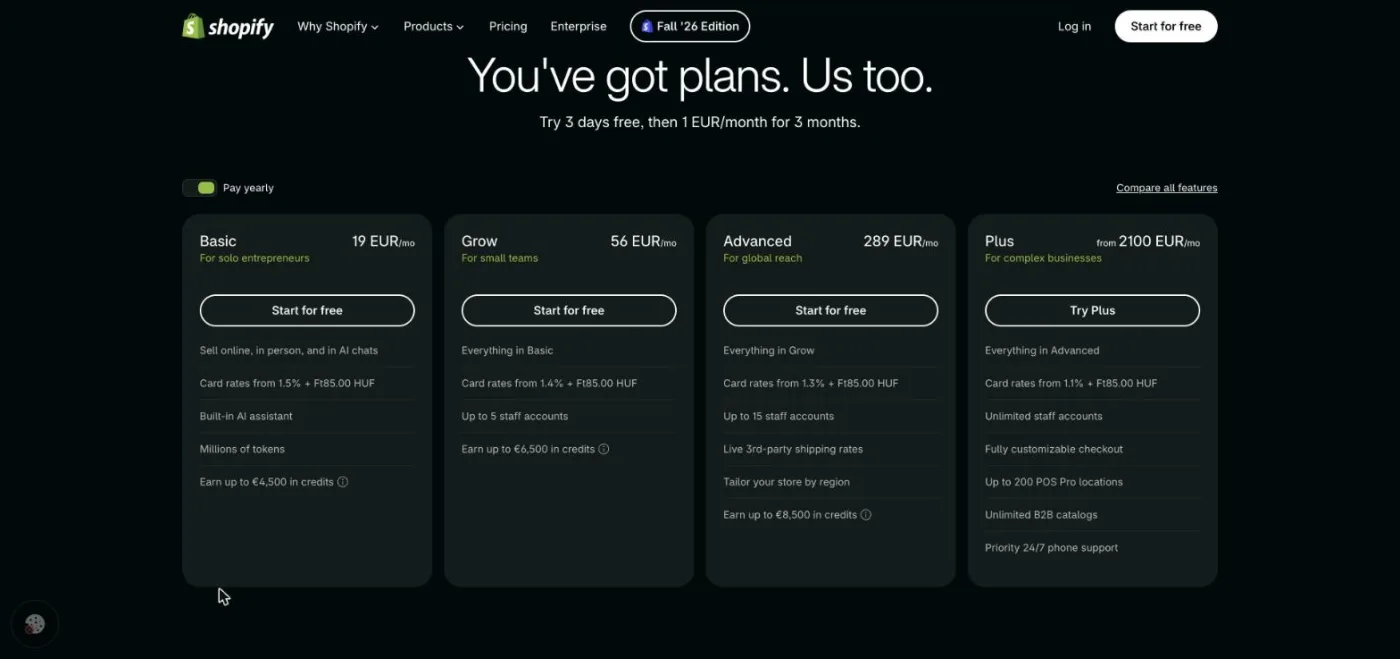
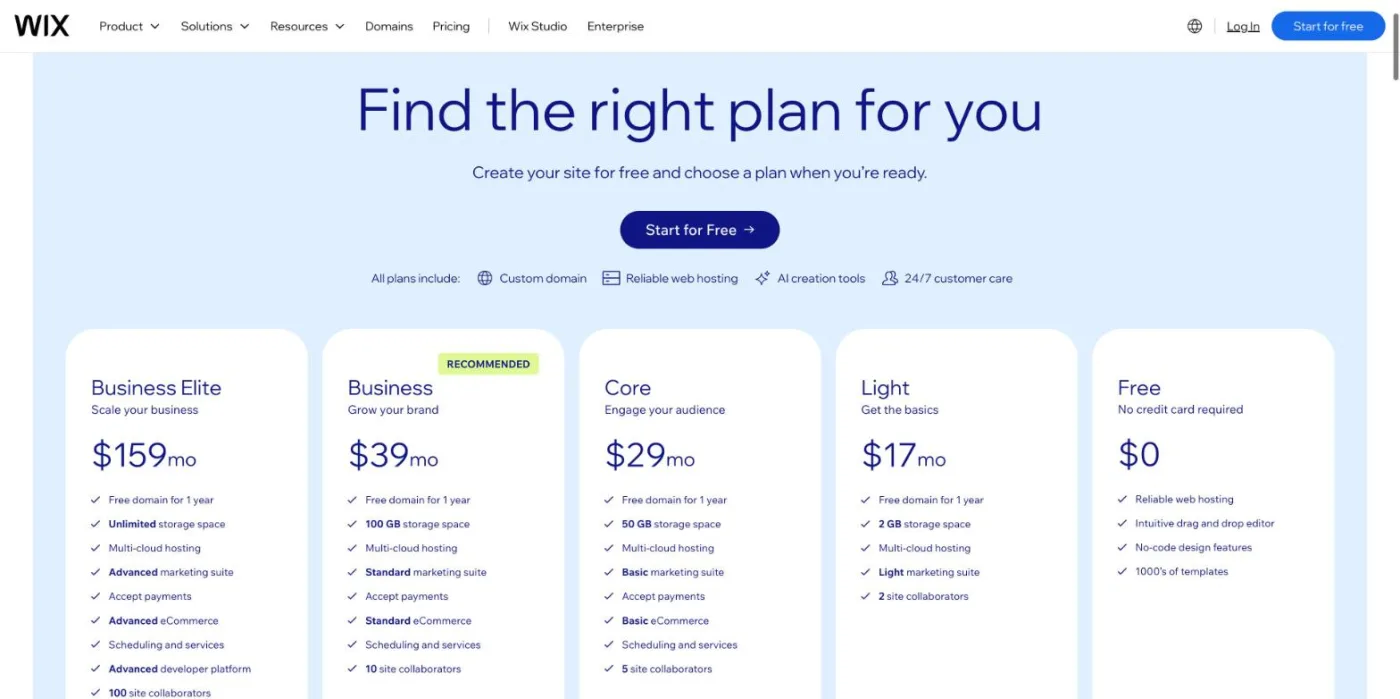
To sell online, the entry price is the same in the US: $29 a month billed yearly for Shopify Basic and for Wix Core. Wix also has a cheaper Light plan without payments, and the Shopify bill grows as you add paid apps. The table below gives the official prices per month (checked October 2026). Shopify adjusts prices by country, so confirm yours on the Shopify pricing page; Wix prices come from the Wix plans page, where displayed prices are for yearly subscriptions.
| Plan | Price per month (checked October 2026) | What it includes for selling |
|---|---|---|
| Shopify Basic | $29 billed yearly, $39 billed monthly | Online store, selling in AI chats, 2% fee if you use a third-party payment provider |
| Shopify Grow | $89 billed yearly, $105 billed monthly | 5 staff accounts, 1% third-party payment fee |
| Shopify Advanced | $359 billed yearly, $399 billed monthly | 15 staff accounts, selling by region, 0.6% third-party payment fee |
| Shopify Plus | From $2,300, custom pricing for large businesses | Customizable checkout, B2B catalogs, 0.2% third-party payment fee |
| Wix Free | $0 | No online payments, Wix branding |
| Wix Light | $17, billed yearly | Custom domain, 2 GB storage, no online payments |
| Wix Core | $29, billed yearly | Accept payments, basic ecommerce, 50 GB storage |
| Wix Business | $39, billed yearly | Standard ecommerce, 100 GB storage |
| Wix Business Elite | $159, billed yearly | Advanced ecommerce, unlimited storage |
On Shopify, payment fees depend on the provider: Shopify Payments adds no transaction fee on top of card rates, while third-party providers trigger the extra percentage shown above. Add the cost of apps (many review, SEO and subscription apps are billed monthly) and, optionally, a paid theme. On Wix, payment processing fees apply on the plans that accept payments, and premium apps from the Wix App Market add to the bill.
To weigh these costs against what organic traffic can bring in, try our ecommerce SEO ROI calculator.
Shopify is stronger for selling in several countries. Shopify Markets manages currencies, prices, duties and domains or subfolders per region, and the free Translate & Adapt app handles translations, with hreflang tags generated automatically. The Advanced plan adds tailored stores by region. Wix Multilingual translates a site into several languages with subdirectory URLs and hreflang, which works well for a brochure site or a small store, but it offers fewer options for region-specific pricing, taxes and fulfillment.
If you are weighing Shopify vs Wix vs WordPress, WordPress with WooCommerce gives the most control over URLs, templates and plugins, with no platform subscription, in exchange for hosting, security and updates you manage yourself. It suits stores that need full technical control or very specific features. Our page on WooCommerce SEO covers that option, and our ranking of the best ecommerce platforms for SEO compares ten platforms side by side.
Wix to Shopify is the most common move as a store grows. Because Shopify imposes its folders, almost every URL changes, so redirects decide the outcome of the migration:
The reverse move, Shopify to Wix, follows the same steps. It mostly makes sense for businesses whose catalog shrank or whose activity shifted toward services.
Each platform's strengths are the mirror of the other's limits. This summary lists what store owners notice most after a few months of use.
The right platform depends on your profile more than on any feature list. This verdict summarizes the choice for the most common situations.
| Your profile | Best choice | Why |
|---|---|---|
| Store that is starting out | Shopify Basic or Wix Core | Same entry price; Shopify if selling is the core, Wix if design and content matter more |
| Store with a large or growing catalog | Shopify | Checkout, variants, markets and apps built for commerce |
| Local service business that sells a few products | Wix | One site for services, bookings and a small store |
| Creator or content-led brand | Wix | Richer blog, design freedom and more URL control |
| International store | Shopify | Markets, currencies and language versions per region |
| Agency building client sites | Wix for showcase sites, Shopify for stores | Each platform for what it does best |
| Store that needs full technical control | WooCommerce | Open code and no fixed folders |
A store that is starting out can succeed on either: choose Shopify if you plan to grow the catalog or sell abroad, Wix if your brand relies on design and storytelling. A large catalog belongs on Shopify, where inventory, variants and apps scale. A local service business gets more from Wix, which combines services, bookings and a few products on one site. A creator who publishes often will appreciate the Wix blog. An agency will often use both, depending on the client. For a wider view, see our ranking of the best website builders.
Pick Shopify to sell at scale, Wix to run a website that also sells, and invest in product pages and content either way, because that is what Google ranks and what AI assistants quote. Sorank publishes that content on Shopify and Wix alike, starting at $49 a month billed yearly: see the plans and the 3-day free trial.

Not at entry level: Shopify Basic and Wix Core both cost $29 a month billed yearly in the US, and Wix also offers a $17 Light plan without online payments (checked October 2026). Shopify usually ends up more expensive once paid apps and third-party payment fees are added, but it includes more commerce features at each level.
Yes. Products can be exported and imported with apps or CSV files, but nearly every URL changes because Shopify uses fixed folders such as /products/ and /collections/. Prepare a complete list of 301 redirects and import it into Shopify before pointing your domain to the new store, so rankings and backlinks are preserved.
With Shopify Payments, Shopify charges card processing rates but no extra transaction fee; with a third-party payment provider it adds 2% on Basic, 1% on Grow, 0.6% on Advanced and 0.2% on Plus. Wix charges payment processing fees on plans that accept payments. Exact card rates vary by country, so check them on each platform's pricing page.
We analyse your competitors, your website and your AI visibility to create a tailored content plan for free.
 AI Content Brief Generator
 FAQ Schema Generator
 AI Blog Post Ideas Generator
 Structured Data Validator (Schema Validator)
 Alt Text Checker
 Internal Link Analyzer
 Backlink Challenge
 AI Meta Description Generator
 AI Blog Title Generator
 Google Indexability Checker
 AI Blog Outline Generator
 UTM Link Builder
 Keyword Clustering Tool
 Canonical Tag Checker
 XML Sitemap Generator
 Broken Link Checker
 AI SEO Title Generator
 Headline Analyzer
 SERP Preview Tool
 Redirect Checker
 Hreflang Tag Generator
 Heading Structure Analyzer
 HTTP Headers Checker
 Favicon Extractor
 SERP CTR Calculator
 SEO vs Paid Search Savings Calculator
 SEO Share of Voice Calculator
 SEO ROI Calculator
 SEO Traffic and Revenue Forecast Calculator
 SEO Budget Calculator
 SEO Break-Even Calculator
 SaaS SEO ROI Calculator
 ROAS Calculator
 Reading Time Calculator
 Ranking Gain Simulator
 Organic Traffic Value Calculator
 Organic Traffic Estimator and Website Traffic Checker
 LTV to CAC Ratio Calculator
 Local SEO ROI Calculator
 Link Building Cost Calculator
 Keyword Value Calculator
 Keyword Opportunity Score Calculator
 Keyword Density Calculator
 GEO ROI Calculator
 GEO Content Investment Calculator
 Ecommerce SEO ROI Calculator
 Customer Lifetime Value Calculator
 Customer Acquisition Cost Calculator
 CTR Calculator
 Cost Per Article Calculator
 Conversion Rate Calculator
 Content Marketing ROI Calculator
 ChatGPT Referral Traffic Estimator
 Bounce Rate Calculator
 Backlink ROI Calculator
 AI Visibility Score Calculator
 AI Traffic Value Calculator
 AI Share of Voice Calculator
 Cost of AI Invisibility Calculator
 AI Citation Rate Calculator
 llms.txt Validator
 AI Overview Checker and AI Overviews Rank Checker
 Robots.txt Checker
 AI SEO Audit
 LLM Readability Checker
 SearchGPT Readiness Checker
 Structured Data LLM Audit
 Website Crawlability AI Audit
 Why ChatGPT Is Not Recommending My Website
 Gemini Ranking Tool
 Perplexity Ranking Checker
 LLM Citation Checker
 Answer Engine Optimization Audit
 GEO Audit
 AI Search Visibility Test
 ChatGPT Visibility Checker
 llms.txt Generator
 URL Extractor
 Webpage to Markdown
 Sitemap Checker
 SERP Volatility Sensor
 Page Size Checker
 Word Counter
 Slug Generator
 Schema Generator
 Robots Generator
 OG Preview
 Meta Tags Generator
 Image Compressor
 Favicon Generator
 On-Page SEO Audit: SEO Checker and SEO Analyzer
 Backlink Analysis Tool
 Keyword Research Tool
 Domain Authority Checker
THEY TRIED SORANK BEFORE YOU
 “I tested Sorank on a real client site and it's insane. It does everything an agency would bill you $1500 a month for. It's going into production on that client now.”
 Guillaume Guersanguersanguillaume.com“We are an Ads agency and we wanted to get our SEO back on track once and for all. Sorank gave us a clear view of our site, helped us prioritize optimizations, and properly structure our content. The tool is easy to use, well designed for a team, and very practical for centralizing tracking without having to juggle multiple platforms. A very solid foundation to start fresh with our SEO.”
 Gaspard MadouiAds Agency
 “I just let the Sorank software do its thing, and now my DR is 25 and my page is ranking higher.”
 Lucas Flandrefoundertrace.fr“I specialized in GEO thanks to Sorank. The GEO Leaderboard allows me to show my clients their position vs competitors on ChatGPT. It’s a real commercial differentiator.”
 MélanieSEO Freelance“Great service, works well for our website and helps us understand how to improve it to rank better on Google and elsewhere. Congrats, keep going, I recommend it.”
 Hugo T.E-commerce merchant