Preferences
Privacy is important to us, so you have the option of disabling certain types of storage that may not be necessary for the basic functioning of the website. Blocking categories may impact your experience on the website. More information

Privacy is important to us, so you have the option of disabling certain types of storage that may not be necessary for the basic functioning of the website. Blocking categories may impact your experience on the website. More information

Squarespace vs Wix in 2026: SEO settings point by point, real speed data, AI crawler control, prices checked October 2026 and a verdict for each profile.
Tools

In short
Wix gives you more technical SEO control than Squarespace (an editable robots.txt, custom canonical tags and structured data per page, native multilingual sites, IndexNow for Bing) and costs less to start, with a free plan and paid plans from $17 per month. Squarespace gives you a more guided editor, more polished templates and simpler settings, from $19 per month in the US, which is enough for most portfolios, restaurants and service businesses. Both can rank on Google and be cited by ChatGPT: what you publish matters more than the builder you pick.
Want to go further? Ask
Quick quiz
Which kind of software is right for your business?
Our advice for you
A free or very simple tool
You are alone or just starting: a free plan or a simple tool covers the basics. Switch when you feel limited.
Our advice for you
An all-in-one tool for small businesses
You want one tool that does a bit of everything, is easy to learn and has support in your language.
Our advice for you
A specialised tool, the best in its field
This task is central to your business: pay for the most complete tool and connect it to the rest.
Our advice for you
An enterprise solution
Many users, strict security and integrations: ask for demos and compare the total cost, setup included.
The Squarespace vs Wix question is usually answered on design and ease of use. This comparison also looks at what decides whether your site is found: crawl and indexing control, page speed measured on real visitors, blogging, settings for AI crawlers, migration and the real cost of each plan. These are the two most used hosted website builders after Shopify: according to W3Techs (data of 28 October 2026), Wix runs 4.2% of all websites and Squarespace 2.4%, or 6.2% and 3.6% of the sites that use a known content management system.
Squarespace is the more structured builder, Wix the more flexible one. The table below sums up the differences that matter for visibility and budget in 2026; each line is detailed in the sections that follow.
| Criterion | Squarespace | Wix |
|---|---|---|
| Editor | Section-based grid, guided layout | Free drag-and-drop placement |
| Free plan | No, 14-day free trial | Yes, with Wix branding and a Wix subdomain |
| Entry price, billed annually (US) | $19 per month (Basic) | $17 per month (Light) |
| Cheapest plan to sell online | Basic ($19), with a 2% transaction fee | Core ($29), no Wix transaction fee |
| robots.txt | Generated by Squarespace, not editable | Editable in the robots.txt editor |
| Canonical tags | Automatic only | Automatic, editable per page |
| Custom structured data | Through code injection (Core and above) | Custom JSON-LD field per page |
| Multilingual | Through the Weglot integration | Wix Multilingual, built in |
| Mobile LCP pass rate (October 2026) | 86.0% of sites | 94.2% of sites |
| Block AI crawlers | One checkbox, off by default | Manual rules in robots.txt |
| Change template after launch | Yes, on version 7.1 | No, the site must be rebuilt |
| Support | Email and chat | Chat and phone callback |
Prices and features checked October 2026 on the official pricing pages and help centers of both platforms.
Both are hosted website builders: you pay a subscription, and the company handles hosting, security updates, SSL certificates and backups. You never install software or manage a server, which is the main difference with a self-hosted CMS such as WordPress.
Squarespace was founded in 2003 in New York by Anthony Casalena and is known for its design-led templates. The investment firm Permira took the company private in 2024. Its current platform, version 7.1, uses one shared structure for every template, and the company also runs Squarespace Domains and the Acuity appointment scheduling service.
Wix was founded in 2006 in Tel Aviv and is listed on the Nasdaq stock exchange. It targets a wider audience, from a first personal site to agencies, which use its separate Wix Studio offer to build client sites. Its App Market adds hundreds of features, from bookings to restaurant orders.
That difference in positioning explains most of what follows: Squarespace limits choices to protect the result, Wix opens choices to protect flexibility.
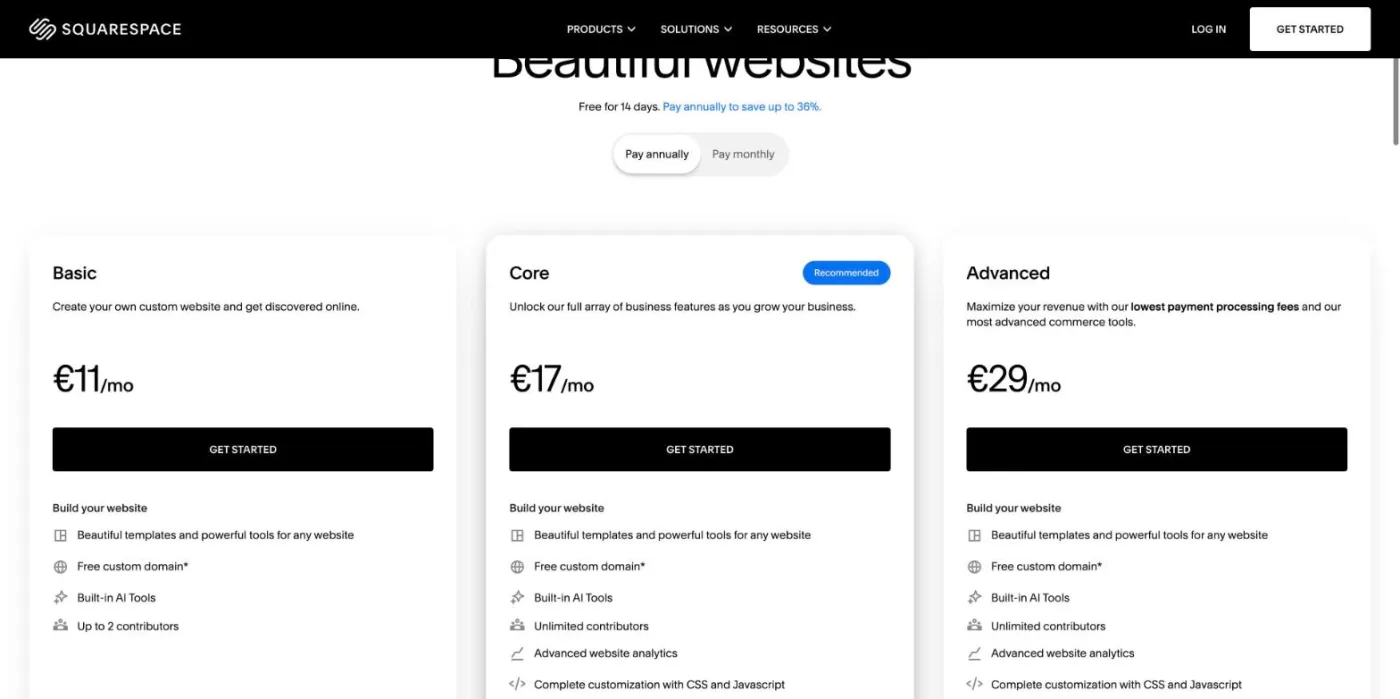
Wix is cheaper to start and Squarespace is cheaper at the top of the range. Wix has a free plan and a $17 entry plan, while its most complete plan costs $159 per month; Squarespace starts at $19 and tops out at $99. Official US prices, per month, billed annually (checked October 2026):
| Level | Squarespace | Wix |
|---|---|---|
| Free | 14-day free trial only | Free plan (Wix branding, Wix subdomain) |
| Entry | Basic: $19 ($25 billed monthly) | Light: $17 (no online store) |
| Standard | Core: $29 ($39 billed monthly) | Core: $29 (basic eCommerce, 50 GB) |
| Growth | Plus: $49 ($65 billed monthly) | Business: $39 (standard eCommerce, 100 GB) |
| Top | Advanced: $99 ($139 billed monthly) | Business Elite: $159 (advanced eCommerce, unlimited storage) |
Sources: the Squarespace pricing page and the Wix plans page, which states that displayed prices are for yearly subscriptions paid in full and that prices and currency vary by location. Squarespace raised its US prices in 2026 and does not sell the same lineup everywhere: from Europe, its pricing page shows three plans instead of four.
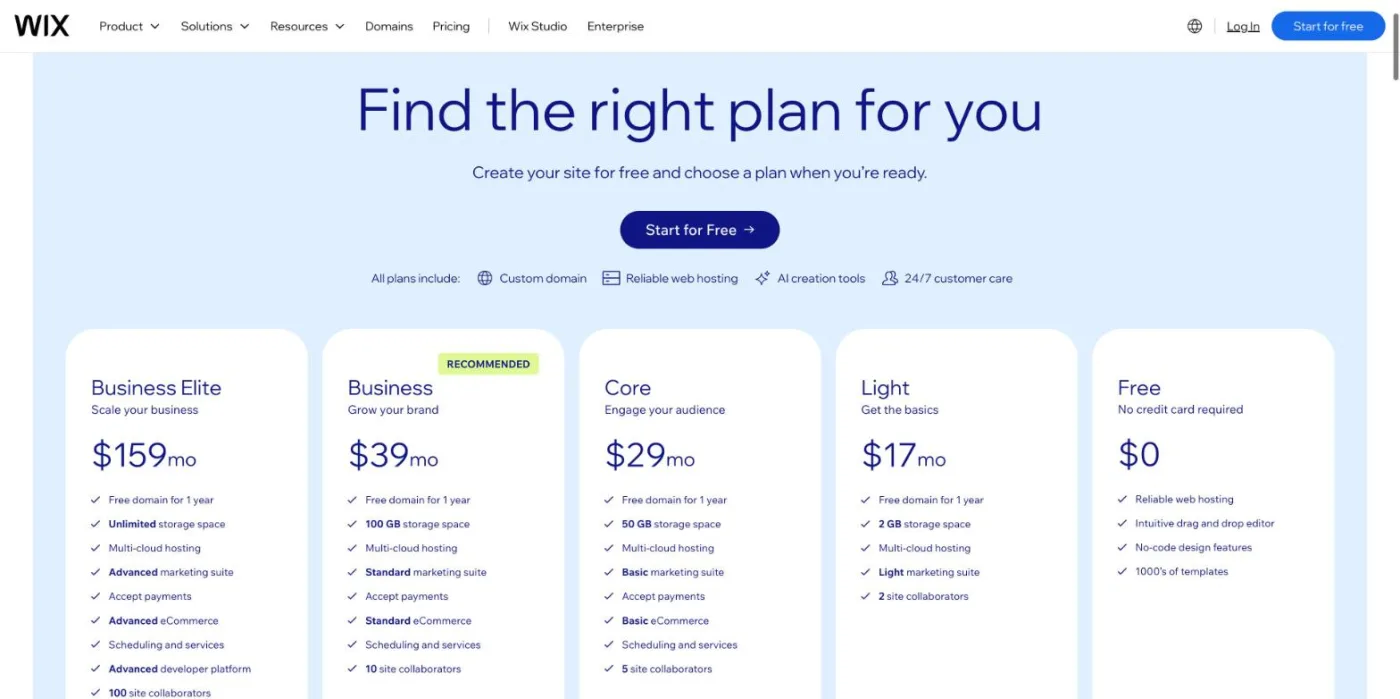
On Wix, the pricing page lists five levels, from Free to Business Elite. The Light plan suits a simple showcase site, but it cannot sell: online payments start with Core. Business and Business Elite add more storage, more advanced store features and higher limits for automations and marketing.
The plan price is only part of the bill on both platforms. Budget for these items before you compare:
Example
A small shop on Squarespace Basic that sells $2,000 a month pays $40 in Squarespace transaction fees, on top of the $19 plan. At that level, Core at $29 is cheaper than Basic, because the 2% fee disappears.
For pure SEO, Wix offers more control and Squarespace covers the essentials with fewer settings. Both platforms handle what Google expects from a small site: editable title tags and meta descriptions, clean URLs, automatic XML sitemaps, free SSL, image alt text, automatic canonical tags and 301 redirects. The differences appear when you need to go further. Here is the comparison point by point:
| SEO setting | Squarespace | Wix |
|---|---|---|
| URLs (slugs) | Editable slugs, fixed collection prefixes such as /blog/ or /shop/p/ | Editable slugs, prefixes such as /post/ or /product-page/ can be changed |
| Title tag and meta description | Per page, plus title format templates | Per page, plus SEO patterns for whole collections |
| 301 redirects | URL Mappings panel (text rules) | URL Redirect Manager, with bulk import |
| XML sitemap | Automatic | Automatic, with pages excluded when set to noindex |
| robots.txt | Generated automatically, not editable | Editable by the site owner |
| Structured data | Basic markup automatic, custom JSON-LD through code injection | Basic markup automatic, custom JSON-LD field per page |
| Canonical tag | Automatic self-referencing tag | Automatic, custom canonical per page |
| Speed (mobile LCP pass rate) | 86.0% of sites | 94.2% of sites |
| Multilingual and hreflang | Weglot integration | Wix Multilingual, hreflang added automatically |
| Blog | Native blog on every plan | Native blog on every plan, more editorial roles |
| Bing indexing | Through Bing Webmaster Tools | IndexNow notification on each update |
For a site of five or ten pages, none of these differences changes your rankings. For a blog of 200 articles, a store with filters and variants or a site in several languages, the extra control of Wix avoids a few dead ends: you can fix a duplicate page with a custom canonical, block a section in robots.txt or add schema markup to a single page without touching code. Our guides to optimizing a Squarespace site for Google and AI and optimizing a Wix site list the settings to check on each platform.
Wix spent years fixing its old SEO reputation, and Google noticed. The company now quotes Google's Search Advocate on its SEO features page:
"Wix has been doing fantastic stuff for a number of years now. I'm impressed. They've been raising the bar not only for their services, but the industry overall."
John Mueller, Search Advocate at Google, quoted on the Wix SEO features page
That praise does not make Squarespace a bad choice. Squarespace sites rank well when their content is good, and its smaller set of settings leaves fewer ways to make a mistake. If you are comparing more than these two options, our ranking of the best CMS for SEO covers WordPress, Webflow, Shopify and the others.
Note
Older comparisons still say that Wix uses hashbang URLs (#!) that Google cannot crawl. That was true more than ten years ago. Wix URLs are now ordinary, crawlable paths, and pages are rendered on the server.
On real visitors' phones, Wix sites load their main content faster than Squarespace sites on average. In the October 2026 edition of the State of Core Web Vitals explorer by CoreWebVitals.io (Chrome field data, phone), 94.2% of Wix sites pass Largest Contentful Paint (75th percentile at 1.6 seconds), against 86.0% of Squarespace sites (2.2 seconds) and 69.5% of WordPress sites (2.7 seconds).
Both builders do well on the other two metrics: 96% of Wix sites and 99% of Squarespace sites pass Interaction to Next Paint (INP), and 97% of Wix sites against 91% of Squarespace sites pass Cumulative Layout Shift (CLS). Squarespace's weaker layout score often comes from large images and banners that load late and push the content down.
Two caveats. These figures describe the average site: one heavy video header or a dozen third-party scripts can push any page out of the green zone, on either platform. And Core Web Vitals are a tie-breaker in Google's ranking, never a substitute for relevant content. The fixes that help most are the same on both platforms. Use a still image instead of a video in the first screen of the home page. Export photos at the width they will be displayed (around 2000 pixels for a full-width banner is enough) and in a compressed format. Load chat widgets, review badges and tracking scripts only where they are needed, since each third-party script delays the page. On either builder, compress images before upload, limit embedded scripts and apps, and check your key pages with a free on-page audit after each redesign.
Squarespace is easier to get right, Wix is easier to customize. Squarespace places content in sections on a snapping grid: you cannot break the layout, and templates look professional with little effort. That explains its popularity with photographers, restaurants, consultants and creative studios. On version 7.1, all templates share the same structure, so you can change the whole design later without rebuilding the site.
Wix lets you place any element anywhere on the page. That freedom suits people who want a specific look, but it also makes it easier to create pages that break on mobile or that get heavy with animations and apps. Wix compensates with a separate mobile editor, where you adjust the phone version of each page.
Both now offer an AI site generator that builds a first draft from a few questions about your business (Squarespace Blueprint AI, Wix AI website builder). Both also have a mobile app to edit pages, answer messages and follow orders from a phone (the Squarespace app and the Wix app). Treat the AI draft as a starting point: the generated text is generic, and the pages that rank are the ones you rewrite with your own offers, prices and answers.
Watch out
On Wix, you cannot switch to another template once a site is live. A full redesign means building a new site and moving the content, the domain and the redirects. Choose the template with care at the start.
On templates, Squarespace offers fewer designs, but each one is consistent and built for a type of business (portfolio, restaurant, store, blog). Wix offers a much larger catalog of templates, plus a blank canvas, so the quality of the final site depends more on your own choices. On both, pick a template for its structure (number of sections, navigation, product pages) rather than for its demo photos, which you will replace anyway.
For support, Wix offers chat and phone callbacks in many countries, plus a large help center; Squarespace answers by email and chat, without phone support. Both have active community forums.
For a small catalog, both work well, and Squarespace is cheaper to start selling (Basic at $19 with a 2% fee, against Core at $29 on Wix). Wix pulls ahead as the store grows: more payment providers, more sales channels, more apps and stronger SEO control over product and category pages.
If online sales are your main business, neither builder is the strongest choice: dedicated store platforms handle large catalogs, filters and international sales better. Our ranking of the best ecommerce platforms for SEO compares them.
Wix includes more marketing tools in its plans, Squarespace sells them as clean add-ons. Both cover the basics a small business needs to turn visitors into customers: forms, newsletters, social posts, appointments and simple analytics.
For a local business, the Google Business Profile matters as much as the website: it decides whether you appear in the map results. Whatever the builder, keep the name, address and phone number identical on the site and on the profile.
Both include a native blog with categories, tags, authors, scheduled publishing, comments and an RSS feed, on every plan. For a blog built to bring organic traffic, the platform matters less than three habits: publishing regularly, covering a topic in depth with linked articles, and answering real questions clearly.
Wix has an edge for larger editorial teams (writer and editor roles, a more complete blog dashboard, SEO settings and patterns per post) and lets you change the /post/ prefix. Squarespace is simpler and produces clean article pages, but its blog is less flexible once you go beyond a few hundred posts, and you cannot remove the collection prefix from the URL. Neither replaces a dedicated CMS for a media site with thousands of articles; our ranking of the best blogging platforms compares the options when the blog is your main asset.
Tip
Whatever the builder, link every new article to two or three older ones on the same topic. Internal links help Google understand your site structure and help AI assistants find the page that best answers a question.
Both let AI assistants read your pages by default, and both give you a way to block them. Being cited by ChatGPT, Gemini, Perplexity or Claude requires two things: crawlers that can read your pages, and content that gives clear, citable answers. On the first point, the two platforms take different routes.
Our guide to robots.txt rules for AI crawlers explains which bots to allow and why. Content written for AI assistants follows a few simple rules on both builders: a direct answer at the top of each page, question-shaped headings that match what people ask, figures with their source and date, and comparison tables when the reader must choose. Short pages with vague marketing text are rarely cited, whatever the platform. The settings of both platforms are good enough: what gets a site cited by AI is its content, meaning precise answers, sourced figures, comparison tables and pages that cover a topic completely. You can measure the result with AI mention tracking, which shows whether ChatGPT, Gemini and Claude cite your brand, and who they cite instead.
Partly on Squarespace, barely on Wix. On both hosted builders, you rent the platform: the design, the templates and the code stay with the company, and only your content and your domain name are really yours.
Two habits limit the risk on either platform: register the domain in your own name (and keep access to the registrar account), and keep a copy of your texts and images outside the builder. If you ever leave, you will rebuild the design, not rewrite the content.
It is possible, but there is no one-click migration in either direction. Neither platform exports a complete site that the other can import: you rebuild the design on the new platform, copy the pages, products and posts, and redirect every old URL to its new address.
Expect a few weeks of fluctuation, and a lasting loss if redirects are missing. Pick for the next three years, not the next three weeks: a migration costs more than the price difference between two plans.
The right builder depends on what the site must do. Here is our verdict for the most common profiles.
Squarespace. Its templates handle large images and galleries elegantly, the grid keeps every page tidy, and you can change the whole design later without rebuilding. Compress images before upload to keep the speed in the green.
Either, with a slight edge to Squarespace if you value a clean result with little work, and to Wix if you need bookings, a specific layout or a site in several languages. On both, the essentials of small business SEO matter more: one page per service, your city in titles, consistent contact details and real reviews.
Squarespace if you sell a few products and want to start at $19 (move to Core once the 2% fee costs more than $10 a month); Wix if you plan many variants, several sales channels or marketplace sales.
Wix, for its control over product URLs, SEO patterns, multiple currencies and built-in multilingual sites. Beyond a few hundred products, compare it with a dedicated store platform.
Wix for a growing editorial blog with several writers; Squarespace for a creator who wants a beautiful blog next to a portfolio, newsletters or paid content, without technical settings.
Wix (and its Wix Studio offer for agencies) for the design freedom and the technical settings; Squarespace for clients who will edit the site themselves and should not be able to break it.
If you plan thousands of pages, complex workflows or full server control, choose neither: look at the other options in our list of the best website builders.
On Squarespace and on Wix, traffic depends on what you publish after launch: pages that answer the questions your customers type into Google and ask ChatGPT. Most small sites stall because nobody has time to write that content every week. A service page per offer, a few in-depth guides on the questions your customers ask before buying, and a regular rhythm of new articles do more for rankings and AI citations than any setting that separates the two builders.
Sorank is our product: an SEO and GEO software in autopilot that finds the keywords your site can win, writes optimized articles with sources, internal links and images, and publishes them automatically on Wix (as well as WordPress, Shopify and Webflow, or any site via webhook), or saves them as drafts for review. Its blog article generator is the part most useful to a site owner short on time. Plans start at $49 per month billed annually, with a 3-day free trial; see Sorank pricing.
The builder sets the floor of your SEO; your content sets the ceiling. Choose Squarespace for a polished site with few settings, Wix for more control and a lower entry price, then spend your energy on the pages that answer your customers' questions.

Wix is cheaper to start: it has a free plan and a Light plan at $17 per month billed annually, against $19 for Squarespace Basic. Squarespace is cheaper at the top, with Advanced at $99 against $159 for Wix Business Elite. To sell online, Squarespace Basic ($19, with a 2% transaction fee) costs less than Wix Core ($29). Prices checked October 2026.
On Squarespace 7.1, yes: all templates share the same structure, so you can apply a new design without rebuilding the site. On Wix, no: once a site is published, you cannot switch templates, and a redesign means building a new site and moving the content. Choose your Wix template carefully at the start.
Beyond the plan, budget for the domain renewal after the first year, professional email, paid apps or extensions and payment processing fees. Squarespace adds a 2% transaction fee on store sales on the Basic plan, and multilingual sites need a paid Weglot subscription in most cases. Wix charges no transaction fee of its own but only allows selling from the Core plan.
We analyse your competitors, your website and your AI visibility to create a tailored content plan for free.
 AI Content Brief Generator
 FAQ Schema Generator
 AI Blog Post Ideas Generator
 Structured Data Validator (Schema Validator)
 Alt Text Checker
 Internal Link Analyzer
 Backlink Challenge
 AI Meta Description Generator
 AI Blog Title Generator
 Google Indexability Checker
 AI Blog Outline Generator
 UTM Link Builder
 Keyword Clustering Tool
 Canonical Tag Checker
 XML Sitemap Generator
 Broken Link Checker
 AI SEO Title Generator
 Headline Analyzer
 SERP Preview Tool
 Redirect Checker
 Hreflang Tag Generator
 Heading Structure Analyzer
 HTTP Headers Checker
 Favicon Extractor
 SERP CTR Calculator
 SEO vs Paid Search Savings Calculator
 SEO Share of Voice Calculator
 SEO ROI Calculator
 SEO Traffic and Revenue Forecast Calculator
 SEO Budget Calculator
 SEO Break-Even Calculator
 SaaS SEO ROI Calculator
 ROAS Calculator
 Reading Time Calculator
 Ranking Gain Simulator
 Organic Traffic Value Calculator
 Organic Traffic Estimator and Website Traffic Checker
 LTV to CAC Ratio Calculator
 Local SEO ROI Calculator
 Link Building Cost Calculator
 Keyword Value Calculator
 Keyword Opportunity Score Calculator
 Keyword Density Calculator
 GEO ROI Calculator
 GEO Content Investment Calculator
 Ecommerce SEO ROI Calculator
 Customer Lifetime Value Calculator
 Customer Acquisition Cost Calculator
 CTR Calculator
 Cost Per Article Calculator
 Conversion Rate Calculator
 Content Marketing ROI Calculator
 ChatGPT Referral Traffic Estimator
 Bounce Rate Calculator
 Backlink ROI Calculator
 AI Visibility Score Calculator
 AI Traffic Value Calculator
 AI Share of Voice Calculator
 Cost of AI Invisibility Calculator
 AI Citation Rate Calculator
 llms.txt Validator
 AI Overview Checker and AI Overviews Rank Checker
 Robots.txt Checker
 AI SEO Audit
 LLM Readability Checker
 SearchGPT Readiness Checker
 Structured Data LLM Audit
 Website Crawlability AI Audit
 Why ChatGPT Is Not Recommending My Website
 Gemini Ranking Tool
 Perplexity Ranking Checker
 LLM Citation Checker
 Answer Engine Optimization Audit
 GEO Audit
 AI Search Visibility Test
 ChatGPT Visibility Checker
 llms.txt Generator
 URL Extractor
 Webpage to Markdown
 Sitemap Checker
 SERP Volatility Sensor
 Page Size Checker
 Word Counter
 Slug Generator
 Schema Generator
 Robots Generator
 OG Preview
 Meta Tags Generator
 Image Compressor
 Favicon Generator
 On-Page SEO Audit: SEO Checker and SEO Analyzer
 Backlink Analysis Tool
 Keyword Research Tool
 Domain Authority Checker
THEY TRIED SORANK BEFORE YOU
 “I tested Sorank on a real client site and it's insane. It does everything an agency would bill you $1500 a month for. It's going into production on that client now.”
 Guillaume Guersanguersanguillaume.com“We are an Ads agency and we wanted to get our SEO back on track once and for all. Sorank gave us a clear view of our site, helped us prioritize optimizations, and properly structure our content. The tool is easy to use, well designed for a team, and very practical for centralizing tracking without having to juggle multiple platforms. A very solid foundation to start fresh with our SEO.”
 Gaspard MadouiAds Agency
 “I just let the Sorank software do its thing, and now my DR is 25 and my page is ranking higher.”
 Lucas Flandrefoundertrace.fr“I specialized in GEO thanks to Sorank. The GEO Leaderboard allows me to show my clients their position vs competitors on ChatGPT. It’s a real commercial differentiator.”
 MélanieSEO Freelance“Great service, works well for our website and helps us understand how to improve it to rank better on Google and elsewhere. Congrats, keep going, I recommend it.”
 Hugo T.E-commerce merchant