Preferences
Privacy is important to us, so you have the option of disabling certain types of storage that may not be necessary for the basic functioning of the website. Blocking categories may impact your experience on the website. More information

Privacy is important to us, so you have the option of disabling certain types of storage that may not be necessary for the basic functioning of the website. Blocking categories may impact your experience on the website. More information

Squarespace vs WordPress in 2026: verified prices, a point-by-point SEO settings table, AI visibility and a verdict for each type of site.
Tools

In short
Squarespace is an all-in-one website builder (from $19 per month billed yearly on its US pricing page, checked October 2026) that hosts your site and handles the SEO basics for you, with little technical control. WordPress is free open-source software that you host yourself (WordPress.org) or rent as a service (WordPress.com, from $4 per month billed yearly), with near-total control over URLs, structured data, robots.txt and speed. Choose Squarespace for a polished site of a few dozen pages that you maintain alone; choose WordPress when content and organic traffic are what grow your business.
Want to go further? Ask
Quick quiz
Which kind of software is right for your business?
Our advice for you
A free or very simple tool
You are alone or just starting: a free plan or a simple tool covers the basics. Switch when you feel limited.
Our advice for you
An all-in-one tool for small businesses
You want one tool that does a bit of everything, is easy to learn and has support in your language.
Our advice for you
A specialised tool, the best in its field
This task is central to your business: pay for the most complete tool and connect it to the rest.
Our advice for you
An enterprise solution
Many users, strict security and integrations: ask for demos and compare the total cost, setup included.
The Squarespace vs WordPress question opposes two ways of building a site. One is a closed product where design, hosting and security come in a single subscription. The other is the most used content management system in the world: WordPress runs 39.5% of all websites, against 2.4% for Squarespace, according to W3Techs (October 2026). This guide compares them on what decides traffic in 2026: real cost, SEO settings one by one, visibility in ChatGPT, Gemini and Perplexity, publishing at scale, maintenance and migration. Every price below comes from the official pricing pages (checked October 2026).
Squarespace is a hosted website builder: you pick a template, edit pages in a visual editor, and Squarespace runs the servers, the SSL certificate, backups and updates. You cannot install the software elsewhere, and you can only add what Squarespace allows: its built-in features, a catalogue of extensions and, on the higher plans, custom code.
WordPress is a content management system (CMS), an application that stores your pages and articles in a database and displays them through a theme. Its code is open source, so anyone can install it, modify it and extend it with plugins. If the notion is new to you, our explainer on what a CMS is covers the basics.
| Criterion | Squarespace | WordPress |
|---|---|---|
| Type | Hosted website builder, closed source | Open-source CMS, self-hosted (.org) or hosted (.com) |
| Entry price (checked October 2026) | Basic $19/month billed yearly, $25 monthly (US) | Software free; WordPress.com Personal $4/month billed yearly, $9 monthly |
| Free option | 14-day free trial, no free plan | Free software; free WordPress.com plan with ads and a subdomain |
| Ease of use | Very easy, visual editor | Learning curve that depends on the theme and plugins |
| SEO basics | Built in | Built in, completed by an SEO plugin |
| Advanced SEO | Limited | Full control |
| Extensions | Curated extensions and custom code | Tens of thousands of plugins |
| Maintenance | Handled by Squarespace | Yours on WordPress.org, handled on WordPress.com |
| Best for | Portfolios, local businesses, small stores | Blogs, media, content-driven and SEO-driven businesses |
The name covers two different products. WordPress.org is the free software: you download it, install it on a host you pay for, and you control every file, every plugin and the server itself. WordPress.com is a commercial hosting service run on the same software; it works more like Squarespace, with a monthly plan and the servers, updates and security handled for you.
For SEO, both run the same CMS and the same plugins, since WordPress.com allows plugin installation on its paid plans (checked October 2026). The differences are hosting quality, which affects speed, and access to the server, which matters for caching, server redirects and log files. In this guide, "WordPress" means both versions unless a row says otherwise; our ranking of the best CMS for SEO compares WordPress with the other options.
Note
The free WordPress.com plan does not include plugins, a custom domain or an ad-free site. For a business site, compare Squarespace with a paid WordPress.com plan or with self-hosted WordPress, never with the free plan.
Squarespace is easier for a first site. You choose a template, replace the text and images, and the result looks professional on desktop and mobile without any setting. The editor works by sections and blocks, styles are global, and the platform prevents most layout mistakes. The limit is the same as the strength: you design inside the frame Squarespace allows, and advanced layouts or custom features need code on the Core and Advanced plans.
WordPress asks for more decisions. You choose a theme, then build pages with the block editor or a page builder, and you add plugins for forms, galleries or bookings. A modern block theme can be as simple as Squarespace for basic pages, but the quality depends on the theme you pick and on how many plugins you stack. In exchange, nothing is out of reach: any layout, any content type, any integration, written by you, a developer or a plugin.
For SEO, ease of use matters more than it seems. A platform you are comfortable with is a platform you update, and pages that stay current rank and get cited longer than pages left untouched for years.
Squarespace sells four website plans in the United States (three in Europe, where Plus does not exist), priced per billing country, and WordPress.com sells five, plus Enterprise on quote. Self-hosted WordPress is free software, but you pay for hosting, a domain and, often, a premium theme or plugins. The table lists the prices shown on the Squarespace pricing page and the WordPress.com pricing page.
| Plan (checked October 2026) | Billed yearly | Billed monthly | What matters for your site |
|---|---|---|---|
| Squarespace Basic | $19/month | $25/month | Up to 2 contributors, 2% fee on online store sales |
| Squarespace Core | $29/month | Between $25 and $139 | Unlimited contributors, custom CSS and JavaScript, 0% store fee |
| Squarespace Plus | $49/month | Between $25 and $139 | More commerce tools, US only |
| Squarespace Advanced | $99/month | $139/month | Lowest payment processing fees, advanced commerce tools |
| WordPress.com Free | $0 | $0 | Ads, subdomain, no plugins |
| WordPress.com Personal | $4/month | $9/month | Plugins, free domain for one year, 6 GB |
| WordPress.com Premium | $8/month | $18/month | Payments, 13 GB |
| WordPress.com Business | $25/month | $40/month | Priority support, 50 GB |
| WordPress.com Commerce | $45/month | $70/month | Store features bundled, 50 GB |
| WordPress.org (self-hosted) | $0 (software) | $0 (software) | You pay hosting, domain, premium theme or plugins |
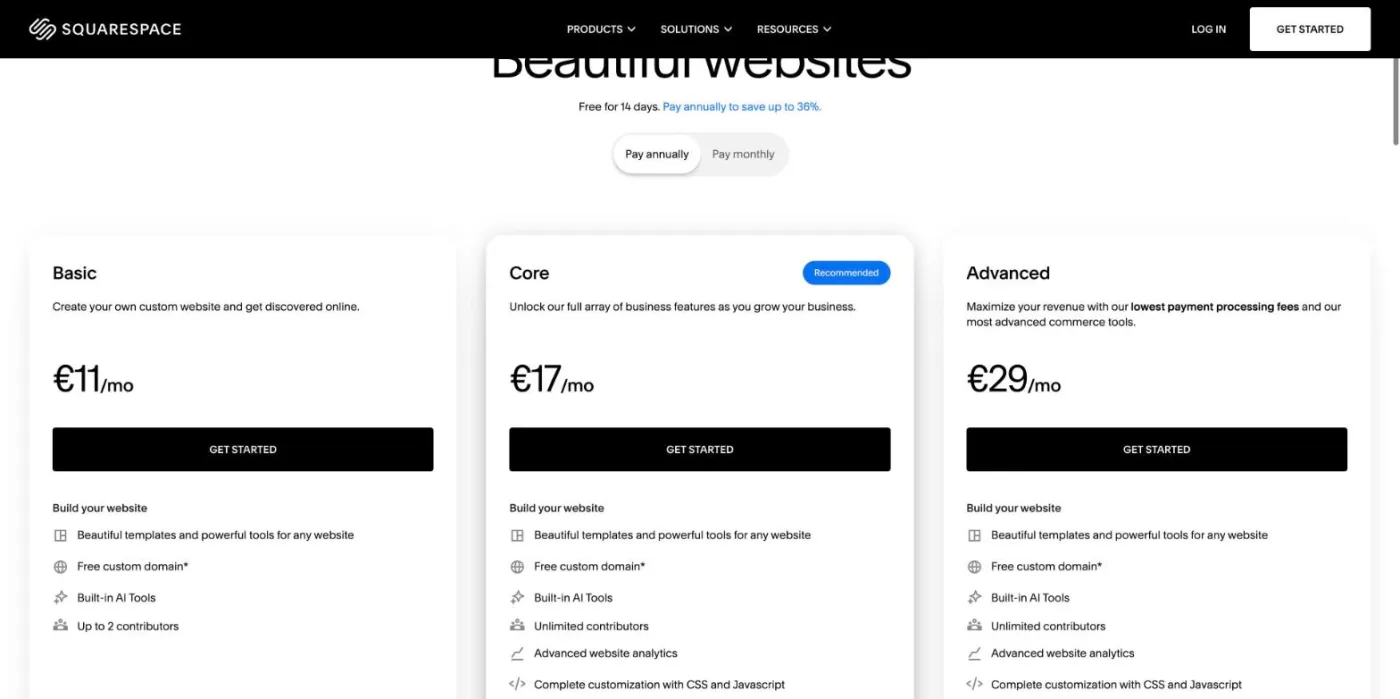
The screenshot was taken from Europe, where Squarespace shows three plans in euros excluding VAT (Basic €11, Core €17, Advanced €29 per month billed yearly): prices are set per billing country, and the Plus plan exists only in the United States. Every plan starts with a 14-day free trial, and paying yearly saves up to 36% compared with monthly billing, according to the same page.
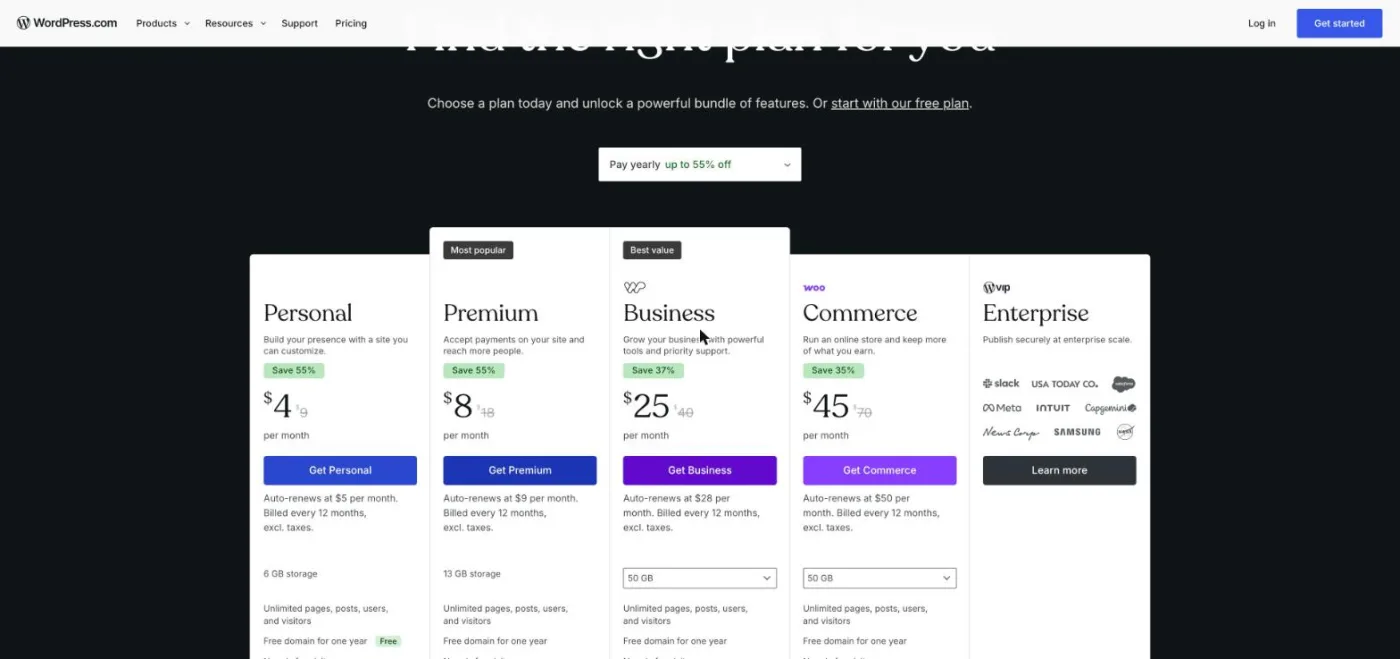
The WordPress.com prices above are first-term prices. The pricing page shows that the plans renew at a higher rate: $5 per month for Personal, $9 for Premium, $28 for Business and $50 for Commerce, billed every 12 months. Budget the renewal price, not the welcome price.
Tip
Compare total cost over three years: plan or hosting, domain renewals, premium theme, paid plugins or extensions, payment fees and the hours of maintenance you or a freelancer will spend. On that horizon, a cheap host with five paid plugins often costs as much as a Squarespace Core plan.
Google ranks pages, not platforms, and both can reach the first page. Squarespace covers the SEO basics and is enough for a small site with good content. WordPress wins as soon as technical control matters: custom structured data, URL structure, robots.txt, hosting and large site architecture.
The Squarespace SEO checklist lists the essentials: a site title under 60 characters, a unique SEO description of 50 to 300 characters per page, readable URL slugs, URL redirects when a slug changes, SSL, alt text, verification in Google Search Console and Bing Webmaster Tools, and an SEO report on version 7.1 sites. Squarespace also generates an XML sitemap at /sitemap.xml and adds canonical tags automatically. For a site of 10 to 50 pages that targets local or niche queries, these settings are enough. Our Squarespace SEO and GEO page details the settings worth checking.
The limits appear when a site grows or competes on crowded queries. You cannot edit robots.txt line by line, override a canonical tag on one page, remove the /blog/ or /store/ prefix from item URLs, or add a type of structured data Squarespace does not generate without writing JSON-LD by hand in code injection. None of this stops a small site from ranking; it slows down a site that wants hundreds of pages, several languages or fine control of what Google indexes.
WordPress core already creates clean permalinks, canonical tags and a sitemap at /wp-sitemap.xml. An SEO plugin then adds what competitive queries require: titles and descriptions per page, detailed schema markup, indexing rules per content type, redirects, breadcrumbs and an editable robots.txt. Our comparison of the best WordPress SEO plugins shows which one to install.
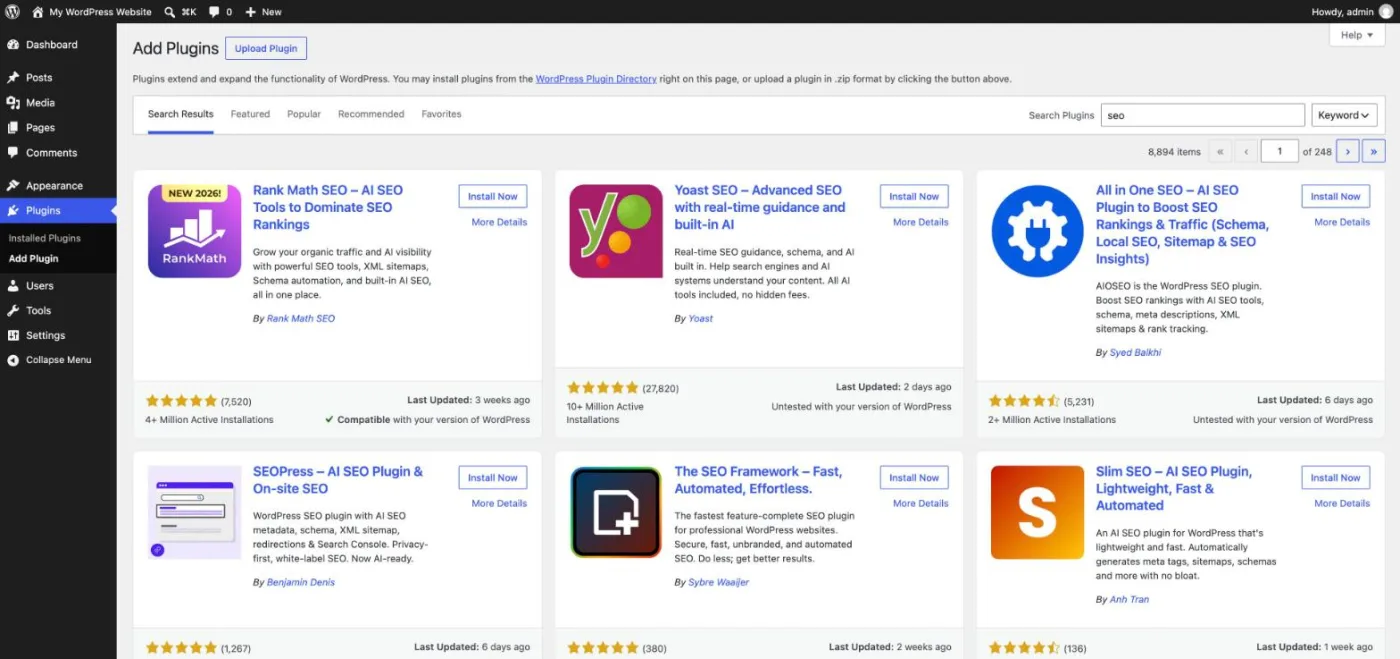
The counterpart of this freedom is responsibility. A heavy theme or a pile of overlapping plugins can slow pages down and hurt Core Web Vitals, and two SEO plugins active at once can print duplicate tags.
| SEO setting | Squarespace | WordPress |
|---|---|---|
| URL structure | Editable slugs; blog and store items keep their collection prefix (/blog/…) | Any structure through permalink settings |
| Title tag and meta description | Per page, built in | Per page with an SEO plugin |
| 301 redirects | URL Mappings panel | Plugin or server rules |
| XML sitemap | Automatic, not editable | Automatic in core, configurable with a plugin |
| robots.txt | Generated automatically; options to hide pages and block AI crawlers | Fully editable |
| Structured data | Basic markup added automatically; custom JSON-LD through code injection | Full control through plugins or code |
| Canonical tag | Automatic, no per-page override | Automatic, editable per page with a plugin |
| Speed | Managed hosting and CDN, little room to tune | Depends on host, theme, cache and plugins |
| Multilingual and hreflang | Through a third-party translation integration | Through plugins, with hreflang tags |
| Blog | Categories, tags, scheduling, contributors | Categories, tags, roles, revisions, scheduling, API |
To be cited by an AI assistant, a site must first be readable by its crawler, then offer clear, structured and sourced answers. Both platforms can do that; the difference lies in how much you can tune. Squarespace research published in July 2026, surveying more than 1,000 small business owners in the US, Canada, the UK and Australia, found that two-thirds of them expect AI search to be very or extremely important for how they get discovered. Squarespace responded with a built-in AI Visibility tool, available on version 7.1 sites in English.
"As AI-generated answers increasingly shape how people discover businesses online, entrepreneurs need greater visibility into how their brand appears across these experiences."
Kristine Romero, VP of Product at Squarespace, Squarespace newsroom
On Squarespace, the decisive setting is the Crawlers panel. Squarespace's help article on optimizing a site for AI-powered search tells you to uncheck "Block known artificial intelligence crawlers" if you want to appear in AI answers. Beyond that switch, you cannot write rules crawler by crawler.
WordPress gives more levers: robots.txt rules for each bot, an llms.txt file, detailed structured data and server logs that show which AI crawlers visit. Our guides on robots.txt for AI crawlers and structured data for AI search explain which settings help. On both platforms, content decides citations: direct answers at the top of each section, tables, figures with sources and pages that cover a topic completely.
Watch out
If you inherited a Squarespace site, open Settings, then Crawlers. A box ticked years ago to keep AI away from your content also keeps your brand out of ChatGPT and Gemini answers.
WordPress started as a blogging tool and is still built for publishing: categories and tags, authors with roles, revision history, scheduled posts, editorial workflows and an API that lets other tools publish for you. Squarespace has a capable blog for a few posts a month, with categories, tags, scheduling and contributors, but managing hundreds of articles, internal links and updates is easier on WordPress.
The number of useful pages you publish and keep up to date is the main organic traffic lever, which is why our guide to the best website builders separates design-first tools from publishing platforms. Sorank, our product, publishes in autopilot on WordPress: it finds the keywords, writes articles with sources and internal links through its blog article generator, and sends them as drafts or live posts, as described on our WordPress SEO and GEO page. On Squarespace, which has no direct connection, Sorank's AI mention tracking still shows whether ChatGPT, Claude and Gemini cite your brand.
Squarespace runs every site on its own infrastructure: updates, security patches, SSL and backups are its job, and you never install anything. The trade-off is that you cannot change the host, the cache or the server configuration, so speed depends on your template, your images and the number of blocks per page.
Self-hosted WordPress is as fast as the host and theme you choose. A good managed host with page caching and a lightweight theme produces fast pages; cheap shared hosting with a heavy page builder does the opposite. Maintenance is yours: core, theme and plugin updates, backups and security monitoring. WordPress.com sits in between, with managed hosting and updates handled for you, while keeping plugins on its paid plans.
| Task | Squarespace | WordPress.org | WordPress.com |
|---|---|---|---|
| Software updates | Automatic | You (or automatic updates you enable) | Automatic |
| Backups | Handled by Squarespace | Host or plugin | Included |
| SSL certificate | Free, automatic | Through your host | Free, automatic |
| Speed tuning | Template and images only | Host, cache, theme, CDN | Plan level and plugins |
| Support | 24/7 customer support | Host support and community forums | Depends on plan |
On Squarespace, your content lives on Squarespace's servers and in Squarespace's format. You own your text, images and domain, but the site itself (layout, sections, settings) cannot be exported and reinstalled elsewhere. If prices rise or a feature disappears, your options are to stay or to rebuild.
WordPress is open source under the GPL licence: you can export the full database and files, move them to any host and keep working with the same site. This portability is why many agencies and media groups standardize on it. For a business whose site is a long-term asset, low lock-in is an SEO advantage, because you can change host or design without changing URLs.
Squarespace includes commerce on every website plan: the Basic plan charges a 2% fee on online store sales, while Core and the higher plans charge 0%, and Advanced has the lowest payment processing fees (checked October 2026). For a catalogue of a few dozen products, a booking page or digital downloads, it is the simplest option.
WordPress sells through WooCommerce, a free plugin with millions of active installations and a large catalogue of payment, shipping and marketing extensions. It suits large catalogues, complex shipping rules and custom checkout flows, at the cost of more setup and maintenance. Our WooCommerce SEO and GEO page covers the settings specific to stores.
Moving is possible, but plan it. Squarespace exports only part of a site, mainly blog posts and some pages, so other pages, products and layouts must be rebuilt by hand. The SEO risk lies in the URLs: every old address must redirect with a 301 to its new equivalent, titles and descriptions must be carried over, internal links updated and the new sitemap submitted in Search Console. Our SEO migration checklist lists the steps that keep rankings intact.
Moving the other way, from WordPress to Squarespace, usually means giving up plugins you rely on and accepting Squarespace's URL prefixes for blog and store items, which creates more redirects. Check each function on a Squarespace trial before you decide.
Example
A Squarespace post at /blog/how-to-choose-a-wedding-photographer can keep the same slug on WordPress if you set the permalink structure to /blog/%postname%/ before importing. No redirect is needed, and the page keeps its history.
Each platform's strengths are the mirror of the other's limits. The table sums them up for a site that needs to be found on Google and cited by AI assistants.
| Squarespace | WordPress | |
|---|---|---|
| Pros | Polished templates, nothing to install, hosting, SSL and updates included, 24/7 support, built-in SEO checklist and AI Visibility tool | Free software, full SEO control, tens of thousands of plugins, any URL structure, editable robots.txt, portable content, built for publishing at scale |
| Cons | Limited technical SEO, no per-crawler robots.txt rules, collection prefixes in URLs, partial export, price set per country | Learning curve, maintenance and security on you (self-hosted), speed depends on host and theme, plugin conflicts, renewal prices on WordPress.com |
| Hidden costs | Higher plan for custom code and 0% store fees, paid extensions | Quality hosting, premium theme and plugins, developer time |
The right platform depends less on features than on how you plan to win visitors. If your site is a shop window you update a few times a year, simplicity wins. If organic traffic is your growth plan, control and publishing capacity win.
| Your profile | Best choice | Why |
|---|---|---|
| Portfolio, photographer, designer | Squarespace | Strong templates, no maintenance, SEO basics included |
| Local service (restaurant, salon, trade), under 30 pages | Squarespace | Fast to launch, local SEO basics are enough |
| Store starting out with a small catalogue | Squarespace Core | 0% store fee and everything in one place |
| Large catalogue or complex shipping | WordPress with WooCommerce | Extensions, custom checkout, full control |
| Blog, media or creator publishing every week | WordPress | Publishing tools, plugins, automation through the API |
| Competitive niche where technical SEO matters | WordPress.org | Schema, robots.txt, hosting and architecture under your control |
| No technical skills, wants WordPress plugins | WordPress.com | Plugins with hosting and updates handled |
| Agency managing many client sites | WordPress | Reusable themes, roles, migrations, no lock-in |
Squarespace is the right tool when design and simplicity matter more than traffic; WordPress is the right tool when traffic is the business. If you plan to grow through Google and AI answers, start on WordPress; if you need a polished site this week and will publish rarely, Squarespace is enough. Either way, the pages you publish and keep up to date will decide your visibility far more than the platform. To publish those pages without writing them all by hand, see Sorank's plans and pricing, from $49 per month billed yearly, with a 3-day free trial.

Yes, for most beginners. Squarespace is a visual builder where hosting, security and updates are handled for you, so you can launch a site in a day without technical skills. WordPress asks you to choose a host, a theme and plugins, and to keep them updated, which takes more learning but gives far more control.
The WordPress software is free and open source. Running a site still costs money: hosting, a domain and often premium themes or plugins for a self-hosted site, or a paid WordPress.com plan, which started at $4 per month billed yearly in October 2026. The free WordPress.com plan shows ads, uses a subdomain and does not allow plugins.
Squarespace is better for a small store that wants everything in one place: commerce is included in every plan, with a 0% store transaction fee from the Core plan. WordPress with the free WooCommerce plugin is better for large catalogues, complex shipping or custom checkout, as long as you accept more setup and maintenance.
We analyse your competitors, your website and your AI visibility to create a tailored content plan for free.
 AI Content Brief Generator
 FAQ Schema Generator
 AI Blog Post Ideas Generator
 Structured Data Validator (Schema Validator)
 Alt Text Checker
 Internal Link Analyzer
 Backlink Challenge
 AI Meta Description Generator
 AI Blog Title Generator
 Google Indexability Checker
 AI Blog Outline Generator
 UTM Link Builder
 Keyword Clustering Tool
 Canonical Tag Checker
 XML Sitemap Generator
 Broken Link Checker
 AI SEO Title Generator
 Headline Analyzer
 SERP Preview Tool
 Redirect Checker
 Hreflang Tag Generator
 Heading Structure Analyzer
 HTTP Headers Checker
 Favicon Extractor
 SERP CTR Calculator
 SEO vs Paid Search Savings Calculator
 SEO Share of Voice Calculator
 SEO ROI Calculator
 SEO Traffic and Revenue Forecast Calculator
 SEO Budget Calculator
 SEO Break-Even Calculator
 SaaS SEO ROI Calculator
 ROAS Calculator
 Reading Time Calculator
 Ranking Gain Simulator
 Organic Traffic Value Calculator
 Organic Traffic Estimator and Website Traffic Checker
 LTV to CAC Ratio Calculator
 Local SEO ROI Calculator
 Link Building Cost Calculator
 Keyword Value Calculator
 Keyword Opportunity Score Calculator
 Keyword Density Calculator
 GEO ROI Calculator
 GEO Content Investment Calculator
 Ecommerce SEO ROI Calculator
 Customer Lifetime Value Calculator
 Customer Acquisition Cost Calculator
 CTR Calculator
 Cost Per Article Calculator
 Conversion Rate Calculator
 Content Marketing ROI Calculator
 ChatGPT Referral Traffic Estimator
 Bounce Rate Calculator
 Backlink ROI Calculator
 AI Visibility Score Calculator
 AI Traffic Value Calculator
 AI Share of Voice Calculator
 Cost of AI Invisibility Calculator
 AI Citation Rate Calculator
 llms.txt Validator
 AI Overview Checker and AI Overviews Rank Checker
 Robots.txt Checker
 AI SEO Audit
 LLM Readability Checker
 SearchGPT Readiness Checker
 Structured Data LLM Audit
 Website Crawlability AI Audit
 Why ChatGPT Is Not Recommending My Website
 Gemini Ranking Tool
 Perplexity Ranking Checker
 LLM Citation Checker
 Answer Engine Optimization Audit
 GEO Audit
 AI Search Visibility Test
 ChatGPT Visibility Checker
 llms.txt Generator
 URL Extractor
 Webpage to Markdown
 Sitemap Checker
 SERP Volatility Sensor
 Page Size Checker
 Word Counter
 Slug Generator
 Schema Generator
 Robots Generator
 OG Preview
 Meta Tags Generator
 Image Compressor
 Favicon Generator
 On-Page SEO Audit: SEO Checker and SEO Analyzer
 Backlink Analysis Tool
 Keyword Research Tool
 Domain Authority Checker
THEY TRIED SORANK BEFORE YOU
 “I tested Sorank on a real client site and it's insane. It does everything an agency would bill you $1500 a month for. It's going into production on that client now.”
 Guillaume Guersanguersanguillaume.com“We are an Ads agency and we wanted to get our SEO back on track once and for all. Sorank gave us a clear view of our site, helped us prioritize optimizations, and properly structure our content. The tool is easy to use, well designed for a team, and very practical for centralizing tracking without having to juggle multiple platforms. A very solid foundation to start fresh with our SEO.”
 Gaspard MadouiAds Agency
 “I just let the Sorank software do its thing, and now my DR is 25 and my page is ranking higher.”
 Lucas Flandrefoundertrace.fr“I specialized in GEO thanks to Sorank. The GEO Leaderboard allows me to show my clients their position vs competitors on ChatGPT. It’s a real commercial differentiator.”
 MélanieSEO Freelance“Great service, works well for our website and helps us understand how to improve it to rank better on Google and elsewhere. Congrats, keep going, I recommend it.”
 Hugo T.E-commerce merchant