Preferences
Privacy is important to us, so you have the option of disabling certain types of storage that may not be necessary for the basic functioning of the website. Blocking categories may impact your experience on the website. More information

Privacy is important to us, so you have the option of disabling certain types of storage that may not be necessary for the basic functioning of the website. Blocking categories may impact your experience on the website. More information

Squarespace vs Webflow in 2026: verified prices, every SEO setting, measured speed, blogging, selling online, AI visibility and a verdict per profile.
Tools

In short
Webflow is the better choice when you want full technical control over SEO: editable robots.txt, custom structured data fed by the CMS, native localization and lighter pages. Squarespace is the better choice when you want a polished site with selling tools built in and almost nothing to configure. Squarespace starts at $19 per month and Webflow at $15 per month, both billed annually (checked October 2026). Choose Squarespace for a portfolio, a local service or a small shop, and Webflow for a marketing site, a growing blog or a multilingual business.
Want to go further? Ask
Quick quiz
Which kind of software is right for your business?
Our advice for you
A free or very simple tool
You are alone or just starting: a free plan or a simple tool covers the basics. Switch when you feel limited.
Our advice for you
An all-in-one tool for small businesses
You want one tool that does a bit of everything, is easy to learn and has support in your language.
Our advice for you
A specialised tool, the best in its field
This task is central to your business: pay for the most complete tool and connect it to the rest.
Our advice for you
An enterprise solution
Many users, strict security and integrations: ask for demos and compare the total cost, setup included.
The Squarespace vs Webflow question usually comes from people who care about design: both builders are known for refined templates, and both host the site for you. They are not the same size: according to W3Techs (October 2026), Squarespace powers 2.4% of all websites and Webflow 0.8%. For search, popularity matters less than control: which platform lets you publish fast, well-structured pages that Google ranks and that ChatGPT, Gemini or Perplexity quote? This comparison covers verified prices, every SEO setting, measured speed, blogging, selling online, AI visibility and migration, then gives a verdict for each profile. For a wider view of the market, see our ranking of the best website builder software.
Squarespace is an all-in-one website builder: you pick a template, edit sections in a guided editor, and get hosting, a blog, a store, forms and email marketing in a single subscription. Webflow is a visual development platform: you design with boxes, classes and breakpoints that mirror HTML and CSS, and you model your content in a CMS with your own fields. The first saves time, the second gives control over every element of the page.
That difference shapes everything else, from the price of a blog to the way you handle redirects. The table below sums up the choice before the detailed sections.
| Criterion | Squarespace | Webflow |
|---|---|---|
| Type | All-in-one hosted builder | Visual development platform with a built-in CMS |
| Editor | Section-based, guided layouts | Box model, classes and breakpoints, close to HTML and CSS |
| Learning curve | A few hours | A few days to a few weeks |
| Free option | 14-day free trial | Free Starter plan on a Webflow subdomain |
| Entry price (billed annually, US) | $19 per month (Basic) | $15 per month (Basic, without CMS) |
| Cheapest plan with a blog | Basic, $19 per month | Premium, from $25 per month |
| Selling online | Included in every plan | Separate Ecommerce plans from $29 per month |
| Multilingual | Through the Weglot extension | Webflow Localize add-on |
| Best for | Portfolios, local services, small shops | Marketing sites, content hubs, design-led teams |
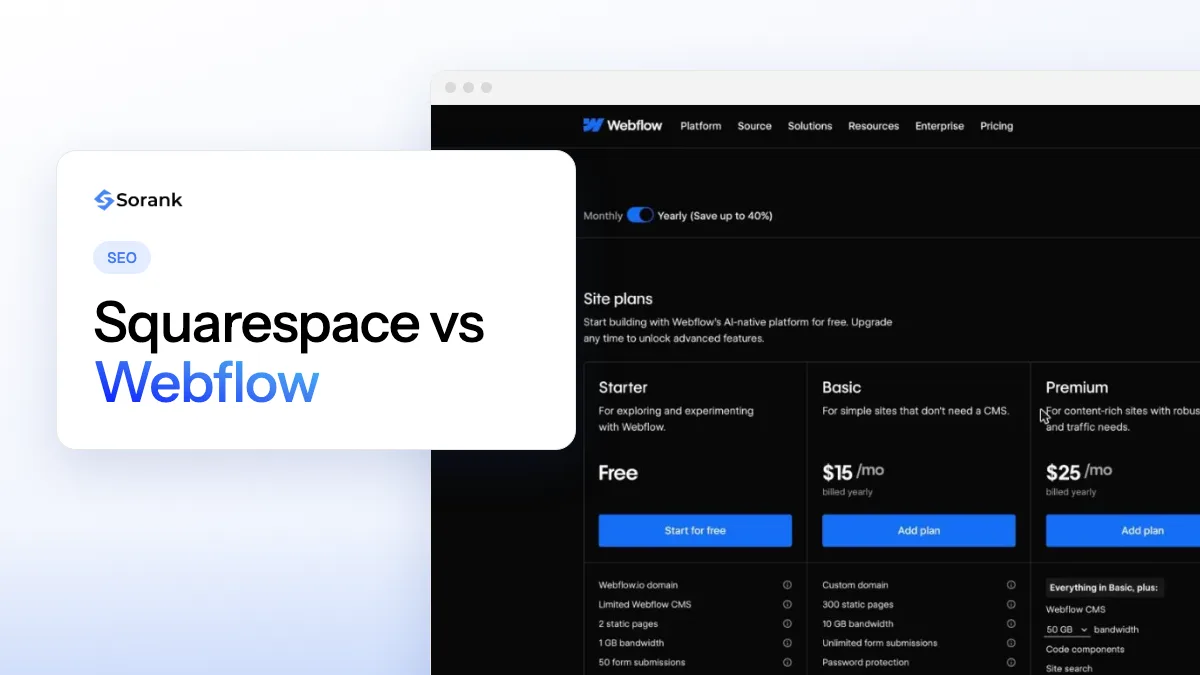
Squarespace sells four plans in the United States, from $19 to $99 per month billed annually ($25 to $139 billed monthly), and every plan can sell products. Webflow charges per site: $15 per month for a site without a CMS, from $25 for a site with a CMS, and separate Ecommerce plans for online stores. The figures below come from the official Squarespace pricing page and the Webflow pricing page (checked October 2026).
| Plan | Price per month, billed annually | Key limits and fees |
|---|---|---|
| Squarespace Basic | $19 | 2 contributors, 2% store transaction fee, card rates from 2.9% + $0.30 |
| Squarespace Core | $29 | Unlimited contributors, 0% store fee, code injection, automated tax |
| Squarespace Plus | $49 | Card rates from 2.7% + $0.30, 1% fee on digital content |
| Squarespace Advanced | $99 | Card rates from 2.5% + $0.30, 0% fee on digital content |
| Webflow Starter | Free | Webflow subdomain, 2 static pages, 50 CMS items, 1 GB bandwidth |
| Webflow Basic | $15 | Custom domain, 300 static pages, 10 GB bandwidth, no CMS |
| Webflow Premium | From $25 | CMS up to 20,000 items, site search, price rises with bandwidth |
| Webflow Ecommerce Standard | $29 | 500 products, 2% transaction fee |
| Webflow Ecommerce Plus | $74 | 5,000 products, 0% transaction fee |
| Webflow Ecommerce Advanced | $212 | 15,000 products, 0% transaction fee |
| Webflow Team | $2,500 | Annual contract, Localize, publishing workflows, AEO agents |
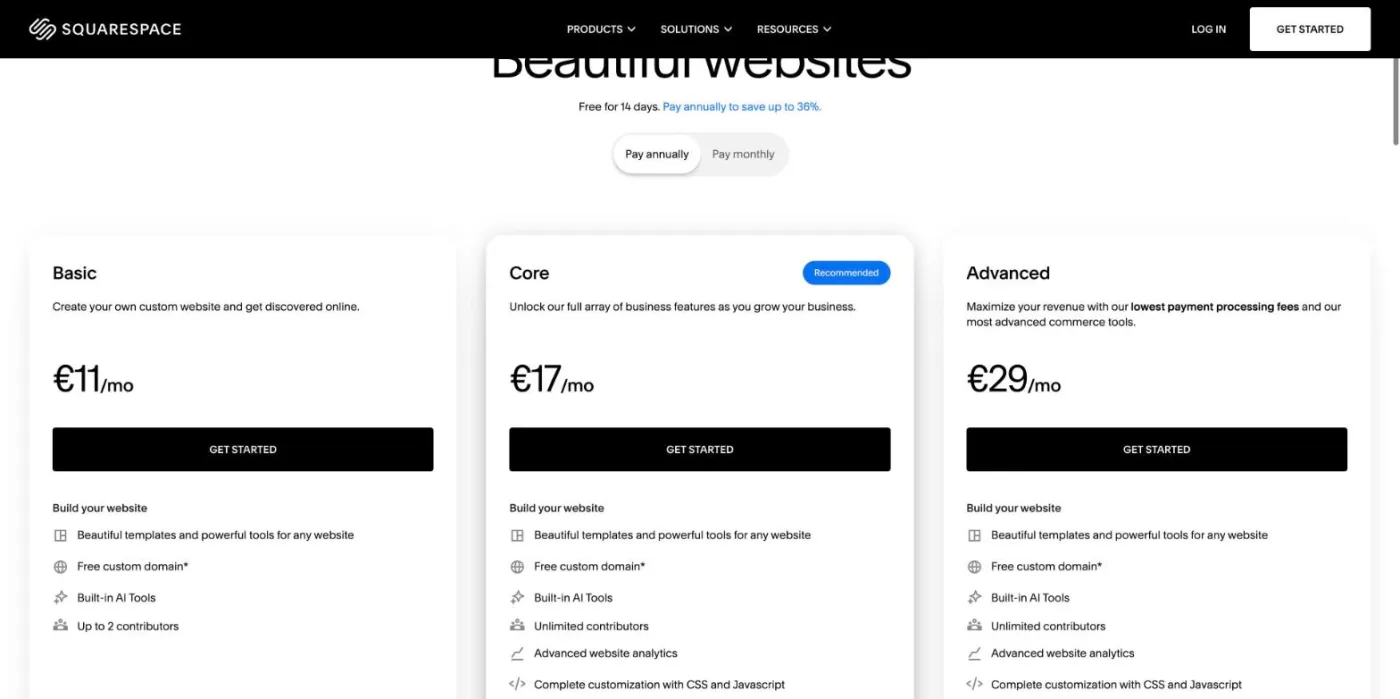
Squarespace adjusts its offer by region. Viewed from Europe, the pricing page lists only three plans (Basic, Core and Advanced) in euros, with VAT added at checkout.
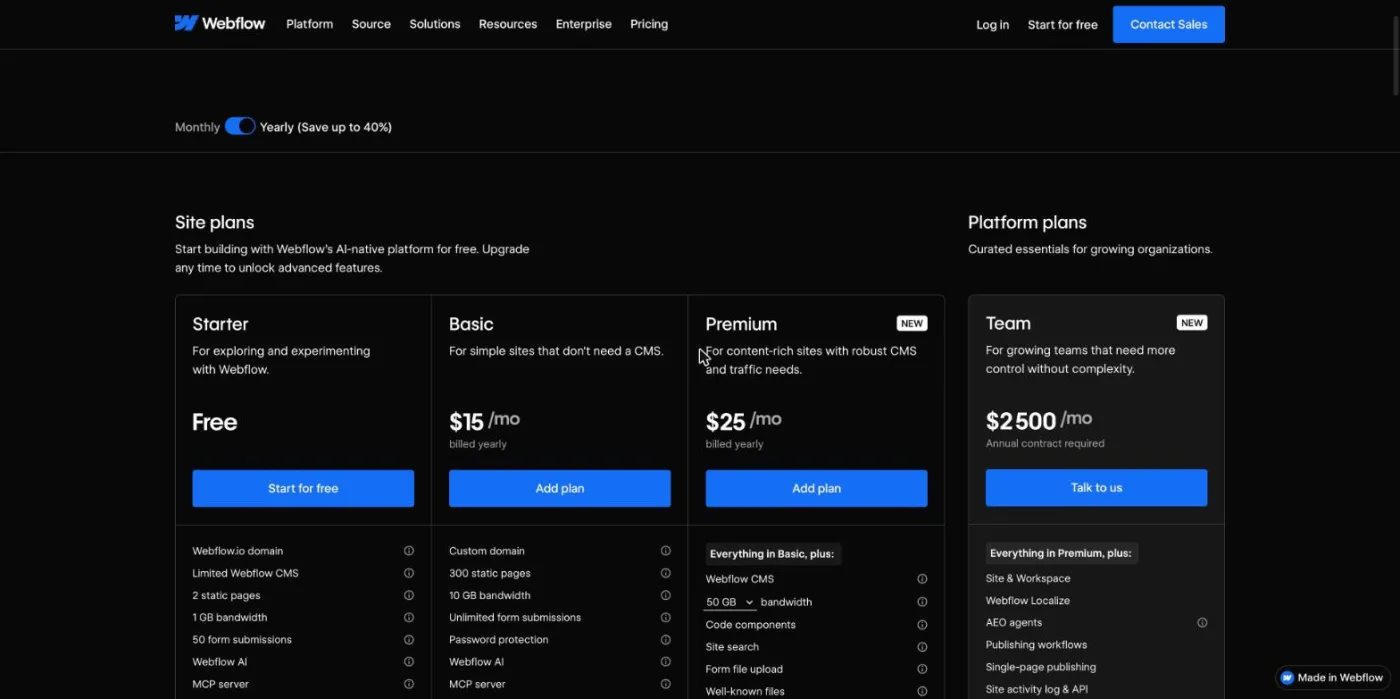
Webflow prices every site in US dollars, taxes added at checkout. The free Starter plan is a sandbox for learning: two static pages and a Webflow subdomain are not enough to publish a real business site.
Tip
A Webflow Ecommerce plan replaces the site plan instead of adding to it, so a small store on Ecommerce Standard costs $29 per month in total. On Squarespace, Basic can already sell, but its 2% transaction fee makes Core cheaper as soon as online sales pass about $500 per month.
Webflow gives you more SEO control, setting by setting. Both platforms cover the basics that Google needs: editable titles and meta descriptions, clean URLs, an automatic XML sitemap, 301 redirects and HTTPS. Squarespace hides several technical files behind fixed defaults, while Webflow exposes almost all of them.
| SEO setting | Squarespace | Webflow |
|---|---|---|
| URLs | Editable slug for every page, post and product; posts sit under the blog page slug | Editable slug for every page; CMS items follow the /collection/item pattern |
| Title and meta description | SEO fields on every page, post and product | Fields on every page, bound to CMS fields for templates |
| 301 redirects | URL mappings panel (301 and 302 rules) | 301 redirects panel in site settings, with wildcard patterns |
| XML sitemap | Generated automatically, not editable | Generated automatically, can be replaced by a custom sitemap |
| robots.txt | Shared file, not editable; one checkbox blocks known AI crawlers | Fully editable in the SEO settings |
| Structured data | Basic markup added automatically; custom JSON-LD through code injection (Core and up) | Custom code in the page head, fed by CMS fields for each item |
| Canonical | Generated automatically | Global canonical URL setting, plus custom code where needed |
| Speed | Managed hosting and CDN; heaviest median pages among major platforms | Managed hosting and global CDN; weight depends on your build |
| Multilingual | Weglot extension, billed separately | Webflow Localize add-on with localized SEO and hreflang |
| Blog | Native blog on every plan, with categories, tags and scheduling | CMS collection with custom fields, from the Premium plan |
For most small sites, the Squarespace defaults are enough: the platform writes a canonical tag, a sitemap and basic structured data without any action from you. The gap appears when you need something specific, such as a custom rule for a section of the site, product markup with extra properties, or schema markup that changes with each article. On Webflow, you add a JSON-LD block to the CMS template once, connect it to fields, and every new item inherits valid markup.
Redirects work well on both. Squarespace URL mappings accept a list of rules in a text box, and Webflow accepts wildcard patterns, which is useful when a whole folder moves. Learn how a 301 redirect passes authority before you rename anything. For titles and descriptions, the free meta tags generator previews how a page will look in Google on either platform.
Watch out
In Squarespace, the option to block known AI crawlers sits in the crawler settings. Leave it unchecked if you want ChatGPT, Gemini or Perplexity to read and cite your pages: once it is checked, these bots are disallowed in your robots.txt.
Multilingual SEO is the clearest difference. Webflow Localize translates static pages and CMS content, localizes SEO fields and adds hreflang tags for each language version, with localized URLs on the higher tier. Squarespace relies on the Weglot extension, a separate subscription that works but sits outside the platform.
Lab tests favor Webflow. In the 2025 Web Almanac by HTTP Archive, Webflow sites reach a median mobile Lighthouse performance score of 58, second only to Wix, while Squarespace sits among the lowest platforms with scores between 30 and 32. The same study found that Squarespace produces the heaviest pages of the five platforms it weighed, with a median mobile page weight of 3,974 KB.
Real-user data is kinder to Squarespace. The Web Almanac reports that 96% of Squarespace mobile sites have a good Interaction to Next Paint score, the best result of the ten platforms measured, and that its overall Core Web Vitals pass rate rose by about 8% in a year. Squarespace pages are heavy, but they stay responsive once loaded.
On both platforms, speed depends on what you put on the page. Large uncompressed images, video backgrounds, several font families and third-party scripts slow down any template. Webflow gives you more room to build a light page, and also more room to build a heavy one with complex interactions. On Squarespace, the main levers are image size, the number of sections per page and the extensions you add.
Squarespace is better for a simple blog, Webflow for a content site that needs structure. Squarespace includes a blog on every plan, with a comfortable editor, categories, tags, authors, scheduled posts and an RSS feed. Its limits show when you want more than a title, a body and a cover image: there are no custom fields, and every post shares the same layout.
Webflow treats a blog as a CMS collection. You decide which fields each article has (author, summary, FAQ, reading time, related articles), design the template once and let every article fill it. Reference fields let you link articles to authors, categories or products, which helps internal linking at scale. The cost is the Premium plan, from $25 per month, with a limit of 20,000 CMS items, and a writing interface that feels less natural than Squarespace for long texts.
If your site is a single page with no blog at all, both platforms work, and the choice comes down to design. Our guide to one page website SEO explains how to rank that kind of site, and our ranking of the best CMS for SEO compares the platforms built for large content sites.
Squarespace is better for most small shops. Commerce comes with every plan: products, inventory, digital downloads, memberships, invoices and discount codes on Core and up, with 0% store transaction fees from Core. A shop with a few dozen products can be live in an afternoon.
Webflow Ecommerce gives you full design control over product pages, the cart and the checkout, which suits brands for whom the store is part of the experience. It costs more for the same catalog, it caps the number of products at 500, 5,000 or 15,000 depending on the plan, and its app ecosystem is smaller. For a large catalog, neither is the natural choice: a dedicated store platform will serve you better.
Squarespace is easier: no technical knowledge is needed, the editor prevents most layout mistakes, and switching templates does not break the content. Webflow asks you to understand how a web page is built (containers, flexbox, classes, breakpoints). Designers and front-end developers learn it in days; complete beginners often need weeks, or a template and a freelancer.
Both platforms handle hosting, security updates and SSL certificates, so neither requires the plugin maintenance of a self-hosted CMS. On Webflow, what you maintain is the design system: a site built with tidy classes stays easy to edit for years, a site built in a hurry becomes fragile. Webflow also offers an editor mode in which marketing teams can change text and publish CMS items without touching the design.
Both platforms serve server-rendered HTML that AI crawlers can read, so both sites can be cited. The difference is control: on Webflow, you edit robots.txt, write structured data for every content type and design pages around clear question and answer blocks; on Squarespace, you rely on defaults and on one checkbox for AI crawlers. Webflow now markets its higher plans around answer engine optimization, and its CEO describes the website as the reference that AI agents read about a brand.
“the website has actually become ten times or a million times more important than it ever has been before, because now it’s not just this one destination that you go to, but actually it becomes your source of truth as a brand.”
Linda Tong, CEO of Webflow, GTMnow podcast, May 2026
The platform only opens the door. What gets a page quoted by AI assistants is its content: a direct answer at the top of each section, facts with sources, consistent information about the brand across the web, and regular publishing on the questions your customers ask. To know whether it works, you need to track your brand mentions in AI answers and see who is cited in your place. Sorank, our software, connects to a Webflow site for SEO and GEO in a few minutes and handles both: it publishes optimized articles and tracks citations in ChatGPT, Claude and Gemini.
There is no direct importer between the two platforms, so a move means rebuilding the design and transferring the content. Rankings survive when every old URL either stays identical or redirects to its new equivalent. Follow these steps:
Note
The Squarespace export file points to images on Squarespace servers instead of including them. Download every image and upload it to Webflow before you cancel the Squarespace subscription.
The same logic applies to any platform change; our SEO migration guide details the checks before and after the switch.
Choose by the work you want to do yourself and by the way your site will grow. The table below gives a verdict for the most common profiles.
| Profile | Best choice | Why |
|---|---|---|
| Photographer, artist or creative portfolio | Squarespace | Image-first templates, live in a day, nothing to maintain |
| Designer who sells web design | Webflow | Custom layouts and interactions that show your skills |
| Local service (restaurant, therapist, studio) | Squarespace | Forms, maps, booking add-on and SEO defaults that are enough |
| Small shop starting out | Squarespace Core | Commerce included, 0% store transaction fee |
| Startup or software marketing site | Webflow | Full control of pages, structured data and landing pages |
| Content-led business with a growing blog | Webflow Premium | CMS with custom fields, templates and reference fields |
| Multilingual business | Webflow with Localize | Translated pages, localized SEO and hreflang in one place |
| Agency building client sites | Webflow | Reusable components, editor mode for clients |
If neither fits, compare the other pairs: Webflow vs WordPress for unlimited content and plugins, or Squarespace vs Wix for the easiest builders with a free option.
Squarespace wins on simplicity and built-in selling, Webflow wins on SEO control, speed and content structure; both can rank on Google and be cited by AI assistants in 2026 if you publish useful content regularly. That last part is where most sites fail. Sorank can take it over with its AI article generator, and our guide to SEO and GEO on Squarespace lists the settings to check before you publish.

No, you can build a complete site in Webflow without writing code, but its editor follows the logic of HTML and CSS: boxes, classes, flexbox and breakpoints. People who know these concepts learn it in a few days, while complete beginners usually need a few weeks or a ready-made template. Squarespace requires no technical knowledge at all.
Squarespace has no free plan, only a 14-day free trial before you choose a paid plan. Webflow has a free Starter plan, limited to 2 static pages, 50 CMS items and a Webflow subdomain. It is useful for learning the tool, but not for publishing a real business site.
Squarespace is faster for most portfolios: its templates are built around images and galleries, and a site can be online in a day. Webflow is the better pick for designers who want a layout nobody else has, motion effects, or a portfolio that also proves their web design skills.
We analyse your competitors, your website and your AI visibility to create a tailored content plan for free.
 AI Content Brief Generator
 FAQ Schema Generator
 AI Blog Post Ideas Generator
 Structured Data Validator (Schema Validator)
 Alt Text Checker
 Internal Link Analyzer
 Backlink Challenge
 AI Meta Description Generator
 AI Blog Title Generator
 Google Indexability Checker
 AI Blog Outline Generator
 UTM Link Builder
 Keyword Clustering Tool
 Canonical Tag Checker
 XML Sitemap Generator
 Broken Link Checker
 AI SEO Title Generator
 Headline Analyzer
 SERP Preview Tool
 Redirect Checker
 Hreflang Tag Generator
 Heading Structure Analyzer
 HTTP Headers Checker
 Favicon Extractor
 SERP CTR Calculator
 SEO vs Paid Search Savings Calculator
 SEO Share of Voice Calculator
 SEO ROI Calculator
 SEO Traffic and Revenue Forecast Calculator
 SEO Budget Calculator
 SEO Break-Even Calculator
 SaaS SEO ROI Calculator
 ROAS Calculator
 Reading Time Calculator
 Ranking Gain Simulator
 Organic Traffic Value Calculator
 Organic Traffic Estimator and Website Traffic Checker
 LTV to CAC Ratio Calculator
 Local SEO ROI Calculator
 Link Building Cost Calculator
 Keyword Value Calculator
 Keyword Opportunity Score Calculator
 Keyword Density Calculator
 GEO ROI Calculator
 GEO Content Investment Calculator
 Ecommerce SEO ROI Calculator
 Customer Lifetime Value Calculator
 Customer Acquisition Cost Calculator
 CTR Calculator
 Cost Per Article Calculator
 Conversion Rate Calculator
 Content Marketing ROI Calculator
 ChatGPT Referral Traffic Estimator
 Bounce Rate Calculator
 Backlink ROI Calculator
 AI Visibility Score Calculator
 AI Traffic Value Calculator
 AI Share of Voice Calculator
 Cost of AI Invisibility Calculator
 AI Citation Rate Calculator
 llms.txt Validator
 AI Overview Checker and AI Overviews Rank Checker
 Robots.txt Checker
 AI SEO Audit
 LLM Readability Checker
 SearchGPT Readiness Checker
 Structured Data LLM Audit
 Website Crawlability AI Audit
 Why ChatGPT Is Not Recommending My Website
 Gemini Ranking Tool
 Perplexity Ranking Checker
 LLM Citation Checker
 Answer Engine Optimization Audit
 GEO Audit
 AI Search Visibility Test
 ChatGPT Visibility Checker
 llms.txt Generator
 URL Extractor
 Webpage to Markdown
 Sitemap Checker
 SERP Volatility Sensor
 Page Size Checker
 Word Counter
 Slug Generator
 Schema Generator
 Robots Generator
 OG Preview
 Meta Tags Generator
 Image Compressor
 Favicon Generator
 On-Page SEO Audit: SEO Checker and SEO Analyzer
 Backlink Analysis Tool
 Keyword Research Tool
 Domain Authority Checker
THEY TRIED SORANK BEFORE YOU
 “I tested Sorank on a real client site and it's insane. It does everything an agency would bill you $1500 a month for. It's going into production on that client now.”
 Guillaume Guersanguersanguillaume.com“We are an Ads agency and we wanted to get our SEO back on track once and for all. Sorank gave us a clear view of our site, helped us prioritize optimizations, and properly structure our content. The tool is easy to use, well designed for a team, and very practical for centralizing tracking without having to juggle multiple platforms. A very solid foundation to start fresh with our SEO.”
 Gaspard MadouiAds Agency
 “I just let the Sorank software do its thing, and now my DR is 25 and my page is ranking higher.”
 Lucas Flandrefoundertrace.fr“I specialized in GEO thanks to Sorank. The GEO Leaderboard allows me to show my clients their position vs competitors on ChatGPT. It’s a real commercial differentiator.”
 MélanieSEO Freelance“Great service, works well for our website and helps us understand how to improve it to rank better on Google and elsewhere. Congrats, keep going, I recommend it.”
 Hugo T.E-commerce merchant