Preferences
Privacy is important to us, so you have the option of disabling certain types of storage that may not be necessary for the basic functioning of the website. Blocking categories may impact your experience on the website. More information

Privacy is important to us, so you have the option of disabling certain types of storage that may not be necessary for the basic functioning of the website. Blocking categories may impact your experience on the website. More information

Framer vs Webflow: SEO settings point by point, CMS limits, speed, localization, AI visibility, prices checked October 2026 and the right pick for each profile.
Tools

In short
Framer and Webflow both publish fast, pre-rendered pages that Google and AI assistants can read, and both cover the SEO basics: editable titles and meta descriptions, automatic sitemaps, canonical tags and 301 redirects on paid plans. Webflow wins on technical control (editable robots.txt, LLMs.txt, AI crawler controls, built-in schema support) and on CMS volume, with 20,000 items for $25 a month. Framer wins on design speed and entry price ($10 a month), which suits landing pages and small marketing sites. Pick Framer for a lean, design-led site; pick Webflow for a site that must grow through content.
Want to go further? Ask
Quick quiz
Which kind of software is right for your business?
Our advice for you
A free or very simple tool
You are alone or just starting: a free plan or a simple tool covers the basics. Switch when you feel limited.
Our advice for you
An all-in-one tool for small businesses
You want one tool that does a bit of everything, is easy to learn and has support in your language.
Our advice for you
A specialised tool, the best in its field
This task is central to your business: pay for the most complete tool and connect it to the rest.
Our advice for you
An enterprise solution
Many users, strict security and integrations: ask for demos and compare the total cost, setup included.
The Framer vs Webflow debate usually starts with design: Framer feels like a design tool, Webflow like a visual front-end editor. For organic traffic, the useful question is different: which one lets you publish pages that rank on Google and get quoted by ChatGPT, Gemini or Perplexity, and keep doing it as the site grows? Webflow is the more widespread platform: according to W3Techs, it runs 0.8% of all websites (1.2% of sites with a known content management system), against 0.2% for Framer (0.3% of the market), in October 2026. Framer grows fast from a smaller base. This guide compares the two on what drives visibility: SEO settings, URLs, speed, CMS, localization, readability by AI assistants, cost and migration.
Framer is a design-first website builder: you work on a free canvas close to Figma, add animations in a few clicks and publish to Framer's hosting. Webflow is a visual development platform: you build with boxes, classes and a style system close to HTML and CSS, then publish to Webflow's hosting. Both are closed, hosted platforms, so you never manage a server, plugins or updates.
The practical difference shows up after launch. Framer is optimized for the time between an idea and a published page. Webflow is optimized for a site that a marketing team edits for years, with a structured CMS, roles, publishing workflows and finer technical settings. Framer's own leadership puts it plainly in the company's latest funding announcement:
"With this funding, we're doubling down on enterprise growth and AI, so any company can confidently run their entire website on Framer."
Koen Bok, CEO and co-founder of Framer, TechCrunch
That move toward larger sites is real: the same TechCrunch report (August 2025) states that Framer reached $50 million in annual recurring revenue and that businesses had become the majority of its new customers, including 40% of the most recent Y Combinator batch (Y Combinator is a well-known startup accelerator in California). Webflow still holds the edge for complex, content-heavy sites, but the gap is narrowing.
| Criterion | Framer | Webflow |
|---|---|---|
| Best for | Landing pages, startup, portfolio and agency showcase sites | Marketing sites with a large blog, resource center or several languages |
| Learning curve | Short, familiar to Figma users | Longer, rewards knowledge of HTML and CSS |
| CMS ceiling | 2,500 items on Pro, up to 40,000 with paid add-ons | 20,000 items on Premium |
| Technical SEO control | Essentials, some settings through custom code | Broad, most settings in the interface |
| Entry paid plan | $10 a month billed yearly (Basic) | $15 a month billed yearly (Basic, no CMS) |
Google ranks pages, not builders, so neither platform gets a ranking bonus. The difference lies in how much of the technical layer you control from the interface and how much you must add yourself. The table below lists each setting as stated on the official pricing pages and documentation of both platforms (checked October 2026).
| SEO setting | Framer | Webflow |
|---|---|---|
| URL and slug | Editable per page and per CMS item, CMS items under a folder (/blog/post) | Editable per page and per CMS item, one folder per collection |
| Title and meta description | Per page, and per CMS template built from fields | Per page, and per CMS template built from fields |
| 301 redirects | Pro plan only: exact, wildcard, capture-group and named-parameter rules, CSV import | All paid site plans, set in site settings |
| XML sitemap | Generated automatically | Generated automatically, with sitemap controls |
| Robots.txt | Generated automatically | Editable, plus an LLMs.txt file and controls to allow or block AI bots |
| Structured data | JSON-LD added through custom code | Schema markup support in the interface, JSON-LD through custom code |
| Canonical tag | Set per page and per CMS template | Global or page-level canonical URL |
| Speed | Pre-rendered pages on a global CDN | Pre-rendered pages on a global CDN |
| Multilingual | Localization add-on, $20 per locale per month (up to 20) | Webflow Localize add-on on site plans, included in Team |
| Blog | Simple CMS, 2 to 10 collections depending on plan | Full CMS, up to 40 collections, references, scheduled publishing, RSS |
Both tools let you edit the title tag, meta description, social image and slug of every static page. For CMS items, both build these tags from fields, so each article gets unique metadata without manual work. Webflow adds a CMS item indexing control on Premium, which lets you keep thin items out of Google. Write each title and description as an answer to the query; our guide to landing pages shows how to align a page's promise with its search intent.
Framer generates sitemap.xml and robots.txt for every published site. Its official Webflow to Framer SEO migration guide lists exact, wildcard, capture-group and named-parameter redirects, importable from a CSV file. Redirects only appear on the Pro plan, which matters as soon as you rename a page. Webflow offers 301 redirects on every paid site plan, an editable robots.txt and LLMs.txt, and a switch to allow or block AI crawlers. Webflow gives finer control; Framer covers the essentials with less setup.
Schema markup tells Google and AI assistants what a page is: an article, a product, an organization, a person. On Framer, you paste JSON-LD into the page head and fill it with CMS fields; the official guide reminds you to validate it on the published page and keep it consistent with visible content. Webflow now lists schema markup support among its built-in SEO features, a small advantage for teams without a developer. Our article on structured data for AI assistants explains which types still help.
Tip
Before publishing, run your main templates through a free on-page SEO audit. Duplicate titles and missing descriptions on CMS templates are the most common issue on both builders, because one template error repeats on every item.
Both builders pre-render pages to HTML and serve them from a global CDN, so text sits in the source code without waiting for JavaScript. That matters: Google's JavaScript SEO basics state that server-side or pre-rendering is still a great idea because it makes sites faster for users and crawlers, and not all bots can run JavaScript. Our guide to JavaScript SEO explains why AI crawlers are even stricter than Googlebot.
Framer pages load a React runtime for animations and interactions; Webflow loads lighter scripts by default and offers GSAP-powered interactions. In both cases, what hurts the Core Web Vitals is the same list: oversized hero videos, heavy scroll effects, unoptimized fonts and third-party scripts. A restrained Framer site and a restrained Webflow site end up in the same speed range; measure your own pages in Search Console rather than trusting a platform's reputation.
Organic growth usually comes from a blog, a glossary or a resource center, so the CMS sets the ceiling of an SEO strategy. Framer's CMS is simple and pleasant to use: 2 collections and 1,000 items on Basic, 10 collections and 2,500 items on Pro, then paid add-ons of $20 per 10,000 items up to 40,000 items (checked October 2026). Webflow Premium includes up to 40 collections and 20,000 CMS items, with reference fields that link authors, categories and related posts, per-item and scheduled publishing, RSS feeds and content APIs.
For a blog of a few hundred articles, both are enough. For a site that plans to publish every week for years, with categories, authors and related content, Webflow's CMS is the safer long-term base. Sorank, our product, connects natively to Webflow and publishes to Framer through a webhook: in both cases it finds the keywords, writes optimized articles and publishes them directly or as drafts.
Example
A blog that publishes 20 articles a month reaches 2,500 items in about ten years on Framer Pro, but a site that also stores authors, categories, case studies and glossary entries in the CMS can hit that limit much sooner. On Webflow Premium, the same site has room for 20,000 items.
Both sell localization as a paid add-on. Framer charges $20 per locale per month, up to 20 locales, on Basic and Pro. Webflow Localize is an optional add-on on paid site plans and is included in the Team plan (checked October 2026). Both translate static pages and CMS content and let you localize slugs and SEO fields.
For international SEO, check three things after setup: each language has its own URL, the hreflang tags point to the right alternates, and each locale appears in the sitemap. Our guide to SEO localization covers what to adapt beyond the words: keywords, currencies, examples. Machine translation is a starting point, since the main search term often differs from one market to the next.
Being cited depends mostly on content: direct answers, sourced figures, clear headings, self-contained sections. The platform plays a supporting role, and both now market features for AI assistants.
Whatever the builder, measure the result. AI mention tracking shows whether your brand appears in ChatGPT, Claude or Gemini answers and who is cited instead, and our study of the sources ChatGPT cites shows which page formats win.
Note
No builder setting replaces content written to be quoted. A page that answers the question in its first two sentences, with a sourced figure and a comparison table, gets cited more often on Framer and on Webflow alike.
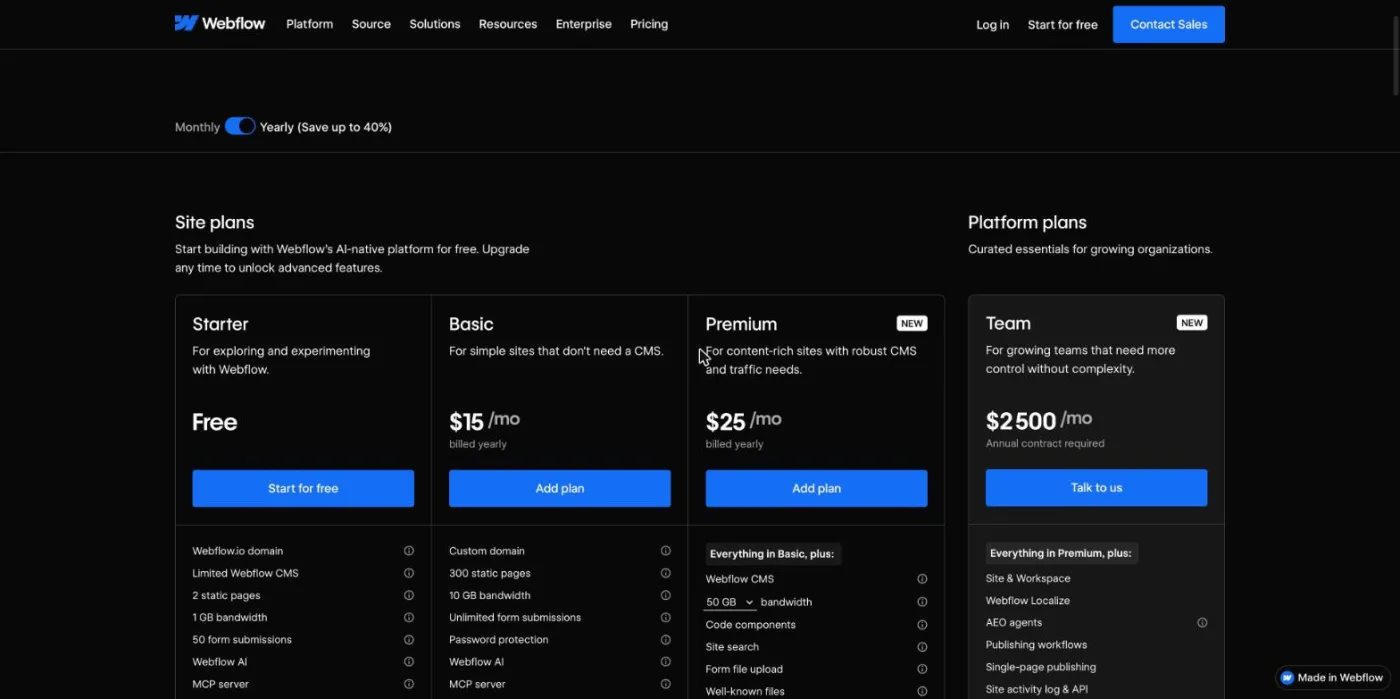
Both bill per site, in dollars, with lower prices on yearly billing. Prices below come from the official pricing pages of Framer and Webflow (checked October 2026).
| Plan | Price | Main limits |
|---|---|---|
| Framer Free | $0 | Framer subdomain, 1 GB bandwidth, no custom domain |
| Framer Basic | $10 a month billed yearly | Custom domain, 30 pages, 2 CMS collections, 1,000 CMS items, 50 GB, no redirects |
| Framer Pro | $30 a month billed yearly | 150 pages, 10 collections, 2,500 CMS items, 100 GB, redirects, staging |
| Framer Enterprise | Custom quote | Custom limits, SSO, uptime guarantee |
| Webflow Starter | $0 | Webflow subdomain, 2 static pages, 50 CMS items, 1 GB bandwidth |
| Webflow Basic | $15 a month billed yearly | Custom domain, 300 static pages, 10 GB, no CMS |
| Webflow Premium | From $25 a month billed yearly | CMS up to 20,000 items, site search, price rises with bandwidth (50 GB to 2.5 TB) |
| Webflow Team | $2,500 a month, annual contract | Localize, AEO agents, publishing workflows |
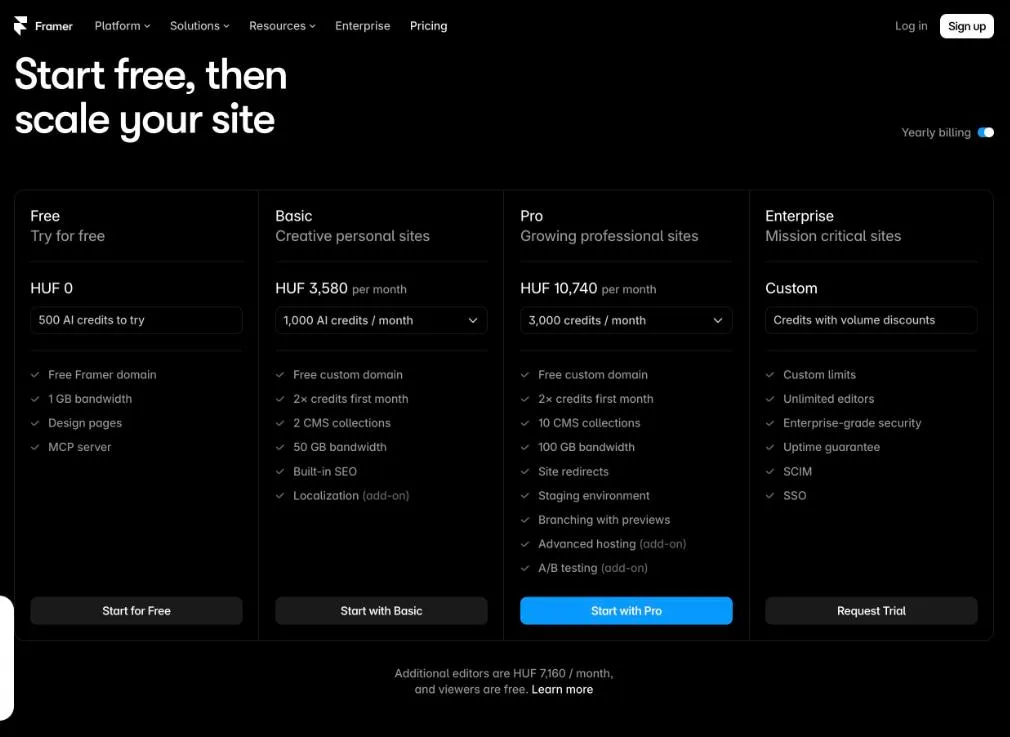
Extra seats change the bill. On Framer, each additional editor costs $20 a month and viewers are free. On Webflow, editors and designers are billed through a separate Workspace plan. For a five-page landing site, Framer Basic is the cheapest real option. As soon as you need a blog with redirects, compare Framer Pro at $30 with Webflow Premium at $25: Webflow becomes the better value for content, with eight times more CMS items.
A move between builders is a site migration, even if the domain stays the same. Rankings survive when every old URL leads somewhere relevant and every page keeps its tags. The method:
Our SEO migration checklist details each step.
Watch out
Moving a blog to Framer Basic to save money removes redirects. Any URL that changes then returns a 404 error and loses its links, which costs far more than the $20 monthly difference with Pro.
The right builder depends on who edits the site and how much content it will hold in three years. The table gives our verdict for the most common profiles.
| Your profile | Best choice | Why |
|---|---|---|
| Startup launching a landing page fast | Framer | Fastest design-to-publish workflow, lowest entry price |
| Designer or freelancer building portfolio sites | Framer | Design freedom, animations, simple hand-over to the client |
| Marketing team publishing on a blog every week | Webflow | Larger CMS, references, scheduled publishing |
| Multilingual site in several markets | Webflow | Finer SEO control per locale, Localize included in Team |
| Agency managing many client sites | Webflow | Mature ecosystem, roles and permissions, large freelance pool |
| Small site that may grow later | Framer, with a migration plan | Cheap start, but plan the move before content piles up |
To compare with Wix, Squarespace and other builders, see our ranking of the best website builders.
The builder decides how easy it is to publish; your content decides whether you rank and get cited. Choose the tool your team will keep feeding, then publish regularly. Sorank writes and publishes SEO and GEO articles on Webflow or Framer, from $49 a month billed yearly: see the plans and the 3-day free trial.

Framer is better for designers who want to publish a polished landing page or portfolio quickly, at a lower entry price. Webflow is better for content-heavy and multilingual sites, thanks to a larger CMS and finer technical SEO settings. For most companies, the deciding factor is how much content the site will hold in a few years.
Yes for many marketing sites. Framer offers import tools and an official SEO migration guide: keep the same slugs, recreate metadata and JSON-LD, import 301 redirects from a CSV file on the Pro plan, then submit the new sitemap. Check first that your CMS fits within Framer's limits of 2,500 items on Pro, or 40,000 with paid add-ons.
Yes for small and medium sites. Framer pre-renders pages to HTML, generates the sitemap and robots.txt, and lets you edit titles, descriptions, canonicals and slugs on every page and CMS template. Its limits are redirects reserved for the Pro plan and structured data added by hand through custom code.
We analyse your competitors, your website and your AI visibility to create a tailored content plan for free.
 AI Content Brief Generator
 FAQ Schema Generator
 AI Blog Post Ideas Generator
 Structured Data Validator (Schema Validator)
 Alt Text Checker
 Internal Link Analyzer
 Backlink Challenge
 AI Meta Description Generator
 AI Blog Title Generator
 Google Indexability Checker
 AI Blog Outline Generator
 UTM Link Builder
 Keyword Clustering Tool
 Canonical Tag Checker
 XML Sitemap Generator
 Broken Link Checker
 AI SEO Title Generator
 Headline Analyzer
 SERP Preview Tool
 Redirect Checker
 Hreflang Tag Generator
 Heading Structure Analyzer
 HTTP Headers Checker
 Favicon Extractor
 SERP CTR Calculator
 SEO vs Paid Search Savings Calculator
 SEO Share of Voice Calculator
 SEO ROI Calculator
 SEO Traffic and Revenue Forecast Calculator
 SEO Budget Calculator
 SEO Break-Even Calculator
 SaaS SEO ROI Calculator
 ROAS Calculator
 Reading Time Calculator
 Ranking Gain Simulator
 Organic Traffic Value Calculator
 Organic Traffic Estimator and Website Traffic Checker
 LTV to CAC Ratio Calculator
 Local SEO ROI Calculator
 Link Building Cost Calculator
 Keyword Value Calculator
 Keyword Opportunity Score Calculator
 Keyword Density Calculator
 GEO ROI Calculator
 GEO Content Investment Calculator
 Ecommerce SEO ROI Calculator
 Customer Lifetime Value Calculator
 Customer Acquisition Cost Calculator
 CTR Calculator
 Cost Per Article Calculator
 Conversion Rate Calculator
 Content Marketing ROI Calculator
 ChatGPT Referral Traffic Estimator
 Bounce Rate Calculator
 Backlink ROI Calculator
 AI Visibility Score Calculator
 AI Traffic Value Calculator
 AI Share of Voice Calculator
 Cost of AI Invisibility Calculator
 AI Citation Rate Calculator
 llms.txt Validator
 AI Overview Checker and AI Overviews Rank Checker
 Robots.txt Checker
 AI SEO Audit
 LLM Readability Checker
 SearchGPT Readiness Checker
 Structured Data LLM Audit
 Website Crawlability AI Audit
 Why ChatGPT Is Not Recommending My Website
 Gemini Ranking Tool
 Perplexity Ranking Checker
 LLM Citation Checker
 Answer Engine Optimization Audit
 GEO Audit
 AI Search Visibility Test
 ChatGPT Visibility Checker
 llms.txt Generator
 URL Extractor
 Webpage to Markdown
 Sitemap Checker
 SERP Volatility Sensor
 Page Size Checker
 Word Counter
 Slug Generator
 Schema Generator
 Robots Generator
 OG Preview
 Meta Tags Generator
 Image Compressor
 Favicon Generator
 On-Page SEO Audit: SEO Checker and SEO Analyzer
 Backlink Analysis Tool
 Keyword Research Tool
 Domain Authority Checker
THEY TRIED SORANK BEFORE YOU
 “I tested Sorank on a real client site and it's insane. It does everything an agency would bill you $1500 a month for. It's going into production on that client now.”
 Guillaume Guersanguersanguillaume.com“We are an Ads agency and we wanted to get our SEO back on track once and for all. Sorank gave us a clear view of our site, helped us prioritize optimizations, and properly structure our content. The tool is easy to use, well designed for a team, and very practical for centralizing tracking without having to juggle multiple platforms. A very solid foundation to start fresh with our SEO.”
 Gaspard MadouiAds Agency
 “I just let the Sorank software do its thing, and now my DR is 25 and my page is ranking higher.”
 Lucas Flandrefoundertrace.fr“I specialized in GEO thanks to Sorank. The GEO Leaderboard allows me to show my clients their position vs competitors on ChatGPT. It’s a real commercial differentiator.”
 MélanieSEO Freelance“Great service, works well for our website and helps us understand how to improve it to rank better on Google and elsewhere. Congrats, keep going, I recommend it.”
 Hugo T.E-commerce merchant