Preferences
Privacy is important to us, so you have the option of disabling certain types of storage that may not be necessary for the basic functioning of the website. Blocking categories may impact your experience on the website. More information

Privacy is important to us, so you have the option of disabling certain types of storage that may not be necessary for the basic functioning of the website. Blocking categories may impact your experience on the website. More information

Webflow vs WordPress for SEO and GEO in 2026: settings compared point by point, measured speed, prices checked October 2026 and a verdict for each profile.
Tools

In short
Webflow and WordPress can both rank on Google and be cited by ChatGPT, Gemini or Perplexity, because both send crawlable HTML and let you control titles, URLs, redirects, sitemaps and robots.txt. Webflow includes hosting and most SEO settings out of the box and scores better on measured speed, with less to maintain. WordPress offers unlimited content, fully free URL structures and a huge plugin ecosystem, at the cost of setup and upkeep. Choose Webflow for a design-led marketing site run by a small team, WordPress for a large blog, a multilingual site with complex URLs, a big store or a tight budget.
Want to go further? Ask
Quick quiz
Which kind of software is right for your business?
Our advice for you
A free or very simple tool
You are alone or just starting: a free plan or a simple tool covers the basics. Switch when you feel limited.
Our advice for you
An all-in-one tool for small businesses
You want one tool that does a bit of everything, is easy to learn and has support in your language.
Our advice for you
A specialised tool, the best in its field
This task is central to your business: pay for the most complete tool and connect it to the rest.
Our advice for you
An enterprise solution
Many users, strict security and integrations: ask for demos and compare the total cost, setup included.
The Webflow vs WordPress question is usually framed as design freedom against flexibility. For search, it is narrower: which platform makes it easier to publish fast, well-structured pages that Google ranks and that AI assistants quote? The market is lopsided. According to W3Techs (October 2026), WordPress runs 39.5% of all websites and Webflow 0.8%. Popularity does not decide rankings, though. This guide compares what does: each SEO setting, measured speed, blogging at scale, multilingual setup, visibility in AI answers, verified prices, maintenance, ecommerce and migration, with a setup checklist for each platform. If you need the basics first, read what a CMS is and how it works.
Webflow is a hosted visual builder with a built-in CMS: you design pages on a canvas, Webflow generates the code and hosts the site, and you pay a monthly plan per site. WordPress is open-source software that you install on hosting of your choice (WordPress.org), or rent as a hosted service (WordPress.com). Its features come from themes and plugins written by thousands of developers.
That difference in model explains almost every other gap. Webflow decides a lot for you, which keeps sites consistent and fast but limits what you can change. WordPress decides almost nothing for you, which lets you build anything but leaves quality, speed and security in your hands.
| Criterion | Webflow | WordPress (self-hosted) |
|---|---|---|
| Type | Hosted visual builder with a CMS | Open-source CMS on your own hosting |
| Who maintains it | Webflow (hosting, updates, security) | You or your host (core, theme, plugins) |
| Design | Visual canvas close to HTML and CSS | Themes, block editor or page builders |
| Extensions | Apps marketplace and custom code | Over 77,000 free plugins in the official directory |
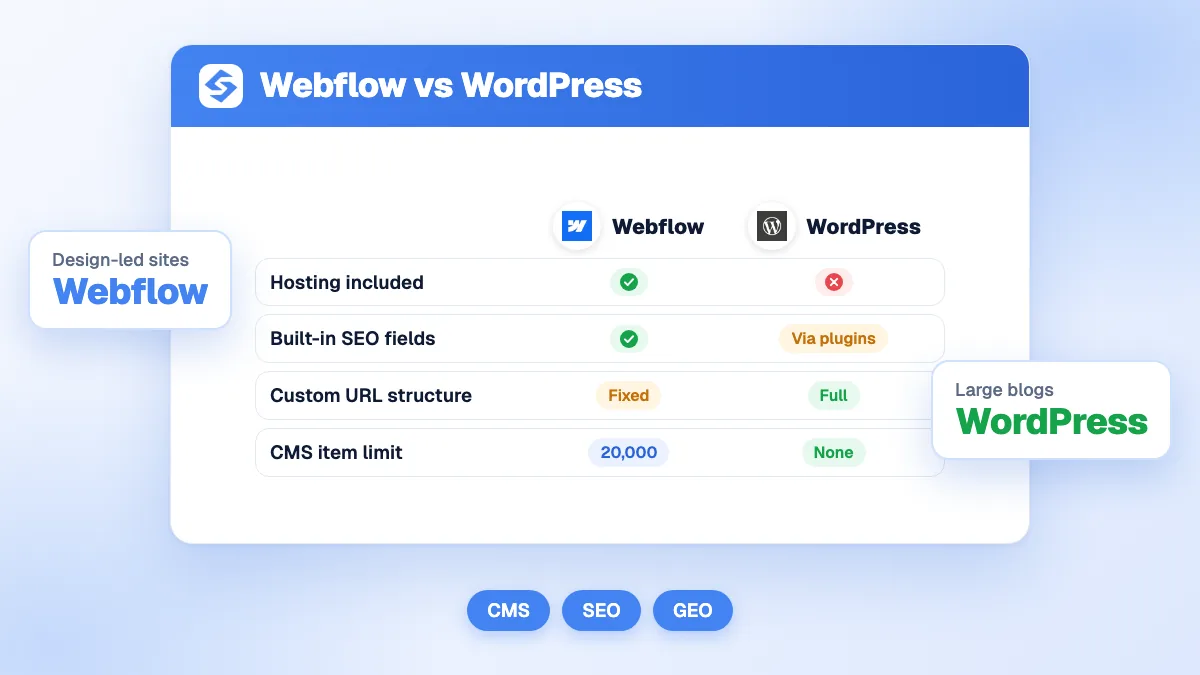
| Content scale | Up to 20,000 CMS items on the Premium site plan | No platform limit |
| Starting price | Free Starter plan, then $15 a month billed yearly | Free software, plus hosting and domain |
| Ownership | Site tied to Webflow hosting | Files and database are yours, any host |
On the essentials of SEO, the two platforms are closer than most comparisons suggest. Both render pages on the server, so Google and AI crawlers receive the full text without running JavaScript. Both let you write a unique title and meta description per page, choose the slug, add alt text to images, publish an XML sitemap, set 301 redirects and add structured data. Both support HTTPS, custom domains, responsive design and blog content.
The difference lies in how you get there. On Webflow, these settings sit in the page settings and site settings panels from day one. On WordPress, part of them is native and the rest arrives with a plugin you choose and configure. Once configured, a Webflow site and a WordPress site can be equally sound on technical SEO; the gap shows in speed by default, URL freedom, scale and maintenance.
Neither platform has a built-in ranking advantage: Google ranks pages, not platforms. The real difference is how much work it takes to get the technical foundations right, and how far you can go beyond them. Webflow covers most needs with no setup. WordPress covers all of them, with more setup.
Google said as much when it published its guidance on AI features in Search. Its advice for AI Overviews and AI Mode repeats the classic requirements (crawlable pages, an HTTP 200 status code, indexable content), and none of them depends on the CMS you use.
"Meeting the technical requirements covers you for search generally, including AI formats."
John Mueller, Google Search Relations, Google Search Central Blog
Webflow exposes the title tag, meta description, Open Graph tags and slug of every static page, and lets you bind them to fields for CMS items, so each blog post gets its own metadata automatically. WordPress handles slugs natively but relies on an SEO plugin for titles, meta descriptions and social tags. Once a plugin is installed, WordPress matches Webflow and adds extras such as bulk editing, content analysis and redirect managers. Our comparison of the best WordPress SEO plugins covers the options.
This is Webflow's main constraint. CMS items always live under their collection folder (for example /blog/post-name), and you cannot drop that folder or nest collections deeper. WordPress lets you design any permalink structure, with or without categories, dates or folders. That freedom matters for large sites, for multilingual sites and for migrations that must keep old URLs intact.
Schema markup tells Google and AI assistants what a page is: an article, a product, an organization, a breadcrumb. On WordPress, SEO plugins generate Article, Organization or Breadcrumb markup automatically. On Webflow you paste JSON-LD into custom code and fill it with CMS fields: flexible and precise, but manual.
Tip
Whatever the platform, run your main templates through a free on-page SEO audit right after launch. Missing titles, duplicate meta descriptions and broken heading levels show up on both platforms, usually because of a template, so one fix repairs hundreds of pages.
The table below lists the settings that decide whether a site can be crawled, indexed and understood, with what each platform offers natively and what needs a plugin or code. Webflow features come from its official plan comparison; WordPress features describe the core software, without plugins, unless stated.
| SEO setting | Webflow | WordPress |
|---|---|---|
| URLs and slugs | Editable slugs; CMS items always under a collection folder | Fully configurable permalinks for posts, pages and categories |
| Title and meta description | Native fields, bindable to CMS fields | Through an SEO plugin (Yoast SEO, Rank Math and others) |
| 301 redirects | Built into site settings on paid plans | Automatic redirect when a post slug changes; full control through a plugin |
| XML sitemap | Generated automatically, can be replaced by a custom one | Core sitemap since version 5.5; plugins add finer control |
| robots.txt | Editable in site settings, with crawler access controls | Virtual file by default; edited through a plugin or a physical file |
| Structured data | Custom JSON-LD fed by CMS fields | Generated by SEO plugins or written in the theme |
| Canonical tag | Global or page-level canonical URL | Added on posts and pages by core; custom values through a plugin |
| Speed | Managed hosting and global CDN included | Depends on hosting, theme, plugins and caching |
| Multilingual | Webflow Localize add-on: subfolders, translated SEO fields, sitemap with hreflang | Translation plugin required (often paid), very flexible |
| Blog | CMS collections, scheduled publishing, up to 20,000 items | Native posts, categories, tags, authors, revisions, no limit |
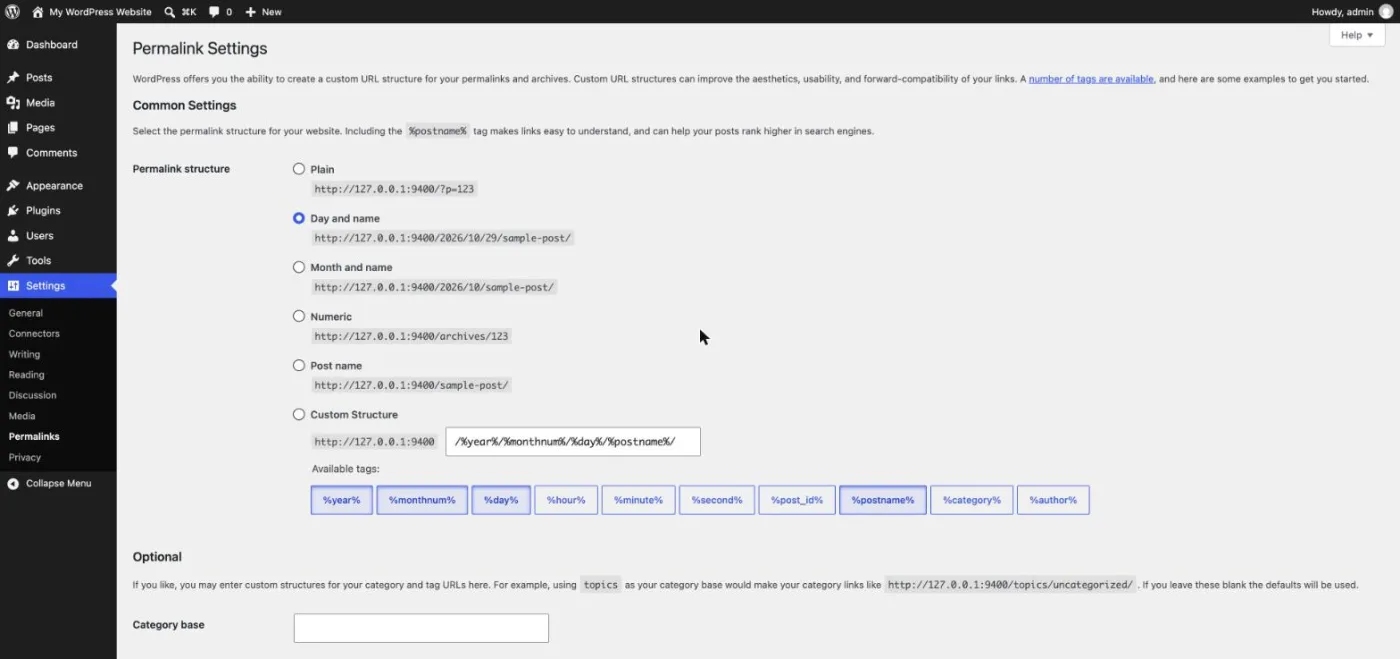
WordPress permalinks are a good example of the control gap. One setting changes the URL pattern of the whole site, and custom structures accept tags such as the post name or the category. Pick the structure before publishing: changing it later forces a redirect for every existing post.
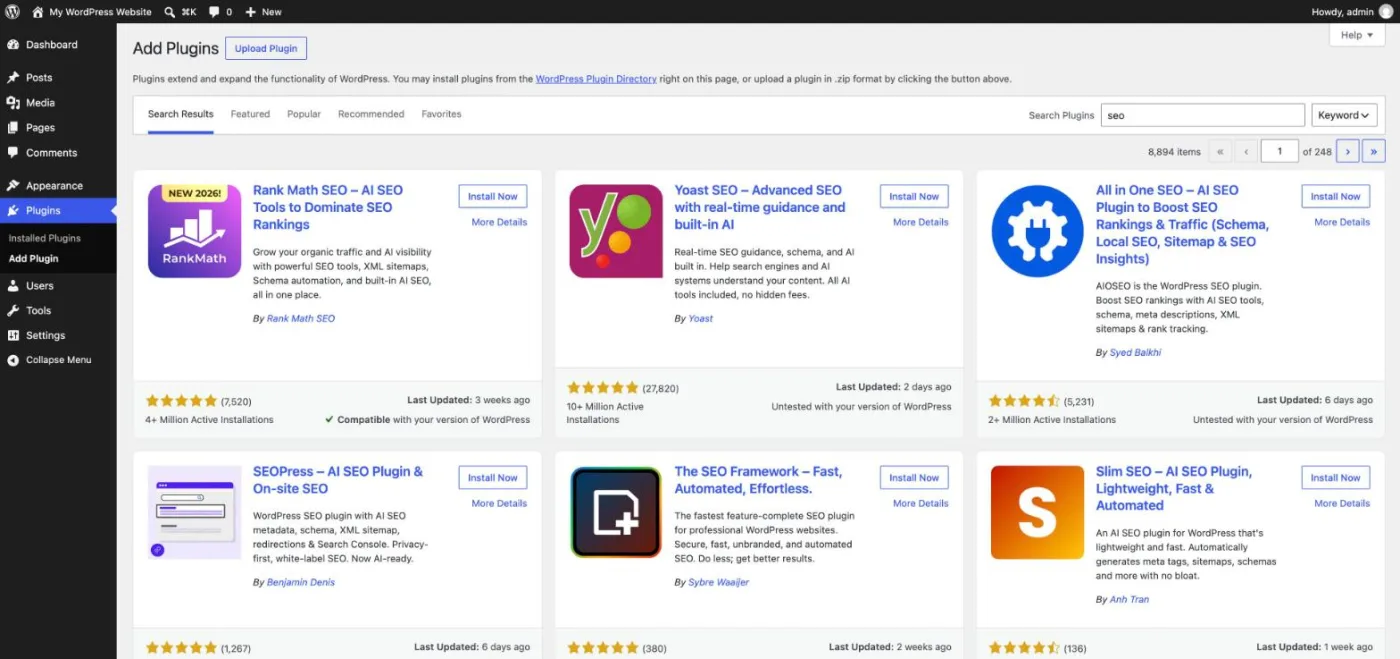
For titles, meta descriptions, structured data and redirects, most WordPress sites install one SEO plugin. Searching "seo" in the plugin directory returns several mature options with millions of active installations, so the question is which one fits your workflow rather than whether one exists. Install only one: two SEO plugins print duplicate tags.
On measured data, Webflow sites are faster on average, while the best WordPress sites are as fast as any. Speed matters for SEO through the Core Web Vitals, Google's metrics for loading, responsiveness and visual stability, which are part of the page experience its ranking systems reward.
The HTTP Archive Web Almanac 2025, built from millions of real sites, gives the clearest comparison. The median Lighthouse performance score on mobile was 58 for Webflow and 41 for WordPress in 2025 (73 and 63 on desktop). On real-user Core Web Vitals, only 45% of WordPress sites passed all three metrics on mobile, among the lowest rates of the platforms studied. The same report found a median Lighthouse SEO score of 100 for Webflow and around 92 for WordPress.
The explanation is architectural. Webflow controls hosting, the CDN, image compression and the code it outputs, so most sites start fast; heavy animations, large videos and third-party scripts are what slow them down. WordPress speed depends on choices you make: hosting quality, theme, page builder, number of plugins and caching. A well-built WordPress site on good hosting with a light theme can beat a Webflow site loaded with interactions. A cheap shared host with 40 plugins rarely competes.
Note
These figures are medians across thousands of sites. Your own site is the only one that counts: check its field data in PageSpeed Insights or the Core Web Vitals report of Search Console before and after any platform decision.
For a content-heavy site, WordPress is the stronger publishing tool; for a site with a few dozen to a few thousand articles, Webflow is comfortable. Organic traffic mostly comes from articles and guides, so the blog matters more than the homepage.
Webflow's CMS is pleasant to use and its visual templates make every article look consistent. Its limits appear with volume and complexity: the Premium site plan caps the CMS at 20,000 items and 40 collections, collection structures are rigid, and editorial roles and approval workflows sit on the more expensive team plans. WordPress was built for publishing: categories, tags, authors, revisions, scheduling, custom post types and an unlimited number of posts, with an editor that most writers already know.
Internal linking follows the same pattern. On WordPress, categories and tags create archive pages automatically, related-post plugins add links between articles, and you can restructure a silo in a few clicks. On Webflow, you build those links with reference fields and collection lists: clean and fully controlled, but every template has to be designed by hand.
Both platforms accept automated publishing through their APIs, which matters if you publish often. Sorank, our product, connects to Webflow and to WordPress in a few minutes, finds the keywords and publishes optimized articles with its blog article generator, either directly or as drafts for review.
Webflow sells translation as an add-on, WordPress relies on plugins, and both can produce a correct multilingual setup: one URL per language, hreflang tags and translated metadata.
Webflow Localize adds locales to a site from $9 a month, priced by the number of locales. Each language lives in a subfolder (such as /fr/ or /de/), titles and meta descriptions are translated per locale, and Webflow generates a sitemap with hreflang tags. Higher tiers add localized URLs, so a French page can have a French slug, and automatic visitor routing. The limit is cost and flexibility: more languages mean a higher tier, and every structure follows Webflow's model.
WordPress has no multilingual feature in core. Translation plugins add languages in subfolders, subdomains or separate domains, translate slugs, menus, categories and SEO fields, and output hreflang tags. You get more freedom, including different URL structures per market, at the price of a paid plugin in most cases and more configuration. For large international sites, that freedom often decides the choice.
Visibility in AI answers, or GEO (generative engine optimization), depends far more on content than on the CMS. The platform still affects three technical points, and both handle them well when configured properly.
Webflow has also added AI features around search to its platform: AI-assisted SEO audits, and analytics add-ons that report traffic from AI agents. On WordPress, equivalent features come from plugins. These tools help you spot issues, but they do not write the content that gets cited. Structure matters as much as the words: a question-style heading followed by a direct answer, a comparison table and a sourced figure give AI assistants passages they can quote, and both editors produce that HTML without any code.
What gets a page cited is answer-first writing, sourced facts, tables and clear structure, on either platform. Our study of the sources ChatGPT cites shows which kinds of pages win, and AI mention tracking tells you whether your brand appears in the answers.
Watch out
Moving from WordPress to Webflow, or the reverse, will not make AI assistants cite you more by itself. The pages that get quoted are the ones that answer a precise question better than the alternatives, whatever the CMS behind them.
Webflow charges per site, in dollars, with hosting included. WordPress software is free, but you pay for hosting, a domain, often a premium theme and paid plugins. Prices below come from the official pricing pages of Webflow and WordPress.com (checked October 2026), excluding taxes.
| Plan | Price | What you get |
|---|---|---|
| Webflow Starter | Free | Webflow subdomain, 2 static pages, 50 CMS items, 1 GB bandwidth |
| Webflow Basic | $15/month billed yearly | Custom domain, 300 static pages, 10 GB bandwidth, no CMS |
| Webflow Premium | From $25/month billed yearly | CMS up to 20,000 items, site search, well-known files, price rises with bandwidth |
| Webflow Ecommerce | $29, $74 or $212/month billed yearly | Standard (500 items, 2% transaction fee), Plus (5,000 items), Advanced (15,000 items) |
| Webflow Localize | From $9/month, by number of locales | Translated pages and SEO fields, locale subfolders |
| WordPress.org | Free software | Plus hosting, domain, theme and plugins, from a few dollars to tens of dollars a month |
| WordPress.com | $4, $8, $25 or $45/month billed yearly | Personal, Premium, Business (plugins allowed) and Commerce hosted plans |
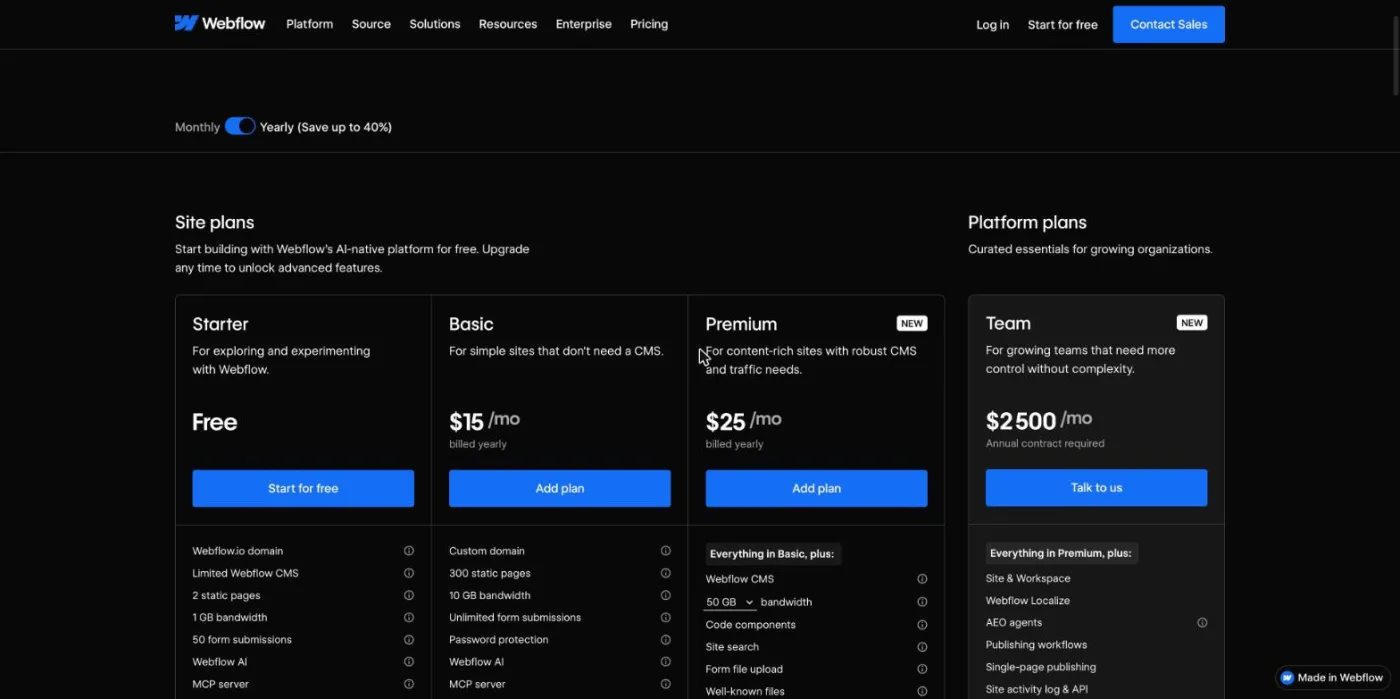
For a small business site the totals end up close. A Webflow Premium plan costs about $300 a year, and a WordPress site on decent managed hosting with a premium theme and one or two paid plugins lands in a similar range. The gaps appear elsewhere: Webflow adds paid add-ons for translation, analytics and testing, and its team and enterprise plans are expensive, while WordPress costs grow with developer time, maintenance and security. The real difference is maintenance time, which Webflow largely removes.
Webflow is easier to maintain, WordPress is easier to start with for writers. Webflow's designer interface mirrors HTML and CSS concepts (boxes, classes, flexbox), so designers love it and beginners need a few weeks to feel at ease. Once the site is built, marketers edit text and publish posts in a simpler editor, with little risk of breaking the layout.
WordPress installs in minutes on most hosts, and its block editor is familiar to anyone who has used a word processor. The difficulty comes later: core, theme and plugin updates, compatibility between plugins, backups and security. Popular software attracts attacks, and outdated plugins are the most common entry point. Managed WordPress hosting solves much of this for a higher monthly fee.
Webflow handles hosting, SSL certificates, backups, DDoS protection and updates for you. The trade-off is dependency: you can export static code, but the CMS, forms and hosting stay on Webflow, and you depend on its prices and product choices. A WordPress site belongs to you, and you can move it to any host at any time.
Maintenance has a direct SEO cost. A hacked WordPress site can be filled with spam pages, flagged in search results and lose its rankings for weeks, and a plugin update that breaks a template can strip titles or structured data without anyone noticing. On Webflow, these risks are much lower, but a designer who changes a class or deletes a field can still break the SEO settings of a whole collection. On both platforms, a monthly crawl of the site catches these regressions early.
WordPress wins on breadth, Webflow on coherence. The official WordPress directory lists over 77,000 free plugins, plus thousands of paid themes and extensions: forms, memberships, online courses, bookings, multilingual setups, SEO, caching, security. Almost any feature exists already, which saves development time but multiplies the risk of conflicts and heavy pages.
Webflow's apps marketplace is much smaller. Most needs are covered natively (forms, interactions, CMS, hosting, site search) or through custom code and third-party embeds. Advanced features such as memberships, complex filters or multi-step forms often require an external tool, which adds a subscription and sometimes scripts that slow pages down. Both platforms offer APIs for developers and connect to automation tools.
For a small catalog with a strong brand, Webflow Ecommerce works: custom product pages, custom checkout, and up to 15,000 items on the Advanced plan. For a large catalog, complex variants, subscriptions or many payment and shipping options, WordPress with WooCommerce is the more complete choice, with thousands of extensions and no item limit. Many brands that care about SEO also pair a dedicated ecommerce platform with a content site. For product SEO, both platforms need the same work: unique descriptions, clean category URLs and product structured data.
A new Webflow site needs about an hour of configuration before it is ready to rank. Follow this order:
A WordPress site needs a few more decisions, mostly made once. Follow this order:
A platform change is a site move, and Google's guide on moving a site with URL changes asks for permanent redirects from every old URL to its new one, kept for as long as possible and generally at least one year. The method that works:
Our SEO migration checklist goes through each step in detail.
Example
A WordPress post at /2024/05/webflow-tips/ moving to Webflow becomes /blog/webflow-tips. Without a 301 redirect from the old address, Google sees a 404 error and the post loses its rankings and backlinks. Check the redirects of your 20 most visited posts by hand before switching the domain.
The right choice depends on your team, your content volume and your budget more than on SEO features, since both platforms can be configured to rank. Use the profile closest to yours.
| Your profile | Best choice | Why |
|---|---|---|
| Startup or agency site, design-led, small team | Webflow | Clean code, hosting and SEO basics included, little maintenance |
| Marketing team that wants to edit without developers | Webflow | Visual editing with fewer ways to break the site |
| Content site or blog with thousands of articles | WordPress | No item limit, mature editorial workflow, flexible URLs |
| Large online store | WordPress with WooCommerce (or a dedicated ecommerce platform) | Webflow's ecommerce plans suit small catalogs |
| Multilingual site with complex structure | WordPress | More control over URLs and hreflang through plugins |
| Local service business with a few pages | Either | Webflow Basic or a simple WordPress site both do the job |
| Creator or newsletter writer | WordPress | Native blog, memberships and newsletters through plugins |
| Tight budget, technical skills in-house | WordPress | Free software and low-cost hosting |
For a wider view including Wix, Shopify and headless options, see our ranking of the best CMS for SEO.
The platform sets the ceiling; your content and its structure decide how close you get to it. Pick the one your team will keep publishing on, then feed it regularly with articles built for Google and AI assistants. Sorank does that on Webflow and WordPress alike, starting at $49 a month billed yearly: see the plans and the 3-day free trial.

Usually at the start, since WordPress software is free and basic hosting costs a few dollars a month. Webflow costs $15 to $25 a month billed yearly for most sites, hosting included. Once you add a premium theme, paid plugins, good hosting and maintenance time, the yearly totals for a small business site end up close.
Both. Agencies that build content-heavy sites, stores or multilingual projects often stay on WordPress for its flexibility and plugin ecosystem. Design-led studios increasingly choose Webflow because its visual canvas maps to real HTML and CSS and clients can edit content without breaking the layout.
Yes. Every paid Webflow site plan includes hosting on Webflow's infrastructure with a global CDN, SSL certificate and backups. You can export the static code of a site, but the CMS, forms and hosting stay on Webflow, so moving away means rebuilding those parts on another platform.
We analyse your competitors, your website and your AI visibility to create a tailored content plan for free.
 AI Content Brief Generator
 FAQ Schema Generator
 AI Blog Post Ideas Generator
 Structured Data Validator (Schema Validator)
 Alt Text Checker
 Internal Link Analyzer
 Backlink Challenge
 AI Meta Description Generator
 AI Blog Title Generator
 Google Indexability Checker
 AI Blog Outline Generator
 UTM Link Builder
 Keyword Clustering Tool
 Canonical Tag Checker
 XML Sitemap Generator
 Broken Link Checker
 AI SEO Title Generator
 Headline Analyzer
 SERP Preview Tool
 Redirect Checker
 Hreflang Tag Generator
 Heading Structure Analyzer
 HTTP Headers Checker
 Favicon Extractor
 SERP CTR Calculator
 SEO vs Paid Search Savings Calculator
 SEO Share of Voice Calculator
 SEO ROI Calculator
 SEO Traffic and Revenue Forecast Calculator
 SEO Budget Calculator
 SEO Break-Even Calculator
 SaaS SEO ROI Calculator
 ROAS Calculator
 Reading Time Calculator
 Ranking Gain Simulator
 Organic Traffic Value Calculator
 Organic Traffic Estimator and Website Traffic Checker
 LTV to CAC Ratio Calculator
 Local SEO ROI Calculator
 Link Building Cost Calculator
 Keyword Value Calculator
 Keyword Opportunity Score Calculator
 Keyword Density Calculator
 GEO ROI Calculator
 GEO Content Investment Calculator
 Ecommerce SEO ROI Calculator
 Customer Lifetime Value Calculator
 Customer Acquisition Cost Calculator
 CTR Calculator
 Cost Per Article Calculator
 Conversion Rate Calculator
 Content Marketing ROI Calculator
 ChatGPT Referral Traffic Estimator
 Bounce Rate Calculator
 Backlink ROI Calculator
 AI Visibility Score Calculator
 AI Traffic Value Calculator
 AI Share of Voice Calculator
 Cost of AI Invisibility Calculator
 AI Citation Rate Calculator
 llms.txt Validator
 AI Overview Checker and AI Overviews Rank Checker
 Robots.txt Checker
 AI SEO Audit
 LLM Readability Checker
 SearchGPT Readiness Checker
 Structured Data LLM Audit
 Website Crawlability AI Audit
 Why ChatGPT Is Not Recommending My Website
 Gemini Ranking Tool
 Perplexity Ranking Checker
 LLM Citation Checker
 Answer Engine Optimization Audit
 GEO Audit
 AI Search Visibility Test
 ChatGPT Visibility Checker
 llms.txt Generator
 URL Extractor
 Webpage to Markdown
 Sitemap Checker
 SERP Volatility Sensor
 Page Size Checker
 Word Counter
 Slug Generator
 Schema Generator
 Robots Generator
 OG Preview
 Meta Tags Generator
 Image Compressor
 Favicon Generator
 On-Page SEO Audit: SEO Checker and SEO Analyzer
 Backlink Analysis Tool
 Keyword Research Tool
 Domain Authority Checker
THEY TRIED SORANK BEFORE YOU
 “I tested Sorank on a real client site and it's insane. It does everything an agency would bill you $1500 a month for. It's going into production on that client now.”
 Guillaume Guersanguersanguillaume.com“We are an Ads agency and we wanted to get our SEO back on track once and for all. Sorank gave us a clear view of our site, helped us prioritize optimizations, and properly structure our content. The tool is easy to use, well designed for a team, and very practical for centralizing tracking without having to juggle multiple platforms. A very solid foundation to start fresh with our SEO.”
 Gaspard MadouiAds Agency
 “I just let the Sorank software do its thing, and now my DR is 25 and my page is ranking higher.”
 Lucas Flandrefoundertrace.fr“I specialized in GEO thanks to Sorank. The GEO Leaderboard allows me to show my clients their position vs competitors on ChatGPT. It’s a real commercial differentiator.”
 MélanieSEO Freelance“Great service, works well for our website and helps us understand how to improve it to rank better on Google and elsewhere. Congrats, keep going, I recommend it.”
 Hugo T.E-commerce merchant