Preferences
Privacy is important to us, so you have the option of disabling certain types of storage that may not be necessary for the basic functioning of the website. Blocking categories may impact your experience on the website. More information

Privacy is important to us, so you have the option of disabling certain types of storage that may not be necessary for the basic functioning of the website. Blocking categories may impact your experience on the website. More information

Webflow vs Wix compared for SEO and GEO: verified prices, SEO settings point by point, speed data, blog, store, migration and a verdict for each profile.
Tools

In short
Both Webflow and Wix can rank on Google and be quoted by AI assistants: they render clean HTML, generate a sitemap and let you edit titles, meta descriptions, robots.txt and 301 redirects. Wix is cheaper to start, faster to learn and stronger for local businesses and small stores, with multilingual included. Webflow gives designers and marketing teams finer control over code, CMS structure and custom schema, at a higher price and with a steeper learning curve. Choose Wix to launch quickly on a budget, Webflow for a design-led brand or startup site that a team will grow.
Want to go further? Ask
Quick quiz
Which kind of software is right for your business?
Our advice for you
A free or very simple tool
You are alone or just starting: a free plan or a simple tool covers the basics. Switch when you feel limited.
Our advice for you
An all-in-one tool for small businesses
You want one tool that does a bit of everything, is easy to learn and has support in your language.
Our advice for you
A specialised tool, the best in its field
This task is central to your business: pay for the most complete tool and connect it to the rest.
Our advice for you
An enterprise solution
Many users, strict security and integrations: ask for demos and compare the total cost, setup included.
The Webflow vs Wix question usually comes down to ease against control. For search, it is narrower: which platform makes it easier to publish fast, well-structured pages that Google ranks and that ChatGPT, Gemini or Perplexity cite? The two builders are far apart in size: according to W3Techs (data of October 2026), Wix runs 4.2% of all websites and Webflow 0.8%. Popularity does not decide rankings, though. This comparison covers what does: technical SEO settings, speed, blogging, ecommerce, multilingual, AI visibility, cost and migration. If you need the basics first, read what a CMS is and how it works.
Wix is an all-in-one website builder for small businesses: you drag elements onto a page, pick apps from a market and get booking, payments, email marketing and a store in the same dashboard. Webflow is a visual development platform: you build with the logic of HTML and CSS (boxes, classes, flexbox, grids) without writing code, and you structure content in a CMS with your own collections and fields. Wix optimizes for speed of launch, Webflow for precision and scale of design.
| Criterion | Webflow | Wix |
|---|---|---|
| Type | Visual development platform with hosting and CMS | All-in-one drag-and-drop website builder |
| Best for | Designers, agencies, startups, marketing teams | Local businesses, solo founders, small stores, creators |
| Learning curve | Steep: box model, classes, CMS bindings | Gentle: templates, drag and drop, AI site generator |
| Entry paid plan | Basic, $15 per month (no CMS) | Light, $17 per month |
| Content model | Custom CMS collections and fields | Blog app plus CMS collections and dynamic pages |
| Ecommerce | Separate ecommerce plans from $29 per month | Included from the Core plan ($29 per month) |
| Multilingual | Localize add-on, paid per locale | Wix Multilingual included |
| App ecosystem | Apps marketplace, code embeds, API | Large Wix App Market, Velo for custom code |
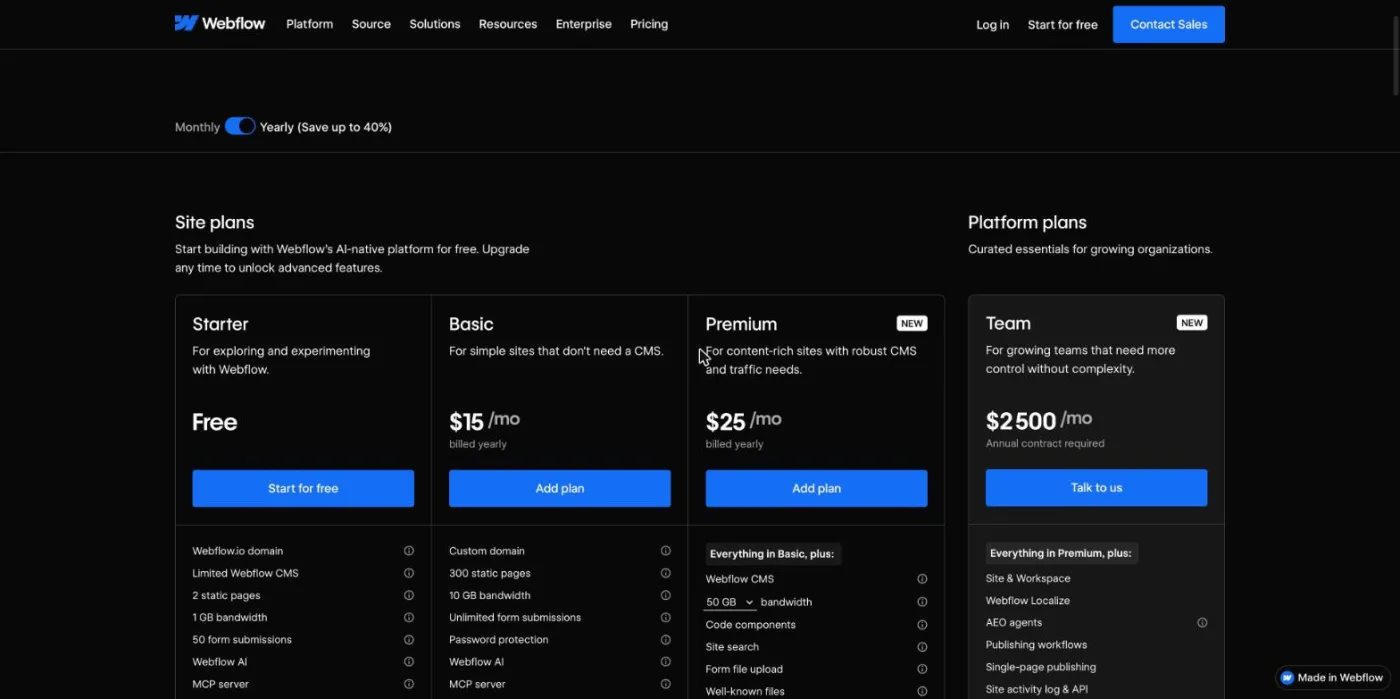
Wix is cheaper for most small sites because one plan covers the site, the domain for the first year and basic selling. Webflow splits its pricing between site plans (hosting and features for one site), ecommerce plans and optional workspace plans for teams. The prices below are the annual-billing prices displayed on each official pricing page (checked October 2026), before taxes.
| Plan | Webflow (per month, billed yearly) | Wix (per month, billed yearly) |
|---|---|---|
| Free | Starter: free, Webflow subdomain, 2 static pages, 50 CMS items | Free: $0, Wix subdomain and Wix ads |
| Entry | Basic: $15, custom domain, 300 static pages, no CMS | Light: $17, 2 GB storage |
| Content site | Premium: $25, CMS up to 20,000 items, from 50 GB bandwidth | Core: $29, 50 GB storage, basic ecommerce |
| Store | Ecommerce Standard: $29 (2% transaction fee), Plus: $74, Advanced: $212 | Business: $39, standard ecommerce; Business Elite: $159 |
| Teams | Team: $2,500 per month, annual contract; Enterprise on quote | Wix Studio and Enterprise offers for agencies and large accounts |
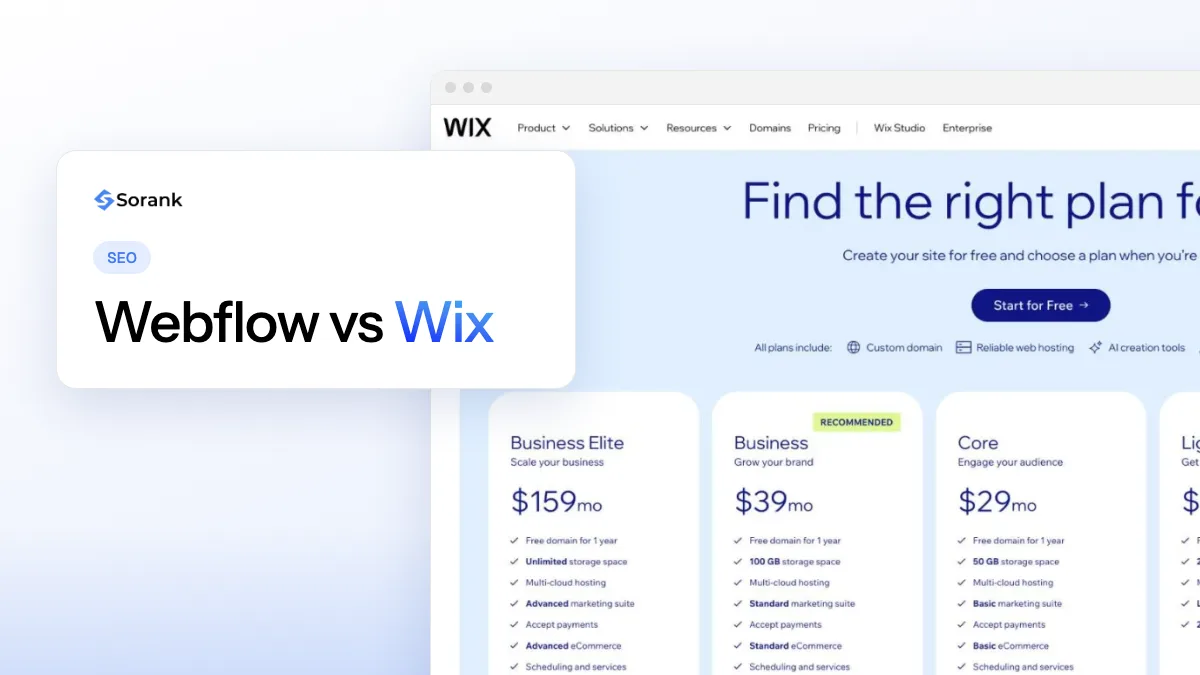
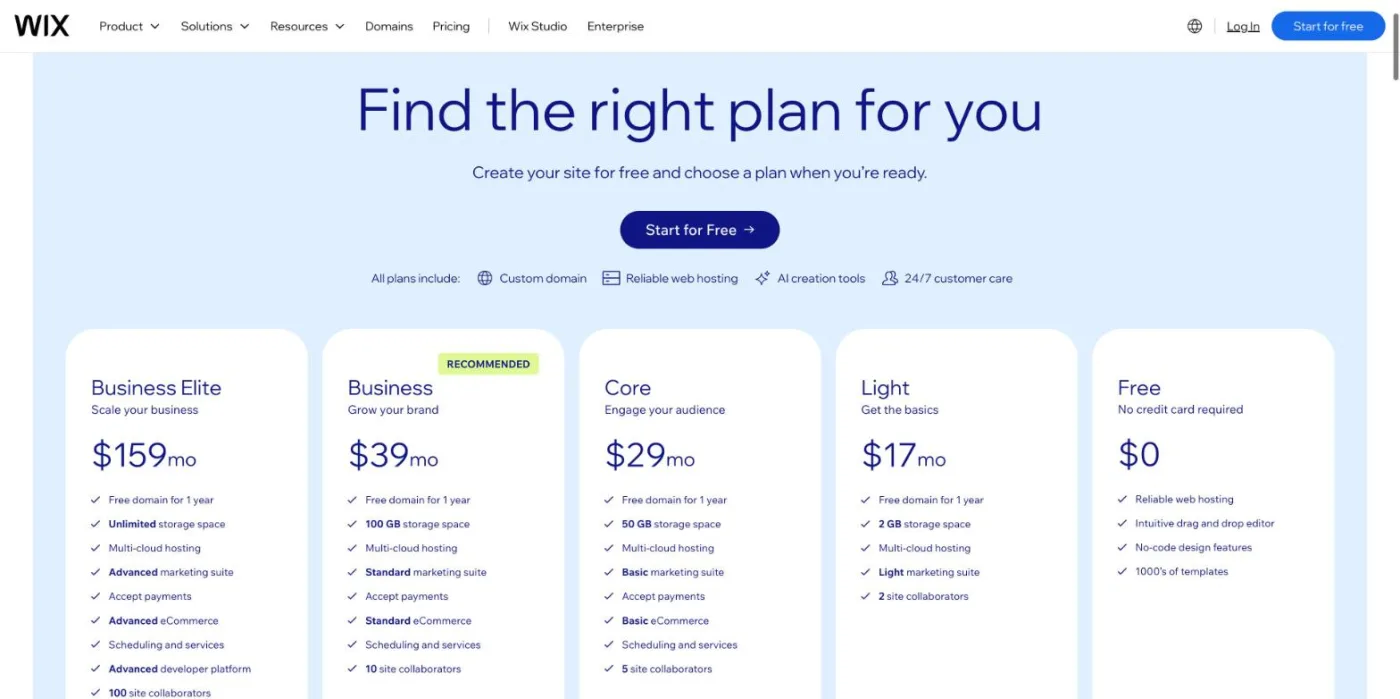
On the Wix plans page, the four paid plans are Light ($17), Core ($29), Business ($39) and Business Elite ($159) per month, billed yearly and paid in full at purchase, with a 14-day money-back guarantee on the first upgrade. Wix also states that prices and currency vary by location, so the amount you see can differ.
Watch out
Many comparisons still quote the old Webflow CMS and Business plans. In October 2026 the Webflow pricing page lists Basic at $15 and Premium at $25 per month billed yearly, and only Premium includes the CMS you need for a blog. Ecommerce is a separate plan, and the Standard ecommerce plan adds a 2% transaction fee.
For a five-page brochure site, Wix Light and Webflow Basic cost about the same. As soon as you need a blog, Webflow Premium ($25) stays slightly cheaper than Wix Core ($29); for a store, Wix Core or Business is cheaper than Webflow Ecommerce Plus ($74) once you want to avoid the transaction fee.
Neither platform has a ranking advantage: Google ranks pages, not builders. Both now cover every technical basic, and the difference lies in how much you can customize beyond them. Webflow gives more control over markup, class names and structured data; Wix gives more guidance, with an SEO setup checklist and automatic defaults that prevent beginner mistakes.
| SEO setting | Webflow | Wix |
|---|---|---|
| URLs | Editable slugs; CMS items always live under /collection-slug/item-slug | Editable slugs; prefixes such as /post/ and /product-page/ can be changed in SEO settings |
| Title and meta description | Per page, and bound to CMS fields for templates | Per page, plus SEO patterns for page types (blog posts, products) |
| 301 redirects | Redirect list in site settings, with patterns for whole folders | URL Redirect Manager, bulk import, automatic redirects when a URL changes |
| XML sitemap | Generated automatically, can be replaced by a custom one | Generated automatically, split by page type |
| robots.txt | Editable in site settings | Editable in the SEO dashboard |
| Structured data | Custom JSON-LD in page code, fed by CMS fields | Automatic markup for products, posts and events, plus custom markup per page |
| Canonical | Self-referencing canonical from a global canonical URL setting | Self-referencing canonical by default, editable per page |
| Speed | Managed hosting with CDN, clean code if the build is clean | Managed hosting with CDN, performance work done by Wix |
| Multilingual | Localize add-on with translated slugs and hreflang | Wix Multilingual with language folders and hreflang |
| Blog | CMS collections you design yourself | Ready-made blog app with categories, tags and authors |
Wix spent years with a poor SEO reputation, and the gap closed long ago. Google's search team said so publicly when a site owner asked whether to leave Wix for WordPress:
"Wix is fine for SEO. A few years back it was pretty bad in terms of SEO, but they’ve made fantastic progress"
John Mueller, Search Advocate at Google, quoted by Search Engine Journal
The measured data agrees. In the Web Almanac 2025 by HTTP Archive, Webflow and Wix are the only platforms with a perfect median Lighthouse SEO score of 100 on both desktop and mobile, while WordPress, Duda and Joomla sit around 92. That audit checks basics (titles, meta descriptions, crawlable links, valid robots.txt), so it shows that both platforms ship clean defaults, not that every site on them is well optimized.
Note
The fixed /collection-slug/item-slug pattern of Webflow is rarely a ranking problem, but plan it before you publish: a blog collection named "blog" gives /blog/post-name, which is clear for users and for your future redirects.
To check what each platform outputs on your own pages (titles, headings, canonical, missing alt text), run a page through a free on-page SEO audit before and after launch.
Both host your site on managed infrastructure with a global CDN, so you never configure a server or a cache. The difference comes from the build: Webflow outputs only the elements you place, so a careful designer can ship very light pages, while a heavy Webflow build with large animations and many fonts can be slow. Wix loads more platform code, but the company has invested heavily in rendering speed.
The same Web Almanac 2025 chapter gives comparable lab figures: Wix has the best median Lighthouse performance score of all CMS measured, 87 on desktop and 64 on mobile, against 73 and 58 for Webflow. On real-user data, 74% of Wix sites pass all three Core Web Vitals on mobile in 2025, up from 55% the year before; the report does not publish a Core Web Vitals pass rate for Webflow. For a small business site built from a template, Wix is therefore at least as fast as Webflow; for a custom Webflow build, speed depends on the designer.
Wix is easier. You can start from a template or from the AI site generator, move elements freely on the canvas and publish a site in an afternoon without any knowledge of web design. Its editor hides the structure of the page, which is comfortable for beginners and limiting for designers who want pixel-perfect responsive layouts.
Webflow is harder because it exposes how the web works: containers, the box model, classes, breakpoints and CMS bindings. A designer who knows CSS feels at home within days; a business owner without that background usually needs several weeks or a freelancer. Once the site is built, Webflow offers an editor mode where marketers change text, images and CMS items without touching the design, which is what makes it popular with startup marketing teams.
For a simple blog, Wix is quicker: the blog app comes with categories, tags, authors, comments and SEO patterns ready to use. For a content strategy with several content types (guides, glossary, case studies, location pages), Webflow is stronger, because each collection has its own fields and templates, and Premium allows up to 20,000 CMS items per site.
Publishing regularly matters more than the platform. Sorank connects directly to both, and its blog article generator writes and publishes optimized articles on autopilot, with sources and internal links, to Webflow or Wix, either live or as drafts for review.
Wix is the better choice for a small store. Selling is included from the Core plan, Business adds standard ecommerce features, and Wix offers its own payment processing, abandoned cart recovery and multichannel selling in the same dashboard. Webflow ecommerce gives total design freedom over product pages, cart and checkout, but it costs $29 per month with a 2% transaction fee on Standard, $74 on Plus to remove the fee, and catalogs are capped (500 items on Standard, 5,000 on Plus, 15,000 on Advanced).
For a brand with a short, design-led catalog, Webflow works well. For a store that will grow its catalog, sell on marketplaces or need advanced inventory, both are limited, and a dedicated ecommerce platform becomes the safer long-term option.
Wix is cheaper for multilingual: Wix Multilingual is included in the platform, adds each language in its own folder and generates the hreflang tags. Webflow sells Localize as an add-on, from $9 per month for the Essential tier and $29 per month for Advanced, priced by number of locales (checked October 2026). Webflow Localize gives fine control over translated slugs, localized SEO fields and styles per language, which suits international brands with strict design rules.
On both platforms, check that each language version has its own indexable URL, translated title and meta description, and correct hreflang tags: an automatic translation layered on a single URL is invisible to search in other languages.
Both platforms serve their pages as server-rendered HTML, which ChatGPT, Gemini, Claude and Perplexity can read without running JavaScript. Both let you edit robots.txt to allow or block AI crawlers such as GPTBot, ClaudeBot or PerplexityBot (see which AI bots to allow), and both now support an llms.txt file: Webflow lets you upload one in the SEO settings, Wix can generate one for upgraded sites.
Wix goes further in its dashboard with an AI visibility overview that tracks how often a site is cited by AI assistants. Webflow wins on structured data: JSON-LD built from CMS fields lets every article, product or location page describe itself precisely, which helps structured data for AI answers. Whatever the platform, being cited depends on content that answers questions clearly, on sources and on mentions elsewhere, and you can measure it with AI mention tracking across ChatGPT, Claude and Gemini.
Each platform has a few constraints that you should know before you commit, because they are hard to work around later.
None of these limits prevents a site from ranking. They matter for large sites, international brands and teams that need full technical control, and they barely touch a local business site of twenty pages.
There is no automatic import from Wix to Webflow: you rebuild the design in Webflow and move the content by hand or by CSV for CMS collections. The SEO risk lies in the URLs, because Wix paths such as /post/name rarely match the new structure.
Tip
Keep the same slugs wherever you can (for example /blog/post-name in Webflow for /post/post-name in Wix, with one redirect pattern). Fewer changed URLs means fewer redirects and a faster recovery. Our website redesign SEO checklist covers every step.
The same method applies in the other direction, from Webflow to Wix, and to any change of platform.
The right choice depends less on SEO than on who builds and runs the site. Here is the verdict by profile.
| Profile | Verdict | Why |
|---|---|---|
| Local service business (plumber, clinic, restaurant) | Wix | Fast to launch, booking and reviews apps, enough SEO for local search |
| Small store starting out | Wix | Ecommerce included from $29, no transaction fee from Wix |
| Creator or portfolio | Wix, or Webflow if you are a designer | Wix for speed, Webflow for a signature design |
| Startup or SaaS marketing site | Webflow | Design control, CMS for many page types, editor mode for marketers |
| Design or web agency | Webflow | Client handover, reusable components, workspace plans for teams |
| Content-heavy site (hundreds of articles) | Webflow | Custom collections and up to 20,000 CMS items on Premium |
| Multilingual site on a budget | Wix | Multilingual included, no paid add-on per locale |
If you run a small business and are still weighing other builders, our guides to the best website builder software and to small business SEO go further.
In the Webflow vs Wix choice, the platform sets the ceiling; your content and your regularity decide the results. Wix gets a small business online fastest and cheapest, Webflow gives a growing brand more control. On either one, the traffic comes from publishing useful pages every week and being cited by AI assistants, which Sorank automates from the first article: see the plans and the 3-day free trial.

For a simple site, they cost about the same: Webflow Basic is $15 and Wix Light is $17 per month billed yearly (checked October 2026). For a blog, Webflow Premium at $25 is slightly cheaper than Wix Core at $29. For a store or a multilingual site, Wix is usually cheaper because ecommerce and multilingual are included in its plans.
No, you can build a full site in Webflow without writing code. You do need to understand web design concepts such as the box model, classes and responsive breakpoints, which takes beginners several weeks. Custom code is only needed for advanced elements like structured data or third-party scripts.
Yes, but there is no automatic import. You rebuild the design in Webflow, move the content by hand or by CSV, and set up 301 redirects from every old Wix URL to its new address before switching the domain. Done carefully, rankings usually recover within a few weeks.
We analyse your competitors, your website and your AI visibility to create a tailored content plan for free.
 AI Content Brief Generator
 FAQ Schema Generator
 AI Blog Post Ideas Generator
 Structured Data Validator (Schema Validator)
 Alt Text Checker
 Internal Link Analyzer
 Backlink Challenge
 AI Meta Description Generator
 AI Blog Title Generator
 Google Indexability Checker
 AI Blog Outline Generator
 UTM Link Builder
 Keyword Clustering Tool
 Canonical Tag Checker
 XML Sitemap Generator
 Broken Link Checker
 AI SEO Title Generator
 Headline Analyzer
 SERP Preview Tool
 Redirect Checker
 Hreflang Tag Generator
 Heading Structure Analyzer
 HTTP Headers Checker
 Favicon Extractor
 SERP CTR Calculator
 SEO vs Paid Search Savings Calculator
 SEO Share of Voice Calculator
 SEO ROI Calculator
 SEO Traffic and Revenue Forecast Calculator
 SEO Budget Calculator
 SEO Break-Even Calculator
 SaaS SEO ROI Calculator
 ROAS Calculator
 Reading Time Calculator
 Ranking Gain Simulator
 Organic Traffic Value Calculator
 Organic Traffic Estimator and Website Traffic Checker
 LTV to CAC Ratio Calculator
 Local SEO ROI Calculator
 Link Building Cost Calculator
 Keyword Value Calculator
 Keyword Opportunity Score Calculator
 Keyword Density Calculator
 GEO ROI Calculator
 GEO Content Investment Calculator
 Ecommerce SEO ROI Calculator
 Customer Lifetime Value Calculator
 Customer Acquisition Cost Calculator
 CTR Calculator
 Cost Per Article Calculator
 Conversion Rate Calculator
 Content Marketing ROI Calculator
 ChatGPT Referral Traffic Estimator
 Bounce Rate Calculator
 Backlink ROI Calculator
 AI Visibility Score Calculator
 AI Traffic Value Calculator
 AI Share of Voice Calculator
 Cost of AI Invisibility Calculator
 AI Citation Rate Calculator
 llms.txt Validator
 AI Overview Checker and AI Overviews Rank Checker
 Robots.txt Checker
 AI SEO Audit
 LLM Readability Checker
 SearchGPT Readiness Checker
 Structured Data LLM Audit
 Website Crawlability AI Audit
 Why ChatGPT Is Not Recommending My Website
 Gemini Ranking Tool
 Perplexity Ranking Checker
 LLM Citation Checker
 Answer Engine Optimization Audit
 GEO Audit
 AI Search Visibility Test
 ChatGPT Visibility Checker
 llms.txt Generator
 URL Extractor
 Webpage to Markdown
 Sitemap Checker
 SERP Volatility Sensor
 Page Size Checker
 Word Counter
 Slug Generator
 Schema Generator
 Robots Generator
 OG Preview
 Meta Tags Generator
 Image Compressor
 Favicon Generator
 On-Page SEO Audit: SEO Checker and SEO Analyzer
 Backlink Analysis Tool
 Keyword Research Tool
 Domain Authority Checker
THEY TRIED SORANK BEFORE YOU
 “I tested Sorank on a real client site and it's insane. It does everything an agency would bill you $1500 a month for. It's going into production on that client now.”
 Guillaume Guersanguersanguillaume.com“We are an Ads agency and we wanted to get our SEO back on track once and for all. Sorank gave us a clear view of our site, helped us prioritize optimizations, and properly structure our content. The tool is easy to use, well designed for a team, and very practical for centralizing tracking without having to juggle multiple platforms. A very solid foundation to start fresh with our SEO.”
 Gaspard MadouiAds Agency
 “I just let the Sorank software do its thing, and now my DR is 25 and my page is ranking higher.”
 Lucas Flandrefoundertrace.fr“I specialized in GEO thanks to Sorank. The GEO Leaderboard allows me to show my clients their position vs competitors on ChatGPT. It’s a real commercial differentiator.”
 MélanieSEO Freelance“Great service, works well for our website and helps us understand how to improve it to rank better on Google and elsewhere. Congrats, keep going, I recommend it.”
 Hugo T.E-commerce merchant