Preferences
Privacy is important to us, so you have the option of disabling certain types of storage that may not be necessary for the basic functioning of the website. Blocking categories may impact your experience on the website. More information

Privacy is important to us, so you have the option of disabling certain types of storage that may not be necessary for the basic functioning of the website. Blocking categories may impact your experience on the website. More information

Wix vs WordPress in 2026: every SEO setting compared, speed on real visitors, AI visibility, migration risk and prices checked October 2026.
Tools

In short
WordPress gives you the highest SEO ceiling: full access to code, server, URL structure and tens of thousands of plugins, and your content stays portable. Wix gives you a higher floor: hosting, security, speed and the SEO basics are handled for you, and Chrome field data shows Wix sites pass Largest Contentful Paint far more often than WordPress sites (94.2% against 69.5% on phones in October 2026). For a local business or a small service site, both rank on Google and get cited by AI assistants; for a large content site, a complex store or a site you may move one day, self-hosted WordPress is the safer long-term choice.
Want to go further? Ask
Quick quiz
Which kind of software is right for your business?
Our advice for you
A free or very simple tool
You are alone or just starting: a free plan or a simple tool covers the basics. Switch when you feel limited.
Our advice for you
An all-in-one tool for small businesses
You want one tool that does a bit of everything, is easy to learn and has support in your language.
Our advice for you
A specialised tool, the best in its field
This task is central to your business: pay for the most complete tool and connect it to the rest.
Our advice for you
An enterprise solution
Many users, strict security and integrations: ask for demos and compare the total cost, setup included.
The Wix vs WordPress debate is often framed as "easy versus powerful". For SEO, the useful question is narrower: how much technical control does your site need, and who will maintain it every month? The two platforms do not play in the same league by volume. According to W3Techs (data of 28 October 2026), WordPress runs 39.5% of all websites and holds 58.3% of the content management system market, while Wix runs 4.2% of all websites (6.2% of the market). This comparison covers what decides rankings on Google and citations in ChatGPT, Gemini or Perplexity: SEO settings one by one, speed measured on real visitors, content tools, AI crawler settings, security, migration risk and total cost, with a verdict by profile at the end.
Wix is a hosted website builder: you rent an all-in-one platform (hosting, editor, templates, security, updates) for a monthly fee, and you build pages by dragging elements onto a canvas. WordPress is open source software: free to download from WordPress.org, you install it on a host you choose, then extend it with themes and plugins. You own the files and the database, and you are responsible for keeping them updated.
A third option sits between the two: WordPress.com, a hosted service run by Automattic on top of the WordPress software. It handles hosting, security and updates like Wix, and since plugins are now allowed on every paid plan, it keeps most of the flexibility of self-hosted WordPress. In this article, "WordPress" means self-hosted WordPress unless WordPress.com is named.
Wix also has two faces. The classic Wix editor targets small businesses that build their own site; Wix Studio targets agencies and designers, with responsive layouts, team workflows and more code through Velo. Both share the same hosting, SEO settings and pricing logic, so everything below applies to both unless stated otherwise.
| Criterion | Wix | WordPress (self-hosted) |
|---|---|---|
| Type | All-in-one hosted builder | Free open source software, host of your choice |
| Starting cost | Free plan; paid plans from $17 per month (billed annually) | Software free; hosting and domain to pay |
| Editor | Drag and drop on a free canvas | Block editor, theme templates, optional page builders |
| Maintenance | Handled by Wix | Updates, backups and security on you or your host |
| Extensions | Wix App Market | Tens of thousands of plugins and themes |
| Online store | Built in from the Core plan | WooCommerce (free plugin) or other plugins |
| Mobile LCP pass rate (October 2026) | 94.2% of sites | 69.5% of sites |
| Content export | No full-site export | Built-in export of all content (XML file) |
| Best for | Local businesses, service sites, small stores, non-technical teams | Content sites, large catalogs, custom projects, long-term ownership |
For most small sites, both platforms cover the SEO essentials: editable title tags and meta descriptions, clean URLs, automatic XML sitemaps, canonical tags, image alt text, 301 redirects, free SSL and mobile-friendly templates. Old criticisms of Wix (hashbang URLs, no control over titles, pages invisible to crawlers) date from more than ten years ago and no longer apply. Google ranks pages on relevance, quality, links and page experience; it does not reward one platform over the other.
Google's own Search Advocate summed up where small sites really lose rankings when a marketer asked him about testing Wix against WordPress:
"The more small business sites I see, the fewer I see with technical SEO issues, and the more the issues lie with the content."
John Mueller, Search Advocate at Google, quoted by TechRadar (2021)
WordPress wins when you need control beyond the essentials:
Wix wins on the opposite side: fewer ways to break things. Its SEO setup checklist walks beginners through the basics, the robots.txt editor warns that editing the file is an advanced action, and platform updates never conflict with a plugin you forgot about. On WordPress, a wrong setting (the "discourage search engines" box left checked after launch, two SEO plugins writing conflicting tags) can deindex a site without anyone noticing. Our guides to optimizing a Wix site for Google and AI and optimizing WordPress for SEO and AI search list the settings to check on each platform.
Watch out
On WordPress, check Settings, Reading after every launch or migration: the option that asks search engines not to index the site is a classic cause of sudden traffic loss.
Point by point, Wix covers every core SEO setting natively, while WordPress covers most of them in its core and relies on a plugin for the rest. The table below shows where each setting lives on each platform, so you know what you get out of the box and what you must add.
| SEO setting | Wix | WordPress (self-hosted) |
|---|---|---|
| URLs and slugs | Editable slug per page, post and product; customizable prefixes for page types | Any permalink structure (Settings, Permalinks), custom post types and taxonomies |
| Title tag and meta description | Per page and per page type (templates with variables), in the SEO panel | Theme sets the title; an SEO plugin adds per-page fields, templates and bulk editing |
| 301 redirects | URL Redirect Manager in the dashboard, with bulk import | Automatic redirect when a post slug changes; full manager through a plugin or server rules |
| XML sitemap | Generated and updated automatically | Native sitemap since WordPress 5.5 (wp-sitemap.xml); SEO plugins replace it with finer control |
| robots.txt | Editor in the SEO dashboard | Virtual file generated by WordPress; edit through a plugin or upload a physical file |
| Structured data | Automatic markup for blog posts, products and events; custom JSON-LD per page or page type | Little in core; SEO plugins output a connected schema graph, custom code for the rest |
| Canonical tag | Automatic, editable per page | Automatic on posts and pages in core; plugins handle archives and custom cases |
| Speed | Hosting, CDN and image compression managed by Wix | Depends on hosting, theme, plugins and caching you choose |
| Multilingual | Wix Multilingual built in, hreflang added automatically | Through plugins (WPML, Polylang, TranslatePress), hreflang handled by the plugin |
| Blog | Wix Blog app: categories, tags, authors, scheduling, SEO settings per post | Core strength: revisions, scheduling, categories, tags, roles, custom fields |
URLs are where the platforms differ most. WordPress lets you define the whole permalink structure (for example /blog/post-name/ or /category/post-name/) and create custom content types with their own URL base. Wix gives each page type a fixed pattern with an editable prefix and an editable slug. For a site of a few dozen pages the difference is invisible; for a site with thousands of URLs organized in silos, WordPress gives you a structure that follows your topics.
Both platforms add a canonical tag automatically, which prevents most duplicate content problems. Wix has a redirect manager in the dashboard; WordPress only redirects old post slugs on its own, so any URL change on pages, categories or after a migration needs a redirect plugin or server rules. Our guide to SEO redirects explains which type to use and when.
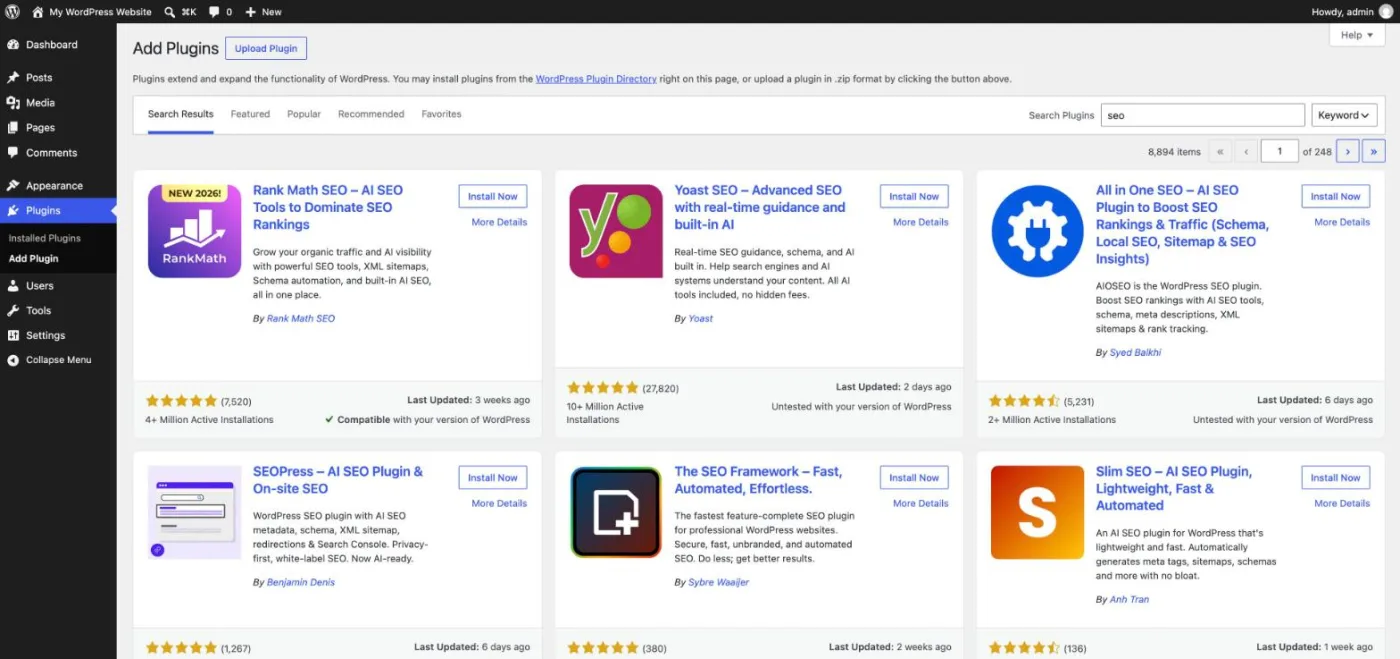
Wix adds schema markup automatically to blog posts, products and events, and lets you paste custom JSON-LD on any page or page type. WordPress core outputs very little structured data; SEO plugins generate a connected graph (organization, website, article, breadcrumb, author) and some add FAQ, how-to or product types. Both can reach the same result; WordPress gives developers more ways to automate it across thousands of pages.
For a site in several languages, Wix has the simpler path: Wix Multilingual is built in, each language gets its own URL and the hreflang tags are added for you. WordPress has no multilingual feature in core, so you add a plugin such as WPML, Polylang or TranslatePress, each with its own URL model and its own handling of translated slugs and sitemaps. The plugin route gives more control over translated URLs and content; it also adds one more component to maintain and test after every update.
The first hour after launch decides most of the technical SEO of a small site. Wix needs mostly checks; WordPress needs a few installs and settings.
On average, Wix sites are faster on real visitors' phones. In the October 2026 edition of the State of Core Web Vitals explorer by CoreWebVitals.io (Chrome field data, phones), 94.2% of Wix sites pass Largest Contentful Paint against 69.5% of WordPress sites, with a 75th percentile LCP of 1.6 seconds for Wix and 2.7 seconds for WordPress. On layout stability, 97% of Wix sites pass Cumulative Layout Shift against 90% of WordPress sites. Both platforms pass interaction responsiveness (INP) on 96% to 97% of sites.
| Core Web Vitals, phones (October 2026) | Wix | WordPress |
|---|---|---|
| Largest Contentful Paint, sites passing | 94.2% | 69.5% |
| LCP at the 75th percentile | 1.6 s | 2.7 s |
| Interaction to Next Paint, sites passing | 96% | 97% |
| Cumulative Layout Shift, sites passing | 97% | 90% |
| Sites in the sample | 5,623 | 63,295 |
The WordPress average hides a wide spread. A WordPress site on good hosting, with a light theme, page caching and optimized images, can be faster than any builder; a site on cheap shared hosting with a heavy page builder and dozens of plugins will be slow. Wix removes that variable: the platform controls hosting and delivery, so a beginner cannot make a bad hosting choice. Core Web Vitals work as a tie-breaker in Google's ranking, so speed alone never compensates for weak content, but a slow site loses visitors before they read anything.
Tip
On WordPress, three choices decide most of your speed: the host, the theme and the number of plugins. A lightweight theme plus a caching plugin usually moves LCP more than any other fix.
Wix is easier on day one. You pick a template, drag elements where you want them and publish; hosting, SSL and updates are already handled. Its free-positioning canvas suits people who think visually, with the counterpart that a layout built freely on desktop sometimes needs adjustments on mobile.
WordPress asks for more decisions before the first page: a host, a theme, a handful of plugins. Once set up, its block editor is comfortable for writing: you add paragraphs, headings, images, tables or buttons as blocks, and the side panel holds the settings that matter for SEO (slug, excerpt, featured image, categories, publication status). The learning curve comes from the ecosystem around the editor, not from the editor itself: knowing which plugin to trust, how to update safely, how to restore a backup.
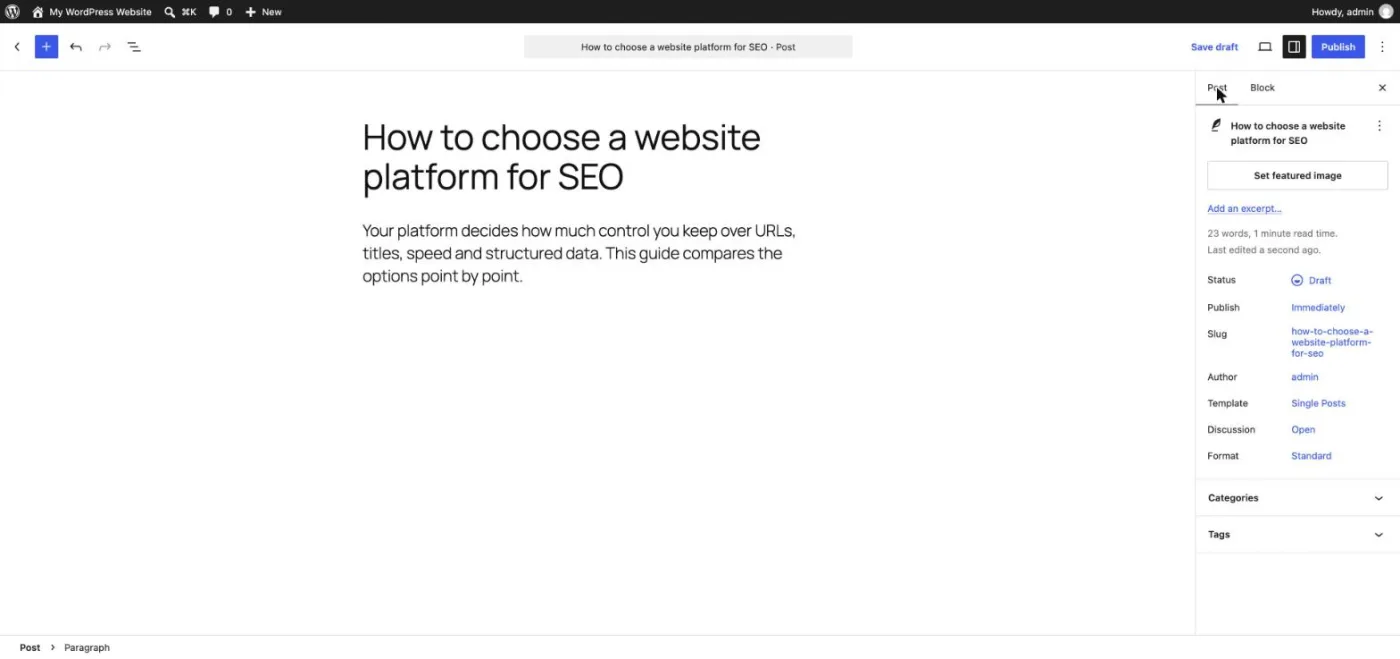
For a team where nobody wants to manage software, Wix saves time every month. For a team with one person comfortable with updates and plugins, WordPress quickly becomes as easy, and much more flexible.
Wix offers more design freedom without code; WordPress offers more design freedom with code. Wix provides hundreds of designer templates by industry, a canvas where any element can be placed anywhere, animations and a mobile view you adjust separately. The main limit is that switching to another template later means rebuilding the site, because content and layout are tied together.
WordPress separates content from presentation: your posts and pages live in the database, and the theme decides how they look. You can change themes without losing content, build templates with the site editor or a page builder, and hand a developer the code for anything custom. The counterpart is quality control: thousands of themes exist, and a heavy or poorly coded theme can slow the site and add messy markup. For SEO, choose a lightweight, well-maintained theme with clean heading structure, whichever platform you pick.
WordPress started as a blogging platform, and it shows: revisions, scheduled publishing, categories and tags, custom fields, multiple authors with roles, and an editor that handles long articles well. For a content strategy built on hundreds of articles, WordPress makes topic clusters, internal linking and bulk updates easier, especially with plugins that suggest internal links or let you edit titles across the whole site.
The Wix Blog covers the needs of most small businesses: categories, tags, authors, SEO settings per post, scheduled publishing and post templates. Its limits appear at scale, when you want custom article layouts per category, advanced filtering, custom fields on every post or programmatic updates of hundreds of articles at once. Our comparison of the best CMS for SEO covers the other options if content is your main acquisition channel.
Note
Whatever the platform, a blog grows faster when each new article links to two or three older ones on the same topic. Plan topics in clusters rather than one-off posts.
Wix bundles marketing tools in its plans: forms, email campaigns, social posts, automations, a contact list and built-in analytics, with limits that grow from the Light plan to Business Elite. Everything lives in one dashboard, connected to your site's contacts and orders, which saves a small team from stitching tools together.
WordPress leaves marketing to plugins and external services: a form plugin, an email marketing service connected through its own plugin, an analytics tag, a customer relationship tool. You choose the best tool for each job and keep your data where you want it, at the cost of more setup. For SEO, the difference matters less than for marketing: both connect to Google Search Console and Google Analytics, and both let you add tracking tags without code.
Wix includes e-commerce from its Core plan: product pages, payments, inventory, and automatic product markup for Google. It suits a small to medium catalog that needs to be online quickly, with shipping and taxes configured from one dashboard.
On WordPress, the store comes from WooCommerce, a free plugin published by Automattic and installed on millions of sites, with extensions for PayPal, Stripe, subscriptions, bookings or marketplaces. You get full control over product URLs, category pages and faceted filters, which matters for SEO on large catalogs, but you also manage the performance and security of a heavier site. WordPress.com sells a Commerce plan that bundles WooCommerce with managed hosting. For a store, the comparison also extends to dedicated platforms such as Shopify, which handle hosting like Wix while focusing only on selling.
To be cited by ChatGPT, Gemini, Perplexity or Claude, a site must let their crawlers in and offer clear, citable answers. Both platforms now give you the technical tools:
These settings open the door; content is what earns the citation: direct answers at the top of each section, sourced figures, comparison tables and pages that cover a question completely. To see whether AI assistants actually cite your brand, and who they cite instead, use AI mention tracking. Our study of the platforms AI assistants cite most also shows how much third-party sites weigh next to your own pages.
One difference remains in favor of WordPress for GEO at scale: control over the HTML. On WordPress, you can shape templates so that every article opens with a short answer, uses clean heading levels and outputs the same structured data on hundreds of pages at once. On Wix, you get clean, consistent markup without effort, but fewer ways to change it globally. For a site of twenty pages, both are equal; for a site of two thousand, templates make the difference.
For a business that serves customers in one city or region, both platforms rank equally well in local results, because local rankings depend mostly on the Google Business Profile, reviews, proximity and consistent name, address and phone number across the web. The website supports that profile with clear service pages, a page per location when you have several, and local business markup.
Wix adds business information to its automatic structured data and makes it easy to build a contact page with a map, booking and forms. On WordPress, an SEO plugin or a dedicated local SEO add-on generates the local business markup, and you can build location pages at scale from a template. A single-location business gains nothing decisive from either; a network of fifty branches is easier to manage with WordPress templates and custom fields.
Photos of your premises, team and work matter on local pages too. Both platforms let you write alt text on every image and serve images in modern formats. Wix compresses and resizes images automatically; on WordPress, image sizes are generated by core and compression usually comes from a plugin or the host. Oversized images are the most common cause of slow WordPress pages, so add compression on day one.
Wix is safer by default because you cannot touch the server: the platform patches its infrastructure, provides SSL and blocks most attacks before they reach your site. Your part is limited to strong passwords, two-factor authentication and careful management of collaborators.
WordPress core is maintained by a large security team and updated quickly when a flaw is found. Most compromised WordPress sites are hacked through an outdated plugin or theme, a weak password or a poorly configured host. A WordPress site stays secure when you keep core, themes and plugins updated, remove what you do not use, back up automatically and choose a host that isolates accounts. Managed WordPress hosting, or WordPress.com, takes most of that work off your hands.
For SEO, security is a ranking matter too: a hacked site can be flagged in Google's results, filled with spam pages or deindexed. If nobody will watch updates every month, the Wix model, or a managed WordPress host, is the prudent choice.
Wix has a single support team responsible for the whole platform: help center, step-by-step articles, and customer care by chat or callback depending on your plan, with priority support on the highest plan. When something breaks, there is one company to contact.
Self-hosted WordPress has no central support desk. Help comes from the official documentation and forums, your host, the developers of each plugin and theme (often with premium support for paid versions) and a very large community of freelancers and agencies. The answer to almost any question exists somewhere, but when a problem involves the host, a plugin and the theme at once, you have to find who is responsible. WordPress.com, by contrast, includes support from its own team on paid plans.
Wix charges one subscription that includes everything; WordPress is free software whose real cost is hosting, domain, premium plugins and maintenance time. Prices below were checked October 2026 on the official Wix plans page and WordPress.com pricing page, in US dollars, per month, before tax.
| Plan | Billed annually | Billed monthly | What it includes |
|---|---|---|---|
| Wix Free | $0 | $0 | Wix subdomain and Wix ads, no custom domain |
| Wix Light | $17 | Higher | Website without online selling, 2 GB storage |
| Wix Core | $29 | Higher | Accept payments, basic e-commerce, 50 GB storage |
| Wix Business | $39 | Higher | Standard e-commerce, 100 GB storage |
| Wix Business Elite | $159 | Higher | Advanced e-commerce, developer platform, unlimited storage |
| WordPress.com Personal | $4 | $9 | Hosted WordPress, plugins allowed, 6 GB storage |
| WordPress.com Premium | $8 | $18 | Premium themes, payment buttons, 13 GB storage |
| WordPress.com Business | $25 | $40 | Developer tools (SFTP, SSH), 50 GB storage |
| WordPress.com Commerce | $45 | $70 | WooCommerce store tools, 0% transaction fees |
| Self-hosted WordPress | Hosting price | Software free; budget for hosting, domain, premium plugins and maintenance time | |
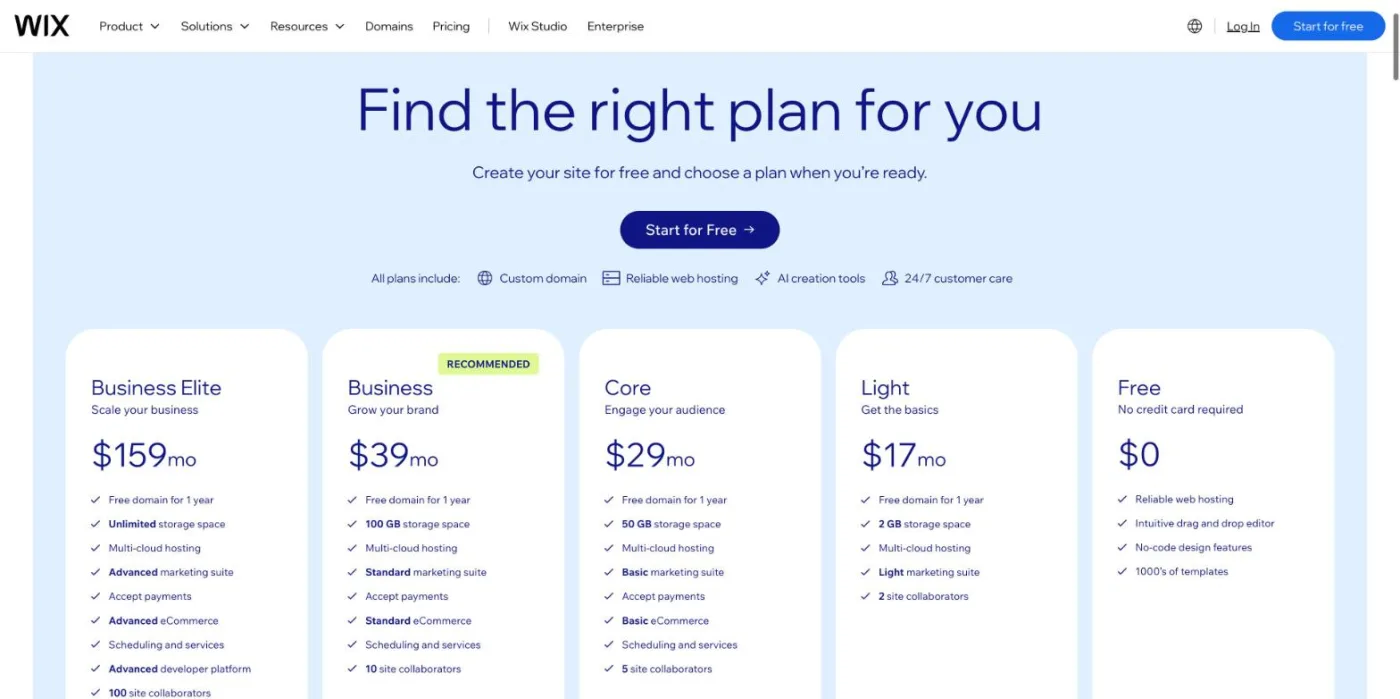
Wix also displays localized prices that can include tax depending on your country, and monthly billing costs more than the annual rate. The free plan carries Wix branding on a Wix subdomain, which is not suited to SEO since you cannot use your own domain.
Example
A small business blog with a contact form: Wix Light at $17 per month, against WordPress.com Personal at $4 or a self-hosted site where hosting is the main bill. If you need online payments, compare Wix Core at $29 with WordPress.com Commerce at $45.
The hidden cost of WordPress is time: updates, backups, security and plugin conflicts, or the price of a developer or managed host to handle them. The hidden cost of Wix is dependence: you rent the platform, its pricing can change, and you cannot take the site with you.
To compare fairly, estimate the cost over three years rather than the first month. On Wix, add the plan, the domain after the first free year and any paid apps. On WordPress, add hosting, the domain, premium themes or plugins renewed each year and the hours spent on maintenance, valued at your own rate or a developer's. For a simple site, the totals are often close; the gap opens when Wix apps pile up or when WordPress needs regular paid help.
Yes, if the move is planned. This is the most underestimated SEO difference between the two platforms. WordPress includes an export tool (Tools, Export) that downloads all posts, pages, comments and media references in an XML file, and you can move the site to any host. Wix does not offer a full-site export: leaving means rebuilding pages elsewhere and copying content, with blog posts and store products as the easiest parts to recover.
In both directions, rankings survive a move only when four conditions are met:
Our SEO migration checklist details each step. Expect a few weeks of ranking fluctuation even when everything is done right. If you think you might outgrow your first platform within three years, factor the cost of a migration into your choice today.
WordPress scales further, because you can change everything underneath it: move to a more powerful host, add a CDN and object caching, split the database, or call in developers for custom features. Some of the largest media and corporate sites run on WordPress, with enterprise hosting such as WordPress VIP.
Wix scales well within its model. The platform handles traffic peaks, hosting and security for you, and Wix Studio and the Velo developer platform add custom code, dynamic pages and data collections. The ceiling appears with very large catalogs, complex URL rules, unusual integrations or server-level needs that the platform does not expose. For SEO, the question to ask is simple: in three years, will your site need anything the platform cannot do? If the answer is probably yes, start where you can grow.
The short version: Wix trades control for simplicity, WordPress trades simplicity for control.
The right platform depends on who maintains the site and how far it must grow. Here is the verdict for the most common profiles.
Wix. A plumber, a clinic, a lawyer or a restaurant needs a fast site, a few service pages, a contact form and local SEO basics. Wix delivers that without maintenance, with speed that passes Core Web Vitals on most sites.
Wix for a small catalog that must be online this month, with payments from the Core plan. Choose WooCommerce on WordPress if you already know the catalog will grow into hundreds of products with filters and category pages.
WordPress with WooCommerce, on solid hosting. Control over product URLs, faceted navigation, canonical rules and structured data pays off once the catalog runs into thousands of pages.
WordPress. Revisions, roles, custom fields, topic clusters and plugins for internal linking make it the reference for a blog meant to become your main acquisition channel.
Wix for a visual portfolio you want to design freely; WordPress.com if writing is the core of your work and you want a portable site without server management.
WordPress when clients need custom features and ownership of their site; Wix (or Wix Studio) when they want to edit pages themselves and never hear about updates. Many agencies offer both and decide per project.
On either platform, organic traffic comes from publishing useful content regularly and keeping the technical basics clean. Sorank is our product: an SEO and GEO software in autopilot that finds the keywords your site can win, writes optimized articles with sources, internal links and images, and publishes them automatically on WordPress and Wix (as well as Shopify and Webflow, or any site through a webhook), or saves them as drafts for review. The blog article generator connects in a few minutes, and plans start at $49 per month billed annually with a 3-day free trial: see Sorank pricing.
Choose the platform you can maintain every month; the content you publish on it decides your rankings and your citations in AI answers.

No. Google ranks pages on relevance, quality, links and page experience, not on the platform behind them. WordPress offers more technical control for large or complex sites, while Wix handles speed and the SEO basics by default. A well-built Wix site can rank above a poorly maintained WordPress site, and the reverse.
At the start, yes: WordPress asks you to choose a host, a theme and plugins, then to keep them updated, while Wix bundles everything in one editor. Once set up, the WordPress block editor is comfortable for writing pages and articles. The extra effort is mostly maintenance, which managed hosting or WordPress.com can take over.
Both have free options, with limits. The Wix free plan and the WordPress.com free plan put your site on their subdomain with platform branding, which is not suited to SEO. The WordPress software itself is free, but you pay for hosting and a domain to put it online.
We analyse your competitors, your website and your AI visibility to create a tailored content plan for free.
 AI Content Brief Generator
 FAQ Schema Generator
 AI Blog Post Ideas Generator
 Structured Data Validator (Schema Validator)
 Alt Text Checker
 Internal Link Analyzer
 Backlink Challenge
 AI Meta Description Generator
 AI Blog Title Generator
 Google Indexability Checker
 AI Blog Outline Generator
 UTM Link Builder
 Keyword Clustering Tool
 Canonical Tag Checker
 XML Sitemap Generator
 Broken Link Checker
 AI SEO Title Generator
 Headline Analyzer
 SERP Preview Tool
 Redirect Checker
 Hreflang Tag Generator
 Heading Structure Analyzer
 HTTP Headers Checker
 Favicon Extractor
 SERP CTR Calculator
 SEO vs Paid Search Savings Calculator
 SEO Share of Voice Calculator
 SEO ROI Calculator
 SEO Traffic and Revenue Forecast Calculator
 SEO Budget Calculator
 SEO Break-Even Calculator
 SaaS SEO ROI Calculator
 ROAS Calculator
 Reading Time Calculator
 Ranking Gain Simulator
 Organic Traffic Value Calculator
 Organic Traffic Estimator and Website Traffic Checker
 LTV to CAC Ratio Calculator
 Local SEO ROI Calculator
 Link Building Cost Calculator
 Keyword Value Calculator
 Keyword Opportunity Score Calculator
 Keyword Density Calculator
 GEO ROI Calculator
 GEO Content Investment Calculator
 Ecommerce SEO ROI Calculator
 Customer Lifetime Value Calculator
 Customer Acquisition Cost Calculator
 CTR Calculator
 Cost Per Article Calculator
 Conversion Rate Calculator
 Content Marketing ROI Calculator
 ChatGPT Referral Traffic Estimator
 Bounce Rate Calculator
 Backlink ROI Calculator
 AI Visibility Score Calculator
 AI Traffic Value Calculator
 AI Share of Voice Calculator
 Cost of AI Invisibility Calculator
 AI Citation Rate Calculator
 llms.txt Validator
 AI Overview Checker and AI Overviews Rank Checker
 Robots.txt Checker
 AI SEO Audit
 LLM Readability Checker
 SearchGPT Readiness Checker
 Structured Data LLM Audit
 Website Crawlability AI Audit
 Why ChatGPT Is Not Recommending My Website
 Gemini Ranking Tool
 Perplexity Ranking Checker
 LLM Citation Checker
 Answer Engine Optimization Audit
 GEO Audit
 AI Search Visibility Test
 ChatGPT Visibility Checker
 llms.txt Generator
 URL Extractor
 Webpage to Markdown
 Sitemap Checker
 SERP Volatility Sensor
 Page Size Checker
 Word Counter
 Slug Generator
 Schema Generator
 Robots Generator
 OG Preview
 Meta Tags Generator
 Image Compressor
 Favicon Generator
 On-Page SEO Audit: SEO Checker and SEO Analyzer
 Backlink Analysis Tool
 Keyword Research Tool
 Domain Authority Checker
THEY TRIED SORANK BEFORE YOU
 “I tested Sorank on a real client site and it's insane. It does everything an agency would bill you $1500 a month for. It's going into production on that client now.”
 Guillaume Guersanguersanguillaume.com“We are an Ads agency and we wanted to get our SEO back on track once and for all. Sorank gave us a clear view of our site, helped us prioritize optimizations, and properly structure our content. The tool is easy to use, well designed for a team, and very practical for centralizing tracking without having to juggle multiple platforms. A very solid foundation to start fresh with our SEO.”
 Gaspard MadouiAds Agency
 “I just let the Sorank software do its thing, and now my DR is 25 and my page is ranking higher.”
 Lucas Flandrefoundertrace.fr“I specialized in GEO thanks to Sorank. The GEO Leaderboard allows me to show my clients their position vs competitors on ChatGPT. It’s a real commercial differentiator.”
 MélanieSEO Freelance“Great service, works well for our website and helps us understand how to improve it to rank better on Google and elsewhere. Congrats, keep going, I recommend it.”
 Hugo T.E-commerce merchant