Preferences
Privacy is important to us, so you have the option of disabling certain types of storage that may not be necessary for the basic functioning of the website. Blocking categories may impact your experience on the website. More information
Privacy is important to us, so you have the option of disabling certain types of storage that may not be necessary for the basic functioning of the website. Blocking categories may impact your experience on the website. More information

An SSL certificate proves a website's identity and sets up encryption between visitors and the server. Learn the types and how to get one free.







Founder Sorank, 7+ years in SEO.
Summary
An SSL certificate is a digital file that proves a website's identity and lets a browser set up an encrypted connection with that website. A trusted certificate authority signs the file after it checks who owns the domain. Today the connection runs on TLS, but the name SSL stays in common use.
Want to go further? Ask
SSL certificate is the file that makes HTTPS work. When you see a padlock next to a web address, the browser has checked this file and set up encryption with the server. The certificate does two jobs. It proves the server is the one it claims to be, and it gives the browser the key it needs to scramble the data sent between the two of them.
An SSL certificate links a public key to a name, usually a domain such as example.com. It also names the issuer, the certificate authority that signed it, and a validity period with a start date and an end date. The IETF standard that defines this format, RFC 5280 for X.509 certificates, describes it as a data structure that binds a public key to a subject, and a trusted certification authority signs it to vouch for that binding.
Because a trusted authority signs the file, a browser can check the signature and trust the name without asking the server to prove anything else. If the signature is missing or the authority is unknown, the browser stops and warns the visitor.
The certificate does its work during the handshake, the short exchange that happens before any page loads. In plain terms, the steps are these:
If a check fails, the visitor sees a warning page instead of your content. That is why a certificate problem can cost you a visitor before they read a single line.
SSL was the first protocol built for this job. Its later versions were replaced by TLS, short for Transport Layer Security. The old SSL versions are no longer considered safe, and every certificate sold or issued today is used with TLS.
People still say SSL out of habit. So when a hosting menu or a product page says "SSL certificate," it means the certificate used for TLS. The name is old, but the file does the same job.
Certificates differ in how much the authority checks before it signs. Three validation levels are common:
| Type | What the authority checks | Typical use |
|---|---|---|
| Domain Validated (DV) | That you control the domain. | Blogs, shops and most websites. |
| Organization Validated (OV) | The domain and the company behind it. | Business sites that want the owner's details checked. |
| Extended Validation (EV) | The most thorough check of the legal entity and its registration. | Large companies and banks that need the highest level of checks. |
Certificates also differ by scope. A single-domain certificate covers one name. A wildcard certificate covers every subdomain of one domain, such as *.example.com. A multi-domain certificate covers several different names in one file, listed in the subject alternative name (SAN) field.
You get a certificate from a certificate authority, either a paid one or a free one. Let's Encrypt is the best-known free option. It states that it does not charge a fee for its certificates, although some hosting providers add a small fee for the service they wrap around them. Its default certificates are valid for 90 days, and it also offers short-lived certificates that last six days.
Because a certificate expires so quickly, renewal should run on a script or a scheduled task, not by hand. Many hosts also offer a certificate in their control panel, which does these steps for you.
Before the authority signs, it asks you to prove that you control the domain. With the HTTP-01 challenge, your ACME client, the software that talks to the authority, puts a file on your web server at a fixed address under /.well-known/acme-challenge/. With the DNS-01 challenge, you publish a TXT record named _acme-challenge under your domain in the DNS. Either way, the authority checks the proof, then signs the certificate. The certificate is then installed on the server, and the site starts to serve HTTPS.
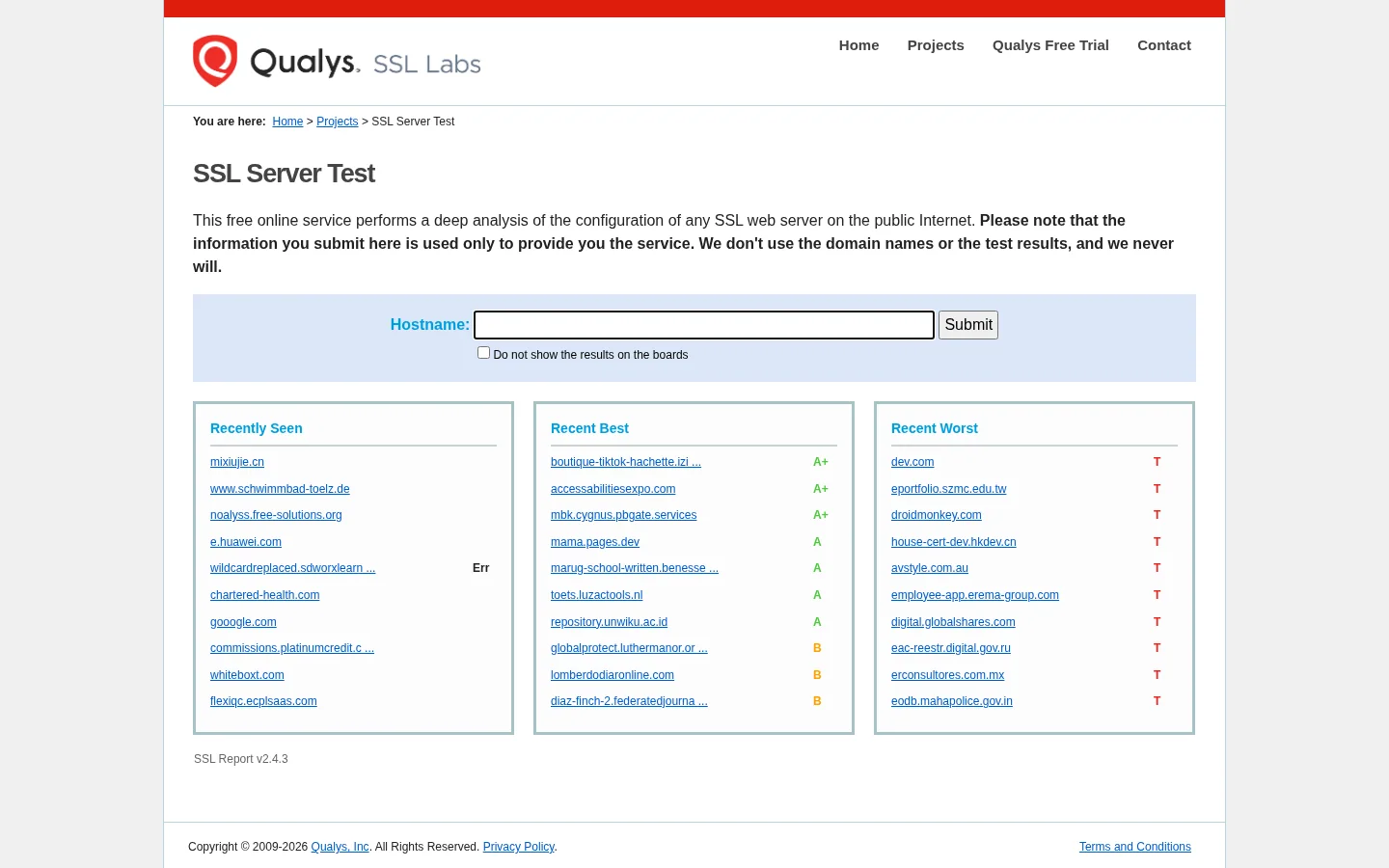
Click the padlock in your browser to see who issued the certificate and when it expires. For a full review, use a public test. Qualys SSL Labs runs a free server test that analyzes the SSL and TLS setup of a site and gives it a grade. You enter a hostname, and you do not need an account.
For a quick look at the response headers that come with your pages, Sorank's free HTTP headers checker shows what a server sends back for any URL.
Example
A shop moves from http://shop.example.com to a secure address. The new certificate is installed, but the old http:// addresses still load. Visitors who type the old address see no padlock, and search engines find two copies of every page. Adding a redirect from each old address to its secure twin fixes both problems.
Most certificate problems show up as a warning in the browser. These four errors are the usual causes.
What it is: the certificate has passed its end date. How to spot it: the browser shows a warning that the connection is not private, and the certificate details show a past expiry date. How to fix it: renew the certificate and install it on the server. Automate the renewal, because a 90-day certificate expires often.
What it is: the certificate was issued for another name, such as www.example.com while visitors use example.com, or the site moved to a new domain. How to spot it: the browser warns that the name on the certificate does not match the address. How to fix it: request a certificate that lists every name your visitors use in its subject alternative name field.
What it is: a page loads over HTTPS, but some images, scripts or styles load from plain HTTP addresses. How to spot it: the padlock is missing, or the browser console lists mixed content warnings. How to fix it: change each address so it starts with https://.
What it is: after a move to HTTPS, the old HTTP addresses still show a page instead of sending visitors to the secure version. How to spot it: type the http:// address of a page and see whether it stays on http. How to fix it: set a 301 redirect from each HTTP address to its HTTPS address. On nginx, the rule is one line inside the port 80 server block:
return 301 https://$host$request_uri;Tip
Set a reminder well before each expiry date, and check the certificate after every server change. A renewal that fails silently is one common way a secure site suddenly shows a warning.
Google first announced HTTPS as a ranking signal in a blog post on its Search Central blog. Google called it a very lightweight signal, one that affected fewer than 1% of global queries at the time. A valid certificate will not lift a weak page to the top, so do not expect a jump in rankings from HTTPS alone.
The real value is access and trust. Search engines and AI bots must reach your pages to read them, and a broken HTTPS setup can make that harder. A crawlability problem caused by an expired or mismatched certificate looks like missing pages, even though the content is fine. Visitors who see a warning also leave before they read anything, so they do not link to you or share your page.
A valid certificate sits inside your technical SEO, next to redirects and the signals that tell engines which pages to index. For a deeper look at moving a site to HTTPS, read HTTPS and SEO: ranking impact, safe migration and common errors.
Sorank's free SEO tools include an on-page SEO audit and the headers checker above, so you can check the basics of a page before you publish it.
An SSL certificate proves a site's identity and sets up encryption between a visitor and your server. Free certificates from Let's Encrypt are enough for many small sites, but they expire quickly, so set up renewal once and check it regularly. Keep every name and every resource on HTTPS, and the warning will not appear.
Sources
Not exactly. HTTPS is the secure version of the web protocol, and the SSL certificate is one of the things that makes it work. A browser will not trust an HTTPS connection unless the server presents a valid certificate.
Some are. Let's Encrypt issues free certificates, and many hosting providers include one in their control panel. Paid certificates from commercial authorities add checks on the owner. The encryption is the same, so a free certificate protects your visitors well for most sites.
Usually the certificate has expired, its name does not match the address, or it was signed by an authority the browser does not trust. Open the certificate details to see which problem applies, then fix it on the server.
 “I tested Sorank on a real client site and it's insane. It does everything an agency would bill you $1500 a month for. It's going into production on that client now.”

 Guillaume Guersanguersanguillaume.com“We are an Ads agency and we wanted to get our SEO back on track once and for all. Sorank gave us a clear view of our site, helped us prioritize optimizations, and properly structure our content. The tool is easy to use, well designed for a team, and very practical for centralizing tracking without having to juggle multiple platforms. A very solid foundation to start fresh with our SEO.”
 Gaspard MadouiAds Agency
 “I just let the Sorank software do its thing, and now my DR is 25 and my page is ranking higher.”
 Lucas Flandrefoundertrace.fr“I specialized in GEO thanks to Sorank. The GEO Leaderboard allows me to show my clients their position vs competitors on ChatGPT. It’s a real commercial differentiator.”
 MélanieSEO Freelance“Great service, works well for our website and helps us understand how to improve it to rank better on Google and elsewhere. Congrats, keep going, I recommend it.”
 Hugo T.E-commerce merchant