Preferences
Privacy is important to us, so you have the option of disabling certain types of storage that may not be necessary for the basic functioning of the website. Blocking categories may impact your experience on the website. More information
Privacy is important to us, so you have the option of disabling certain types of storage that may not be necessary for the basic functioning of the website. Blocking categories may impact your experience on the website. More information

Learn how breadcrumbs help SEO, which type to use, the exact HTML and BreadcrumbList schema, and how to add them in  WordPress, WooCommerce and
 Shopify.
In short
Breadcrumbs are a short trail of links, such as Home › Shoes › Running shoes, that shows where a page sits in your site. For SEO, they add internal links to parent pages, explain your hierarchy to Google and AI models, and can replace the raw URL in desktop results when you add BreadcrumbList markup.
Want to go further? Ask
Quick quiz
Is SEO right for you, and how should you start?
Sorank matches your answers


Test it for 3 days on your own site and see where you stand on Google, ChatGPT and the other AIs.
Start 3-day free trial3 days free, then stop whenever you want. 90-day results guarantee, conditions apply.
A breadcrumb trail is a secondary navigation that lists the parent pages of the current page, from the top of the site down to the page you are reading. It usually sits just above the title, in small text, with a separator between each step. The name comes from the Hansel and Gretel tale, where the children drop crumbs to find their way home.
Breadcrumbs answer one question for the visitor: "where am I, and what is one level up?" Someone who lands on a product page from Google never saw your home page or your menu. The trail gives them the context in one glance and a one-click way to the category.
Every trail has the same four parts. Get each one right and most of the SEO work is done.
| Part | Example | Rule |
|---|---|---|
| Root | Home | Link to the home page. Optional in the markup, useful on the page. |
| Intermediate levels | Shoes › Running shoes | Each one is a link to a real, indexable page. |
| Separator | › or / | Added with CSS, so screen readers do not read it out. |
| Current page | Trail Runner X2 | Plain text, never a link, styled differently. |
They are not your main menu. The Nielsen Norman Group puts it first in its 11 breadcrumb design guidelines by Page Laubheimer: breadcrumbs supplement the global navigation, they never replace it. They are also not a copy of your URL. Google's own BreadcrumbList documentation asks for trails that reflect "a typical user path" to the page, not necessarily the folder structure of the address. A product at /p/48213 can still have a clean trail Home › Shoes › Running shoes.
For a short definition to share with a colleague, see our glossary entry on breadcrumb navigation and its markup. This guide goes further: which type to choose, how to write the HTML and the schema, how to set it up in WordPress and other platforms, and how to check it.
Breadcrumbs do not lift rankings on their own. What they do is give Google and AI models a clear map of your hierarchy, send internal links to your category pages from every child page, and make your result easier to read on desktop. Those three effects add up, which is why almost every large site uses them.
Every product or article page links back to its parent category. On a store with 2000 products split into 20 categories, each category gets around 100 extra links from relevant pages, with a short, exact anchor text. That is the cheapest internal linking you will ever build, and it points exactly where you want authority to flow: to the category pages that target your broadest, most valuable keywords.
Breadcrumbs also shorten click depth. A deep article buried four clicks from the home page becomes reachable from every sibling page through its category. For the wider plan, read our guide on building an internal linking strategy around priority pages.
A trail is a plain statement of hierarchy: this page belongs to this category, which belongs to this section. Google reads it in the HTML links and, more precisely, in the BreadcrumbList markup. AI models that read your pages, such as ChatGPT, Claude and Gemini, get the same signal: they can tell that your "Trail Runner X2" page is a running shoe, sold by a shoe store, without guessing from the text. Our article on which structured data helps AI search covers the limits of that effect: markup helps understanding, it does not force a citation.
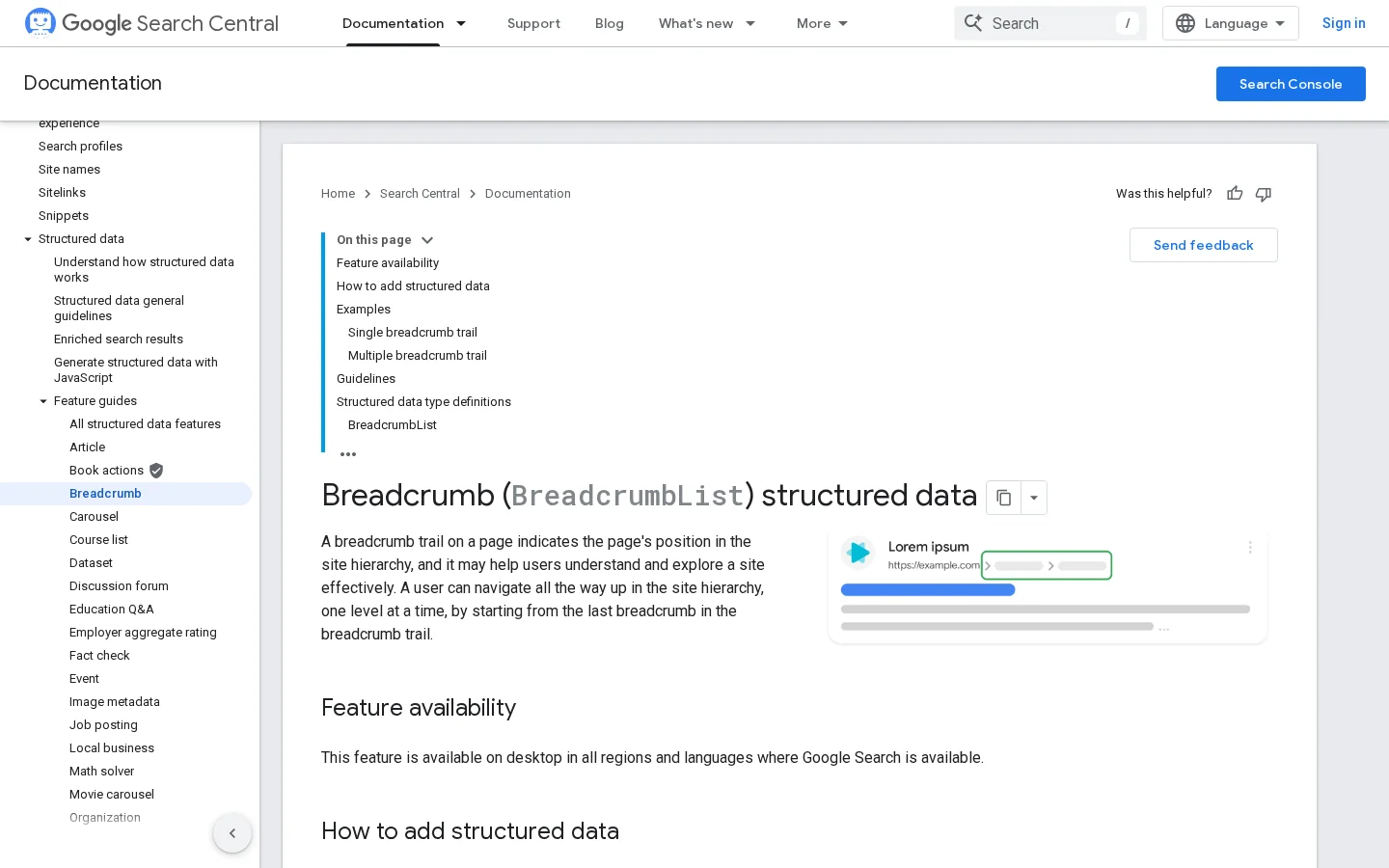
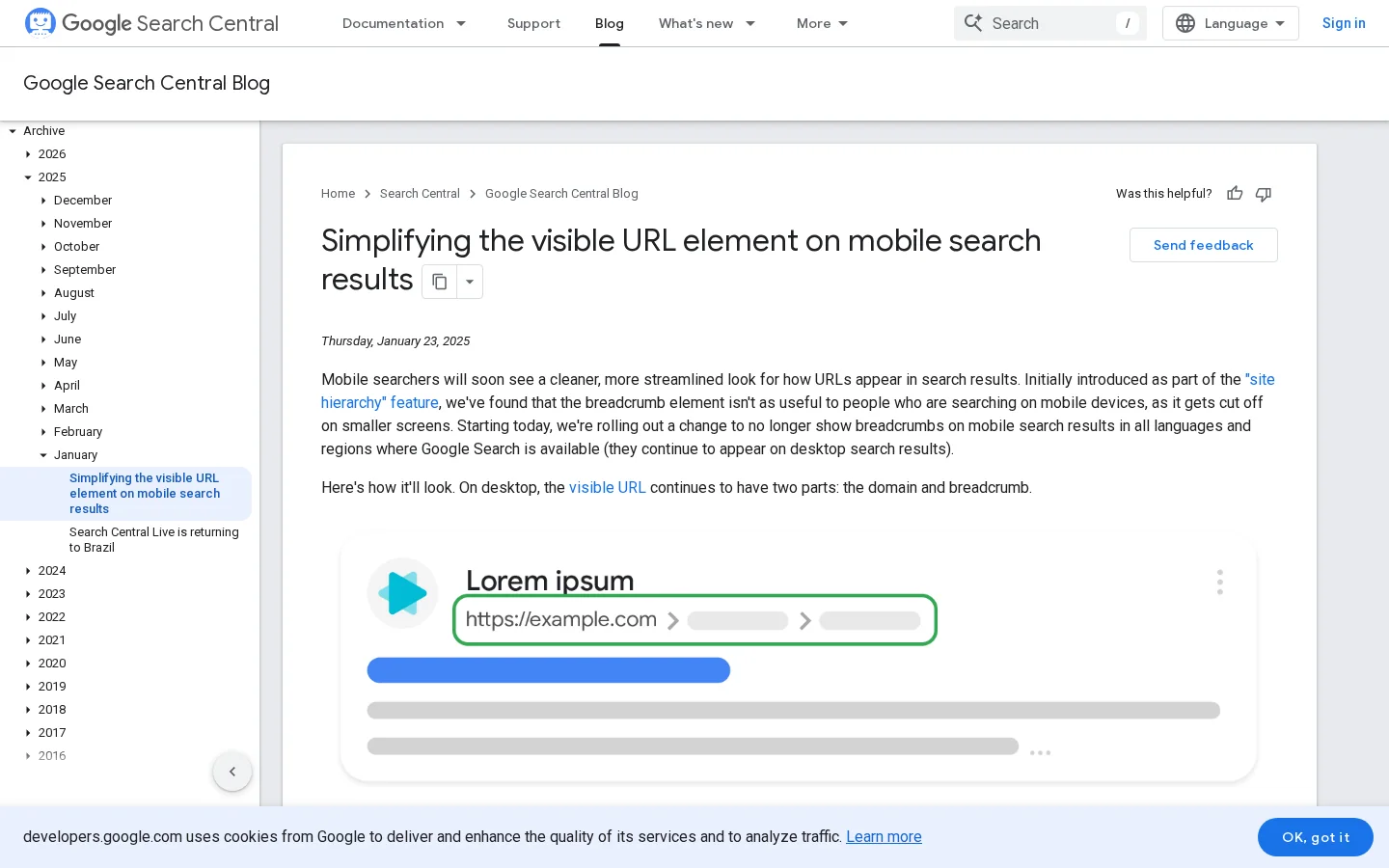
Since 2009, Google has shown the breadcrumb trail in place of the raw URL above the title of a result. On January 23, 2025, Caitlin Dorsey, product manager on Google Search, announced on the Search Central blog that breadcrumbs would no longer show on mobile results, where the visible URL is now the domain only. Desktop results keep the trail, and Google adds: "If you're using breadcrumb markup, there's nothing you need to do."
So keep the markup. It still shapes desktop results, it still feeds the Breadcrumbs report in Search Console, and it still describes your structure to every system that reads your pages.
The user benefit is real but not universal. In the competing Semrush article, the head of SEO at MEDvidi reports that fewer than 0.5% of blog visitors clicked the breadcrumbs, so the team removed them from the blog. That is one site, one section. On a store or a documentation site with deep hierarchies, the trail is often the fastest way back to a list of products. Measure clicks on your own trail before you judge it.
Breadcrumbs in Google, the key facts
Sources: Google Search Central (BreadcrumbList documentation, blog of January 23, 2025), Nielsen Norman Group, Semrush blog (MEDvidi example)

There are three types: hierarchy-based (location), attribute-based and history-based (path). For SEO, the hierarchy-based trail is the one to build on every page. Attribute trails are a useful extra on filtered pages, and history trails should be avoided.
Principle: the trail shows the fixed place of the page in the site, from the home page down. It is the same for every visitor.
When to use it: on any site with at least three levels: stores, blogs with categories, documentation, local service sites with city pages.
Pros: stable, cacheable, easy to mark up, matches what Google expects in BreadcrumbList.
Limits: a page that belongs to two categories needs a choice (see the section on polyhierarchy below).
Example: Home › Guides › Technical SEO › Breadcrumbs.
Principle: the trail lists the filters or attributes that define the current list: Home › Shoes › Running › Size 42 › Waterproof.
When to use it: on e-commerce listings with facets, usually under a hierarchy trail, often as removable "chips".
Pros: visitors see and undo their filters in one click.
Limits: each attribute step links to a filter URL. If those URLs are blocked, canonicalized or set to noindex, you are sending internal links to pages you do not want indexed. Keep attribute steps out of the BreadcrumbList markup and follow the rules in our guide to faceted navigation SEO and filter pages.
Principle: the trail lists the pages this visitor opened before, in order.
When to use it: almost never. The back button already does it, and Nielsen Norman Group's second guideline is to reflect the hierarchy, not the session history.
Limits: the trail changes for every visitor, so Googlebot sees a trail that means nothing, often a single "Home" step. It also breaks caching.
| Type | Same for everyone | Good for BreadcrumbList | Best use | Main risk |
|---|---|---|---|---|
| Hierarchy-based | Yes | Yes | Every multi-level site | Pages in two categories |
| Attribute-based | No, depends on filters | No, keep it out of the markup | Filtered product lists | Links to non-indexable filter URLs |
| History-based | No | No | None for SEO | Empty or random trail for crawlers |
Hierarchy trail vs history trail
A good trail follows your real hierarchy, has one path per page, links only to real pages, ends with the current page as plain text, and uses short labels that match the target keyword of each parent page. Decide these rules once, before any code.
Your breadcrumbs should mirror the structure you would draw on a whiteboard: home, sections, categories, pages. If that structure is unclear, fix it first. Our guide to site architecture for SEO shows how to plan it, and a semantic cocoon is one way to organize topics so each level has a clear parent.
This is the hardest case. A "waterproof trail shoe" belongs to Running, to Hiking and to Sale. Nielsen Norman Group recommends showing one canonical path, not several, and not a personalized one. In practice:
/running/trail-runner-x2, the trail goes through Running.The label of each parent is the anchor text of a link to that parent, repeated on every child page. Use the short name of the category's target keyword: "Running shoes", not "Our wonderful collection of running shoes" and not "Category 4". Keep it short enough to fit on one line on mobile. For the current page, use a shortened title if the full title is long; both Yoast and Rank Math have a "breadcrumb title" field for this.
Every step except the last must be a link to a real, indexable page that returns a 200 status. A step that points to a redirect, a 404 or a noindex page wastes the link. If a level has no page (for example a "Products" label that is only a menu heading), either create a useful hub page or remove the level.
Trail design rules
A correct breadcrumb has two layers: a visible, accessible HTML trail and a BreadcrumbList block in JSON-LD that says exactly the same thing. Most plugins write both for you, but you need to know what good output looks like to check it.
The W3C breadcrumb pattern of the WAI-ARIA Authoring Practices sets three rules: the trail sits in a navigation landmark, that landmark has a label, and the current page carries aria-current="page". An ordered list adds the notion of order for screen readers.
<nav aria-label="Breadcrumb" class="breadcrumb">
  <ol>
    <li><a href="https://example.com/">Home</a></li>
    <li><a href="https://example.com/shoes/">Shoes</a></li>
    <li><a href="https://example.com/shoes/running/">Running shoes</a></li>
    <li><span aria-current="page">Trail Runner X2</span></li>
  </ol>
</nav>Draw the separator with CSS, so it is not part of the text that screen readers and AI models read. On mobile, Nielsen Norman Group advises against trails that wrap onto several lines and asks for tap targets of at least 1 cm by 1 cm. A horizontal scroll on one line solves both.
.breadcrumb ol {
  display: flex;
  flex-wrap: nowrap;
  overflow-x: auto;
  list-style: none;
  margin: 0;
  padding: 0;
  font-size: 0.875rem;
}
.breadcrumb li {
  white-space: nowrap;
}
.breadcrumb li + li::before {
  content: "›";
  padding: 0 0.5em;
  color: #6b7280;
}
.breadcrumb a {
  display: inline-block;
  padding: 0.5em 0;
}
.breadcrumb [aria-current="page"] {
  color: #374151;
  font-weight: 600;
}Google's documentation lists three properties for each ListItem: position (1 is the start of the trail), name (the label) and item (the URL). The list needs at least two items. The item can be left out on the last entry, and Google then uses the URL of the page itself.
<script type="application/ld+json">
{
  "@context": "https://schema.org",
  "@type": "BreadcrumbList",
  "itemListElement": [
    {
      "@type": "ListItem",
      "position": 1,
      "name": "Shoes",
      "item": "https://example.com/shoes/"
    },
    {
      "@type": "ListItem",
      "position": 2,
      "name": "Running shoes",
      "item": "https://example.com/shoes/running/"
    },
    {
      "@type": "ListItem",
      "position": 3,
      "name": "Trail Runner X2"
    }
  ]
}
</script>
Three details that most guides skip:
When a page really has two useful paths, Google accepts an array of BreadcrumbList objects. Each trail restarts at position 1.
[
  {
    "@context": "https://schema.org",
    "@type": "BreadcrumbList",
    "itemListElement": [
      { "@type": "ListItem", "position": 1, "name": "Running shoes", "item": "https://example.com/shoes/running/" },
      { "@type": "ListItem", "position": 2, "name": "Trail Runner X2" }
    ]
  },
  {
    "@context": "https://schema.org",
    "@type": "BreadcrumbList",
    "itemListElement": [
      { "@type": "ListItem", "position": 1, "name": "Hiking", "item": "https://example.com/hiking/" },
      { "@type": "ListItem", "position": 2, "name": "Trail Runner X2" }
    ]
  }
]
Warning
The old data-vocabulary.org format for breadcrumbs is dead. Google announced the end of its support on January 21, 2020 and started the rollout in July 2020. If your theme still outputs data-vocabulary.org/Breadcrumb, replace it with schema.org BreadcrumbList.
For the broader picture of types and syntax, see our schema markup definition.
In WordPress, the fastest way is an SEO plugin: Yoast SEO or Rank Math both output the visible trail and the BreadcrumbList schema. You turn breadcrumbs on in the plugin settings, then place them in your theme with a block, a shortcode or one line of PHP. Many recent themes do the placement for you.
Breadcrumbs in WordPress in 6 steps
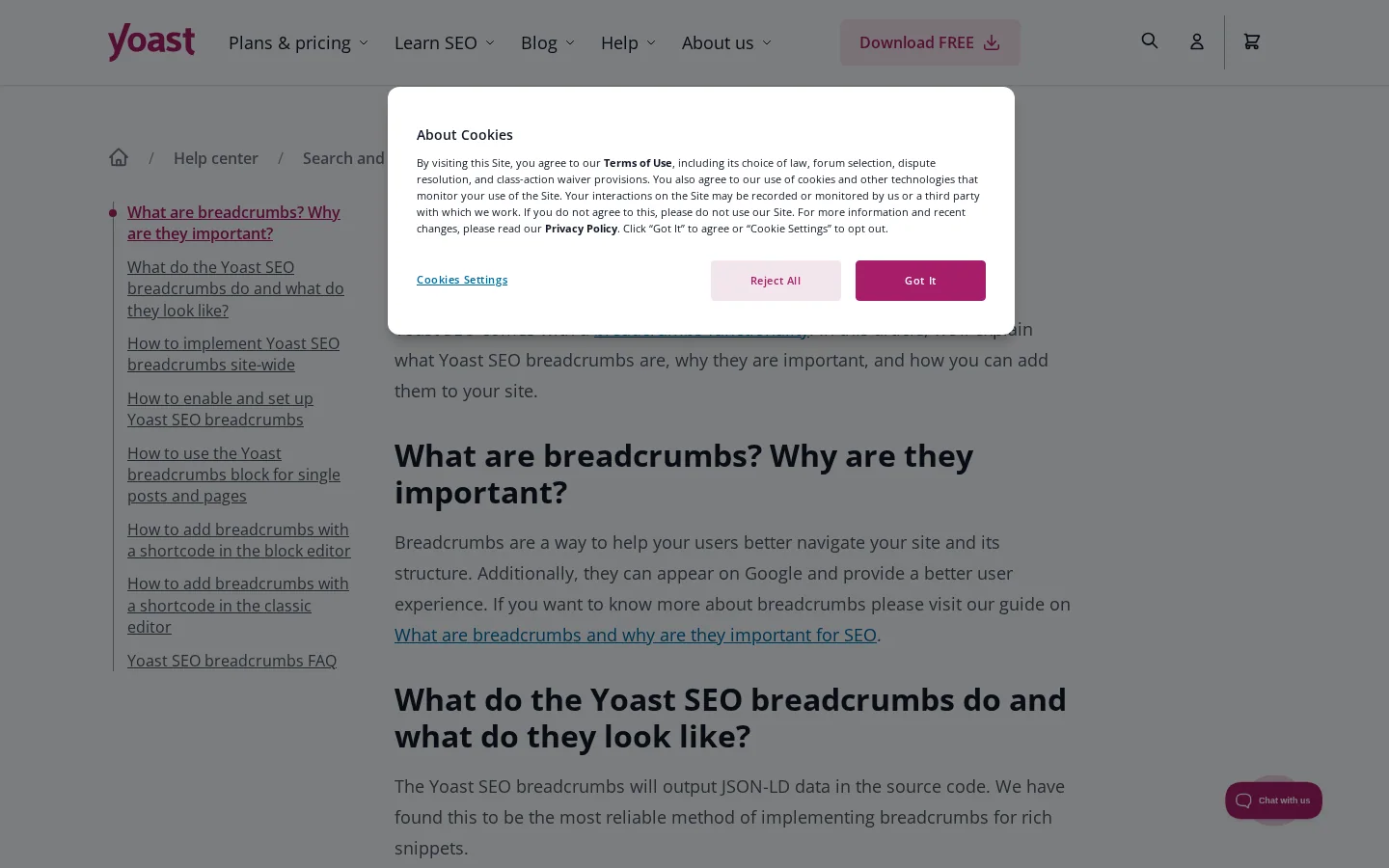
The Yoast help article on implementing breadcrumbs describes the process. Breadcrumbs are off by default.
single.php and page.php just above the title, or at the end of header.php.[wpseo_breadcrumb]<?php
if ( function_exists( 'yoast_breadcrumb' ) ) {
yoast_breadcrumb( '<p id="breadcrumbs">', '</p>' );
}
?>Yoast warns that theme updates can overwrite this edit: work in a child theme, back up first. To change the trail itself, Yoast offers a primary category on posts, a custom breadcrumb title per post or term, and three filters for developers: wpseo_breadcrumb_links (the whole trail), wpseo_breadcrumb_single_link (one item) and wpseo_breadcrumb_separator.
Here is a common use of the first filter: inserting the blog page between Home and the category on posts.
add_filter( 'wpseo_breadcrumb_links', function ( $links ) {
  if ( is_singular( 'post' ) ) {
    $blog_id = (int) get_option( 'page_for_posts' );
    if ( $blog_id ) {
      array_splice( $links, 1, 0, array(
        array(
          'url'  => get_permalink( $blog_id ),
          'text' => get_the_title( $blog_id ),
        ),
      ) );
    }
  }
  return $links;
} );
add_theme_support( 'rank-math-breadcrumbs' ) if you build the theme.[rank_math_breadcrumb]<?php if ( function_exists( 'rank_math_the_breadcrumbs' ) ) rank_math_the_breadcrumbs(); ?>The primary taxonomy used in the trail is set in Rank Math SEO › Titles & Meta › Posts › Primary Taxonomy, and each post or category has a "Breadcrumb Title" field in its Advanced tab. Not sure which plugin to keep? Our comparison of Rank Math and Yoast for WordPress SEO goes through the differences.
On block themes such as Twenty Twenty-Four, you have no single.php to edit. Go to Appearance › Editor › Templates, open the Single Posts template, add a Shortcode block above the title with your plugin's shortcode (or the Yoast Breadcrumbs block), and save. The trail then shows on every page that uses that template. Repeat for the Pages, Archive and, on a store, Single Product templates.
WooCommerce prints its own breadcrumbs on product and shop pages. If you also add a plugin trail, you get two. Yoast SEO for WooCommerce has a "Replace WooCommerce breadcrumbs" option, on by default. With Rank Math, its documentation gives a short function to remove WooCommerce's trail before adding its own:
function remove_wc_breadcrumbs() {
  remove_action( 'woocommerce_before_main_content', 'woocommerce_breadcrumb', 20, 0 );
}
add_action( 'init', 'remove_wc_breadcrumbs' );
Then view the source of a product page and count the BreadcrumbList blocks: you want exactly one (or one array, if you chose two trails on purpose).
Tip
If Sorank publishes your blog, it syncs your WordPress categories and files each article in the right section, so the trail of every new article lands in the right category from day one. See how Sorank works with WordPress for SEO and GEO.
Outside WordPress, you usually write the trail yourself: one template snippet for the visible HTML and one for the JSON-LD, fed by the same data so they can never disagree.
Many Shopify themes include a breadcrumb option in the theme editor. If yours does not, add a snippet. The catch is the collection object: it only exists when the visitor reached the product through a collection URL (/collections/running/products/x2). On the canonical /products/x2 URL, the one Google indexes, it is empty. So fall back on a fixed collection, here the first one of the product (a product metafield with a "primary collection" is cleaner).
{%- liquid
  assign crumb_collection = collection
  if crumb_collection == blank and product
    assign crumb_collection = product.collections.first
  endif
-%}
<nav aria-label="Breadcrumb" class="breadcrumb">
  <ol>
    <li><a href="{{ routes.root_url }}">Home</a></li>
    {%- if product and crumb_collection -%}
      <li><a href="{{ crumb_collection.url }}">{{ crumb_collection.title }}</a></li>
      <li><span aria-current="page">{{ product.title }}</span></li>
    {%- elsif collection -%}
      <li><span aria-current="page">{{ collection.title }}</span></li>
    {%- endif -%}
  </ol>
</nav>
Check that your theme does not already print a BreadcrumbList in its own JSON-LD, then add yours from the same variables.
On a site built with Next.js, Astro, Nuxt or a custom back end, build the trail from one array and generate both outputs from it. Render it on the server, so the links and the JSON-LD are in the HTML that crawlers receive, without waiting for JavaScript.
function breadcrumbJsonLd(trail, siteUrl) {
  return {
    "@context": "https://schema.org",
    "@type": "BreadcrumbList",
    "itemListElement": trail.map((step, i) => ({
      "@type": "ListItem",
      "position": i + 1,
      "name": step.name,
      ...(step.path ? { "item": new URL(step.path, siteUrl).href } : {})
    }))
  };
}

// trail = [{ name: "Guides", path: "/guides/" }, { name: "Breadcrumbs" }]
The last step has no path, so it gets no item, which Google reads as the current page.
| Platform | Visible trail | BreadcrumbList | Watch out for |
|---|---|---|---|
| WordPress + Yoast | Block, shortcode or PHP | Automatic, in the Yoast schema graph | Theme trail still active, two trails |
| WordPress + Rank Math | Shortcode, PHP or theme support | Automatic if the Schema module is on | Advanced Mode needed to see the settings |
| WooCommerce | Built in | Depends on the SEO plugin | Duplicate trail on product pages |
| Shopify | Theme option or Liquid snippet | Theme or your own snippet | Empty collection on canonical product URLs |
| Custom or headless | Your component | Your code, from the same data | Trail rendered only in the browser |
Test a sample of each template with Google's Rich Results Test, then follow the Breadcrumbs report in Search Console over time, and crawl the site to catch broken or redirected steps. One template error repeats on thousands of pages, so check templates, not single URLs.
Run one URL of each type (post, page, category, product, tag) through the Rich Results Test. You should see a "Breadcrumbs" item with no error. Compare each name and URL with the visible trail.
The live test of the URL Inspection tool shows the rendered HTML Google sees. Use it when the trail is built by JavaScript: if the trail is missing from the rendered HTML, Google does not see it either.
Under Enhancements in Search Console, the Breadcrumbs report counts valid items and items with errors, such as a missing item field on an intermediate step. Google confirmed in January 2025 that this report stays in place after the mobile change. Watch it after each theme or plugin update.
Crawl the site and filter links found in the breadcrumb element: every target should return a 200 status, be indexable, and be its own canonical. For one page, our free internal link analyzer lists every internal link and shows whether the breadcrumb links are there.
Tip
Paste a page URL or your JSON-LD into the free structured data validator to check the BreadcrumbList syntax, then run the structured data audit for AI comprehension: BreadcrumbList is one of the five types it scores.
Breadcrumbs in Google Search, the key dates
Most breadcrumb problems come from templates: two plugins writing two trails, markup that does not match the page, or steps that point to pages you do not want indexed. Each one is easy to spot with a view of the source and a crawl.
What it is: the theme, WooCommerce and an SEO plugin each print a trail, or each add a BreadcrumbList.
How to spot it: search the page source for BreadcrumbList; more than one block (not in an array you made on purpose) is a duplicate. Look for two visible trails on product pages.
How to fix it: keep one source. Turn off the theme option, or use the plugin's "replace" setting, or remove the WooCommerce action.
What it is: the JSON-LD says Home › Shoes › Running, the page shows Home › Sale › X2.
How to spot it: compare the Rich Results Test output with the page on a few templates.
How to fix it: generate both outputs from the same data, as in the code above. Google's guidelines say markup must describe visible content.
What it is: the last step links to the page itself.
How to spot it: click the last item; if the page reloads, it is a self-link.
How to fix it: render it as plain text with aria-current="page". Nielsen Norman Group: "You should never have a link that does nothing."
What it is: a category was renamed, its old URL redirects, and the trail still uses the old one on 500 pages.
How to spot it: a crawl filtered on breadcrumb links, sorted by status code and indexability.
How to fix it: update the source (category slug, menu, plugin setting) so the trail uses the final URL directly.
What it is: history-based logic, or a Shopify trail built only from the collection object.
How to spot it: open the same product from two different collections and from a Google result; the trail changes or disappears.
How to fix it: use a primary category or primary collection, so the canonical URL always gets the same trail.
What it is: "Uncategorized", "Blog posts archive", or a 70-character post title as the last step.
How to spot it: read the trail on 10 random pages, on a phone.
How to fix it: rename categories, use the breadcrumb title field, and move posts out of "Uncategorized".
What it is: a client-side component injects the trail and the JSON-LD after page load.
How to spot it: view the raw source (not the inspector): the trail is missing. Compare with the rendered HTML in URL Inspection.
How to fix it: render on the server or at build time. Google can render JavaScript, but it does so later, and not every crawler that reads your pages runs JavaScript at all.
What it is: a long trail pushes the title and the content down the screen.
How to spot it: open a deep page on a small phone.
How to fix it: one line with horizontal scroll (CSS above), or show only the parent level on mobile, as Nielsen Norman Group suggests. Keep the full trail in the markup.
A typical breadcrumb audit, before and after
Breadcrumbs are one piece of a larger system: they give each page a vertical link to its parent, while contextual links in the text connect related pages sideways. You need both. A site with perfect breadcrumbs and no links inside the content still leaves its best articles isolated from each other.
For AI search, the logic is the same as for Google. A clear hierarchy, written in the HTML and in BreadcrumbList, makes it easier for a model to place a page in context: this page is a guide, in the technical SEO section, of a site about SEO software. That context helps when ChatGPT or Gemini decide which source answers a question. It is one signal among many; the content itself and the mentions of your brand on other sites weigh more. To see whether AI models actually cite your pages, and on which prompts, Sorank's GEO optimization for ChatGPT, Claude and Gemini tracks your brand in their answers.
On desktop Google, a clean trail also works alongside sitelinks: both come from a structure Google understands. Our article on how Google sitelinks work explains what you can and cannot influence there.
Open three pages of your site, one deep article, one category and one product or service page, and check the trail against the list below. If one item fails, fix the template, not the page.
Your breadcrumb checklist
Breadcrumbs take an afternoon to set up on most sites and then work on every page, every day. Do it once, check it after each theme or plugin update, and spend the rest of your time on what moves rankings most: content that answers the search and links that point to it.
Yes, indirectly. They add internal links from every page to its parent category, explain your site hierarchy to Google and AI models, and can replace the raw URL in desktop results when you add BreadcrumbList markup. They do not raise rankings on their own.
On desktop, yes. Since January 23, 2025, Google no longer shows breadcrumbs in mobile results, where only the domain appears. The BreadcrumbList markup is still supported, and the Breadcrumbs report in Search Console still works.
Install one SEO plugin such as Yoast SEO or Rank Math, turn on breadcrumbs in its settings, then place the trail with its block, its shortcode or one line of PHP above the title. Turn off any trail from your theme or WooCommerce so you do not get two.
We analyse your competitors, your website and your AI visibility to create a tailored content plan for free.
 Website Value Calculator
 Website Accessibility Checker
 Google Analytics Checker
 Duplicate Content Checker
 Mobile-Friendly Test
 Website Speed Test
 Subdomain Finder
 Domain Age Checker
 CMS Detector
 Googlebot Simulator
 Nofollow Link Checker
 Meta Tag Checker
 Keyword Cannibalization Checker
 Keyword Intent Checker
 Keyword Extractor
 Google Ads Cost Calculator
 CPC Calculator
 Local Citation Finder
 Reddit Threads Finder
 Disavow File Generator
 Redirect Generator
 Canonical Tag Generator
 Passive Voice Checker
 Google Location Changer
 Google Review Calculator
 Google Review Link Generator
 Keyword Combiner
 Podcast Show Notes Generator
 AI Content Rewriter
 AI Text Humanizer
 ChatGPT Prompt Generator
 Twitter Thread Generator
 Tweet Generator
 Landing Page Copy Generator
 Google Ads Copy Generator
 Pinterest Pin Description Generator
 Anchor Text Generator
 Social Media Post Generator
 LinkedIn Post Generator
 Free AI Writer
 Review Response Generator
 LSI Keyword Generator
 YouTube Video Ideas Generator
 YouTube Tag Generator
 YouTube Description Generator
 Product Description Generator
 CTA Generator
 Blog Introduction Generator
 Conclusion Generator
 Hook Generator
 AI Content Brief Generator
 FAQ Schema Generator
 AI Blog Post Ideas Generator
 Structured Data Validator (Schema Validator)
 Alt Text Checker
 Internal Link Analyzer
 Backlink Challenge
 AI Meta Description Generator
 AI Blog Title Generator
 Google Indexability Checker
 AI Blog Outline Generator
 UTM Link Builder
 Keyword Clustering Tool
 Canonical Tag Checker
 XML Sitemap Generator
 Broken Link Checker
 AI SEO Title Generator
 Headline Analyzer
 SERP Preview Tool
 Redirect Checker
 Hreflang Tag Generator
 Heading Structure Analyzer
 HTTP Headers Checker
 Favicon Extractor
 SERP CTR Calculator
 SEO vs Paid Search Savings Calculator
 SEO Share of Voice Calculator
 SEO ROI Calculator
 SEO Traffic and Revenue Forecast Calculator
 SEO Budget Calculator
 SEO Break-Even Calculator
 SaaS SEO ROI Calculator
 ROAS Calculator
 Reading Time Calculator
 Ranking Gain Simulator
 Organic Traffic Value Calculator
 Organic Traffic Estimator and Website Traffic Checker
 LTV to CAC Ratio Calculator
 Local SEO ROI Calculator
 Link Building Cost Calculator
 Keyword Value Calculator
 Keyword Opportunity Score Calculator
 Keyword Density Calculator
 GEO ROI Calculator
 GEO Content Investment Calculator
 Ecommerce SEO ROI Calculator
 Customer Lifetime Value Calculator
 Customer Acquisition Cost Calculator
 CTR Calculator
 Cost Per Article Calculator
 Conversion Rate Calculator
 Content Marketing ROI Calculator
 ChatGPT Referral Traffic Estimator
 Bounce Rate Calculator
 Backlink ROI Calculator
 AI Visibility Score Calculator
 AI Traffic Value Calculator
 AI Share of Voice Calculator
 Cost of AI Invisibility Calculator
 AI Citation Rate Calculator
 llms.txt Validator
 AI Overview Checker and AI Overviews Rank Checker
 Robots.txt Checker
 AI SEO Audit
 LLM Readability Checker
 SearchGPT Readiness Checker
 Structured Data LLM Audit
 Website Crawlability AI Audit
 Why ChatGPT Is Not Recommending My Website
 Gemini Ranking Tool
 Perplexity Ranking Checker
 LLM Citation Checker
 Answer Engine Optimization Audit
 GEO Audit
 AI Search Visibility Test
 ChatGPT Visibility Checker
 llms.txt Generator
 URL Extractor
 Webpage to Markdown
 Sitemap Checker
 SERP Volatility Sensor
 Page Size Checker
 Word Counter
 Slug Generator
 Schema Generator
 Robots Generator
 OG Preview
 Meta Tags Generator
 Image Compressor
 Favicon Generator
 On-Page SEO Audit: SEO Checker and SEO Analyzer
 Backlink Analysis Tool
 Keyword Research Tool
 Domain Authority Checker
 “I tested Sorank on a real client site and it's insane. It does everything an agency would bill you $1500 a month for. It's going into production on that client now.”

 Guillaume Guersanguersanguillaume.com“We are an Ads agency and we wanted to get our SEO back on track once and for all. Sorank gave us a clear view of our site, helped us prioritize optimizations, and properly structure our content. The tool is easy to use, well designed for a team, and very practical for centralizing tracking without having to juggle multiple platforms. A very solid foundation to start fresh with our SEO.”
 Gaspard MadouiAds Agency
 “I just let the Sorank software do its thing, and now my DR is 25 and my page is ranking higher.”
 Lucas Flandrefoundertrace.fr“I specialized in GEO thanks to Sorank. The GEO Leaderboard allows me to show my clients their position vs competitors on ChatGPT. It’s a real commercial differentiator.”
 MélanieSEO Freelance“Great service, works well for our website and helps us understand how to improve it to rank better on Google and elsewhere. Congrats, keep going, I recommend it.”
 Hugo T.E-commerce merchant