Preferences
Privacy is important to us, so you have the option of disabling certain types of storage that may not be necessary for the basic functioning of the website. Blocking categories may impact your experience on the website. More information
Privacy is important to us, so you have the option of disabling certain types of storage that may not be necessary for the basic functioning of the website. Blocking categories may impact your experience on the website. More information

Google picks sitelinks automatically from your site structure. Learn which signals you can influence, how to hide a sitelink, and how paid sitelinks work.

In short
Google sitelinks are the extra links shown under a search result, pointing to other pages on your site. Google picks organic sitelinks automatically from your site's link structure, and you cannot choose them directly. You can shape them indirectly by making your key pages easy to reach and clearly labeled, and you can remove an unwanted page from search with a noindex tag. If you need a link you choose yourself, use paid sitelinks in Google Ads.
Want to go further? Ask
Quick quiz
Is SEO right for you, and how should you start?
Sorank matches your answers


Test it for 3 days on your own site and see where you stand on Google, ChatGPT and the other AIs.
Start 3-day free trial3 days free, then stop whenever you want. 90-day results guarantee, conditions apply.
A sitelink is a link shown under a search result that points to another page on the same site. The result turns into a small menu: your home page, then pages like pricing, contact or a product category. You see them most often when someone types your brand name, because that search asks for one specific site. Organic sitelinks show mostly on brand and navigational searches, where the person wants one site, not a list of options.
Two different things look the same on the page. Organic sitelinks are chosen by Google from your site, and you cannot order them. Paid sitelinks are an ad format in Google Ads. You write the link text, pick the URL, and pay for each click. Both sit under a result, but they are controlled in completely different ways. Treat them as two projects with two sets of tasks.
Sitelinks are one of several elements that take space in the results. The SERP features glossary entry lists the others. When your name is searched, the whole first page is your brand SERP, and sitelinks are one part of it.
Organic sitelinks vs paid sitelinks
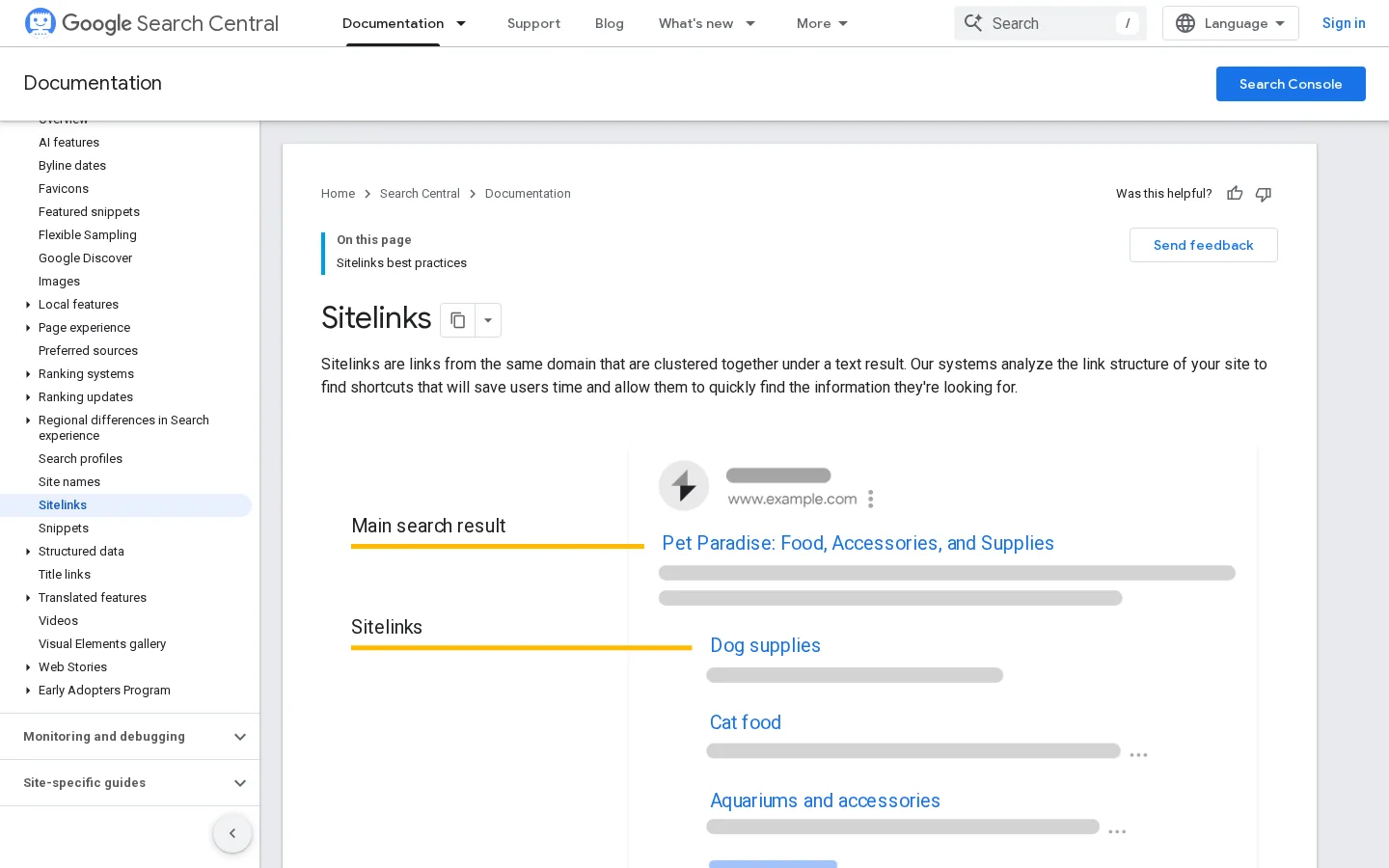
Google's own documentation on sitelinks says that its systems analyze the link structure of your site to find shortcuts. It also says that sitelinks appear only when Google thinks they will be useful to the user, and that they are automated: "At the moment, sitelinks are automated." Google adds that it may use site owner input in the future, but the page gives you no direct setting today.
Three things follow from that wording. First, the links come from the connections between your own pages, so your internal structure is the lever you have. Second, the query matters. Google picks links that fit what the searcher wants, so the set shown for your brand can differ from the set shown for a generic query. Third, Google can hold sitelinks back entirely when it does not think they are relevant. Your goal is not to force a list. Your goal is to make a good list possible.
Not every signal is in your hands. The table below separates what you can work on from what you cannot.
| Signal | What it means | Can you act on it? |
|---|---|---|
| Link structure | How your pages link to each other, from the menu and from content | Yes, through navigation and internal links |
| Anchor text | The words on the links that point to a page | Yes, write labels that name the destination |
| Titles and headings | What each page says about itself | Yes, keep them informative and distinct |
| Page usefulness | Whether people stay, read and act on the page | Yes, through content and page quality |
| Brand demand | How many people search your name | Partly, through marketing that grows brand searches |
| Google's choice for a query | Which links fit this exact search | No |
On titles and headings, Google's guidance is that they should be "informative, relevant, and compact," and that you should "avoid repetitions in your content." A site where every page carries the same title gives Google no reason to pick one page over another as a shortcut.
Organic sitelinks are not fixed. They can change when your pages change, when Google's view of your structure changes, or when search behavior changes. A link that appeared for a year can disappear after a redesign. Check the sitelinks you get every few weeks, not once at launch.
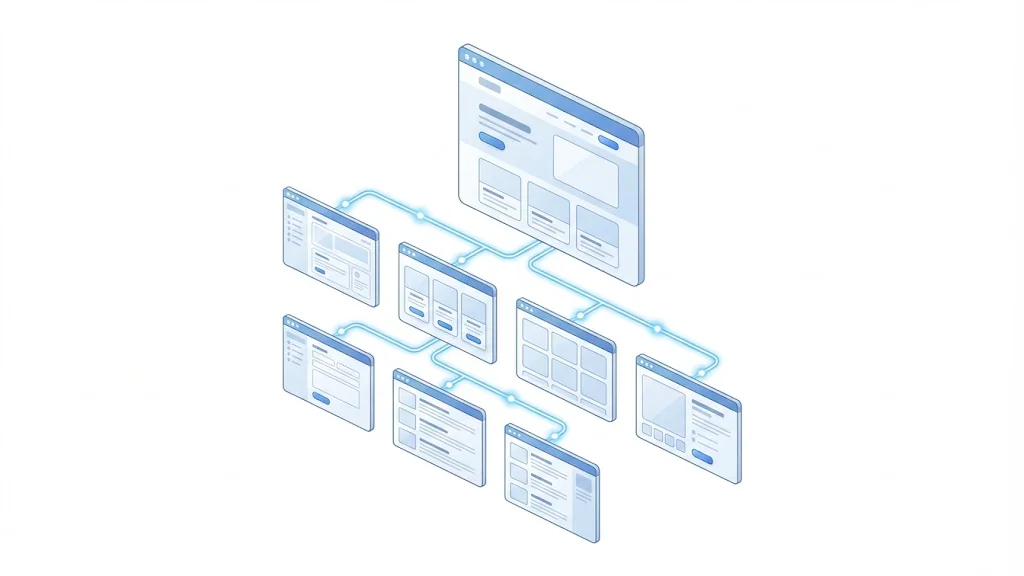
Google's advice is to "create a logical site structure that is easy for users to navigate," and to "make sure you link to your important pages from other relevant pages." Both points are about how a visitor moves through your site, and they are the same signals a crawler uses to understand your priorities.
For a deeper view of how structure shapes crawling and ranking, read our guide to site architecture for SEO, and the internal linking strategy guide for the planning side.
The pages you want as sitelinks should be easy to reach from the home page. For a site with 40 product pages, that usually means four pages in the main navigation: pricing, about, contact, and the main category. Each of them should also be linked from the home page body. The point is that your site itself puts these pages forward. Pages that look central in your own structure are the ones most likely to look useful as shortcuts.
Count the clicks. If your pricing page takes four clicks from the home page to reach, Google has to follow a long path to see it as important. Shorten the path with a menu link or a link in a high-traffic article.
Google asks that anchor text be "concise and relevant to the page they're pointing to." The label a visitor reads and the label Google reads should say where the link goes. Labels like "Read more" or "Click here" tell Google nothing. Use the name of the page instead.
<a href="/pricing">Pricing plans for small teams</a>Check your site for generic labels. In most sites, the same few words are repeated hundreds of times. Replace them on the pages that matter most first, which are the pages you want as sitelinks.
Each page needs its own title. A common pattern is a template that gives every page the same suffix, or the same first part, so that the title of pricing and the title of the blog look alike in the results. Make the first words the subject of the page.
<title>Wholesale Pricing | Acme Shoes</title>When many pages compete for the same query, keep their topics separate. Sorank's topic cluster generator plans clusters with anti-cannibalization built in, so each page targets a different question and the titles do not repeat.
A small change in the structure
Start with a brand query. Open a private browser window, search your brand name, and write down every sitelink you see. Google has no list you can export, so the audit is manual. Check both the desktop and the mobile results, because the layout can differ between them. Then compare what you see with the pages you want to be seen.
Sitelink audit in six steps
Tip
To count the internal links pointing at each priority page, try the free internal link analyzer from Sorank. Run it on the pages that link to your key pages, and compare the counts before and after your changes.
Keep a simple log with four columns: date, query, the sitelinks you saw, and what you changed. After two or three checks, you will see which changes coincide with better sitelinks. That log is worth more than any single audit, because Google's choices move.
There are three methods you can use, and they are not interchangeable. The first improves your structure and lets Google decide. The second removes a page from search so it cannot be a sitelink. The third buys a link you choose. Each one has a different cost, speed and risk, so pick the one that matches the problem you have.
Principle: make your important pages easy to reach and clearly labeled, so Google has good candidates for shortcuts.
When to use it: when your brand search shows weak links, or links to minor pages, and you want better ones.
Advantages: it improves the whole site, not only the sitelinks. The same work helps visitors and crawlers, and it costs only your time.
Limits: you cannot force a specific link. The change is indirect, and it can take weeks before you see a difference.
Example: a software company moves its pricing page from a footer link into the main menu, and renames its vague "Learn more" links to "Feature list for accounting teams". Its next brand check shows the pricing page where the blog used to be.
Principle: tell Google not to index a page you do not want to see, so it cannot appear as a sitelink.
When to use it: when a page is shown as a sitelink but should not be, such as an old campaign page or a staging copy.
Advantages: it is precise and free, and it works on any page you control.
Limits: it removes the page from search altogether, not only from the sitelinks. It is the wrong tool for any page you want people to find.
Example: an event page from last year still appears under the brand search. The team adds a noindex tag and removes the page from the sitemap. Details of the setup are in section 7 below.
Principle: create sitelinks in Google Ads, where you control the text and the URL.
When to use it: when you need a specific link to show during a campaign, such as a sale page or a booking form, and you have an ad budget.
Advantages: you decide the wording and the destination, and you measure clicks in your ad account.
Limits: you pay per click, and the links only appear while the ads run. They do not change your organic sitelinks.
Example: a retailer adds a "Sale ends Sunday" sitelink for three weeks in a Search campaign, then removes it when the offer ends.
| Method | What you control | Speed | Cost | Main risk |
|---|---|---|---|---|
| 1. Improve the structure | Indirect: the links Google can choose from | Slow, several weeks or more | Your time | No guarantee that Google shows the link you want |
| 2. Noindex the page | Whether the page is in the index at all | Depends on when Google recrawls the page | Free | The page disappears from search, not only from sitelinks |
| 3. Paid sitelinks | Link text and URL, while the ads run | Fast, once the campaign is live | Per click | Costs money for as long as the ads run |
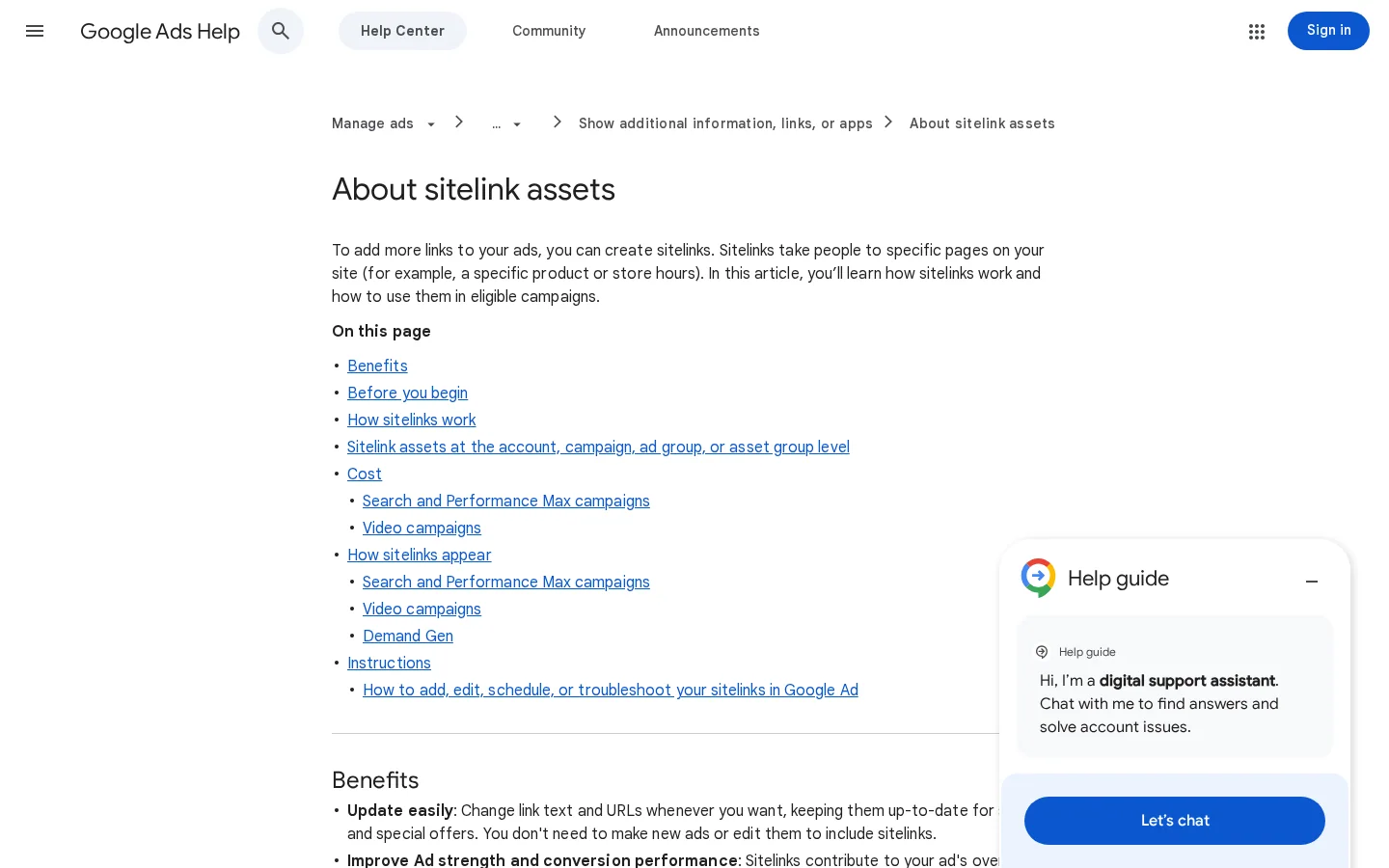
Google's help page on sitelink extensions says you can add sitelinks at the account, campaign, asset group, or ad group level. Asset groups apply to Performance Max campaigns. Set them at the highest level that makes sense for your offer, then override them where a campaign needs something different.
The limits you work within
Source: Google Ads Help, sitelink extensions
With 25 characters per text, every word counts. Google's help page says sitelink text is limited to 25 characters in most languages, and to 12 characters in double-width languages such as Chinese, Japanese and Korean. Write the text as the destination, not as a command. "Pricing" is clear. "Book a demo" tells the reader the next step. "Shipping and returns" fits and answers a real question. Avoid vague words like "More" or "Info."
Google recommends that you "create at least 4 sitelinks at the account level," and that you "provide at least 6 sitelinks with descriptions for all your high-volume ad groups, asset groups, and campaigns." Sitelinks with descriptions take more room, so write them only where they add information. A sitelink with a short description that repeats the link text adds nothing.
Sitelinks are free to add. Google says you are only charged for clicks from people viewing your ad, and that the cost per click equals the cost of a click on the headline in the same ad. A sitelink that gets no clicks costs nothing, but it also brings nothing. Review the click data every week and replace the links that never get clicked.
Note
Paid sitelinks are an ad format. Adding them to a campaign does not give you organic sitelinks, and an organic sitelink does not give you a paid one.
Google's sitelinks documentation gives two options for a page you do not want shown: "consider removing the page from your site," or use noindex. The page does not describe a request form or a demotion setting for organic sitelinks. So if a link you dislike appears, your real choices are to change the page, to change the structure around it, or to take the page out of the index.
Google's documentation says to place this tag in the head section of the page you want to hide.
<meta name="robots" content="noindex">Google also accepts an X-Robots-Tag HTTP header with the value noindex. Use it for PDFs and other files that cannot hold a meta tag.
X-Robots-Tag: noindexBefore you wait for Google, confirm that your server sends the header. This command prints the header if it is present, and nothing if it is not.
curl -sI https://www.example.com/old-page | grep -i x-robots-tagWarning
Noindex removes the page from search results, not only from the sitelinks. Use it only on pages you are willing to lose from search. Do not add a robots.txt rule for the same page, because Google must be able to crawl the page to see the tag.
| Situation | What happens |
|---|---|
| Noindex tag, page open to crawlers | Google can read the tag and drop the page from its index |
| Noindex tag, page blocked in robots.txt | Google cannot read the tag, so the page can stay indexed and visible |
| No noindex, page still linked from your site | The page stays eligible, and Google decides whether to show it |
For the full case of a page that is kept out of the index on purpose, read our explanation of the "excluded by noindex" status, which covers how to tell an intended exclusion from a mistake.
Most sitelink problems come from a handful of errors. Each one below says what it is, how to spot it, and how to fix it.
What it is: the page is disallowed in robots.txt and also carries a noindex tag. Google cannot crawl the page, so it cannot read the tag, and the old link can stay in the results.
How to spot it: look for a Disallow rule that matches the page, then check the page's status in Google Search Console. A page blocked by robots.txt shows up with that status. Our guide on the robots.txt status in Search Console explains each case.
User-agent: *
Disallow: /old-page/
How to fix it: remove the Disallow rule for that page, keep the noindex tag, and let Google recrawl the page. Once the tag is readable, the page can drop out of the index.
What it is: links such as "Read more," "Here" or "Learn more" on pages that should lead to your priority pages.
How to spot it: crawl the site and export the anchor text of every internal link. Sort by anchor and look for the same few words pointing to many different pages.
How to fix it: replace the anchor with the name of the destination. Start with links from the home page and the main menu, because those carry the most weight in your structure.
What it is: the page you want as a sitelink is several clicks away from the home page, and only one or two pages link to it.
How to spot it: measure click depth with a crawler, or count the clicks by hand from the home page. Also count the internal links to the page.
How to fix it: link the page from the main menu or from the home page body. Add links from related high-traffic articles, using the anchor text described above.
What it is: many pages share one title, or a long shared prefix, so their titles do not tell them apart.
How to spot it: sort the crawl export by title and look for the same title on several URLs. Any crawler that exports page titles will show this in a few seconds.
How to fix it: give each page a title that starts with its own subject. Keep the brand name at the end, and keep the total length readable in the results.
What it is: a team makes a change, then expects a specific sitelink to appear the next day.
How to spot it: the goal is written as "make Google show the pricing link," and nobody tracks the result.
How to fix it: set the expectation that structure changes take time, track the brand query on a fixed schedule, and keep a log. If you need a link to show now, use paid sitelinks, and understand that you pay for each click while they run.
Before you blame Google, check these
In 2024, Google changed one part of the sitelinks display. It retired the sitelinks search box, the small search field that sometimes appeared under a brand result. Google announced the change on October 21, 2024, and said it would take effect on November 21, 2024. Google's reason was that usage had dropped, and it said the change "doesn't affect rankings or other sitelinks."
Sitelinks search box, 2024
Source: Search Engine Journal, October 21, 2024
For your site, the practical effect is small. You do not need to change your site because of this change. The sitelinks you earn from structure and labels stay the same. What you should take from it is that Google keeps trimming display features to what users actually use, so the lasting lever stays the same: a clear structure, clear labels and pages that deserve to be seen.
If you do one thing today, run the brand search, write down the sitelinks you see, and pick one priority page that is missing from the list. Then find the three internal links that point to it, and make the anchors name the page. That single change is a real start, and the log you keep will tell you whether it worked.
Not directly. Google chooses organic sitelinks automatically and shows them only when it thinks they are useful. You can influence them indirectly through your site structure, and you can create paid sitelinks in Google Ads, which you control fully and pay for per click.
Google's documentation suggests removing the page or adding a noindex tag. The tag must be readable by Google, so the page must not be blocked in robots.txt. Noindex also removes the page from search results entirely.
Google announced on October 21, 2024 that it would retire the sitelinks search box on November 21, 2024, because usage had dropped. Google said this does not affect rankings or other sitelinks.
We analyse your competitors, your website and your AI visibility to create a tailored content plan for free.
 AI Content Brief Generator
 FAQ Schema Generator
 AI Blog Post Ideas Generator
 Structured Data Validator (Schema Validator)
 Alt Text Checker
 Internal Link Analyzer
 Backlink Challenge
 AI Meta Description Generator
 AI Blog Title Generator
 Google Indexability Checker
 AI Blog Outline Generator
 UTM Link Builder
 Keyword Clustering Tool
 Canonical Tag Checker
 XML Sitemap Generator
 Broken Link Checker
 AI SEO Title Generator
 Headline Analyzer
 SERP Preview Tool
 Redirect Checker
 Hreflang Tag Generator
 Heading Structure Analyzer
 HTTP Headers Checker
 Favicon Extractor
 SERP CTR Calculator
 SEO vs Paid Search Savings Calculator
 SEO Share of Voice Calculator
 SEO ROI Calculator
 SEO Traffic and Revenue Forecast Calculator
 SEO Budget Calculator
 SEO Break-Even Calculator
 SaaS SEO ROI Calculator
 ROAS Calculator
 Reading Time Calculator
 Ranking Gain Simulator
 Organic Traffic Value Calculator
 Organic Traffic Estimator and Website Traffic Checker
 LTV to CAC Ratio Calculator
 Local SEO ROI Calculator
 Link Building Cost Calculator
 Keyword Value Calculator
 Keyword Opportunity Score Calculator
 Keyword Density Calculator
 GEO ROI Calculator
 GEO Content Investment Calculator
 Ecommerce SEO ROI Calculator
 Customer Lifetime Value Calculator
 Customer Acquisition Cost Calculator
 CTR Calculator
 Cost Per Article Calculator
 Conversion Rate Calculator
 Content Marketing ROI Calculator
 ChatGPT Referral Traffic Estimator
 Bounce Rate Calculator
 Backlink ROI Calculator
 AI Visibility Score Calculator
 AI Traffic Value Calculator
 AI Share of Voice Calculator
 Cost of AI Invisibility Calculator
 AI Citation Rate Calculator
 llms.txt Validator
 AI Overview Checker and AI Overviews Rank Checker
 Robots.txt Checker
 AI SEO Audit
 LLM Readability Checker
 SearchGPT Readiness Checker
 Structured Data LLM Audit
 Website Crawlability AI Audit
 Why ChatGPT Is Not Recommending My Website
 Gemini Ranking Tool
 Perplexity Ranking Checker
 LLM Citation Checker
 Answer Engine Optimization Audit
 GEO Audit
 AI Search Visibility Test
 ChatGPT Visibility Checker
 llms.txt Generator
 URL Extractor
 Webpage to Markdown
 Sitemap Checker
 SERP Volatility Sensor
 Page Size Checker
 Word Counter
 Slug Generator
 Schema Generator
 Robots Generator
 OG Preview
 Meta Tags Generator
 Image Compressor
 Favicon Generator
 On-Page SEO Audit: SEO Checker and SEO Analyzer
 Backlink Analysis Tool
 Keyword Research Tool
 Domain Authority Checker
 “I tested Sorank on a real client site and it's insane. It does everything an agency would bill you $1500 a month for. It's going into production on that client now.”

 Guillaume Guersanguersanguillaume.com“We are an Ads agency and we wanted to get our SEO back on track once and for all. Sorank gave us a clear view of our site, helped us prioritize optimizations, and properly structure our content. The tool is easy to use, well designed for a team, and very practical for centralizing tracking without having to juggle multiple platforms. A very solid foundation to start fresh with our SEO.”
 Gaspard MadouiAds Agency
 “I just let the Sorank software do its thing, and now my DR is 25 and my page is ranking higher.”
 Lucas Flandrefoundertrace.fr“I specialized in GEO thanks to Sorank. The GEO Leaderboard allows me to show my clients their position vs competitors on ChatGPT. It’s a real commercial differentiator.”
 MélanieSEO Freelance“Great service, works well for our website and helps us understand how to improve it to rank better on Google and elsewhere. Congrats, keep going, I recommend it.”
 Hugo T.E-commerce merchant