Preferences
Privacy is important to us, so you have the option of disabling certain types of storage that may not be necessary for the basic functioning of the website. Blocking categories may impact your experience on the website. More information
Privacy is important to us, so you have the option of disabling certain types of storage that may not be necessary for the basic functioning of the website. Blocking categories may impact your experience on the website. More information

Google Performance Max explained: how the campaign works, a setup checklist, brand exclusions, the reports to read and the mistakes that waste budget.

In short
Google Performance Max is one campaign type that shows ads across Search, YouTube, Display, Discover, Gmail and Maps. Google's AI chooses the placements and the queries, so you control it through your conversion goal, your assets, your audience signals and your exclusions. Set up conversion tracking first, attach a brand exclusion on day one, and read the reports by channel before you trust the numbers.
Want to go further? Ask
Quick quiz
Is SEO right for you, and how should you start?
Sorank matches your answers


Test it for 3 days on your own site and see where you stand on Google, ChatGPT and the other AIs.
Start 3-day free trial3 days free, then stop whenever you want. 90-day results guarantee, conditions apply.
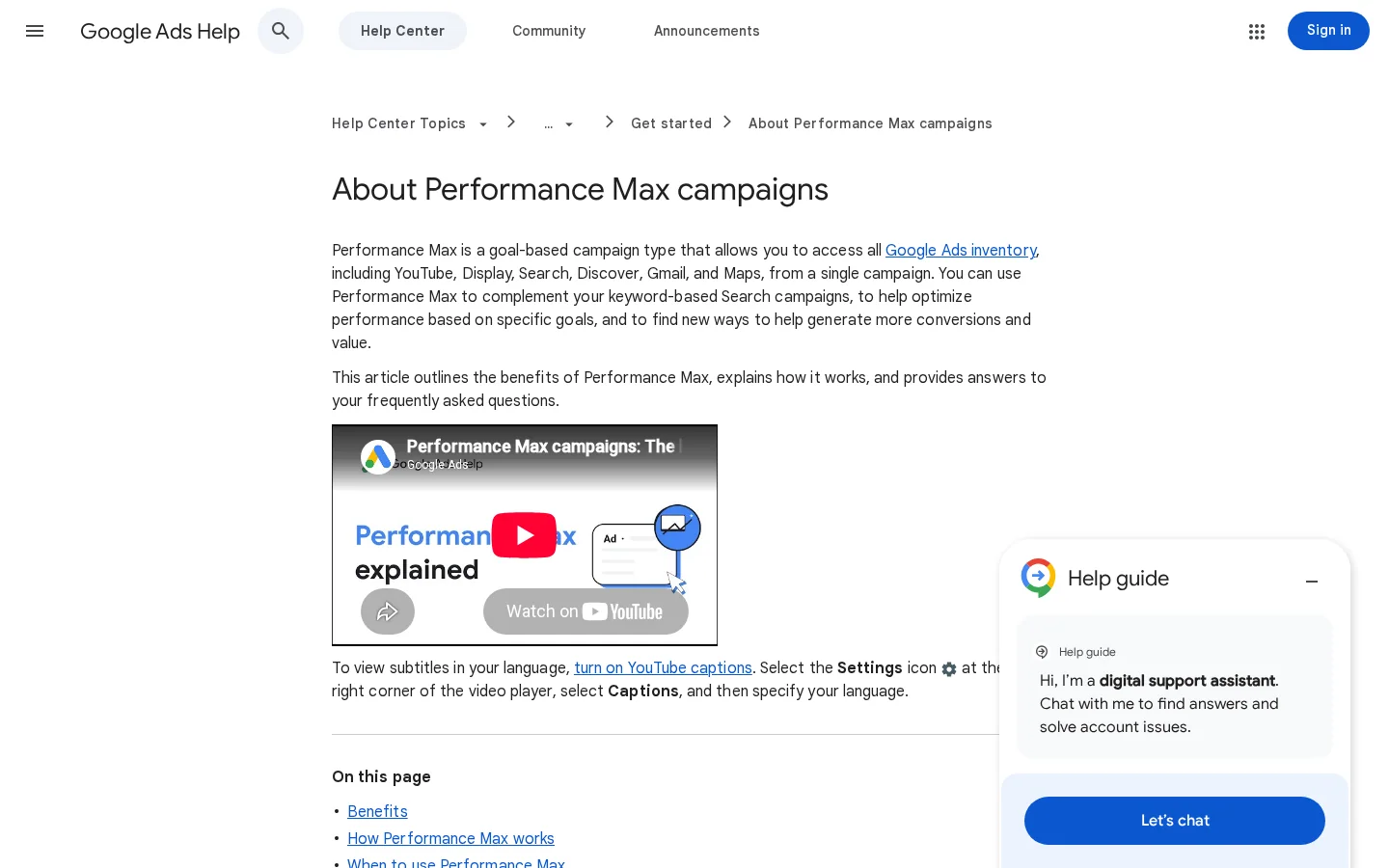
Performance Max, often shortened to PMax, is a campaign type. One campaign can show ads on several Google channels at once. Google's own help page describes it as a way to reach people across its inventory from a single campaign, using its official Performance Max overview as the reference (consulted November 2026).
The main difference with a Search campaign is who picks the placements. In a Search campaign, you choose the keywords and the match types, and your ads show when someone searches for them. In Performance Max, you give Google your goal, your creative assets and your budget. The system then decides which queries, channels and audiences to target.
Search campaign or Performance Max?
Source: Google Ads Help, Performance Max overview, consulted November 2026
That does not mean you lose all control. You still choose the conversion you optimize for, the assets, the final URL, the budget and the exclusions. What you lose is the keyword list as your main lever. Most of the work moves to the inputs you give the system and to the reports you read afterwards.
It also helps to know what Performance Max is not. It is not a fix for a weak landing page, and it does not repair a broken conversion setup. If the system learns from a conversion that is not a real sale or lead, it will optimize for the wrong thing with full confidence. The quality of the signal decides the quality of the result.
Performance Max fits best when you already know what a good conversion is worth to you. It fits less well if you have no tracking, no offer that converts, or no idea which product margins you need to protect. In those cases, fix the basics first, then come back to the campaign.
Google's help page lists the campaign objectives that work with Performance Max: Sales, Leads, Website traffic, Local store visits and promotions, or no goal. Pick the objective that matches the action you actually want. A Website traffic goal will send visits, but it will not tell the system that a sale matters more than a click.
If you run an e-commerce store, Sales is usually the right starting point. If you sell a service, Leads is the closer match. Each objective changes which conversion actions the campaign can use, so choose it before you build the rest.
Performance Max looks like a single button, but it is built from five inputs. Each one tells the system something different. If one input is missing or weak, the others cannot compensate for it. Set them in this order, because the goal shapes everything that comes after.
The five building blocks, in the order to set them
Goal and conversions. Google's documentation says you define the conversion actions you care about, then you can set an optional ROAS or CPA target. Smart Bidding then bids based on the probability that a given auction leads to one of those conversions. The more accurate the conversion, the more accurate the bidding. A purchase with a real order value is worth more than a form fill that never turns into a lead.
Asset groups. An asset group is a set of creative assets, such as images, text, logos and videos. Google's system mixes these assets to build ads across its inventory. Group the assets by product line or by customer problem, not by campaign budget. A group for running shoes should not share its text with a group for hiking boots, because the system will learn from both at once.
Audience signals. Audience signals tell the system who your best customers are, for example people who visited a pricing page or bought before. Google describes them as a way to guide learning. They are a starting point, so keep them honest. Feeding a broad list of everyone who ever visited the site adds noise instead of direction.
Search themes. Search themes are topics you add to guide the system toward search intent. They work with keywordless targeting and carry the same priority as phrase and broad match keywords. Use them to describe what you sell in the words your customers use. You can read more about keyword logic in our guide to Google Ads and how campaign types work.
Exclusions and reports. Exclusions are the controls that keep the campaign away from traffic you do not want. Brand exclusions are the most important one for most advertisers, and they are covered in detail below. Reports close the loop. Without them, you cannot tell whether the system is doing useful work or just spending your budget on easy clicks.

A good setup takes longer than the button suggests. Most of the time goes into the conversion tracking, the asset library and the exclusions. Do not skip them to launch faster. A campaign that launches in an hour with bad inputs will spend your budget for weeks while it learns the wrong lessons.
What it is. You define the conversion actions the campaign will optimize for. A purchase, a lead form or a booked call can all count, but each one needs to be tracked correctly.
How to check it. Make one real conversion yourself. Confirm that it appears once in Google Ads, with the right value, and that it does not appear twice. Compare the count with your CRM or your order system for the same day.
How to fix it. Remove duplicate tags, keep one primary conversion for bidding, and mark secondary actions as observation only if they should not drive bids. A campaign that optimizes for newsletter sign-ups when you need sales will look busy and earn little.
Write asset groups around one theme each. For an online shop, that can be a product family, a price tier or a customer need. Add the full set of formats the system asks for, including images, short and long headlines, descriptions and a logo. Each asset should match the landing page it leads to. If your headline promises a discount and the page does not show it, the system will send people to a page that disappoints them.
For ad copy, follow the same rules you would use for search ads. Our guide to ad copywriting covers the structure in detail. The short version is to name the product, state the benefit and give one clear reason to click.
Google's help page says that final URL expansion means you remain responsible for reviewing landing page accuracy and compliance. The system can send traffic to pages you did not hand-pick. That is useful for finding new pages, but it also means a page with an outdated price or a missing policy page can receive paid traffic.
Before you launch
Warning
Final URL expansion is the setting most often forgotten. Before you turn it on, open the pages it can reach and check that prices, stock and offers are correct. Paid traffic reaches an error page just as fast as a good one.
Google's budget panel shows low, medium and high daily recommendations, with forecasts for each. Use these as a range, not as a target. A budget that is too low can stop the campaign from gathering enough conversions to learn. A budget that is too high can spend money before the bidding has a clear picture. Pick the level you can sustain for several weeks, then judge the campaign on that period.
For a wider view of spend and cost per conversion, our guide to Google Ads cost explains the usual budget ranges and the trade-offs between them.
Performance Max gives you fewer levers than a Search campaign, so each lever matters more. You have four main controls. They work in different ways, and each one solves a different problem. Use the section below to decide which one you need before you change anything.
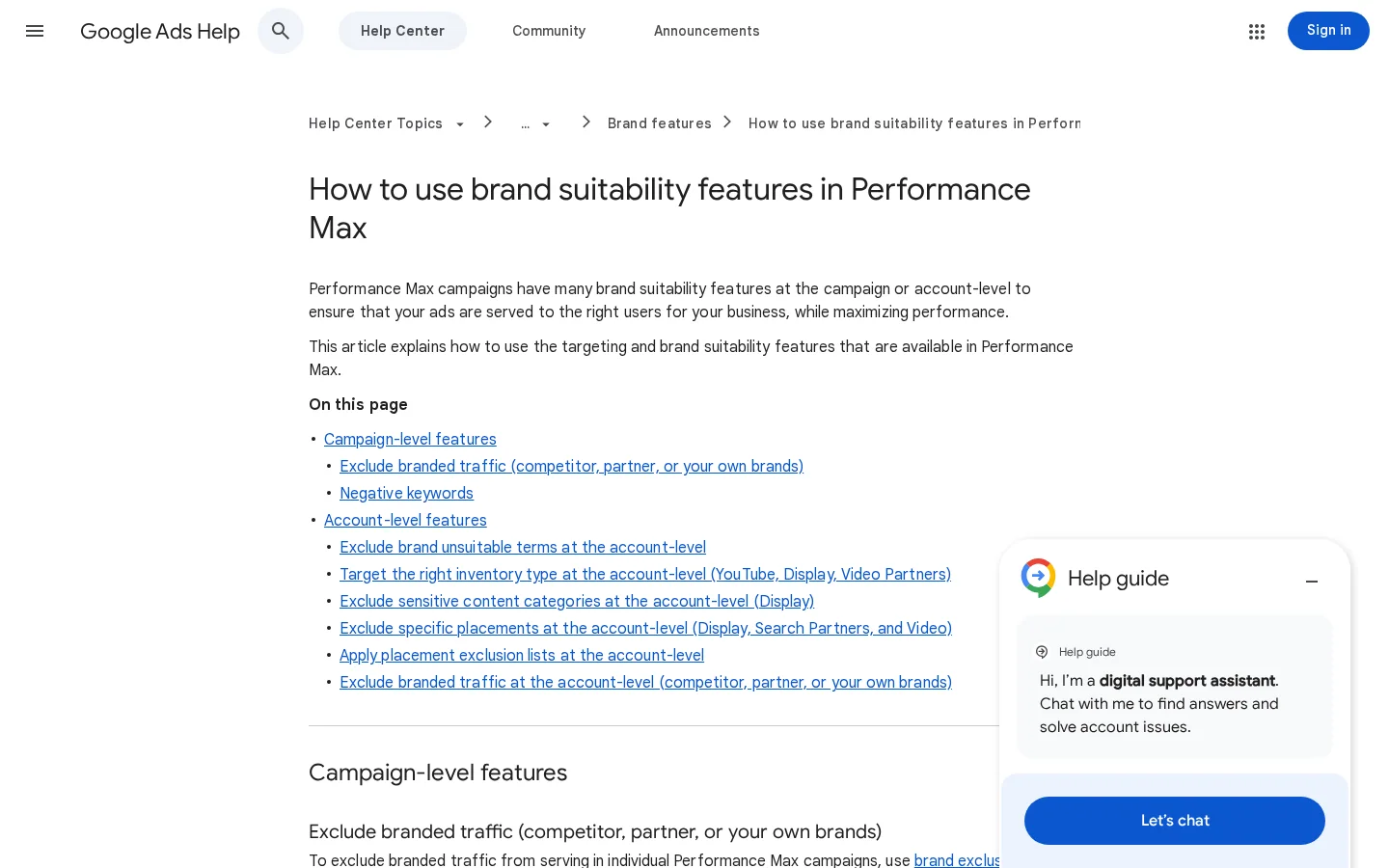
What it is. A brand exclusion keeps branded traffic out of a campaign. You build a brand list, then attach it at campaign level or at account level. Google's help page on brand exclusions in Performance Max says they keep branded traffic out of individual campaigns, whether the brand is your own, a competitor or a partner.
When to use it. Use a brand exclusion whenever you want Performance Max to find new customers, not to collect people who already search for you. For most businesses, this is the default setting from the first day.
Advantages. It is set once and applies to every asset group in the campaign. It removes the most common source of wasted spend, which is paying for clicks you would have received for free from organic search.
Limits. It only works on the brands you list. If your brand list is incomplete, the campaign keeps finding the gaps. Hotel Ads campaigns inside Performance Max for travel goals do not support brand exclusions, so check your objective before you rely on it.
Example. Imagine a shoe retailer that adds its own name, its common misspellings and its product line names to a brand list. The list is attached at campaign level. The next report shows less spend on the brand term and more spend on generic product searches. The team then checks organic brand rankings, which carry that traffic at no cost.
Warning
A brand exclusion does not protect you from a brand search that you actually want to win. If you sell on a marketplace or run a launch, a short pause on the exclusion can be the right call. Decide this on purpose, not by accident.
What it is. A negative keyword blocks a query or a term you do not want the campaign to match. Google's post "What's new in Performance Max campaigns", dated February 23, 2023, explains that negative keywords can be added at account level and that they also apply to Performance Max campaigns.
When to use it. Use a negative keyword when your search terms report shows a specific leak, such as a query for a free version of your product or a term that belongs to a different market. Fix the leak directly rather than guessing.
Advantages. It is precise, easy to explain to a client or a manager, and it works on the exact term you name. It lets you prune a bad query without changing the whole strategy.
Limits. It only blocks what you list. Variants you have not thought of will keep appearing, so you need to review the report and add new terms over time. A long list can also become hard to maintain, so review it on a fixed schedule.
Example. The shoe retailer finds the query "shoe repair near me" in its reports. It is not a buying query for its products, so the team adds it as a negative keyword. The change is small, but it removes a steady stream of irrelevant clicks.
What it is. A search theme is a topic you add to point the system toward a kind of search intent. Google's help page describes them as carrying the same priority as phrase and broad match keywords, and they are used with keywordless targeting.
When to use it. Use search themes when you want the campaign to reach a specific group of queries, such as "trail running shoes" for a store that sells them. Keep them close to the products in the asset groups, so the message and the query match.
Advantages. They give the system a clear direction, which helps when the campaign has few conversions and needs a steer. They are easy to write because you describe the topic in plain words.
Limits. They are not exact control. A search theme behaves more like a broad keyword, so queries outside the topic can still match. Check the search terms and the Insights data before you assume the theme is doing what you wrote.
Example. A bakery that sells gluten-free bread adds the theme "gluten-free bread delivery". The campaign starts to match queries about delivery and gluten-free products, but it also matches queries about general bread. The team reviews the report and adds the general bread queries as negative keywords.
What it is. An audience signal is a hint about your best customers. Google's help page says signals help the campaign learn faster from high-intent audiences. They guide the system; they do not restrict the campaign to those people.
When to use it. Use audience signals at launch, when the campaign has no history. Add your customer list, people who visited high-value pages, or people who added to a cart. Remove weak signals once the campaign has enough conversions to learn on its own.
Advantages. They speed up the first weeks of learning, and they tell the system what high-value looks like for your business.
Limits. A signal that is too broad adds noise, and a signal that is too narrow can slow down learning. Because it is a hint, it does not show you the exact audience the system reached. Judge it through the results, not through the list you uploaded.
Example. A software company uploads a list of trial users who converted to paid plans. The campaign learns faster in its first month. After that, the team removes the signal and compares performance, to check that the gain was not temporary.
The table below puts the four controls side by side, so you can match each one to the problem you are trying to solve.
| Control | What it does | Best for | Main limit |
|---|---|---|---|
| Brand exclusion | Keeps branded traffic out of the campaign | Stopping ads on your own brand and on competitor or partner brands | Only covers the brands you list |
| Negative keyword | Blocks a specific query or term | Fixing a leak you see in the search terms report | Only blocks what you add, so the list needs upkeep |
| Search theme | Steers the system toward a topic | Guiding keywordless targeting toward valuable intent | Not exact control, queries outside the topic can match |
| Audience signal | Hints about your best customers | Speeding up learning at launch | A hint, not a filter, so it adds noise if too broad |
Performance Max reporting is richer than many people expect, but it does not show everything. Google's help page lists several report types, including asset-level metrics, asset group reporting, channel performance, Google Analytics integration, creative video reporting, placement reports and conversion tracking. Read them together. Each one answers a different question.
Start with the channel and the asset group views every week. If one channel takes most of the budget and brings few conversions, you have a question to ask. Then check the placement report to see where the ads actually ran. A high reach with no conversions often points to placements that do not match your buyer.
| Report | What it shows | Watch out for |
|---|---|---|
| Asset group reporting | Results for each theme you sell | Groups with few conversions give noisy numbers |
| Channel performance | Where the budget and conversions go | A channel can look weak only because it reaches an earlier step of the journey |
| Placement report | The sites and apps where ads ran | Reach can look good while the placements are poor |
| Asset-level metrics | How each image, video or headline performs | Early results change a lot, so wait for volume |
| Conversion tracking | Conversions by action and value | Two tags on one action double the count |
| Google Analytics integration | Sessions and engagement from the same campaign | Attribution models differ between Google Ads and Analytics |
The reports cannot tell you the full story of a customer. A person may see an ad on YouTube, search your brand later and buy after a Search click. Performance Max credits the conversion according to the attribution settings you chose. Read the numbers as a view of one path, not as proof of which channel created the sale.
Also check the reports against your own data. A conversion count that differs from your order system is a tracking problem, not a performance result. Fix the tracking first, because every decision you make afterward depends on it.
For e-commerce, Performance Max sits next to the product feed. The feed is the list of products that Google reads from your store, usually through Merchant Center. If the feed has wrong prices, missing images or out-of-stock items, the campaign will show products you cannot sell. Our glossary entry on Merchant Center explains how the feed is set up and maintained.
If you already run a Shopping campaign, you will recognize many of the feed rules. Our guide to Google Shopping ads covers the feed, the campaigns and the ROAS logic in detail. This article is about the Performance Max side of the same feed, so it does not repeat those steps. Read both if your store uses both campaign types.
Here is what to check in the feed before you rely on Performance Max for products:
When the feed is weak, the campaign inherits the weakness. No setting in the campaign fixes a product that has the wrong price. Treat the feed as part of the campaign, not as a separate job that someone else owns.
Most Performance Max problems come from a small set of mistakes. Each one looks reasonable when you make it, and each one shows up later in the reports. Check for these five first. For each mistake, the sections below explain what it is, how to spot it and how to fix it.
What it is. The campaign keeps reaching people who already search for your brand. The conversions look good, but many of them would have happened anyway.
How to spot it. Open the search terms or Insights data and look for your brand name, your product names and your common misspellings. If they take a large share of conversions, the campaign is buying traffic you already have.
How to fix it. Build a brand list with your brand, variants and product names, then attach it at campaign level. Check the result over a full conversion cycle, and compare organic brand traffic before and after.
Brand traffic, before and after the fix
What it is. All products share one asset group. The system cannot match a headline to the product it describes, so the ads feel generic.
How to spot it. The asset group report shows one group with almost all spend, and the headlines do not match the top sellers.
How to fix it. Split the catalog by theme, such as product family, margin tier or customer need. Write assets for each group. Keep the groups different enough that their results can be compared.
What it is. The campaign is still learning, and the owner changes the budget, the assets or the goal before the results can settle.
How to spot it. The change log shows edits every few days. Conversion numbers swing up and down with no clear reason.
How to fix it. Give the campaign a fixed period before you judge it. Make one change at a time, note the date, and compare the same weeks. Large edits reset the learning, so change the inputs with care.
What it is. The campaign optimizes for a form fill, a click or a page view, and that action is cheap but does not lead to revenue.
How to spot it. Compare the conversion count with your sales or lead quality data. If many conversions never become customers, the bidding is chasing the wrong target.
How to fix it. Make the business outcome the primary conversion, such as a purchase or a qualified lead. Move the cheap action to secondary, so it is still measured but does not drive bids.
What it is. Final URL expansion sends traffic to pages that are out of date, broken or out of stock.
How to spot it. Look at the landing page report. Pages with high spend and low engagement, or with error codes, are the first suspects.
How to fix it. Review each page the campaign reaches, fix the errors and remove pages that should not get paid traffic. Recheck after each site update, because a page can change without you noticing.
Note
For a full review of a campaign that already runs, our guide to a Google Ads audit gives a checklist you can apply to Performance Max as well as to other campaign types.
Performance Max is not new, and its history explains why many accounts look the way they do. Google moved Smart Shopping and Local campaigns into Performance Max during 2022. The upgrade came with a timeline, a one-click tool and automatic upgrades for the campaigns that did not move on their own.
Google's post dated January 27, 2022, explains the steps. It says the one-click upgrade tool started for Smart Shopping in April and for Local in June. Automatic upgrades ran from July to September for Smart Shopping and from August to September for Local. Once a campaign was upgraded, the old campaign type could no longer be created.
From the announcement to the upgrade, 2022
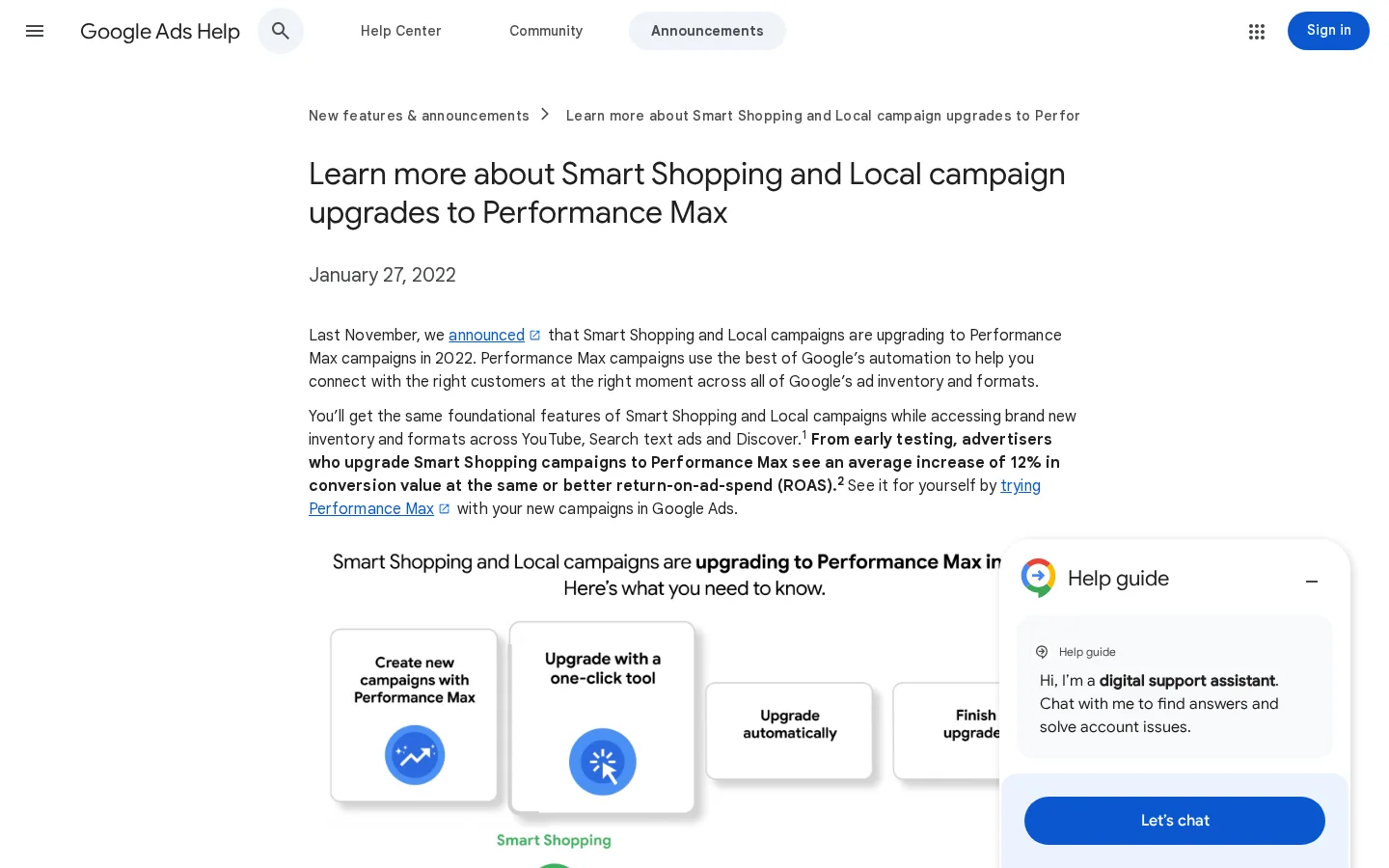
Google also reported a result for early testers. The January 2022 post says that an average increase of 12% in conversion value came at the same or better return on ad spend. Google attributes this figure to early testing and cites its own data from September and October 2021. Treat it as Google's result for its test group, not as a promise for your account.
What Google reported for the upgrade
Sources: Google Ads Help, Smart Shopping and Local campaign upgrades to Performance Max, January 27, 2022; Google Ads Help, Performance Max overview, consulted November 2026
The upgrade explains a common complaint. Advertisers who ran Smart Shopping or Local campaigns for years lost a tool they knew well. The new campaign type gave them reach, but it asked them to trust more automation. The skill now is to judge that automation with the right inputs and reports.
The goal of a campaign is a return you can accept, not a high number on the dashboard. Start from your margin. If your gross margin is 40%, a sale at 1 unit of revenue gives you 0.40 of gross profit, so you need a return above the break-even level to make money on the ad spend.
Break-even ROAS = 1 / gross margin

Example: gross margin 40%
Break-even ROAS = 1 / 0.40 = 2.5
In this example, a ROAS below 2.5 loses money on gross profit alone, before shipping, returns and other costs. Add those costs to the margin before you set the target, so the number reflects what you keep. Then set the target ROAS in the campaign a little above break-even, so the system has room to pursue volume without losing money on each sale.
Tip
Use the free ROAS Calculator to turn your margin and ad spend into a break-even figure before you set a target.
Use the table below to decide what to do when a metric moves. Each metric answers one question, and each one leads to a different action.
| Metric | Question it answers | Act when |
|---|---|---|
| ROAS | Is the spend returning enough revenue? | It stays below break-even for a full conversion cycle |
| Conversion value | Does the counted revenue match your sales data? | It differs from your order system after a tracking check |
| Channel mix | Where does the budget go? | One channel takes most of the spend and brings almost no conversions |
| Brand search volume | Are you paying for clicks you already had? | Brand clicks rise after launch and organic brand traffic falls |
Measurement also covers the rest of your search presence. Sorank does not run paid campaigns. Its GEO / SEO dashboard shows Google and AI traffic in one view, so you can watch your organic results while a Performance Max campaign runs. That makes it easier to see whether paid clicks are replacing clicks you were already getting for free.
You do not need to fix everything at once. Start with the three changes that protect your budget, then add the rest as the campaign gathers data. Each step below is small, and each one is worth doing before you change the bids or the budget.
This week, in order
Performance Max rewards the advertiser who gives it clean inputs and reads the results with care. If you keep the goal honest, the exclusions tight and the reports under review, the system has a fair chance to find customers you would not have reached on your own.
Performance Max is a campaign type that shows ads across Google Search, YouTube, Display, Discover, Gmail and Maps from one campaign. Google's AI chooses the placements and the queries, based on the conversion goal, the assets and the audience signals you provide. You control the outcome through those inputs and through your exclusions.
No. Performance Max runs as its own campaign type, and you can keep a Search campaign alongside it. Keep the Search campaign when you need exact keyword control over the terms that matter most to your business.
Build a brand list in Google Ads and attach it as a brand exclusion, at campaign level or at account level. Then check the search terms and the channel reports to confirm that branded traffic is no longer being bought.
We analyse your competitors, your website and your AI visibility to create a tailored content plan for free.
 AI Content Brief Generator
 FAQ Schema Generator
 AI Blog Post Ideas Generator
 Structured Data Validator (Schema Validator)
 Alt Text Checker
 Internal Link Analyzer
 Backlink Challenge
 AI Meta Description Generator
 AI Blog Title Generator
 Google Indexability Checker
 AI Blog Outline Generator
 UTM Link Builder
 Keyword Clustering Tool
 Canonical Tag Checker
 XML Sitemap Generator
 Broken Link Checker
 AI SEO Title Generator
 Headline Analyzer
 SERP Preview Tool
 Redirect Checker
 Hreflang Tag Generator
 Heading Structure Analyzer
 HTTP Headers Checker
 Favicon Extractor
 SERP CTR Calculator
 SEO vs Paid Search Savings Calculator
 SEO Share of Voice Calculator
 SEO ROI Calculator
 SEO Traffic and Revenue Forecast Calculator
 SEO Budget Calculator
 SEO Break-Even Calculator
 SaaS SEO ROI Calculator
 ROAS Calculator
 Reading Time Calculator
 Ranking Gain Simulator
 Organic Traffic Value Calculator
 Organic Traffic Estimator and Website Traffic Checker
 LTV to CAC Ratio Calculator
 Local SEO ROI Calculator
 Link Building Cost Calculator
 Keyword Value Calculator
 Keyword Opportunity Score Calculator
 Keyword Density Calculator
 GEO ROI Calculator
 GEO Content Investment Calculator
 Ecommerce SEO ROI Calculator
 Customer Lifetime Value Calculator
 Customer Acquisition Cost Calculator
 CTR Calculator
 Cost Per Article Calculator
 Conversion Rate Calculator
 Content Marketing ROI Calculator
 ChatGPT Referral Traffic Estimator
 Bounce Rate Calculator
 Backlink ROI Calculator
 AI Visibility Score Calculator
 AI Traffic Value Calculator
 AI Share of Voice Calculator
 Cost of AI Invisibility Calculator
 AI Citation Rate Calculator
 llms.txt Validator
 AI Overview Checker and AI Overviews Rank Checker
 Robots.txt Checker
 AI SEO Audit
 LLM Readability Checker
 SearchGPT Readiness Checker
 Structured Data LLM Audit
 Website Crawlability AI Audit
 Why ChatGPT Is Not Recommending My Website
 Gemini Ranking Tool
 Perplexity Ranking Checker
 LLM Citation Checker
 Answer Engine Optimization Audit
 GEO Audit
 AI Search Visibility Test
 ChatGPT Visibility Checker
 llms.txt Generator
 URL Extractor
 Webpage to Markdown
 Sitemap Checker
 SERP Volatility Sensor
 Page Size Checker
 Word Counter
 Slug Generator
 Schema Generator
 Robots Generator
 OG Preview
 Meta Tags Generator
 Image Compressor
 Favicon Generator
 On-Page SEO Audit: SEO Checker and SEO Analyzer
 Backlink Analysis Tool
 Keyword Research Tool
 Domain Authority Checker
 “I tested Sorank on a real client site and it's insane. It does everything an agency would bill you $1500 a month for. It's going into production on that client now.”

 Guillaume Guersanguersanguillaume.com“We are an Ads agency and we wanted to get our SEO back on track once and for all. Sorank gave us a clear view of our site, helped us prioritize optimizations, and properly structure our content. The tool is easy to use, well designed for a team, and very practical for centralizing tracking without having to juggle multiple platforms. A very solid foundation to start fresh with our SEO.”
 Gaspard MadouiAds Agency
 “I just let the Sorank software do its thing, and now my DR is 25 and my page is ranking higher.”
 Lucas Flandrefoundertrace.fr“I specialized in GEO thanks to Sorank. The GEO Leaderboard allows me to show my clients their position vs competitors on ChatGPT. It’s a real commercial differentiator.”
 MélanieSEO Freelance“Great service, works well for our website and helps us understand how to improve it to rank better on Google and elsewhere. Congrats, keep going, I recommend it.”
 Hugo T.E-commerce merchant