Preferences
Privacy is important to us, so you have the option of disabling certain types of storage that may not be necessary for the basic functioning of the website. Blocking categories may impact your experience on the website. More information

Privacy is important to us, so you have the option of disabling certain types of storage that may not be necessary for the basic functioning of the website. Blocking categories may impact your experience on the website. More information

Blocked by robots.txt in Search Console: find the rule at fault, unblock the right pages, use noindex for the others and validate the fix step by step.

Tools

In short
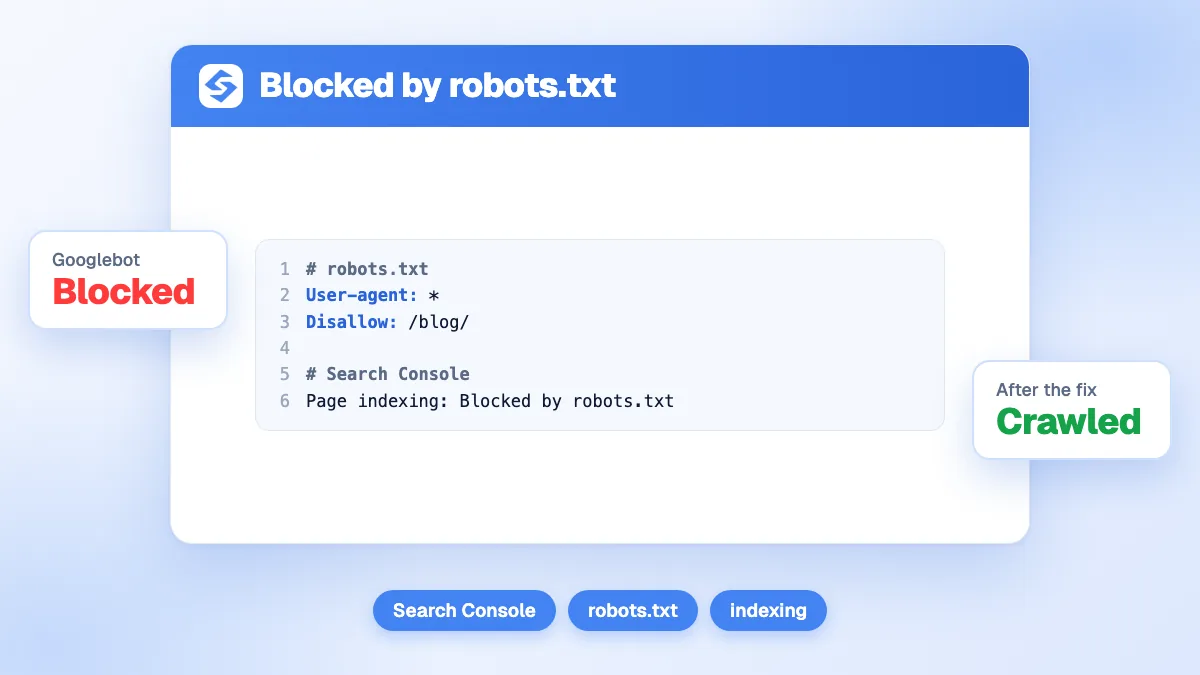
"Blocked by robots.txt" means a rule in your robots.txt file stops Googlebot from crawling a URL, so Google cannot read the page and it usually stays out of search results. If the block is deliberate (admin, cart, internal search), leave it. If an important page is affected, find the Disallow rule that matches it, change it, test the URL, then request a recrawl. To keep a page out of Google, use noindex instead, because robots.txt controls crawling, not indexing.
Want to go further? Ask
Quick quiz
Who should fix the technical side of your site?
Our advice for you
Export the affected URLs is the right solution for you
Number 1 in this ranking, the best match for your answers.
Our advice for you
Separate deliberate blocks from mistakes is the right solution for you
Number 2 in this ranking, the best match for your answers.
Our advice for you
Find the rule that matches is the right solution for you
Number 3 in this ranking, the best match for your answers.
Our advice for you
Edit the file is the right solution for you
Number 4 in this ranking, the best match for your answers.
The blocked by robots.txt status appears in the Page indexing report of Google Search Console, among the reasons why pages are not indexed. Google's own Page indexing report documentation describes it in one line: the page was blocked by your site's robots.txt file. Behind that line are two very different situations, a healthy block and an accidental one, plus a confusing cousin, "Indexed, though blocked by robots.txt". This guide shows how to tell them apart and fix each one without breaking anything else. If you are new to the file itself, start with our definition of robots.txt.
Your robots.txt file sits at the root of the host (example.com/robots.txt) and tells crawlers which paths they may fetch. When Googlebot finds a URL, through a link or a sitemap, it checks that file first. If a Disallow rule matches the path for its user agent, it does not fetch the page. Search Console then lists the URL under "Blocked by robots.txt".
Two consequences follow. Google cannot see the content, the title, the internal links or any meta tag on the page. And because it never reads the page, it cannot see a noindex tag either. The status is listed as a reason for non-indexing, so for most sites it is informational: Google itself notes that URLs blocked by robots.txt are probably blocked on purpose.
The problem starts when the list contains pages you want on Google: product pages, articles, category pages, or a whole site after a migration. In that case the block is a direct cause of a website not showing up on Google, and it is one of the fastest technical issues to fix.
The second status looks contradictory, and it is the one that worries site owners most. Google's introduction to robots.txt explains it: robots.txt is not a mechanism for keeping a page out of Google. If other pages link to a disallowed URL, Google can still index the URL itself, without crawling it. The result then shows the address with no description, because Google never read the text.
| Status | Crawled by Google? | In the index? | Report category | Usual fix |
|---|---|---|---|---|
| Blocked by robots.txt | No | No | Reason page not indexed | Nothing if deliberate; edit the rule if the page matters |
| Indexed, though blocked by robots.txt | No | Yes, URL only, usually without description | Warning (indexed pages) | Unblock it if you want it in Google; unblock and add noindex if you do not |
The key is to decide first what you want for each URL: indexed or not indexed. Robots.txt answers a different question (crawled or not crawled), and mixing the two is the source of most errors.
Watch out
Never block a page in robots.txt and add noindex at the same time. Google's documentation on blocking indexing with noindex is explicit: for the directive to work, the page must not be blocked by robots.txt. Otherwise Googlebot never sees the tag.
Most accidental blocks come from a handful of causes. Check them in this order:
Disallow: / protects a test site, then ships with the launch and blocks everything.Disallow: /p blocks /products/ and /pricing/ as well as /p/. Robots.txt rules match the start of the path.* matches any sequence of characters and $ marks the end of a URL. Disallow: /*? blocks every URL with a parameter, which can include paginated or filtered pages you want indexed.Remember that Google follows the most specific rule (the longest matching path), and when an Allow and a Disallow are equally specific, the least restrictive one wins. A targeted Allow: /blog/ can therefore reopen a folder under a broader block.
In Google Search Console, open Indexing, then Pages, and click the "Blocked by robots.txt" row. Export the list and sort it by folder. You will usually see a pattern within a minute: one directory, one parameter, one subdomain.
Mark each pattern as "keep blocked" or "should be on Google". Carts, checkouts, account pages, internal search results and admin areas belong in the first group. Anything that answers a search query, earns links or appears in your XML sitemap belongs in the second. A URL that is both in the sitemap and blocked is a contradiction to resolve.
Open the URL Inspection tool on one example URL: it states whether crawling is allowed. Then read the live file, or paste the URL into our free robots.txt checker to see which line blocks it and for which user agent.
Remove or narrow the rule, or add a more specific Allow. Keep the change minimal and test it against both a URL you want to unblock and a URL that must stay blocked. If the file is a mess, rebuild a clean one with our robots.txt generator and compare before publishing.
Google generally caches robots.txt for up to 24 hours, according to its robots.txt specification. To speed things up, open Settings, then the robots.txt report in Search Console (available for domain-level properties), and use "Request a recrawl" for the file. Then request indexing for your most important unblocked URLs in URL Inspection.
Click "Validate fix" on the issue page. Validation can take several days to a few weeks, and new URLs are checked as Google recrawls them. Our guide to Google indexing covers what happens after the crawl, when Google decides whether a page is worth keeping.
Tip
Before pushing a new robots.txt live, test a short list of ten key URLs (home, a category, a product, an article, the sitemap URL) against it. One copy-paste error in a Disallow line can block a whole site, and the cost appears in your traffic within days.
The fix depends on what you want for the page:
<meta name="robots" content="noindex"> in the head, or an X-Robots-Tag: noindex HTTP header for PDFs and other files. Once Google has recrawled the page and dropped it, you may block it again if crawl volume matters, though most sites never need to. Our noindex definition explains the options.For faceted navigation with thousands of filter URLs, a robots.txt block can remain the right tool to save crawl budget. The "Indexed, though blocked" warning on a few of those URLs is then acceptable, as long as canonical versions of your categories are crawlable and indexed.
Three signals confirm a successful fix. URL Inspection on the live URL shows "Crawl allowed: Yes". The count of blocked pages in the Page indexing report falls over the following weeks. And the unblocked pages start to collect impressions in the Performance report. A quick pass with our indexability checker also catches the other blockers that often travel with robots.txt mistakes: a stray noindex, a wrong canonical or a redirect.
Monitoring matters because these errors come back. A theme update, a plugin or a deployment script can rewrite robots.txt without anyone noticing. Watching pages whose clicks and impressions drop suddenly is the fastest early warning.
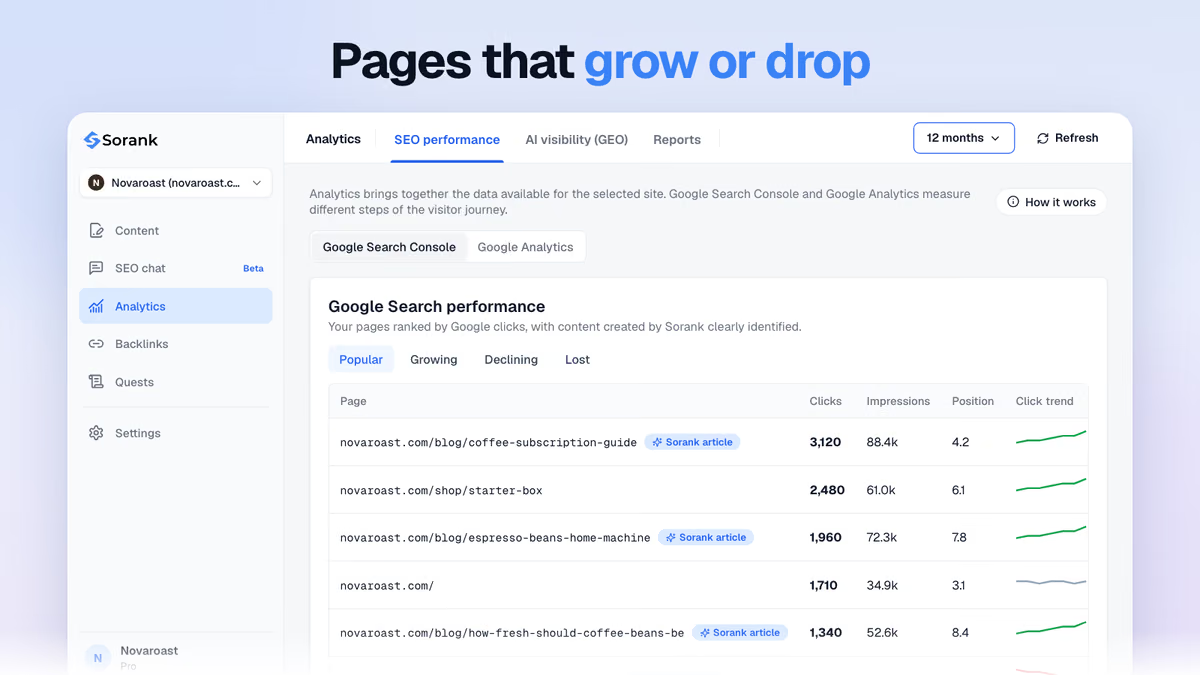
The Sorank GEO and SEO dashboard connects to Search Console and shows those rising and falling pages in one view, so a block introduced by a deployment shows up as a cluster of declining URLs rather than as a slow, unexplained loss.
Robots.txt now has a second audience: the crawlers of AI assistants. OpenAI, Anthropic, Perplexity and Google each publish user agents (GPTBot and OAI-SearchBot, ClaudeBot, PerplexityBot, Google-Extended) that respect robots.txt. A rule meant for one of them, or a blanket User-agent: * block, decides whether ChatGPT, Claude or Perplexity can read your pages when they search the web to build an answer.
The same reasoning applies as with Google: decide per bot what you want. Blocking training crawlers while allowing search crawlers is a common compromise, and our guide to robots.txt for AI crawlers lists the user agents and the rules for each. The glossary entry on AI crawlers explains which bot does what.
Note
A page AI assistants cannot crawl can still be mentioned from third-party sources, but it can rarely be quoted directly. Our study of the sources AI platforms cite shows how much citations depend on pages the assistants can read.
To see the effect of these choices, track the prompts that matter to your business. AI mention tracking in Sorank shows whether ChatGPT, Gemini or Claude cite your site, and which competitors they cite instead.
Robots.txt decides what crawlers may read; noindex decides what search results may show. Keep blocks for areas with no search value, never block a page you want indexed or de-indexed, and check the Page indexing report after every migration or deployment. Most "blocked by robots.txt" problems are fixed in minutes once the matching rule is found, and Sorank's Search Console dashboard helps you catch the next one before it costs traffic.

Google generally refreshes its cached copy of robots.txt within 24 hours, and you can request a recrawl of the file in the Search Console robots.txt report. Recrawling the unblocked pages themselves can take from a few days to a few weeks. Requesting indexing in URL Inspection helps for a handful of important URLs.
Only if the list contains pages you want to appear on Google. Blocks on carts, account pages, admin areas or internal search results are normal and need no action. Export the list, group it by folder and check whether any valuable section appears.
Its URL can be indexed if other pages link to it, but Google cannot read its content, so the result usually appears without a description and rarely ranks for anything meaningful. If you want the page to rank, unblock it so Google can crawl and evaluate it.
We analyse your competitors, your website and your AI visibility to create a tailored content plan for free.
 AI Content Brief Generator
 FAQ Schema Generator
 AI Blog Post Ideas Generator
 Structured Data Validator (Schema Validator)
 Alt Text Checker
 Internal Link Analyzer
 Backlink Challenge
 AI Meta Description Generator
 AI Blog Title Generator
 Google Indexability Checker
 AI Blog Outline Generator
 UTM Link Builder
 Keyword Clustering Tool
 Canonical Tag Checker
 XML Sitemap Generator
 Broken Link Checker
 AI SEO Title Generator
 Headline Analyzer
 SERP Preview Tool
 Redirect Checker
 Hreflang Tag Generator
 Heading Structure Analyzer
 HTTP Headers Checker
 Favicon Extractor
 SERP CTR Calculator
 SEO vs Paid Search Savings Calculator
 SEO Share of Voice Calculator
 SEO ROI Calculator
 SEO Traffic and Revenue Forecast Calculator
 SEO Budget Calculator
 SEO Break-Even Calculator
 SaaS SEO ROI Calculator
 ROAS Calculator
 Reading Time Calculator
 Ranking Gain Simulator
 Organic Traffic Value Calculator
 Organic Traffic Estimator and Website Traffic Checker
 LTV to CAC Ratio Calculator
 Local SEO ROI Calculator
 Link Building Cost Calculator
 Keyword Value Calculator
 Keyword Opportunity Score Calculator
 Keyword Density Calculator
 GEO ROI Calculator
 GEO Content Investment Calculator
 Ecommerce SEO ROI Calculator
 Customer Lifetime Value Calculator
 Customer Acquisition Cost Calculator
 CTR Calculator
 Cost Per Article Calculator
 Conversion Rate Calculator
 Content Marketing ROI Calculator
 ChatGPT Referral Traffic Estimator
 Bounce Rate Calculator
 Backlink ROI Calculator
 AI Visibility Score Calculator
 AI Traffic Value Calculator
 AI Share of Voice Calculator
 Cost of AI Invisibility Calculator
 AI Citation Rate Calculator
 llms.txt Validator
 AI Overview Checker and AI Overviews Rank Checker
 Robots.txt Checker
 AI SEO Audit
 LLM Readability Checker
 SearchGPT Readiness Checker
 Structured Data LLM Audit
 Website Crawlability AI Audit
 Why ChatGPT Is Not Recommending My Website
 Gemini Ranking Tool
 Perplexity Ranking Checker
 LLM Citation Checker
 Answer Engine Optimization Audit
 GEO Audit
 AI Search Visibility Test
 ChatGPT Visibility Checker
 llms.txt Generator
 URL Extractor
 Webpage to Markdown
 Sitemap Checker
 SERP Volatility Sensor
 Page Size Checker
 Word Counter
 Slug Generator
 Schema Generator
 Robots Generator
 OG Preview
 Meta Tags Generator
 Image Compressor
 Favicon Generator
 On-Page SEO Audit: SEO Checker and SEO Analyzer
 Backlink Analysis Tool
 Keyword Research Tool
 Domain Authority Checker
THEY TRIED SORANK BEFORE YOU
 “I tested Sorank on a real client site and it's insane. It does everything an agency would bill you $1500 a month for. It's going into production on that client now.”

 Guillaume Guersanguersanguillaume.com“We are an Ads agency and we wanted to get our SEO back on track once and for all. Sorank gave us a clear view of our site, helped us prioritize optimizations, and properly structure our content. The tool is easy to use, well designed for a team, and very practical for centralizing tracking without having to juggle multiple platforms. A very solid foundation to start fresh with our SEO.”
 Gaspard MadouiAds Agency
 “I just let the Sorank software do its thing, and now my DR is 25 and my page is ranking higher.”
 Lucas Flandrefoundertrace.fr“I specialized in GEO thanks to Sorank. The GEO Leaderboard allows me to show my clients their position vs competitors on ChatGPT. It’s a real commercial differentiator.”
 MélanieSEO Freelance“Great service, works well for our website and helps us understand how to improve it to rank better on Google and elsewhere. Congrats, keep going, I recommend it.”
 Hugo T.E-commerce merchant