Preferences
Privacy is important to us, so you have the option of disabling certain types of storage that may not be necessary for the basic functioning of the website. Blocking categories may impact your experience on the website. More information
Privacy is important to us, so you have the option of disabling certain types of storage that may not be necessary for the basic functioning of the website. Blocking categories may impact your experience on the website. More information

How Google Local Services Ads work after the 2026 move into Google Ads: ranking signals, billing rules, verification, setup steps, metrics and costly mistakes.

Tools

In short
Google Local Services Ads (LSA) are pay-per-lead ads that put a verified local provider at the very top of Google Search and Maps. You pay for a valid call, message or booking, not for a click, and your rank depends on your bid, your responsiveness, your reviews and your verification status. Since August 2026, Google has started moving LSA campaigns into Google Ads as a special Performance Max type, so the setup, bidding and reporting rules are changing right now.
Want to go further? Ask
Quick quiz
How should you get more local customers from Google?
Sorank matches your answers


Test it for 3 days on your own site and see where you stand on Google, ChatGPT and the other AIs.
Start 3-day free trial3 days free, then stop whenever you want. 90-day results guarantee, conditions apply.
This guide covers how the format works today, what changed in 2025 and 2026, how Google ranks and bills you, how to set it up step by step, the four ways to fit LSA into your local marketing, the metrics to track and the mistakes that cost the most money. It is written for business owners, marketing managers and PPC specialists who want the mechanics, not a sales pitch.
Local Services Ads are a separate ad product built for service businesses: plumbers, electricians, locksmiths, cleaners, lawyers, real estate agents, pet care, tutors and many more categories. When someone searches for "emergency plumber near me", a block of providers can appear above the regular search ads. Each card shows the business name, rating, review count, hours, a phone button and, depending on the badge, a "Google Verified" mark.
Three things make LSA different from a classic Google Ads search campaign. First, there are no keywords: you choose service types and areas, and Google decides which searches match. Second, you pay per lead, not per click: a lead is a phone call, a message or a booking request that meets Google's criteria. Third, Google screens the business before or soon after the ads go live: licenses, insurance and background checks, depending on the category and country.
LSA cards show on Google Search and Google Maps. Google's own help page on the 2026 migration confirms that ads in the new pay-per-lead Performance Max campaigns "continue to show exclusively on Google Search and Google Maps". They do not run on YouTube, Gmail or the Display network, even after the move into Google Ads.
Availability depends on the country and the business category. Booking leads, for example, are only available in the United States and Canada. Some categories get message leads and booking, others only phone leads. Before planning a budget, check that your category exists in your country inside the Local Services Ads sign-up flow.
The table below compares the three ways a local business can appear at the top of a local search. If you need a refresher on the auction behind classic ads, read our guide to how Google Ads works.
| Criterion | Local Services Ads | Google Search ads | Local pack (organic) |
|---|---|---|---|
| What you pay for | A valid lead (call, message, booking) | A click | Nothing per click |
| Targeting | Service types and areas, no keywords | Keywords, audiences, locations | Relevance, distance, prominence |
| Position | Top of results, above search ads | Top and bottom of results | Below ads, with the map |
| Trust signal | Google Verified badge, reviews | Ad copy, extensions | Reviews, photos, profile |
| Landing page needed | No, the profile is the page | Yes | Website optional but helps |
| Speed to results | Days to weeks (screening) | Hours | Months |
| Control | Low: budget, hours, services | High: bids, keywords, copy | Indirect: profile and site quality |
If you read an LSA guide written before mid-2026, part of it is now wrong. Two changes matter most: the badges were merged into a single "Google Verified" badge, and LSA campaigns are moving into Google Ads.
Local Services Ads: the recent milestones
For years, home service providers earned a "Google Guaranteed" badge, backed by a money-back promise to customers, while professional services got "Google Screened". In October 2025, Google replaced these labels with a single Google Verified badge. The badge still means the business passed Google's screening (identity, license, insurance and background checks where required), but the money-back guarantee is gone. If your website, quotes or vans still say "Google Guaranteed", update them: promising a guarantee that no longer exists is a trust problem.
Google's help page "Local Services Ads transition to Performance Max campaigns with pay-per-lead goals" explains the change. Existing campaigns are migrated automatically. Your targeted locations, service types, business categories, budget limits and ad schedule move over, and past lead history transfers to Google Ads. Performance reports do not. As Brooke Osmundson summarized in Search Engine Journal on July 20, 2026, admins get 14 days of notice before their account moves, and the old LSA dashboard closes afterwards.
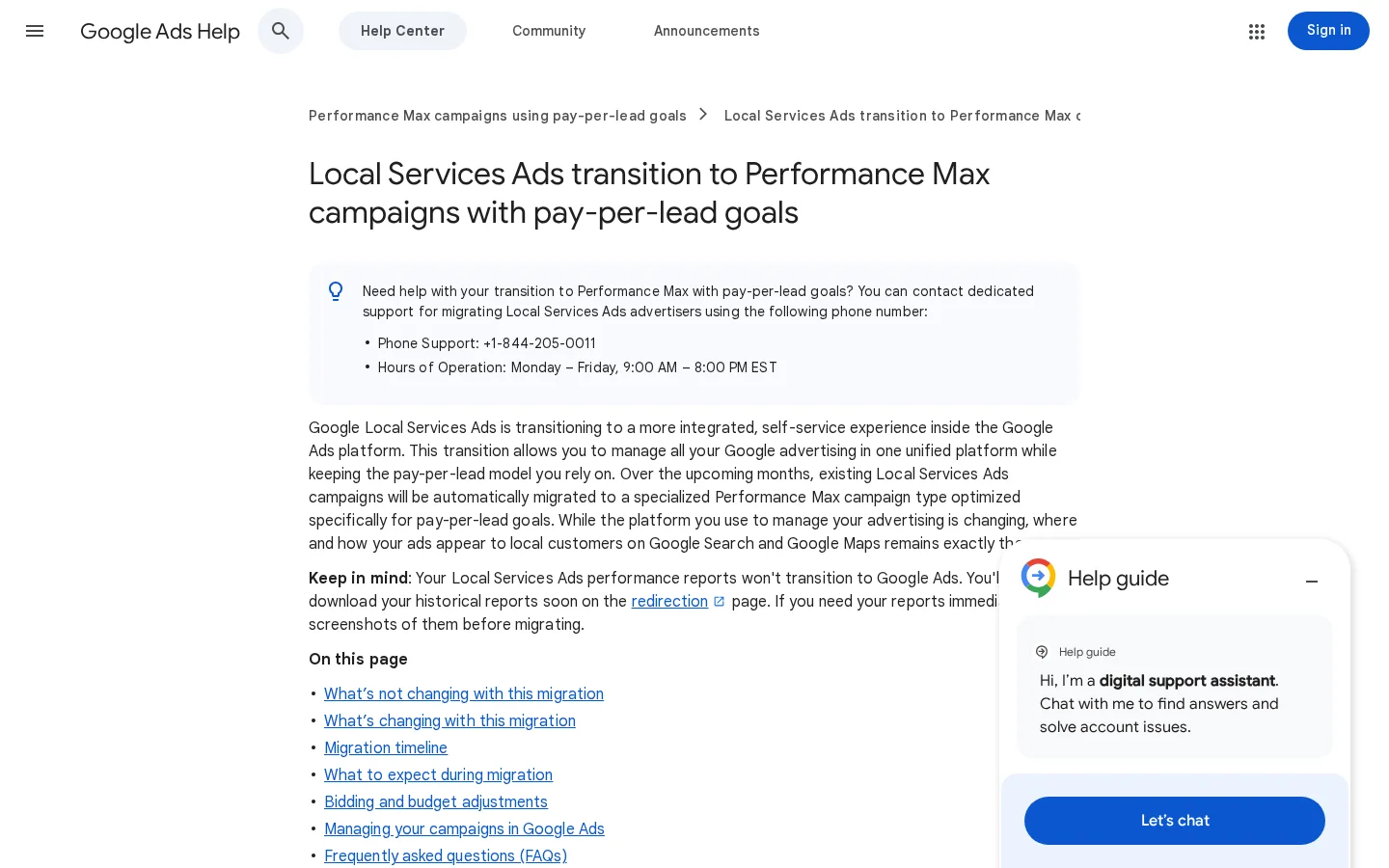
The practical consequences, all stated on Google's migration help page:
Warning
Export your LSA performance reports before your account migrates. Historical impressions, clicks, weekly spend and ad-level reports do not move to Google Ads, and you will need them to compare cost per lead before and after the switch.

LSA is an auction, but not one you win with money alone. Google's help page "About ad rankings" says listings are ranked by an auction "where the highest ranked ads show first", and that the auction weighs three groups of signals.
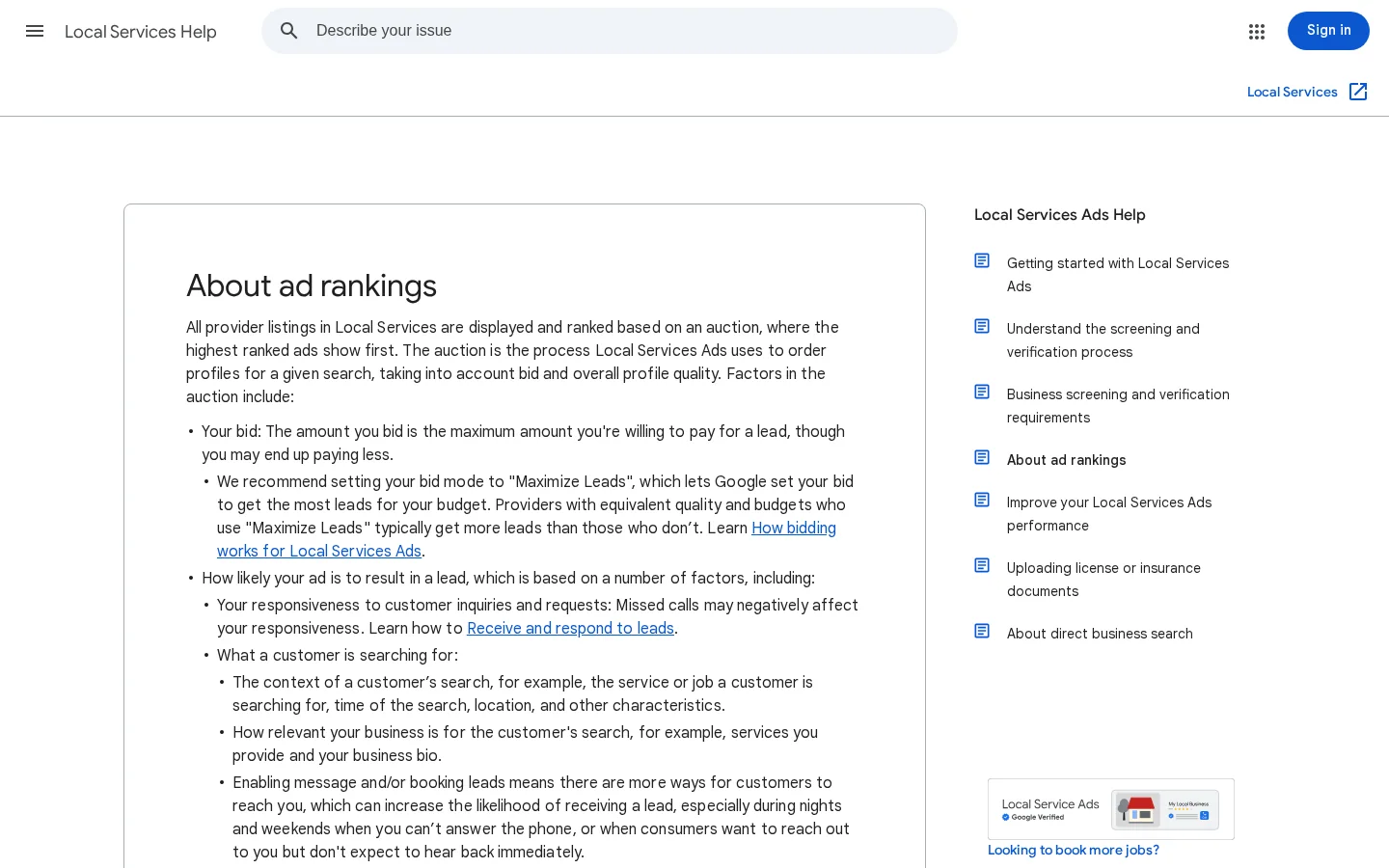
The bid is the most you are willing to pay for a lead, and you may pay less. Google recommends the "Maximize leads" mode, which sets bids automatically to get as many leads as possible within your budget. In migrated Google Ads campaigns, manual maximum bids are gone and you work with a budget and, optionally, a campaign-level target.
This is where most providers lose ground without knowing it. Google lists:
Ratings, number of reviews, average response time, high-quality images, completed verification checks and other business details. Reviews now live in your Google Business Profile, so the work you do there also feeds your LSA rank. Our guides on how to get more Google reviews and how to respond to them apply directly.
If several locations of the same business serve the same area, Google shows only the highest-ranking one for a given query. Opening a second account for the same area does not double your exposure. And because search context includes the time of the search, a business that is open when the search happens has an advantage over one that is closed: keep your hours accurate and consider message leads for evenings and weekends.
| Signal (per Google) | What you control | Action this week |
|---|---|---|
| Bid or budget | Budget, target if any | Set a budget that covers at least a few leads per week, then adjust |
| Responsiveness | Who answers, how fast | Route LSA calls to a person, not a voicemail |
| Search context | Hours, service areas | Match hours with your real availability and your Business Profile |
| Relevance | Service types, bio | Select only the jobs you really do, write a specific bio |
| Lead types | Messages, bookings | Turn on message leads and answer them within minutes |
| Profile quality | Reviews, photos, verification | Ask every satisfied customer for a review, add real job photos |
You are not charged for impressions or profile views. You are charged per valid lead. Google's page "How leads work" defines the rules, and they are more precise than most guides admit.
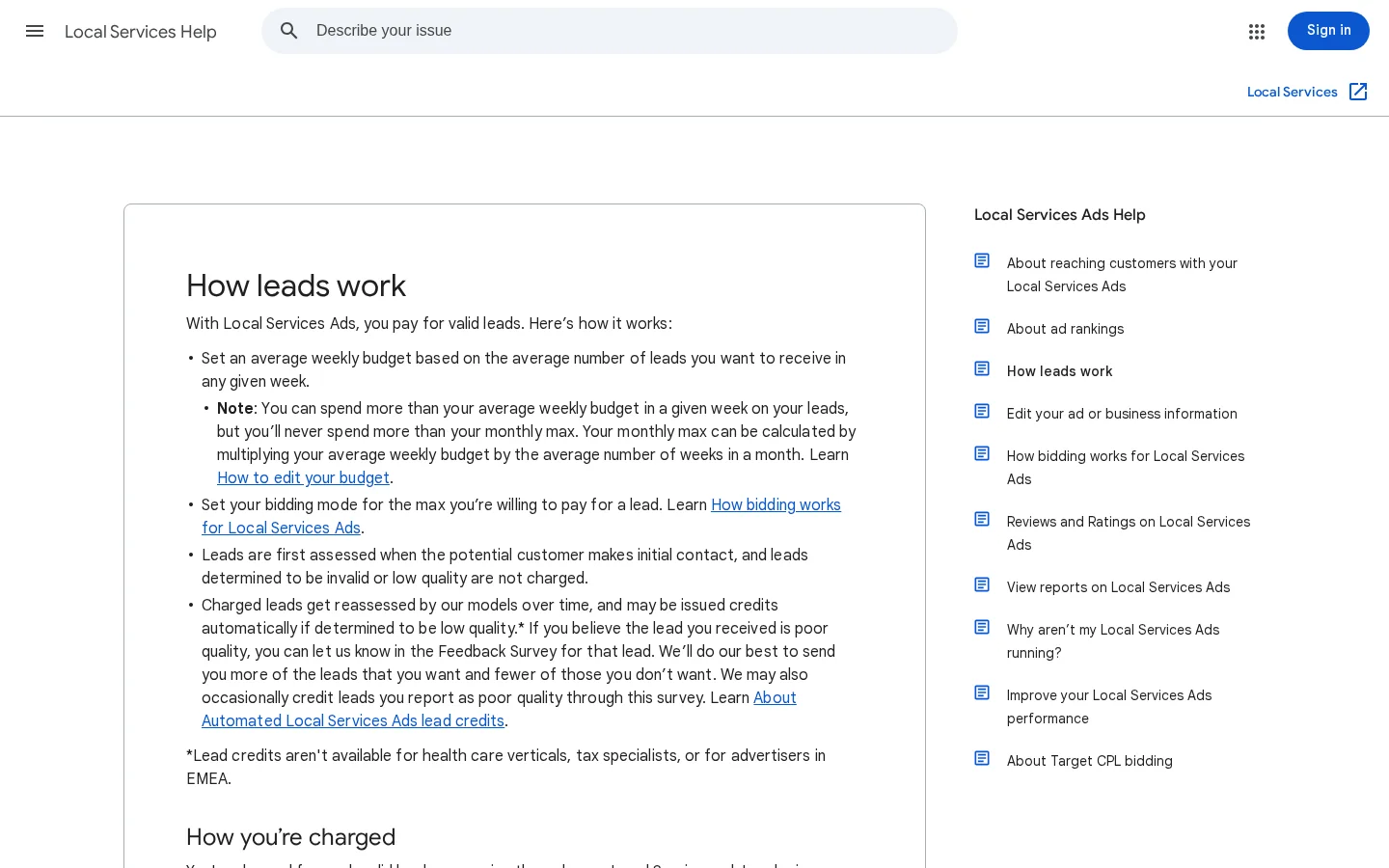
You are charged when you answer a call, or call the customer back and speak with them. Missed calls count too: a missed call during business hours becomes a charged lead if the customer stays on the line for more than 20 seconds. If your phone line uses an automated menu, the timer starts after the caller's first key press. In practice, a phone that rings out during opening hours costs you a lead and gives you nothing in return.
A message lead is charged when you receive a text message or email from the customer through the ad. Google says message leads are usually priced below phone leads, though "that is not always the case". A booking lead is charged when you receive a booking request, and booking is only available in the United States and Canada.
If the same phone number or email contacts you again with interaction within 15 days, you are not charged again. After 15 days without activity, a new contact can become a new charged lead. Low-quality leads can be credited automatically, but credits are not available for health care verticals, tax specialists or advertisers in EMEA, and automatic credits are not available in EEA countries.
The numbers that drive your LSA bill
Sources: Google Local Services Help ("How leads work", "Business screening and verification requirements") and Google Ads Help (LSA transition to Performance Max), 2026
After migration, Google converts your weekly budget into a daily one. The arithmetic is simple, and it is worth checking it in your account the day the migration happens:
daily_budget        = historical_weekly_budget / 7
monthly_spend_cap   = daily_budget * 30.4

Example: weekly budget 700
daily_budget        = 700 / 7  = 100
monthly_spend_cap   = 100 * 30.4 = 3040
Daily budgets can overspend on a single busy day and compensate over the month, as in other Google Ads campaigns. If your team can only handle a fixed number of jobs per day, watch the first weeks closely.
Before your ads can run with the Google Verified badge, Google checks the business. The exact list depends on your category and country, and Google's page "Business screening and verification requirements" details it for the United States. It says the process takes 3 to 4 weeks to complete after you submit your documents, so start the paperwork the day you create the account.
Verification checklist before you launch
A verified Business Profile is mandatory. If yours is not verified yet, follow our step-by-step guide on how to verify your Google Business Profile. In some categories, Google lets new providers run "pre-badge" ads before verification is complete, but those listings appear below verified providers.
Here is the full process for a new advertiser. While Google finishes the migration, new pay-per-lead campaigns may still start from the Local Services Ads sign-up flow rather than from inside Google Ads, so check which entry point your account sees.
The 7-step LSA launch
Go through the sign-up flow with your exact category. If your category is not listed in your country, LSA is not an option yet, and your budget is better spent on classic Google Ads and local SEO.
After migration, name, address and hours sync from Google Business Profile. Any mismatch between the profile and what you tell customers on the phone hurts you twice: in the LSA ranking and in the local pack. Add real photos of jobs, vehicles and team; Google lists high-quality images among profile quality signals.
Every service type you tick is a promise. If you tick "water heater installation" but refuse those jobs, you pay for leads you turn down. The same goes for areas: a zip code 45 minutes away may produce leads you cannot serve profitably. Start with your core jobs and your best areas, then expand when the data supports it.
Upload documents as soon as the account exists. Name every file clearly and make sure the business name on the license and insurance matches the profile exactly. Mismatches are a common cause of delay.
The bio feeds relevance. Write it for a customer, not for an algorithm: years in business, the jobs you do most, the areas you cover, whether you offer emergency service, the brands you install, the languages your team speaks. Keep it factual and avoid superlatives.
Set a budget large enough to produce a handful of leads per week, otherwise you will not learn anything in a month. Set hours you can really staff. Turn on message leads: they capture people who search late at night and give you a chance to reply first thing in the morning.
Every lead is a race. Answer calls live, reply to messages within minutes, call back missed calls immediately. In the lead inbox (Lead Manager after migration), mark leads as booked or not and give feedback. Google uses this to improve matching, and it gives you the data to compute cost per booked job.
LSA rarely works best alone. There are four common ways to combine it with your other channels. Each has its place, depending on your budget, your capacity to answer leads and how established your brand already is.
Principle: you spend your whole local ad budget on pay-per-lead, and do nothing else on paid search. When to use it: small teams with no time to manage keywords, in a category where LSA is available. Advantages: simple, no landing page, you pay only for contacts. Limits: little control, no keyword data, volume capped by how many people search in your area, and full dependence on one Google format. Example: a solo locksmith who answers every call and wants zero campaign management.
Principle: LSA takes the top slot, Search ads cover the rest of the page and the long-tail queries LSA does not match. When to use it: when LSA volume is capped and you want more leads, or when you sell services that LSA categories do not cover. Advantages: two placements on the same page, keyword data from Search that helps you understand demand. Limits: you may pay twice for the same customer; Search ads need landing pages and conversion tracking. Example: an HVAC company running LSA for "AC repair" and Search ads for "heat pump installation cost".
Principle: LSA brings leads now, local SEO builds free visibility in the local pack and organic results over months. Both feed on the same assets: Business Profile, reviews, photos. When to use it: almost always, because every review you earn helps both. Advantages: lower cost per lead over time, less dependence on paid. Limits: SEO takes months and needs content work. Example: a plumber running LSA while publishing location pages for each town served.
Principle: you cover every place a local customer looks: LSA cards, Search ads, the local pack, organic results and the recommendations given by ChatGPT, Gemini or Google's AI Overviews. When to use it: established businesses with several trucks or locations and someone to own marketing. Advantages: maximum share of the page and of AI answers, resilience if one channel changes (as LSA is changing now). Limits: needs coordination and measurement across channels. Example: a regional roofing company that runs LSA in its core cities, Search ads for storm-related queries and works on being cited in AI answers through local GEO.
| Method | Effort | Speed | Cost over time | Control | Best for |
|---|---|---|---|---|---|
| LSA only | Low | Fast after screening | Stays flat or rises | Low | Solo providers |
| LSA + Search ads | Medium | Fast | Rises with competition | High on Search | Growth in paid volume |
| LSA + local SEO | Medium | Slow for SEO part | Falls as organic grows | Medium | Most local businesses |
| Full local stack | High | Mixed | Lowest per lead long term | Highest | Multi-location businesses |
LSA only vs LSA plus local SEO
Tip
Before choosing between more ad spend and more SEO, compare the two with our free SEO vs PPC calculator, then estimate what local search could bring you with the local SEO ROI calculator.
Once leads come in, the work moves from setup to operations. Most gains come from how you handle leads, not from changing settings.
Measure the share of calls answered live during business hours and the time to first reply on messages. If calls go to voicemail at lunch or after 5 pm, either staff those hours or remove them from your schedule. A missed call that lasts more than 20 seconds is charged anyway, so a missed call costs you twice: the money and the rank.
Reviews are part of profile quality. Build a routine: ask for a review at the end of every completed job, with a direct link. Reply to every review, positive or negative. Look at our analysis of local ranking factors: the same habits lift the local pack.
Every month, pull the leads by service type and by city. Remove service types that produce leads you never book, and areas where the drive time kills the margin. Add hours only when you can staff them.
Mark leads as booked, not booked, or not relevant. With manual disputes gone after migration, this feedback and Google's automatic review are the main tools you have to steer lead quality.
A typical LSA account before and after a cleanup
Cost per lead is the number everyone looks at, and it is the wrong one to optimize alone. A cheap lead that never books costs more than an expensive one that turns into a job. Track the chain from lead to revenue.
| Metric | Formula | What it tells you |
|---|---|---|
| Cost per lead | Spend / charged leads | The price Google charges you |
| Booking rate | Booked jobs / charged leads | How well your team converts |
| Cost per booked job | Spend / booked jobs | The real acquisition cost |
| Revenue per booked job | Revenue from LSA jobs / booked jobs | Average job value from this channel |
| Return on ad spend | Revenue from LSA jobs / spend | Whether the channel pays |
| Leads by city and service | Count per segment | Where to expand or cut |
| Answer rate | Answered calls / total calls | Your responsiveness signal |
Before you judge the price Google charges, compute the most you can afford to pay per lead. Use your own numbers:
max_cost_per_lead = average_job_revenue * gross_margin * booking_rate

Example (your own figures):
average_job_revenue = 450
gross_margin        = 0.40
booking_rate        = 0.35
max_cost_per_lead   = 450 * 0.40 * 0.35 = 63
If your actual cost per lead stays above that number for several weeks, LSA is losing money on first jobs. That can still be fine if customers come back (maintenance contracts, repeat services), but then you need customer lifetime value in the equation. Our free customer acquisition cost calculator helps you put these numbers side by side, and our list of PPC metrics explains the other ratios to watch.
Note
Leads charged and leads not charged appear separately in the lead list. Reconcile them each month with your own call log or CRM: it is the only way to spot charged leads that should have been credited.
These are the errors that cost local businesses the most money on LSA. For each one: what it is, how to spot it, how to fix it.
What it is: calls that reach voicemail or nobody during opening hours. How to spot it: compare charged phone leads with the calls your team actually spoke to; listen to call recordings where available. How to fix it: route LSA calls to a line that is always staffed during scheduled hours, or shorten your hours. Remember that a missed call beyond 20 seconds is charged.
What it is: selecting job types you do not want or cannot do, to get more exposure. How to spot it: leads by service type with a booking rate near zero. How to fix it: remove those service types; the leads they bring are paid and wasted.
What it is: hours set to 24/7 or wider than staffed hours. How to spot it: missed calls clustered early morning, evening or weekends. How to fix it: align LSA hours, Business Profile hours and real staffing. Turn on message leads to capture after-hours demand instead.
What it is: a different business name or address on the license, the insurance, the Business Profile and the LSA account. How to spot it: verification stuck for weeks, or rejected documents. How to fix it: use the exact legal or registered name everywhere, and fix the profile first since it now syncs into Google Ads.
What it is: mentioning a money-back guarantee that Google discontinued in 2025. How to spot it: search your website, quotes and vehicle wraps for "Google Guaranteed". How to fix it: replace it with "Google Verified" and do not promise a refund on Google's behalf.
What it is: losing years of performance history when the LSA dashboard closes. How to spot it: you received the 14-day migration notice and have no local export. How to fix it: download every report available now, by month, service and city, and store them with your CRM data.
What it is: cutting or raising budget based on cost per lead, without booking data. How to spot it: nobody in the team can tell you the cost per booked job. How to fix it: mark every lead as booked or not and compute cost per booked job and return on ad spend each month.
What it is: relying on LSA only while competitors also hold the local pack, organic results and AI answers. How to spot it: when your LSA budget runs out mid-week, leads drop to zero. How to fix it: build the free channels in parallel, starting with reviews, the Business Profile and location pages. Our guide to combining SEO and PPC shows how to share the work.
LSA buys the top slot for searches Google matches to your category. It does not cover the long tail of questions customers ask before they call ("why is my water heater making noise", "how much does a panel upgrade cost"), and it does not decide what ChatGPT, Gemini or Google's AI Overviews recommend when someone asks for "a reliable electrician in Austin". That visibility comes from your website, your reviews, your mentions on other sites and the clarity of your pages.
This is where Sorank helps. It researches the questions your customers ask, writes and publishes the articles and location content on autopilot, and tracks whether AI assistants mention your business through GEO optimization and AI mention tracking. Used next to LSA, it lowers your dependence on a single paid format at a time when that format is changing. If you run a service business, see how it works for local businesses.
Tip
Want to know if AI assistants already recommend you? Run the free AI search visibility test on your business name and main service.
The action for today: open your LSA account, export your reports, check that your hours and service types match what your team can really handle, and list the five customers you will ask for a review this week.
There is no fixed price: the cost per lead is set by an auction and varies with your trade, your city and the competition. You pay only for valid leads (answered calls, missed business-hours calls longer than 20 seconds, messages and bookings), and message leads are usually priced below phone leads. Compute your break-even cost per lead from your average job value, margin and booking rate before judging the price.
No. In October 2025, Google merged Google Guaranteed, Google Screened and License Verified into a single Google Verified badge, and the money-back guarantee ended. The badge still shows that the business passed Google's screening, such as license, insurance and background checks where required.
Yes. Since August 2026, Google has been migrating Local Services Ads into Google Ads as Performance Max campaigns with pay-per-lead goals, starting with selected US home and storefront services, with non-US accounts scheduled for 2027. Manual maximum bids and manual lead disputes disappear, budgets become daily, and historical performance reports do not transfer, so export them before your account moves.
We analyse your competitors, your website and your AI visibility to create a tailored content plan for free.
 AI Content Brief Generator
 FAQ Schema Generator
 AI Blog Post Ideas Generator
 Structured Data Validator (Schema Validator)
 Alt Text Checker
 Internal Link Analyzer
 Backlink Challenge
 AI Meta Description Generator
 AI Blog Title Generator
 Google Indexability Checker
 AI Blog Outline Generator
 UTM Link Builder
 Keyword Clustering Tool
 Canonical Tag Checker
 XML Sitemap Generator
 Broken Link Checker
 AI SEO Title Generator
 Headline Analyzer
 SERP Preview Tool
 Redirect Checker
 Hreflang Tag Generator
 Heading Structure Analyzer
 HTTP Headers Checker
 Favicon Extractor
 SERP CTR Calculator
 SEO vs Paid Search Savings Calculator
 SEO Share of Voice Calculator
 SEO ROI Calculator
 SEO Traffic and Revenue Forecast Calculator
 SEO Budget Calculator
 SEO Break-Even Calculator
 SaaS SEO ROI Calculator
 ROAS Calculator
 Reading Time Calculator
 Ranking Gain Simulator
 Organic Traffic Value Calculator
 Organic Traffic Estimator and Website Traffic Checker
 LTV to CAC Ratio Calculator
 Local SEO ROI Calculator
 Link Building Cost Calculator
 Keyword Value Calculator
 Keyword Opportunity Score Calculator
 Keyword Density Calculator
 GEO ROI Calculator
 GEO Content Investment Calculator
 Ecommerce SEO ROI Calculator
 Customer Lifetime Value Calculator
 Customer Acquisition Cost Calculator
 CTR Calculator
 Cost Per Article Calculator
 Conversion Rate Calculator
 Content Marketing ROI Calculator
 ChatGPT Referral Traffic Estimator
 Bounce Rate Calculator
 Backlink ROI Calculator
 AI Visibility Score Calculator
 AI Traffic Value Calculator
 AI Share of Voice Calculator
 Cost of AI Invisibility Calculator
 AI Citation Rate Calculator
 llms.txt Validator
 AI Overview Checker and AI Overviews Rank Checker
 Robots.txt Checker
 AI SEO Audit
 LLM Readability Checker
 SearchGPT Readiness Checker
 Structured Data LLM Audit
 Website Crawlability AI Audit
 Why ChatGPT Is Not Recommending My Website
 Gemini Ranking Tool
 Perplexity Ranking Checker
 LLM Citation Checker
 Answer Engine Optimization Audit
 GEO Audit
 AI Search Visibility Test
 ChatGPT Visibility Checker
 llms.txt Generator
 URL Extractor
 Webpage to Markdown
 Sitemap Checker
 SERP Volatility Sensor
 Page Size Checker
 Word Counter
 Slug Generator
 Schema Generator
 Robots Generator
 OG Preview
 Meta Tags Generator
 Image Compressor
 Favicon Generator
 On-Page SEO Audit: SEO Checker and SEO Analyzer
 Backlink Analysis Tool
 Keyword Research Tool
 Domain Authority Checker
5/5 from 5 reviews
 “I tested Sorank on a real client site and it's insane. It does everything an agency would bill you $1500 a month for. It's going into production on that client now.”

 Guillaume Guersanguersanguillaume.com“We are an Ads agency and we wanted to get our SEO back on track once and for all. Sorank gave us a clear view of our site, helped us prioritize optimizations, and properly structure our content. The tool is easy to use, well designed for a team, and very practical for centralizing tracking without having to juggle multiple platforms. A very solid foundation to start fresh with our SEO.”
 Gaspard MadouiAds Agency
 “I just let the Sorank software do its thing, and now my DR is 25 and my page is ranking higher.”
 Lucas Flandrefoundertrace.fr“I specialized in GEO thanks to Sorank. The GEO Leaderboard allows me to show my clients their position vs competitors on ChatGPT. It’s a real commercial differentiator.”
 MélanieSEO Freelance“Great service, works well for our website and helps us understand how to improve it to rank better on Google and elsewhere. Congrats, keep going, I recommend it.”
 Hugo T.E-commerce merchant