Preferences
Privacy is important to us, so you have the option of disabling certain types of storage that may not be necessary for the basic functioning of the website. Blocking categories may impact your experience on the website. More information
Privacy is important to us, so you have the option of disabling certain types of storage that may not be necessary for the basic functioning of the website. Blocking categories may impact your experience on the website. More information

 WordPress Autoblogging: How to Set It Up Without Putting Your Site at Risk
Set up WordPress autoblogging step by step with a free plugin, then avoid the copyright and duplicate content risks that can cost you rankings.
In short
WordPress autoblogging is a site that publishes new articles on a schedule, with little or no manual writing. You can start with a free plugin, but free plugins mostly copy or rewrite content from other sites, which brings copyright and duplicate content risks. Start in draft mode and review every post.
Want to go further? Ask
Quick quiz
Which kind of software is right for your business?
Our advice for you
A free or very simple tool
You are alone or just starting: a free plan or a simple tool covers the basics. Switch when you feel limited.
Our advice for you
An all-in-one tool for small businesses
You want one tool that does a bit of everything, is easy to learn and has support in your language.
Our advice for you
A specialised tool, the best in its field
This task is central to your business: pay for the most complete tool and connect it to the rest.
Our advice for you
An enterprise solution
Many users, strict security and integrations: ask for demos and compare the total cost, setup included.
Autoblogging is a way to publish new posts without writing each one by hand. On WordPress, a plugin or an outside service creates the posts, and WordPress publishes them at a time you set. People use it to keep a blog active, to test a topic, or to build a site around a niche they know well.
The idea sounds simple. In practice, the quality of the site depends on three choices: where the content comes from, who checks it, and how often it goes live. Most autoblog problems come from one of these three choices being left on the default settings.
The table below shows which jobs change when you move from a manual blog to an autoblog. The work does not disappear. It moves from writing to checking.
| Job | Manual blog | Autoblog |
|---|---|---|
| Choose topics | You research each topic | A feed, a keyword list or a tool picks them |
| Write the text | You write every draft | A plugin or a service writes it |
| Check facts and sources | You do it while you write | You must do it after the post is created |
| Publish | You press publish | WordPress publishes on a schedule |
Autoblogging can save hours each week. It cannot fix a weak source, so the rest of this guide focuses on the setup and the checks. For the broader concept, read our overview of auto blogging. This article covers the hands-on WordPress setup.
Yes. The WordPress.org plugin directory has free plugins that create posts automatically. Many of them work from RSS feeds, which are lists of new items that other sites publish. The plugin reads the feed, creates a post for each new item, and publishes it. Some free plugins also add an AI writer or a second source, but those features are often limited or paid.
Free has a price. Free versions usually cap the number of sources, the posts per month or the features. Some depend on an outside service that can change its terms or go offline. Before you install a plugin, check its last update date, its support forum and its licence.
The timeline below shows two rules that matter for any autoblog. They are not about one plugin. They come from what Google and the US Copyright Office say about automated content.
Rules that shape autoblogging
Sources: Google Search Central blog, March 5, 2024; US Copyright Office, Part 2 report, January 29, 2025

Autoblogging comes in four forms. They differ in where the content comes from, how much effort the setup takes and which risk you carry. Pick the form before you pick the plugin, because the risk follows the method.
How it works: the plugin reads the RSS feeds of the sites you choose and turns each new item into a post. The post can hold the full text, an excerpt, or only a link.
When to use it: when you want a news or link page that tracks a few sources you have permission to use, and you add your own comments.
Advantages: it is often free, quick to set up and fresh by default.
Limits: the text belongs to someone else. Full copies create duplicate content and can infringe copyright. Many feeds also publish the same story, so your site fills with near-identical posts.
Example: a site about hiking gear reads three gear blogs through their feeds and posts a short summary with a link to each original article.
How it works: you give the plugin a list of keywords or topics. An AI model writes a new article for each entry, sometimes after a search for sources. AI content generation explains how these models produce text at scale.
When to use it: when your site needs many original articles on a defined set of topics, and you have time to review each one.
Advantages: the text is new, and you control the topics.
Limits: the output can be generic, repeat the same structure, or state facts that are wrong. Many of these tools are paid, and the free tier is often a short trial.
Example: a local bakery lists 40 topics about cakes and events. The plugin drafts one post per topic, and the owner edits each draft before it goes live.
How it works: the plugin connects to an outside service through an API key or token. The service returns articles, news items or product data, and the plugin posts them.
When to use it: when the service has a clear licence that allows republishing with attribution, and you need a steady flow of items.
Advantages: the setup is often a token and a few options. The feed is structured, so filters are easy to set.
Limits: your site depends on that service. Its licence decides what you can publish, and a change in its prices or terms can stop your posts.
Example: a site about tax news pulls only items from sources whose licence allows excerpts, and it links to each source in every post.
How it works: a service plans topics, writes the articles and sends them to your content management system. You review the plan and the output, and you set how often posts go live.
When to use it: when you want keyword research, writing and publishing in one workflow, and you have someone who can check the output each week.
Advantages: planning, writing and publishing sit in one place, and the posts are original.
Limits: you depend on the vendor's quality, and you still carry the duty to check facts. A managed service does not remove that duty.
Example: a service builds a 12-week calendar, drafts each article, and sends it to WordPress so a person can check it before the schedule runs.
| Method | Where the content comes from | Setup effort | Main risk |
|---|---|---|---|
| RSS aggregation | Other sites' feeds | Low | Duplicate content and copyright |
| Keyword-based AI writers | A model writes from your keyword list | Medium | Generic or wrong text |
| API content sources | An outside service, under its licence | Medium | Dependence on the service's terms |
| Managed autopilot services | A service plans and writes | Low to medium | Quality depends on the vendor and on your review |
Many sites that get into trouble chose the first method without weighing its risk. If you want a site that lasts, choose a method whose main risk you can control.
A free autoblog needs four things: a backup, one source, a draft status and a test run. The steps below use a free RSS-based plugin, because it is the most common free setup. The same order works for the other methods.
Setting up a free autoblog plugin
Make a full backup of the site. Check that your hosting allows scheduled tasks. Decide which feeds you have permission to use, and write the list down. The feed choice drives your copyright risk for the whole life of the site.
Also compare your WordPress and PHP versions with the plugin's stated requirements. A plugin that is no longer maintained can break after a WordPress update, and a broken autoblog can publish nothing for weeks without a clear error message.
Open your WordPress admin. Go to Plugins, then Add New Plugin, search for the plugin name, and select Install Now. When the install finishes, select Activate. Most plugins then add a menu item named after them. Open it and paste your first feed address, which usually ends in .xml or .rss.
Use one feed at first. Two or three feeds at once make it harder to see which source caused a problem, and they multiply the duplicate content risk.
Choose draft status for the first weeks. Auto-publish sends every post live the moment the schedule runs, so an error reaches readers and search engines at once. The comparison below shows the trade-off.
Auto-publish or draft first?
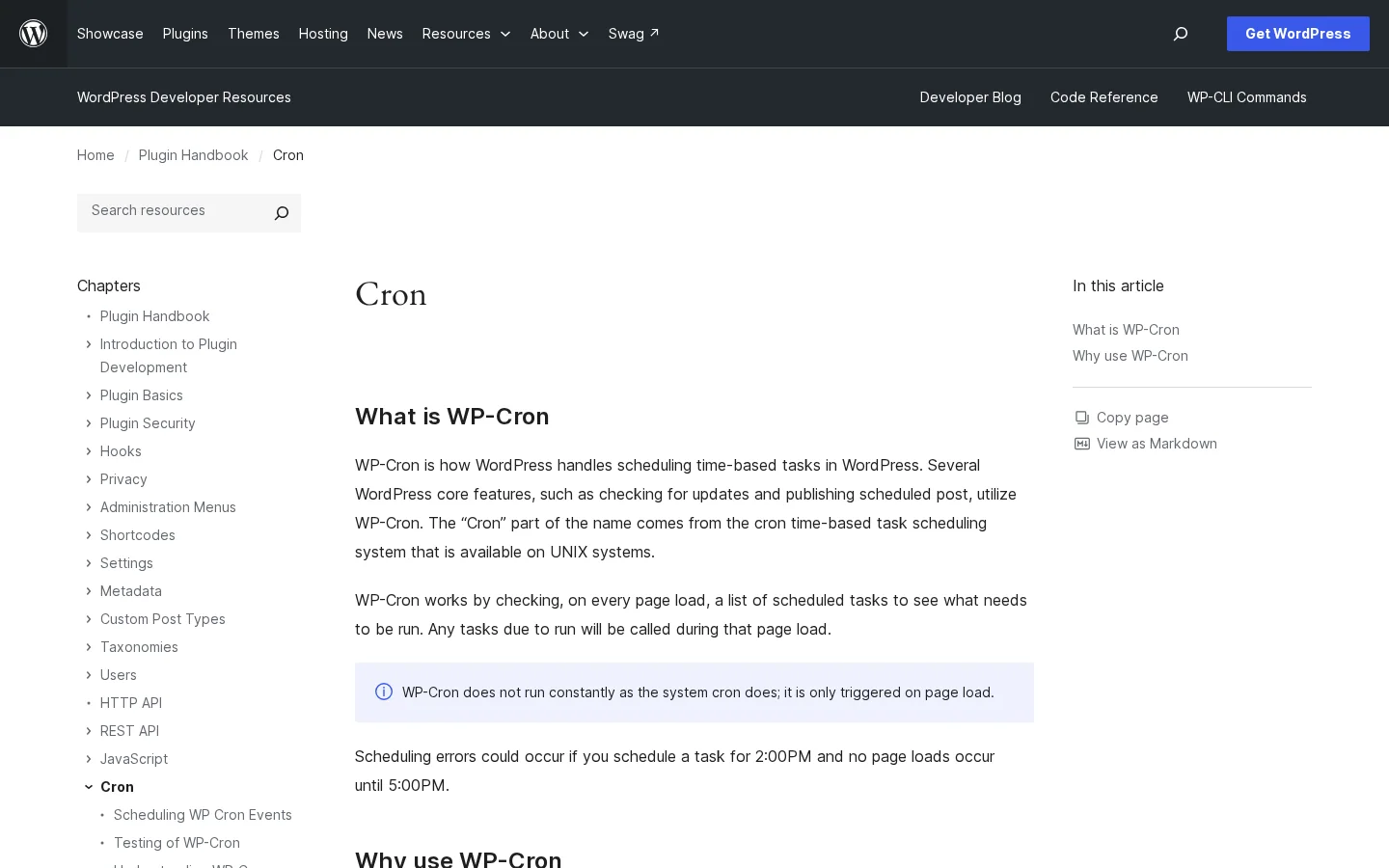
Scheduled posts depend on WP-Cron, a WordPress system that runs only when someone visits your site. It checks the list of due tasks on each page load. If nobody visits when a post is due, the post waits for the next visit.
This matters for an autoblog. A site with few visitors can publish a post hours or days late, or several at once when traffic arrives. The WordPress developer handbook says WP-Cron "is only triggered on page load", so the timing depends on visits.
The fix is to turn off the page-load trigger and call the same file from your server's own scheduler. Add this line to wp-config.php, above the comment that says to stop editing:
define( 'DISABLE_WP_CRON', true );Then add a server cron job that calls the WP-Cron file every 15 minutes. Replace the address with your own site.
*/15 * * * * wget -q -O - https://example.com/wp-cron.php?doing_wp_cron >/dev/null 2>&1Note
Check that the cron job runs. Open your hosting panel or server logs about 30 minutes after you add it. If the scheduled posts appear on time, the setup works. If they still wait for visits, the cron job is not running, and the fix is in the server settings, not in WordPress.
In the US, copyright protects the text and images that someone created, not the facts or ideas behind them. That gives you a clear rule for an autoblog: you may use the facts from a source, but you should not copy its wording, its structure or its images without permission.
A full copy of an article from an RSS feed is the highest-risk case. An excerpt with a link to the source is safer, and a summary in your own words with a link is safer still. Republishing is clearly allowed only when the source grants a licence, such as a content service with written terms.
The US Copyright Office says that copyright needs a human author. In its January 29, 2025 report on copyrightability, it says a person can claim protection for creative arrangements or changes to the output, but not for the mere provision of prompts. Text that a model writes from your prompt alone may therefore be unprotected, which means you may not be able to stop someone else from copying it.
That gap matters for a business. If your site's value sits in its text, add real human work: your own examples, your own data and your own structure.

Warning
This is general information, not legal advice. Rules differ by country, and a court can weigh the same facts differently. If you plan to republish content at scale, ask a lawyer who knows your market before you launch.
Google does not ban automated content as such. In its March 5, 2024 announcement, Google introduced scaled content abuse, which it defines as many pages generated for the primary purpose of manipulating search rankings. The policy applies whether automation, people or both produce the content.
The key phrase is "without adding value for users". The Google Search Central spam policies page names generative AI tools used to create many pages without adding value as its first example. It also lists scraping feeds to generate many pages, and stitching content from other pages together. Changing words with synonym swaps does not help if readers gain little. Our guide to content spinning explains why Google treats that as a penalty risk.
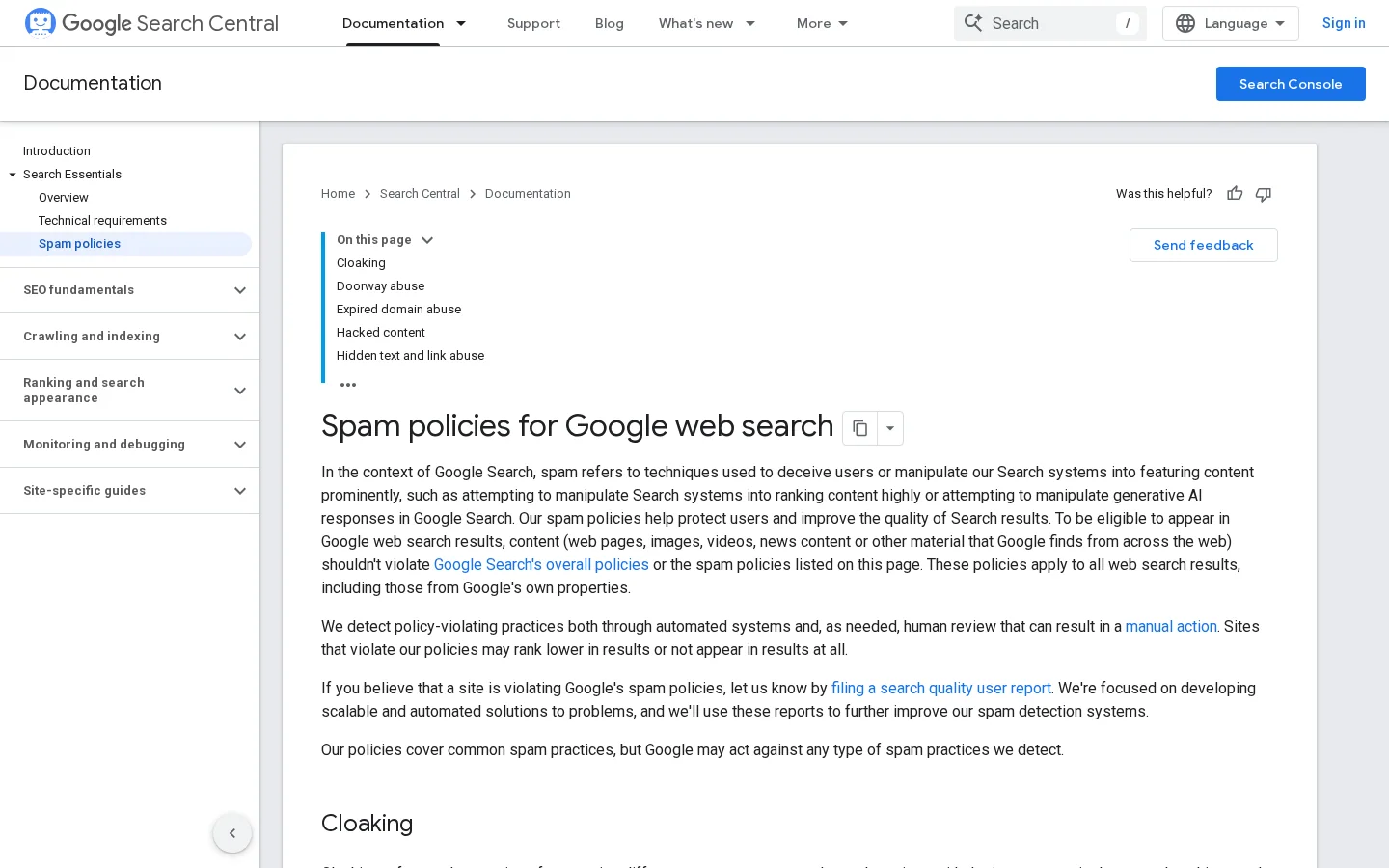
In its guidance on using generative AI content, Google says generative models predict likely words rather than retrieve facts. It asks creators to check accuracy and to review metadata such as titles, descriptions and image alt text before publishing. It also suggests that you can explain how your content was made, so readers have context. These checks are what separate a useful site from one that search engines can read as spam.
Five mistakes cause most autoblog problems. Each one below has three parts: what it is, how to spot it, and how to fix it. Check your site against this list once a month.
What it is: your post repeats another page's text, in full or with a few words swapped. Google treats near-copies as low value, and the original page may rank above yours.
How to spot it: search for one sentence from your post in quotation marks. If another site shows the same sentence, you have a copy. Also check whether two of your own posts share the same paragraphs.
How to fix it: rewrite the post around your own summary and examples, keep quotes short, and link to the source. For background on the term, read the duplicate content glossary entry.
What it is: the post states a figure, a date or a feature that is wrong, or that the model invented. A fluent sentence can still be false, because the model predicts words and does not check them against a source.
How to spot it: list every number, date, product name and claim in the post. Write next to each one the source where you checked it. A claim with no source is a warning sign.
How to fix it: open the source for each claim before you publish, and delete any claim you cannot check. A short, checked post is worth more than a long, wrong one. For a step-by-step method, read how to fact-check AI content before you publish it.
What it is: every post has the same headings, the same intro and the same closing line. Readers notice, and the pages look like template output rather than useful pages.
How to spot it: put the headings of three posts side by side. If they match, the structure is a template.
How to fix it: give each post its own angle, its own example and a length that fits the topic. Remove generic intros and closing summaries that add nothing new.
What it is: the title tag, the meta description and the image alt text come from the feed or the default template. They may repeat across posts or describe the wrong page.
How to spot it: export the titles and meta descriptions from your SEO plugin or from the site, then sort them. Duplicates and vague titles stand out in a list.
How to fix it: write a unique title and description for each post. Google asks creators to review this metadata before publishing, so treat it as part of the article, not as an afterthought.
What it is: the schedule publishes 20 or 30 posts in the first week. A new site with that volume looks like a content farm, and nobody has checked the output.
How to spot it: count the posts published in the last 7 days, then count how many you actually read. If the first number is much larger than the second, the schedule is too fast.
How to fix it: lower the frequency to what you can review. Raise it only after several weeks of clean results, such as posts that get indexed and that readers finish.
A feed post before and after review
A safe routine checks every draft before it goes live. Once the setup is done, this weekly order decides whether the site stays healthy.
Before the schedule runs
Tip
Once posts are live, check that Google can index them. The free Google indexability checker tells you whether a page can be indexed, so you find a blocked page before it costs you traffic.
Sorank is the managed autopilot option in the table above. Its AI content calendar plans a blog from keyword suggestions and from the topics your competitors cover, then groups them into silos so that posts support each other. Its blog article generator writes each planned article.
For WordPress, Sorank uses a native connector for WordPress.org and WordPress.com. The connector handles the login, the formatting, the images and the publishing, so you do not paste text by hand. The review rules still apply. A managed service can write a draft, but someone who knows the business still has to check the facts and the claims.
If your site already runs on WordPress, the WordPress SEO and GEO page explains how search engines and AI models read the content on your site.
| Part of the workflow | What it does | What you still check |
|---|---|---|
| Blog planner | Plans topics and the calendar | Topic choices and their priority |
| Article generator | Writes each planned article | Facts, sources and claims |
| WordPress connector | Sends articles to your site | Titles, images and the final approval |
Start small: one method, one source and one schedule, in draft mode. Your first month should follow this order.
Your first month
WordPress autoblogging can work. The sites that last treat it as a publishing system with a review step, not as a way to skip the work.
A free plugin can publish posts for you, and the WordPress.org directory has several. The real costs are your review time and the risk of copied or wrong content, which can hurt your rankings.
Google does not ban automated content by itself. Its spam policy on scaled content abuse targets many pages made to manipulate rankings, without adding value for users, whether automation or people make them.
Only with care. Copying a full article can infringe the author's copyright. Use a short excerpt with a link to the source, or write your own summary, and check the terms of the feed.
We analyse your competitors, your website and your AI visibility to create a tailored content plan for free.
 Duplicate Content Checker
 Mobile-Friendly Test
 Website Speed Test
 Subdomain Finder
 Domain Age Checker
 CMS Detector
 Googlebot Simulator
 Nofollow Link Checker
 Meta Tag Checker
 Keyword Cannibalization Checker
 Keyword Intent Checker
 Keyword Extractor
 Google Ads Cost Calculator
 CPC Calculator
 Local Citation Finder
 Reddit Threads Finder
 Disavow File Generator
 Redirect Generator
 Canonical Tag Generator
 Passive Voice Checker
 Google Location Changer
 Google Review Calculator
 Google Review Link Generator
 Keyword Combiner
 Podcast Show Notes Generator
 AI Content Rewriter
 AI Text Humanizer
 ChatGPT Prompt Generator
 Twitter Thread Generator
 Tweet Generator
 Landing Page Copy Generator
 Google Ads Copy Generator
 Pinterest Pin Description Generator
 Anchor Text Generator
 Social Media Post Generator
 LinkedIn Post Generator
 Free AI Writer
 Review Response Generator
 LSI Keyword Generator
 YouTube Video Ideas Generator
 YouTube Tag Generator
 YouTube Description Generator
 Product Description Generator
 CTA Generator
 Blog Introduction Generator
 Conclusion Generator
 Hook Generator
 AI Content Brief Generator
 FAQ Schema Generator
 AI Blog Post Ideas Generator
 Structured Data Validator (Schema Validator)
 Alt Text Checker
 Internal Link Analyzer
 Backlink Challenge
 AI Meta Description Generator
 AI Blog Title Generator
 Google Indexability Checker
 AI Blog Outline Generator
 UTM Link Builder
 Keyword Clustering Tool
 Canonical Tag Checker
 XML Sitemap Generator
 Broken Link Checker
 AI SEO Title Generator
 Headline Analyzer
 SERP Preview Tool
 Redirect Checker
 Hreflang Tag Generator
 Heading Structure Analyzer
 HTTP Headers Checker
 Favicon Extractor
 SERP CTR Calculator
 SEO vs Paid Search Savings Calculator
 SEO Share of Voice Calculator
 SEO ROI Calculator
 SEO Traffic and Revenue Forecast Calculator
 SEO Budget Calculator
 SEO Break-Even Calculator
 SaaS SEO ROI Calculator
 ROAS Calculator
 Reading Time Calculator
 Ranking Gain Simulator
 Organic Traffic Value Calculator
 Organic Traffic Estimator and Website Traffic Checker
 LTV to CAC Ratio Calculator
 Local SEO ROI Calculator
 Link Building Cost Calculator
 Keyword Value Calculator
 Keyword Opportunity Score Calculator
 Keyword Density Calculator
 GEO ROI Calculator
 GEO Content Investment Calculator
 Ecommerce SEO ROI Calculator
 Customer Lifetime Value Calculator
 Customer Acquisition Cost Calculator
 CTR Calculator
 Cost Per Article Calculator
 Conversion Rate Calculator
 Content Marketing ROI Calculator
 ChatGPT Referral Traffic Estimator
 Bounce Rate Calculator
 Backlink ROI Calculator
 AI Visibility Score Calculator
 AI Traffic Value Calculator
 AI Share of Voice Calculator
 Cost of AI Invisibility Calculator
 AI Citation Rate Calculator
 llms.txt Validator
 AI Overview Checker and AI Overviews Rank Checker
 Robots.txt Checker
 AI SEO Audit
 LLM Readability Checker
 SearchGPT Readiness Checker
 Structured Data LLM Audit
 Website Crawlability AI Audit
 Why ChatGPT Is Not Recommending My Website
 Gemini Ranking Tool
 Perplexity Ranking Checker
 LLM Citation Checker
 Answer Engine Optimization Audit
 GEO Audit
 AI Search Visibility Test
 ChatGPT Visibility Checker
 llms.txt Generator
 URL Extractor
 Webpage to Markdown
 Sitemap Checker
 SERP Volatility Sensor
 Page Size Checker
 Word Counter
 Slug Generator
 Schema Generator
 Robots Generator
 OG Preview
 Meta Tags Generator
 Image Compressor
 Favicon Generator
 On-Page SEO Audit: SEO Checker and SEO Analyzer
 Backlink Analysis Tool
 Keyword Research Tool
 Domain Authority Checker
 “I tested Sorank on a real client site and it's insane. It does everything an agency would bill you $1500 a month for. It's going into production on that client now.”

 Guillaume Guersanguersanguillaume.com“We are an Ads agency and we wanted to get our SEO back on track once and for all. Sorank gave us a clear view of our site, helped us prioritize optimizations, and properly structure our content. The tool is easy to use, well designed for a team, and very practical for centralizing tracking without having to juggle multiple platforms. A very solid foundation to start fresh with our SEO.”
 Gaspard MadouiAds Agency
 “I just let the Sorank software do its thing, and now my DR is 25 and my page is ranking higher.”
 Lucas Flandrefoundertrace.fr“I specialized in GEO thanks to Sorank. The GEO Leaderboard allows me to show my clients their position vs competitors on ChatGPT. It’s a real commercial differentiator.”
 MélanieSEO Freelance“Great service, works well for our website and helps us understand how to improve it to rank better on Google and elsewhere. Congrats, keep going, I recommend it.”
 Hugo T.E-commerce merchant