Preferences
Privacy is important to us, so you have the option of disabling certain types of storage that may not be necessary for the basic functioning of the website. Blocking categories may impact your experience on the website. More information
Privacy is important to us, so you have the option of disabling certain types of storage that may not be necessary for the basic functioning of the website. Blocking categories may impact your experience on the website. More information

An SEO specialist keeps a site crawlable, picks the right keywords, improves content, earns links and reports results. Here is the job, day by day.
In short
An SEO specialist makes a website easy for search engines and AI assistants to find, read and recommend. Day to day, that means checking how Google crawls the site, choosing the topics worth targeting, improving pages, earning links from trusted sites, and reporting what moved. Many specialists now also track how ChatGPT, Gemini, Claude and Perplexity describe the brand.
Want to go further? Ask
Quick quiz
Is SEO right for you, and how should you start?
Sorank matches your answers


Test it for 3 days on your own site and see where you stand on Google, ChatGPT and the other AIs.
Start 3-day free trial3 days free, then stop whenever you want. 90-day results guarantee, conditions apply.
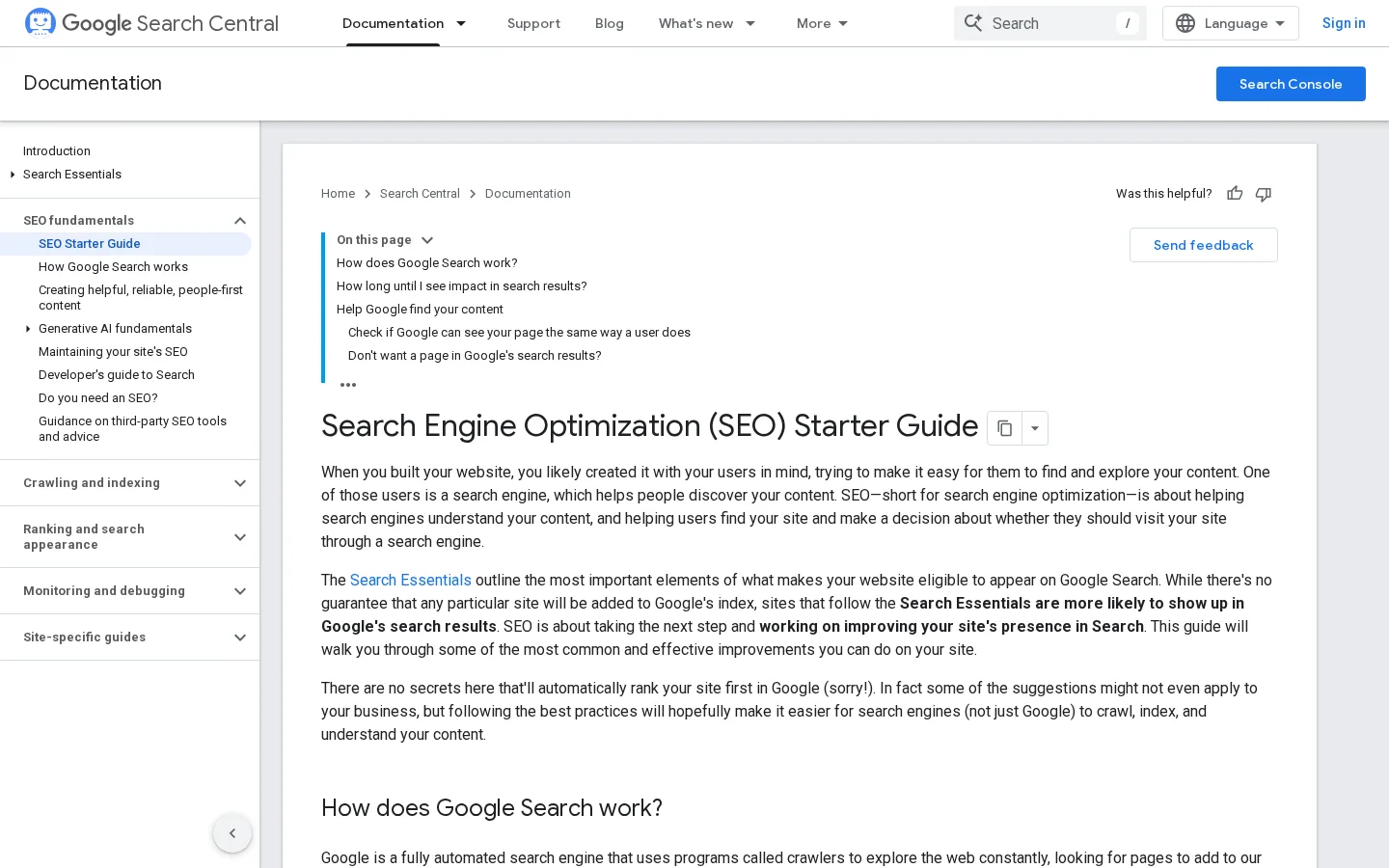
The job title sounds narrow, but the work covers the whole path from a crawler reaching a page to a reader choosing it. Google's own SEO Starter Guide defines SEO as "helping search engines understand your content." That is the job in one sentence. The rest of this article shows what it looks like in practice, what you need to do it, and where the work is heading.
Every task serves one outcome: the right pages appear for the searches that matter, and they earn clicks. A specialist who fixes a broken redirect does not do it for the redirect. They do it because the redirect wastes the links pointing at the old page and sends visitors to an error.
That gives you a simple test for any task. Ask which visitor or search engine behavior it changes. If you cannot name one, the task is probably busywork.
Most SEO work crosses teams. The specialist rarely writes the code, designs the page or pitches the press story. They define the work, check the result and push the owner to act. Knowing that split is the first thing that makes the role workable.
| Area | What the specialist does | Who usually ships the work |
|---|---|---|
| Technical | Finds crawl, index and speed problems, and writes the fix ticket | Developers |
| Content | Picks topics, writes briefs, sets titles and descriptions, edits | Writers and editors |
| Links | Plans outreach, reviews the link profile, removes harmful links | Outreach team or agency |
| Brand and product | Feeds accurate facts about the product into pages | Product, marketing and PR teams |
| Reporting | Defines the metrics and explains what changed and why | The specialist, then the manager |
The last column matters most. If you cannot get a developer to ship a fix, the best audit in the world is worth nothing. Good specialists write tickets a developer can act on in one afternoon: the URL, the problem, the expected result and an example.
Most SEO work falls into five areas. Each one has its own tools, rhythm and failure modes. A specialist usually spends most of their time on two or three of them, depending on the site. A large store needs more technical work. A blog needs more content. A young company needs links and brand mentions first.
Technical SEO makes sure search engines can reach, render and understand your pages. The basic questions are simple. Does Google find the page? Does it load? Does it return the right status code? Is it allowed into the index? Is it linked from somewhere else on the site?
In practice, the specialist runs a crawl of the site, then reads the results. A crawl lists every URL with its status code, title, canonical tag and internal links. The common problems are 404 pages that still receive links, redirect chains that take three or four hops, pages blocked by mistake in robots.txt, and duplicate pages created by filters and URL parameters. For the full list, see the technical SEO checklist.
Technical work also covers speed, mobile layout, and whether the content is in the HTML or only appears after JavaScript runs. That last case is where many sites lose visibility without noticing. The page looks fine to a visitor but reads as thin to a crawler.
Technical health: the monthly check
Keyword research tells you what people type, how often, and what they want when they type it. The volume matters less than the intent. The query "what does an seo specialist do" is a question. "seo specialist salary" is career research. "hire an seo specialist" is a buying signal. Each one needs a different page, and a page that tries to serve all three usually serves none of them well.
Start with the queries you already get. Search Console shows the queries that brought impressions and clicks to your pages. Look for pages that sit on page two or three of the results. They are often a few improvements away from real traffic. Then open the pages that rank above you for the same query and check the format: a list, a guide, a tool or a product page. The format that ranks tells you what Google thinks the searcher wants.
Keep a simple map of query to page: one main page per main query. If two of your pages compete for the same query, pick the stronger one, improve it, then merge the weaker page into it or change the weaker page to serve a different intent. This problem, called keyword cannibalization, is common and hard to see. It shows up as rankings that jump between your own URLs from week to week.
Keyword map: the monthly review
Sorank automates much of this work through its automated keyword research feature. The decision stays human, though: which intent you serve, and which page takes it.
On-page work covers the title tag, meta description, headings, body copy, images and internal links on each page. The specialist's job is not to stuff these fields with keywords. It is to make each page say clearly what it is about, in a way that matches the search intent.
Titles deserve most of the attention. Google's guide says a good title is "unique to the page, clear and concise, and accurately describes the contents of the page." A clear, specific title beats a clever one. Descriptions follow the same logic. Google describes a good meta description as "short, unique to one particular page," so run that test across the site. Duplicate descriptions are one of the easiest visible fixes you will find.
Content work also means editing what already exists. Most sites have old pages that get impressions but few clicks, or pages that lost rankings after a redesign. The specialist reviews them, decides whether to improve, merge or remove each one, and briefs the writer. Improving an existing page is often faster than publishing a new one, and it keeps the links the page already has.
The SEO content strategy guide covers how to decide which pages to write, and in what order.
On-page: before you publish
Links still matter. They show search engines which pages other sites consider worth citing. The specialist's job is to earn links that last and to avoid the shortcuts that get sites penalized.
Google's spam policies are clear on the basics. Link spam is "the practice of creating links to or from a site primarily for the purpose of manipulating search rankings." Google Search Central's spam policies list buying or selling links for ranking purposes as a violation, and they name "excessive link exchanges" such as "Link to me and I'll link to you." Paid links are not a violation when they are marked as sponsored or nofollow. The line is not whether money changed hands. It is whether the link was meant to manipulate rankings.
Earning links usually comes from something worth linking to: original data, a useful tool, a clear guide, or a resource that other writers cite. The backlink strategies article compares the main methods by effort, cost and risk. If someone offers you paid placements, read should you buy backlinks first.
In a typical month, the specialist reviews new links, checks for lost links, and reads the anchor text. A sudden spike of exact-match anchors from unrelated sites is a warning sign. A slow rise from relevant sites is what you want.
Link health: the monthly check
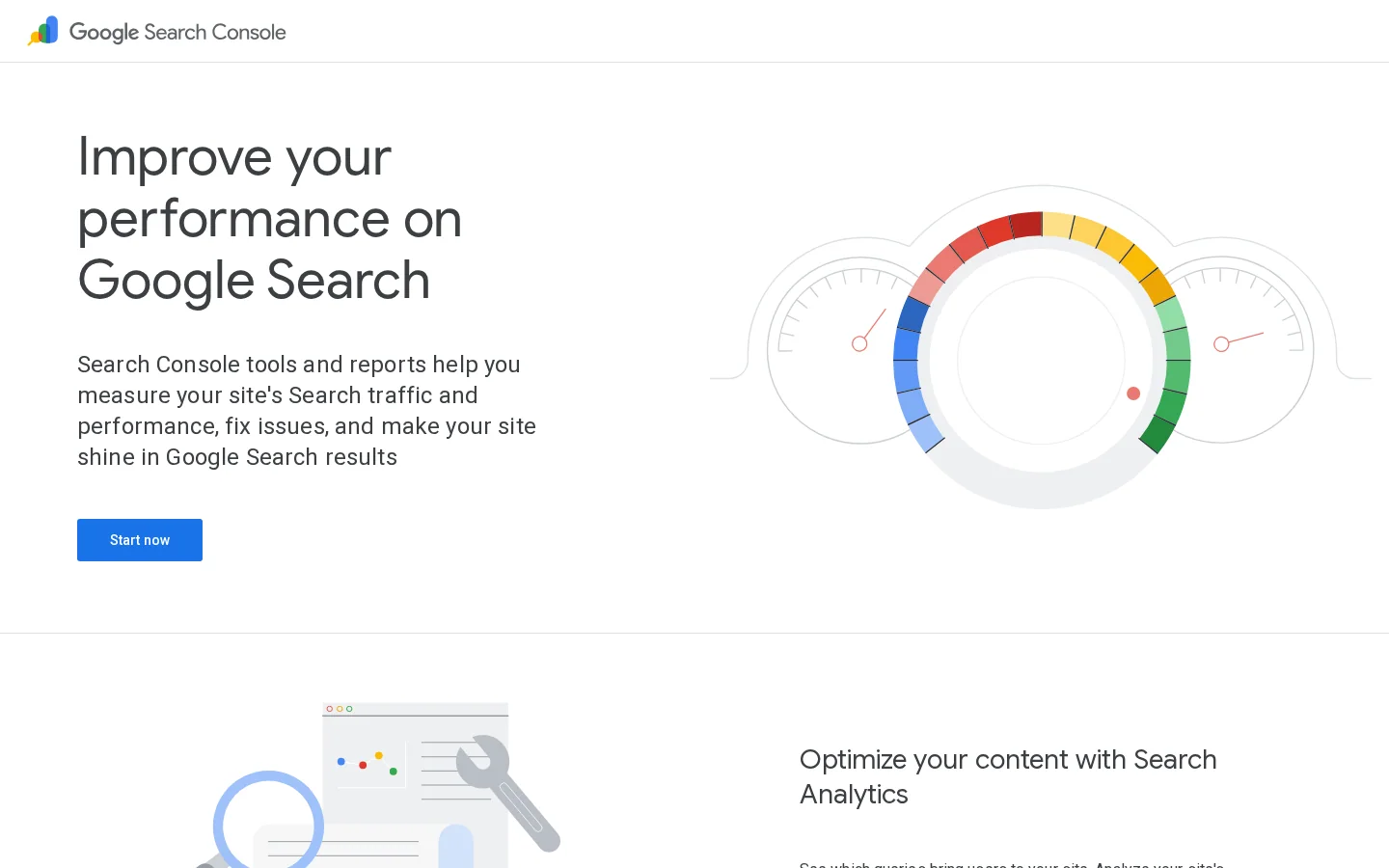
The specialist must show what changed and why. The core tool is Google Search Console, which reports how your site performs in Google Search. Its performance report uses four metrics, and it helps to know exactly what each one means. Google's Search Console help on the performance report defines clicks as "the number of times a user clicked your site from Google Search results." Impressions are "how many times your site appeared in Search results." CTR is "the click count divided by the impression count." Average position is "the average position of the topmost result from your site."
That last definition is easy to misread. It describes the topmost result from your site for a query, not every page on the site. A page can look fine on average position and still sit below a stronger page from your own domain for the same query. Check the query and page filters together before you draw a conclusion.
By default, the performance report shows the past three months. For a longer view, export the data on a schedule and keep it in your own sheet. Otherwise trends across seasons, or across a redesign, are hard to see.
A monthly report must answer these three questions
A good report is short. It answers what changed, what caused it and what happens next. A report that only lists rankings does not do the job. The SEO reporting guide gives a structure that works with managers who have five minutes to read it.

No two weeks look the same, but an in-house specialist usually spreads the work across a few fixed blocks. The table shows one realistic week for a mid-size site. Your own week will change with team size, the age of the site and how often the content moves.
| Day | Block | What gets done |
|---|---|---|
| Monday | Review | Check Search Console for drops, new queries and crawl errors, then write the week's priorities |
| Tuesday | Technical | Run a crawl, sort the issues by impact and open tickets for developers |
| Wednesday | Content | Brief two articles, edit one underperforming page and review drafts |
| Thursday | Links | Review new and lost backlinks, answer outreach replies and check anchor text |
| Friday | Reporting | Update the dashboard and write a short note on what changed and what comes next |
The point of the rhythm is consistency. SEO results come slowly, so one missed week rarely shows up in the numbers. A quarter of missed weeks almost always does. Block the time in the calendar, and treat the Monday review as the one meeting you do not skip.
The role mixes technical, analytical and communication skills. You do not need to be an engineer, but you do need to understand what an engineer is looking at. The list below is what the job asks for, in rough order of importance for a new specialist.
You should understand how a browser requests a page, what a status code means, how a redirect works, and why a page can be in the HTML and still be missed by Google when it is rendered badly. You should know where a canonical tag, a meta robots directive and a structured data block live in the code. You do not need to ship production code, but you must read it well enough to file a ticket that a developer cannot misread.
Search Console and an analytics tool are the basics. Beyond them, a specialist should be comfortable with spreadsheets, filters and simple segmentation. The skill is asking a precise question: which blog posts lost clicks in the last three months, and which queries did they lose? A specific question gets an answer you can act on. A vague one gets a dashboard nobody reads.
You will write briefs, titles, descriptions and sometimes whole pages. Clear writing matters more than clever writing. A title that tells the reader exactly what they get is worth more than one built to sound smart. You will also edit other people's copy, which means spotting a paragraph that repeats a phrase without adding anything.
Most SEO decisions need someone else's time. A developer has to ship the fix. A writer has to rework the page. A manager has to approve the budget. The specialist who gets things done explains impact in terms the other person cares about: lost visits, lost leads, or hours of rework avoided.
The field is full of advice that was once true or never was. Judgment means knowing which to drop. The clearest example is the meta keywords tag. Google's guide states that "Google Search doesn't use the keywords meta tag." Time spent filling it is time lost.
Skills that pay off versus habits to drop
Where you work changes what you do. The same job looks different inside a company's marketing team, at an agency, as a freelancer, or in a hybrid setup. Each option is a real way to get SEO done, and none is the best in every case.
How it works. One specialist, or a small team, works for one brand and sits close to the developers and writers.
When to use it. The site is large, the content changes often, or SEO has to shape product decisions. Example: a software company that launches a feature each month needs someone who decides which pages to create before the feature ships.
Advantages. Deep product knowledge, a full history of the site, and fast changes because nobody waits for an approval chain.
Limits. Narrow experience. One person has rarely seen every kind of site, and a single specialist can become a bottleneck when they are sick or leave.
How it works. An outside team works across several clients and sells SEO as a service, often with a fixed monthly scope.
When to use it. You need a specific project done once, such as a migration, or you lack the internal skills to set priorities. Example: a company moving a large site to a new domain, with a team that has done the same job many times.
Advantages. Breadth. An agency has seen many sites and can spot patterns quickly, and it usually has a process for audits and reporting.
Limits. Less context on your product, slower approvals, and wide variation in quality. Some agencies deliver strategy. Others deliver a monthly package of links. Read the contract's scope before you read the agency's name.
Our comparison of agency and in-house SEO goes deeper on costs, speed and control.
How it works. An independent specialist takes on a defined piece of work, or a small retainer, for one client or a few.
When to use it. You need focused work: an audit, a content plan, or ongoing help for a small site. Example: a local service business that wants a one-month audit and a plan for its service pages.
Advantages. Flexibility, a lower cost for scoped work, and direct access to the person doing the job.
Limits. Capacity and continuity. A freelancer with six clients will not reply within the hour, and when they leave, their knowledge can leave with them. Ask for documentation as part of the deliverable.
How it works. A small in-house owner sets the priorities and runs the calendar. Outside specialists handle technical audits, link campaigns or migrations.
When to use it. One or two people in the company are responsible for search, and they need expertise they cannot hire full time. Example: a marketing manager who owns the content calendar while an agency runs the link outreach.
Advantages. Control over direction, with outside skills on demand.
Limits. Unclear ownership. Write down who owns each area before the work starts, or the handoffs will fail quietly.
| Model | Best for | Main advantage | Main limit |
|---|---|---|---|
| In-house | Large or fast-changing sites | Deep product knowledge and speed | Narrow experience and a single point of failure |
| Agency | One-off projects, or teams without SEO skills | Breadth of experience and a set process | Less context, slower approvals, and scope that depends on the contract |
| Freelancer | Focused audits and small sites | Flexible, and often cheaper for scoped work | Limited capacity and continuity risk |
| Hybrid | Teams with one owner who needs outside help | Control of direction with expertise on demand | Unclear ownership if it is not written down |
In-house or agency, at a glance
If you are starting as the SEO specialist for a site, or taking one over, the first 90 days decide whether the work pays off. The method below assumes a site that has been around for a while and has no written SEO plan. For a brand-new site, the first priority is simpler: get the pages found and indexed.
The first 90 days in five steps
Run a full crawl and pull the Search Console performance and indexing data for the last three months. Your goal is not a perfect list of issues. It is a short list of issues that matter. The SEO audit method shows how to rank each finding by the traffic or revenue it affects. Put the findings in one sheet with four columns: issue, affected URLs, expected impact and effort.
Look first at the pages that earn money or leads. Then at the pages that bring the most search traffic. Then at everything else. An error on a page nobody visits is noise until the bigger problems are fixed.
This is where the audit turns into shipped work. Start with the errors that stop search engines from reaching or indexing pages. A common one is a robots.txt file that blocks more than intended. A clean file for a small store might look like this:
User-agent: *
Disallow: /cart/
Disallow: /checkout/
Sitemap: https://www.example.com/sitemap.xml
Blocking a URL in robots.txt stops crawling. It does not reliably stop indexing. If you need a page out of search results, use a noindex directive and keep the page crawlable, so Google can see the directive. Mixing those two up is one of the most frequent mistakes in technical SEO.
Warning
Test every robots.txt change on a staging copy first. One wrong line can hide a whole section of the site from crawlers.
With the foundation fixed, shift to content and links. Pick three to five topics that map to your highest-value queries. For each one, decide whether to improve an existing page or create a new one. Write the brief, set the title and description, and plan the internal links from related pages. The internal linking strategy guide explains which links to add first. Internal links are the cheapest lever in this phase, and they cost nothing to earn.
Then start outreach for the one or two pages that deserve links. Quality beats volume here. One strong page with a few relevant links often does more than ten thin posts.
Finish the quarter with a short report. Show what you fixed, what moved in Search Console, and what the next quarter's plan is. A manager who reads a clear report gives you more time the next quarter.
Search is no longer only a list of blue links. People ask ChatGPT, Gemini, Claude and Perplexity for recommendations, and those assistants name brands in their answers. A specialist who ignores that layer leaves a growing part of discovery unmeasured.
The basics do not change. An assistant can only recommend what it can read and trust. Pages must be crawlable, clearly written and easy to extract. Facts about the brand must be consistent across the web. Links and mentions from credible sources still help. The work you already do for search usually makes a site easier for AI systems to use, which is why the two disciplines overlap so much.
The new work is measurement at the level of prompts. Instead of a rank for one keyword, you track how often the brand appears in answers to a set of real questions, and which sources the assistant cites. The unit of work becomes the prompt: what a customer asks, and which answer they get back. The AI visibility optimization guide covers the practical side. Sorank's AI mention tracking page shows how Sorank follows brand mentions in assistant answers.
| Question | Classic SEO measure | AI visibility equivalent |
|---|---|---|
| Are we found? | Impressions and average position | Share of answers that name the brand |
| Do we get the visit? | Clicks and CTR | Citations and referral visits from assistants |
| Who beats us? | Competitor rankings for the same query | Brands named next to us in answers |
| What should change? | Content and link gaps | Prompts where the brand is missing |
Two cautions. Answers vary from run to run, so a single check tells you little. Track trends over many prompts and several weeks. And the AI layer does not replace organic search. For many sites, classic search still sends more traffic than assistants do. Check your own numbers before you decide where to spend. See AI SEO vs traditional SEO for how to combine the two in one plan.
Most SEO losses come from a short list of repeated mistakes. Each one is easy to make, slow to notice and fixable once you know what to look for. The five below come up again and again in site audits.
Reporting: before and after
What it is. Adding a list of keywords to the head of a page in the hope it helps rankings. Google's guide says that "Google Search doesn't use the keywords meta tag."
How to spot it. View the source of a page and look for a meta tag named keywords. Check your CMS or SEO plugin too, because many fill it in automatically from a form.
How to fix it. Turn off the field in the CMS or plugin. Move the effort into the title, the description and the visible copy, where readers and search engines both look.
What it is. Two or more pages on your site compete for the same main query. Google alternates between them, and neither ranks as well as one strong page would.
How to spot it. In Search Console, filter by one query and look at the pages listed for it. If several of your URLs show up, and their positions swing from week to week, you have an overlap.
How to fix it. Choose the stronger page as the main target and improve it. Then either merge the weaker page into it with a redirect, or change the weaker page so it serves a different intent, such as a comparison or a use case.
What it is. Paying for links that are not marked sponsored or nofollow, or trading links at scale. Google's spam policies treat buying or selling links for ranking purposes as a violation.
How to spot it. Look for a sudden burst of links from unrelated sites, with exact-match anchor text, that all arrived in the same few weeks.
How to fix it. List the links. Ask the site owners to remove them. Use Google's disavow tool only for links you cannot get removed. Then replace them with links you earned. The backlink audit guide walks through the review step by step.
What it is. Pages with no internal links pointing to them. Search engines may find them through the sitemap or an outside link, but the rest of the site passes them little authority.
How to spot it. Compare the URLs in your sitemap with the URLs a crawler reaches by following internal links from the homepage. Anything in the sitemap that the crawl cannot reach is an orphan.
How to fix it. Link each important page from two or three related pages, using descriptive anchor text. Then re-crawl to confirm the page is now reachable.
What it is. A monthly deck full of charts that never says what to do next. It keeps the work visible but does not change the site.
How to spot it. Ask what decision the last report led to. If nobody can answer, the report is decoration.
How to fix it. Put one action at the top of each report, with an owner and a date. The SEO reporting guide shows a structure that puts decisions first.
Note
Google's guidance changes over time. Check the current documentation before you act on an older article, this one included.
Whether you hire someone in-house, an agency or a freelancer, the questions are similar. A strong answer is specific. A weak one is a list of buzzwords.
Ask these questions, and listen for specifics
Red flags are easy to name. Guaranteed rankings. A monthly link count with no quality check. Reports that show only traffic. A plan that starts with buying links. Pricing that depends on how many pages get written rather than what those pages achieve.
A specialist does not need every tool on the market. You need a reliable source for each job. The table groups the tools by the job they do. Start with the free options, because they cover the basics.
| Job | Free option | Paid option or platform |
|---|---|---|
| Indexing and performance | Google Search Console | Analytics platforms that combine search and AI data |
| Crawling | Screaming Frog, free for up to 500 URLs | Paid crawl licenses or cloud crawlers |
| Internal links | Internal link analyzer | Site audit suites |
| Keyword research | Keyword suggestion tools | Keyword research platforms |
| Reporting | Looker Studio dashboards | Dedicated SEO reporting software |
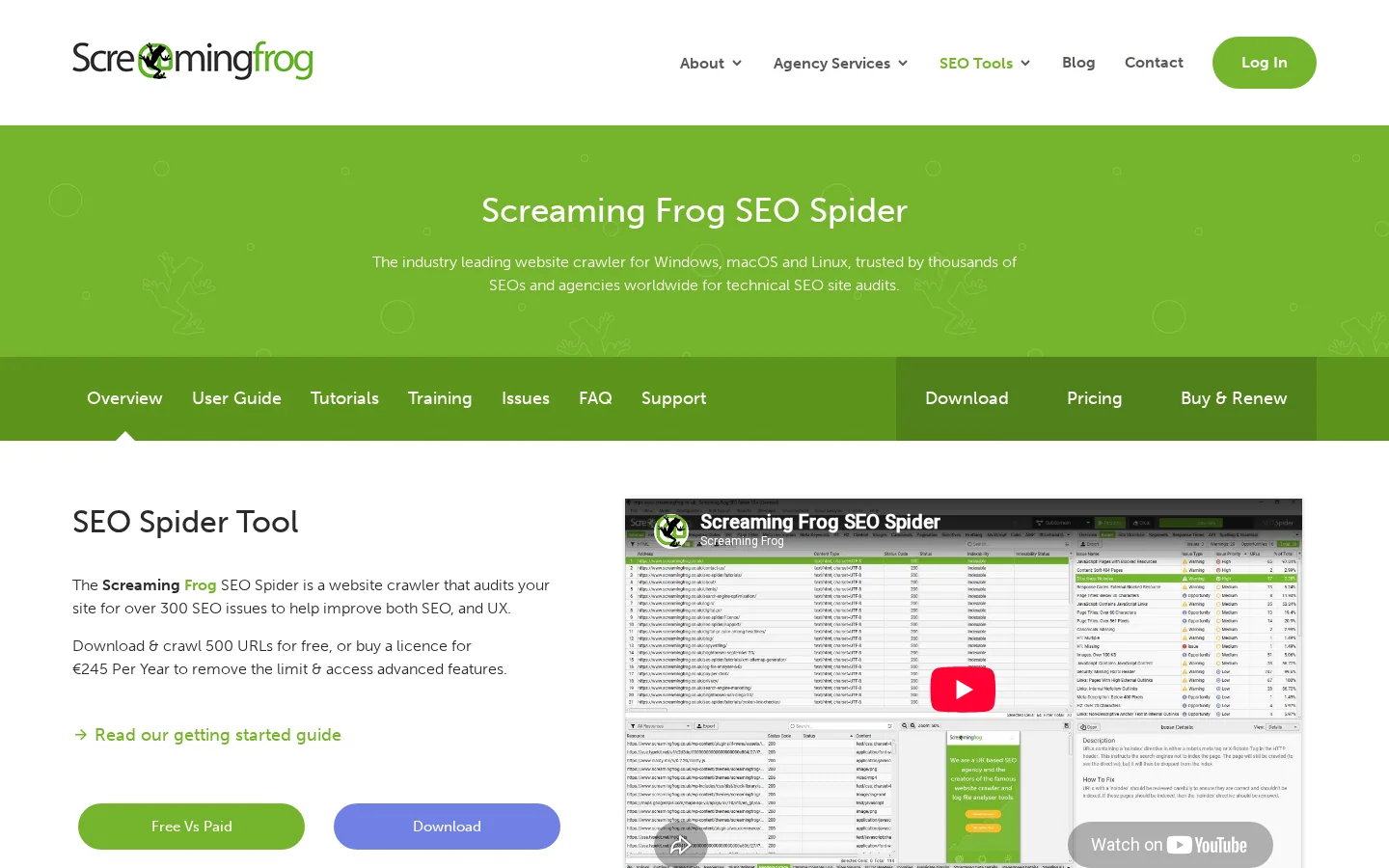
The Screaming Frog SEO Spider lets you crawl up to 500 URLs for free. That is enough for a small site or a sample of a large one. The paid licenses remove the limit and add features such as JavaScript rendering and saved crawls, which matter once the site has more than a few hundred pages.
Tip
Before you write your fix list, run the free internal link analyzer on your most important pages. Compare the result with your crawl, and you will see which pages need links first.
If you run SEO for a team, Sorank's page for SEO teams covers content, links and AI tracking in one place. Whichever tools you pick, the job stays the same: find what blocks the right pages, fix it, and show what changed.
Most days mix monitoring and fixing: checking Search Console, reviewing crawl errors, briefing content, reviewing links and writing short reports. The mix depends on whether the site is large, new or mostly content.
Technical literacy, so you can read crawl data and file tickets a developer can act on. Analysis in Search Console and an analytics tool. Clear writing for titles, briefs and pages. The ability to persuade developers and writers to do the work.
Increasingly, yes. ChatGPT, Gemini, Claude and Perplexity name brands in their answers, so specialists track which prompts mention the brand and which sources the assistants cite. Classic search work still applies alongside it.
We analyse your competitors, your website and your AI visibility to create a tailored content plan for free.
 Duplicate Content Checker
 Mobile-Friendly Test
 Website Speed Test
 Subdomain Finder
 Domain Age Checker
 CMS Detector
 Googlebot Simulator
 Nofollow Link Checker
 Meta Tag Checker
 Keyword Cannibalization Checker
 Keyword Intent Checker
 Keyword Extractor
 Google Ads Cost Calculator
 CPC Calculator
 Local Citation Finder
 Reddit Threads Finder
 Disavow File Generator
 Redirect Generator
 Canonical Tag Generator
 Passive Voice Checker
 Google Location Changer
 Google Review Calculator
 Google Review Link Generator
 Keyword Combiner
 Podcast Show Notes Generator
 AI Content Rewriter
 AI Text Humanizer
 ChatGPT Prompt Generator
 Twitter Thread Generator
 Tweet Generator
 Landing Page Copy Generator
 Google Ads Copy Generator
 Pinterest Pin Description Generator
 Anchor Text Generator
 Social Media Post Generator
 LinkedIn Post Generator
 Free AI Writer
 Review Response Generator
 LSI Keyword Generator
 YouTube Video Ideas Generator
 YouTube Tag Generator
 YouTube Description Generator
 Product Description Generator
 CTA Generator
 Blog Introduction Generator
 Conclusion Generator
 Hook Generator
 AI Content Brief Generator
 FAQ Schema Generator
 AI Blog Post Ideas Generator
 Structured Data Validator (Schema Validator)
 Alt Text Checker
 Internal Link Analyzer
 Backlink Challenge
 AI Meta Description Generator
 AI Blog Title Generator
 Google Indexability Checker
 AI Blog Outline Generator
 UTM Link Builder
 Keyword Clustering Tool
 Canonical Tag Checker
 XML Sitemap Generator
 Broken Link Checker
 AI SEO Title Generator
 Headline Analyzer
 SERP Preview Tool
 Redirect Checker
 Hreflang Tag Generator
 Heading Structure Analyzer
 HTTP Headers Checker
 Favicon Extractor
 SERP CTR Calculator
 SEO vs Paid Search Savings Calculator
 SEO Share of Voice Calculator
 SEO ROI Calculator
 SEO Traffic and Revenue Forecast Calculator
 SEO Budget Calculator
 SEO Break-Even Calculator
 SaaS SEO ROI Calculator
 ROAS Calculator
 Reading Time Calculator
 Ranking Gain Simulator
 Organic Traffic Value Calculator
 Organic Traffic Estimator and Website Traffic Checker
 LTV to CAC Ratio Calculator
 Local SEO ROI Calculator
 Link Building Cost Calculator
 Keyword Value Calculator
 Keyword Opportunity Score Calculator
 Keyword Density Calculator
 GEO ROI Calculator
 GEO Content Investment Calculator
 Ecommerce SEO ROI Calculator
 Customer Lifetime Value Calculator
 Customer Acquisition Cost Calculator
 CTR Calculator
 Cost Per Article Calculator
 Conversion Rate Calculator
 Content Marketing ROI Calculator
 ChatGPT Referral Traffic Estimator
 Bounce Rate Calculator
 Backlink ROI Calculator
 AI Visibility Score Calculator
 AI Traffic Value Calculator
 AI Share of Voice Calculator
 Cost of AI Invisibility Calculator
 AI Citation Rate Calculator
 llms.txt Validator
 AI Overview Checker and AI Overviews Rank Checker
 Robots.txt Checker
 AI SEO Audit
 LLM Readability Checker
 SearchGPT Readiness Checker
 Structured Data LLM Audit
 Website Crawlability AI Audit
 Why ChatGPT Is Not Recommending My Website
 Gemini Ranking Tool
 Perplexity Ranking Checker
 LLM Citation Checker
 Answer Engine Optimization Audit
 GEO Audit
 AI Search Visibility Test
 ChatGPT Visibility Checker
 llms.txt Generator
 URL Extractor
 Webpage to Markdown
 Sitemap Checker
 SERP Volatility Sensor
 Page Size Checker
 Word Counter
 Slug Generator
 Schema Generator
 Robots Generator
 OG Preview
 Meta Tags Generator
 Image Compressor
 Favicon Generator
 On-Page SEO Audit: SEO Checker and SEO Analyzer
 Backlink Analysis Tool
 Keyword Research Tool
 Domain Authority Checker
 “I tested Sorank on a real client site and it's insane. It does everything an agency would bill you $1500 a month for. It's going into production on that client now.”

 Guillaume Guersanguersanguillaume.com“We are an Ads agency and we wanted to get our SEO back on track once and for all. Sorank gave us a clear view of our site, helped us prioritize optimizations, and properly structure our content. The tool is easy to use, well designed for a team, and very practical for centralizing tracking without having to juggle multiple platforms. A very solid foundation to start fresh with our SEO.”
 Gaspard MadouiAds Agency
 “I just let the Sorank software do its thing, and now my DR is 25 and my page is ranking higher.”
 Lucas Flandrefoundertrace.fr“I specialized in GEO thanks to Sorank. The GEO Leaderboard allows me to show my clients their position vs competitors on ChatGPT. It’s a real commercial differentiator.”
 MélanieSEO Freelance“Great service, works well for our website and helps us understand how to improve it to rank better on Google and elsewhere. Congrats, keep going, I recommend it.”
 Hugo T.E-commerce merchant