Preferences
Privacy is important to us, so you have the option of disabling certain types of storage that may not be necessary for the basic functioning of the website. Blocking categories may impact your experience on the website. More information
Privacy is important to us, so you have the option of disabling certain types of storage that may not be necessary for the basic functioning of the website. Blocking categories may impact your experience on the website. More information

A gap analysis framework that sorts missing rankings and AI citations into access, content and authority gaps, with the checks and fixes for each.
In short
A gap analysis framework is a set of checks that sorts why a page is missing from search results or AI answers into one of three gaps: access, content or authority. You run the same tests on each page, then fix the gap that fails. Because each gap has its own owner, the diagnosis also sets the order of work.
Want to go further? Ask
Quick quiz
Which kind of SEO tool is right for you?
Sorank matches your answers


Test it for 3 days on your own site and see where you stand on Google, ChatGPT and the other AIs.
Start 3-day free trial3 days free, then stop whenever you want. 90-day results guarantee, conditions apply.
When a page is not cited, the cause looks the same from the outside. You ask ChatGPT, Gemini, Claude or Perplexity about your category, your brand is missing from the answer, and the obvious conclusion is that the copy is weak. So the team rewrites the page. Two months later nothing has changed, because the copy was never the problem. A firewall rule blocked the crawler, the key answer only appeared after a script ran, or the review sites that the models trust had never named the brand.
A gap analysis framework puts the diagnosis before the fix. It names the places where visibility can fail, gives each one a test that returns yes or no, and only then assigns work. It is not a score, and it does not replace keyword research or a crawl. It sits in front of them and answers one question: which kind of problem is this, on this page, for this prompt?
The order matters because a generic audit produces the opposite result. It lists everything that could be better, from missing alt text to slow images to thin paragraphs. A list of 200 issues feels like progress, but it does not tell you which five would change whether an AI system can retrieve and quote your page. The framework cuts that list down before you start.
Clicks are part of the stakes too. The chart below comes from a 2025 study of Google users, and it shows how much a traditional result loses when an AI summary sits above it.
What happens to clicks when an AI summary appears
Source: Pew Research Center, July 22, 2025
In its July 2025 study, Pew Research Center found that users clicked a traditional result in 8% of visits when an AI summary appeared, against 15% of visits without one. Clicks on links inside the summary were rare, at 1% of visits. The traditional result lost nearly half its clicks, which is why a gap analysis has to cover AI answers as well as the ten blue links.
Each gap answers one question with yes or no. Access asks whether machines can reach and read the page. Content asks whether a page exists that answers the prompt in a form an AI system can quote. Authority asks whether other sources name you the way they name your competitors. Treat any "no" as a gap, and check the layers in this order, because a page that fails access cannot be judged on its copy.
Access is the most technical gap and often the cheapest to fix once you find it. A page can be blocked by robots.txt, by a firewall or CDN rule, or by a template that puts the key text on the page only after a script runs. Any of these makes the copy irrelevant, because the bot never sees it. Check three things: whether each AI crawler you care about is allowed, whether the main answer exists in the raw HTML, and whether the page has one H1 and a logical heading order with short paragraphs that a system can lift out as a unit.
Access checks for every target page
Crawler permission depends on the bot, because each operator uses a different crawler for a different job. The table lists the OpenAI and Anthropic crawlers as their own documentation describes them.
| Crawler | Operator | Purpose, per the operator | Control with robots.txt |
|---|---|---|---|
| OAI-SearchBot | OpenAI | Surfaces your site in ChatGPT search features | Yes, but blocking it hides the site from ChatGPT search answers |
| GPTBot | OpenAI | Crawls content that may be used to train OpenAI's foundation models | Yes, and blocking it signals that your content should not be used for that training |
| ChatGPT-User | OpenAI | Visits pages when a user starts an action in ChatGPT or a Custom GPT | robots.txt rules may not apply, because a user starts the visit |
| ClaudeBot | Anthropic | Collects web content that could contribute to training Anthropic's models | Yes, and Anthropic's page shows an example for it |
| Claude-SearchBot | Anthropic | Indexes content to improve the relevance and accuracy of search responses | Disabling it may reduce visibility, but no robots.txt example is shown |
| Claude-User | Anthropic | Accesses a site when a Claude user asks a question that needs it | Disabling it stops retrieval, but no robots.txt example is shown |
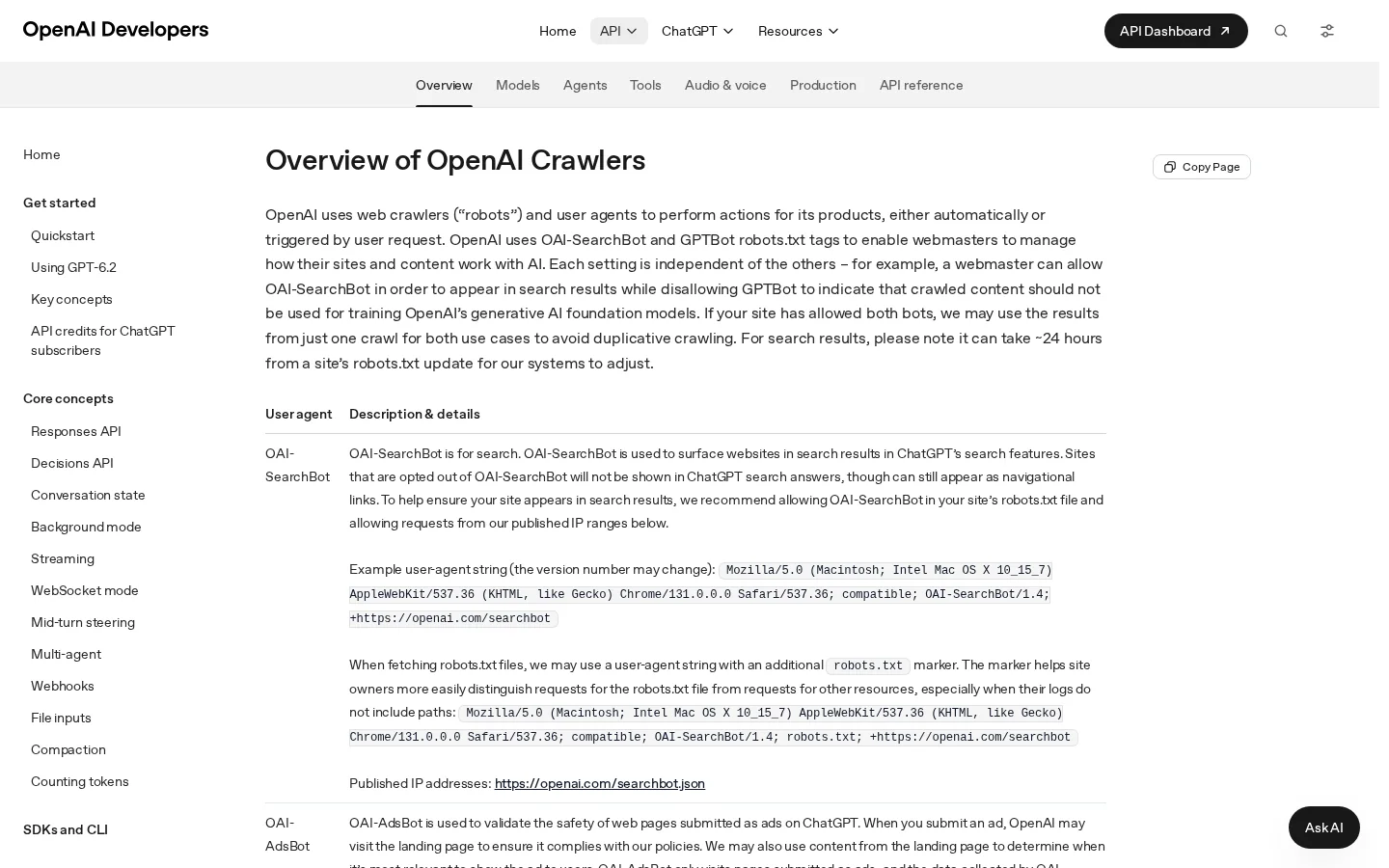
The distinctions in that table change what you block. OpenAI's crawler documentation says that disallowing GPTBot signals that your content should not be used to train its foundation models. Opting out of OAI-SearchBot hides your site from ChatGPT search answers, although the site can still appear as a navigational link. Blocking the wrong crawler can remove you from the answers you want to be in, and the documentation also notes that robots.txt rules may not apply to ChatGPT-User visits that a user starts.
A content gap exists when no page covers the prompt, or when a page covers it but cannot be lifted cleanly. This is the same thinking as a content gap analysis, applied to the answer layer. The second case is more common than teams expect, and it has four usual patterns:
Google's Search Central documentation, which shows no update date on the page, states that AI features need no separate file or markup. It says: "There are no additional requirements to appear in AI Overviews or AI Mode, nor other special optimizations necessary." A page is eligible when it is indexed and can be shown with a snippet. So the content work is about the quality of the answer, not about special formats.
The target is a block of 40 to 80 words that answers one question on its own, under its own heading. That is the structure described in content chunking. Write the block first, then add the detail around it, and keep the evidence next to the claim.
One section, before and after the content test
Tip
Before you rewrite, run the free On-Page SEO Audit from Sorank's free SEO tools on the page. It checks the title, meta description, headings, images and links in seconds, so you can separate on-page problems from the deeper content problem.
AI systems do not read only your site. When they answer a comparison or a "best for" question, they lean on pages that compare options: review sites, directories, industry press, community threads and established blogs. A brand that appears only on its own domain has an authority gap, even when its pages are excellent. Check three things. First, mention parity: for each prompt, which third-party sources are cited, and does your brand appear on them? This is the same test as a citation gap check. Second, entity consistency: does the company have the same name, description and profile details across the public directories and profiles that machines use to identify a business? Third, sentiment: when your brand is discussed, is the context neutral or positive, or do old complaints dominate?
Fixing authority takes weeks or months, because the work depends on other people. Start by finding where you are already named without a link, and ask for the link. Unlinked brand mentions walks through that search. The difference between a citation and a plain mention matters here too, as explained in AI citations vs mentions.
Where a brand gets named in AI answers
A diagnosis needs two things: the questions your buyers ask, and a record of what AI systems answer today. Build the list from three places: the questions your sales team hears, the queries that already bring visits to your site, and the questions where a competitor is clearly named. Start with 20 to 30 prompts. That is enough to see patterns, and small enough to re-run every week.
Mix the prompt types, because each type tests a different gap:
| Type | Example prompt | What it reveals |
|---|---|---|
| Category | Best tools for diagnosing AI visibility | Whether you appear in a shortlist at all |
| Problem | Why is my page not cited by ChatGPT | Whether you have a page that answers the problem |
| Comparison | Tool A vs tool B for AI visibility tracking | Whether third parties place you against competitors |
| Brand | What does your brand do | Whether your entity description is accurate |
Log each run with its date, platform and exact wording. The same prompt can give a different answer on the next run, so one answer is not a verdict. AI search volatility explains why answers keep moving, and why a baseline needs several runs before you act on it.
Pick one page that should be cited, and one prompt it should answer. The six steps below give you a one-line verdict per gap. Work through them in order, because each step assumes the previous one passed.
The diagnosis in six steps
Start with the logs. Your server logs record which user agents request which pages, so search them for GPTBot, OAI-SearchBot, ClaudeBot and Claude-SearchBot. A bot that never appears in the logs for a page may be blocked, or may never have been sent there. Then compare what the server returns with what a visitor sees. The check below fetches the raw HTML and counts the key sentence:
curl -s https://www.example.com/your-page | grep -c "the one-sentence answer"A count of 0 means the sentence is not in the HTML the server sends. Do not assume every AI crawler runs JavaScript, so treat any text that exists only after scripts run as at risk. Blocked by robots.txt covers how a similar block shows up in Google's own reports.
Next, the rules. OpenAI's documentation, shown below, is the place to check which operator uses which user agent before you write any rule.
When you decide what to allow, write the rule per crawler and state why. For example, to keep ChatGPT search visibility while opting out of OpenAI's training crawler, you could use:
User-agent: GPTBot
Disallow: /

User-agent: OAI-SearchBot
Allow: /
Whether to block training crawlers is a business decision, not a technical one. The rule should say what you actually want. Anthropic's support article shows a block for ClaudeBot in the same format, and it asks site owners to add the rule for each subdomain they want to opt out:
User-agent: ClaudeBot
Disallow: /
Anthropic also warns that blocking its IP addresses may not work reliably, because the crawler then cannot read your robots.txt. Use the robots.txt rule, then confirm the result in your logs.
A verdict is short enough to paste into a task tracker. It names the gap, the evidence and the fix, and nothing else. Here is an example for a pricing guide that gets no citations:
Page: /pricing-guide
Access: pass (GPTBot and OAI-SearchBot allowed, key sentence in raw HTML)
Content: gap (answer starts at about word 210, figures have no date)
Authority: gap (cited on none of the three comparison sources for the prompt)
Fix first: content, then authority outreach
Note
The fix order follows the gaps. Access comes first, because a blocked page cannot benefit from better copy. Authority comes last, because it takes the longest.
Teams usually begin from one of three directions: the page, the prompt or the competitor. Each one is valid, and each one has a blind spot. Use the same three gap tests in all three, so the results can be compared.
You take one page that should be winning and run the six steps on it. When to use it: you have a page that targets a category and is not cited. Advantages: the verdict is concrete, it is quick, and it finds access and extraction faults on pages that already exist. Limits: it cannot find pages you never wrote, and it hides the prompts where you have no page at all. Example: a pricing guide that is never cited for "how much does it cost" prompts, while a firewall rule quietly blocks the AI crawler.
You begin with the prompt set, find which page should answer each prompt, and run the tests on that page. When to use it: you care about a category or a stage of the buying journey. Advantages: it follows buyer intent, and it reveals missing pages that a list of your own URLs would never show. Limits: it needs repeated runs, and it produces a lot of answers to read. Example: a "best tools for" prompt names three products, none of them yours, and no page on your site answers that question directly.
You list the brands and sources that AI answers cite for each prompt, then compare that list with your own. When to use it: you want to find the authority gap and the exact third-party sources that matter. Advantages: it names the sources to approach, and it shows patterns across a whole category. Limits: it is easy to copy the wrong lesson, because a competitor may be cited for a reputation you cannot replicate. Example: three comparison sites are cited for every prompt in a category, and your brand appears on none of them.
| Approach | Starts from | Best at finding | Main blind spot | First fix it usually points to |
|---|---|---|---|---|
| Page first | One URL you own | Access and extraction faults on existing pages | Pages you never wrote | Access or content work on that page |
| Prompt first | Buyer questions | Missing pages and missing topics | Needs repeated runs to be reliable | A new or rewritten page |
| Competitor first | Cited sources | Authority gaps and the sources to approach | Copying a reputation you cannot match | Outreach and mention work |
The practical answer is to start with the page you already have, because it gives you a verdict within a day. Then use the prompt view to find the pages you are missing, and the competitor view to plan the authority work.
Sorank tracks AI visibility in ChatGPT, Gemini, Claude and Perplexity. Its GEO software shows which prompts you appear in, which competitors show up in the answers, and what AI systems search for behind a prompt. That covers the prompt-first and competitor-first views without rebuilding a spreadsheet each week. Doing the work by hand is fine for a dozen prompts. Past that, a tracker saves the repeated runs, and the repeated runs are what make a verdict reliable.
Once the verdicts are in, the order of work follows the gap. Access problems are often the quickest to clear, so they go first. Content work comes next, page by page. Authority work takes the longest, so it should start early and run in parallel. The table gives the usual owner and effort for each gap. Treat it as a planning guide, not a promise.
| Gap | Usual owner | Typical effort | Start when |
|---|---|---|---|
| Access | Engineering with SEO | Hours to a few days, once the cause is known | The raw HTML misses the answer, or a rule blocks a crawler |
| Content | Writer with SEO | Days per page | Access passes and a target prompt has no quotable answer |
| Authority | Marketing or communications | Weeks to months | Access and content pass, and third parties cite competitors only |
Run access work and content work in parallel when they sit with different people. Do not rewrite a page that a crawler cannot reach, and do not start outreach to a page with no clear answer, because a new link to a page with nothing quotable on it does little for you.
Most failed diagnoses come from a short list of mistakes. Each one looks reasonable from inside the team, which is why they repeat. Check your process against this list before you trust a verdict.
Six mistakes to check for in every diagnosis
What it is: the team rewrites a page that the crawler never reads, then waits for a citation that cannot come. How to spot it: the page was rewritten, nothing changed, and the raw HTML is missing the key text or a rule blocks the crawler. How to fix it: run the access test first. Change the rule or the template, confirm the sentence is in the raw HTML, and only then judge the copy.
What it is: one answer is taken as the verdict, either a win or a loss. How to spot it: the answer changes on the next run or between platforms, and the log has only one date. How to fix it: run each prompt several times on each platform you track, keep the wording fixed, and record the date. Read the pattern across runs, not a single answer.
What it is: your brand name appears in the answer with no link, and the team reports a win. How to spot it: the answer names you but cites no source, or the source it cites is a competitor. How to fix it: log mentions and citations in separate columns. A mention shows the brand is known. A citation shows that a source is being used, and a cited source is the one that can send a reader to you.
What it is: a single wildcard rule, or a block list copied from a blog, that blocks more than the team meant to. How to spot it: the robots.txt file has a broad rule for "AI bots" and no per-crawler lines, and nobody can say which crawler it is meant to stop. How to fix it: write one rule per crawler, based on the operator's documentation. OpenAI's pages show that GPTBot and OAI-SearchBot do different jobs, so a block on one is not a block on the other. Decide which visibility you want to keep, and write the rule to match.
What it is: a statistic or claim with no date and no link to the publisher. How to spot it: the figure appears with no "as of" date, or the link points to a page that no longer exists. How to fix it: give every figure its date and the publisher's name, link to the page that states it, and check the link each time you update the article. Readers, and the systems that compare sources, have less reason to trust a claim they cannot trace.
What it is: the team publishes more articles on its own site to fix a gap that sits on other sites. How to spot it: the sources cited for your prompts never mention your brand, and your new articles do not change the list of cited sources. How to fix it: approach the sources the answers already cite. Start with backlink gap analysis to see which sites link to your competitors and not to you, then prioritize the ones that appear in the answers.
A diagnosis is a snapshot, so repeat it on a schedule, with the same prompts, the same platforms and the same wording. Log the verdict for each gap, and change one thing per cycle. If you change three things at once, you cannot tell which one moved the answer.
One-off check or a repeated loop
Each log row needs the same columns: date, prompt, platform, named (yes or no), linked (yes or no), cited sources, access verdict, content verdict, authority verdict, and the change made in that cycle. A GEO flywheel is one way to set up that weekly loop, and GEO reporting shows how to turn the log into a monthly report.
Choose one page that should be winning and one prompt it should answer. Run the six steps, write the verdict, and fix only the first gap that fails. Then run the same prompt again to see what moved. One cycle done properly teaches you more than a month of rewriting.
This week's checks
When the framework runs smoothly, the GEO checklist gives you a longer list of points to tick off across the whole site.
A gap analysis framework is a fixed set of checks that sorts why a page is missing from search results or AI answers into access, content or authority problems. You run the same tests on each page, then fix only the gap that fails, so the work goes to the right owner first.
An SEO audit lists everything that could be improved on a site. A gap analysis starts from one visibility failure, such as a prompt where you are not cited, and asks which of three layers causes it. It produces a verdict per gap, not a long list of issues.
Read the robots.txt file and any firewall rules for each AI crawler, such as GPTBot, OAI-SearchBot and ClaudeBot, then check that your key sentences appear in the raw HTML. If a crawler is blocked, or the text only exists after scripts run, that is an access gap.
We analyse your competitors, your website and your AI visibility to create a tailored content plan for free.
 Duplicate Content Checker
 Mobile-Friendly Test
 Website Speed Test
 Subdomain Finder
 Domain Age Checker
 CMS Detector
 Googlebot Simulator
 Nofollow Link Checker
 Meta Tag Checker
 Keyword Cannibalization Checker
 Keyword Intent Checker
 Keyword Extractor
 Google Ads Cost Calculator
 CPC Calculator
 Local Citation Finder
 Reddit Threads Finder
 Disavow File Generator
 Redirect Generator
 Canonical Tag Generator
 Passive Voice Checker
 Google Location Changer
 Google Review Calculator
 Google Review Link Generator
 Keyword Combiner
 Podcast Show Notes Generator
 AI Content Rewriter
 AI Text Humanizer
 ChatGPT Prompt Generator
 Twitter Thread Generator
 Tweet Generator
 Landing Page Copy Generator
 Google Ads Copy Generator
 Pinterest Pin Description Generator
 Anchor Text Generator
 Social Media Post Generator
 LinkedIn Post Generator
 Free AI Writer
 Review Response Generator
 LSI Keyword Generator
 YouTube Video Ideas Generator
 YouTube Tag Generator
 YouTube Description Generator
 Product Description Generator
 CTA Generator
 Blog Introduction Generator
 Conclusion Generator
 Hook Generator
 AI Content Brief Generator
 FAQ Schema Generator
 AI Blog Post Ideas Generator
 Structured Data Validator (Schema Validator)
 Alt Text Checker
 Internal Link Analyzer
 Backlink Challenge
 AI Meta Description Generator
 AI Blog Title Generator
 Google Indexability Checker
 AI Blog Outline Generator
 UTM Link Builder
 Keyword Clustering Tool
 Canonical Tag Checker
 XML Sitemap Generator
 Broken Link Checker
 AI SEO Title Generator
 Headline Analyzer
 SERP Preview Tool
 Redirect Checker
 Hreflang Tag Generator
 Heading Structure Analyzer
 HTTP Headers Checker
 Favicon Extractor
 SERP CTR Calculator
 SEO vs Paid Search Savings Calculator
 SEO Share of Voice Calculator
 SEO ROI Calculator
 SEO Traffic and Revenue Forecast Calculator
 SEO Budget Calculator
 SEO Break-Even Calculator
 SaaS SEO ROI Calculator
 ROAS Calculator
 Reading Time Calculator
 Ranking Gain Simulator
 Organic Traffic Value Calculator
 Organic Traffic Estimator and Website Traffic Checker
 LTV to CAC Ratio Calculator
 Local SEO ROI Calculator
 Link Building Cost Calculator
 Keyword Value Calculator
 Keyword Opportunity Score Calculator
 Keyword Density Calculator
 GEO ROI Calculator
 GEO Content Investment Calculator
 Ecommerce SEO ROI Calculator
 Customer Lifetime Value Calculator
 Customer Acquisition Cost Calculator
 CTR Calculator
 Cost Per Article Calculator
 Conversion Rate Calculator
 Content Marketing ROI Calculator
 ChatGPT Referral Traffic Estimator
 Bounce Rate Calculator
 Backlink ROI Calculator
 AI Visibility Score Calculator
 AI Traffic Value Calculator
 AI Share of Voice Calculator
 Cost of AI Invisibility Calculator
 AI Citation Rate Calculator
 llms.txt Validator
 AI Overview Checker and AI Overviews Rank Checker
 Robots.txt Checker
 AI SEO Audit
 LLM Readability Checker
 SearchGPT Readiness Checker
 Structured Data LLM Audit
 Website Crawlability AI Audit
 Why ChatGPT Is Not Recommending My Website
 Gemini Ranking Tool
 Perplexity Ranking Checker
 LLM Citation Checker
 Answer Engine Optimization Audit
 GEO Audit
 AI Search Visibility Test
 ChatGPT Visibility Checker
 llms.txt Generator
 URL Extractor
 Webpage to Markdown
 Sitemap Checker
 SERP Volatility Sensor
 Page Size Checker
 Word Counter
 Slug Generator
 Schema Generator
 Robots Generator
 OG Preview
 Meta Tags Generator
 Image Compressor
 Favicon Generator
 On-Page SEO Audit: SEO Checker and SEO Analyzer
 Backlink Analysis Tool
 Keyword Research Tool
 Domain Authority Checker
 “I tested Sorank on a real client site and it's insane. It does everything an agency would bill you $1500 a month for. It's going into production on that client now.”

 Guillaume Guersanguersanguillaume.com“We are an Ads agency and we wanted to get our SEO back on track once and for all. Sorank gave us a clear view of our site, helped us prioritize optimizations, and properly structure our content. The tool is easy to use, well designed for a team, and very practical for centralizing tracking without having to juggle multiple platforms. A very solid foundation to start fresh with our SEO.”
 Gaspard MadouiAds Agency
 “I just let the Sorank software do its thing, and now my DR is 25 and my page is ranking higher.”
 Lucas Flandrefoundertrace.fr“I specialized in GEO thanks to Sorank. The GEO Leaderboard allows me to show my clients their position vs competitors on ChatGPT. It’s a real commercial differentiator.”
 MélanieSEO Freelance“Great service, works well for our website and helps us understand how to improve it to rank better on Google and elsewhere. Congrats, keep going, I recommend it.”
 Hugo T.E-commerce merchant