Preferences
Privacy is important to us, so you have the option of disabling certain types of storage that may not be necessary for the basic functioning of the website. Blocking categories may impact your experience on the website. More information
Privacy is important to us, so you have the option of disabling certain types of storage that may not be necessary for the basic functioning of the website. Blocking categories may impact your experience on the website. More information

A Yahoo business listing is free, but Yahoo has no self-serve form anymore. Learn where Yahoo gets your data and the 6 steps to appear and fix wrong details.

In short
A Yahoo business listing is the record of your name, address, phone, hours and category that Yahoo Search shows when someone looks for your company or a local service. It is free to appear. Yahoo no longer runs its own self-serve claim form: its results come from Microsoft Bing and from partner data, so you control them through Bing Places, your website and the directories that feed Yahoo.
Want to go further? Ask
Quick quiz
How should you get more local customers from Google?
Sorank matches your answers


Test it for 3 days on your own site and see where you stand on Google, ChatGPT and the other AIs.
Start 3-day free trial3 days free, then stop whenever you want. 90-day results guarantee, conditions apply.
A Yahoo business listing is not a page you own on Yahoo. It is the set of facts about your business that Yahoo Search assembles from its partners and shows in a local module or a knowledge panel: name, address, phone number, opening hours, website, category, and sometimes photos and ratings.
For years, Yahoo ran its own directory, Yahoo Local, with a "Basic Listing" form that any owner could fill in. That model is gone. Today the listing you see on Yahoo is a copy. The original lives somewhere else, and Yahoo picks it up.
Your business data can show up in three places on Yahoo:
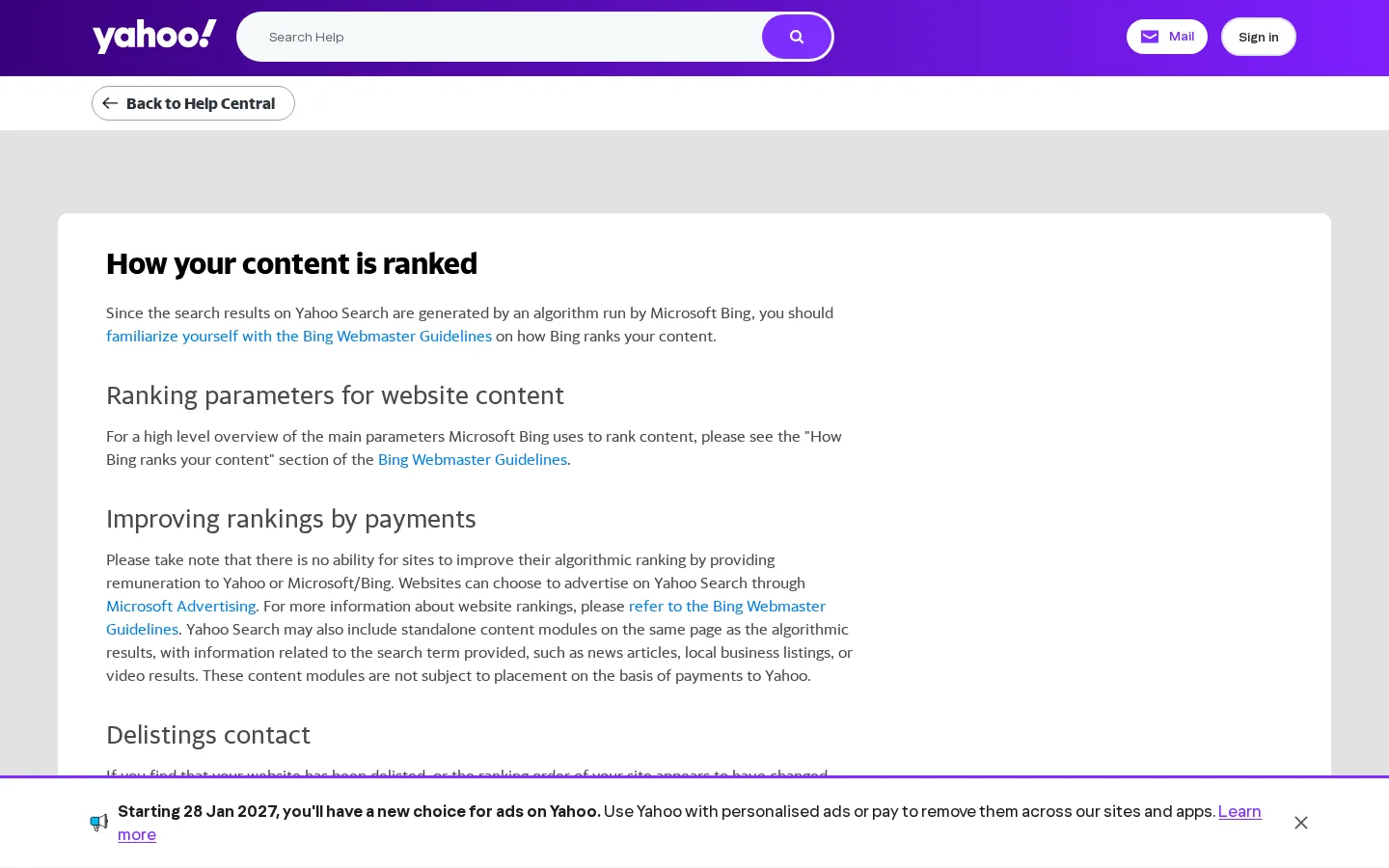
Yahoo's own help page on ranking explains the split. It says results "are generated by an algorithm run by Microsoft Bing", and that Yahoo may add separate modules, including "local business listings", which are not placed based on payment (Yahoo Help, How your content is ranked).
Most articles on this topic still describe a form on local.yahoo.com and a "Claim your business" button. That flow went through two partners over the years: first Yext, then The Real Yellow Pages (Thryv). Both routes have changed.
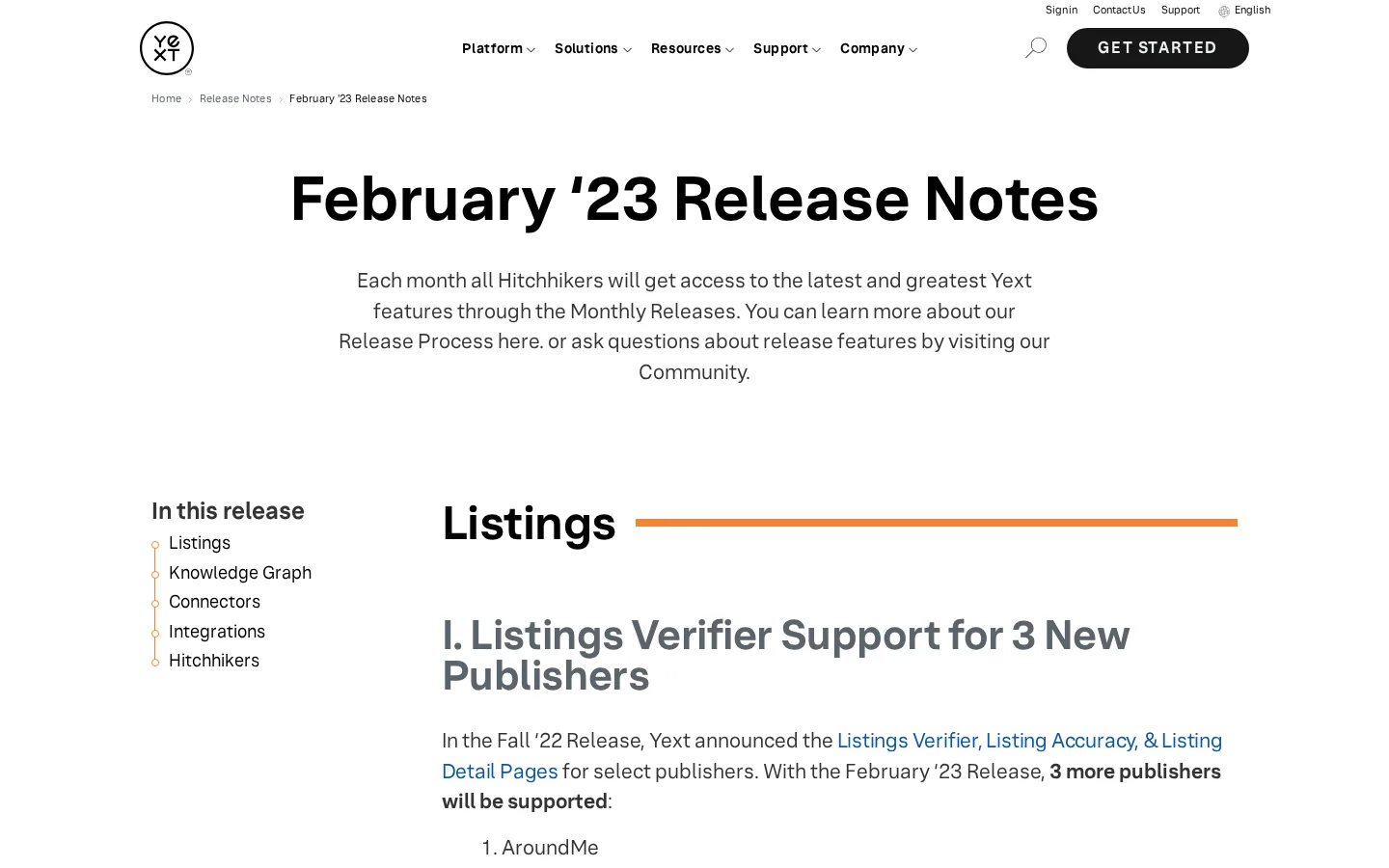
Yext moved to a submission-based integration with Yahoo in early 2023. Its February 2023 release notes say that "Yahoo! is no longer supported in the Listings Scan tool or API" and that real-time updates and listings analytics stopped on Yahoo (Yext, February '23 Release Notes). When we checked in November 2026, Yahoo's old help article for Basic Listings (SLN26672) opened the Yahoo account help index instead of the listing instructions.
How the Yahoo business listing changed
Note
If a guide tells you to "go to local.yahoo.com and click Claim", check the date. Since the claim flow moved to partners, the reliable way to control your Yahoo data is to control its sources.
Yes. Appearing on Yahoo costs nothing. Yahoo does not charge for the local module, and its help page states that these modules are not placed based on payments. Every source that feeds Yahoo also has a free tier: Bing Places for Business, your own website, Yelp and the free listing of The Real Yellow Pages.
What you can pay for is convenience, not presence:
None of these is required to show up. Treat any call from a "Yahoo Business Advisor" that says otherwise with care, and never pay to "keep" a free listing.
Free route vs paid sync service

Yahoo gets its business information from Microsoft Bing for organic results, and from data partners for local modules. Yahoo does not publish the full list of those partners. So the practical answer is to make the same facts true everywhere Yahoo could look.
This is how the local search ecosystem works in general: a few primary sources (search engine profiles, your website, data aggregators) feed hundreds of secondary sites. We explain the full flow in our guide to the local search ecosystem and how business data flows.
| Source | Role for Yahoo | How sure is it? | What you do |
|---|---|---|---|
| Microsoft Bing (web index) | Generates Yahoo's organic results | Documented by Yahoo Help | Get indexed by Bing, submit your sitemap in Bing Webmaster Tools |
| Bing Places for Business | Likely input for local data on Bing and Yahoo | Logical, not confirmed by Yahoo for the local module | Claim and verify your listing |
| Your website | Source that Bing crawls and trusts | Documented (it is a Bing result like any other) | Clear NAP, LocalBusiness schema, contact page |
| The Real Yellow Pages (Thryv) | Partner used by the Yahoo claim flow | Reported by third-party guides in 2025 | Create or claim the free listing |
| Yelp | Historical content partner of Yahoo | Announced years ago, current status not public | Claim your Yelp page and keep it accurate |
| Data aggregators | Feed many directories that Bing crawls | Indirect | Submit once, keep consistent |
A data aggregator collects business records and resells them to directories, maps and apps. If an aggregator holds an old phone number, that number can spread to dozens of sites and, through Bing, to Yahoo.
Because Bing generates Yahoo's results, anything that helps you on Bing helps you on Yahoo. That includes your Bing Places listing, the indexing of your website by Bing, and the reviews and citations Bing can read. It also includes AI answers: Microsoft Copilot runs on Bing's index, so the same data shapes how you are described in AI answers.
To get your business on Yahoo, work on the sources, in this order: your website, Bing Places, Google Business Profile, the Yellow Pages listing, then the main directories. Then check Yahoo Search after a few weeks. The whole setup takes 2 to 4 hours for one location.
The 6-step method to appear on Yahoo
Your NAP (name, address, phone) is the identity search engines use to match records. Write it down once, exactly as you want it, and copy it. Do not type it again from memory each time.
Put this NAP in your website footer and on your contact page, as plain text (not inside an image).
Structured data tells Bing, without guessing, which name, address and phone belong to your business. Add a JSON-LD block to your home page or contact page. Here is a minimal example to adapt:
<script type="application/ld+json">
{
  "@context": "https://schema.org",
  "@type": "Plumber",
  "name": "Smith Plumbing",
  "url": "https://www.smithplumbing.com/",
  "telephone": "+1-214-555-0142",
  "address": {
    "@type": "PostalAddress",
    "streetAddress": "1200 Main St, Suite 4",
    "addressLocality": "Dallas",
    "addressRegion": "TX",
    "postalCode": "75202",
    "addressCountry": "US"
  },
  "openingHoursSpecification": [{
    "@type": "OpeningHoursSpecification",
    "dayOfWeek": ["Monday","Tuesday","Wednesday","Thursday","Friday"],
    "opens": "08:00",
    "closes": "18:00"
  }],
  "sameAs": [
    "https://www.yelp.com/biz/smith-plumbing-dallas",
    "https://www.facebook.com/smithplumbing"
  ]
}
</script>
Use the most precise type that fits (Plumber, Dentist, Restaurant...) rather than the generic LocalBusiness. The sameAs list links your site to your profiles, which helps engines connect the records. For every property and the rules to follow, see our complete LocalBusiness JSON-LD example.
Tip
Do not want to write the code by hand? Our free schema markup generator builds a valid LocalBusiness block from a form, ready to paste.
Bing Places is the closest thing to a "Yahoo business dashboard" that exists today. Sign in with a Microsoft account, then either import your Google Business Profile (fastest, it copies your data and photos) or create the listing by hand. Verify it with the method Bing offers you: phone, email, or a postcard.
If you import from Google, check the result field by field. Imports copy errors too. Our guide shows how to create, import and verify a Bing Places listing, with the cases where verification fails.
Open Bing Webmaster Tools, add your site (you can import it from Google Search Console), and submit your XML sitemap. Then use the URL Inspection tool on your home page and contact page. If Bing cannot index these pages, Yahoo cannot show them either.
Check also that your robots.txt does not block Bingbot. A blanket rule written for another crawler can block it by mistake:
User-agent: *
Disallow:

Sitemap: https://www.smithplumbing.com/sitemap.xmlThe Real Yellow Pages (yellowpages.com, run by Thryv) is the partner that the Yahoo claim link pointed to in 2025. Search for your business on the site. If it exists, claim it. If not, add it with the free option. Expect a sales call offering paid upgrades: you can decline, the free listing stays.
Do the same on Yelp. Yelp content reached Yahoo results through a content partnership announced years ago, and Yelp pages rank well on Bing for brand and service searches. Our guide to setting up Yelp for Business and handling reviews covers the claim process.
Search on Yahoo for three things: your exact business name, your name plus your city, and your phone number. Write down every wrong fact you see, and which site it comes from (click the link under the local result or the panel).
Then correct the source site. Yahoo says it "has no control over what is published outside of the Yahoo network" and recommends contacting the website owner first. Once the site is updated, Yahoo Search can take "up to 10-12 weeks" to show the change (Yahoo Help, Remove search results from Yahoo Search).
Setup checklist for one location
To claim or fix an existing Yahoo listing, find which site supplies the record, claim the listing on that site, and correct it there. Yahoo has no editor for business records, so a "claim" on Yahoo means a claim at the source.
Duplicates usually come from an old move, a rebrand, or a second phone number. Find every listing with the old data, then mark it as moved or closed on the source site rather than deleting it: a closed record tells engines the old data is wrong, while a deleted one can be recreated by an aggregator. Our guide on keeping listings accurate and fixing duplicates explains this cleaning process in detail.
This happens when a former employee, an agency or a previous owner claimed it. Start with the source site's support: most directories have an ownership dispute process that asks for proof (business licence, a utility bill, an email on your domain). On Bing Places, an existing claim can block yours until the dispute is settled.
This is the most common case for new businesses. It usually means Bing has not indexed your site, or that no partner holds a record for you yet. Go back to steps 3, 4 and 5 above. A business with a verified Bing Places listing and an indexed website rarely stays invisible on Yahoo for long.
Warning
Calls or emails that claim your "Yahoo listing will be removed" unless you pay are a classic scam pattern. Yahoo does not charge for local modules. Verify any offer on the vendor's official site before giving card details.
There are four ways to manage how your business appears on Yahoo: the Bing-first route, the directory-by-directory route, a paid listing sync service, and the aggregator route. They are not exclusive. Most small businesses combine the first two; chains add the third.
Principle: treat Yahoo as a mirror of Bing. You claim Bing Places, get your site indexed in Bing Webmaster Tools, and keep your website as the master copy of your data.
When to use it: always, as the base. It is free and it also covers Bing and Copilot.
Advantages: free, you own every account, and it fixes three engines at once.
Limits: Yahoo does not confirm that Bing Places feeds its local module, so you still need to check Yahoo itself.
Example: a dentist imports her Google profile into Bing Places, verifies by phone, submits her sitemap, and appears in Yahoo's local module for "dentist" plus her city a few weeks later.
Principle: you claim, by hand, the main directories that Bing reads: Yellow Pages, Yelp, Apple Business Connect, Facebook, and the leaders of your industry.
When to use it: for one to five locations, when you have a few hours and want full control.
Advantages: free, permanent, and each profile is a local citation that also helps on Google and Bing.
Limits: slow, and you must update every site by hand when something changes (new hours, a move).
Example: a café owner spends one afternoon on ten profiles, using a shared document with the exact NAP and description to copy and paste.
Tip
Not sure which directories matter in your country? Our free local citation finder lists the directories by country, so you can start with the ones that carry weight.
Principle: a vendor pushes your data to dozens of directories from one dashboard. Turbify Localworks is the one historically tied to Yahoo; listing management platforms in general work the same way.
When to use it: from about ten locations, or when your data changes often (seasonal hours, many staff).
Advantages: one place to update, fast propagation, review monitoring in the same tool.
Limits: a fee per location, and with some vendors the listings they lock can revert to their old state when you cancel. Read the terms on that point before you sign.
Example: a franchise with 40 outlets changes its holiday hours once and sees them updated across its main listings the same week.
Principle: you submit your data to the data aggregators of your country, which resell it to many smaller directories and apps.
When to use it: when an old address keeps coming back on small sites, which shows an aggregator still holds it.
Advantages: fixes the root of a problem that would otherwise return.
Limits: slow (months), indirect, and the effect on Yahoo cannot be measured on its own.
Example: a law firm that moved in 2024 still shows its old address on 30 small directories; one correction at the aggregator level stops the spread.
| Method | Cost | Setup time | Best for | Main limit |
|---|---|---|---|---|
| Bing-first route | Free | 1 to 2 hours | Every business | No direct control of Yahoo's local module |
| Directory by directory | Free | 2 to 6 hours | 1 to 5 locations | Manual updates |
| Paid sync service | Monthly fee per location | Under 1 hour per location | 10 locations or more | Recurring cost, possible revert on cancel |
| Aggregator route | Free to paid, by country | Weeks to months | Old data that keeps returning | Slow, hard to measure |
Yes, because the work is the same as for Bing and costs nothing extra. Yahoo is a small engine on its own, but it shares its results with Bing, and the data you fix for it also feeds AI answers.
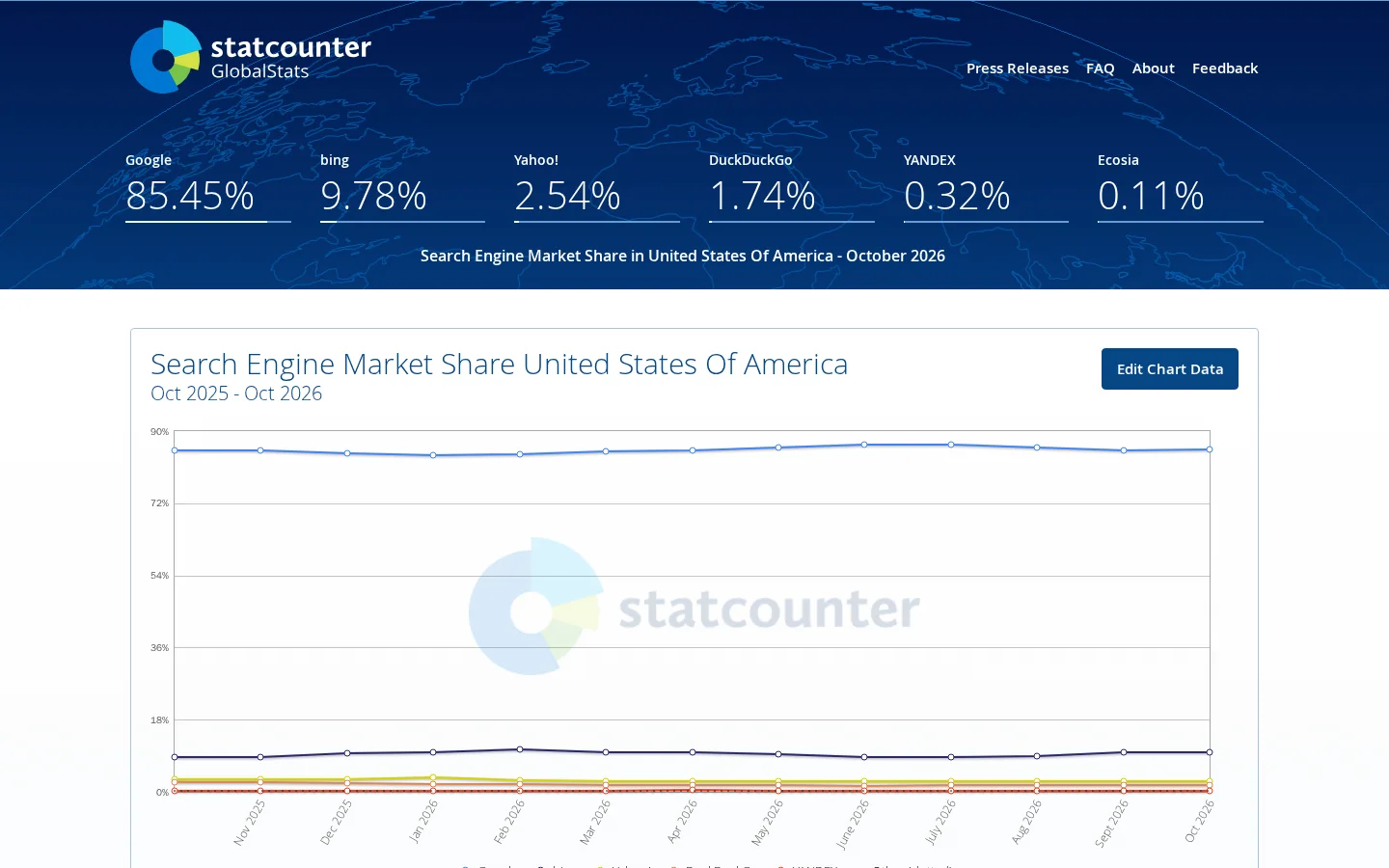
In the United States, StatCounter measured Yahoo at 2.54% of searches in October 2026, behind Google (85.45%) and Bing (9.78%). Put together, Bing and Yahoo, which show results from the same engine, reach about one search in eight (StatCounter Global Stats, search engine market share in the United States).
AI models that search the web, such as Microsoft Copilot, which relies on Bing, and ChatGPT with search, pull business facts from the same pages: your website, your profiles, directories and reviews. A wrong phone number on a directory can end up in an AI answer. Fixing your Yahoo data is therefore also part of getting your local business recommended by ChatGPT, Gemini and AI Overviews.
What one fix on your data reaches
Sources: Yahoo Help (SLN35619, SLN4530), StatCounter Global Stats, October 2026
The most common mistakes are trying to edit Yahoo directly, paying for something free, and leaving old data alive on the sources. Here is how to spot and fix each one.
What it is: following an old guide to local.yahoo.com and losing an hour on redirects.
How to spot it: the claim link sends you to the Yahoo home page, a help index, or a third-party site.
How to fix it: start from the sources (Bing Places, your website, Yellow Pages, Yelp), as in the step-by-step section above.
What it is: agreeing to a subscription because a caller says your listing will disappear.
How to spot it: pressure to decide on the phone, no written offer, a sender that is not on the vendor's official domain.
How to fix it: decline, ask for the offer in writing, and verify it on the official site. If you already paid, check the contract's cancellation terms and what happens to your listings.
What it is: listing "Smith Plumbing 24/7 Emergency Plumber Dallas" instead of your real name.
How to spot it: your name on Bing Places or Yelp is different from your sign and your website.
How to fix it: use your real name everywhere. Keyword stuffing breaks the match between records, and Bing and Google both treat it as a guideline violation.
What it is: correcting one directory, while the aggregator or the Bing record that fed it still holds the old value.
How to spot it: the wrong address comes back after a few weeks, or appears on new small sites.
How to fix it: correct Bing Places and your website first, then the aggregator, then the directories. Work from the top of the data chain down.
What it is: using a different tracking number on each directory.
How to spot it: a search on Yahoo for your phone number returns no result, or your listings show several numbers.
How to fix it: keep your local number as the main phone on every listing. If a platform allows it, add the tracking number as a secondary field only.
What it is: setting up the listings once and forgetting them for two years.
How to spot it: old hours, a closed branch still shown, reviews without answers.
How to fix it: put a check in your calendar every quarter, and right after any change (move, new phone, new hours). Our 30-point local SEO checklist gives a routine you can reuse.
Before and after a clean-up of the sources
To track your Yahoo presence, check three searches each quarter, follow your Bing data, and watch how AI answers describe your business. There is no Yahoo dashboard for owners, so you build your own simple routine.
Keep the results in one sheet with dates. Over four quarters, you will see whether the clean-up holds.
The same facts also feed AI answers, which you cannot check by hand prompt after prompt. Sorank's AI mention tracking follows whether ChatGPT, Claude and Gemini cite your business and how they describe it, so you notice when wrong data from a directory reaches an AI answer.
For several locations, the rule is the same, but the bottleneck becomes updates. Each location needs its own NAP, its own page on your website (a location page with its own schema), and its own Bing Places listing. Bing Places accepts bulk uploads for chains, which saves time compared with one form per location.
A few rules that avoid most problems for chains and agencies:
Your Yahoo business listing is free and you control it through its sources. Today, write your official NAP, check it on your website, and claim or verify Bing Places. This week, claim your Yellow Pages and Yelp listings and add LocalBusiness schema. In twelve weeks, search your name, city and phone on Yahoo again and fix the source of anything still wrong.
If you also want the pages behind your listings to rank and be cited by AI models, Sorank's GEO optimization works on the content side, so that Google, Bing and AI answers describe your business with the right facts.
Yes. Yahoo does not charge to show your business in its local results, and its help pages say these modules are not placed based on payment. Paid sync services and directory ads exist, but none of them is required to appear.
Yahoo no longer runs a self-serve listing form, so you work on its sources. Claim and verify Bing Places for Business, get your website indexed in Bing Webmaster Tools, and claim your free Yellow Pages and Yelp listings with the same name, address and phone.
Once the source site is corrected, Yahoo says its search results can take up to 10 to 12 weeks to reflect the change. Fix Bing Places and your website first, then check Yahoo again after that window.
We analyse your competitors, your website and your AI visibility to create a tailored content plan for free.
 Website Value Calculator
 Website Accessibility Checker
 Google Analytics Checker
 Duplicate Content Checker
 Mobile-Friendly Test
 Website Speed Test
 Subdomain Finder
 Domain Age Checker
 CMS Detector
 Googlebot Simulator
 Nofollow Link Checker
 Meta Tag Checker
 Keyword Cannibalization Checker
 Keyword Intent Checker
 Keyword Extractor
 Google Ads Cost Calculator
 CPC Calculator
 Local Citation Finder
 Reddit Threads Finder
 Disavow File Generator
 Redirect Generator
 Canonical Tag Generator
 Passive Voice Checker
 Google Location Changer
 Google Review Calculator
 Google Review Link Generator
 Keyword Combiner
 Podcast Show Notes Generator
 AI Content Rewriter
 AI Text Humanizer
 ChatGPT Prompt Generator
 Twitter Thread Generator
 Tweet Generator
 Landing Page Copy Generator
 Google Ads Copy Generator
 Pinterest Pin Description Generator
 Anchor Text Generator
 Social Media Post Generator
 LinkedIn Post Generator
 Free AI Writer
 Review Response Generator
 LSI Keyword Generator
 YouTube Video Ideas Generator
 YouTube Tag Generator
 YouTube Description Generator
 Product Description Generator
 CTA Generator
 Blog Introduction Generator
 Conclusion Generator
 Hook Generator
 AI Content Brief Generator
 FAQ Schema Generator
 AI Blog Post Ideas Generator
 Structured Data Validator (Schema Validator)
 Alt Text Checker
 Internal Link Analyzer
 Backlink Challenge
 AI Meta Description Generator
 AI Blog Title Generator
 Google Indexability Checker
 AI Blog Outline Generator
 UTM Link Builder
 Keyword Clustering Tool
 Canonical Tag Checker
 XML Sitemap Generator
 Broken Link Checker
 AI SEO Title Generator
 Headline Analyzer
 SERP Preview Tool
 Redirect Checker
 Hreflang Tag Generator
 Heading Structure Analyzer
 HTTP Headers Checker
 Favicon Extractor
 SERP CTR Calculator
 SEO vs Paid Search Savings Calculator
 SEO Share of Voice Calculator
 SEO ROI Calculator
 SEO Traffic and Revenue Forecast Calculator
 SEO Budget Calculator
 SEO Break-Even Calculator
 SaaS SEO ROI Calculator
 ROAS Calculator
 Reading Time Calculator
 Ranking Gain Simulator
 Organic Traffic Value Calculator
 Organic Traffic Estimator and Website Traffic Checker
 LTV to CAC Ratio Calculator
 Local SEO ROI Calculator
 Link Building Cost Calculator
 Keyword Value Calculator
 Keyword Opportunity Score Calculator
 Keyword Density Calculator
 GEO ROI Calculator
 GEO Content Investment Calculator
 Ecommerce SEO ROI Calculator
 Customer Lifetime Value Calculator
 Customer Acquisition Cost Calculator
 CTR Calculator
 Cost Per Article Calculator
 Conversion Rate Calculator
 Content Marketing ROI Calculator
 ChatGPT Referral Traffic Estimator
 Bounce Rate Calculator
 Backlink ROI Calculator
 AI Visibility Score Calculator
 AI Traffic Value Calculator
 AI Share of Voice Calculator
 Cost of AI Invisibility Calculator
 AI Citation Rate Calculator
 llms.txt Validator
 AI Overview Checker and AI Overviews Rank Checker
 Robots.txt Checker
 AI SEO Audit
 LLM Readability Checker
 SearchGPT Readiness Checker
 Structured Data LLM Audit
 Website Crawlability AI Audit
 Why ChatGPT Is Not Recommending My Website
 Gemini Ranking Tool
 Perplexity Ranking Checker
 LLM Citation Checker
 Answer Engine Optimization Audit
 GEO Audit
 AI Search Visibility Test
 ChatGPT Visibility Checker
 llms.txt Generator
 URL Extractor
 Webpage to Markdown
 Sitemap Checker
 SERP Volatility Sensor
 Page Size Checker
 Word Counter
 Slug Generator
 Schema Generator
 Robots Generator
 OG Preview
 Meta Tags Generator
 Image Compressor
 Favicon Generator
 On-Page SEO Audit: SEO Checker and SEO Analyzer
 Backlink Analysis Tool
 Keyword Research Tool
 Domain Authority Checker
 “I tested Sorank on a real client site and it's insane. It does everything an agency would bill you $1500 a month for. It's going into production on that client now.”

 Guillaume Guersanguersanguillaume.com“We are an Ads agency and we wanted to get our SEO back on track once and for all. Sorank gave us a clear view of our site, helped us prioritize optimizations, and properly structure our content. The tool is easy to use, well designed for a team, and very practical for centralizing tracking without having to juggle multiple platforms. A very solid foundation to start fresh with our SEO.”
 Gaspard MadouiAds Agency
 “I just let the Sorank software do its thing, and now my DR is 25 and my page is ranking higher.”
 Lucas Flandrefoundertrace.fr“I specialized in GEO thanks to Sorank. The GEO Leaderboard allows me to show my clients their position vs competitors on ChatGPT. It’s a real commercial differentiator.”
 MélanieSEO Freelance“Great service, works well for our website and helps us understand how to improve it to rank better on Google and elsewhere. Congrats, keep going, I recommend it.”
 Hugo T.E-commerce merchant