Preferences
Privacy is important to us, so you have the option of disabling certain types of storage that may not be necessary for the basic functioning of the website. Blocking categories may impact your experience on the website. More information
Privacy is important to us, so you have the option of disabling certain types of storage that may not be necessary for the basic functioning of the website. Blocking categories may impact your experience on the website. More information

Learn how to optimize content for SEO step by step: match search intent, write clear titles and links, structure the page and measure what changed.
In short
Optimizing content for SEO means making a page match the query it targets and giving the reader what they came for. Start with the search intent behind the keyword, then write, structure and link the page, and measure what changes. Most of the work is editorial, not technical.
Want to go further? Ask
Quick quiz
Is SEO right for you, and how should you start?
Sorank matches your answers


Test it for 3 days on your own site and see where you stand on Google, ChatGPT and the other AIs.
Start 3-day free trial3 days free, then stop whenever you want. 90-day results guarantee, conditions apply.
Optimizing content for SEO means making a page match the query it targets, covering that topic in enough depth to be useful, and making its structure, title and links easy for Google to read. It is a set of editorial and technical choices made on one page, not a list of tricks added after the text is finished. Four parts decide the result, and each one has its own check.
| Part | What it covers | How you check it |
|---|---|---|
| Search intent | The goal behind the query and the format that serves it | Read the current top 10 results |
| Topic depth | Subtopics covered, examples, evidence | Compare your headings with the top results |
| On-page signals | Title, description, headings, URL, images | Review each element on the live page |
| Links | Internal links in and out, and their anchor text | List the links that point to and from the page |
| Performance | Clicks, impressions and position after publication | Search Console, page by page |
Google's guidance on helpful content gives a good test for the depth part. Its self-assessment asks, among other things, "Does the content provide a substantial, complete, or comprehensive description of the topic?" and "Does the content provide substantial value when compared to other pages in search results?" Google Search Central's helpful content guidance is written as questions about the page itself. None of them ask how many times a keyword appears. The rest of this guide turns them into steps you can run on a real page.
Decide what kind of page the query asks for before you decide what to write. A page that answers a different question will not rank, however well it is written. Search intent is the goal behind a query, and a person who types "how to optimize content for SEO" wants a method. A list of software features that happens to use the same words is the wrong answer, even if it mentions the topic.
Search the query in a private browser window and read the first ten results from start to finish. Note four things: the format (guide, checklist, tool, comparison or product page), how long the sections are, which subtopics appear in the headings, and which questions sit in the "People also ask" box. Those are the signals Google has already rewarded for this query. You are not copying them. You are checking what a complete answer looks like before you write yours.
Format follows intent. If most results are step-by-step guides, a 400-word overview will lose, and a 4000-word essay with no steps will lose too. If the results mix guides and tools, write a guide that links to a tool. The table below shows the usual pattern for each kind of query.
| Query pattern | Intent | Format that usually wins | What to put first |
|---|---|---|---|
| "what is", "how to" | Learn | Guide with steps | A two-sentence definition or answer |
| "best", "X vs Y" | Compare | Comparison table with criteria | The table or the verdict within the first screen |
| "pricing", "service", "agency" | Buy | Product or service page | The offer, the price logic and proof |
| Brand name | Find a site | Homepage or brand page | The brand name, what it does, a link |
Ask ChatGPT, Gemini and Perplexity the same question and note which sources they name. AI answers tend to pick pages that state the answer in the first lines and use clear headings. The same checks apply, with a different emphasis, as explained in how to optimize content for AI search. If a competitor is cited and your page is not, compare the first paragraph of each. The cited page usually answers faster.
Example
For "how to optimize content for SEO", the top results are long guides with a checklist and numbered steps. A page that opens with a definition, covers the steps in order and ends with a checklist fits that intent. A page that only lists tools does not, even if it is well written.

Give each page one primary keyword and let the related terms become sections, not repetitions. A page can rank for dozens of variants, but it needs one clear target to organize the title, the URL and the opening paragraph around.
Put the primary keyword in the title, the H1, the URL and the first paragraph. Use supporting terms in H2 and H3 headings, where they name a subtopic a reader will look for. In this guide, "on-page SEO" and "internal links" are supporting terms, and each one has its own heading. The method for a single page is covered in how to optimize a page for one keyword.
| Term type | Example | Where it goes |
|---|---|---|
| Primary | optimize content for SEO | Title, H1, URL, first paragraph |
| Supporting | on-page SEO, search intent, internal links | An H2 or H3 section for each |
| Variant | SEO content optimization | Body text, used naturally and not repeated |
| Question | how many keywords per page | An FAQ entry or a short subsection that answers it |
Variants with the same intent belong on the same page. "Optimize content for SEO", "SEO content optimization" and "how to improve SEO content" are one job, not three. Pull the queries that already bring impressions to the page from Search Console, then sort them by intent. Queries that want the same answer stay on one page. Queries that want a different format, such as a tool or a comparison, get their own page, or a link to one. The grouping method is explained in keyword clustering.
There is no correct keyword density, and Google publishes no figure for one. A density percentage describes a text after you wrote it. It can show that a term is missing, which is useful, but it cannot tell you that a page should contain the term a fixed share of the time. The reasoning is set out in keyword density and why the percentage myth fades.
Tip
Paste the page text into the keyword density calculator to see which terms the page uses most. Use the result to spot a missing subtopic, not to hit a number.
Stuffing shows up as the same phrase in every paragraph, sentences rebuilt around a term, a run of near-identical variants, and the keyword repeated in alt text and anchor text for every image or link. Google's spam policies list keyword stuffing as a practice to avoid, and readers notice it first. Read the draft aloud. If a sentence sounds written for a search engine, rewrite it so it says what a person would say. For a fuller set of examples, see keyword stuffing examples and how to write naturally.
The same idea, written two ways
Warning
Do not add the keyword to a paragraph by removing a useful sentence to make room for it. The reader loses more than the page gains. Keep the sentence and let the keyword sit where the topic already is.
Use one H1, one H2 for each subtopic, short paragraphs and an answer in the first sentence of each section. These habits make a page easy to read on a phone and easy to skim for a reader in a hurry. They also make it easier for a search engine or an AI system to lift a clear passage from the page.
Open every section with the direct answer to its heading, then spend the rest of the section on the reasons, the steps and the edge cases. A reader who only reads the first sentence of each section still leaves with the answer. The rest of the section is for the reader who wants the detail.
The pattern is simple. Write the answer as one sentence that could stand alone in a search result. Then add the mechanism, an example and one limit. Sections written this way are easier to edit later, because the answer and the detail can change separately.
Two ways to open a section
A heading should say what the section contains. "Title tags" tells the reader where to look. "The one trick nobody mentions" makes them guess. Descriptive headings also give search engines and AI systems clear labels for each part of the page, which is why they belong in the outline before the prose.
Length is a result of coverage, not a target. Google's guidance asks whether a page is substantial and complete, which is a question about what it covers, not how many words it contains. A guide to a narrow task can be 1200 words and complete. A broad topic can need 4000. Stop when every subtopic the top results cover has an answer and you have added something they lack, not when a word count is reached.
Each page needs a title tag that describes it, a meta description that summarizes it for the click, a short URL that uses the keyword, headings that outline it, and images with alt text that says what they show. These are the elements a search engine reads first and the ones a person sees in the results before they click.
The title tag is the title element in the page head. Google builds the title link shown in results from several sources, including the title element, the main visible heading, og:title tags, anchor text that points at the page and WebSite structured data. Google can override a title when it detects a problem, such as a half-empty, outdated or inaccurate title tag. The guidance from Google Search Central on title links is to keep titles concise and descriptive, avoid vague labels such as "Home", avoid keyword repetition, and give each page its own text. The sentence that matters most is "It's important to have distinct text that describes the content of the page."
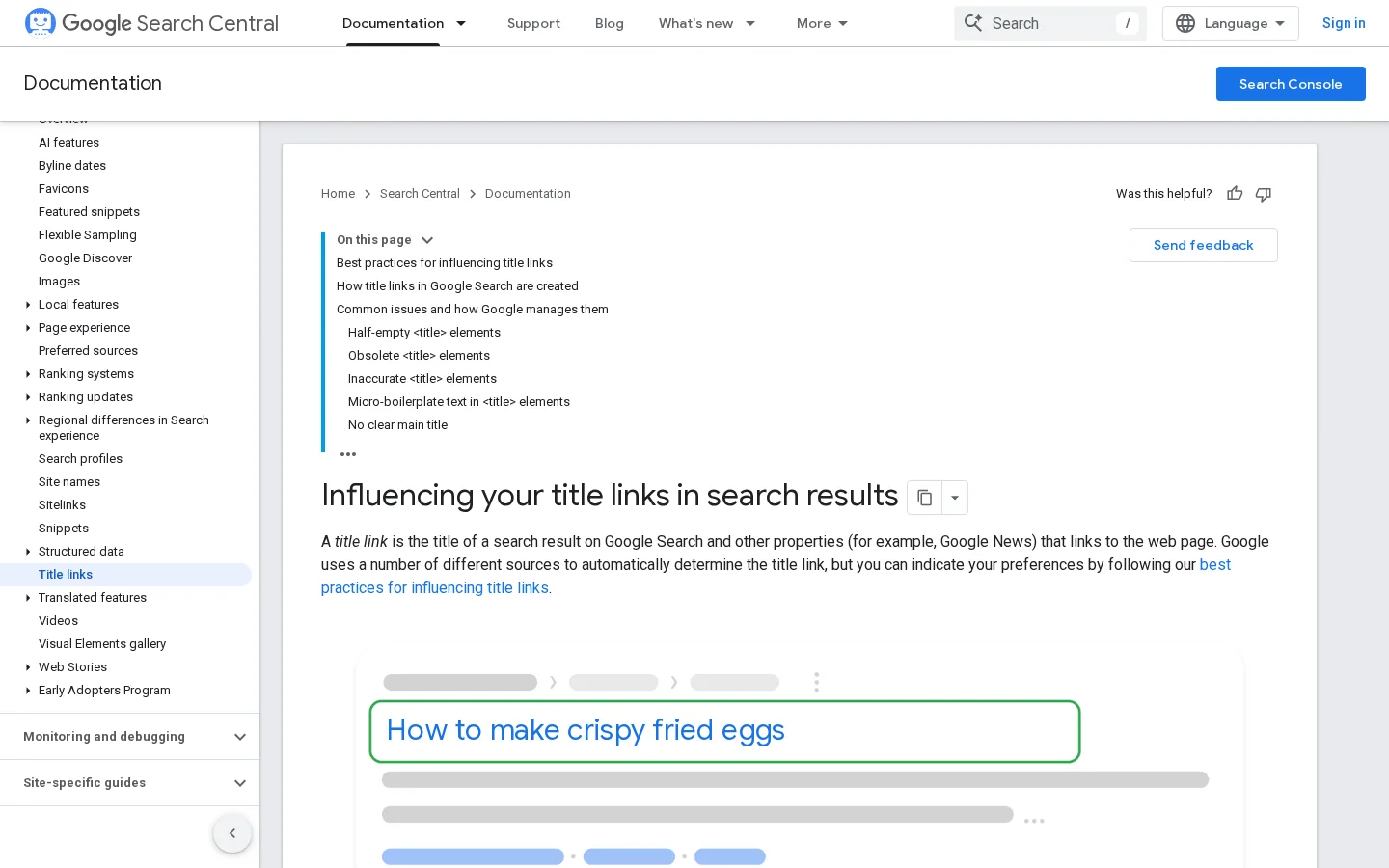
In practice, write the title as a promise the page keeps. Put the main term first, add the qualifier that makes the page different, and check the title in the results rather than in your CMS, because truncation happens on the results page, usually to fit the width of the device.
A title rewritten for the page it names
<title>How to Optimize Content for SEO: A Step-by-Step Guide</title>
<meta name="description" content="Optimize an existing page for SEO: match the search intent, fix the title and links, and measure the result in Search Console.">The meta description is the summary that often appears under the title in results. Google's snippet guidance, published by Google Search Central, says snippets are created primarily from the page content, and that Google sometimes uses the meta description when it gives a more accurate description than the page text does. The advice is to write a brief, relevant overview for each page. It also warns that identical descriptions on every page "aren't helpful when individual pages appear in search results." The guidance does not say a description changes your ranking. Its job is to earn the click once the page is shown. You can draft options with the meta description generator, then edit one by hand so it names the specific page. The concept is covered in the meta descriptions entry.
A URL should be short and lowercase, use hyphens and contain the primary keyword once. Changing a live URL needs a 301 redirect and a plan for the internal links that point to it. Alt text describes what an image shows, for a reader who cannot see it. If an image is purely decorative, its alt text can be empty. Do not put the keyword into the alt text of every image. For the full set of image checks, see image SEO.
| Element | Its job | Common mistake |
|---|---|---|
| Title tag | Names the page in results | Repeats the keyword, or says only "Home" |
| Meta description | Summarizes the page for the click | Identical on every page |
| H1 | The visible title of the page | Two H1s, or none |
| URL | A short label for the page | Dates, IDs or long parameter strings |
| Alt text | Describes the image for a reader who cannot see it | "image1", or a list of keywords |
Depth means answering the questions a reader brings, in the order they bring them, and adding something the other top results do not have. That addition can be a check you ran, a worked example with real values, or a source you read carefully and quoted correctly.
Take subtopics from four places: the headings of the top results, the "People also ask" questions, the queries your page already gets in Search Console, and the questions people put to AI tools. A subtopic that appears in three of those four places is almost certainly needed. A subtopic that appears in only one may be a detour worth skipping.
Google's questions ask whether the content provides "original information, reporting, research, or analysis", and whether it offers "insightful analysis or interesting information that is beyond the obvious". In practice, that means one element per section that the other pages do not have: a before-and-after example, a test you ran on a real page, a table of values or a short calculation. Originality comes from specifics. A paragraph that says "use descriptive titles" is generic. A paragraph that shows the title before and after, and explains what changed in the result, is specific.
A number in an article should come with the study it came from, its date and its sample. The figures below come from a First Page Sage study of Google results. It covers 1184 client and panel domains, 3.67 billion impressions and 41.2 million clicks, recorded between March 1 and August 31, 2026. Read the chart as a pattern: the first position takes most of the clicks, and the share drops quickly after that. It does not predict what your own page will get, because your queries, your brand and your competitors change the numbers.
Internal links help Google find pages and understand how they relate, and anchor text tells the reader and the search engine what the target page is about. Both work best when every important page has links from related pages and each link says what it points to.
The link guidance from Google Search Central is direct: "Every page you care about should have a link from at least one other page on your site." A page with no inbound internal link is hard for Google to discover through your site and receives no internal signal. Start by listing the pages you want to rank, then check which of them have no link from another page. The concept is explained in internal linking basics.
Google suggests a test: read only the anchor text, out of context, and check whether it is specific enough to make sense. "Click here", "read more" and "this article" fail, because they say nothing about the target. A good anchor is descriptive, reasonably short and relevant to both pages. Vary the anchors. Use the exact phrase sometimes, a partial phrase sometimes and a descriptive phrase when it reads better. Do not put the keyword into every link, because keyword-stuffed anchors are a problem of their own, as described in anchor text optimization.
<!-- good: the anchor names the target -->
<a href="/blog-geo-seo/keyword-optimization">how to optimize a page for one keyword</a>
<!-- bad: the anchor says nothing about the target -->
<a href="/blog-geo-seo/keyword-optimization">click here</a>
Anchor text that works out of context
A link placed right after the sentence it supports does more work than a block of links at the end. Link to a tool when you have just explained the problem it solves, and to a definition when you use a term the reader may not know. Put links in the body text, where the reader meets them in context, and keep the closing section for a summary.
Tip
Run the free internal link analyzer on the page you are editing. It lists the internal links on the page, so you can see which ones are missing or repeated.
Take one page that already gets impressions, fix its intent match first, then its structure, then its links, and measure the result after Google has recrawled it. Doing the steps in that order stops you from polishing headings on a page that answers the wrong question.
Optimize an existing page in six steps
In Search Console, open the Performance report, filter it by the page, then open the queries list and export it. Look for queries that have impressions but a weak average position, because those are the ones a better page can move. To find the queries that name the task, filter the list with a regular expression. The Queries filter accepts a regex, so this pattern catches "optimize content for SEO", "optimization of SEO content" and similar phrasing:
optimi[sz].*(content|seo)Search the primary query and open the top five results. For each one, note the format, the headings, the subtopics and the one thing it does that the others do not. Put the notes in a table with three columns: subtopic, who covers it, and whether your page covers it. The empty cells are your outline.
Write the title and the opening answer after the outline, not before. The title has to match what the page now delivers. The first section should give the answer in two or three sentences, so a reader who stops there still has what they came for. If the page targets a single keyword, the page-level method in how to optimize a page for one keyword covers the same placement rules in more detail.
Turn the empty cells into H2 and H3 headings. Remove sections that repeat each other or that no top result needs. If two pages cover the same intent, merge them and redirect the old URL. Redirect choices are explained in 301 vs 302 redirects, which matters whenever a URL changes.
Add one or two internal links from related pages to this one, and make the links in this page descriptive. Check each image for alt text that describes what it shows. Replace any link that goes to a redirect or to a broken page. Each fix is small, and together they make the page easier for Google to crawl and understand.
Publish the page, then request indexing for the URL in Search Console. Google's title link guidance notes that changes can take days to weeks to show in results. Record the clicks, impressions and average position for the page on the day you publish, then compare the same measures after a few weeks on the same date range. A single week is too short to judge a change.
AI content optimization for SEO means using a language model for the repetitive checks on a page, such as finding missing subtopics, drafting title options and rewriting unclear sentences. A person still decides what the page claims. The model saves time on slow, mechanical work. It is not a source of facts, examples or test results, so those parts have to come from you.
Most of the time saved comes from comparison work. Paste your draft next to the headings of the top five results, then ask which subtopics the draft lacks. Check each suggestion against the search intent before you add a section, because a model will suggest subtopics that answer a different question.
Compare my draft with the headings of these five pages. List the subtopics the five pages cover that my draft does not. For each one, name the query it answers. Do not write any new text yet.Give the model tasks that have a clear right answer, and keep the final decision for yourself. The table shows what to check after each task.
| Task | What the model can do | What you check |
|---|---|---|
| Gap analysis | List subtopics from the top results that your headings lack | Each gap answers the same query as your page |
| Title options | Draft five titles from the outline | The title matches what the page delivers |
| Meta description | Summarize one section in two sentences | It names this page and adds no invented fact |
| Alt text | Describe an image | The description matches what the image shows |
| Link suggestions | Propose related pages from your URL list | Each anchor makes sense when read on its own |
| Sentence edits | Shorten long sentences and cut filler | The meaning did not change |
A model writes fluent sentences about any topic, including sentences that are wrong. Numbers and examples in a draft need your own source. A figure needs a named study, a date and a sample, as set out in the section on numbers above. An example needs real values from a page you checked. If a model gives you a statistic without a source, delete it.
Warning
Do not paste a model's answer into the page as a finished paragraph. Rewrite it in your own words, then check that the first sentence still answers the heading.
Google's guidance says that using generative AI is not against its rules by itself, but AI-assisted content still has to meet the Search Essentials. The problem is the result: generating many pages without adding value for users can break Google's spam policies. The test is the same as for any page: does a reader get something they could not get from the top results? The Google Search Central guidance on generative AI content sets out the standard, and what Google says about AI content and rankings covers what it means for a site.
If you run the same checks each time you update a page, save the prompt as a template. The method for writing prompts that get useful answers is covered in its own guide.
Tip
Ask the model to explain each suggested change in one sentence. If you cannot tell how the change helps the reader, skip it.
The most common mistakes are a mismatch with search intent, titles that repeat the keyword, sections that list without explaining, generic anchor text, pages with no inbound internal link and pages that are never updated. Each one has a clear sign and a clear fix.
| Mistake | How to spot it | How to fix it |
|---|---|---|
| The page answers a different question | The top results use another format, or the page ranks for queries you never targeted | Change the format or split the page by intent |
| Titles that repeat or copy each other | Sort the titles of a crawl by duplicates | Write one title per page from what the page delivers |
| Sections that list without explaining | Bullets that are nouns, with no sentence on why or how | Add the mechanism, an example and a limit |
| Generic anchor text | Filter anchors for "click here", "read more", "this article" | Rewrite each anchor to name its target |
| Orphan pages | No other page on the site links to the URL | Add links from two or three related pages, in body text |
| Content decay | Clicks fall for months on the same queries with no change to the page | Refresh the facts, examples and sources, then update the title |
What it is: the page is well written but built for another intent, such as a product page for a query that wants a method. How to spot it: the top results use a different format, or Search Console shows the page ranking for queries you never planned to target. How to fix it: change the format to match the results, or split the page so each intent has its own URL.
What it is: a template that gives every page the same title pattern, such as "Keyword | Brand" with a different keyword each time, or a title stuffed with variants. How to spot it: crawl the site and sort the titles to find duplicates and near-duplicates. How to fix it: write one title per page from what the page actually delivers, put the main term first, and keep the brand at the end only where it helps.
What it is: a section of tips where each bullet is a label and no sentence explains why it matters or how to apply it. How to spot it: read the section without the headings. If you cannot tell what the reader should do first, it is a list, not an explanation. How to fix it: give each point a mechanism, one example with real values, and a limit that says when it does not apply.
What it is: internal links with anchors such as "click here", "read more" or "this article". How to spot it: filter the link report of a crawl for those phrases. How to fix it: rewrite each anchor so it names the target in a few words, and vary the wording across the site instead of repeating one phrase for every link to the same page.
What it is: a page that exists but that no other page on your site links to. Google can still find it through a sitemap, but it gets no internal signal from the rest of the site. How to spot it: list the inbound internal links for each important URL and sort by the lowest count. How to fix it: add links from two or three related pages, placed in the body text where the topic is discussed, not in a footer block.
What it is: a page that once ranked well and now loses clicks, while its facts, examples or sources have aged. The loss is slow, so it is easy to miss. How to spot it: compare clicks for the same queries over several months and look for a steady fall with no change to the page. How to fix it: refresh the facts, examples and sources, update the title if the format or the year has changed, and keep the URL so the page keeps its history. The pattern is described in content decay and how to recover traffic.
Sorank's Content Optimization module audits pages you have already published and fixes them. The feature page still labels it as beta. It is useful when you have many pages and cannot review each one by hand.
The module checks the title tag, meta description, text length, H1, internal and external links (including missing, broken and redirected links), image alt text and file size, the canonical tag, Article structured data and the noindex tag. It also reads the last 30 days of Google traffic for each page and whether the page matches its search intent. Each page is sorted into one of three lists: all pages, pages to rewrite, or pages to fix.
What it changes depends on the page. Pages that already perform get targeted fixes to specific elements, and the rest of the page stays the same. Weak or outdated pages are rewritten at the same URL, so existing links and Google history are kept, and you can review the new version before it goes live. Pages that cover the same topic can be merged into one more complete page. A "Fix everything on autopilot" option processes the whole site at once, and single fixes can be published one at a time.
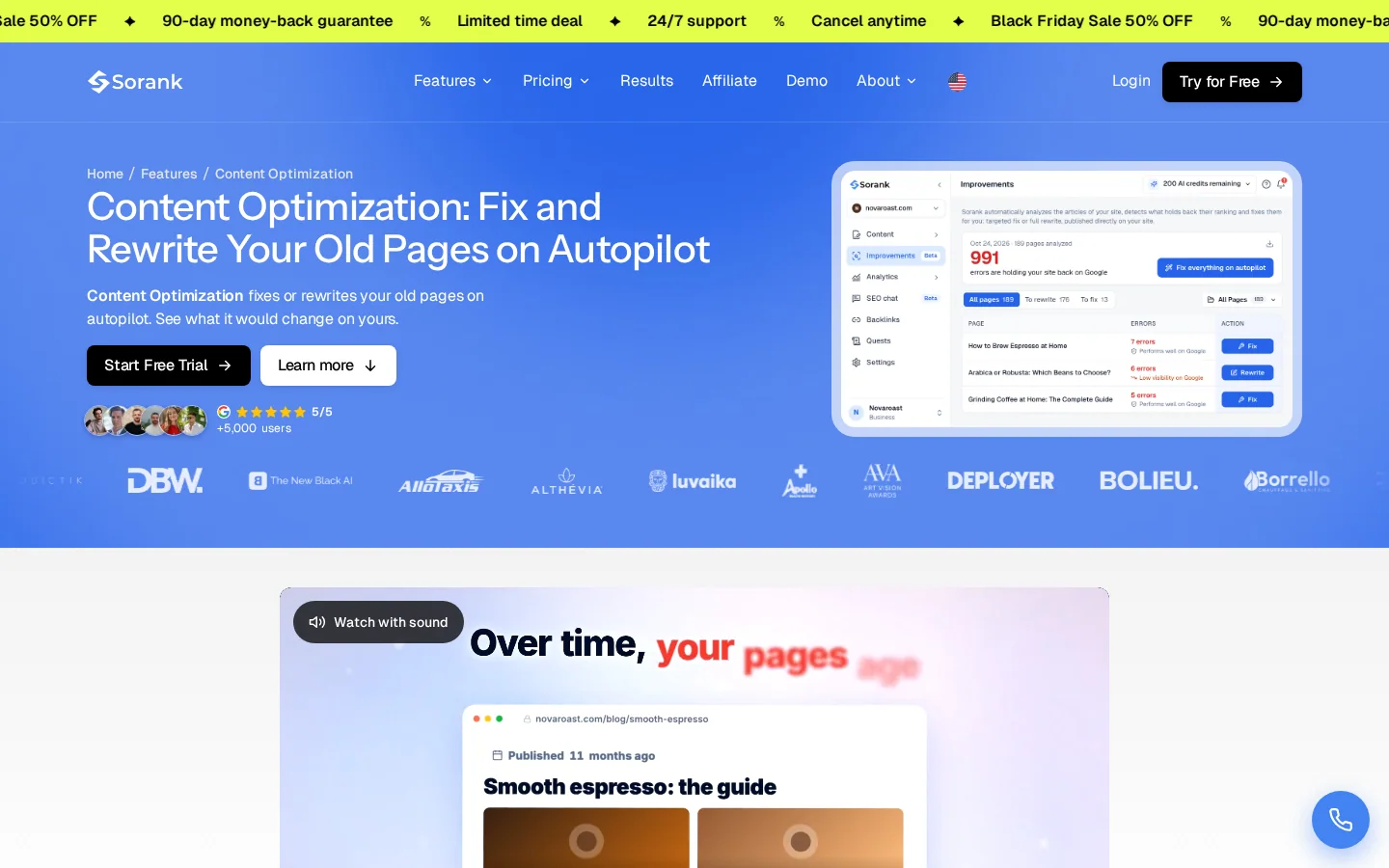
The steps in this guide work by hand too. The tool is most useful when the list of pages is too long to review one by one, because it applies the same checks to every page and shows which ones to look at first.
Measure clicks, impressions and average position for each changed page in Search Console, compare the same date ranges before and after, and judge the change by the page's own trend. A single bad week says little. A change in position with no change in clicks is a signal to check the title and the snippet.
Position 1 with and without an AI answer
Source: First Page Sage, Google CTR study (data March 1 to August 31, 2026)
The First Page Sage report puts the gap this way: "Ranking #1 is worth 84% less on a page with an AI answer than on one without." This is why the intent review should include a check of the AI answer for your query. When an AI answer sits above your result, the title and the first paragraph have to do more work, because fewer people reach the organic listing at all.
Compare the four weeks before a change with the four weeks after it, on the same page, and check whether the query mix changed too. A page can gain impressions from a new query and lose clicks on an old one, and a total hides that split.
If the average position improves and clicks stay flat, the snippet is not earning the click, so check the title and the meta description. If clicks rise while the position stays the same, the snippet got better. This split tells you which part of the page to work on next.
Run this checklist before you publish a page and again each time you update it, because every item takes a few minutes to check. Most of the items are about intent and clarity, not technique, and that is where most of the gains come from.
Before you publish or update a page
The best optimization is a page a reader finishes and trusts. Keep the answer first, the detail where it helps and the links where the reader needs the next step.
Start with the queries the page already gets in Search Console, then compare the page with the top results for its main query. Fix the search intent match first, then the title, headings and internal links, and recheck the clicks after Google recrawls the page.
Search intent matters most, because a page that answers a different question from the one people type will not rank, however well it is written. After that, depth and a clear structure decide whether the page is useful enough to rank and to be clicked.
No. Google does not publish a target keyword density, and a density figure only describes a text after you write it. Use a density check to find missing subtopics, not to hit a percentage.
We analyse your competitors, your website and your AI visibility to create a tailored content plan for free.
 Website Value Calculator
 Website Accessibility Checker
 Google Analytics Checker
 Duplicate Content Checker
 Mobile-Friendly Test
 Website Speed Test
 Subdomain Finder
 Domain Age Checker
 CMS Detector
 Googlebot Simulator
 Nofollow Link Checker
 Meta Tag Checker
 Keyword Cannibalization Checker
 Keyword Intent Checker
 Keyword Extractor
 Google Ads Cost Calculator
 CPC Calculator
 Local Citation Finder
 Reddit Threads Finder
 Disavow File Generator
 Redirect Generator
 Canonical Tag Generator
 Passive Voice Checker
 Google Location Changer
 Google Review Calculator
 Google Review Link Generator
 Keyword Combiner
 Podcast Show Notes Generator
 AI Content Rewriter
 AI Text Humanizer
 ChatGPT Prompt Generator
 Twitter Thread Generator
 Tweet Generator
 Landing Page Copy Generator
 Google Ads Copy Generator
 Pinterest Pin Description Generator
 Anchor Text Generator
 Social Media Post Generator
 LinkedIn Post Generator
 Free AI Writer
 Review Response Generator
 LSI Keyword Generator
 YouTube Video Ideas Generator
 YouTube Tag Generator
 YouTube Description Generator
 Product Description Generator
 CTA Generator
 Blog Introduction Generator
 Conclusion Generator
 Hook Generator
 AI Content Brief Generator
 FAQ Schema Generator
 AI Blog Post Ideas Generator
 Structured Data Validator (Schema Validator)
 Alt Text Checker
 Internal Link Analyzer
 Backlink Challenge
 AI Meta Description Generator
 AI Blog Title Generator
 Google Indexability Checker
 AI Blog Outline Generator
 UTM Link Builder
 Keyword Clustering Tool
 Canonical Tag Checker
 XML Sitemap Generator
 Broken Link Checker
 AI SEO Title Generator
 Headline Analyzer
 SERP Preview Tool
 Redirect Checker
 Hreflang Tag Generator
 Heading Structure Analyzer
 HTTP Headers Checker
 Favicon Extractor
 SERP CTR Calculator
 SEO vs Paid Search Savings Calculator
 SEO Share of Voice Calculator
 SEO ROI Calculator
 SEO Traffic and Revenue Forecast Calculator
 SEO Budget Calculator
 SEO Break-Even Calculator
 SaaS SEO ROI Calculator
 ROAS Calculator
 Reading Time Calculator
 Ranking Gain Simulator
 Organic Traffic Value Calculator
 Organic Traffic Estimator and Website Traffic Checker
 LTV to CAC Ratio Calculator
 Local SEO ROI Calculator
 Link Building Cost Calculator
 Keyword Value Calculator
 Keyword Opportunity Score Calculator
 Keyword Density Calculator
 GEO ROI Calculator
 GEO Content Investment Calculator
 Ecommerce SEO ROI Calculator
 Customer Lifetime Value Calculator
 Customer Acquisition Cost Calculator
 CTR Calculator
 Cost Per Article Calculator
 Conversion Rate Calculator
 Content Marketing ROI Calculator
 ChatGPT Referral Traffic Estimator
 Bounce Rate Calculator
 Backlink ROI Calculator
 AI Visibility Score Calculator
 AI Traffic Value Calculator
 AI Share of Voice Calculator
 Cost of AI Invisibility Calculator
 AI Citation Rate Calculator
 llms.txt Validator
 AI Overview Checker and AI Overviews Rank Checker
 Robots.txt Checker
 AI SEO Audit
 LLM Readability Checker
 SearchGPT Readiness Checker
 Structured Data LLM Audit
 Website Crawlability AI Audit
 Why ChatGPT Is Not Recommending My Website
 Gemini Ranking Tool
 Perplexity Ranking Checker
 LLM Citation Checker
 Answer Engine Optimization Audit
 GEO Audit
 AI Search Visibility Test
 ChatGPT Visibility Checker
 llms.txt Generator
 URL Extractor
 Webpage to Markdown
 Sitemap Checker
 SERP Volatility Sensor
 Page Size Checker
 Word Counter
 Slug Generator
 Schema Generator
 Robots Generator
 OG Preview
 Meta Tags Generator
 Image Compressor
 Favicon Generator
 On-Page SEO Audit: SEO Checker and SEO Analyzer
 Backlink Analysis Tool
 Keyword Research Tool
 Domain Authority Checker
 “I tested Sorank on a real client site and it's insane. It does everything an agency would bill you $1500 a month for. It's going into production on that client now.”

 Guillaume Guersanguersanguillaume.com“We are an Ads agency and we wanted to get our SEO back on track once and for all. Sorank gave us a clear view of our site, helped us prioritize optimizations, and properly structure our content. The tool is easy to use, well designed for a team, and very practical for centralizing tracking without having to juggle multiple platforms. A very solid foundation to start fresh with our SEO.”
 Gaspard MadouiAds Agency
 “I just let the Sorank software do its thing, and now my DR is 25 and my page is ranking higher.”
 Lucas Flandrefoundertrace.fr“I specialized in GEO thanks to Sorank. The GEO Leaderboard allows me to show my clients their position vs competitors on ChatGPT. It’s a real commercial differentiator.”
 MélanieSEO Freelance“Great service, works well for our website and helps us understand how to improve it to rank better on Google and elsewhere. Congrats, keep going, I recommend it.”
 Hugo T.E-commerce merchant