Preferences
Privacy is important to us, so you have the option of disabling certain types of storage that may not be necessary for the basic functioning of the website. Blocking categories may impact your experience on the website. More information

Privacy is important to us, so you have the option of disabling certain types of storage that may not be necessary for the basic functioning of the website. Blocking categories may impact your experience on the website. More information

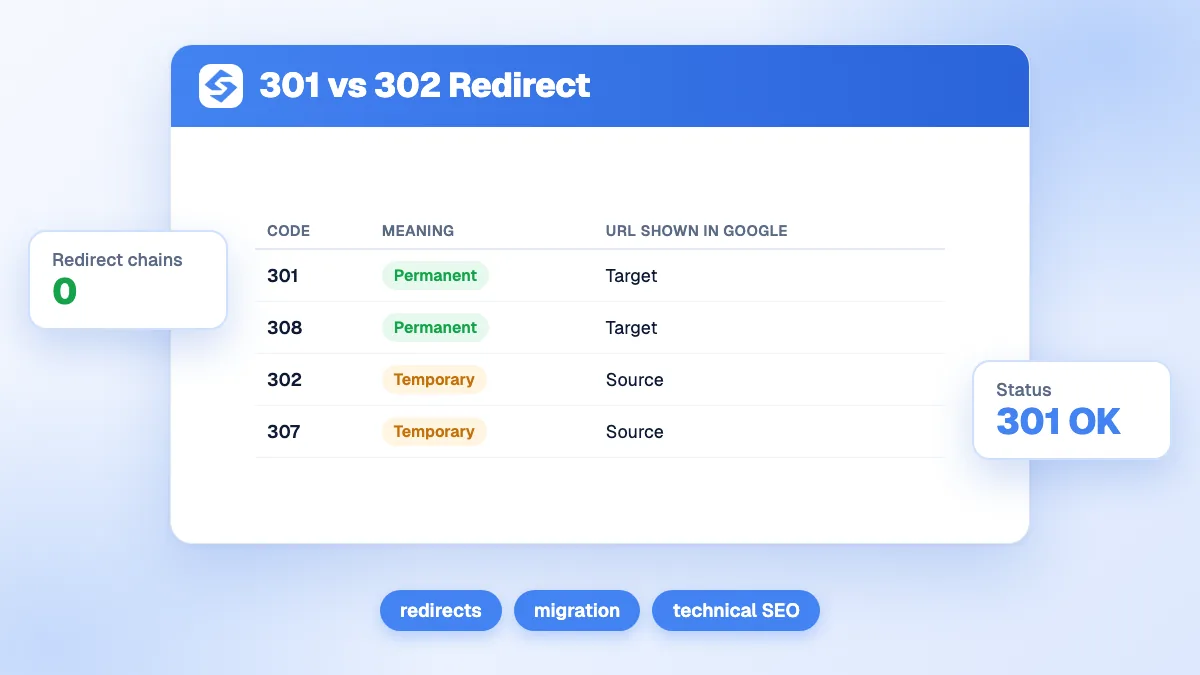
301 vs 302 redirect: a 301 is permanent and makes the new URL canonical, a 302 is temporary and keeps the old one. When to use each, plus 307, 308 and SEO tips.

Tools

In short
a 301 redirect says a page has moved permanently: Google treats the new URL as the one to show in search results and transfers the old page's signals to it. A 302 redirect says the move is temporary: Google keeps showing the original URL. Use a 301 (or 308) for migrations, URL changes and merged pages; use a 302 (or 307) for short-term situations such as a temporary promotion, maintenance or A/B tests. Choosing the wrong one rarely destroys rankings, but it sends Google the wrong signal about which URL to keep.
Want to go further? Ask
Quick quiz
Who should fix the technical side of your site?
Our advice for you
Check it yourself with free Google tools
Search Console lists the pages Google cannot read, and PageSpeed Insights tests speed. Many small issues are fixed from your website builder settings.
Our advice for you
A web developer
Your problem is in the code or the server: a developer who knows SEO is the right person. Give them the list of errors from Search Console.
Our advice for you
A technical audit tool
Your site has many pages: a crawler reads them all like Google does and gives a full list of errors to fix, page by page.
Our advice for you
An automatic audit, then content
Your site works but brings few visitors: technical issues are rarely the cause. Sorank audits the site, then writes the pages that bring traffic.
The 301 vs 302 redirect question comes up in every migration, redesign and URL cleanup. Google's documentation on redirects and Google Search explains that the redirect type is a signal for which URL should be canonical. This guide compares the codes, shows when to use each, and lists the mistakes that cost traffic. For the full topic, see our guide to SEO redirects.
| Code | Name | Type | URL Google shows in results | Typical use |
|---|---|---|---|---|
| 301 | Moved Permanently | Permanent | The target | Migration, URL change, merged pages |
| 308 | Permanent Redirect | Permanent | The target | Same as 301, keeps the request method |
| 302 | Found | Temporary | The source | Temporary page, maintenance, test |
| 307 | Temporary Redirect | Temporary | The source | Same as 302, keeps the request method |
| 303 | See Other | Temporary | The source | After a form submission |
According to Google, permanent redirects make the target the URL shown in search results, while temporary redirects keep the source page there; the target may still be indexed if other canonical signals point to it. The HTTP status codes themselves are defined in the web standard RFC 9110.
Both pass signals to the target. Google has said for years that redirects do not lose PageRank, so a 302 does not "waste" link value. The real difference is the canonical choice: with a 302, Google keeps the old URL as the main one, so the new URL may not rank in its place. If a "temporary" redirect stays in place for a long time, Google may eventually treat it like a permanent one, but relying on that is a gamble. Our glossary entries on the 301 redirect and the canonical tag detail the signals.
Note
Google also reads instant meta refresh redirects as permanent and delayed ones as temporary, and treats JavaScript redirects as a last resort because rendering can fail. Server-side 301 or 308 redirects remain the most reliable.
Example
A shop renames /winter-coats to /coats. That move is final: a 301. During a two-week sale, it sends /coats to /coats-sale and will switch back: a 302. Using a 301 for the sale would invite Google to replace /coats with /coats-sale in results, then have to undo it.
| Mistake | Effect | Fix |
|---|---|---|
| 302 used for a permanent move | Old URL kept in results | Switch to 301 or 308 |
| Redirect chains (A to B to C) | Slower crawl and pages, signals diluted | Redirect A directly to C |
| Redirect loops | Page unreachable | Fix the rule that points back |
| Everything redirected to the home page | Treated like a soft 404 | Redirect to the closest equivalent page |
| Internal links still pointing to old URLs | Unnecessary redirects on every click | Update internal links to the final URL |
Tip
After any batch of redirects, crawl the old URLs and check that each returns a single 301 to a page that answers 200. The free redirect checker shows the full chain and status codes for a URL.
On most CMSs, a redirect manager or plugin handles it; on servers, rules in the web server configuration (Apache, Nginx) or the hosting dashboard; on frameworks, the routing or middleware. Whatever the method, choose the code deliberately, test it, and keep a list of redirects so they survive the next redesign (see website redesign SEO). The canonical checker confirms that the target page declares itself as canonical.
Use a 301 when the move is final and a 302 when you will switch back; both pass signals, and the difference is which URL Google keeps. Keep redirects direct, update internal links, and audit them after every migration. Sorank, SEO and GEO software that runs on autopilot, keeps publishing and linking content on clean URLs once your structure is set; see the Sorank plans, with a 3-day free trial. For the indexing side, read Google indexing.

No, when it is used for a temporary move. It passes signals like a 301 but tells Google to keep the original URL in results. It becomes a problem when used for a permanent change, because the new URL may not replace the old one in search results.
As long as possible, ideally permanently, and at least one year after a migration. Old URLs keep receiving visits from bookmarks and external links, and removing redirects too early turns them into 404 errors.
Both are permanent redirects and Google treats them the same way for search. A 308 also guarantees that the request method and body stay the same, which matters for forms and APIs; for regular pages, 301 is the common choice.
We analyse your competitors, your website and your AI visibility to create a tailored content plan for free.
 AI Content Brief Generator
 FAQ Schema Generator
 AI Blog Post Ideas Generator
 Structured Data Validator (Schema Validator)
 Alt Text Checker
 Internal Link Analyzer
 Backlink Challenge
 AI Meta Description Generator
 AI Blog Title Generator
 Google Indexability Checker
 AI Blog Outline Generator
 UTM Link Builder
 Keyword Clustering Tool
 Canonical Tag Checker
 XML Sitemap Generator
 Broken Link Checker
 AI SEO Title Generator
 Headline Analyzer
 SERP Preview Tool
 Redirect Checker
 Hreflang Tag Generator
 Heading Structure Analyzer
 HTTP Headers Checker
 Favicon Extractor
 SERP CTR Calculator
 SEO vs Paid Search Savings Calculator
 SEO Share of Voice Calculator
 SEO ROI Calculator
 SEO Traffic and Revenue Forecast Calculator
 SEO Budget Calculator
 SEO Break-Even Calculator
 SaaS SEO ROI Calculator
 ROAS Calculator
 Reading Time Calculator
 Ranking Gain Simulator
 Organic Traffic Value Calculator
 Organic Traffic Estimator and Website Traffic Checker
 LTV to CAC Ratio Calculator
 Local SEO ROI Calculator
 Link Building Cost Calculator
 Keyword Value Calculator
 Keyword Opportunity Score Calculator
 Keyword Density Calculator
 GEO ROI Calculator
 GEO Content Investment Calculator
 Ecommerce SEO ROI Calculator
 Customer Lifetime Value Calculator
 Customer Acquisition Cost Calculator
 CTR Calculator
 Cost Per Article Calculator
 Conversion Rate Calculator
 Content Marketing ROI Calculator
 ChatGPT Referral Traffic Estimator
 Bounce Rate Calculator
 Backlink ROI Calculator
 AI Visibility Score Calculator
 AI Traffic Value Calculator
 AI Share of Voice Calculator
 Cost of AI Invisibility Calculator
 AI Citation Rate Calculator
 llms.txt Validator
 AI Overview Checker and AI Overviews Rank Checker
 Robots.txt Checker
 AI SEO Audit
 LLM Readability Checker
 SearchGPT Readiness Checker
 Structured Data LLM Audit
 Website Crawlability AI Audit
 Why ChatGPT Is Not Recommending My Website
 Gemini Ranking Tool
 Perplexity Ranking Checker
 LLM Citation Checker
 Answer Engine Optimization Audit
 GEO Audit
 AI Search Visibility Test
 ChatGPT Visibility Checker
 llms.txt Generator
 URL Extractor
 Webpage to Markdown
 Sitemap Checker
 SERP Volatility Sensor
 Page Size Checker
 Word Counter
 Slug Generator
 Schema Generator
 Robots Generator
 OG Preview
 Meta Tags Generator
 Image Compressor
 Favicon Generator
 On-Page SEO Audit: SEO Checker and SEO Analyzer
 Backlink Analysis Tool
 Keyword Research Tool
 Domain Authority Checker
THEY TRIED SORANK BEFORE YOU
 “I tested Sorank on a real client site and it's insane. It does everything an agency would bill you $1500 a month for. It's going into production on that client now.”

 Guillaume Guersanguersanguillaume.com“We are an Ads agency and we wanted to get our SEO back on track once and for all. Sorank gave us a clear view of our site, helped us prioritize optimizations, and properly structure our content. The tool is easy to use, well designed for a team, and very practical for centralizing tracking without having to juggle multiple platforms. A very solid foundation to start fresh with our SEO.”
 Gaspard MadouiAds Agency
 “I just let the Sorank software do its thing, and now my DR is 25 and my page is ranking higher.”
 Lucas Flandrefoundertrace.fr“I specialized in GEO thanks to Sorank. The GEO Leaderboard allows me to show my clients their position vs competitors on ChatGPT. It’s a real commercial differentiator.”
 MélanieSEO Freelance“Great service, works well for our website and helps us understand how to improve it to rank better on Google and elsewhere. Congrats, keep going, I recommend it.”
 Hugo T.E-commerce merchant