
Preferences
Privacy is important to us, so you have the option of disabling certain types of storage that may not be necessary for the basic functioning of the website. Blocking categories may impact your experience on the website. More information
Privacy is important to us, so you have the option of disabling certain types of storage that may not be necessary for the basic functioning of the website. Blocking categories may impact your experience on the website. More information

A canonical URL is the preferred version of a page that search engines should index. How the rel canonical tag works, how Google chooses and when to use it.








Founder Sorank, 7+ years in SEO.
Summary
A canonical URL is the preferred address of a page when several URLs serve the same or very similar content. It tells search engines which version to index and rank, so ranking signals gather on one page instead of splitting across copies. Sites declare it with a rel=canonical link, a sitemap entry or a redirect.
Want to go further? Ask
Canonical URL is the address that represents a piece of content when the same content can be reached at more than one address. Among the possible duplicates, it is the one version you want search engines to treat as the original, the most representative URL of the group.
Canonical URL handling is a core part of technical SEO because duplicate URLs are common and mostly accidental. Without a clear canonical, search engines have to guess which version to show. The guess can split authority across copies, waste crawl budget and surface the wrong page in results.
Canonicalization is the process of selecting the representative URL of a group of duplicate pages. The canonical URL is the address that comes out of that process, either because you nominated it with a signal or because the search engine chose it. Once the choice is made, the other copies step aside: the canonical is the version that gets indexed and ranked.
The idea matters because one article can live at many addresses. A single page may be reachable with tracking parameters, under several hostnames or over both HTTP and HTTPS. Each address is a separate URL to a crawler, even when the content is identical. A canonical gives the crawler one answer to the question of which address counts.
Most duplicate content is not deliberate. Google's guidance on duplicates gives two common examples: tracking parameters, such as a tag added to a link for a campaign, and the same content reachable through a variety of URLs. In practice, the usual causes are:
Because these variations come from how sites are built and shared, almost every site of meaningful size has duplicate URLs. Naming a canonical is how you keep them organized instead of leaving search engines to sort them out alone.
The most common method is the rel=canonical link element. It sits in the head of each duplicate page and points to the preferred address. Google also recommends adding the same tag to the canonical page itself, which removes doubt about the page you want indexed. Google's documentation on duplicate URLs lists other methods too: the rel=canonical HTTP header, a sitemap, redirects and AMP variants. Each one has trade-offs, and Google compares them in a table of canonicalization methods.
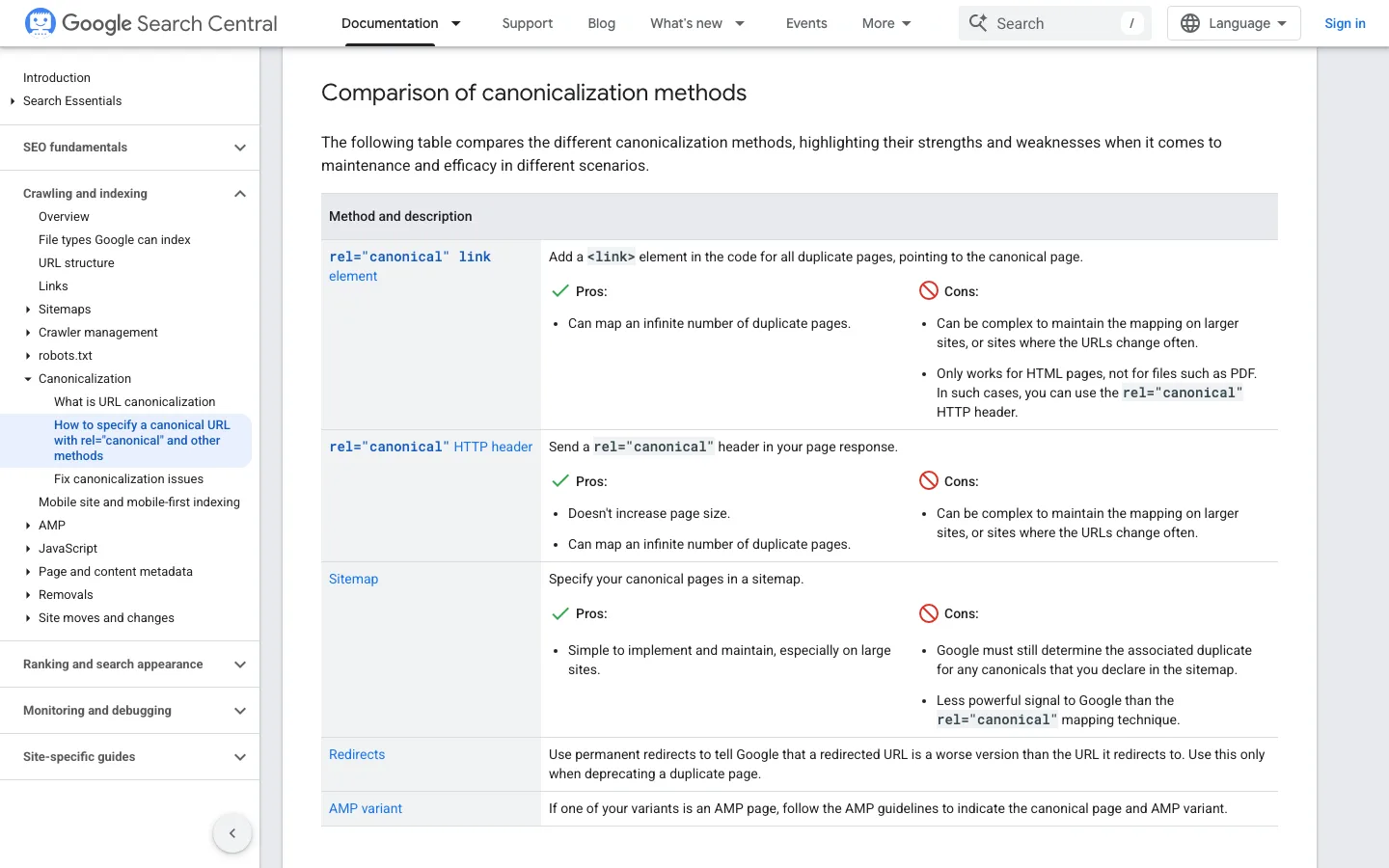
Google's documentation describes a rel=canonical link as a strong signal and a sitemap entry as a weak signal. A redirect is the right tool when the old address should no longer be used at all. A simple example of the link element is shown below.
<link rel="canonical" href="https://www.example.com/blue-widget/">To check the canonical declared on a page, use the free Sorank canonical tag checker, then compare the result with the address you intended.
You can state a preference, but the final choice belongs to Google. When it finds several pages with the same content, it selects the one it judges most useful for users. Google's canonicalization guide lists the signals it uses: redirects, rel=canonical annotations, sitemap inclusion, whether a page is served over HTTPS, and hreflang clusters. When no signal is given, Google identifies the version it considers best to show in Search.
The practical rule is consistency. A canonical that agrees with your redirects, your sitemap and your internal links is much more likely to be honored. A canonical that conflicts with them is a weak signal that Google may override. The same logic applies to crawling: Google wants to avoid spending crawling time on duplicate pages, so that it can spend more time on new and updated pages. A clean canonical structure supports crawling and indexing by making the choice obvious.
Three tools solve related problems in different ways. A canonical tag suggests a preferred version while leaving the duplicate reachable, which suits tracking parameters where the alternate address must keep working. A 301 redirect moves users and signals to the new address for good, so it is the right choice when the old URL should no longer exist.
A noindex tag asks search engines not to index a page at all. That is a different intent from consolidating duplicates. A page should not combine noindex with a canonical that points somewhere else, because the two instructions conflict. Choosing one tool for each situation keeps indexing predictable.
Several errors come back again and again. Pointing every paginated page to page one can hide content from the index. Canonicals that disagree with redirects or internal links send mixed signals. Pointing a canonical at a page with genuinely different content is another common slip, and so is a canonical that leads to a page that is missing or redirected.
The fix is to keep the signals aligned. Nominate a canonical only when pages are truly duplicates or close variants, make your redirects, sitemap and internal links point to the same address, and check the result after each change. A single well-chosen canonical beats a dozen tags that contradict each other.
For SEO, a canonical keeps links and relevance on the page you want to rank. It stops duplicate copies from competing with it and frees crawl time for pages that matter. Managing canonical URLs across a large site is therefore a recurring task, and a canonical review is a standard step in any technical SEO audit. Cleaning up duplicates keeps ranking signals from leaking away quietly between copies.
For GEO, the same clarity helps AI assistants. When a clear canonical exists, AI systems that crawl the web meet one authoritative version instead of several scattered copies, which makes the content easier to attribute. A clean structure lowers the risk that an assistant cites a parameter-filled or outdated address. Sorank's keyword research helps you give each canonical page one clear intent, so there is less reason for two pages to compete for the same question.
Publishing and organizing content well also shows in results. The LV3D case study reports that LV3D multiplied its organic traffic by 4 in 5 months with Sorank, which published dozens of articles a month for the brand. For a practical walkthrough of the duplicate page cases, see the guide on alternate pages with a proper canonical tag.
A canonical URL is the preferred version of a page when duplicates exist, and the rel=canonical link is the main way to signal it. Duplicate URLs are usually accidental. Google treats the canonical as a strong signal, not a command, so consistency across tags, redirects and sitemaps is what makes your choice stick. Done well, canonicalization consolidates ranking signals and protects the pages you want to win.
To go further, read about the structure of a URL slug and how the canonical tag fits into the rest of your technical setup. For the official rules, see the Google guidance on consolidating duplicate URLs and the Google page on canonicalization.
Yes, a rel="canonical" link can name a URL on another domain. It is still a hint, not a command: Google decides whether two pages are duplicates based on how similar their content is, so the tag only carries weight when the target holds the same article.
Google's guidance calls the link element a strong signal, not a requirement, and asks for absolute URLs in the href. For syndicated content the advice is more specific. Google's troubleshooting guide says the canonical element is not recommended for avoiding duplication by syndication partners, and that the most effective fix is for partners to block indexing of your content.
Open the page source and find the tag in the head. It should look like this:
<link rel="canonical" href="https://www.example.com/original-article/">An external canonical is only right if the target is the same article on the other domain. Check three things:
| Situation | What to do |
|---|---|
| A partner republished your article | Ask them to add a noindex tag to their copy, so your original stays the indexed version. |
| A canonical to a foreign domain appeared on your site | Treat it as a possible hack. Google warns that attacks can insert a cross-domain canonical, and its algorithms may then choose the malicious URL over yours. Clean the injected code, then review your plugins and themes. |
| You own both domains and both copies must stay live | A cross-domain canonical can work, but it is only a hint. Check which URL Google picks in the URL Inspection tool in Search Console. |
| The old copy should disappear | Use a 301 redirect to the main URL instead. |
Tip
After a plugin update, a theme change or a migration, check the canonical on your top pages. A template bug can add a foreign canonical to every page at once.
To see where any page's canonical points, use the free canonical tag checker. If the same article also appears on another site, read how to republish content without losing rankings before you agree on a tag.
Sources: Google Search Central, Fix canonicalization issues (no visible date), and Google Search Central, Consolidate duplicate URLs (no visible date).
Sources
A canonical URL is the single preferred version of a page that you want search engines to index when several URLs serve the same or very similar content. Google describes it as the most representative URL of a set of duplicates. Naming a canonical consolidates ranking signals onto one page instead of splitting them across copies.
No. Google describes a rel=canonical link as a strong signal, not a directive. It also weighs redirects, sitemap inclusion, HTTPS and hreflang clusters, then picks the version it considers best to show in Search. If those signals conflict with your tag, Google may choose a different canonical.
A canonical tag suggests which version to index while keeping the duplicate URL accessible to users, which suits cases like tracking parameters. A 301 redirect permanently sends both users and ranking signals to a new URL. Use a redirect when the old URL should no longer exist, and a canonical when the alternate still needs to work.
 “I tested Sorank on a real client site and it's insane. It does everything an agency would bill you $1500 a month for. It's going into production on that client now.”

 Guillaume Guersanguersanguillaume.com“We are an Ads agency and we wanted to get our SEO back on track once and for all. Sorank gave us a clear view of our site, helped us prioritize optimizations, and properly structure our content. The tool is easy to use, well designed for a team, and very practical for centralizing tracking without having to juggle multiple platforms. A very solid foundation to start fresh with our SEO.”
 Gaspard MadouiAds Agency
 “I just let the Sorank software do its thing, and now my DR is 25 and my page is ranking higher.”
 Lucas Flandrefoundertrace.fr“I specialized in GEO thanks to Sorank. The GEO Leaderboard allows me to show my clients their position vs competitors on ChatGPT. It’s a real commercial differentiator.”
 MélanieSEO Freelance“Great service, works well for our website and helps us understand how to improve it to rank better on Google and elsewhere. Congrats, keep going, I recommend it.”
 Hugo T.E-commerce merchant



















