Preferences
Privacy is important to us, so you have the option of disabling certain types of storage that may not be necessary for the basic functioning of the website. Blocking categories may impact your experience on the website. More information
Privacy is important to us, so you have the option of disabling certain types of storage that may not be necessary for the basic functioning of the website. Blocking categories may impact your experience on the website. More information

See YouTube search trends for free with Google Trends, YouTube Studio Research and Charts, plus the latest top searches with volumes and a weekly routine.

In short
YouTube search trends are the topics and queries people type into YouTube more than usual right now. To see them for free, set Google Trends to "YouTube Search", open the Research tab in YouTube Studio, and check YouTube Charts. Then keep only the rising queries that fit your niche and still lack good videos.
Want to go further? Ask
Quick quiz
Which social network should you focus on?
Sorank matches your answers


Test it for 3 days on your own site and see where you stand on Google, ChatGPT and the other AIs.
Start 3-day free trial3 days free, then stop whenever you want. 90-day results guarantee, conditions apply.
A YouTube search trend is a query whose search interest on YouTube rises faster than its usual level, over a day, a week or a season. It is not the same as a popular search. "asmr" or "music" are searched by millions of people every month, all year: they are popular, but they are not trending. "coachella 2026" in April or a new game trailer the day it drops are trends: they spike, then fade.
The difference matters because the two need opposite strategies. A popular evergreen query is a long game: hard to rank for, but it pays for years. A trend is a short window: easier to rank for in the first days, when few good videos exist, but worth little once the wave has passed.
YouTube is a search engine with its own audience and intent. People search YouTube to watch: tutorials, reviews, music, reactions, live events, gameplay. The same topic can trend on YouTube and stay flat on Google, or the reverse. A recipe can be big on Google (people want the text) and small on YouTube, while a game trailer is the opposite. That is why you need YouTube-specific data, not just web search data. Our guide on how video SEO works across Google, YouTube and AI search explains how the two ecosystems connect.
The scale of YouTube search demand (global, May 2026)
Source: Backlinko, top YouTube searches, updated May 14, 2026 (Semrush Keyword Analytics for YouTube data)
The most recent public list with volumes is the one Backlinko updated on May 14, 2026, built from Semrush's YouTube keyword data. It covers global YouTube-only searches for May 2026, with volumes rounded to the nearest hundred thousand. Here are the top 10.
The list below goes further and sorts each query by type. That label is ours: it shows which queries are evergreen and which are trends you could only catch for a few weeks.
| Rank | Query | Monthly searches | Type |
|---|---|---|---|
| 1 | asmr | 22M | Evergreen format |
| 2 | mrbeast | 11M | Creator |
| 3 | coachella | 11M | Seasonal event |
| 4 | music | 10M | Generic |
| 5 | michael jackson | 9.2M | Artist |
| 6 | song | 7.9M | Generic |
| 7 | justin bieber | 7.2M | Artist |
| 8 | wwe | 7.2M | Sports |
| 9 | karaoke | 7.1M | Evergreen format |
| 10 | nba | 6.8M | Sports |
| 12 | minecraft | 6.4M | Game |
| 14 | justin bieber coachella 2026 | 6M | Trend (one event) |
| 15 | ishowspeed | 5.8M | Creator |
| 19 | lofi | 5.3M | Evergreen format |
| 26 | pragmata | 4.3M | Trend (game release) |
| 29 | phonk | 4.2M | Music genre |
| 31 | crimson desert | 4M | Trend (game release) |
| 32 | the boys | 4M | Trend (TV season) |
| 38 | avengers doomsday trailer | 3.7M | Trend (trailer) |
| 56 | gta 6 | 2.9M | Long anticipation trend |
| 63 | podcast | 2.8M | Generic |
| 71 | study music | 2.5M | Evergreen format |
| 73 | mukbang | 2.5M | Evergreen format |
| 80 | white noise | 2.4M | Evergreen format |
Three patterns stand out, and they repeat in every version of this list over the years.
Warning
Many "top YouTube searches" pages that still rank on Google use data from 2019 or 2020, with PewDiePie at number one. Always check the date of a list before you use it. A list older than a few months tells you what was popular, not what is trending.
There are six free methods, and each one answers a different question. Google Trends tells you if interest is rising. YouTube Studio tells you what your own audience searches and watches. YouTube Charts tells you what the whole platform watches. Autocomplete tells you the exact words people type. Third-party lists give you volumes. Watching other channels tells you which videos actually win.
| Method | What it shows | Volumes | Freshness | Best for |
|---|---|---|---|---|
| Google Trends set to "YouTube Search" | Interest over time, rising and top related queries, by country | No (index from 0 to 100) | Near real time, up to the past hour | Checking if a topic is rising or seasonal |
| YouTube Studio Research tab | High-performing videos on a topic, outlier scores, what your viewers watch elsewhere | No (views of videos, not searches) | Recent uploads, filters by upload date | Ideas for your own channel and niche |
| YouTube Charts | Trending music videos, top podcast shows, trending movie trailers | No | Daily or weekly charts | Music, podcasts, film and entertainment channels |
| YouTube search autocomplete | Exact phrases people type after a seed word | No | Live | Wording of titles and long-tail angles |
| Public lists of top searches | Ranked queries with monthly search volume | Yes (estimates) | Monthly at best | Sizing demand and spotting big events |
| Competitor and outlier tracking | Videos that beat their channel's average | No | Depends on how often you check | Proving that an angle works before you film |
None of these free methods gives you exact YouTube search volume for any keyword you want. For that you need a paid keyword tool. We compared the options in our list of YouTube keyword tools, free and paid. For most creators and brands, the free stack below is enough to decide what to film.
Google Trends is the best free tool to see whether a YouTube query is rising, flat or seasonal. You only have to change one setting: the search type, from "Web Search" to "YouTube Search".
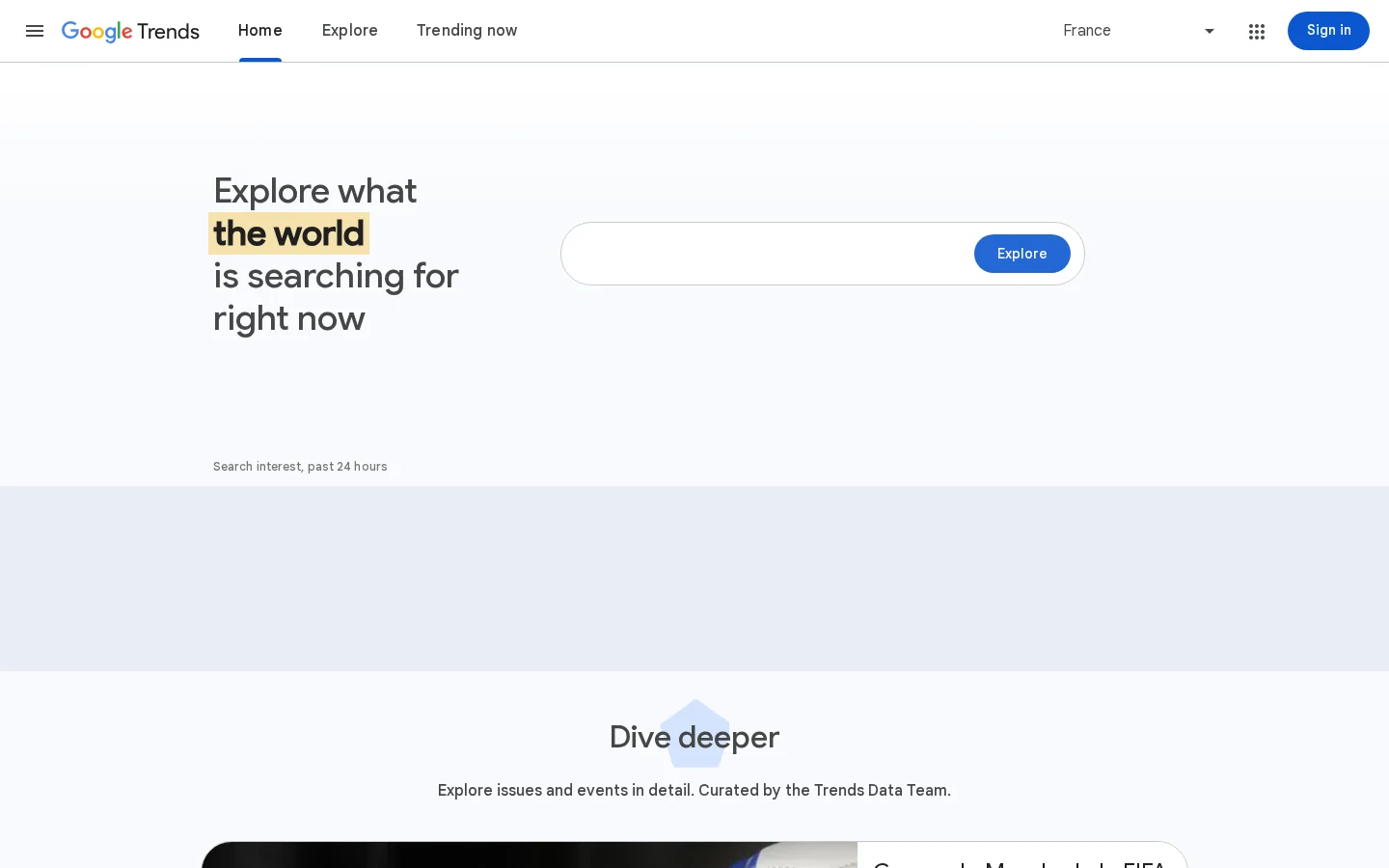
You can also build the address yourself, which is faster when you check the same topics every week. The gprop=youtube parameter switches the data to YouTube searches.
https://trends.google.com/trends/explore?gprop=youtube&geo=US&date=now%207-d&q=asmr,white%20noise
Change geo for the country (FR, GB, IN, BR...), date for the period (now 1-d, now 7-d, today 3-m, today 12-m, today 5-y) and q for up to five queries separated by commas. Save the links in a bookmark folder and your weekly check takes two minutes.
The line in Google Trends is not a search count. According to Google's Trends FAQ, each data point is divided by the total searches of the place and period, then rescaled from 0 to 100. A value of 100 means "the highest share of searches for this query in this period", not "100 searches". The same FAQ says the data is a sample, that low-volume queries show as 0, and that repeated searches by the same person over a short time are removed.
In practice:
Tip
Run the same query twice, once in "Web Search" and once in "YouTube Search". If YouTube interest rises faster than web interest, viewers want to watch, not read: that is a video opportunity. We go deeper into the settings in our guide to using Google Trends for SEO.
It gives no absolute volumes. Small niches often show zero, because low-volume queries are filtered out. And it tells you that people search, not whether good videos already exist. That is why you cross it with YouTube Studio.
YouTube Studio has a free research tool for any channel. Its name and place changed several times, which is why many guides send you to a menu that no longer exists. It was called Research, then Inspiration, then Trends under Analytics. On November 13, 2026, YouTube turned the Trends tab into a new Research tab, placed under the new Insights section on desktop, as Relevant Audience reported on November 15, 2026.
The current help article, "Research content & find trends", gives this path:
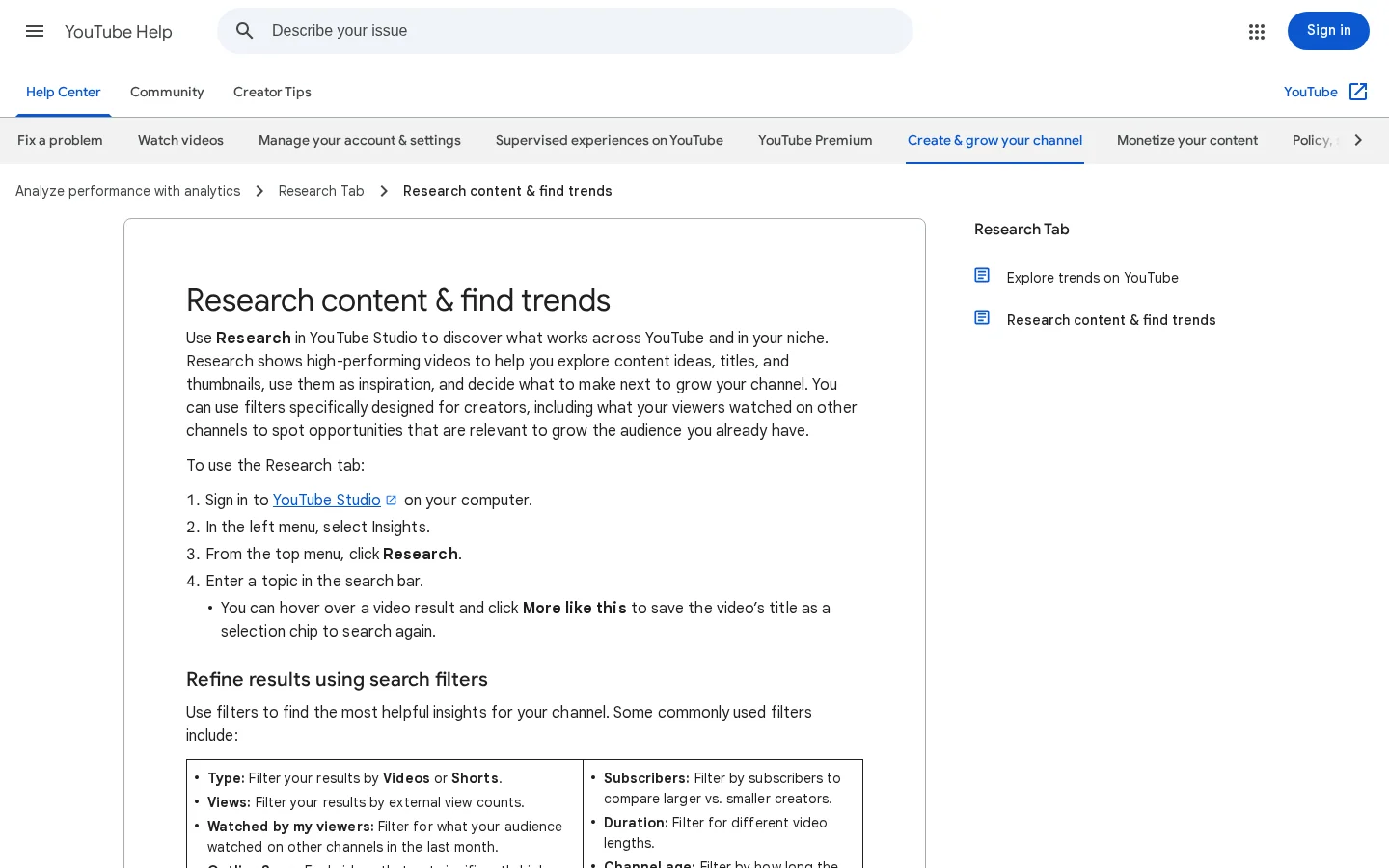
Research shows high-performing videos for your topic. Its value is in the filters. The help article lists eight: type (videos or Shorts), views, "Watched by my viewers", outlier score, upload date, subscribers, duration and channel age.
The help page of the previous Trends tab, still online in YouTube's Help Center, described cards that some creators may still see during the rollout: top searches of your audience over the last 28 days, breakout videos from similar channels, and "content gaps for Shorts". A content gap is a search where viewers cannot find enough good results. The page also notes that audience interest ranges from "very low" to "very high", based on the last 28 days, and that some insights are limited to certain countries, languages and devices. If you still have these cards, the content gaps are the most valuable: they are trends with no good answer yet. Our definition of content gap analysis explains how to use the same logic on a website.
Note
YouTube also offers Ask Studio, an assistant inside Studio. Its help page says it uses the same YouTube-wide search capabilities as Research, so you can ask it in plain words what is working in your niche this week.
Google Trends vs YouTube Studio Research
YouTube no longer has a general Trending page. On July 10, 2025, TechCrunch reported that YouTube was removing its Trending page and its "Trending Now" list, launched in 2015, because visits had dropped a lot over the previous five years. They were replaced by category charts on YouTube Charts: Trending Music Videos, Weekly Top Podcast Shows and Trending Movie Trailers. Trending gaming videos stay on the Gaming Explore page, and YouTube said it would keep suggesting popular videos through personalized recommendations.
For a music, podcast, film or gaming channel, these charts are a direct trend feed. For other niches they are less useful, but they still help: a trailer or a podcast that climbs the charts often creates searches around it (reactions, explanations, theories, "ending explained"), which any channel can answer.
How YouTube's trend tools changed
The last free methods are manual, but they give you something the tools do not: the exact words viewers use, and proof that an angle already works.
Type a seed word in the YouTube search bar and read the suggestions. They come from what people actually type, so they show you the long tail around a trend. To dig further:
These long-tail queries have less volume than the main trend, but far less competition, and the viewer's need is clearer.
Pick 10 to 20 channels in your niche, including small ones. Every week, open their latest videos and look for one that clearly beats the channel's usual views. The Research tab's outlier score does this for you, but a quick manual check works too. When two or three unrelated channels have an outlier on the same subject, you are looking at a trend, not luck.
Many YouTube trends start elsewhere: a sound on TikTok, a format on Instagram Reels, a thread on Reddit or X, a news story. By the time they reach YouTube search, the first movers have an edge. Our guide to how TikTok, YouTube and Reddit rank search results shows how these platforms feed each other.
Finding a trend is the easy part. The work is choosing the right ones and publishing fast enough. Here is a weekly routine that takes about one hour.
The weekly YouTube trend routine
Give each candidate a score from 1 to 5 on four criteria, then multiply. Multiplying, not adding, means a zero on fit kills the idea, which is what you want.
| Criterion | 1 point | 5 points |
|---|---|---|
| Fit with your channel | Your viewers would not care | Core topic of your channel |
| Growth | Flat or already falling | Steady climb for 2 weeks or more |
| Gap | Many recent, strong videos | Few or weak results |
| Speed | Needs weeks of work | You can publish in 48 hours |
If you track candidates in a spreadsheet, put the four scores in columns B to E and the total in F. A second formula gives the growth of the Google Trends index between two weeks, from columns G (last week) and H (this week):
=B2*C2*D2*E2
=IF(G2=0,"new",(H2-G2)/G2)
Keep ideas above 150 out of 625 and film the top one first.
A very fresh trend rewards speed more than depth. A Short can be filmed and published the same day. If the topic still grows after a week, make the full video: tutorial, comparison, breakdown, review. Give it a clear title with the trending phrase at the start, a description that answers the question in the first lines, and chapters. Our free YouTube description generator with chapters and hashtags and the YouTube tag generator save time on that part.
Tip
Stuck on angles? Paste the trending query into our free YouTube video ideas generator: it returns 10 title ideas for your niche that you can check in YouTube Studio Research.
A topic people search on YouTube is often searched on Google and asked to ChatGPT, Gemini or Claude too. Writing an article on it brings a second stream of traffic, and AI models often quote both YouTube videos and written pages. Our study on how often AI models cite YouTube looks at this link. If you lack time to write, Sorank's automated keyword research finds the matching search terms for your site, and its content calendar plans and publishes the articles on autopilot.
Before you film a trend
Seasonal trends are the safest trends, because they come back at the same time every year. Set Google Trends to YouTube Search, the past 5 years, and look for waves with the same shape each year. Typical seasonal patterns on YouTube:
The rule: publish 4 to 6 weeks before the usual start of the wave. YouTube needs a little time to understand and test a new video, and early viewers send the signals that push it when the peak arrives. Then update the title and description each year rather than making a new video from scratch.
Most failed "trend videos" fail for the same few reasons. For each one, here is how to spot it and how to fix it.
What it is: treating "100" as 100 searches, or a jump from 20 to 60 as "3x more people". How to spot it: you quote Trends numbers as counts in a report or a plan. How to fix it: always compare with a reference query, and use a volume source (a keyword tool or a dated public list) when you need numbers.
What it is: relying on a "top YouTube searches" page from years ago, or looking for the Trending page and the old Trends tab. How to spot it: the list has no date, or names that dropped out of the news long ago; the menu you were told to click is not there. How to fix it: check the date of every list, and use the current path in YouTube Studio: Insights, then Research.
What it is: a cooking channel making a video on a game release because it trends. How to spot it: the video gets views but low watch time, few subscribers and no effect on your other videos. How to fix it: score fit first. If you cannot link the trend to your topic in one sentence ("the 5 snacks from that new game, made for real"), skip it.
What it is: publishing when the curve is already going down. How to spot it: in Google Trends, the line for your query peaked before your upload date; your video gets search impressions for a few days, then nothing. How to fix it: check trends every week, keep a fast format (Shorts, simple talking-head videos) ready, and plan seasonal topics weeks before.
What it is: believing that a query has exactly 22M searches because a list says so. How to spot it: two tools give very different numbers for the same query, which is common for YouTube data because YouTube does not publish search volumes. How to fix it: use volumes to rank and size ideas, not as facts, and always look at the trend line next to the number.
What it is: making a 20-minute video on a topic that people only want in 30 seconds, or the reverse. How to spot it: in Research, filter by type: if all the winning results are Shorts, the demand is for Shorts. How to fix it: match the format that already wins, then test the other one only if the trend lasts.
What it is: a trending phrase in the title, but a video that answers something else. How to spot it: a good click rate from search but very short average view duration, and comments saying "this is not what the title says". How to fix it: answer the searched question in the first 30 seconds, and keep the title literal. Trend viewers decide fast.
What it is: remaking the outlier video with the same angle. How to spot it: your video looks like the ten others in the results. How to fix it: read the comments of the top videos. The questions people ask there, still unanswered, are your angle.
If you publish often, a simple tracker pays off fast. It turns a weekly scroll into data you can compare over months.
The goal is not to follow every trend. It is to catch the two or three a month that fit your channel, while they are still rising, with a video that answers the search better than what exists. Start this week: open Google Trends, switch to YouTube Search, set the past 7 days, and read the "Rising" queries for your main topic.
YouTube removed its Trending page in July 2025 and replaced it with category charts on YouTube Charts (music videos, podcasts, movie trailers). For your own niche, use the Research tab in YouTube Studio with a recent upload date and a high outlier score, and Google Trends set to YouTube Search.
No. Google Trends shows an index from 0 to 100, which is the share of searches for a query in a place and period, not a count. Use it to see if interest rises or falls, and use a keyword tool or a dated public list when you need volumes.
In the global list updated in May 2026 by Backlinko from Semrush data, "asmr" leads with about 22M monthly searches, followed by "mrbeast" and "coachella" at about 11M each. Formats, creators, artists and big events dominate the top 100.
We analyse your competitors, your website and your AI visibility to create a tailored content plan for free.
 Website Value Calculator
 Website Accessibility Checker
 Google Analytics Checker
 Duplicate Content Checker
 Mobile-Friendly Test
 Website Speed Test
 Subdomain Finder
 Domain Age Checker
 CMS Detector
 Googlebot Simulator
 Nofollow Link Checker
 Meta Tag Checker
 Keyword Cannibalization Checker
 Keyword Intent Checker
 Keyword Extractor
 Google Ads Cost Calculator
 CPC Calculator
 Local Citation Finder
 Reddit Threads Finder
 Disavow File Generator
 Redirect Generator
 Canonical Tag Generator
 Passive Voice Checker
 Google Location Changer
 Google Review Calculator
 Google Review Link Generator
 Keyword Combiner
 Podcast Show Notes Generator
 AI Content Rewriter
 AI Text Humanizer
 ChatGPT Prompt Generator
 Twitter Thread Generator
 Tweet Generator
 Landing Page Copy Generator
 Google Ads Copy Generator
 Pinterest Pin Description Generator
 Anchor Text Generator
 Social Media Post Generator
 LinkedIn Post Generator
 Free AI Writer
 Review Response Generator
 LSI Keyword Generator
 YouTube Video Ideas Generator
 YouTube Tag Generator
 YouTube Description Generator
 Product Description Generator
 CTA Generator
 Blog Introduction Generator
 Conclusion Generator
 Hook Generator
 AI Content Brief Generator
 FAQ Schema Generator
 AI Blog Post Ideas Generator
 Structured Data Validator (Schema Validator)
 Alt Text Checker
 Internal Link Analyzer
 Backlink Challenge
 AI Meta Description Generator
 AI Blog Title Generator
 Google Indexability Checker
 AI Blog Outline Generator
 UTM Link Builder
 Keyword Clustering Tool
 Canonical Tag Checker
 XML Sitemap Generator
 Broken Link Checker
 AI SEO Title Generator
 Headline Analyzer
 SERP Preview Tool
 Redirect Checker
 Hreflang Tag Generator
 Heading Structure Analyzer
 HTTP Headers Checker
 Favicon Extractor
 SERP CTR Calculator
 SEO vs Paid Search Savings Calculator
 SEO Share of Voice Calculator
 SEO ROI Calculator
 SEO Traffic and Revenue Forecast Calculator
 SEO Budget Calculator
 SEO Break-Even Calculator
 SaaS SEO ROI Calculator
 ROAS Calculator
 Reading Time Calculator
 Ranking Gain Simulator
 Organic Traffic Value Calculator
 Organic Traffic Estimator and Website Traffic Checker
 LTV to CAC Ratio Calculator
 Local SEO ROI Calculator
 Link Building Cost Calculator
 Keyword Value Calculator
 Keyword Opportunity Score Calculator
 Keyword Density Calculator
 GEO ROI Calculator
 GEO Content Investment Calculator
 Ecommerce SEO ROI Calculator
 Customer Lifetime Value Calculator
 Customer Acquisition Cost Calculator
 CTR Calculator
 Cost Per Article Calculator
 Conversion Rate Calculator
 Content Marketing ROI Calculator
 ChatGPT Referral Traffic Estimator
 Bounce Rate Calculator
 Backlink ROI Calculator
 AI Visibility Score Calculator
 AI Traffic Value Calculator
 AI Share of Voice Calculator
 Cost of AI Invisibility Calculator
 AI Citation Rate Calculator
 llms.txt Validator
 AI Overview Checker and AI Overviews Rank Checker
 Robots.txt Checker
 AI SEO Audit
 LLM Readability Checker
 SearchGPT Readiness Checker
 Structured Data LLM Audit
 Website Crawlability AI Audit
 Why ChatGPT Is Not Recommending My Website
 Gemini Ranking Tool
 Perplexity Ranking Checker
 LLM Citation Checker
 Answer Engine Optimization Audit
 GEO Audit
 AI Search Visibility Test
 ChatGPT Visibility Checker
 llms.txt Generator
 URL Extractor
 Webpage to Markdown
 Sitemap Checker
 SERP Volatility Sensor
 Page Size Checker
 Word Counter
 Slug Generator
 Schema Generator
 Robots Generator
 OG Preview
 Meta Tags Generator
 Image Compressor
 Favicon Generator
 On-Page SEO Audit: SEO Checker and SEO Analyzer
 Backlink Analysis Tool
 Keyword Research Tool
 Domain Authority Checker
 “I tested Sorank on a real client site and it's insane. It does everything an agency would bill you $1500 a month for. It's going into production on that client now.”

 Guillaume Guersanguersanguillaume.com“We are an Ads agency and we wanted to get our SEO back on track once and for all. Sorank gave us a clear view of our site, helped us prioritize optimizations, and properly structure our content. The tool is easy to use, well designed for a team, and very practical for centralizing tracking without having to juggle multiple platforms. A very solid foundation to start fresh with our SEO.”
 Gaspard MadouiAds Agency
 “I just let the Sorank software do its thing, and now my DR is 25 and my page is ranking higher.”
 Lucas Flandrefoundertrace.fr“I specialized in GEO thanks to Sorank. The GEO Leaderboard allows me to show my clients their position vs competitors on ChatGPT. It’s a real commercial differentiator.”
 MélanieSEO Freelance“Great service, works well for our website and helps us understand how to improve it to rank better on Google and elsewhere. Congrats, keep going, I recommend it.”
 Hugo T.E-commerce merchant