Preferences
Privacy is important to us, so you have the option of disabling certain types of storage that may not be necessary for the basic functioning of the website. Blocking categories may impact your experience on the website. More information

Privacy is important to us, so you have the option of disabling certain types of storage that may not be necessary for the basic functioning of the website. Blocking categories may impact your experience on the website. More information

What the Search Console status Alternate page with proper canonical tag means, why it is usually fine, the cases that need a fix, and how to check them.
Tools


In short
"Alternate page with proper canonical tag" is a status in the Page indexing report of Google Search Console. It means the URL carries a rel="canonical" tag pointing to another page, Google accepted that choice and indexed the canonical page instead. In most cases it is the expected result of a correct setup (parameter URLs, product variants, AMP or mobile versions) and Google says there is nothing to do. It becomes a problem when pages you want ranked appear in this list: language versions, paginated pages or articles whose template points the canonical to the wrong URL.
Want to go further? Ask
Quick quiz
Which way of finding customers online fits you best?
4 quick questions to choose your main channel.
Our advice for you
Sorank is the right solution for you
Your customers search before they buy: articles that answer their questions bring them for months. Sorank writes and publishes them, and tracks what ChatGPT says about you.
Sorank matches your answers
Test it for 3 days on your own site, or start with a free audit to see where you stand.
3 days free, then stop whenever you want. 90-day money-back guarantee.
Alternate page with proper canonical tag is listed under "Why pages aren't indexed" in Search Console, which worries many site owners. Google's Page indexing report documentation is clear: "This page correctly points to the canonical page, which is indexed, so there is nothing you need to do." This guide explains what the status means, how to tell the normal cases from the real errors, how to check a URL in a few minutes and what to fix when the canonical is wrong.
A canonical URL is the version of a page that Google indexes and shows in search results when several URLs carry the same content. The status describes the cleanest possible outcome of canonicalization:
Google's examples are "an AMP page with a desktop canonical, or a mobile version of a desktop canonical, or the desktop version of a mobile canonical." On real sites, the list is mostly filled with URL variants that point to a main page: tracking parameters, sorting and filtering options, product variants, print versions.
The status is often confused with its two neighbours. The difference is who chose the canonical:
| Status | Canonical declared by you? | Google's choice | Action |
|---|---|---|---|
| Alternate page with proper canonical tag | Yes | Same as yours | None in most cases |
| Duplicate without user-selected canonical | No | Google picked one itself | Check Google's choice |
| Duplicate, Google chose different canonical than user | Yes | Different from yours | Fix conflicting signals |
Most of the time. If the URLs in the report are variants you never wanted in search results, the status confirms that your canonical tags work. Typical cases:
| URL in the report | Why it is an alternate | Action |
|---|---|---|
| /product?utm_source=newsletter | Tracking parameter, same content as /product | None |
| /shoes?sort=price-asc | Sorting option of a category page | None |
| /collections/sale/products/red-dress | Product reachable through a collection path, canonical to /products/red-dress (default behaviour on Shopify) | None |
| /article/amp or m.example.com/article | AMP or mobile version of a desktop page | None |
| /t-shirt?color=blue | Colour variant with the same description, canonical to the main product | None, unless the variant deserves its own page |
A large number is not a problem in itself. An online shop with filters can have ten times more alternates than indexed pages, and that is the system working. On Shopify, WordPress and most modern CMS, canonical tags are generated automatically for these variants.
Note
Google states that "alternate language pages are not detected by Search Console" in this status. If your French or German pages appear here, it is not because of hreflang: their canonical tag points to another URL, usually the English page.
The status becomes a warning when it contains pages you want to rank. Google followed your canonical tag, so if the tag is wrong, Google faithfully keeps the wrong page out of the index. Five cases deserve a check.
A theme, plugin or migration script sets every blog post's canonical to the homepage, or every product's canonical to its category. The pages disappear from Google, and the report calls it "proper" because the tag is technically valid. Look for important URLs (articles, services, products) in the export.
Translated pages must each have a canonical pointing to themselves, plus hreflang annotations linking the versions. Google's guide to localized versions says that localized pages "are only considered duplicates if the main content of the page remains untranslated", and that "each language version must list itself as well as all other language versions." A canonical pointing from /fr/ to /en/ tells Google to drop the French page. Our guide to international SEO covers the full setup, and an hreflang generator writes the tags for you.
Pages 2, 3 and 4 of a category or blog archive often point to page 1. Google's pagination guidelines say the opposite: "Don't use the first page of a paginated sequence as the canonical page. Instead, give each page its own canonical URL." Otherwise the products or posts listed only on deeper pages lose a crawl path. See our guide to pagination SEO.
If people search for "blue linen shirt" and your blue variant has its own photos and stock, canonicalizing it to the generic product removes a page that could rank. Give it unique content and a self-referencing canonical, or leave it as a variant if the search demand is not there.
A spike after a redesign or a new filter module usually means Googlebot discovered thousands of new parameter URLs. Each one is handled correctly, but on a large site crawling them uses crawl budget that new pages need. Stop linking to the parameter URLs internally and keep the filters that create no search value out of crawlable links.
Tip
To see what a page declares right now, without waiting for Google to recrawl it, run it through our free canonical tag checker. It shows the canonical in the HTML and flags pages that point somewhere unexpected.
The fix is always in the tag itself and in the signals around it. Google's guide to consolidating duplicate URLs recommends a self-referencing canonical on every canonical page, internal links to the canonical URL, and warns against using robots.txt or noindex to pick a canonical.
| Problem | Fix |
|---|---|
| Important page points to another URL | Replace the tag with a self-referencing canonical: <link rel="canonical" href="https://www.example.com/this-page/"> |
| Language versions point to the English page | Self-referencing canonical on each language version, plus reciprocal hreflang tags |
| Page 2+ point to page 1 | Each paginated page gets its own canonical |
| Variant deserves to rank | Unique content, own canonical, internal links to it |
| Thousands of parameter URLs crawled | Internal links to clean URLs only; keep the canonical tags in place |
After the fix, request indexing for a few key URLs in the URL Inspection tool and let Googlebot recrawl the rest. The pages move from "Not indexed" to "Indexed" as they are recrawled; our guide to Google indexing explains how to speed that up. If the URL in question has no canonical at all and Google grouped it on its own, the status is different: see our guide to Duplicate without user-selected canonical.
A correct canonical concentrates links, internal links and engagement on one URL, the one Google shows. A wrong canonical removes a page from Google without any error message, because the report labels it "proper". That is why the list deserves a quick review after every redesign, migration or theme change.
The same logic applies to AI assistants. ChatGPT, Perplexity and Gemini answer many questions by retrieving pages from search indexes and citing their URLs. A page excluded as an alternate by mistake cannot be retrieved, so it cannot be cited either, while a clean canonical makes the URL you chose the one AI answers link to.
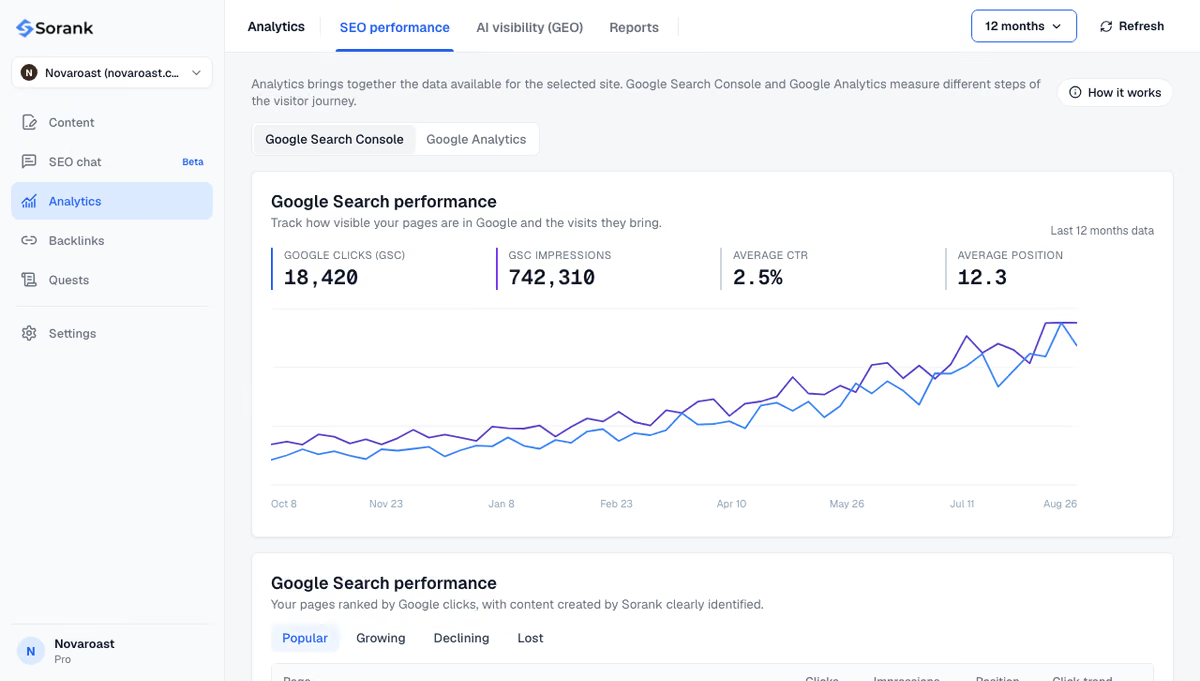
Sorank is our product: an autopilot SEO and GEO software. Its GEO and SEO dashboard shows clicks, impressions and positions from Search Console, so a page that drops out after a canonical mistake is visible quickly, and AI mention tracking checks every week whether ChatGPT, Claude and Gemini cite your brand.
The short version: alternate pages are usually proof that your canonical tags work; act only when a page you want ranked is in the list. To keep adding pages that deserve to be indexed and cited, see Sorank's plans, from $49 per month with a 3-day free trial.

Not if the URLs listed are variants you do not want indexed: there is nothing to fix, and Google says no action is needed. Validation is useful only after you have corrected wrong canonical tags on pages you want ranked, to ask Google to recheck them.
No. The canonical page is indexed and receives the signals of its alternates, which is the purpose of the canonical tag. It only hurts when the listed URL is a page you wanted in search results and its canonical tag points to the wrong page by mistake.
Usually because Googlebot discovered new URL variants: a new filter or sorting module, tracking parameters in internal links, a theme that adds collection paths to product URLs, or a migration. Check a few examples with the URL Inspection tool. If they are variants with correct canonicals, no action is needed beyond removing internal links to parameter URLs.
 AI Content Brief Generator
 FAQ Schema Generator
 AI Blog Post Ideas Generator
 Structured Data Validator
 Alt Text Checker
 Internal Link Analyzer
 Backlink Challenge
 AI Meta Description Generator
 AI Blog Title Generator
 Google Indexability Checker
 AI Blog Outline Generator
 UTM Link Builder
 Keyword Clustering Tool
 Canonical Tag Checker
 XML Sitemap Generator
 Broken Link Checker
 AI SEO Title Generator
 Headline Analyzer
 SERP Preview Tool
 Redirect Checker
 Hreflang Tag Generator
 Heading Structure Analyzer
 HTTP Headers Checker
 Favicon Extractor
 SERP CTR Calculator
 SEO vs Paid Search Savings Calculator
 SEO Share of Voice Calculator
 SEO ROI Calculator
 SEO Traffic and Revenue Forecast Calculator
 SEO Budget Calculator
 SEO Break-Even Calculator
 SaaS SEO ROI Calculator
 ROAS Calculator
 Reading Time Calculator
 Ranking Gain Simulator
 Organic Traffic Value Calculator
 Organic Traffic Estimator
 LTV to CAC Ratio Calculator
 Local SEO ROI Calculator
 Link Building Cost Calculator
 Keyword Value Calculator
 Keyword Opportunity Score Calculator
 Keyword Density Calculator
 GEO ROI Calculator
 GEO Content Investment Calculator
 Ecommerce SEO ROI Calculator
 Customer Lifetime Value Calculator
 Customer Acquisition Cost Calculator
 CTR Calculator
 Cost Per Article Calculator
 Conversion Rate Calculator
 Content Marketing ROI Calculator
 ChatGPT Referral Traffic Estimator
 Bounce Rate Calculator
 Backlink ROI Calculator
 AI Visibility Score Calculator
 AI Traffic Value Calculator
 AI Share of Voice Calculator
 Cost of AI Invisibility Calculator
 AI Citation Rate Calculator
 llms.txt Validator
 AI Overview Checker
 Robots.txt Checker
 AI SEO Audit
 LLM Readability Checker
 SearchGPT Readiness Checker
 Structured Data LLM Audit
 Website Crawlability AI Audit
 Why ChatGPT Is Not Recommending My Website
 Gemini Ranking Tool
 Perplexity Ranking Checker
 LLM Citation Checker
 Answer Engine Optimization Audit
 GEO Audit
 AI Search Visibility Test
 ChatGPT Visibility Checker
 llms.txt Generator
 URL Extractor
 Webpage to Markdown
 Sitemap Checker
 SERP Volatility Sensor
 Page Size Checker
 Word Counter
 Slug Generator
 Schema Generator
 Robots Generator
 OG Preview
 Meta Tags Generator
 Image Compressor
 Favicon Generator
 On-Page SEO Audit
 Backlink Analysis Tool
 Keyword Research Tool
 Domain Authority Checker
THEY TRIED SORANK BEFORE YOU
 “I tested Sorank on a real client site and it's insane. It does everything an agency would bill you $1500 a month for. It's going into production on that client now.”
 Guillaume Guersanguersanguillaume.com“We are an Ads agency and we wanted to get our SEO back on track once and for all. Sorank gave us a clear view of our site, helped us prioritize optimizations, and properly structure our content. The tool is easy to use, well designed for a team, and very practical for centralizing tracking without having to juggle multiple platforms. A very solid foundation to start fresh with our SEO.”
 Gaspard MadouiAds Agency
 “I just let the Sorank software do its thing, and now my DR is 25 and my page is ranking higher.”
 Lucas Flandrefoundertrace.fr“I specialized in GEO thanks to Sorank. The GEO Leaderboard allows me to show my clients their position vs competitors on ChatGPT. It’s a real commercial differentiator.”
 MélanieSEO Freelance“Great service, works well for our website and helps us understand how to improve it to rank better on Google and elsewhere. Congrats, keep going, I recommend it.”
 Hugo T.E-commerce merchant