Preferences
Privacy is important to us, so you have the option of disabling certain types of storage that may not be necessary for the basic functioning of the website. Blocking categories may impact your experience on the website. More information
Privacy is important to us, so you have the option of disabling certain types of storage that may not be necessary for the basic functioning of the website. Blocking categories may impact your experience on the website. More information

The 15 ecommerce trust signals that make shoppers buy: reviews, returns, payment, HTTPS. Where to place each one, the schema to add and a one-hour audit.
In short
Ecommerce trust signals are the visible proofs that your store is real, safe and fair: reviews, clear returns, secure payment, HTTPS, reachable contacts and an honest company identity. Each one removes a specific fear. Place it on the page where that fear appears, and mark it up so Google and AI models can read it too.
Want to go further? Ask
Quick quiz
Where should your online shop find its next customers?
Sorank matches your answers


Test it for 3 days on your own site and see where you stand on Google, ChatGPT and the other AIs.
Start 3-day free trial3 days free, then stop whenever you want. 90-day results guarantee, conditions apply.
A trust signal is any element that answers a shopper's silent question: "Can I give this site my money without regret?" On a store, that question splits into four smaller fears: is the business real, is the product as described, is my payment safe, and can I get my money back if something goes wrong.
Every trust signal you add should answer one of those four fears. A padlock answers the payment fear. A return policy answers the regret fear. A street address and a company number answer the "is this a scam" fear. Reviews with photos answer the "is the product as described" fear. A badge that answers no fear is decoration.
Group your signals by the fear they remove. This is the frame we use in the rest of this guide, and it is also the easiest way to audit a store in 30 minutes.
The four fears, and the signals that answer them
Google groups quality around Experience, Expertise, Authoritativeness and Trust. In its guide on creating helpful, reliable, people-first content, Google Search Central writes: "Of these aspects, trust is most important." The same page adds that E-E-A-T itself "isn't a specific ranking factor". In practice, the trust signals in this guide are what raters and algorithms can actually see when they judge whether a store deserves that trust. Our definition of Google's E-E-A-T quality framework covers the theory; this guide covers the store.
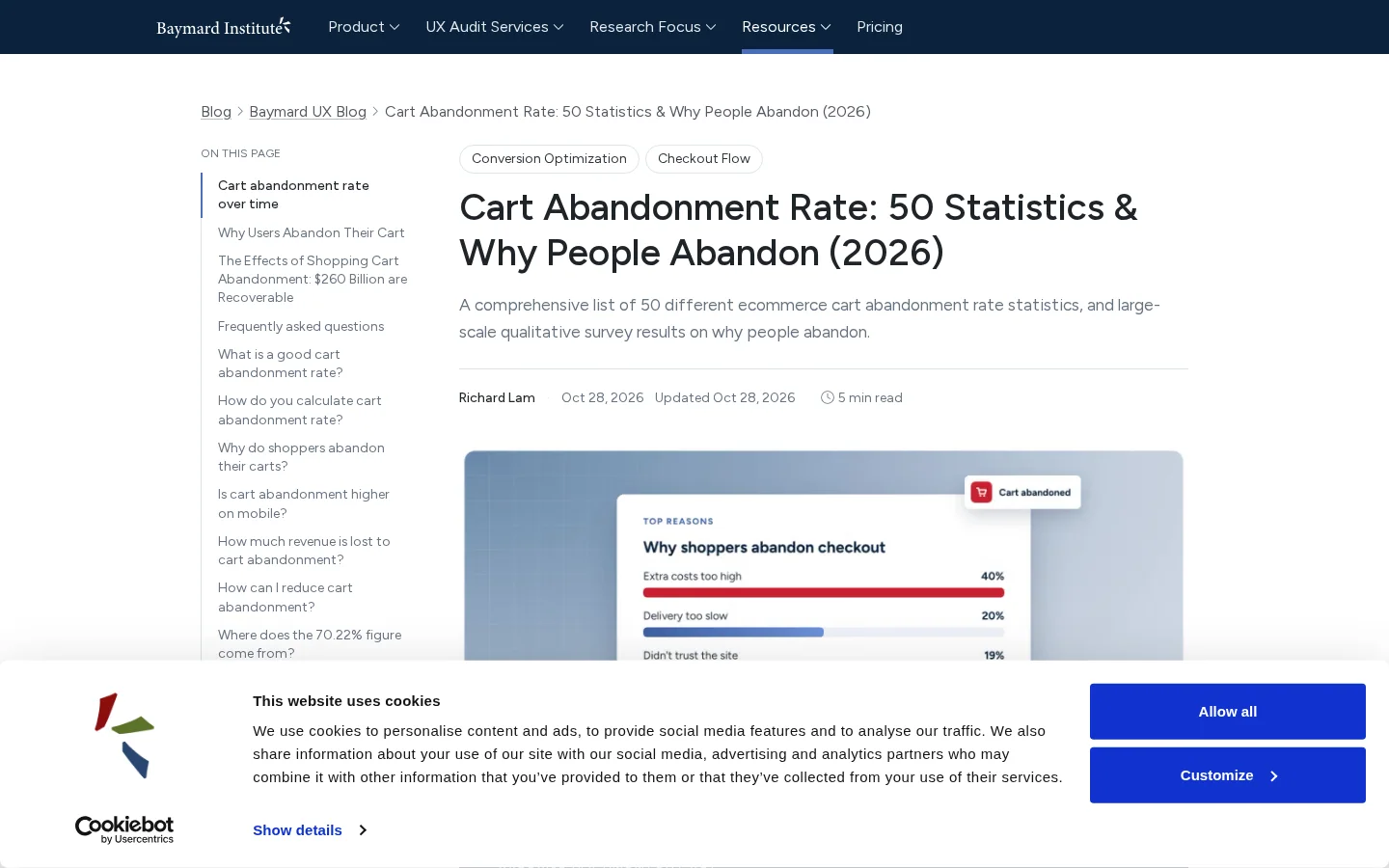
Trust signals matter because distrust is one of the top reasons shoppers leave at checkout, right after extra costs and slow delivery. The good news: most of the fixes are cheap, and they work on every visitor you already pay to bring.
The Baymard Institute keeps a running list of 50 cart abandonment studies and puts the average rate at 70.22%. In its latest survey of reasons for abandonment (US shoppers, excluding those who were "just browsing"), 19% said "I didn't trust the site with my credit card information" and 13% said the returns policy wasn't satisfactory. Look at the other answers too: hidden costs, slow delivery and a total you can't see up front are also trust problems, because they make the shopper feel tricked.
Trust signals are not only a conversion topic. Reviews become stars in Google results through structured data. Return and shipping policies can be shown next to your products in Google Shopping. And when ChatGPT, Gemini or Claude recommend a store, they lean on what other sites say about it: review platforms, forums, press. We explain that mechanism in our guide on how review sites shape AI recommendations.
These are the 15 signals that answer real fears, ranked roughly by impact for a store that is not yet a household name. For each one: why it counts, and what "done well" looks like.
Reviews are the strongest proof that the product exists and works. The Spiegel Research Center at Northwestern University, with data from PowerReviews, found in its study of how online reviews influence sales (first published in 2017) that a product with five reviews has a purchase likelihood 270% greater than a product with none. The lift was 380% for higher-priced products and 190% for lower-priced ones. Gains drop quickly after the first five reviews, so your first goal is simple: get every product to five.
What reviews do to purchase likelihood
Source: Spiegel Research Center, Northwestern University, with PowerReviews (2017)
Two details from the same study change how you should manage reviews. First, purchase likelihood peaks between 4.0 and 4.7 stars, then drops as the rating gets close to 5.0: a perfect score looks too good to be true. Second, a "verified buyer" badge improves the odds of purchase by 15%. So never hide negative reviews; answer them.
A return policy answers the regret fear. "Done well" means four facts visible in one glance: the return window in days, who pays return shipping, how the refund is made (card, store credit), and how many days the refund takes. Put those four facts on the product page, near the Add to cart button, and link to the full page.
Show an estimated delivery date ("Arrives Tue 3 Dec") and the shipping cost on the product page. A date beats a range of days because the shopper doesn't have to count. A free shipping threshold shown in the cart ("You are 12€ away from free shipping") also removes the "surprise cost" feeling.
HTTPS is the minimum, not a differentiator. Every page, every image and every script must load over HTTPS, otherwise browsers flag the page as not secure. The technical part (certificate, redirects, mixed content) is in our guide to HTTPS and its effect on SEO, and the basics are in our SSL certificate definition.
Shoppers trust the brands they already use. Showing Visa, Mastercard, PayPal, Apple Pay or Google Pay tells them their bank or wallet stands between them and you. Wallets also mean they never type a card number on your site, which removes the payment fear entirely.
Legal company name, registration number, VAT number, street address. Write them as text, not as an image, in the footer and on the About and Contact pages. In the EU, much of this is already a legal duty; use it as a trust asset rather than hiding it in small grey type.
A phone number, an email on your own domain (not a free mailbox), a chat with real opening hours, and a promised response time ("We answer within 4 hours, Mon to Fri"). The promise matters as much as the channel.
Who started the store, where the products come from, a photo of the team or the workshop. A store with faces is harder to fake than a store with a logo.
Specs, materials, dimensions, a size guide, care instructions, several real photos and a video. Vague product pages make shoppers think the seller has something to hide. Our checklist of the elements of a product page that ranks and converts goes through each block.
No price that changes in the cart. Taxes included where shoppers expect them, fees named, and if you show a "was" price, a real one. A strikethrough price that was never charged is both a trust killer and, in the EU, a legal risk.
State the legal warranty and any extra guarantee you add, in plain words: what is covered, for how long, and how to claim it.
A review platform rating, a Google store rating, a press mention, an industry certification. Only show badges that link to a page that proves them. A badge that leads nowhere is worse than no badge.
"Sold 1200 times this month", "Rated 4.6 by 830 customers". Numbers only help if they are true and recent; fake counters are easy to spot and fall under consumer protection law. Our guide to social proof marketing with reviews, testimonials and numbers covers the formats in depth.
Terms of sale, privacy policy, cookie policy, legal notice. Few shoppers read them, but many check that they exist. A missing privacy policy is a classic scam marker.
Broken images, typos, 404 pages and slow loading all read as "nobody runs this shop". In the Baymard list above, 17% of shoppers left because the website had errors or crashed. Quality is a trust signal.
| Signal | Fear it answers | Cost to set up | Where it matters most |
|---|---|---|---|
| Reviews with photos | Product as described | Medium (review app, emails) | Product page |
| Return policy summary | Regret | Low | Product page, cart |
| Delivery date and cost | Surprise cost | Low to medium | Product page, cart |
| HTTPS | Payment safety | Low | Whole site |
| Payment brands and wallets | Payment safety | Low | Product page, checkout |
| Company identity | Scam | Low | Footer, About, Contact |
| Reachable humans | Scam, after-sale | Medium (staffing) | Header, Contact, checkout |
| Earned badges | Scam | Medium to high | Home page, product page |
| Legal pages | Scam, data | Low | Footer, checkout |

Place each signal at the exact moment the fear it answers appears. A return policy on the home page helps little; the same sentence next to the Add to cart button helps a lot. Think of the journey as a funnel where each step raises a new question.
Which question each step raises
Your goal here is to prove the business is real. Show a short value line, your store rating with its source, a press or partner row if you have one, and a strip with your three service promises (delivery, returns, support). Contacts go in the header or footer, visible on every page.
Show the star rating and review count on each product card. Shoppers compare products here; a card without stars next to a card with stars loses. Our guide to category page SEO for online stores covers the rest of this template.
This is where most of the trust work happens. Above the fold: stars with review count (linked to the reviews), price with taxes stated, delivery date, stock status, and a one-line return summary under the button. Below: full specs, size guide, reviews with photos, Q&A, warranty.
Show the full total, including shipping and taxes, as early as possible. Repeat the return promise and the delivery date. Add the payment logos. Remove anything that distracts, such as aggressive upsells that push the total up.
Keep it clean and familiar. Offer guest checkout. Visually group the card fields in a clear box, show the payment brands you accept, keep a link to the return policy and a contact option visible, and never surprise the shopper with a new fee on the last step.
Product page: trust signals from top to bottom
The right way is to ask every buyer, at the right moment, with one click, and to publish everything they say. Selecting who you ask, filtering out bad reviews or paying for good ones destroys trust and, in many countries, breaks the law.
Send the request after delivery, not after the order: a few days after the parcel arrives for most products, a few weeks for products that need use (skincare, mattresses, tools). Send one reminder, not five. Ask for a photo; photos are the most convincing part of a review.
First-party reviews live on your site and feed your product pages. Third-party reviews live on an independent platform and prove your store, not just a product. You need both: product reviews to sell the product, store reviews to sell the store.
First-party vs third-party reviews
A calm, specific answer to a bad review often does more than ten good reviews. Thank the person, state the fact, say what you did. Shoppers read the answer to judge how you will treat them if something goes wrong.
In the US, the Rule on the Use of Consumer Reviews and Testimonials (16 CFR Part 465, in force since October 21, 2024) bans writing, buying or selling fake reviews, and buying reviews or getting reviews from employees and their relatives when you know or should know they misrepresent the experience. A general request to all customers to share their experience stays allowed. In the EU, since the Omnibus Directive (applied from May 28, 2022), a store that shows reviews must say whether and how it checks that they come from real buyers. Add one sentence near your reviews: "Reviews are collected after each order and come only from verified buyers."
Warning
Offering a discount "for a 5-star review" is the fastest way to break both rules. If you give an incentive, give it for any review, positive or negative, and say so next to the review.
A trust signal only a human can see is half a signal. Structured data turns your reviews, return policy and shipping rules into facts that Google can show in results and that AI models can quote without guessing.
Product pages should carry Product markup with offers (price, currency, availability) and aggregateRating and review when you have first-party reviews. Our guide to review schema and getting stars in Google shows each property and the rules that make Google ignore stars (self-serving reviews of your own business, ratings not visible on the page).
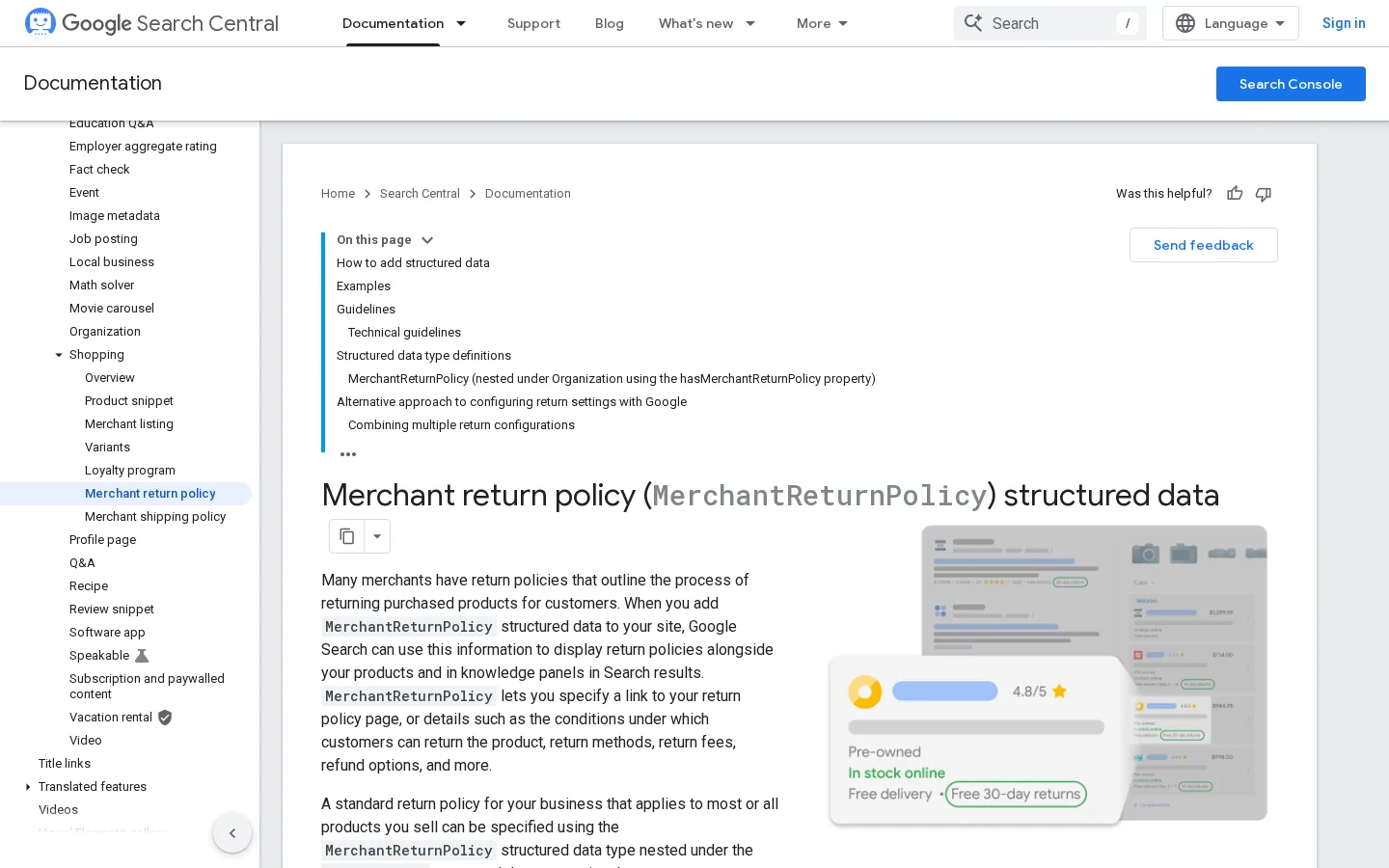
Google's documentation on MerchantReturnPolicy structured data recommends placing your standard policy once, under your Organization (for example OnlineStore), with hasMerchantReturnPolicy. Use the Offer level only for products with a different policy. The required fields are either applicableCountry and returnPolicyCategory (plus merchantReturnDays for a finite window), or simply merchantReturnLink.
<script type="application/ld+json">
{
  "@context": "https://schema.org",
  "@type": "OnlineStore",
  "name": "Example Store",
  "url": "https://www.example.com",
  "hasMerchantReturnPolicy": {
    "@type": "MerchantReturnPolicy",
    "applicableCountry": ["FR", "BE"],
    "returnPolicyCategory": "https://schema.org/MerchantReturnFiniteReturnWindow",
    "merchantReturnDays": 30,
    "returnMethod": "https://schema.org/ReturnByMail",
    "returnFees": "https://schema.org/FreeReturn",
    "refundType": "https://schema.org/FullRefund"
  }
}
</script>
Note
Google applies an order of priority. Return settings in the Content API for Shopping come first, then Merchant Center or Search Console settings, then product-level markup, then organization-level markup. If your Search Console settings say 14 days and your markup says 30, Google uses 14. Keep them identical.
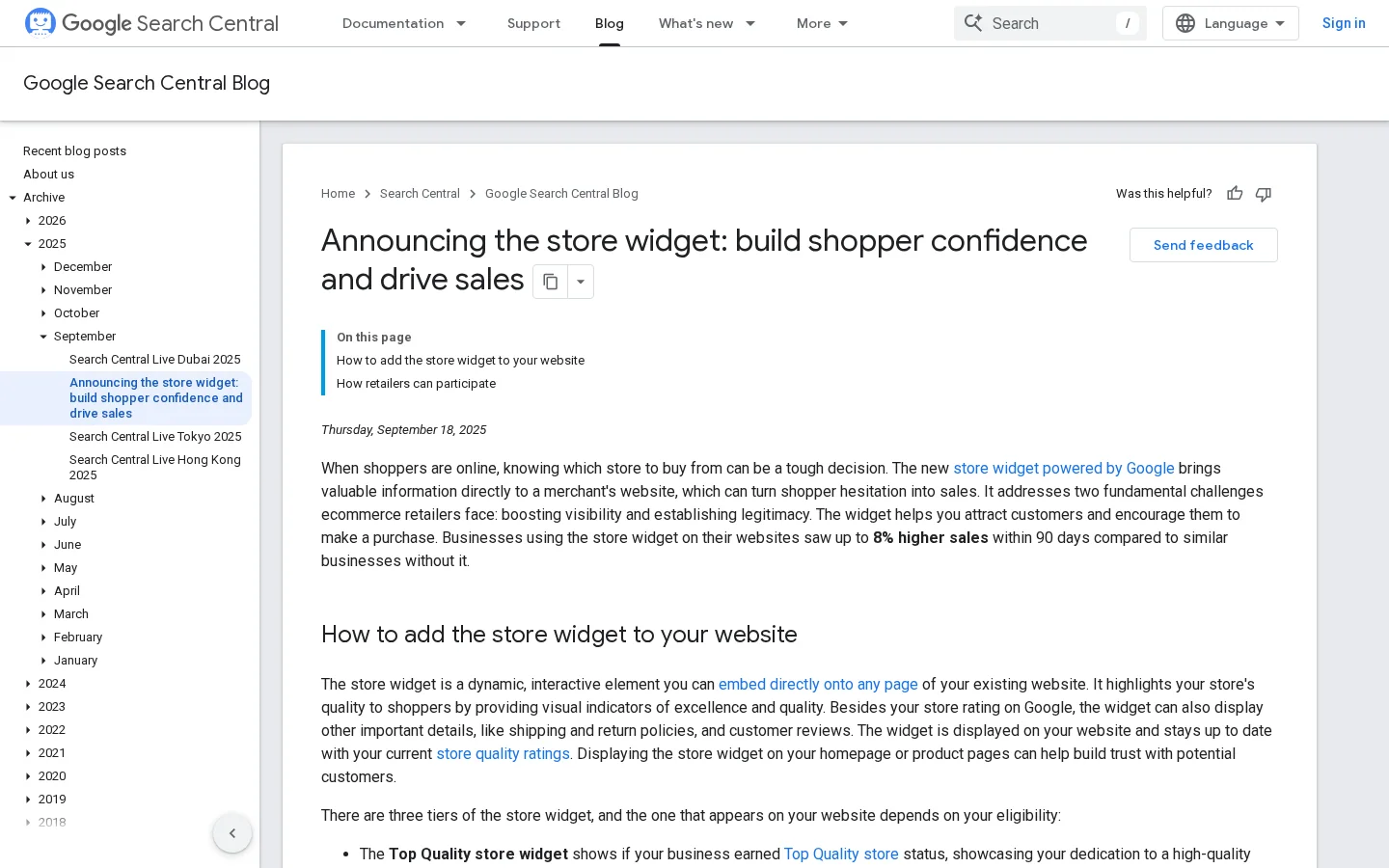
Since September 18, 2025, Google lets merchants embed a store widget on their own site. The Google Search Central announcement of the store widget describes three tiers (Top Quality store, store rating, and a generic widget for stores working toward those badges) and says businesses using it saw "up to 8% higher sales" within 90 days compared with similar businesses without it. It is a third-party signal that updates itself from your Google store data, so it can't be faked.
Paste your page or code into a validator, then fix every error before shipping. Then check the page in Google's URL Inspection tool to confirm Google sees the markup.
Tip
Test your Product, Review and Organization JSON-LD for free with the Sorank structured data validator, and draft missing blocks with our free schema markup generator.
When a shopper asks ChatGPT or Gemini "where can I buy X safely?", the model does not see your badges. It reads text: your pages, and what independent sites say about you. Trust for AI is mostly consensus: the same facts about your store, repeated in many independent places.
Write your policies in plain text a machine can quote ("30-day free returns, refund within 5 business days"). Keep your company name, address and policies identical on your site, your Google Business Profile, your review platform and your marketplaces. Earn reviews and mentions on independent sites in your niche. And measure: you can't fix what you don't see.
Sorank's AI mention tracking shows when ChatGPT, Gemini and Claude cite your store and what they say about it, so you can spot a wrong return period or an old complaint that keeps coming back. For the full picture, our guide to getting your products recommended by AI models covers the content side.
Audit your store like a suspicious first-time visitor. Use a private browser window on a phone, land on a product page from Google, and try to answer the four fears without scrolling for more than a few seconds each.
The one-hour trust audit
Sort each finding by the fear it fails and the effort to fix it. Fix "low effort, payment or regret fear" first: those are the ones that lose an order already in the cart. Then measure the result with your checkout conversion rate; our free conversion rate calculator gives you the before and after in one line. For a broader method to test changes, see our list of proven levers to increase conversion rate.
Trust audit checklist
Most trust problems come from signals that look good to the store owner but read as fake to the shopper. Here are the mistakes we see most, with how to spot and fix each one.
What it is: a "100% secure checkout" image or a shield icon that links nowhere. How to spot it: click every badge on your site; if it opens nothing or a stock image, it is decoration. How to fix it: remove it, and replace it with real payment brand logos and a working link to a badge you have earned.
What it is: a review section where every rating is perfect. How to spot it: export your reviews and check the distribution; zero 1 to 3 star reviews on a large catalog is a red flag. How to fix it: publish every review, answer the bad ones, and show the review count next to the average.
What it is: the policy exists, but the shopper must leave the product page to find it. How to spot it: from a product page on mobile, count the taps to the return window. More than one is too many. How to fix it: add a one-line summary under the Add to cart button with a link to the full policy.
What it is: shipping, taxes or a "service fee" that show up only on the payment page. How to spot it: place a test order and compare the product page price with the final total. How to fix it: show shipping cost and taxes on the product page, and a full total in the cart.
What it is: countdowns that reset on reload, "only 2 left" on every product. How to spot it: reload the page or open it in another browser. How to fix it: show real stock and real deadlines only; shoppers who catch one fake signal stop believing the others.
What it is: a rating in JSON-LD that isn't visible on the page, or a return window in markup that differs from Merchant Center. How to spot it: validate the page and compare each value with what a visitor sees. How to fix it: generate markup from the same data that fills the page, and keep one source of truth for policies.
What it is: no phone, no email, no address, just a form. How to spot it: look for a way to reach a human without filling a form. How to fix it: add an email on your domain, a phone or chat with opening hours, and a response time promise.
Product page trust: before and after an audit
A new store can't show years of reviews, so it must lean on what it can prove today: identity, policies, people and product detail. Generous, clear policies are the fastest substitute for a reputation.
Write a strong About page with faces. Offer a return window longer than your competitors and say it near every button. Send a review request to every early buyer. Ship a few products to people in your niche who will talk about them honestly, and say so. Join Google Merchant Center early so your store rating can start building. And publish useful content: buying guides and comparisons that show you know your products. Sorank's SEO software for ecommerce stores writes and publishes that content on autopilot and earns links from sites in your niche, which also builds the outside mentions AI models rely on.
Ecommerce trust signals work when each one answers a real fear at the moment it appears. Start today with three moves: add a return summary under your Add to cart button, get your five best sellers to five reviews each, and make sure your return policy markup matches your Merchant Center settings. Then audit again in a month, and check what AI models now say about your store.
The most important are customer reviews with photos, a clear return policy, the delivery date and cost shown before checkout, HTTPS with known payment brands, and a real company identity with reachable contacts. Each one answers a specific fear: is the product as described, can I undo the purchase, is my payment safe, is the business real.
Indirectly, yes. Google says trust is the most important part of E-E-A-T, even though E-E-A-T is not a ranking factor on its own. Reviews and return policies marked up with structured data can also appear in Google results, and consistent trust information across the web helps AI models recommend your store.
Only badges that prove something do. Payment brand logos, a Google store rating or a review platform score that links to a real page reassure shoppers. A generic "100% secure" shield that links nowhere proves nothing and can look suspicious.
We analyse your competitors, your website and your AI visibility to create a tailored content plan for free.
 Website Value Calculator
 Website Accessibility Checker
 Google Analytics Checker
 Duplicate Content Checker
 Mobile-Friendly Test
 Website Speed Test
 Subdomain Finder
 Domain Age Checker
 CMS Detector
 Googlebot Simulator
 Nofollow Link Checker
 Meta Tag Checker
 Keyword Cannibalization Checker
 Keyword Intent Checker
 Keyword Extractor
 Google Ads Cost Calculator
 CPC Calculator
 Local Citation Finder
 Reddit Threads Finder
 Disavow File Generator
 Redirect Generator
 Canonical Tag Generator
 Passive Voice Checker
 Google Location Changer
 Google Review Calculator
 Google Review Link Generator
 Keyword Combiner
 Podcast Show Notes Generator
 AI Content Rewriter
 AI Text Humanizer
 ChatGPT Prompt Generator
 Twitter Thread Generator
 Tweet Generator
 Landing Page Copy Generator
 Google Ads Copy Generator
 Pinterest Pin Description Generator
 Anchor Text Generator
 Social Media Post Generator
 LinkedIn Post Generator
 Free AI Writer
 Review Response Generator
 LSI Keyword Generator
 YouTube Video Ideas Generator
 YouTube Tag Generator
 YouTube Description Generator
 Product Description Generator
 CTA Generator
 Blog Introduction Generator
 Conclusion Generator
 Hook Generator
 AI Content Brief Generator
 FAQ Schema Generator
 AI Blog Post Ideas Generator
 Structured Data Validator (Schema Validator)
 Alt Text Checker
 Internal Link Analyzer
 Backlink Challenge
 AI Meta Description Generator
 AI Blog Title Generator
 Google Indexability Checker
 AI Blog Outline Generator
 UTM Link Builder
 Keyword Clustering Tool
 Canonical Tag Checker
 XML Sitemap Generator
 Broken Link Checker
 AI SEO Title Generator
 Headline Analyzer
 SERP Preview Tool
 Redirect Checker
 Hreflang Tag Generator
 Heading Structure Analyzer
 HTTP Headers Checker
 Favicon Extractor
 SERP CTR Calculator
 SEO vs Paid Search Savings Calculator
 SEO Share of Voice Calculator
 SEO ROI Calculator
 SEO Traffic and Revenue Forecast Calculator
 SEO Budget Calculator
 SEO Break-Even Calculator
 SaaS SEO ROI Calculator
 ROAS Calculator
 Reading Time Calculator
 Ranking Gain Simulator
 Organic Traffic Value Calculator
 Organic Traffic Estimator and Website Traffic Checker
 LTV to CAC Ratio Calculator
 Local SEO ROI Calculator
 Link Building Cost Calculator
 Keyword Value Calculator
 Keyword Opportunity Score Calculator
 Keyword Density Calculator
 GEO ROI Calculator
 GEO Content Investment Calculator
 Ecommerce SEO ROI Calculator
 Customer Lifetime Value Calculator
 Customer Acquisition Cost Calculator
 CTR Calculator
 Cost Per Article Calculator
 Conversion Rate Calculator
 Content Marketing ROI Calculator
 ChatGPT Referral Traffic Estimator
 Bounce Rate Calculator
 Backlink ROI Calculator
 AI Visibility Score Calculator
 AI Traffic Value Calculator
 AI Share of Voice Calculator
 Cost of AI Invisibility Calculator
 AI Citation Rate Calculator
 llms.txt Validator
 AI Overview Checker and AI Overviews Rank Checker
 Robots.txt Checker
 AI SEO Audit
 LLM Readability Checker
 SearchGPT Readiness Checker
 Structured Data LLM Audit
 Website Crawlability AI Audit
 Why ChatGPT Is Not Recommending My Website
 Gemini Ranking Tool
 Perplexity Ranking Checker
 LLM Citation Checker
 Answer Engine Optimization Audit
 GEO Audit
 AI Search Visibility Test
 ChatGPT Visibility Checker
 llms.txt Generator
 URL Extractor
 Webpage to Markdown
 Sitemap Checker
 SERP Volatility Sensor
 Page Size Checker
 Word Counter
 Slug Generator
 Schema Generator
 Robots Generator
 OG Preview
 Meta Tags Generator
 Image Compressor
 Favicon Generator
 On-Page SEO Audit: SEO Checker and SEO Analyzer
 Backlink Analysis Tool
 Keyword Research Tool
 Domain Authority Checker
 “I tested Sorank on a real client site and it's insane. It does everything an agency would bill you $1500 a month for. It's going into production on that client now.”

 Guillaume Guersanguersanguillaume.com“We are an Ads agency and we wanted to get our SEO back on track once and for all. Sorank gave us a clear view of our site, helped us prioritize optimizations, and properly structure our content. The tool is easy to use, well designed for a team, and very practical for centralizing tracking without having to juggle multiple platforms. A very solid foundation to start fresh with our SEO.”
 Gaspard MadouiAds Agency
 “I just let the Sorank software do its thing, and now my DR is 25 and my page is ranking higher.”
 Lucas Flandrefoundertrace.fr“I specialized in GEO thanks to Sorank. The GEO Leaderboard allows me to show my clients their position vs competitors on ChatGPT. It’s a real commercial differentiator.”
 MélanieSEO Freelance“Great service, works well for our website and helps us understand how to improve it to rank better on Google and elsewhere. Congrats, keep going, I recommend it.”
 Hugo T.E-commerce merchant