Preferences
Privacy is important to us, so you have the option of disabling certain types of storage that may not be necessary for the basic functioning of the website. Blocking categories may impact your experience on the website. More information
Privacy is important to us, so you have the option of disabling certain types of storage that may not be necessary for the basic functioning of the website. Blocking categories may impact your experience on the website. More information

AI ads explained: AI-made creative,  ChatGPT sponsored placements, EU disclosure rules from August 2026, and how to test a budget without guessing.

Tools

In short
"AI ads" covers two different things. Either the ad itself is made with generative AI (images, video, copy or voice), or the ad is shown inside an AI assistant such as ChatGPT. Both are growing in 2026, the EU adds disclosure duties from 2 August 2026, and a paid placement never buys a place inside the assistant's own answer. Treat them as two budgets with two sets of checks.
Want to go further? Ask
Quick quiz
How should you use AI in your marketing?
Sorank matches your answers


Test it for 3 days on your own site and see where you stand on Google, ChatGPT and the other AIs.
Start 3-day free trial3 days free, then stop whenever you want. 90-day results guarantee, conditions apply.
Search results for this phrase mix two topics. Some pages describe ads whose creative comes out of a generative model: a banner rendered from a prompt, a short video assembled from generated stills, a headline written by a model. Other pages describe a new place to buy ads: the sponsored unit that appears next to an answer in ChatGPT, or the managed inventory that vendors now resell on AI assistants. Read a source closely before you act on it, because the budget, the risks and the rules are different in each case.
The table below puts the two side by side.
| AI-made ads | Ads inside AI answers | |
|---|---|---|
| What is AI | The creative: images, video, copy, voice | The placement: a sponsored unit shown in the assistant |
| Who sees it | Any audience your campaign targets, on the channels you buy | Logged-in adults on the test tiers, in the US so far |
| Who controls it | Your team, inside the platform's generation tools | The AI platform's ad system and its policies |
| Main question | Is it true, labelled and on brand? | Does it pay back, and what does it do to trust? |
Most of the confusion comes from mixing the two. A team that wants cheaper creative needs a generator and a review step. A team that wants to appear next to assistant answers needs a placement budget and a measurement plan. You can do both, but decide which one you are testing first, and measure it on its own.
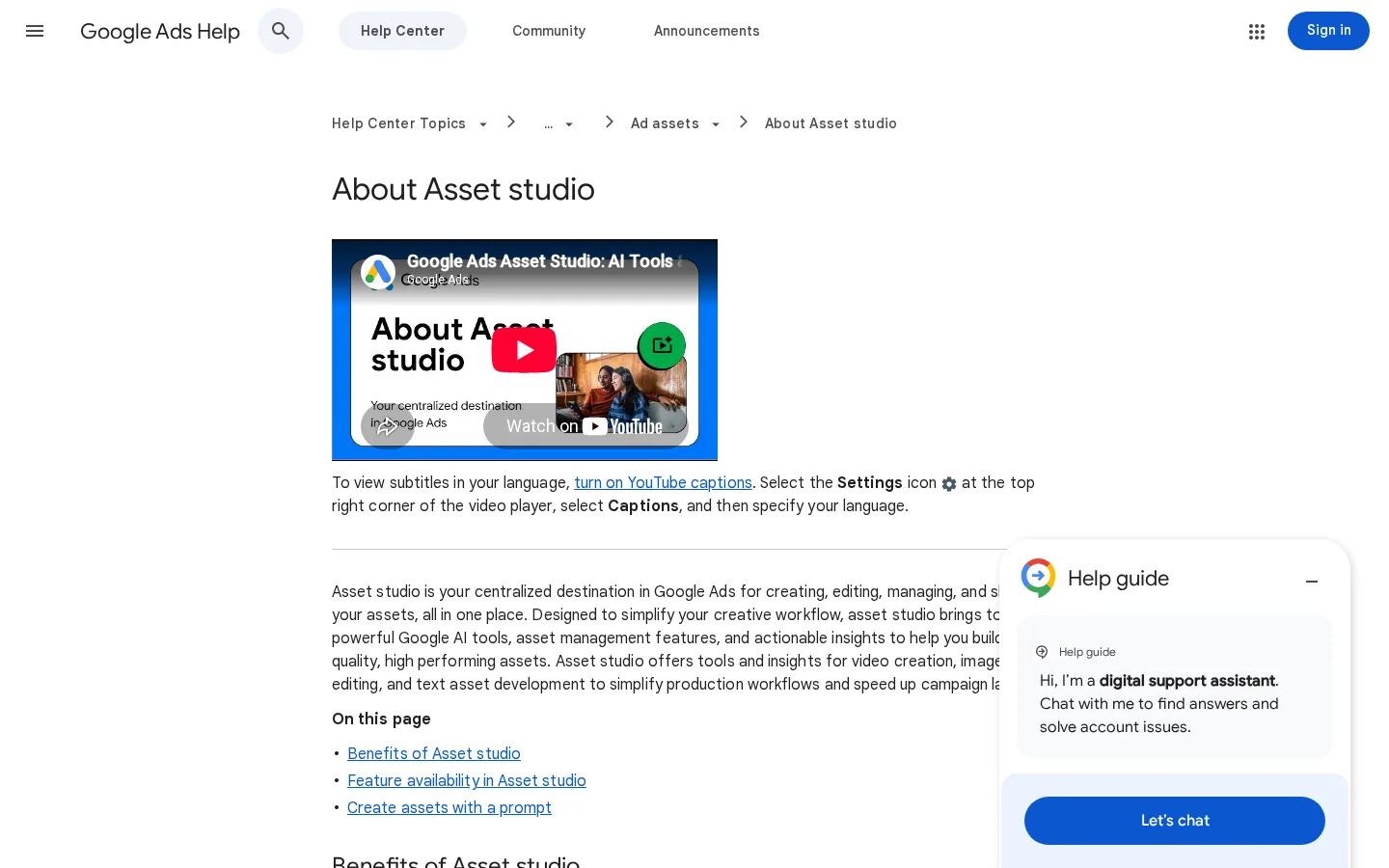
The most documented case is Google's. Google Ads lets you generate images, text and video inside its campaign tools. The Asset studio help page describes the flow: you give a prompt, the tool generates a batch of assets (images, text and videos), and the batch is compiled into one project. You then refine the assets in that workspace and save the ones you want before you deploy them into an existing or new campaign. The help page names the Nano Banana Pro image model.
That flow has a useful property: generation and deployment are separate steps. The help page describes deployment as something you choose after you finalize the assets, so the batch does not go live on its own. Use that gap. Put a person between the batch and the campaign.
Two practical points follow. First, a batch is cheap to produce, so the bottleneck moves to review. Ten variants are only useful if someone can say which one makes a claim you can prove. Second, the output is only as good as the brief. Give the tool the product name, the audience, the offer and the claims you can back with a page on your own site. Vague prompts produce generic ads that are hard to defend, and generic ads are the ones that disappear in a feed.
The third point is that generated assets carry a machine-readable mark. We come back to that in the labels section below. Plan for it before the first campaign, not after the first complaint.
The sequence below is the one we would use for a first batch. It is generic enough to apply to any AI generator, not only Google's.
From prompt to live ad, in five steps

The clearest example of the second meaning is ChatGPT. According to TechCrunch's report of 9 February 2026, OpenAI started testing ads in the United States for logged-in adults on the Free and Go tiers. Go costs $8 per month in the US. Plus, Pro, Business, Enterprise and Education subscribers do not see ads, and users under 18 are excluded.
Note
OpenAI describes this launch as a test, so the countries, tiers and rules can change. Check the current policy before you plan a budget, and do not rely on a figure from a launch-week article.
OpenAI sets a few rules that matter for a budget. Ads are labelled as sponsored and kept separate from the organic content. OpenAI says ads do not influence the answers ChatGPT gives. Ads are matched to the subject of the conversation, to past chats and to earlier ad interactions. They are kept away from sensitive or regulated topics such as health, politics and mental health. Advertisers do not see the conversations themselves. They get aggregate performance data, such as views and clicks.
Two consequences follow. You buy a placement next to an answer, not a position inside it. And the data you receive is thinner than what Google or Meta report, so your own tracking has to show whether a visit turned into revenue. The ad formats and the Ads Manager steps are covered in our guide to ChatGPT Ads and the OpenAI Ads Manager. This article does not repeat them. It looks at what the placement means for the rest of your AI budget.
Vendors have noticed the opening. Some now sell managed access to ChatGPT sponsored inventory and other AI ad surfaces, and they build retargeting audiences from signals such as agent calls or abandoned cart sessions. One example is Asva AI, whose "AI Ads and Retargeting" page claims a 7.62x ROAS across active campaigns and a 72-hour window from cart abandonment to ChatGPT retargeting. We could not verify those figures from an independent source, and the page does not explain how ROAS is attributed. Ask any vendor for its attribution method in writing before you sign.
The timeline below shows the two dates that matter most for planning.
Key dates for AI ads
Sources: TechCrunch, 9 February 2026; EU AI Act, Article 113 and Article 50
If you publish AI-made ads that reach people in the EU, two parts of Article 50 of the AI Act matter. The first applies to the provider of the AI system: its outputs, including synthetic audio, image, video or text, must be marked in a machine-readable format and detectable as artificially generated. The second applies to you as the deployer. If you use an AI system to generate or manipulate image, audio or video content that is a deepfake, you must disclose that the content was artificially generated or manipulated. If you publish AI-generated text to inform the public on matters of public interest, you must disclose that as well.
The article has exceptions. Paragraph 4 excludes law-enforcement uses, artistic or fictional works, and text that a human has reviewed with editorial responsibility. Read the exact paragraph before you rely on an exception, because each one has conditions. This section is a summary, not legal advice, and a lawyer should check your own case.
The stakes are real. For infringements of the Article 50 obligations, Article 99 sets a maximum fine of up to 15 million euros or 3% of total worldwide annual turnover for undertakings, whichever is higher.
What breaking the Article 50 duties can cost
Source: EU AI Act, Article 99, paragraph 4(g)
Warning
A platform label does not replace your own disclosure duty. When you publish the ad, you are the deployer. Keep a record of how each asset was made, and decide before launch which disclosure line you will add, if the law asks for one.
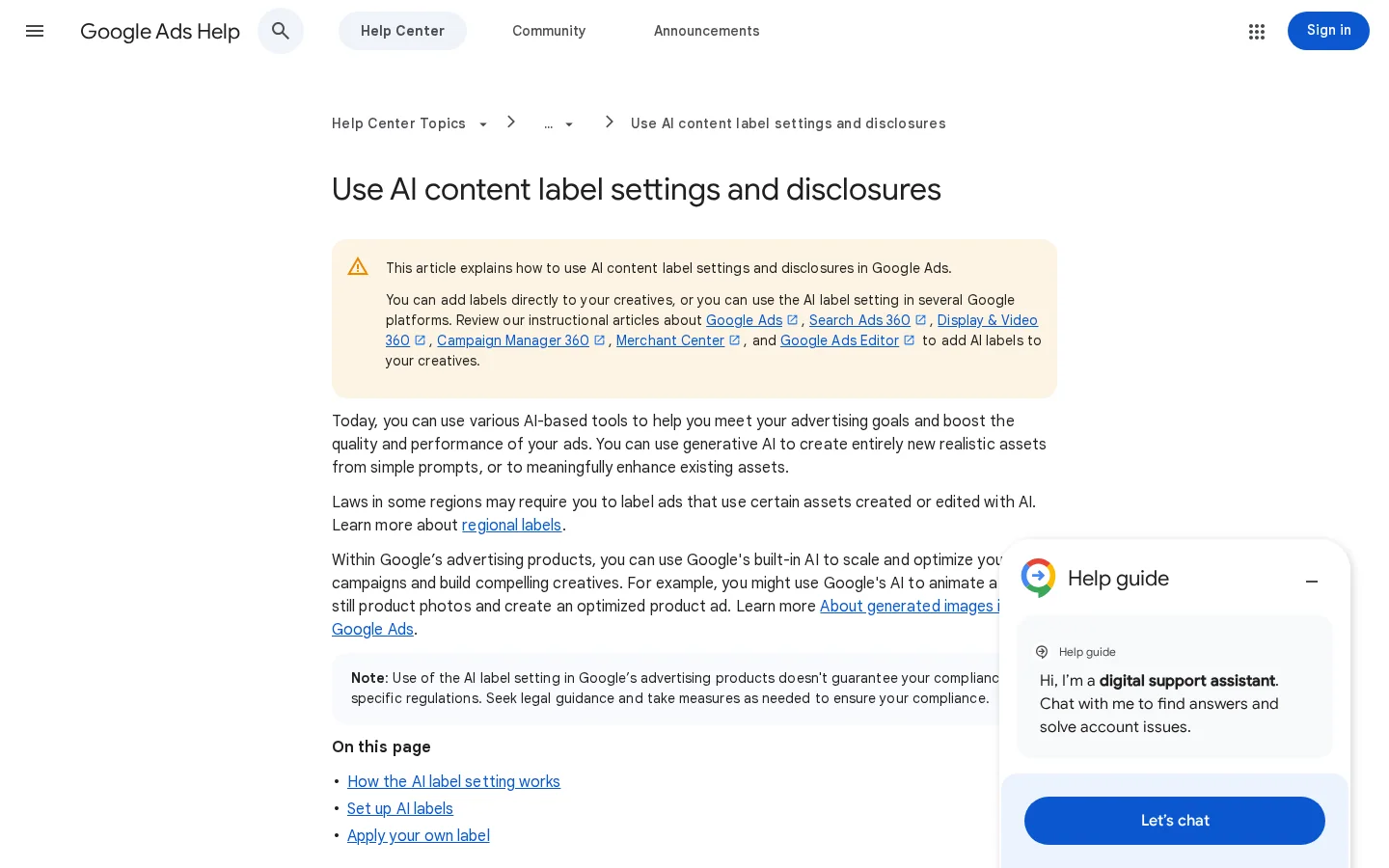
Google's AI content label help page describes three layers. First, Google embeds SynthID, a digital watermark, into images and videos generated with its tools inside Google Ads. The help page says the watermark allows images to be checked to determine whether they were generated or edited using Google AI. Second, Google may apply an AI label on its own, where Google is legally required to do so, or when it receives signals from other platforms. Third, when you use Google's fully automated features, assets may be labelled as AI created or edited on your behalf, and those labels cannot be overwritten.
In practice, a label can appear on an ad you did not expect to label, and you cannot always remove it. Check the labels before launch, not after a complaint. The Google help page on AI content label settings is the reference, and it is worth reading once for each campaign type you run.
Before an AI-made ad goes live
The watermark is not a substitute for review. It helps people trace where an image came from, but it says nothing about whether the claim in the headline is true. A labelled ad with a false claim is still a false claim.
You can run this method in a month without a data team. It assumes you already have analytics and a conversion event for a sale or a lead.
Write one sentence you can prove wrong. For example: "AI-generated product images lower the cost per lead on the same offer." Test one variable at a time. If you change the image, the headline and the audience together, you will not know which change did the work.
Give each asset its own tracking so that the analytics tool can separate it from the others. UTM parameters do this. Use one pattern for every link, and keep the names in a shared sheet so that nobody invents a new one:
https://www.example.com/pricing?utm_source=chatgpt-ads&utm_medium=cpc&utm_campaign=ai-ads-test&utm_content=asset-07The utm_source names the placement, utm_campaign names the test, and utm_content names the asset. If your goal tracking is not set up yet, our guide to conversion tracking covers the setup for GA4 and the ad platforms.
Note
Some visits from AI assistants arrive without a referrer, and analytics can file them under Direct. The UTM tags on your own links are what keep those visits visible, so compare them with the platform report rather than trusting either one alone.
Use the same landing page, the same offer and the same budget for every variant. Change only the asset under test. If the landing page also changes during the test, any difference in results is noise.
Views and clicks tell you whether the ad was seen and chosen. They do not tell you whether it sold anything. Use the table below to decide which number answers which question.
| Metric | What it tells you | Where to read it |
|---|---|---|
| Spend and clicks per variant | Whether the budget reaches the test audience | The ads platform report |
| Conversions per variant, with UTM tags | Whether the visit becomes a sale or a lead | Your analytics, filtered on utm_source and utm_content |
| Cost per conversion | The real price of one result | Spend divided by conversions, for each variant |
| Brand mentions in AI answers | Whether the campaign changed organic citations | Your mention tracking, before and after the test |
| Assets flagged or rejected | Where the review step caught problems | The platform's asset or policy report |
Do not declare a winner from a handful of clicks. Set the minimum number of conversions per variant before you start, and wait until each variant reaches it. If the test cannot reach that number within your budget, the honest result is "no decision yet", and the cheaper move is to run a larger, simpler test next month. Our note on PPC metrics explains how to calculate the formulas behind these numbers.
A sponsored unit does not make an assistant recommend you in its own answer. OpenAI says the ads do not influence the answers. That leaves organic visibility to be earned the same way as before: pages that answer the question clearly, sources that other sites cite, and facts an assistant can lift without rewriting them. Our guide to AI visibility optimization covers those levers in detail.
Paid placement vs organic citation
The practical rule is to track the two channels separately. Measure what your ads deliver, and measure your organic mentions on their own, prompt by prompt. If ad clicks rise while mentions stay flat, you are buying visits that do not build the brand the assistant repeats. An AI visibility audit gives you the baseline to compare against before the test starts.
These five mistakes show up in most first campaigns. For each one, the description tells you what it looks like from the inside, how to spot it, and how to fix it.
What it is: the generator invents a detail that sounds right: a feature you do not have, a price, a result, a certification. A batch makes this worse, because each variant adds one more chance for an invented detail.
How to spot it: read the asset the way a stranger would, then check every noun and number against your own site. If a claim has no page behind it, it is not ready.
How to fix it: give each asset a named reviewer and a short checklist: one claim, one source, one approval. Reject the asset if any line of the checklist fails, even when the image looks right.
One asset, before and after review
What it is: the platform reports views and clicks, the ad looks busy, and the team concludes the campaign works. Sales are recorded somewhere else, and nobody connects the two.
How to spot it: clicks go up for a month and revenue or leads stay where they were. In ChatGPT, the data you receive is aggregate, so you cannot find the gap inside the platform.
How to fix it: tag every URL, record conversions in your own analytics, and review cost per conversion every week, not only at the end.
What it is: the team assumes that the label Google or another platform applies covers the legal duty. That assumption fails when you are the one publishing a deepfake or AI-generated text on a public-interest topic.
How to spot it: nobody can say how an asset was made, and the campaign has no internal record of the prompt, the settings or the reviewer.
How to fix it: keep a generation record for each asset, and ask a lawyer which disclosure line your markets require before you launch in the EU.
What it is: you sell in or near a sensitive area, such as health, mental wellbeing or politics, and expect the same reach as in a neutral category. ChatGPT's ads are kept away from those topics, so reach can be much smaller than the budget suggests.
How to spot it: delivery stays low for days, with no error message and no rejected asset to explain it.
How to fix it: read the platform's policy for your category before you spend. Keep the claims honest and plain, and expect less inventory where the topic is sensitive.
What it is: the team pays for placements and assumes that the assistant will start naming the brand in its answers. The placement and the answer are separate, so the assumption fails.
How to spot it: ad clicks rise, but the brand does not appear in the answers for the prompts your buyers actually use.
How to fix it: track mentions prompt by prompt, and invest in the content and sources that give the assistant something to cite. Use the mention data to choose which prompts to work on first.
The table below compares three ways to work with AI ads. Pick by the question you are testing, not by the vendor's pitch.
| Option | What it covers | Disclosure to check | Measurement limit |
|---|---|---|---|
| Google Ads Asset studio | Batch of images, text and video from a prompt, refined in a project | SynthID watermark; labels may be applied automatically and cannot be overwritten in fully automated features | Results only inside Google campaigns |
| ChatGPT ads | Sponsored units for Free and Go users in the US test | Labelled as sponsored and separated from the answer | Aggregate views and clicks, no conversation data |
| Managed AI-ad vendors | Resold access to AI ad inventory and retargeting audiences | Ask who writes, labels and approves the creative | Vendor dashboards; ROAS claims need your own tracking |
If you already run Google campaigns, the asset tools are the cheapest place to start, because the review and tracking tools are already in place. If you want to test placements inside assistants, start with one small test on the platform's own tools before you add a vendor layer on top.
Sorank is an SEO and GEO platform, so its part of this story is the organic side. Its AI Mention Tracking shows when ChatGPT, Claude or Gemini cite your brand, prompt by prompt, which is the measurement you need to see whether an ad campaign changes organic visibility. Sorank's public feature list does not include ad buying or ad creative, so for those you will need the platforms covered above. Our AI Mention Tracking page describes how the tracking works.
Tip
Before you set any ad budget, get a first read of how ChatGPT talks about your brand with our free ChatGPT Visibility Checker. That gives you the organic baseline to compare your ad results against.
AI ads are either ads whose creative is made with generative AI, or ads shown inside AI assistants such as ChatGPT. The phrase covers both, so check which one a source means before you act on its advice.
No. In the US test that started in February 2026, ads reach logged-in adults on the Free and Go tiers. Paid plans are excluded, users under 18 are excluded, and ads are kept away from sensitive topics such as health and politics.
Some do. From 2 August 2026, Article 50 of the AI Act requires deployers to disclose deepfakes and AI-generated text published to inform the public on matters of public interest, subject to exceptions. Providers must also mark synthetic outputs in a machine-readable way. Check the exact paragraph with a lawyer for your case.
AI ads are either ads whose creative is made with generative AI, or ads shown inside AI assistants such as ChatGPT. The phrase covers both, so check which one a source means before you act on its advice.
No. In the US test that started in February 2026, ads reach logged-in adults on the Free and Go tiers. Paid plans and users under 18 are excluded, and ads are kept away from sensitive topics such as health and politics.
Some do. From 2 August 2026, Article 50 of the AI Act requires deployers to disclose deepfakes and AI-generated text published to inform the public on matters of public interest, subject to exceptions. Check the exact paragraph with a lawyer for your case.
We analyse your competitors, your website and your AI visibility to create a tailored content plan for free.
 AI Content Brief Generator
 FAQ Schema Generator
 AI Blog Post Ideas Generator
 Structured Data Validator (Schema Validator)
 Alt Text Checker
 Internal Link Analyzer
 Backlink Challenge
 AI Meta Description Generator
 AI Blog Title Generator
 Google Indexability Checker
 AI Blog Outline Generator
 UTM Link Builder
 Keyword Clustering Tool
 Canonical Tag Checker
 XML Sitemap Generator
 Broken Link Checker
 AI SEO Title Generator
 Headline Analyzer
 SERP Preview Tool
 Redirect Checker
 Hreflang Tag Generator
 Heading Structure Analyzer
 HTTP Headers Checker
 Favicon Extractor
 SERP CTR Calculator
 SEO vs Paid Search Savings Calculator
 SEO Share of Voice Calculator
 SEO ROI Calculator
 SEO Traffic and Revenue Forecast Calculator
 SEO Budget Calculator
 SEO Break-Even Calculator
 SaaS SEO ROI Calculator
 ROAS Calculator
 Reading Time Calculator
 Ranking Gain Simulator
 Organic Traffic Value Calculator
 Organic Traffic Estimator and Website Traffic Checker
 LTV to CAC Ratio Calculator
 Local SEO ROI Calculator
 Link Building Cost Calculator
 Keyword Value Calculator
 Keyword Opportunity Score Calculator
 Keyword Density Calculator
 GEO ROI Calculator
 GEO Content Investment Calculator
 Ecommerce SEO ROI Calculator
 Customer Lifetime Value Calculator
 Customer Acquisition Cost Calculator
 CTR Calculator
 Cost Per Article Calculator
 Conversion Rate Calculator
 Content Marketing ROI Calculator
 ChatGPT Referral Traffic Estimator
 Bounce Rate Calculator
 Backlink ROI Calculator
 AI Visibility Score Calculator
 AI Traffic Value Calculator
 AI Share of Voice Calculator
 Cost of AI Invisibility Calculator
 AI Citation Rate Calculator
 llms.txt Validator
 AI Overview Checker and AI Overviews Rank Checker
 Robots.txt Checker
 AI SEO Audit
 LLM Readability Checker
 SearchGPT Readiness Checker
 Structured Data LLM Audit
 Website Crawlability AI Audit
 Why ChatGPT Is Not Recommending My Website
 Gemini Ranking Tool
 Perplexity Ranking Checker
 LLM Citation Checker
 Answer Engine Optimization Audit
 GEO Audit
 AI Search Visibility Test
 ChatGPT Visibility Checker
 llms.txt Generator
 URL Extractor
 Webpage to Markdown
 Sitemap Checker
 SERP Volatility Sensor
 Page Size Checker
 Word Counter
 Slug Generator
 Schema Generator
 Robots Generator
 OG Preview
 Meta Tags Generator
 Image Compressor
 Favicon Generator
 On-Page SEO Audit: SEO Checker and SEO Analyzer
 Backlink Analysis Tool
 Keyword Research Tool
 Domain Authority Checker
5/5 from 5 reviews
 “I tested Sorank on a real client site and it's insane. It does everything an agency would bill you $1500 a month for. It's going into production on that client now.”

 Guillaume Guersanguersanguillaume.com“We are an Ads agency and we wanted to get our SEO back on track once and for all. Sorank gave us a clear view of our site, helped us prioritize optimizations, and properly structure our content. The tool is easy to use, well designed for a team, and very practical for centralizing tracking without having to juggle multiple platforms. A very solid foundation to start fresh with our SEO.”
 Gaspard MadouiAds Agency
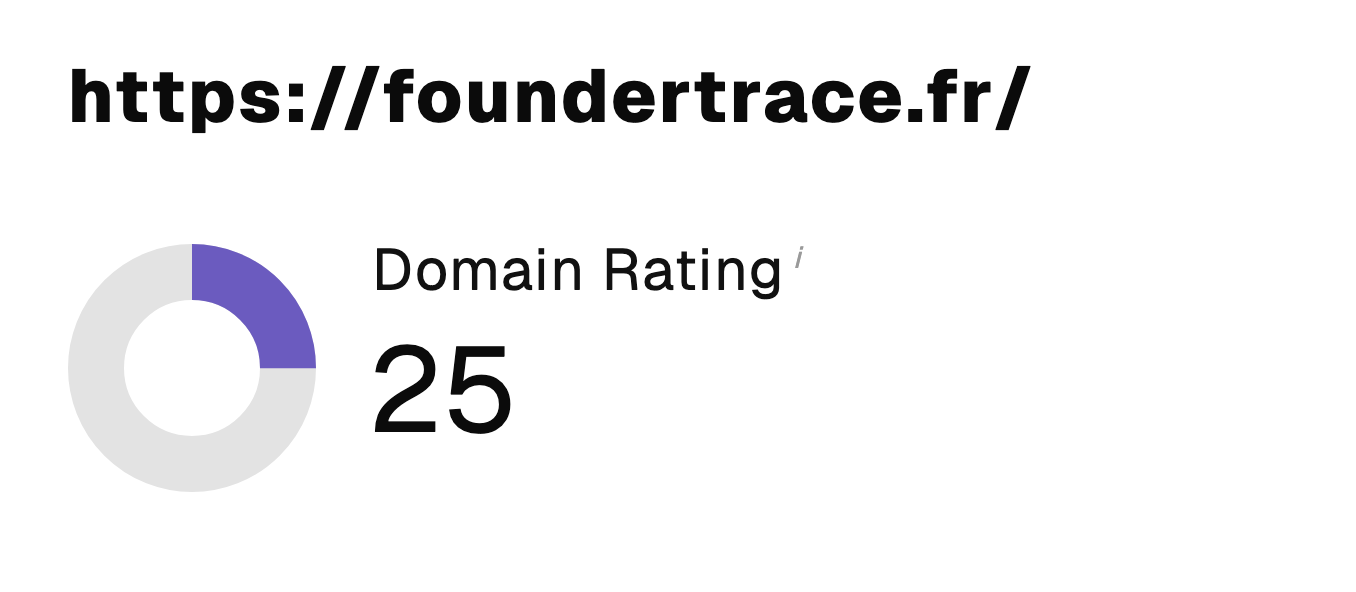 “I just let the Sorank software do its thing, and now my DR is 25 and my page is ranking higher.”
 Lucas Flandrefoundertrace.fr“I specialized in GEO thanks to Sorank. The GEO Leaderboard allows me to show my clients their position vs competitors on ChatGPT. It’s a real commercial differentiator.”
 MélanieSEO Freelance“Great service, works well for our website and helps us understand how to improve it to rank better on Google and elsewhere. Congrats, keep going, I recommend it.”
 Hugo T.E-commerce merchant