Preferences
Privacy is important to us, so you have the option of disabling certain types of storage that may not be necessary for the basic functioning of the website. Blocking categories may impact your experience on the website. More information
Privacy is important to us, so you have the option of disabling certain types of storage that may not be necessary for the basic functioning of the website. Blocking categories may impact your experience on the website. More information

AI writing tools save real time on drafts, but only with a brief, a fact check and an editor. Benefits, limits, tool types and a step-by-step workflow.
In short
AI writing tools are software that generates, rewrites or edits text from a short instruction, using a large language model. Their real benefits are faster first drafts, consistent output, quicker editing and research help. They don't replace fact checking or first-hand experience, so the time you save depends on the review you keep.
Want to go further? Ask
Quick quiz
How should you use AI in your marketing?
Sorank matches your answers


Test it for 3 days on your own site and see where you stand on Google, ChatGPT and the other AIs.
Start 3-day free trial3 days free, then stop whenever you want. 90-day results guarantee, conditions apply.
AI writing tools pay off when they remove a bottleneck you already have. If you publish one article a quarter, the speed gain matters less than the quality of your editing. If you need a dozen pages a month, the gain is large. Each benefit below comes with the point where it stops helping.
The blank page is the slowest part of writing for many people. A tool turns a brief (keyword, reader, angle, length) into a structured first draft in a few minutes. You then spend your time on what needs judgment: the argument, the examples and the claims you can back up.
In HubSpot's 2026 State of AI in Marketing report, which surveyed 1754 marketers, about one third said AI saves their team 10 to 14 hours per week, and another third said it saves more than 15 hours. These answers are self-reported and gathered by a marketing software vendor, so read them as a direction, not as a measure of your own team. Measure your own time before and after you start (see the measurement section below).
What marketing teams report saving with AI
Source: HubSpot, State of AI in Marketing 2026 (self-reported survey)

A tool keeps the same structure, headings and level of detail from one page to the next. That matters when you publish a series such as product explainers, location pages or glossary entries, because readers and search engines see a coherent set.
Consistency is not quality, though. If your brief is vague, the tool repeats a vague structure at scale. Write one good page by hand first, then ask the tool to match its structure, length and tone. Put the two side by side and fix the differences that matter.
Many people use AI writing tools more to edit than to write. Useful tasks include shortening a paragraph to a word limit, changing a formal register to a plain one, turning a list into prose, or checking grammar in a second language.
Ask for one change at a time. A prompt such as "Shorten this paragraph to 40 to 60 words, keep every number, and add no new facts" gives you a result you can check line by line. A prompt such as "Make this better" gives you text that reads smoothly and says less.
A tool can list subtopics, likely questions and a page structure in seconds. Use that list as a checklist of what to cover, not as research. The suggestions come from patterns in training data, so a subtopic the tool proposes may not match what your audience actually searches for.
Check the list against real query data before you commit to the structure: Search Console queries for your existing pages, a keyword tool, or the questions your sales team hears. A free blog outline generator can give you a first skeleton, and you should still judge each heading against the search intent.
One long article can feed a newsletter, a LinkedIn post, a short FAQ and a sales email. Ask for each format separately, with its own length and constraints. Then reread every version. Reusing one article in five places only helps if each version answers a different question for its reader.
The tool is good at form and weak at truth. A language model can state a wrong date, a made-up study or a product feature that doesn't exist, and it will do so in the same confident tone as a correct sentence. This failure mode is described in our AI hallucination definition. The benefits above only count after a person has checked the facts.
An AI writing tool predicts the next small unit of text (a word or part of a word) from everything in its context window: your instructions, any documents you attach and the text it has already written. It has no access to your experience, your customers or your data unless you put that material in the prompt. The input decides most of the output quality. For the broader definition of the process, see our AI content generation entry.
Most tools run the same loop, whatever the interface looks like. Knowing the loop tells you where to intervene.
How a draft is produced, and where you intervene
The size of the context window is the first limit to understand. A long brief plus a long article can push your key rules out of the window, which is one reason a tool can drift from your tone later in a long session. The context window entry explains the limit in more detail.
Three behaviors cause most of the problems you will see. First, generic phrasing: the most likely next words are the most common ones, so drafts sound like every other draft. Second, invented specifics: numbers, names, dates and feature lists are where the model is most likely to fill a gap with plausible text. Third, long-document drift: instructions given at the top carry less weight as the text grows.
The fixes are practical. Keep prompts short and constrained. Put every fact you need in the prompt rather than hoping the tool knows it. Split long pieces into sections and run one prompt per section, each with its own heading, facts, word count and list of phrases to avoid.

There are four families of tools. They overlap, but they fail in different ways, so choose by task and not by brand. Here is each one, with the same questions: what it does, when to use it, what it gives you and where it stops.
How it works: you describe the task in plain language and the assistant returns text, a plan or a rewrite. When to use it: outlines, rewrites, explanations, brainstorming and drafts you will heavily edit. Advantage: it works on almost any task, with no setup. Limit: it knows nothing about your site, brand or customers unless you paste that material in each time. Example: asking for five angles on a topic, then choosing one and asking for a draft of its introduction only.
How it works: the assistant sits inside the word processor or note app where your draft already lives, and suggests changes to the text you wrote. When to use it: finishing your own draft, tightening sentences, catching repetition. Advantage: no copy-paste, and you keep your own voice because the text starts from you. Limit: it sees one document, so it can't judge whether a section fits the page's goal or the competing pages. Example: accepting or rejecting suggestions sentence by sentence during a final pass.
How it works: you paste a text and choose a transformation: shorter, clearer, more formal, friendlier, or corrected for grammar. When to use it: adapting a paragraph for a different reader, or checking a text you did not write. Advantage: precise, fast and easy to verify, because the output is a version of your input. Limit: it cannot add missing facts, examples or experience, so it can make a weak argument read better without making it stronger. Example: cutting a 90-word introduction to 45 words while keeping the one claim it makes.
How it works: you give a keyword or a list of keywords, and the tool researches the topic, writes a structured article, adds images and links, then publishes it to your CMS or sends it as a draft. When to use it: a steady publishing program where every article needs the same structure, links and metadata. Advantage: structure, internal links and publishing happen in one flow, so the process scales. Limit: a weak brief produces many similar pages, and that is the pattern search engines look at. Example: Sorank's AI blog article generator starts from a keyword, analyzes the competing articles, then writes a draft with a summary first, H2 and H3 sections, cited sources and internal links, which you review before publishing.
For a head-to-head of named products, read our comparison of the best AI blog writers. The table below summarizes the four families.
| Type | Best for | Main advantage | Main limit |
|---|---|---|---|
| General chat assistant | Outlines, rewrites, brainstorming | Works on almost any task | No knowledge of your site or brand unless you paste it in |
| In-editor assistant | Finishing your own draft | Works where you already write | Sees one document, not the page's goal |
| Rewrite and grammar tool | Tone, clarity, length, grammar | Fast, precise and easy to verify | Cannot add facts or experience |
| Full blog article generator | A series of articles from keywords | Structure, links and publishing in one flow | Similar, thin pages if you skip the review |
The workflow below is the one that gives teams good results. Each step has a check, so you can see where a draft goes wrong before it reaches your readers. You can run it with any tool from the previous section.
Most bad drafts come from a vague brief, not from a bad tool. Before you open the tool, write the brief in a few lines. It should name the target keyword and the search intent behind it, the reader and the decision they face, the one question the article must answer, and the facts you have already checked. Put the forbidden claims in the brief too, such as prices, guarantees or results you cannot prove.
Brief checklist before you prompt
If you want a starting point for the brief, the free content brief generator gives you a first list of sections and questions. Treat it as raw material and rewrite it for your reader.
Ask the tool for an outline before any prose. Check three things in the outline. Does each H2 answer a question a reader would type? Do two headings cover the same ground? Is there a practical section, with steps the reader can follow today? Remove or merge what fails, then ask for the revised outline. Two rounds are usually enough.
Draft each section in its own prompt. Give the heading, the facts it must use, the target word count and the phrases to avoid. Ask the tool to start with the answer, then develop it. A section that starts with a direct answer is easier to check and easier for a reader to scan. Reject any paragraph that opens with a generic sentence about how the world is changing; it tells the reader nothing and signals a draft nobody reviewed.
Go through the draft and highlight each claim that contains a number, a date, a name, a legal point or a comparison. For each one, open the source, check the exact wording and note the date. If you cannot find a source in five minutes, delete the claim or rewrite it as your own opinion. The method for fact-checking AI content gives a fuller routine for this step.
Once the facts are right, make the article sound like the people who publish it. Replace the tool's stock transitions with your own. Add one example from your own work, one opinion you would defend in a meeting and one limit of your advice. A brand voice written down as rules (words to use, words to avoid, sentence length, how you address the reader) makes this step faster each time. Our brand voice page describes how Sorank keeps this consistent across articles.
Before you publish, record how long each step took, including the review. You need this number to judge the tool later (see the measurement section). Publish as a draft first if your CMS allows it, read the page once more on the live template, then request indexing.
Review in two passes. In the first pass, check facts and claims. In the second, check structure, reading flow and voice. If you do both at once, you tend to miss factual errors because you are reading for style, and you miss structure problems because you are checking sources.
The same section, before and after review
Walk through the draft with the list of claims you highlighted in step 4. Each claim needs a source you have opened, the exact wording it uses and a date when the figure changes over time. Pay special attention to percentages, benchmarks and "studies show" sentences, which are the most common places for invented detail. Remove what you cannot verify. A shorter article with every claim checked beats a longer one with a few made-up numbers, because one wrong number can undo the trust the rest of the page earned.
Read the article out loud, or in a text-to-speech reader, and listen for repeated sentences and vague transitions. Check that the first two sentences of each H2 give the answer, then the detail. Check that every H2 answers a different question. Check that the tables and lists match the text around them. Finally, check the length against your brief, not against a number you remember.
Tip
Paste the draft into the free word counter before you start editing, not after. You will know early whether the piece is too short to cover the question or too long to read in one sitting.
Most failures fall into six patterns. The table gives you a quick scan, and the sections below explain what each one is, how to spot it in your own draft and how to fix it.
| Mistake | How to spot it | Fix |
|---|---|---|
| Publishing the first output | No sentence could only come from you | Rewrite the intro, then add one concrete example |
| Invented statistics | A figure with no link, or a source that doesn't contain it | Delete it, or replace it with a figure you opened and read |
| Vague instructions | Every article has the same length and the same three H2s | Write a brief per article with the reader and the question |
| Thin pages at scale | Pages differ only by the keyword | Merge them, or give each one a unique angle and real data |
| Missing experience | No real case, no result, no decision | Add one measured case or one decision you made |
| Repetitive phrasing | The same phrase appears in most paragraphs | Read it aloud and replace repeats with specifics |
What it is: treating the tool's draft as the finished article. How to spot it: the intro could sit at the top of any competitor's page, and no paragraph contains a choice you made. How to fix it: rewrite the first two paragraphs yourself, starting with the answer to the reader's question. Then add one concrete example from your own work or a source you read, so the page carries information that is specific to you.
What it is: a figure, study or quote that looks real but is not in the source it cites, or has no source at all. How to spot it: open each link and search the page for the exact number. If the link is a homepage, a search result or a 404, the claim is not supported. How to fix it: link the claim to the precise page of the publisher, cite its author or date in the same sentence, and delete anything you could not open. Where a figure comes from a vendor survey, say so in the text.
What it is: a publishing program in which every article has the same length, the same headings and the same generic angle. How to spot it: put two articles side by side and count how many headings match. More than half is a warning sign. How to fix it: write a short brief per article that names the reader, the question and the one thing this page offers that the others don't. Then change the structure when the question changes. A comparison needs a table, a how-to needs steps, and a definition needs a short answer first.
What it is: many pages that each say little and differ only in the keyword they target. How to spot it: you can change the keyword in a paragraph and nothing else in the paragraph needs to change. Search engines see the same pattern at scale. How to fix it: merge pages that answer the same question, and give each remaining page real data, a worked example or a decision the reader must make. Google's rules on this point are covered in the search engine section above.
What it is: an article that describes a process without showing that anyone has run it. How to spot it: there is no result, no failure, no tradeoff that the author chose, and no screenshot of a real page. How to fix it: add the one case you actually have, even a small one: the test you ran, the page you rewrote, the number before and after. Readers and AI assistants both look for evidence that the author did the work.
What it is: the same phrase, often the target keyword, repeated in most paragraphs because the tool was told to use it. How to spot it: read the page aloud, or search it for the keyword and count. If the phrase appears in more than one paragraph out of three, it is stuffed. How to fix it: replace repeats with the specific thing the phrase refers to. The keyword belongs in the title, the first paragraph, one H2 and the sentences where it is the natural subject.
In short: Google doesn't ban AI-written content. It evaluates the page, and its spam policies target content made mainly to manipulate rankings, whatever wrote it. The practical risk is volume without value, not the use of a tool.
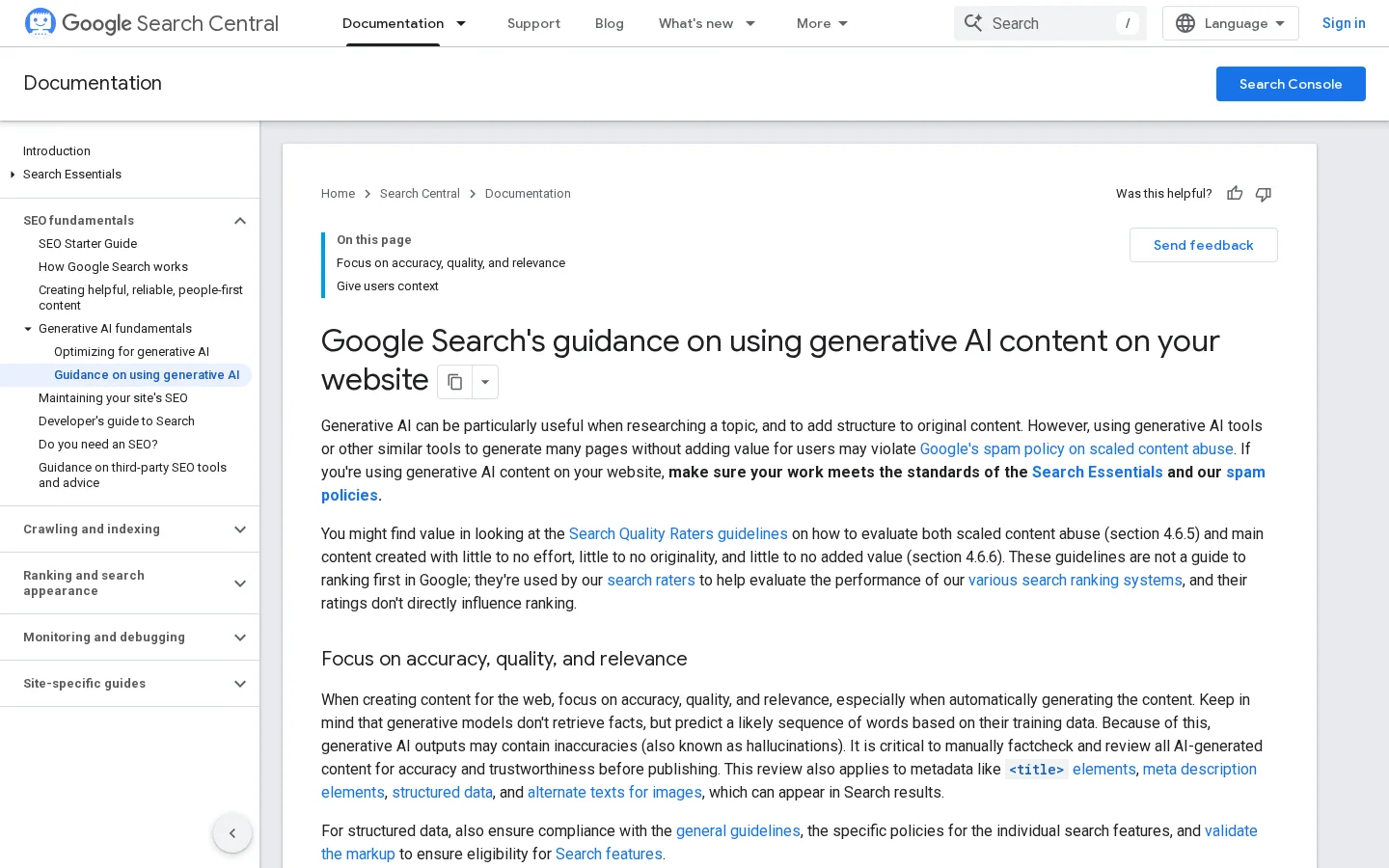
Google's own guidance on generative AI content says the use of AI is acceptable as long as the work meets the standards of Search Essentials, and it warns that generating many pages without adding value to users may violate its spam policy on scaled content abuse. The same guidance page is the one to read before you set a publishing volume. The Google Search Central guidance on using generative AI content is the primary source for this point, and the same page appears in the screenshot below.
The policy itself is in the Google spam policies documentation. Its definition of scaled content abuse is that many pages are generated for the primary purpose of manipulating search rankings, and that these pages don't help users. A good test before publishing a batch is to ask whether each page would still be worth publishing if no one searched for it. For a deeper look at the search side of this question, see our guide to AI content for SEO.
Structured data does not make a weak article rank, but it removes ambiguity about what the page is. Google's Article structured data documentation lists headline and image as recommended properties, with author, datePublished and dateModified as useful additions. Here is a minimal example. Replace the URL and the dates with your own before you use it.
{
  "@context": "https://schema.org",
  "@type": "Article",
  "headline": "Benefits of AI Writing Tools: Speed, Quality and Real Limits",
  "image": "https://www.example.com/images/ai-writing-tools-cover.jpg",
  "author": {
    "@type": "Person",
    "name": "Thibault Besson-Magdelain"
  },
  "datePublished": "2026-11-22",
  "dateModified": "2026-11-22"
}
Keep dateModified honest. Change it only when you update the content, not when you touch the layout, because a date that changes without a content change is a signal readers learn to distrust.
A tool pays off when the cost per published article falls and the articles still earn their place in search and in AI answers. Measure both. Time saved on drafts means little if the review takes so long that the articles are no better, or if they bring no clicks after three months.
Manual workflow vs AI-assisted workflow
Use two simple formulas and fill them in with your own data from the log you kept in step 6. Keep the review hours in the AI column, because a tool that saves three hours of drafting and adds three hours of checking has not saved anything.
cost per article = (tool cost per month + hours spent x hourly cost) / articles published per month
time saved per article = manual hours - (AI hours, including review and fact checking)
Here is a hypothetical example to show the arithmetic, with made-up numbers. Suppose a manual article takes 6 hours and an AI-assisted one takes 2.5 hours, including a full review. The saving is 3.5 hours per article. If the review step is cut to 30 minutes to save time, the saving looks bigger on paper, and the risk of an error in print goes up. Keep the review in the count.
Track the outcome as well as the effort. In Search Console, look at the clicks and impressions of each new URL over 60 to 90 days, compared with pages you wrote by hand on similar topics. Clicks are the metric that connects an article to real traffic, so check the clicks definition if the reports look unfamiliar. Look at how often the pages are cited in AI answers too, if you track that. Pages that fail on both counts are the ones to rewrite, merge or remove.
Sorank is a platform that handles SEO and GEO (generative engine optimization) on autopilot for a site, and its blog article generator covers the drafting part of this workflow. It analyzes the competing articles on a keyword, then writes a structured article with a summary first, H2 and H3 sections, cited sources and internal links to your pages. You then review a score out of 100, edit what you want and publish to your CMS or send it as a draft.
Note
The review steps stay with you. A tool can't know your legal constraints, your pricing or the results you can actually prove, so keep steps 4 and 5 of the workflow in your hands whatever tool you use.
Whatever tool you choose, the benefits of AI writing tools are real and measurable when you keep the human parts: the brief, the fact check, the example from your own work and the decision about what to publish. Start this week with one article. Write the brief, run the workflow, record the time, and check the clicks in 90 days. That single test will tell you more than any list of benefits, including this one.
They are worth it when drafting time is your real bottleneck. If you publish one article a month, the time spent on the brief and the fact check can outweigh the time saved on drafts, so start with a single article and measure it.
Google does not penalize content only because AI wrote it. Its guidance says AI-generated content must meet Search Essentials, and its spam policies target pages made mainly to manipulate rankings, such as many pages with no added value for users.
The biggest risk is publishing claims that sound right but are not. Models can invent numbers, sources and product features, so every figure needs a source you have opened and read before the article goes live.
We analyse your competitors, your website and your AI visibility to create a tailored content plan for free.
 Website Value Calculator
 Website Accessibility Checker
 Google Analytics Checker
 Duplicate Content Checker
 Mobile-Friendly Test
 Website Speed Test
 Subdomain Finder
 Domain Age Checker
 CMS Detector
 Googlebot Simulator
 Nofollow Link Checker
 Meta Tag Checker
 Keyword Cannibalization Checker
 Keyword Intent Checker
 Keyword Extractor
 Google Ads Cost Calculator
 CPC Calculator
 Local Citation Finder
 Reddit Threads Finder
 Disavow File Generator
 Redirect Generator
 Canonical Tag Generator
 Passive Voice Checker
 Google Location Changer
 Google Review Calculator
 Google Review Link Generator
 Keyword Combiner
 Podcast Show Notes Generator
 AI Content Rewriter
 AI Text Humanizer
 ChatGPT Prompt Generator
 Twitter Thread Generator
 Tweet Generator
 Landing Page Copy Generator
 Google Ads Copy Generator
 Pinterest Pin Description Generator
 Anchor Text Generator
 Social Media Post Generator
 LinkedIn Post Generator
 Free AI Writer
 Review Response Generator
 LSI Keyword Generator
 YouTube Video Ideas Generator
 YouTube Tag Generator
 YouTube Description Generator
 Product Description Generator
 CTA Generator
 Blog Introduction Generator
 Conclusion Generator
 Hook Generator
 AI Content Brief Generator
 FAQ Schema Generator
 AI Blog Post Ideas Generator
 Structured Data Validator (Schema Validator)
 Alt Text Checker
 Internal Link Analyzer
 Backlink Challenge
 AI Meta Description Generator
 AI Blog Title Generator
 Google Indexability Checker
 AI Blog Outline Generator
 UTM Link Builder
 Keyword Clustering Tool
 Canonical Tag Checker
 XML Sitemap Generator
 Broken Link Checker
 AI SEO Title Generator
 Headline Analyzer
 SERP Preview Tool
 Redirect Checker
 Hreflang Tag Generator
 Heading Structure Analyzer
 HTTP Headers Checker
 Favicon Extractor
 SERP CTR Calculator
 SEO vs Paid Search Savings Calculator
 SEO Share of Voice Calculator
 SEO ROI Calculator
 SEO Traffic and Revenue Forecast Calculator
 SEO Budget Calculator
 SEO Break-Even Calculator
 SaaS SEO ROI Calculator
 ROAS Calculator
 Reading Time Calculator
 Ranking Gain Simulator
 Organic Traffic Value Calculator
 Organic Traffic Estimator and Website Traffic Checker
 LTV to CAC Ratio Calculator
 Local SEO ROI Calculator
 Link Building Cost Calculator
 Keyword Value Calculator
 Keyword Opportunity Score Calculator
 Keyword Density Calculator
 GEO ROI Calculator
 GEO Content Investment Calculator
 Ecommerce SEO ROI Calculator
 Customer Lifetime Value Calculator
 Customer Acquisition Cost Calculator
 CTR Calculator
 Cost Per Article Calculator
 Conversion Rate Calculator
 Content Marketing ROI Calculator
 ChatGPT Referral Traffic Estimator
 Bounce Rate Calculator
 Backlink ROI Calculator
 AI Visibility Score Calculator
 AI Traffic Value Calculator
 AI Share of Voice Calculator
 Cost of AI Invisibility Calculator
 AI Citation Rate Calculator
 llms.txt Validator
 AI Overview Checker and AI Overviews Rank Checker
 Robots.txt Checker
 AI SEO Audit
 LLM Readability Checker
 SearchGPT Readiness Checker
 Structured Data LLM Audit
 Website Crawlability AI Audit
 Why ChatGPT Is Not Recommending My Website
 Gemini Ranking Tool
 Perplexity Ranking Checker
 LLM Citation Checker
 Answer Engine Optimization Audit
 GEO Audit
 AI Search Visibility Test
 ChatGPT Visibility Checker
 llms.txt Generator
 URL Extractor
 Webpage to Markdown
 Sitemap Checker
 SERP Volatility Sensor
 Page Size Checker
 Word Counter
 Slug Generator
 Schema Generator
 Robots Generator
 OG Preview
 Meta Tags Generator
 Image Compressor
 Favicon Generator
 On-Page SEO Audit: SEO Checker and SEO Analyzer
 Backlink Analysis Tool
 Keyword Research Tool
 Domain Authority Checker
 “I tested Sorank on a real client site and it's insane. It does everything an agency would bill you $1500 a month for. It's going into production on that client now.”

 Guillaume Guersanguersanguillaume.com“We are an Ads agency and we wanted to get our SEO back on track once and for all. Sorank gave us a clear view of our site, helped us prioritize optimizations, and properly structure our content. The tool is easy to use, well designed for a team, and very practical for centralizing tracking without having to juggle multiple platforms. A very solid foundation to start fresh with our SEO.”
 Gaspard MadouiAds Agency
 “I just let the Sorank software do its thing, and now my DR is 25 and my page is ranking higher.”
 Lucas Flandrefoundertrace.fr“I specialized in GEO thanks to Sorank. The GEO Leaderboard allows me to show my clients their position vs competitors on ChatGPT. It’s a real commercial differentiator.”
 MélanieSEO Freelance“Great service, works well for our website and helps us understand how to improve it to rank better on Google and elsewhere. Congrats, keep going, I recommend it.”
 Hugo T.E-commerce merchant