Preferences
Privacy is important to us, so you have the option of disabling certain types of storage that may not be necessary for the basic functioning of the website. Blocking categories may impact your experience on the website. More information
Privacy is important to us, so you have the option of disabling certain types of storage that may not be necessary for the basic functioning of the website. Blocking categories may impact your experience on the website. More information

Copy AI review with real plan prices, how workflow credits are billed, output quality for SEO articles, and who should buy it, checked against public sources.
In short
Copy.ai is an AI writing tool that now sells go-to-market (GTM) workflows. The public Chat plan costs $29 a month billed monthly, while repeatable workflows run on credits and the larger plans go through a sales team. It is quick for short copy and first drafts, but long articles, factual claims and SEO pages need heavy editing before they publish.
Want to go further? Ask
Quick quiz
How should you use AI in your marketing?
Sorank matches your answers


Test it for 3 days on your own site and see where you stand on Google, ChatGPT and the other AIs.
Start 3-day free trial3 days free, then stop whenever you want. 90-day results guarantee, conditions apply.
Copy.ai is best known for short marketing copy: ad headlines, email subject lines, product descriptions and social posts. Its homepage now leads with a different promise, "The First AI-Native GTM Platform," placed under the line "Goodbye AI Copilots, Goodbye Point Solutions." The pitch is one platform that connects sales, marketing and operations data instead of a set of separate AI helpers.
That matters for how you read the product. A GTM platform is built for teams that run many workflows across tools. A solo blogger who wants one well-researched article needs a different set of features, and those are not the ones the homepage puts first. Read every claim with that gap in mind.
The homepage navigation shows Platform, Use cases, Resources, Pricing, GTM AI, a login link and a demo request. The only form on the page is the demo request. The rest of the path, from trying the product to paying for it, runs through the pricing page and then a sales conversation for the bigger plans.
Copy.ai has two working modes, and the price depends on which one you use. Chat is a conversation with a model. You paste a brief, ask for a draft, and edit it in the same window. Workflows are multi-step automations: a sequence of prompts and actions that can run again on new inputs, such as turning a product page into a set of ads.
Chat is the mode most people try first, and it is the one the entry plan covers. Workflows are where the cost model changes, because each run uses credits. If you only need one-off drafts, Chat is the honest comparison. If you need the same job done every week for several people, the workflow cost is the number to check.
Chat or workflows for a content job
The public Chat plan is the only entry price on the page: $29 a month billed monthly, or $24 a month billed annually, which comes to $288 a year. It includes 5 seats, unlimited words in Chat and unlimited Chat Projects. The Growth plan is the first one with workflow credits at a self-serve price, at $1000 a month. Expansion, Scale and Enterprise are sold through the accounts team, and Enterprise shows no price at all.
The table below reflects the plans listed on Copy.ai's public pricing page, checked on 22 November 2026. Plan names, seat counts and credit amounts change often, so check the live page before you buy.
| Plan | Monthly price | Annual billing | Seats | Credits per month | How to buy |
|---|---|---|---|---|---|
| Chat | $29 | $24 a month, $288 a year | 5 | None listed, unlimited words in Chat | Self-serve |
| Growth | $1000 | $12000 a year | 75 | 20K Workflow Credits | Self-serve |
| Expansion | $2000 | $24000 a year | 150 | 45K Workflow Credits | Sales-led |
| Scale | $3000 | $36000 a year | 200 | 75K Workflow Credits | Sales-led |
| Enterprise | Not listed | Not listed | Not listed | Not listed | Custom demo |
Warning
The jump from $29 to $1000 is not a jump in writing capacity. Chat stays unlimited in words on every listed plan. What changes is the number of workflow credits and the team size. Do not budget on the word count you see on the page.
A plan price is the start of the bill, not the whole cost. Three things sit outside the table. First, the editing time. A cheap draft that needs two hours of fact-checking costs more than a pricier tool that gets the facts right in the first pass. Second, the seats. Five seats on Chat suit a small content group, but a team of ten that shares workflows will be on a higher tier even if the words are unlimited. Third, the credit burn, which depends on how many steps your workflow has and how much it generates.
Think of the price as a fixed fee for access and the credits as the variable cost of running your jobs. You need both numbers to compare Copy.ai with another tool, and you need the editing hours to compare either of them with a human writer.

Workflow credits are the unit that limits repeatable automation on Copy.ai. The FAQ defines a credit as "a specific amount of computational power necessary to execute the tasks within a given workflow." In other words, you are not buying a fixed number of articles. You are buying compute, and the compute a workflow uses depends on what it does.
The same FAQ adds two lines that matter for budgeting. A credit's value "depends on the complexity of the tasks performed within Copy.ai," and "each workflow run might have different credit consumption, depending on the steps and content it generates." So a workflow that costs a certain amount on Monday can cost a different amount on Friday if the inputs are longer or the output is longer.
Estimate the monthly credit need with a simple product. Use the average, not the best case, and count every workflow you plan to run.
monthly credits = runs per month × average credits per run × number of workflowsThen compare the result with the allowance of the plan you are considering: 20K on Growth, 45K on Expansion and 75K on Scale, as listed on the pricing page. If your result is above the allowance, you either reduce the number of runs, shorten the workflow, or move up a tier. The cheapest option on paper is the one that lets you run the workflow at the frequency you need.
Note
The average needs real runs. A guess based on the feature list will be wrong. Run the workflow a few times on real inputs before you trust any monthly number.
Run the process on real briefs, not demo inputs. Use the steps below and write the numbers down as you go, so the monthly figure rests on your own data.
Estimate your real credit cost in five steps
Credit use grows with the work the workflow does. A workflow that reads a long product page, checks it against a brand guide and writes five variants uses more than one that writes a single headline from a short brief. That is expected, but it means your cheapest test is not your typical run. Include the longest input you expect, or your monthly estimate will be too low.
Copy.ai does best with short, bounded copy: ad headlines, product descriptions, subject lines and social posts, where a person can check the whole text in a minute or two. The speed gain is real on this kind of work. It gets weaker as the text gets longer, the argument gets more complex and the factual load goes up.
For a set of ad headlines, the work is mostly choosing. You generate options, cut the weak ones, and rewrite two or three. A tool that gives you a broad range of options quickly saves time here. Check each headline against the offer, not against the tone, because a fluent headline can promise something the product does not do.
Product descriptions follow the same rule. Check every feature and every number against the product itself. A generated description that says "fast" or "secure" is a claim, and you must be able to back it up on the product page or in your support docs.
A long article has a structure that a short draft does not: an argument that builds, sections that depend on each other, and examples that are specific to your business. Generated long-form text often reads as a set of plausible sections that do not connect. The fix is to outline first, then write each section against the outline, then check that each section answers the question the title promises.
Long-form also needs a voice. If the draft reads like every other AI article, the reader feels it within two paragraphs. Replace the generic opening with a real example, add a number you can source, and cut any sentence that could appear in any article on the topic.
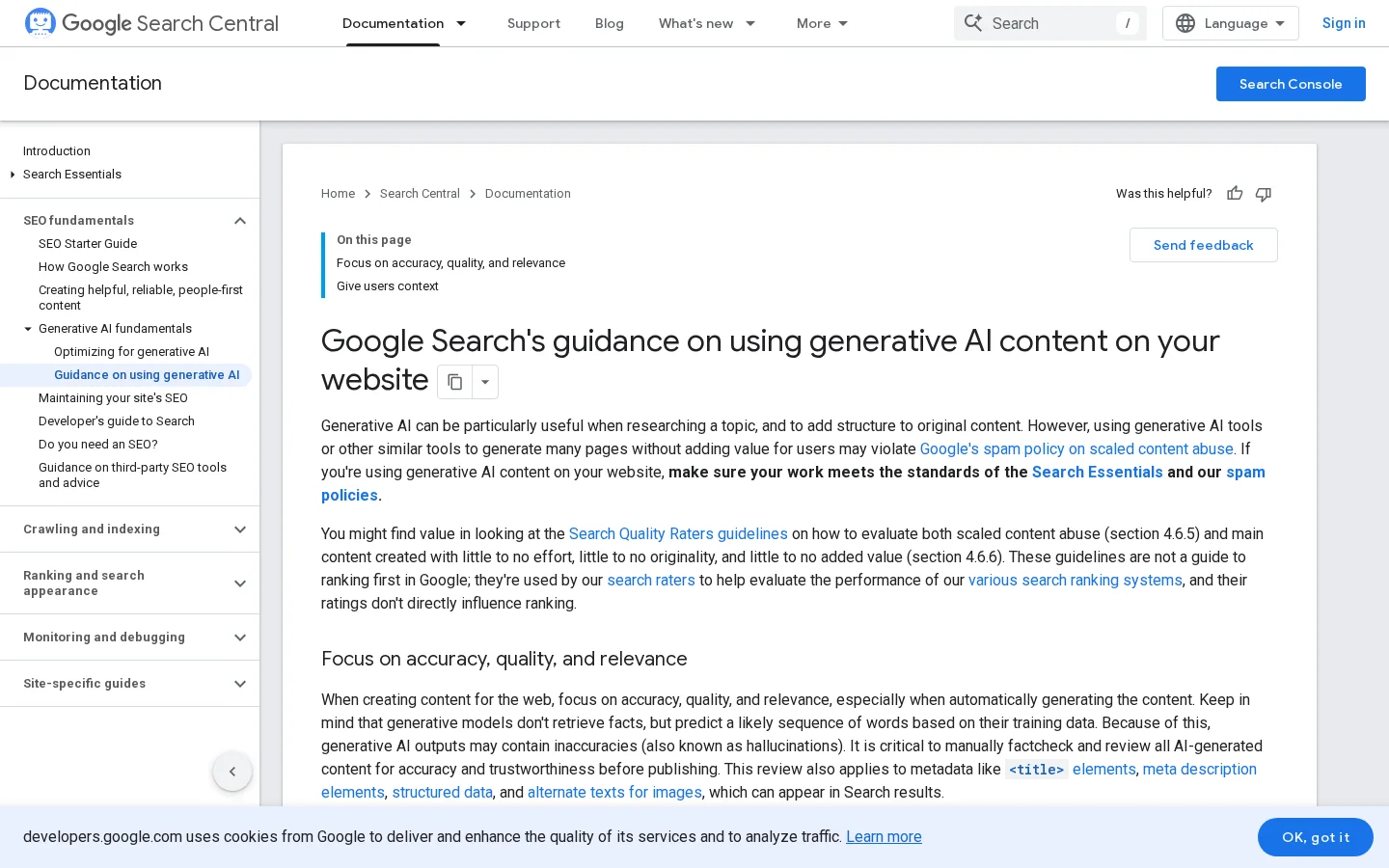
The most important limit is factual. Google's Search Central guidance on generative AI content states that "generative models don't retrieve facts, but predict a likely sequence of words based on their training data." A writing tool can produce a confident statistic, a date or a quote that does not exist. Treat every specific claim in a Copy.ai draft as unverified until you have found its source.
This is the single biggest difference between a usable draft and a risky one. Copy.ai can help you write the sentence around a fact. It cannot be the source of the fact.
A raw draft against an edited draft
No tool is penalized for being a tool. Google's guidance targets content that adds little, and that rule applies whether a person or a model typed the words. The Search Central page on generative AI content tells you to "focus on accuracy, quality, and relevance," and it warns against content created with "little to no effort, little to no originality, and little to no added value."
The page also names the pattern to avoid at scale: "using generative AI tools or other similar tools to generate many pages without adding value for users." That sentence describes a publishing process, not a model. A site that publishes hundreds of thin pages from one prompt is in trouble with or without a specific tool.
Ahrefs published a study on 27 July 2026, written by Ryan Law, Director of Content Marketing at Ahrefs. The study found that more than half of top-ranking pages, 54.7 percent, have under 20 percent AI-generated content, and that 5.3 percent of top-ranking pages are 100 percent AI-generated. Read the numbers as a snapshot of mixed pages, not as a rule for ranking.
Ahrefs is also clear about the limits of its own method. Its article says that "AI content detection is not perfect, and the way we detect AI content will be different from how Google does." Use the study to decide how much AI text is normal, not to conclude that a detector score tells you what Google will do.
AI content in top-ranking pages, Ahrefs July 2026
Source: Ahrefs, Ryan Law, "Google Doesn't Punish AI Content; It Punishes Bad Content," 27 July 2026
The risk pattern Google describes is a raw draft published with no added value, not the use of Copy.ai. You can publish a draft from any writing tool on Google if you add your own examples, check every claim and remove the generic parts. For a deeper look at the policy side and the editing checks, read AI Content for SEO: Does Google Penalize AI-Generated Content, and What Actually Ranks? and our guide on how to fact-check AI content before you publish it.
The question "is Copy.ai good?" is less useful than "which kind of tool do I need?" AI writing products fall into three groups that solve different problems. Each one has a principle, a best use, strengths and limits. Knowing the group tells you what to test before you pay.
Template writers give you a library of prompts for common jobs: a headline, an email, a product description, a blog intro. The principle is that a good template turns a blank page into a form you fill in. They are useful when you produce many short pieces and need consistent starting points.
The advantage is speed on bounded tasks. The limit is depth. A template gives you a shape, but the argument, the example and the fact-check still come from you. Use a template writer when the output is short enough that you can review all of it in one sitting.
Workflow platforms chain steps together: research a product, draft copy, adapt it for channels, and send it on. This is where Copy.ai is now positioned. The principle is that you build the process once and run it again. It is useful for teams with many repeated jobs across marketing and sales.
The advantage is repetition. Once a workflow works, it runs on new inputs without a new brief each time. The limit is the cost model. Credits make the bill depend on use, and a workflow that works well on one input can cost more on a longer one. You also need someone to own the process, check its outputs and fix it when it drifts.
SEO article engines are built around a publishing goal: research a keyword, plan the structure, write the article with sources and publish on a schedule. The principle is that the article is a product of a keyword and a plan, not a single prompt. They suit sites that need a steady flow of articles rather than one-off drafts.
The advantage is that the research and the plan come before the writing, which is where most weak articles fail. The limit is that you still need to review each article for accuracy and voice. Sorank works in this category: its AI blog article generator is built for Google and AI search, and it sits next to the keyword and visibility tools the rest of the platform uses.
| Category | Best for | Main strength | Main limit | Editing you still need |
|---|---|---|---|---|
| Template writers | Short copy in volume | Fast starting points | Shallow on argument and facts | Full review of every line |
| Workflow and GTM platforms (Copy.ai) | Repeated multi-step jobs across a team | Run the same process again on new inputs | Credit cost rises with use | Fact-check and voice check on each run |
| SEO article engines | Steady publishing of search-led articles | Research and plan before writing | Still needs accuracy and voice review | Fact-check, examples and final voice pass |
If you are still comparing names, our rankings of the best AI copywriting tools and the best AI blog writers put them side by side for specific jobs. Use the category first, then the shortlist.
Test Copy.ai on your own work for seven days on the Chat plan before you commit to a workflow plan. Measure the time from brief to a draft you would publish, including your edits. Do not measure only the time to the first draft, because the first draft is the fast part.
Tip
Before you open any writer, build the outline. Our free AI blog outline generator gives you an H2 and H3 plan you can check against your brief, so the draft follows a structure you chose.
The 7-day test
Four numbers tell you most of what you need. The publish-ready time per job, the number of factual corrections per job, the share of lines you rewrote for voice, and the credits used per run. The first is the reason to buy. The second is the risk. The third tells you whether the tool fits your brand. The fourth feeds the formula from the credit section.
Write the results down on the same day you finish. Memory tends to remember the fast first draft and forget the rewrite.
Most bad outcomes with Copy.ai come from a small number of habits. Each one below has a clear symptom, so you can spot it in your own work and fix it.
What it is. You paste the first draft into your CMS with light changes. How to spot it. The draft has no example from your business, and its opening could start any article on the topic. How to fix it. Add one real example in the first two paragraphs, then cut every sentence that is true of every article on the subject. Only then publish.
What it is. You buy a plan based on the monthly price, then run more workflows than the credit allowance covers. How to spot it. You are near the limit in the second week, or you start rationing runs. How to fix it. Use the formula in the credit section with the average from real runs, and keep a buffer for the longest inputs. If the number is above the allowance, shorten the workflow before you upgrade.
What it is. The draft contains a statistic, a date, a study or a quotation that you did not check. How to spot it. Any sentence with a number, a name or a year that has no link next to it. How to fix it. Find the primary source for each claim, add the link and the date in the sentence, and delete anything you cannot source. A claim with no source is worse than no claim.
Warning
Generated quotes are the most dangerous error, because they look like evidence. Never publish a quotation from a model until you have found the original text on the original page.
What it is. The draft sounds fluent but not like your company. How to spot it. Read five pieces you wrote last quarter, then the new draft. If the new one has longer sentences, more adjectives and fewer specifics, the voice has drifted. How to fix it. Rewrite the opening and closing of each piece in your own words, and cut superlatives. Keep a short list of phrases your team never uses and check for them before you publish.
What it is. You ask for a long article in one prompt and accept the structure it chooses. How to spot it. The headings do not match the search intent, two sections repeat each other, or the conclusion introduces a new idea. How to fix it. Write the outline first, check it against what the reader needs, and generate one section at a time against that outline.
Before you publish a Copy.ai draft
Copy.ai makes sense when your work is many short pieces, your team repeats the same multi-step jobs, and someone reviews the output every time. It is a weaker fit when you need long, researched articles that rank on their own, or when you want a single tool that handles the whole search process without an editor.
Buy it if, or skip it if
Note
A Copy.ai subscription does not replace an editor. It changes where the editor spends time: less on the blank page, more on checking facts, examples and voice.
If your goal is a steady flow of articles that are researched, written and published on a schedule, a dedicated article generator fits better than a general writing tool. Sorank's AI blog article generator covers that job for Google and AI search. For the bigger picture of how writing, planning and publishing fit together, the AI content generation glossary entry explains the process and what to check at each step.
The verdict is simple. Copy.ai is a capable tool for short copy and for teams that repeat workflows, with a clear entry price and a cost model that depends on use. It is not a substitute for research, fact-checking or an editor, and it should not be the only thing between a keyword and a published page. Test it for seven days on your real work, measure the publish-ready time and the corrections, and buy the plan that your numbers justify.
It depends on the job. Copy.ai is quick for short copy, ads and first drafts, and its Chat plan has a low entry price. For long SEO articles and repeatable workflows, budget for editing and measure the workflow credit cost before you commit.
The public pricing page lists the Chat plan at $29 a month billed monthly, or $24 a month billed annually. The Growth plan with workflow credits is $1000 a month, and the larger plans are sold through a sales team. Check the live page, since plans change often.
Google does not penalize content only because a tool wrote it. Its guidance targets content with little originality or added value, whatever produced it. Edit each draft for accuracy, add your own examples and check every claim against its source.
We analyse your competitors, your website and your AI visibility to create a tailored content plan for free.
 AI Content Brief Generator
 FAQ Schema Generator
 AI Blog Post Ideas Generator
 Structured Data Validator (Schema Validator)
 Alt Text Checker
 Internal Link Analyzer
 Backlink Challenge
 AI Meta Description Generator
 AI Blog Title Generator
 Google Indexability Checker
 AI Blog Outline Generator
 UTM Link Builder
 Keyword Clustering Tool
 Canonical Tag Checker
 XML Sitemap Generator
 Broken Link Checker
 AI SEO Title Generator
 Headline Analyzer
 SERP Preview Tool
 Redirect Checker
 Hreflang Tag Generator
 Heading Structure Analyzer
 HTTP Headers Checker
 Favicon Extractor
 SERP CTR Calculator
 SEO vs Paid Search Savings Calculator
 SEO Share of Voice Calculator
 SEO ROI Calculator
 SEO Traffic and Revenue Forecast Calculator
 SEO Budget Calculator
 SEO Break-Even Calculator
 SaaS SEO ROI Calculator
 ROAS Calculator
 Reading Time Calculator
 Ranking Gain Simulator
 Organic Traffic Value Calculator
 Organic Traffic Estimator and Website Traffic Checker
 LTV to CAC Ratio Calculator
 Local SEO ROI Calculator
 Link Building Cost Calculator
 Keyword Value Calculator
 Keyword Opportunity Score Calculator
 Keyword Density Calculator
 GEO ROI Calculator
 GEO Content Investment Calculator
 Ecommerce SEO ROI Calculator
 Customer Lifetime Value Calculator
 Customer Acquisition Cost Calculator
 CTR Calculator
 Cost Per Article Calculator
 Conversion Rate Calculator
 Content Marketing ROI Calculator
 ChatGPT Referral Traffic Estimator
 Bounce Rate Calculator
 Backlink ROI Calculator
 AI Visibility Score Calculator
 AI Traffic Value Calculator
 AI Share of Voice Calculator
 Cost of AI Invisibility Calculator
 AI Citation Rate Calculator
 llms.txt Validator
 AI Overview Checker and AI Overviews Rank Checker
 Robots.txt Checker
 AI SEO Audit
 LLM Readability Checker
 SearchGPT Readiness Checker
 Structured Data LLM Audit
 Website Crawlability AI Audit
 Why ChatGPT Is Not Recommending My Website
 Gemini Ranking Tool
 Perplexity Ranking Checker
 LLM Citation Checker
 Answer Engine Optimization Audit
 GEO Audit
 AI Search Visibility Test
 ChatGPT Visibility Checker
 llms.txt Generator
 URL Extractor
 Webpage to Markdown
 Sitemap Checker
 SERP Volatility Sensor
 Page Size Checker
 Word Counter
 Slug Generator
 Schema Generator
 Robots Generator
 OG Preview
 Meta Tags Generator
 Image Compressor
 Favicon Generator
 On-Page SEO Audit: SEO Checker and SEO Analyzer
 Backlink Analysis Tool
 Keyword Research Tool
 Domain Authority Checker
 “I tested Sorank on a real client site and it's insane. It does everything an agency would bill you $1500 a month for. It's going into production on that client now.”

 Guillaume Guersanguersanguillaume.com“We are an Ads agency and we wanted to get our SEO back on track once and for all. Sorank gave us a clear view of our site, helped us prioritize optimizations, and properly structure our content. The tool is easy to use, well designed for a team, and very practical for centralizing tracking without having to juggle multiple platforms. A very solid foundation to start fresh with our SEO.”
 Gaspard MadouiAds Agency
 “I just let the Sorank software do its thing, and now my DR is 25 and my page is ranking higher.”
 Lucas Flandrefoundertrace.fr“I specialized in GEO thanks to Sorank. The GEO Leaderboard allows me to show my clients their position vs competitors on ChatGPT. It’s a real commercial differentiator.”
 MélanieSEO Freelance“Great service, works well for our website and helps us understand how to improve it to rank better on Google and elsewhere. Congrats, keep going, I recommend it.”
 Hugo T.E-commerce merchant