Preferences
Privacy is important to us, so you have the option of disabling certain types of storage that may not be necessary for the basic functioning of the website. Blocking categories may impact your experience on the website. More information
Privacy is important to us, so you have the option of disabling certain types of storage that may not be necessary for the basic functioning of the website. Blocking categories may impact your experience on the website. More information

AthenaHQ review with its real plans, credit math and a five-step trial to test the tool before you pay. Checked against the official pricing page.

In short
AthenaHQ is a paid AI visibility platform that tracks whether ChatGPT, Gemini, Perplexity and other assistants mention your brand, then suggests what to publish next. It has a free Essential plan with 300 credits. The self-serve Starter plan costs $295 per month on AthenaHQ's pricing page, as checked on 21 November 2026.
Want to go further? Ask
Quick quiz
Is SEO right for you, and how should you start?
Sorank matches your answers


Test it for 3 days on your own site and see where you stand on Google, ChatGPT and the other AIs.
Start 3-day free trial3 days free, then stop whenever you want. 90-day results guarantee, conditions apply.
AthenaHQ belongs to the group of tools built for generative engine optimization, or GEO. GEO means measuring and improving how a brand appears inside AI answers, not only in a list of blue links. If the term is new to you, the glossary entry on GEO gives the basic definition, and the rest of this review assumes you have it.
Most reviews agree on what the product is. They disagree on the details: how many AI engines it covers, how many seats you get, and what it costs. Some listings quote a $95 monthly entry price, and we could not find that figure on the pricing page. This review therefore uses the official page as its source, and it says so whenever the page is silent.
The pricing page lists three plans. Essential is free. Starter is the self-serve paid plan at $295 per month. Enterprise is priced on request and handled through a contract. Section 4 goes through each line.
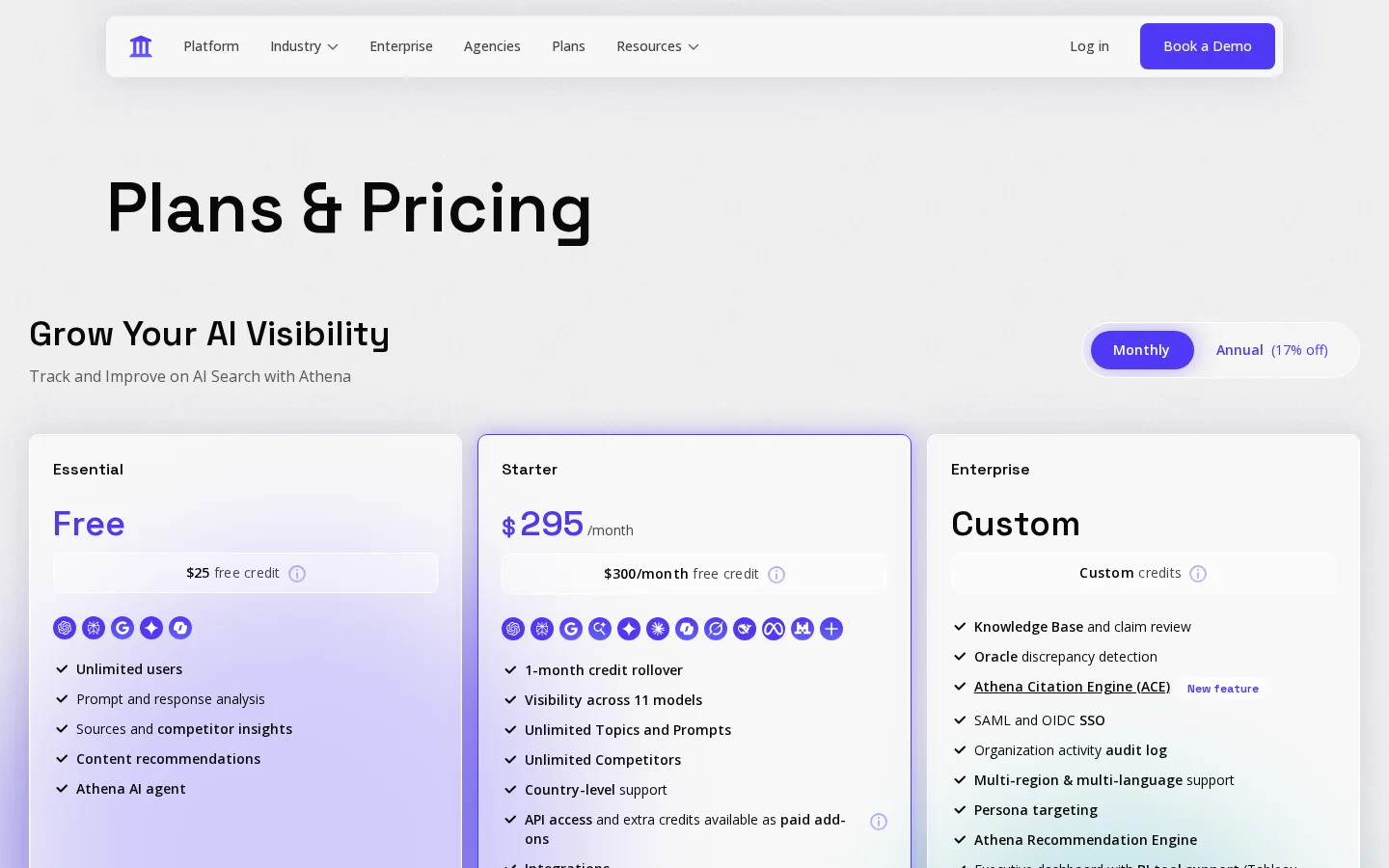
Enterprise adds the features that matter once several people, several brands or a compliance team are involved. The page lists persona targeting, the Athena Citation Engine (ACE), SAML single sign-on with providers such as Okta, audit logs, a dedicated Slack channel and a 2-hour SLA. Several of these items cover administration and support rather than the quality of the tracking, so they only matter if your organization needs them.
If you run one website and you are the only person who reads the reports, start on the free plan. You can move up later without losing the prompts you set up, as long as you keep a copy of them.
A visibility tracker sends the same prompts to several AI assistants on a schedule, reads each answer, and counts the answers that name your brand. The result is a visibility rate, which is the share of answers that mention you. A prompt is the question a buyer types, such as "best running shoes for flat feet", not your brand name. Tracking your brand name alone tells you very little, because few buyers type it.
One tracking run, step by step
The score is simple arithmetic, which is why it is worth checking yourself. Write it down before you compare two tools.
visibility rate = answers that mention you / all answers collectedTake a run with 10 prompts on 5 engines. That gives 50 answers. If 18 of them mention you, the visibility rate is 18 / 50, or 36%. If another tool counts only the answers from ChatGPT and Gemini, the same run gives it a different denominator and a different percentage. Check which engines a dashboard includes before you compare numbers.
A mention is your brand name appearing in the answer. A citation is a link to one of your pages. A source is a page the assistant read while it wrote the answer, which may not be linked at all. Trackers differ in which of the three they count. The AI visibility score entry explains how a single score is built from these signals, and it is worth reading before you trust any one number.
AI answers change between runs, and they can depend on the account, the history and the location of the person asking. One run is a snapshot. A trend needs the same prompts repeated over several days or weeks, which is the reason to use a tracker at all. A manual test gives you one answer, and a tracker gives you a series.

Manual checks, prompt tracking, citation audits and referral analytics each answer a different question. They work better together than as rivals. A tracker is the only one of the four that repeats the same test on a schedule, so it is the one that shows a trend. The other three tell you why a trend moves and where the traffic goes.
Principle: you ask the assistant yourself and read the full answer. When to use it: when you are starting out, or when you want to read the exact wording an assistant uses about your brand. Advantages: it is free, and you read the whole answer rather than a score. Limits: you get one answer, with no history, and no way to tell luck from a real pattern. Example: you ask "best CRM for a 10-person agency" on Monday and your brand appears. On Thursday it does not, and you cannot say why. Our AI visibility audit guide walks through this check step by step.
Principle: the same prompts go to several engines on every run, and every answer is stored. When to use it: when you need a number you can report over time. Advantages: it is repeatable, comparable across engines, and keeps history. Limits: it measures mentions, not revenue, and the cost grows with the number of prompts multiplied by the number of engines. AthenaHQ falls in this category, and so does AI Mention Tracking from Sorank.
Principle: you list the pages that AI assistants rely on when they mention you or a competitor. When to use it: when you want to know what to change on your site, or where to earn a link. Advantages: it points to specific pages you can improve. Limits: the list changes with each prompt, and a page can be read without being cited. Example: if a competitor's comparison page is cited in four of your ten prompts, you have a concrete page to answer, and you can check whether your own page covers the same questions.
Principle: you read the traffic that AI products send to your site. When to use it: when you want to know whether AI brings visits, not only mentions. Advantages: the visits are real, and the data costs nothing. Limits: many visits from AI products arrive without a referrer, so they show up as direct traffic, and the count is too low. Section 8 covers what Search Console does and does not show.
| Method | What it measures | Repeatable | Cost | Main limit |
|---|---|---|---|---|
| Manual checks | Single answers, read in full | No | Free | A snapshot, with no history |
| Prompt tracking | Mentions per engine over time | Yes | Paid | Counts mentions, not visits |
| Citation audits | Pages the AI relies on | Partly | Free to paid | The source list changes with each prompt |
| Referral analytics | Visits from AI products | Yes | Free | Undercounts visits with no referrer |
Once you track several brands, the share of voice in AI answers tells you how much of the answer space you hold compared with your rivals. That is the number to report to a manager, because a single brand's rate says little on its own.
Tip
Before you buy any tracker, run a manual baseline on your own brand with the free ChatGPT visibility checker. Keep the result, so you can compare the first report from the tracker against it.
The Essential plan costs nothing and includes 300 credits and five engines. Starter costs $295 per month, with 3600 credits and 11 engines. Enterprise is custom, and its credit allocation is negotiated as part of the contract. The table below puts the three plans side by side, using only what the pricing page states.
| Plan | Price | Credits | AI engines listed | Seats | Notable extras |
|---|---|---|---|---|---|
| Essential | Free | 300 | 5: ChatGPT, Perplexity, Google AI Overviews, Gemini, Copilot | Unlimited users | Prompt analysis, source and competitor insights, content recommendations, a $25 free credit offer |
| Starter | $295 per month | 3600 per month | 11: the five above, plus Google AI Mode, Claude, Grok, DeepSeek, Meta AI and Mistral | Unlimited seats with role-based access control | A $300 per month free credit offer, API access and extra credits as paid add-ons |
| Enterprise | Custom | Negotiated in the contract | The Starter list, plus "and more" | Unlimited seats with role-based access control | Citation Engine (ACE), persona targeting, SSO, audit logs, a dedicated Slack channel, a 2-hour SLA |
The three numbers that drive the budget
Source: AthenaHQ pricing page, read on 21 November 2026
The page leaves several points open, and each one changes the real cost. Ask about them before you budget.
Warning
Plans and prices change. Every number in this article is the value on the pricing page as checked on 21 November 2026. Check the live page before any budget decision.
The pricing page defines one credit as one AI response. That makes the budget a matter of multiplication. Each prompt sent to each engine costs one credit per run, so you can calculate the cost of any plan before you buy it.
credits per run = prompts x engines
credits per month = credits per run x runs per month
Credits used by one full run
Calculated from the pricing page: one credit equals one AI response
Ten prompts on five engines use 50 credits per run, so 300 credits give you six full runs. That is enough to check whether the tool's answers match what you see by hand, over several days. It is not enough for weekly tracking over a quarter. Thirteen weekly runs at 50 credits each need 650 credits, which is more than twice the free allowance.
Ten prompts on 11 engines use 110 credits per run. Running that every day for 30 days uses 3300 credits, which leaves 300 of the 3600 for extra tests. Any month with more runs than that needs add-on credits, and the page does not price them, so ask for the rate before you commit. If you need more prompts, the cost grows in the same way, so run the formula with your real prompt count before you choose a plan.
Note
The formula assumes one credit per prompt and engine pair, which is what "one credit = one AI response" implies. If an engine returns several responses for one prompt, or a feature uses extra credits, your real usage will be higher. Measure it on the free plan before you buy the paid one.
Run the trial on the free plan and treat it as an audit of the tool, not as a sales demo. The goal is to find out whether its answers match what you see yourself. A tool that reports mentions you cannot find is worse than no tool, because it sends your budget in the wrong direction.
The five-step trial
Example
This example is hypothetical. A running shoe store tests ten prompts such as "best running shoes for flat feet under 150 dollars" and "running shoe brands good for wide feet". The first run shows a mention in 3 of 50 answers, which would be a 6% visibility rate. When the store checks those three answers by hand, two of them name a different brand with a similar name. The real count is 1 in 50, which is 2%. Without the manual check, the store would have reported a rate three times too high.
Keep three things: the list of prompts, the raw answers for each engine, and your hand-checked count. Those three items let you compare any tool later on the same questions. They also protect you if a vendor changes its scoring method after you sign up, because you can rerun the same prompts and see the difference.
Third-party reviews describe an Action Center that turns monitoring into tasks, and a Citation Engine that estimates how likely a page is to be cited. The pricing page places the Citation Engine on Enterprise. Treat every feature claim as untested until it runs on your own prompts, with your own brand names.
Tracking only, or tracking plus action
A demo should answer the questions your trial raised. If the vendor only shows a dashboard, ask for the raw answers behind one chart. The checklist below is what we would ask for before signing.
Ask for these in the demo
Two free sources answer part of the question. Search Console counts clicks from AI features in Google, and your server logs show which AI bots visit your pages. Neither tells you whether ChatGPT named your brand in an answer, so a tracker does not replace them. You need all three to see the whole picture.
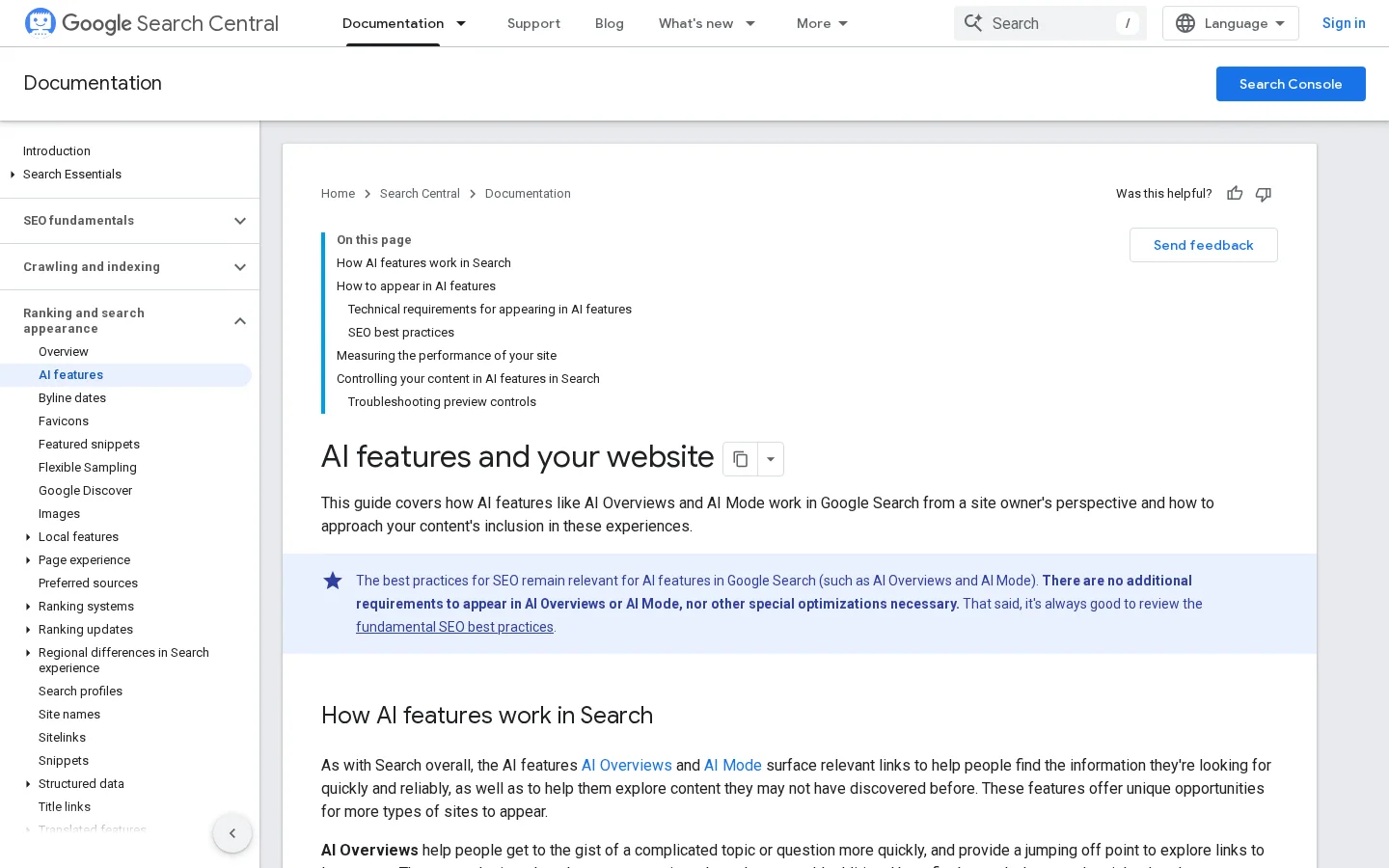
Google's documentation on AI features says that sites appearing in AI Overviews and AI Mode are included in the overall search traffic in Search Console. Those clicks are reported in the Performance report under the Web search type. You do not need a separate report for them, but you do need to check the Web search type rather than an unfiltered total.
OpenAI lists several crawlers with different jobs. GPTBot crawls content that may be used to train its generative AI foundation models. OAI-SearchBot surfaces websites in ChatGPT's search features. ChatGPT-User visits a page when a user asks ChatGPT or a custom GPT a question about it, and robots.txt rules may not apply to it. Read those three descriptions as three separate decisions, not one.
The most common mistake is blocking the wrong bot. The following robots.txt entry opts your site out of training, and nothing else:
User-agent: GPTBot
Disallow: /
Blocking OAI-SearchBot is the step that affects whether your pages can appear in ChatGPT's search features. OpenAI also notes that opted-out sites can still appear as navigational links. Set one rule per bot, based on what you want for each purpose, and read your logs before you change anything. The AI crawlers glossary entry lists the user agents to look for.
These mistakes appear in many reviews, including careful ones. Each has a clear sign and a simple fix, so you can catch it before it costs you a budget cycle.
What it is: you compare the 11 engines on Starter with the 5 on Essential as if they were one product. How to spot it: the review does not name the plan it tested. How to fix it: write down the engine list for the plan you would buy, then compare the lists, not the headline numbers.
What it is: a promotional credit gets treated as a plan that stays free. How to spot it: the pricing page calls it an offer, and the text does not explain its terms. The $25 and $300 offers on AthenaHQ's page are examples. How to fix it: ask in writing what the credit covers, how long it lasts, and what you pay after it runs out.
What it is: you judge a tool on a single batch of answers. How to spot it: a mention appears on one day and disappears the next. How to fix it: run each prompt on two different days before you draw a conclusion, and keep the raw answers so you can check any claim later.
What it is: you block GPTBot to avoid being cited, but GPTBot is about training, and search uses OAI-SearchBot. How to spot it: your robots.txt disallows GPTBot and says nothing about OAI-SearchBot. How to fix it: set one rule per bot, based on whether you want training, search or neither, and use the example in the section above.
What it is: you take a review's seat count or price as today's price. How to spot it: the review has no date, or its figures differ from the official page. How to fix it: check the official page on the day you buy, and note its date in your buying file.
Before you sign, check that you have
The right choice depends on the job you need done. Measurement, team access and content production are three different needs, and no single plan covers all three equally well. The table below gives a quick way to match your situation to an option.
| Your situation | Better fit | Why |
|---|---|---|
| You want to test before paying | AthenaHQ Essential | Free, with 300 credits and five engines |
| You need 11 engines and shared team access | AthenaHQ Starter | The listed engines, with unlimited seats |
| You want the tool to act on what it finds | A tracker that also produces and publishes | Tracking alone stops at the score |
| You want a monthly trend per prompt, per engine | A prompt tracker with monthly history | Repeatable runs, with the sources behind each mention |
If you choose Sorank, its monthly prompt tracking covers ChatGPT, Claude and Gemini, with Grok on higher plans, and runs one analysis per month for each tracked prompt. The GEO Leaderboard shows which brands the assistants recommend instead of you. It is the wrong choice if you need daily runs across eleven engines. Current plans and prices are on the Sorank pricing page.
If you are comparing several vendors, our comparison of the best AI visibility tools puts them on the same criteria. For a suite-based tool, our Semrush AI Visibility Toolkit review covers the same question from a different angle.
Start with the free plan, check twenty answers by hand, and decide from your own data rather than from a headline price.
AthenaHQ's pricing page lists a free Essential plan, a Starter plan at $295 per month and a custom Enterprise plan. Annual pricing is not shown in the text we read. Check the live page before you budget, because prices change.
The Essential plan is free, with 300 credits and five AI engines. One credit is one AI response, so a test of 10 prompts on five engines uses 50 credits, which is enough for six full runs before you pay.
The Starter plan lists 11 engines, including ChatGPT, Perplexity, Google AI Overviews, Google AI Mode, Gemini, Claude, Copilot, Grok, DeepSeek, Meta AI and Mistral. The Enterprise plan lists a similar set and adds the Citation Engine and persona targeting.
We analyse your competitors, your website and your AI visibility to create a tailored content plan for free.
 AI Content Brief Generator
 FAQ Schema Generator
 AI Blog Post Ideas Generator
 Structured Data Validator (Schema Validator)
 Alt Text Checker
 Internal Link Analyzer
 Backlink Challenge
 AI Meta Description Generator
 AI Blog Title Generator
 Google Indexability Checker
 AI Blog Outline Generator
 UTM Link Builder
 Keyword Clustering Tool
 Canonical Tag Checker
 XML Sitemap Generator
 Broken Link Checker
 AI SEO Title Generator
 Headline Analyzer
 SERP Preview Tool
 Redirect Checker
 Hreflang Tag Generator
 Heading Structure Analyzer
 HTTP Headers Checker
 Favicon Extractor
 SERP CTR Calculator
 SEO vs Paid Search Savings Calculator
 SEO Share of Voice Calculator
 SEO ROI Calculator
 SEO Traffic and Revenue Forecast Calculator
 SEO Budget Calculator
 SEO Break-Even Calculator
 SaaS SEO ROI Calculator
 ROAS Calculator
 Reading Time Calculator
 Ranking Gain Simulator
 Organic Traffic Value Calculator
 Organic Traffic Estimator and Website Traffic Checker
 LTV to CAC Ratio Calculator
 Local SEO ROI Calculator
 Link Building Cost Calculator
 Keyword Value Calculator
 Keyword Opportunity Score Calculator
 Keyword Density Calculator
 GEO ROI Calculator
 GEO Content Investment Calculator
 Ecommerce SEO ROI Calculator
 Customer Lifetime Value Calculator
 Customer Acquisition Cost Calculator
 CTR Calculator
 Cost Per Article Calculator
 Conversion Rate Calculator
 Content Marketing ROI Calculator
 ChatGPT Referral Traffic Estimator
 Bounce Rate Calculator
 Backlink ROI Calculator
 AI Visibility Score Calculator
 AI Traffic Value Calculator
 AI Share of Voice Calculator
 Cost of AI Invisibility Calculator
 AI Citation Rate Calculator
 llms.txt Validator
 AI Overview Checker and AI Overviews Rank Checker
 Robots.txt Checker
 AI SEO Audit
 LLM Readability Checker
 SearchGPT Readiness Checker
 Structured Data LLM Audit
 Website Crawlability AI Audit
 Why ChatGPT Is Not Recommending My Website
 Gemini Ranking Tool
 Perplexity Ranking Checker
 LLM Citation Checker
 Answer Engine Optimization Audit
 GEO Audit
 AI Search Visibility Test
 ChatGPT Visibility Checker
 llms.txt Generator
 URL Extractor
 Webpage to Markdown
 Sitemap Checker
 SERP Volatility Sensor
 Page Size Checker
 Word Counter
 Slug Generator
 Schema Generator
 Robots Generator
 OG Preview
 Meta Tags Generator
 Image Compressor
 Favicon Generator
 On-Page SEO Audit: SEO Checker and SEO Analyzer
 Backlink Analysis Tool
 Keyword Research Tool
 Domain Authority Checker
 “I tested Sorank on a real client site and it's insane. It does everything an agency would bill you $1500 a month for. It's going into production on that client now.”

 Guillaume Guersanguersanguillaume.com“We are an Ads agency and we wanted to get our SEO back on track once and for all. Sorank gave us a clear view of our site, helped us prioritize optimizations, and properly structure our content. The tool is easy to use, well designed for a team, and very practical for centralizing tracking without having to juggle multiple platforms. A very solid foundation to start fresh with our SEO.”
 Gaspard MadouiAds Agency
 “I just let the Sorank software do its thing, and now my DR is 25 and my page is ranking higher.”
 Lucas Flandrefoundertrace.fr“I specialized in GEO thanks to Sorank. The GEO Leaderboard allows me to show my clients their position vs competitors on ChatGPT. It’s a real commercial differentiator.”
 MélanieSEO Freelance“Great service, works well for our website and helps us understand how to improve it to rank better on Google and elsewhere. Congrats, keep going, I recommend it.”
 Hugo T.E-commerce merchant