Preferences
Privacy is important to us, so you have the option of disabling certain types of storage that may not be necessary for the basic functioning of the website. Blocking categories may impact your experience on the website. More information
Privacy is important to us, so you have the option of disabling certain types of storage that may not be necessary for the basic functioning of the website. Blocking categories may impact your experience on the website. More information

Server side tracking explained: architectures, real Google Cloud costs, a step-by-step GTM setup, Safari cookie limits, consent rules and the mistakes to avoid.
In short
server side tracking moves your measurement tags from the visitor's browser to a server you control, usually a Google Tag Manager server container on a subdomain like data.yoursite.com. The browser sends one stream of events to your server, and the server decides what to clean, enrich and forward to Google Analytics 4, Google Ads, Meta or your CRM. You get longer-lived first-party cookies, fewer requests blocked, a lighter page and real control over personal data, but it costs money (a production setup on Google Cloud starts around $90 per month) and it does not replace consent.
Want to go further? Ask
Quick quiz
Which way of finding customers online fits you best?
Sorank matches your answers


Test it for 3 days on your own site and see where you stand on Google, ChatGPT and the other AIs.
Start 3-day free trial3 days free, then stop whenever you want. 90-day results guarantee, conditions apply.
In classic tracking, every tool you use loads its own JavaScript in the visitor's browser. Google Analytics, the Google Ads tag, the Meta Pixel, LinkedIn, TikTok, Hotjar: each one opens its own connection to its own domain and collects what it wants. You own the page, but not what leaves it.
With server side tracking, the browser sends its events to an endpoint you own. That endpoint, a "tagging server", receives the raw request, turns it into a standard event, then runs server tags that forward a version of that event to each vendor. The vendor never talks to the visitor's browser directly.
Server side tracking is not a way to track people who refused consent. If a visitor says no in your consent banner, your server must respect that choice exactly like the browser would. It is also not a magic fix for bad data: if your data layer sends the wrong order value, the server forwards the wrong order value, faster.
| Criterion | Client-side tracking | Server side tracking |
|---|---|---|
| Where tags run | Visitor's browser | Your tagging server |
| Requests from the page | One per vendor | One stream to your domain |
| Cookie lifetime in Safari | JavaScript cookies capped at 7 days | Server-set cookies can last longer, if the setup is right |
| Control over data sent to vendors | Low: each script reads what it can | High: you choose every field |
| Cost | Free | Hosting, from about $90 per month in production |
| Skills needed | Tag Manager basics | Tag Manager, cloud hosting, DNS, debugging |
Client-side vs server side tracking
Take a purchase on an online shop. Here is what happens with a Google Tag Manager server container.
purchase event into the data layer, with the order ID, value, currency and items.https://data.yoursite.com/g/collect.The path of one event in server side tracking
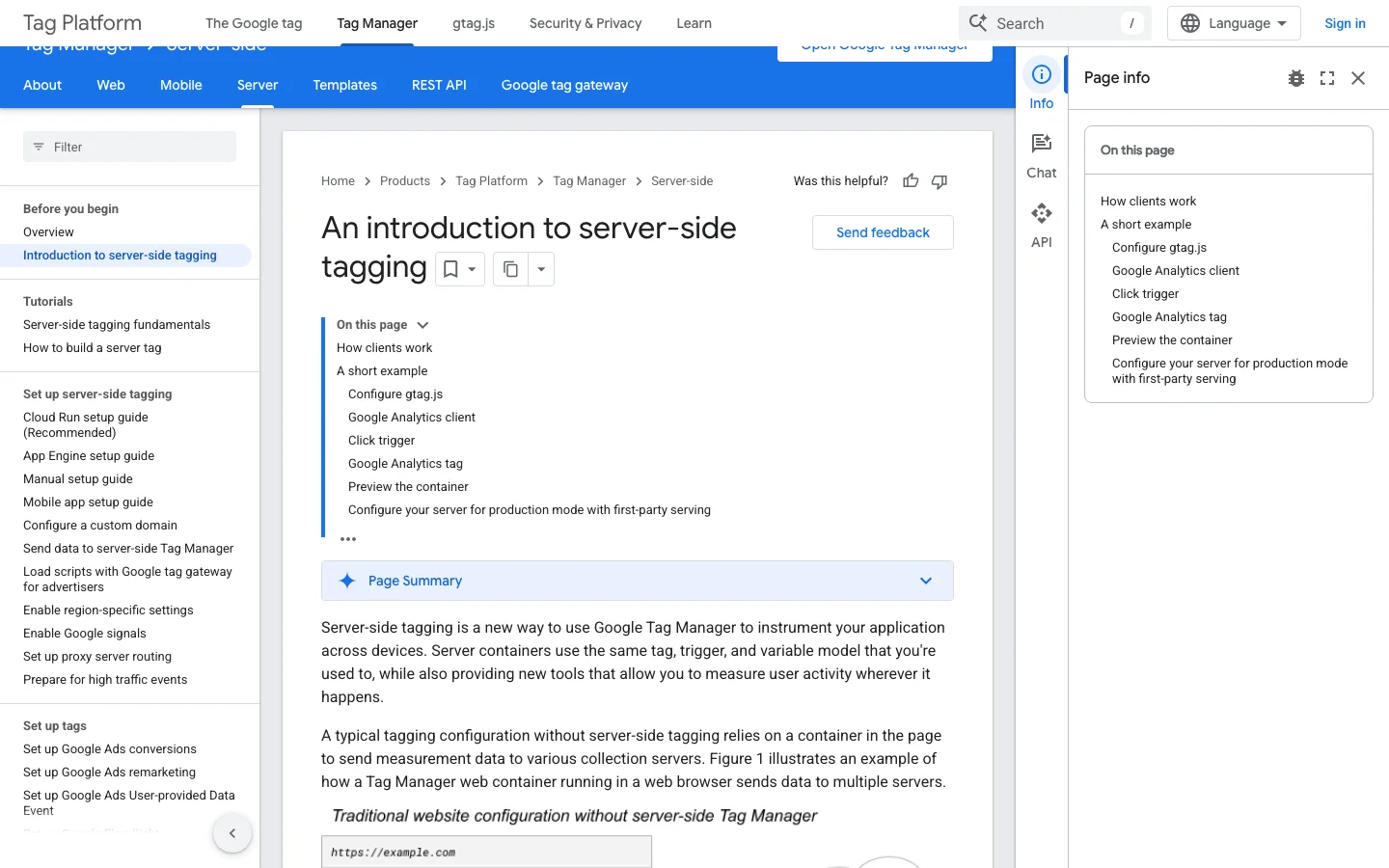
Google's server-side tagging overview explains that clients are checked in priority order and the first one that claims a request handles it. Two clients come built in: Google Analytics and Measurement Protocol. That detail matters: if you add a custom client (for example to receive webhooks from your payment provider), give it the right priority or the GA4 client will never see some requests, or the opposite.
The browser still runs one tag, collects the page context and holds the consent state. Server side tracking reduces the number of scripts, it does not remove all of them. A "pure" server setup without any browser tag is possible (events sent from your back end only), but you then lose page views, scroll and client IDs unless you rebuild them yourself.
There are four real reasons. The order depends on your business: an ecommerce site cares first about ad attribution, a bank about data control.
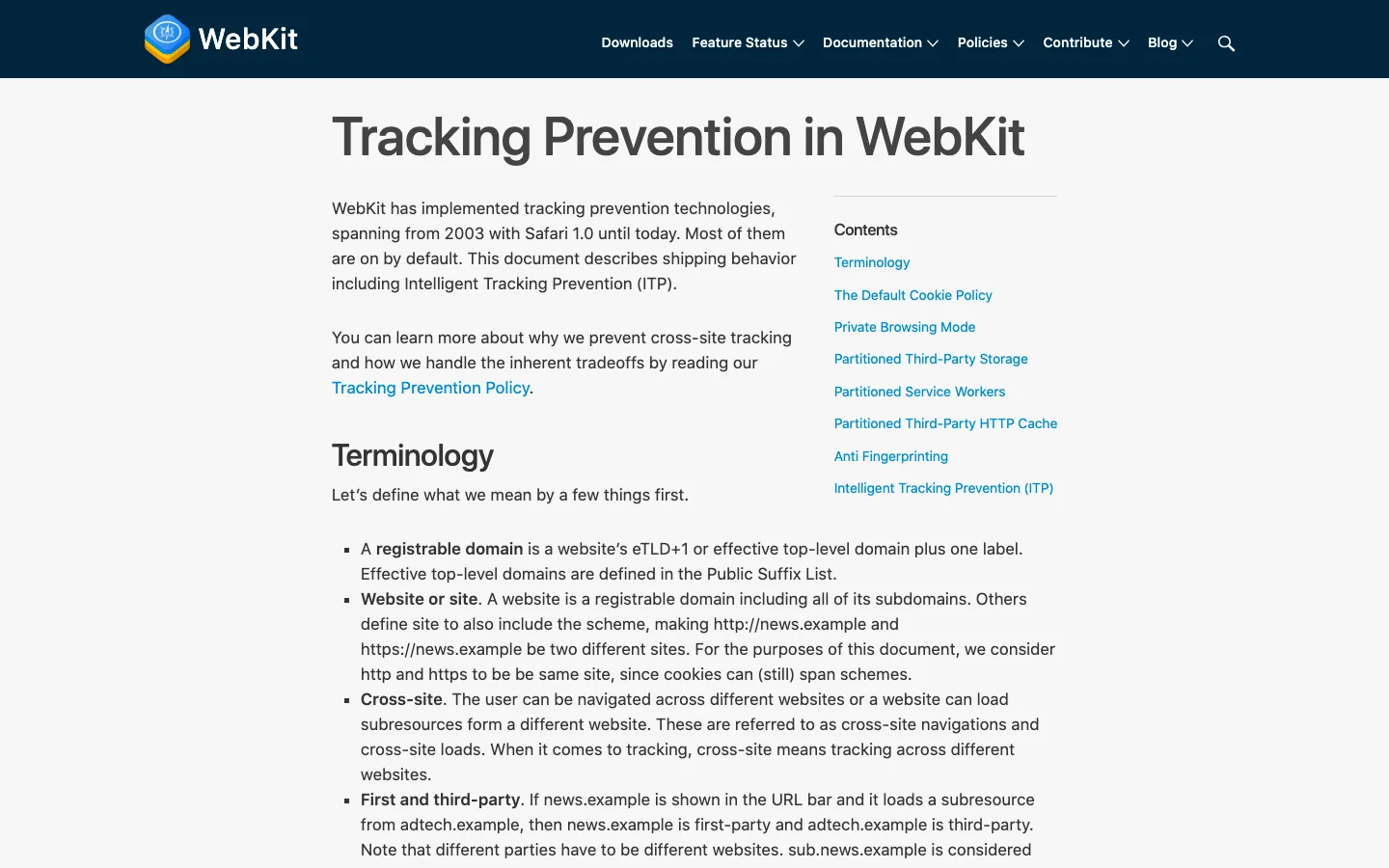
WebKit's Tracking Prevention documentation states that Safari deletes cookies created in JavaScript after 7 days without interaction, and caps them at 24 hours when the landing URL carries link decoration (a gclid or fbclid for example). A visitor who clicks your ad on Monday and buys ten days later looks like a new visitor. Cookies set by a server in the HTTP response are treated differently, but the same page warns that cookies set through CNAME cloaking or third-party IP cloaking are capped at 7 days too. That is the technical heart of the subject: the gain only exists if your tagging server is truly first-party, on the same infrastructure as your site.
Safari's limits on tracking cookies
Source: WebKit, Tracking Prevention in WebKit
Ad blockers and privacy extensions work mostly with lists of known domains and URL patterns. A request to google-analytics.com/g/collect is on every list. A request to your own subdomain is less often blocked. Be honest about it in your planning: some lists already block common server endpoints, and the default /gtm.js and /g/collect paths are well known. Server side tracking recovers part of the data, not all of it.
This is the most underrated benefit. In the server container you decide which fields leave your infrastructure. You can drop the IP address before forwarding to a vendor, truncate the user agent, remove URL parameters that contain emails, hash a phone number before sending it to Meta. In the browser, a vendor script can read the whole page; on your server, it only receives what you send.
Every vendor script you move to the server is one less script for the browser to download, parse and run. On a site loaded with five or six marketing tags, the main thread breathes. That helps your interaction metrics, which count for page speed SEO and for the Core Web Vitals. Measure before and after: the gain depends on how many tags you really remove from the page.
Is server side tracking worth it for you?

Keep a tag in the browser when it needs the page itself: scroll depth, clicks, form fields and the consent banner. Move a tag to your server when you need to control the fields it sends, or when its data is created after the visit. Most mature setups use both.
| Question | If yes | If no |
|---|---|---|
| Does the tag need the page (DOM, scroll, clicks)? | Keep it in the browser | Consider the server |
| Must you remove or hash fields before the vendor receives them? | Move it to the server | Either model works |
| Is the event created after the visit (refund, renewal, CRM status)? | Send it from your back end | Keep the browser event |
| Does the same event exist on both sides? | Share one event ID on both | Use one route only |
Debugging moves too. A browser tag shows its errors in the browser console and the network panel. A server tag shows them in the server preview and in the Cloud Run logs, so check both after each change. Each server tag also adds one hop, so the event reaches the vendor a little later. If a platform reports a gap, compare the timestamps in the server preview with the browser request.
Tip
Move one tag at a time, starting with the one whose fields you most need to control. Run both versions for at least one week, and compare the numbers before you remove the browser tag.
"Server side tracking" covers several designs. They are not exclusive: many mature setups combine two or three. Here they are, from the most common to the most custom.
Principle: you deploy Google's official tagging server image on Cloud Run in your own Google Cloud project. When to use it: you already use Google Tag Manager and want full control. Advantages: official image, your data stays in your cloud project, you choose the region (useful for European data residency). Limits: you manage scaling, billing, updates and the load balancer. Example: a retailer deploys in europe-west1 with 2 minimum instances, maps data.shop.com through a load balancer and sends GA4, Google Ads and Meta from the same container.
Principle: a specialised host runs the same Google container for you; you point a subdomain to it. When to use it: you want server side tagging without managing cloud infrastructure. Advantages: fast setup, often a lower entry price for small traffic, extra features (custom loader paths, cookie keeper). Limits: a new data processor to declare in your contracts and privacy policy, and a dependency on a third party. Example: a 3-person shop gets its server running in an afternoon and pays a monthly plan based on requests.
Principle: your application (Shopify, WooCommerce, your own back office) sends conversions straight to the Meta Conversions API, Google Ads or GA4 Measurement Protocol when the order is saved in the database. When to use it: for events that happen outside the browser (refunds, subscription renewals, offline sales, a lead that becomes a customer in the CRM). Advantages: the most reliable data, since it comes from your database. Limits: development time, and you must pass the browser identifiers (client ID, fbp, gclid) to keep attribution. Example: a software company sends a "qualified lead" event to Google Ads when sales marks the deal as won, 3 weeks after the first click.
Principle: the tagging logic runs on your CDN, close to the visitor (Cloudflare Zaraz, workers at the edge). When to use it: your site is already behind that CDN and you want the shortest path. Advantages: same domain by design, very low latency, no separate server. Limits: fewer vendor templates than Google Tag Manager, and you lock part of your measurement into your CDN provider. Example: a media site behind Cloudflare moves its analytics and ad tags to the edge to cut third-party scripts from every page.
| Architecture | Setup effort | Running cost | Data control | Best for |
|---|---|---|---|---|
| GTM server on Google Cloud | High | From about $90/month | Full | Teams with technical skills, strict data rules |
| GTM server on managed host | Low | Plan based on requests | High, with one more processor | Small and mid-size sites |
| Back-end APIs | High (development) | Low | Full | Offline, CRM and subscription events |
| Edge or CDN tagging | Medium | Included or low | High | Sites already on that CDN |
Note
The strongest setup for ad-driven businesses is usually a hybrid: a GTM server container for browser events, plus back-end API calls for events the browser never sees (refunds, renewals, deals won in the CRM).
Google's Cloud Run setup guide gives the reference numbers. Each server is a Cloud Run instance with 1 vCPU and 0.5 GB of memory, on the "CPU always allocated" pricing model, for about $45 per month per server. Google recommends a minimum of 2 instances in production to reduce the risk of data loss, and expects 2 to 10 servers to handle about 35 to 350 requests per second, depending on the number and type of tags.
Google's reference numbers for a tagging server
Source: Google Tag Platform, Cloud Run setup guide
Warning
The automatic provisioning option in Tag Manager creates a test-sized server. It is fine for a trial, not for production traffic. Before go-live, deploy a production configuration with at least 2 minimum instances.
This is the path for the most common case: a GA4 site with Google Ads and Meta, self-hosted on Google Cloud. Plan two to five days for a first project, testing included.
The 7-step setup
Export your web container and list every tag, trigger and variable. Note which events matter for money (purchase, lead, sign up) and which consent category each tag belongs to. If your current tracking is messy, fix it first: our guide to conversion tracking in GA4, Google Ads and Meta gives the clean event model to start from.
In Google Tag Manager, create a new container and choose "Server" as the target platform. Choose "Manually provision tagging server" and copy the container configuration string. You will need it as the CONTAINER_CONFIG variable. If you are new to Tag Manager, start with our Google Tag Manager guide.
Deploy the preview server first, then the production tagging server. The production command, adapted from Google's guide:
gcloud run deploy "server-side-tagging" \
  --region europe-west1 \
  --image gcr.io/cloud-tagging-10302018/gtm-cloud-image:stable \
  --platform managed \
  --ingress all \
  --min-instances 2 \
  --max-instances 10 \
  --timeout 60 \
  --allow-unauthenticated \
  --no-cpu-throttling \
  --update-env-vars PREVIEW_SERVER_URL="https://YOUR-PREVIEW-URL",CONTAINER_CONFIG="YOUR_CONFIG_STRING"
Check the health endpoint after deployment. A healthy server answers ok:
curl https://YOUR-CLOUD-RUN-URL/healthyThis is where most setups lose the cookie benefit. Pick a subdomain such as data.yoursite.com or sst.yoursite.com (avoid names like analytics, tracking or gtm, which some blocklists target). Two options:
yoursite.com/metrics/) through your load balancer or CDN. The requests and the IP address are those of your site. This is the most robust choice against Safari's IP checks.A CNAME to a vendor's hostname is the weakest option for cookie lifetime, for the reason given by WebKit above. After the mapping, check the response headers of your endpoint with our free HTTP headers checker: you should see your own domain in the Set-Cookie header, with Secure, HttpOnly and a SameSite value.
In the web container, open the Google tag and add the configuration parameter server_container_url with your subdomain. With gtag.js directly:
gtag('config', 'G-XXXXXXXXXX', {
  'server_container_url': 'https://data.yoursite.com'
});
You can also serve the Tag Manager script itself from your domain, so the web container loads from https://data.yoursite.com/gtm.js instead of googletagmanager.com. Enable the Web Container client in the server container for that.
Open Preview mode in both containers at the same time. In the server preview, check for each event: which client claimed it, which tags fired, and the exact outgoing request to each vendor. Then run the old and new setups in parallel for one to two weeks, on separate GA4 properties or with careful deduplication, and compare sessions, conversions and revenue per day before you switch off the old tags.
Moving tags to a server changes where data flows, not the legal basis to collect it. In Europe, reading or writing a cookie for analytics or ads still needs consent under the ePrivacy rules, and personal data still falls under the GDPR wherever it is processed.
With Google Consent Mode, the browser sends the consent state in each request (the gcs parameter in GA4 requests). In the server container, read it and block non-Google tags when ad consent is denied. For tags that have no built-in consent logic, add an explicit trigger condition. A server that ignores the consent state is a server that sends everyone's data to Meta: the legal risk is higher than with client-side tags, because nobody can see it from the browser.
email, phone, token).Your consent banner remains the foundation. If you are choosing one, compare the options in our list of the best cookie consent software, and check that it supports Google Consent Mode v2.
Before and after: what reaches Meta from a purchase
The GA4 client keeps the standard _ga cookie format, so your sessions continue after the switch. A good practice is to let the server set the FPID cookie (server-managed client ID, HttpOnly), which Safari's JavaScript limits do not touch. Be careful: switching to FPID changes the client ID for returning users once, so plan the migration on a quiet week and annotate it in your reports.
Fire the Conversion Linker in the server container so the gclid is stored in a server-set first-party cookie. With a 24-hour cap on JavaScript cookies after an ad click in Safari, this one change can recover conversions that happen days after the click. Add enhanced conversions and, for leads, offline conversion import from your CRM.
Most sites keep the Pixel in the browser and add the Conversions API on the server. Meta then receives each event twice and must merge them. Meta's deduplication documentation is clear: the Pixel's eventID must match the server's event_id, the event names must match, and events are only deduplicated if they arrive within 48 hours of each other. Generate the ID once in the data layer and use it on both sides:
window.dataLayer.push({
  event: 'purchase',
  event_id: 'order_10482',
  ecommerce: {
    transaction_id: '10482',
    value: 129.90,
    currency: 'EUR'
  }
});
Tip
Use the order ID as the event ID for purchases. It is unique, stable, and lets you check deduplication in Meta's Events Manager by searching a single order.
What it is: a CNAME to a vendor hostname, or A records to an IP far from your site's infrastructure. How to spot it: in Safari, open the Web Inspector, Storage tab, and look at the expiry of the _ga or FPID cookie a day after a visit: if it shows 7 days, the cap is applied. How to fix it: serve the tagging server under your main domain through your load balancer or CDN, or on IPs that share your site's range.
What it is: the old client-side GA4 or Ads tags still fire next to the new server flow. How to spot it: sessions or conversions jump by close to 100% on the switch day; in Tag Assistant you see two collect requests per page. How to fix it: remove or pause every direct vendor tag in the web container once the server tags are live, and keep one route per event.
What it is: server tags fire for every event, whatever the visitor chose. How to spot it: refuse all cookies, buy a test product, and look in the server preview: if the Meta tag fired, you have the problem. How to fix it: add consent conditions to every non-Google trigger and rely on the built-in consent behaviour of Google tags.
What it is: the Pixel and the Conversions API send the same purchase without a shared event ID. How to spot it: Meta reports more purchases than your back office, and Events Manager shows low deduplication. How to fix it: generate event_id in the data layer and map it in both the Pixel and the server tag.
What it is: the automatically provisioned trial server handles real traffic. How to spot it: gaps in data at traffic peaks, 5xx errors or timeouts in Cloud Run logs. How to fix it: redeploy with at least 2 minimum instances and a maximum sized to your peak requests per second.
What it is: back-end events reach Google Ads or Meta without gclid, fbp, fbc or client ID. How to spot it: server events appear in the platform but are not attributed to campaigns. How to fix it: store these identifiers with the order or lead at the time of the visit, and send them with the server event.
What it is: Cloud Logging stores every request. How to spot it: the Google Cloud bill shows logging above compute. How to fix it: disable request logging in the tagging server, or add a log exclusion filter, and keep error logs only.
Go-live checklist
Do not judge server side tracking on feelings. Compare the two weeks before and after on numbers that should move:
To keep campaign sources clean in GA4 while you compare, tag your links consistently with our free UTM builder. And remember that some traffic stays invisible whatever your tracking: visits from AI assistants often arrive without a referrer, as explained in our page on AI dark traffic.
Tip
Your analytics only see the visitors who click. To know whether ChatGPT, Gemini, Claude or Perplexity cite your brand at all, Sorank's AI mention tracking checks the answers of these assistants for you.
Start small. Move GA4 first, check the numbers, then add Google Ads, then Meta. Each step is reversible as long as you keep the old web container version. If your budget or team cannot support a self-hosted server today, the back-end API route for your key conversions (purchase or qualified lead) already gives you the most reliable data for the money you spend on ads.
Yes, if you collect the same consent as with browser tags. Server side tracking changes where data flows, not the legal basis: when a visitor refuses cookies, your server tags must not fire for ad vendors. It even helps compliance, because you can remove IP addresses and personal fields before data leaves your infrastructure.
Google estimates about $45 per month per Cloud Run server and recommends at least 2 instances in production, so around $90 per month before traffic peaks, load balancer and logging. Managed hosts offer plans based on requests that can be cheaper for small sites. The setup and maintenance time is usually the largest cost.
Partly. Requests to your own subdomain are blocked less often than requests to google-analytics.com, but some blocklists already target common server endpoints and paths. Expect to recover part of the lost data, not all of it, and never use it to track visitors who refused consent.
We analyse your competitors, your website and your AI visibility to create a tailored content plan for free.
 Duplicate Content Checker
 Mobile-Friendly Test
 Website Speed Test
 Subdomain Finder
 Domain Age Checker
 CMS Detector
 Googlebot Simulator
 Nofollow Link Checker
 Meta Tag Checker
 Keyword Cannibalization Checker
 Keyword Intent Checker
 Keyword Extractor
 Google Ads Cost Calculator
 CPC Calculator
 Local Citation Finder
 Reddit Threads Finder
 Disavow File Generator
 Redirect Generator
 Canonical Tag Generator
 Passive Voice Checker
 Google Location Changer
 Google Review Calculator
 Google Review Link Generator
 Keyword Combiner
 Podcast Show Notes Generator
 AI Content Rewriter
 AI Text Humanizer
 ChatGPT Prompt Generator
 Twitter Thread Generator
 Tweet Generator
 Landing Page Copy Generator
 Google Ads Copy Generator
 Pinterest Pin Description Generator
 Anchor Text Generator
 Social Media Post Generator
 LinkedIn Post Generator
 Free AI Writer
 Review Response Generator
 LSI Keyword Generator
 YouTube Video Ideas Generator
 YouTube Tag Generator
 YouTube Description Generator
 Product Description Generator
 CTA Generator
 Blog Introduction Generator
 Conclusion Generator
 Hook Generator
 AI Content Brief Generator
 FAQ Schema Generator
 AI Blog Post Ideas Generator
 Structured Data Validator (Schema Validator)
 Alt Text Checker
 Internal Link Analyzer
 Backlink Challenge
 AI Meta Description Generator
 AI Blog Title Generator
 Google Indexability Checker
 AI Blog Outline Generator
 UTM Link Builder
 Keyword Clustering Tool
 Canonical Tag Checker
 XML Sitemap Generator
 Broken Link Checker
 AI SEO Title Generator
 Headline Analyzer
 SERP Preview Tool
 Redirect Checker
 Hreflang Tag Generator
 Heading Structure Analyzer
 HTTP Headers Checker
 Favicon Extractor
 SERP CTR Calculator
 SEO vs Paid Search Savings Calculator
 SEO Share of Voice Calculator
 SEO ROI Calculator
 SEO Traffic and Revenue Forecast Calculator
 SEO Budget Calculator
 SEO Break-Even Calculator
 SaaS SEO ROI Calculator
 ROAS Calculator
 Reading Time Calculator
 Ranking Gain Simulator
 Organic Traffic Value Calculator
 Organic Traffic Estimator and Website Traffic Checker
 LTV to CAC Ratio Calculator
 Local SEO ROI Calculator
 Link Building Cost Calculator
 Keyword Value Calculator
 Keyword Opportunity Score Calculator
 Keyword Density Calculator
 GEO ROI Calculator
 GEO Content Investment Calculator
 Ecommerce SEO ROI Calculator
 Customer Lifetime Value Calculator
 Customer Acquisition Cost Calculator
 CTR Calculator
 Cost Per Article Calculator
 Conversion Rate Calculator
 Content Marketing ROI Calculator
 ChatGPT Referral Traffic Estimator
 Bounce Rate Calculator
 Backlink ROI Calculator
 AI Visibility Score Calculator
 AI Traffic Value Calculator
 AI Share of Voice Calculator
 Cost of AI Invisibility Calculator
 AI Citation Rate Calculator
 llms.txt Validator
 AI Overview Checker and AI Overviews Rank Checker
 Robots.txt Checker
 AI SEO Audit
 LLM Readability Checker
 SearchGPT Readiness Checker
 Structured Data LLM Audit
 Website Crawlability AI Audit
 Why ChatGPT Is Not Recommending My Website
 Gemini Ranking Tool
 Perplexity Ranking Checker
 LLM Citation Checker
 Answer Engine Optimization Audit
 GEO Audit
 AI Search Visibility Test
 ChatGPT Visibility Checker
 llms.txt Generator
 URL Extractor
 Webpage to Markdown
 Sitemap Checker
 SERP Volatility Sensor
 Page Size Checker
 Word Counter
 Slug Generator
 Schema Generator
 Robots Generator
 OG Preview
 Meta Tags Generator
 Image Compressor
 Favicon Generator
 On-Page SEO Audit: SEO Checker and SEO Analyzer
 Backlink Analysis Tool
 Keyword Research Tool
 Domain Authority Checker
 “I tested Sorank on a real client site and it's insane. It does everything an agency would bill you $1500 a month for. It's going into production on that client now.”

 Guillaume Guersanguersanguillaume.com“We are an Ads agency and we wanted to get our SEO back on track once and for all. Sorank gave us a clear view of our site, helped us prioritize optimizations, and properly structure our content. The tool is easy to use, well designed for a team, and very practical for centralizing tracking without having to juggle multiple platforms. A very solid foundation to start fresh with our SEO.”
 Gaspard MadouiAds Agency
 “I just let the Sorank software do its thing, and now my DR is 25 and my page is ranking higher.”
 Lucas Flandrefoundertrace.fr“I specialized in GEO thanks to Sorank. The GEO Leaderboard allows me to show my clients their position vs competitors on ChatGPT. It’s a real commercial differentiator.”
 MélanieSEO Freelance“Great service, works well for our website and helps us understand how to improve it to rank better on Google and elsewhere. Congrats, keep going, I recommend it.”
 Hugo T.E-commerce merchant