Preferences
Privacy is important to us, so you have the option of disabling certain types of storage that may not be necessary for the basic functioning of the website. Blocking categories may impact your experience on the website. More information

Privacy is important to us, so you have the option of disabling certain types of storage that may not be necessary for the basic functioning of the website. Blocking categories may impact your experience on the website. More information

Google Tag Manager explained: tags, triggers and variables, a step-by-step install, the tags worth adding for SEO, and the limits for Google and AI crawlers.
Tools

In short
Google Tag Manager (GTM) is a free tool from Google that lets you add and update tracking codes (tags) on a website without editing its source code each time. You install one container snippet on every page, then create tags (Google Analytics 4, Google Ads conversions, pixels), triggers (when each tag fires) and variables (the data they use) in a web interface, test them in Preview mode and publish. GTM measures your site; it does not improve rankings by itself, and anything it injects with JavaScript is invisible to most AI crawlers.
Want to go further? Ask
Quick quiz
Which way of measuring your marketing fits you?
Sorank matches your answers


Test it for 3 days on your own site and see where you stand on Google, ChatGPT and the other AIs.
Start 3-day free trial3 days free, then stop whenever you want. 90-day money-back guarantee.
Google Tag Manager sits between your website and every marketing tool that needs to measure it. Google describes it as a way to manage tags "without editing code" and documents the full setup in its Tag Manager help center. This guide covers what GTM is, how to install it, which tags matter for SEO, where its limits are for Google and for AI assistants, and the mistakes that break tracking.
Google Tag Manager is a tag management system: a single piece of code on your site that loads and controls all the other tracking codes. Instead of asking a developer to paste a new script every time marketing adds a tool, you configure it once in GTM and publish. Google launched it in 2012 and it is free; a paid enterprise edition, Tag Manager 360, exists for large organizations that need more workspaces and approval workflows.
GTM is built on four concepts:
The fifth piece is the data layer. Google defines it as "an object used by Google Tag Manager and gtag.js to pass information to tags" in its data layer documentation. Your site pushes structured information into it (dataLayer.push with an event name, a transaction value, a user type) and GTM reads it reliably, without scraping the page.
The two tools are complementary. GTM deploys and fires tags; Google Analytics stores and reports the data that some of those tags send. You can run GA4 without GTM (by pasting the Google tag directly) and GTM without GA4 (to manage only ad pixels), but most sites use them together.
| Question | Google Tag Manager | Google Analytics 4 |
|---|---|---|
| Main job | Deploy and control tracking codes | Collect, store and report visitor data |
| Has reports? | No, only a debug view (Preview mode) | Yes: acquisition, engagement, conversions |
| Who uses it daily | Marketers, analysts, developers | Marketers, SEO, management |
| Works with other vendors | Yes: Google Ads, Meta, LinkedIn, Hotjar, any custom HTML | Google products mainly |
| Price | Free (360 edition paid) | Free (360 edition paid) |
For organic search, GA4 is where you read results: sessions from Google, landing pages, conversions from organic traffic. Our guide to Google Analytics for SEO covers the reports that matter.
Go to tagmanager.google.com, sign in with a Google account, click Create Account, enter the company name and country, then name the container after your domain (www.example.com) and choose the target platform: Web for a website. Other types exist for iOS, Android, AMP and server-side tagging.
GTM gives you two pieces of code. According to Google, the script block goes as high in the <head> as possible, and the noscript block goes immediately after the opening <body> tag, on every page. Both carry your container ID, which starts with GTM-. On WordPress, Shopify, Wix or Webflow, a plugin, theme setting or native integration usually does this for you.
Tip
Install GTM in the site template, not page by page. A page that misses the snippet is a page with no analytics and no conversions, and nobody notices until a report looks wrong.
Create a new tag of type Google tag, paste your GA4 measurement ID (G-XXXXXXX) and set the trigger to Initialization or All Pages. This single tag sends page views and the automatic events of enhanced measurement (scrolls, outbound clicks, file downloads, site search).
Track the actions that matter for your business: form submissions, demo requests, purchases, clicks on a phone number. Use GA4 event tags with triggers, then mark the key events as conversions in GA4. Our guide to conversion tracking explains how to choose them. For campaigns, tag your links with a UTM builder so each source is identified.
Click Preview to open your site with Tag Assistant: you see which tags fired on each page and event, and which did not. When everything fires as expected, click Submit, name the version (for example "GA4 + form conversion") and publish. Every published version is saved, so you can roll back in one click.
GTM does not change your rankings, but it gives you the measurement that SEO decisions depend on. The useful set for an organic strategy:
Yes, and Google documents it: create a Custom HTML tag containing a JSON-LD block, fill it with GTM variables, publish and test with the Rich Results Test using the URL input. Google's Search Central page on JavaScript-generated structured data lists the caveats: duplicating information in GTM "increases the risk of having a mismatch between page content and the structured data", and dynamically generated Product markup "can make Shopping crawls less frequent and less reliable".
The bigger limit concerns AI. Googlebot renders JavaScript, so it can read markup injected by GTM after a delay. Most AI crawlers do not. A Vercel analysis published in December 2024, The rise of the AI crawler, found that "none of the major AI crawlers currently render JavaScript", naming GPTBot, OAI-SearchBot, ChatGPT-User, ClaudeBot and PerplexityBot; Gemini, which uses Google's infrastructure, is the exception.
Watch out
Schema, titles, canonical tags or text added through GTM do not exist for ChatGPT, Claude or Perplexity. Put schema markup in the server-rendered HTML (your CMS or theme) and keep GTM for measurement.
The safe rule: GTM for tracking, the HTML source for anything search engines and AI must read. A schema generator gives you the JSON-LD to paste in your template, and our article on JavaScript SEO explains how rendering affects indexing.
An empty container is light. The weight comes from what you load inside it: chat widgets, heatmaps, several ad pixels and heavy custom HTML, all fighting for the main thread at page load. That can hurt Core Web Vitals, especially Interaction to Next Paint on mobile.
| Problem | Fix |
|---|---|
| Too many tags firing on All Pages | Fire each tag only where it is needed (checkout pixels on checkout pages) |
| Non-critical tags at page load | Use Window Loaded or a timer trigger for chat, heatmaps and surveys |
| Old tags nobody uses | Audit the container every quarter and pause unused tags |
| Many third-party scripts | Consider server-side tagging to move processing off the browser |
GTM tells you what happens after the click. It does not tell you why a page ranks, which queries bring impressions, or whether ChatGPT cites your brand at all. For search performance, the source of truth is Google Search Console; for AI visibility, you need to ask the assistants your buyers' questions and record who they cite.
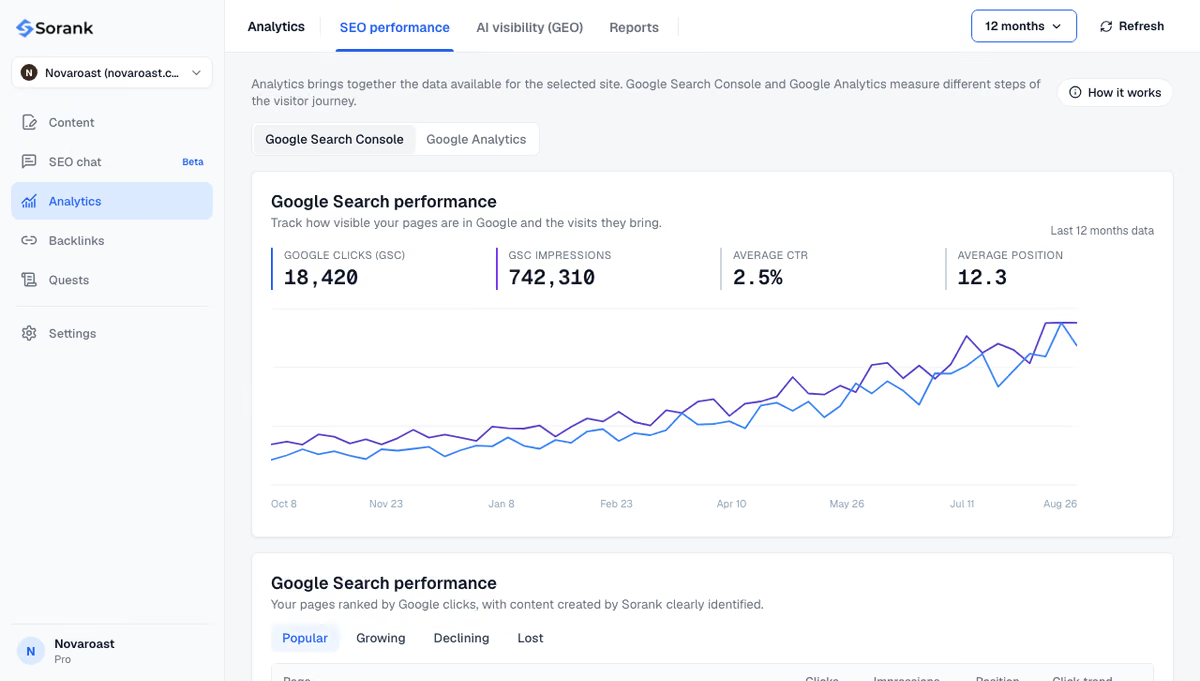
Sorank is our product: an autopilot SEO and GEO software. Its GEO and SEO dashboard shows clicks, impressions and positions from Search Console next to the articles it publishes, and AI mention tracking checks every week whether ChatGPT, Claude and Gemini cite your brand. GA4 through GTM then measures what that traffic does on your site.
The short version: install GTM once in your template, track the few events that mean revenue, keep SEO elements in the HTML. Measurement comes from GTM and GA4; growth comes from content that ranks and gets cited. To publish that content without adding hours to your week, see Sorank's plans, from $49 per month with a 3-day free trial.

Yes. Google Tag Manager is free for websites and apps of any size. Google also sells Tag Manager 360, part of the Google Marketing Platform, for large organizations that need more workspaces, approval workflows and support. Most businesses never need the paid edition.
Yes, if you want reports. Google Tag Manager only deploys and fires tags; it does not store data or show traffic statistics. You use GTM to send data to Google Analytics 4, which collects it and builds the reports on sessions, sources and conversions.
Open your container and click Preview: Tag Assistant loads your site and lists the tags that fired on each page and event. You can also view the page source and search for your container ID, which starts with GTM-. In Google Analytics 4, the Realtime report should show your own visit within a few seconds.
We analyse your competitors, your website and your AI visibility to create a tailored content plan for free.
 AI Content Brief Generator
 FAQ Schema Generator
 AI Blog Post Ideas Generator
 Structured Data Validator (Schema Validator)
 Alt Text Checker
 Internal Link Analyzer
 Backlink Challenge
 AI Meta Description Generator
 AI Blog Title Generator
 Google Indexability Checker
 AI Blog Outline Generator
 UTM Link Builder
 Keyword Clustering Tool
 Canonical Tag Checker
 XML Sitemap Generator
 Broken Link Checker
 AI SEO Title Generator
 Headline Analyzer
 SERP Preview Tool
 Redirect Checker
 Hreflang Tag Generator
 Heading Structure Analyzer
 HTTP Headers Checker
 Favicon Extractor
 SERP CTR Calculator
 SEO vs Paid Search Savings Calculator
 SEO Share of Voice Calculator
 SEO ROI Calculator
 SEO Traffic and Revenue Forecast Calculator
 SEO Budget Calculator
 SEO Break-Even Calculator
 SaaS SEO ROI Calculator
 ROAS Calculator
 Reading Time Calculator
 Ranking Gain Simulator
 Organic Traffic Value Calculator
 Organic Traffic Estimator and Website Traffic Checker
 LTV to CAC Ratio Calculator
 Local SEO ROI Calculator
 Link Building Cost Calculator
 Keyword Value Calculator
 Keyword Opportunity Score Calculator
 Keyword Density Calculator
 GEO ROI Calculator
 GEO Content Investment Calculator
 Ecommerce SEO ROI Calculator
 Customer Lifetime Value Calculator
 Customer Acquisition Cost Calculator
 CTR Calculator
 Cost Per Article Calculator
 Conversion Rate Calculator
 Content Marketing ROI Calculator
 ChatGPT Referral Traffic Estimator
 Bounce Rate Calculator
 Backlink ROI Calculator
 AI Visibility Score Calculator
 AI Traffic Value Calculator
 AI Share of Voice Calculator
 Cost of AI Invisibility Calculator
 AI Citation Rate Calculator
 llms.txt Validator
 AI Overview Checker and AI Overviews Rank Checker
 Robots.txt Checker
 AI SEO Audit
 LLM Readability Checker
 SearchGPT Readiness Checker
 Structured Data LLM Audit
 Website Crawlability AI Audit
 Why ChatGPT Is Not Recommending My Website
 Gemini Ranking Tool
 Perplexity Ranking Checker
 LLM Citation Checker
 Answer Engine Optimization Audit
 GEO Audit
 AI Search Visibility Test
 ChatGPT Visibility Checker
 llms.txt Generator
 URL Extractor
 Webpage to Markdown
 Sitemap Checker
 SERP Volatility Sensor
 Page Size Checker
 Word Counter
 Slug Generator
 Schema Generator
 Robots Generator
 OG Preview
 Meta Tags Generator
 Image Compressor
 Favicon Generator
 On-Page SEO Audit: SEO Checker and SEO Analyzer
 Backlink Analysis Tool
 Keyword Research Tool
 Domain Authority Checker
THEY TRIED SORANK BEFORE YOU
 “I tested Sorank on a real client site and it's insane. It does everything an agency would bill you $1500 a month for. It's going into production on that client now.”
 Guillaume Guersanguersanguillaume.com“We are an Ads agency and we wanted to get our SEO back on track once and for all. Sorank gave us a clear view of our site, helped us prioritize optimizations, and properly structure our content. The tool is easy to use, well designed for a team, and very practical for centralizing tracking without having to juggle multiple platforms. A very solid foundation to start fresh with our SEO.”
 Gaspard MadouiAds Agency
 “I just let the Sorank software do its thing, and now my DR is 25 and my page is ranking higher.”
 Lucas Flandrefoundertrace.fr“I specialized in GEO thanks to Sorank. The GEO Leaderboard allows me to show my clients their position vs competitors on ChatGPT. It’s a real commercial differentiator.”
 MélanieSEO Freelance“Great service, works well for our website and helps us understand how to improve it to rank better on Google and elsewhere. Congrats, keep going, I recommend it.”
 Hugo T.E-commerce merchant