Preferences
Privacy is important to us, so you have the option of disabling certain types of storage that may not be necessary for the basic functioning of the website. Blocking categories may impact your experience on the website. More information

Privacy is important to us, so you have the option of disabling certain types of storage that may not be necessary for the basic functioning of the website. Blocking categories may impact your experience on the website. More information

Measure the visits the AIs send to your site with Google Analytics 4: filter ChatGPT, Perplexity, Gemini and Copilot sources step by step, then follow the trend.

Tools

Summarize this article with AI
Quick quiz
How should you get mentioned by ChatGPT and other AI assistants?
Sorank matches your answers


Test it for 3 days on your own site and see where you stand on Google, ChatGPT and the other AIs.
Start 3-day free trial3 days free, then stop whenever you want. 90-day money-back guarantee.
With the rise of conversational agents like ChatGPT, Perplexity, Gemini, or Copilot, your visibility no longer depends solely on Google. These artificial intelligences increasingly influence users' decisions by recommending websites in their answers.
But one question remains:
Is your site mentioned by these AIs?
In this article, we explain step by step how to measure visits from artificial intelligences using Google Analytics, and why it is a key lever in your SEO strategy for 2026.
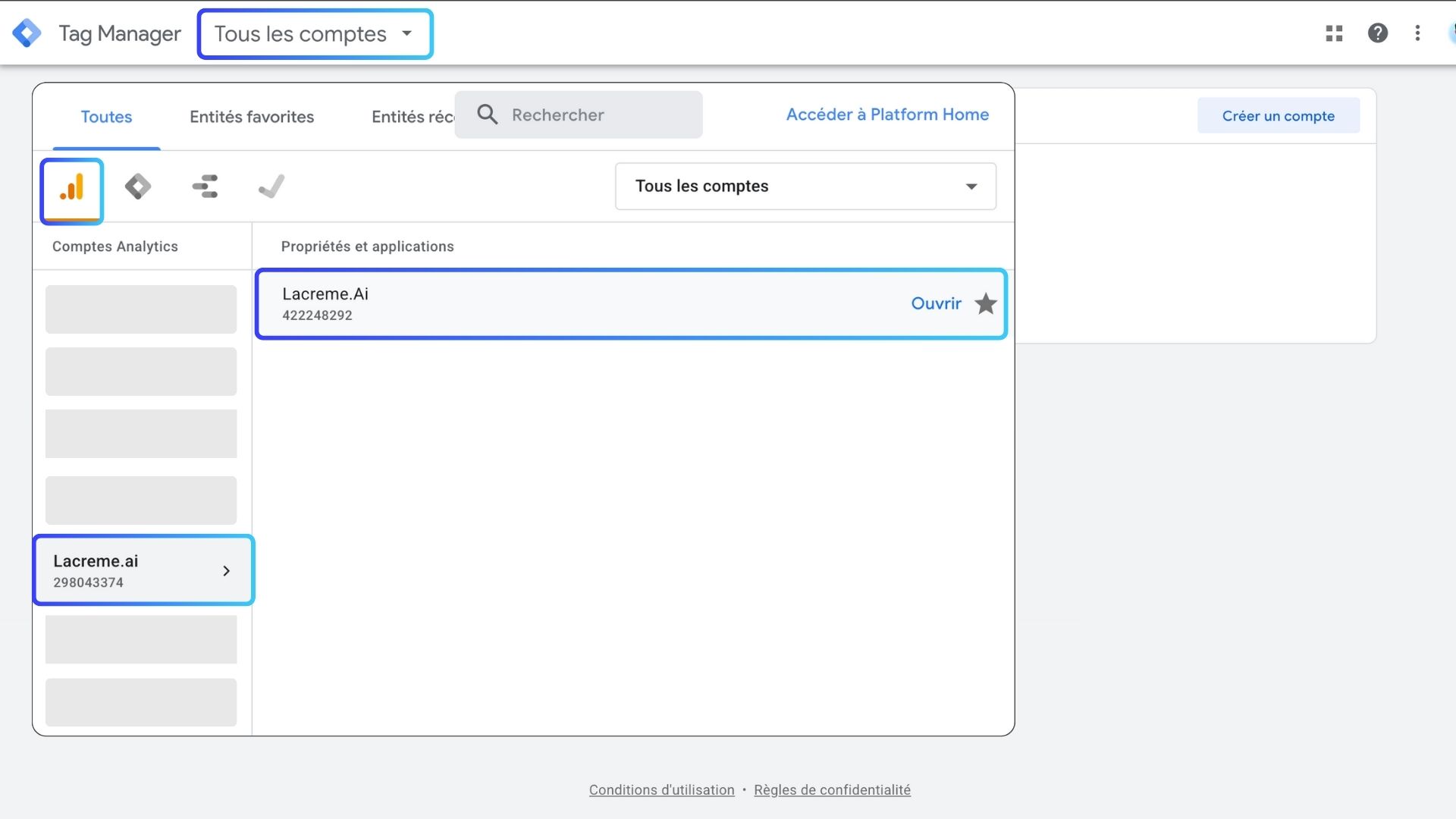
Go to Google Analytics
In this example, we use one of our websites.
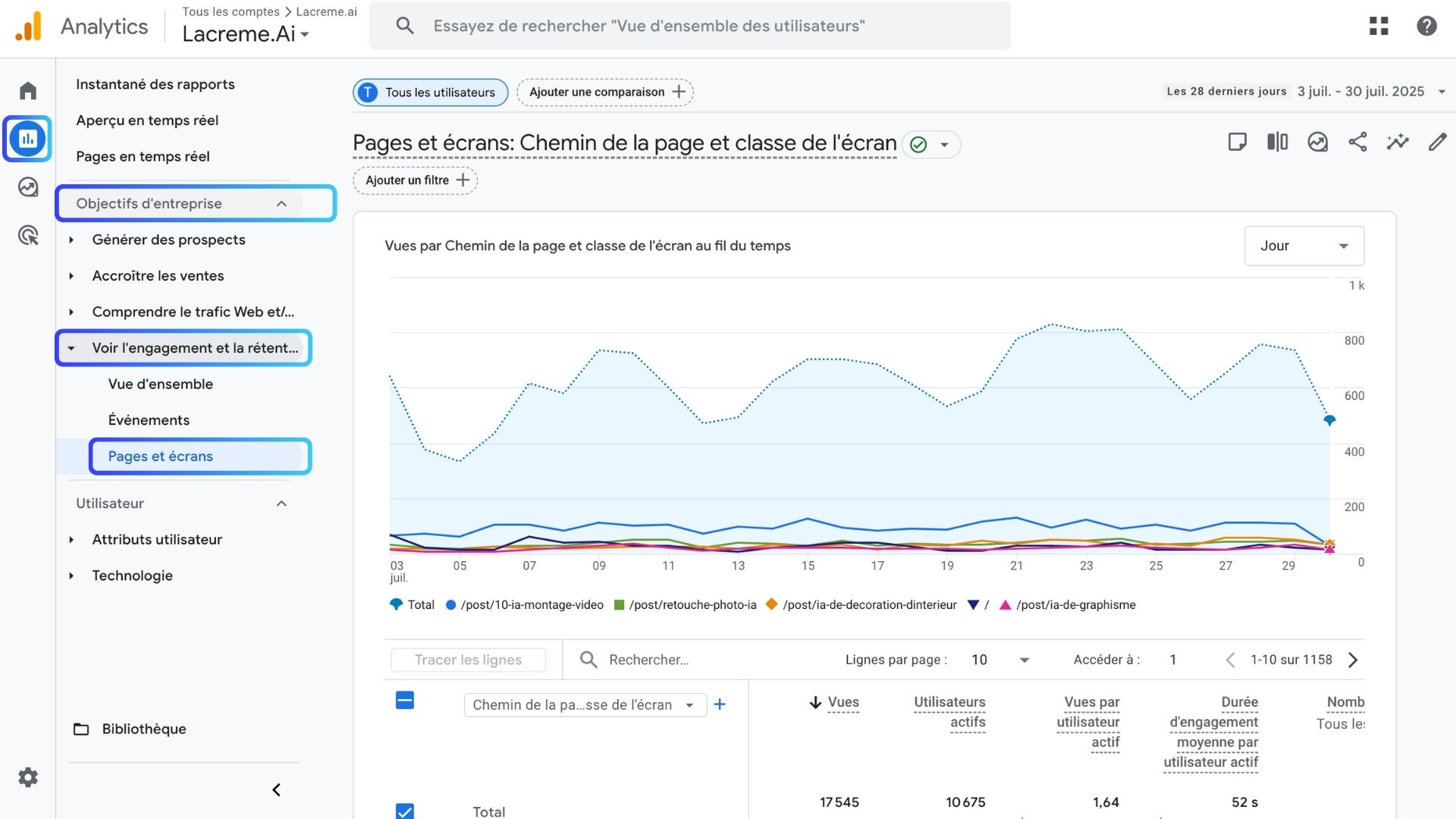
Once inside the GA4 interface:
Here, you see all the pages visited... but they are not yet filtered by AI.
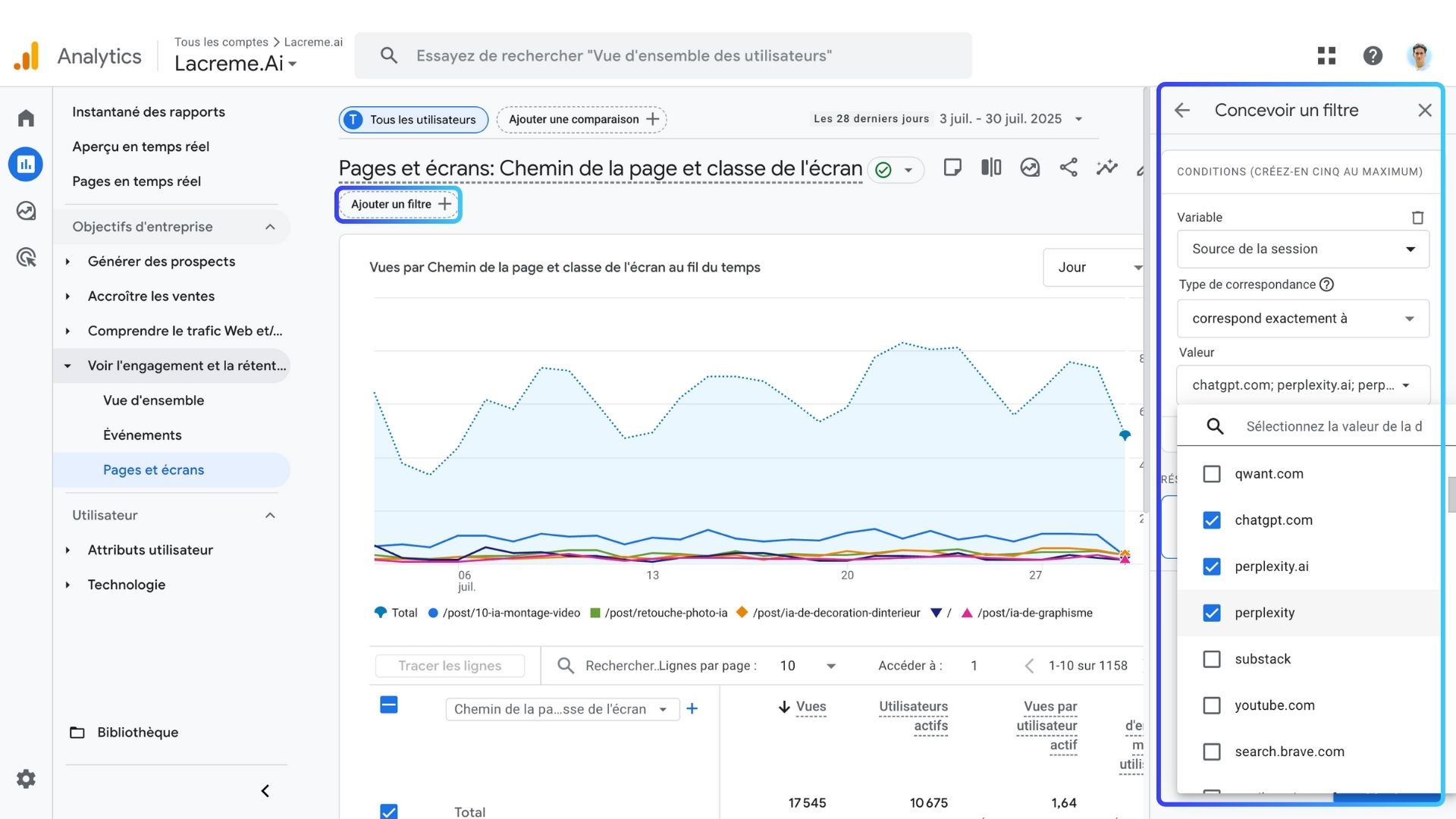
Add a filter by clicking "Add comparison".
Session sourceexactly matcheschat.openai.com
perplexity.ai
copilot.microsoft.com
cloud.aio.ai
mammoth.ai
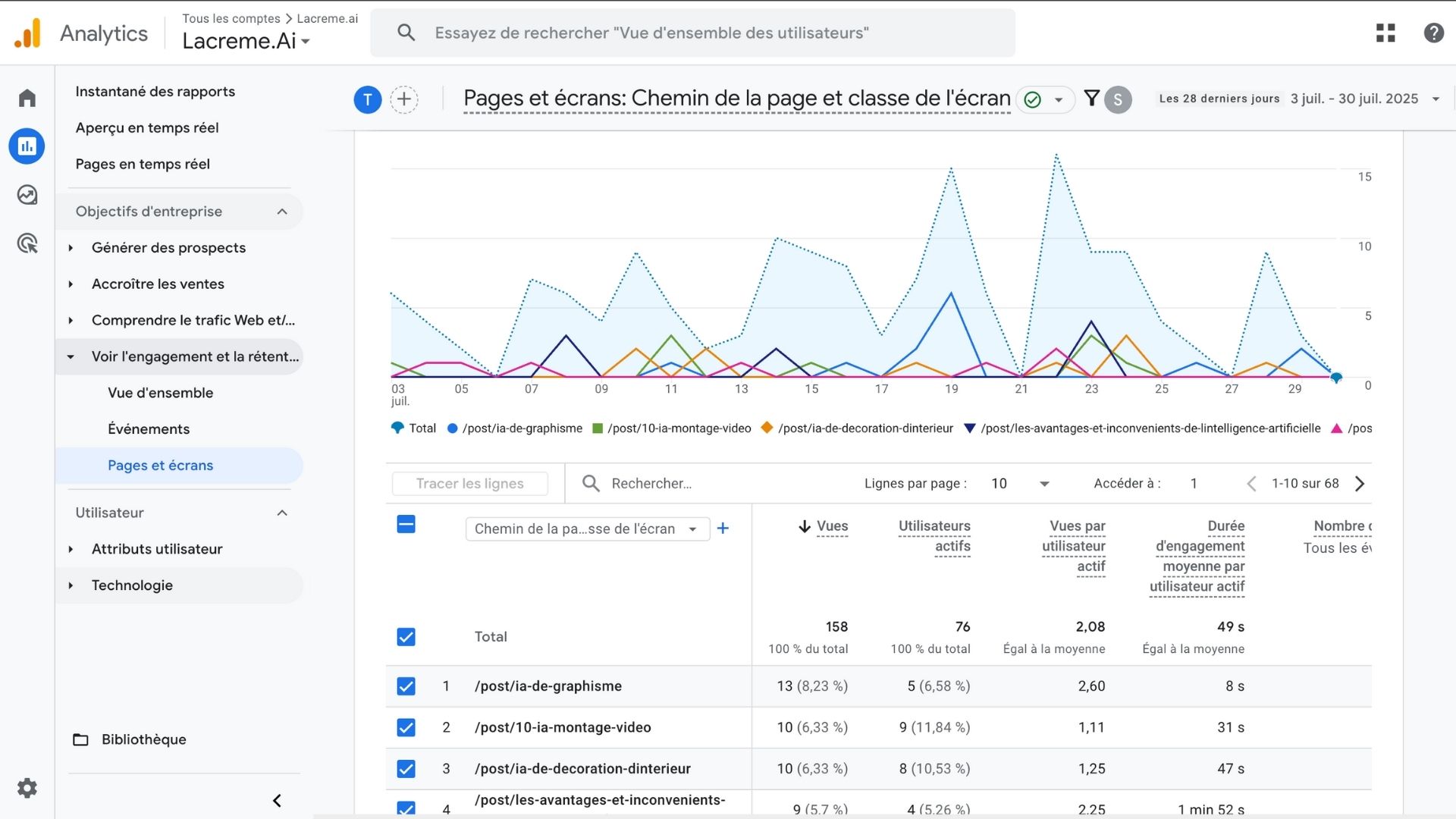
Once the filter is applied, you will see:
But that's not all. You also have access to:
To understand the impact of AI:
does not exactly match (exclude AIs).Source / Average engagement duration / Pages viewed per session, AI: ~2x longer, ~2 pages, Others: ~54 seconds, ~1.7 pages
💡 Users coming from AI spend more time on your site and explore more of your content. Building this kind of segmented reporting into a recurring dashboard is exactly the kind of work agencies handle; our comparison of the 10 best data analytics agencies in France profiles specialists who set up this tracking end to end.
It's an essential component of GEO (Generative Engine Optimization). Teams that want this monitored continuously without manual GA4 filtering typically bring in a specialist; our comparison of the 10 best GEO and AI visibility agencies in France lists providers who track AI citations at scale.
Measuring visitors coming from artificial intelligences is now an essential SEO skill.
Thanks to Google Analytics and a simple method, you can finally know whether your site is visible in AI answers.

Google Analytics does not explicitly label traffic as “AI”. However, each AI assistant uses its own domain when opening links (example: chat.openai.com for ChatGPT). By filtering traffic based on the session source, you can isolate visits generated by AIs and measure their impact on your site.
It’s normal for some websites to have little or no AI traffic yet, depending on niche, authority, and content depth. To increase your mentions: • Publish content targeting informational queries • Strengthen topical authority • Improve internal linking • Earn quality backlinks • Ensure your pages are structured and easy for AIs to parse (clear sections, schema, FAQ, definitions) AI visibility grows progressively, it’s a long-term GEO strategy.
Not necessarily. AI tools recommend pages based on: • Relevance • Freshness • Authority • Content clarity • User intent matching Traffic is only a symptom. For a real picture of your AI visibility, you need both: • Analytics data (visits) • Mention tracking (how often AIs cite your site) Together, they form the foundation of your GEO performance.
We analyse your competitors, your website and your AI visibility to create a tailored content plan for free.
 AI Content Brief Generator
 FAQ Schema Generator
 AI Blog Post Ideas Generator
 Structured Data Validator (Schema Validator)
 Alt Text Checker
 Internal Link Analyzer
 Backlink Challenge
 AI Meta Description Generator
 AI Blog Title Generator
 Google Indexability Checker
 AI Blog Outline Generator
 UTM Link Builder
 Keyword Clustering Tool
 Canonical Tag Checker
 XML Sitemap Generator
 Broken Link Checker
 AI SEO Title Generator
 Headline Analyzer
 SERP Preview Tool
 Redirect Checker
 Hreflang Tag Generator
 Heading Structure Analyzer
 HTTP Headers Checker
 Favicon Extractor
 SERP CTR Calculator
 SEO vs Paid Search Savings Calculator
 SEO Share of Voice Calculator
 SEO ROI Calculator
 SEO Traffic and Revenue Forecast Calculator
 SEO Budget Calculator
 SEO Break-Even Calculator
 SaaS SEO ROI Calculator
 ROAS Calculator
 Reading Time Calculator
 Ranking Gain Simulator
 Organic Traffic Value Calculator
 Organic Traffic Estimator and Website Traffic Checker
 LTV to CAC Ratio Calculator
 Local SEO ROI Calculator
 Link Building Cost Calculator
 Keyword Value Calculator
 Keyword Opportunity Score Calculator
 Keyword Density Calculator
 GEO ROI Calculator
 GEO Content Investment Calculator
 Ecommerce SEO ROI Calculator
 Customer Lifetime Value Calculator
 Customer Acquisition Cost Calculator
 CTR Calculator
 Cost Per Article Calculator
 Conversion Rate Calculator
 Content Marketing ROI Calculator
 ChatGPT Referral Traffic Estimator
 Bounce Rate Calculator
 Backlink ROI Calculator
 AI Visibility Score Calculator
 AI Traffic Value Calculator
 AI Share of Voice Calculator
 Cost of AI Invisibility Calculator
 AI Citation Rate Calculator
 llms.txt Validator
 AI Overview Checker and AI Overviews Rank Checker
 Robots.txt Checker
 AI SEO Audit
 LLM Readability Checker
 SearchGPT Readiness Checker
 Structured Data LLM Audit
 Website Crawlability AI Audit
 Why ChatGPT Is Not Recommending My Website
 Gemini Ranking Tool
 Perplexity Ranking Checker
 LLM Citation Checker
 Answer Engine Optimization Audit
 GEO Audit
 AI Search Visibility Test
 ChatGPT Visibility Checker
 llms.txt Generator
 URL Extractor
 Webpage to Markdown
 Sitemap Checker
 SERP Volatility Sensor
 Page Size Checker
 Word Counter
 Slug Generator
 Schema Generator
 Robots Generator
 OG Preview
 Meta Tags Generator
 Image Compressor
 Favicon Generator
 On-Page SEO Audit: SEO Checker and SEO Analyzer
 Backlink Analysis Tool
 Keyword Research Tool
 Domain Authority Checker
THEY TRIED SORANK BEFORE YOU
 “I tested Sorank on a real client site and it's insane. It does everything an agency would bill you $1500 a month for. It's going into production on that client now.”
 Guillaume Guersanguersanguillaume.com“We are an Ads agency and we wanted to get our SEO back on track once and for all. Sorank gave us a clear view of our site, helped us prioritize optimizations, and properly structure our content. The tool is easy to use, well designed for a team, and very practical for centralizing tracking without having to juggle multiple platforms. A very solid foundation to start fresh with our SEO.”
 Gaspard MadouiAds Agency
 “I just let the Sorank software do its thing, and now my DR is 25 and my page is ranking higher.”
 Lucas Flandrefoundertrace.fr“I specialized in GEO thanks to Sorank. The GEO Leaderboard allows me to show my clients their position vs competitors on ChatGPT. It’s a real commercial differentiator.”
 MélanieSEO Freelance“Great service, works well for our website and helps us understand how to improve it to rank better on Google and elsewhere. Congrats, keep going, I recommend it.”
 Hugo T.E-commerce merchant