Google Analytics 4로 AI가 사이트에 보내는 방문을 측정하는 방법입니다. ChatGPT, Perplexity, Gemini, Copilot 유입을 단계별로 필터링하고 추세를 확인하세요.
도구


AI로 이 글 요약하기
ChatGPT, Perplexity, Gemini, Copilot 같은 대화형 에이전트가 부상하면서 가시성은 더 이상 Google에만 좌우되지 않습니다. 이러한 인공지능은 답변에서 웹사이트를 추천하며 사용자의 결정에 점점 더 큰 영향을 미칩니다.
하지만 한 가지 질문이 남습니다:
이러한 AI가 귀사의 사이트를 언급하고 있습니까?
이 글에서는 Google Analytics를 활용해 인공지능에서 오는 방문을 측정하는 방법을 단계별로 설명하고, 그것이 2026년 SEO 전략의 핵심 지렛대인 이유를 함께 살펴봅니다.
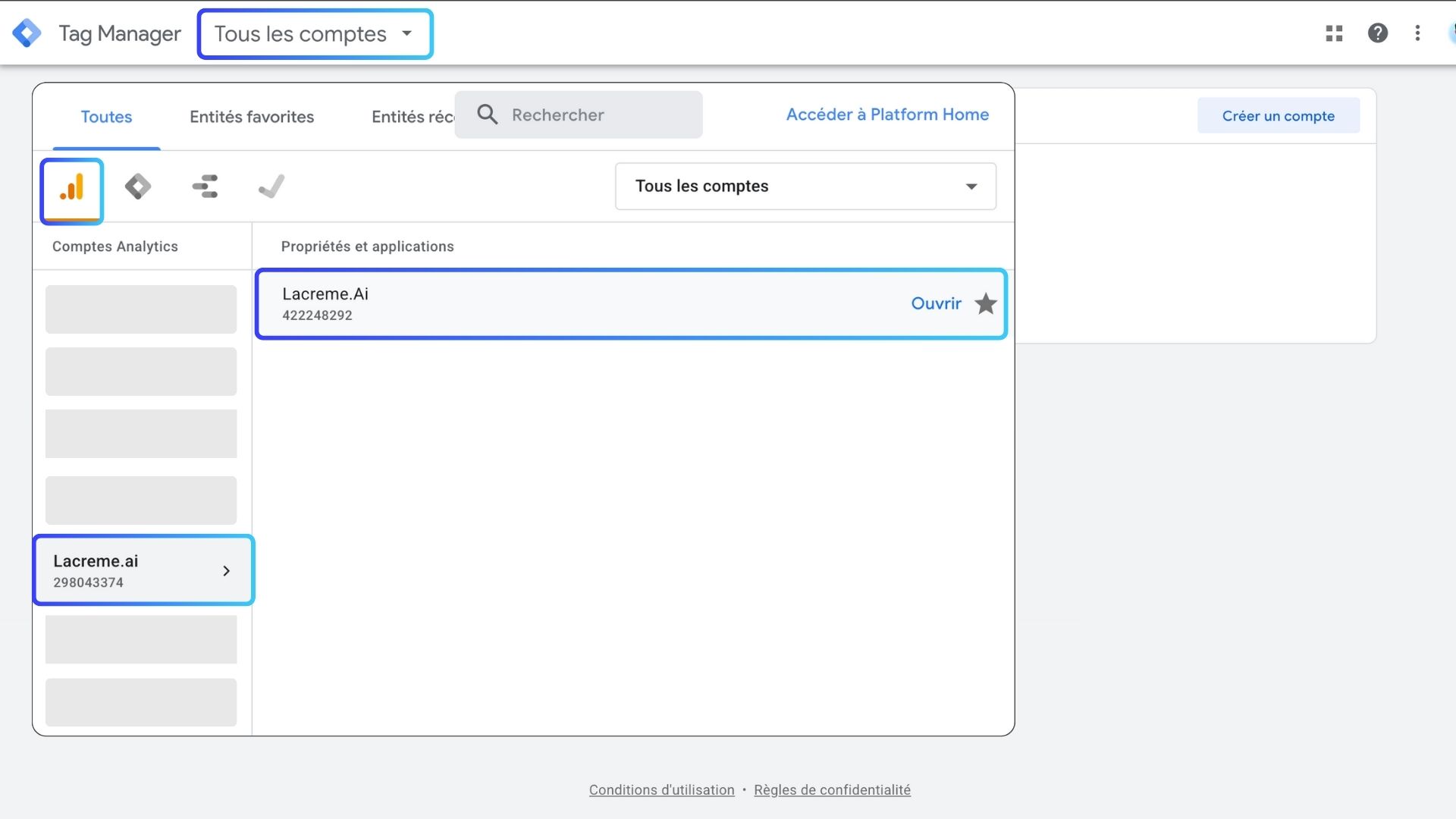
Google Analytics에 접속하세요
이 예시에서는 저희 웹사이트 중 하나를 사용합니다.
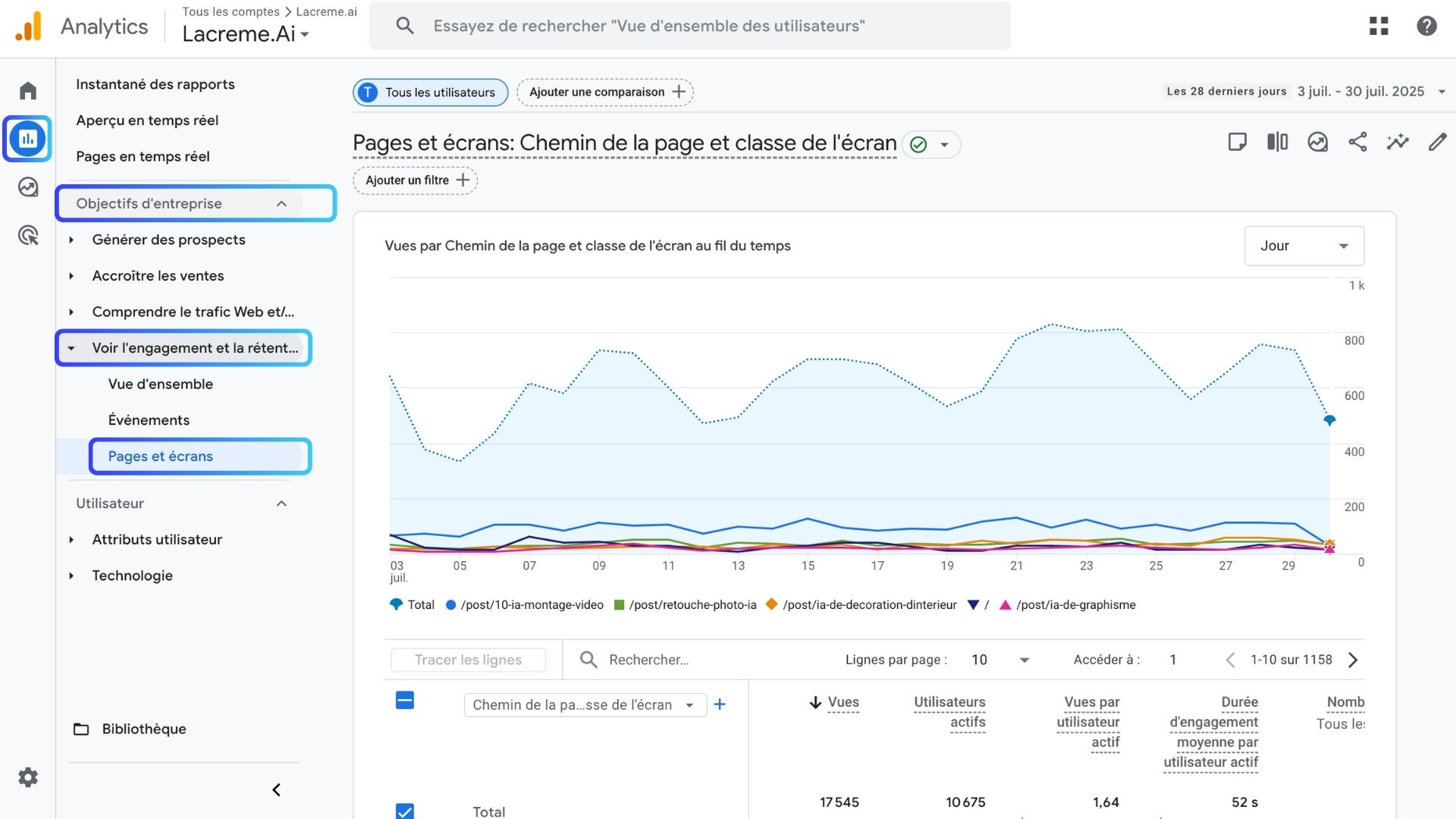
GA4 인터페이스에 들어가면:
여기에서 방문된 모든 페이지가 표시됩니다... 다만 아직 AI 기준으로 필터링되지는 않았습니다.
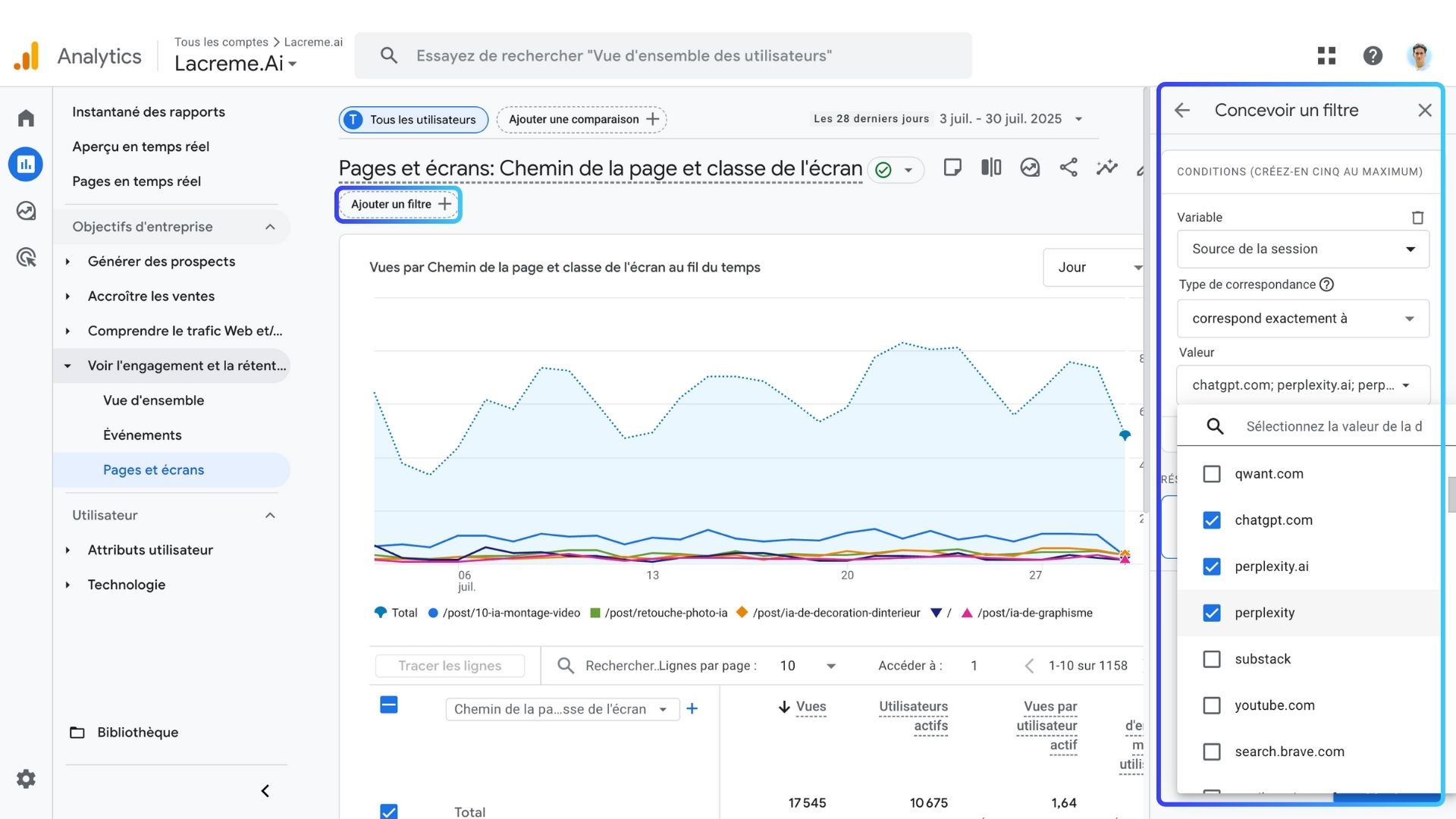
“비교 추가”를 클릭해 필터를 추가하세요.
Session sourceexactly matcheschat.openai.com
perplexity.ai
copilot.microsoft.com
cloud.aio.ai
mammoth.ai
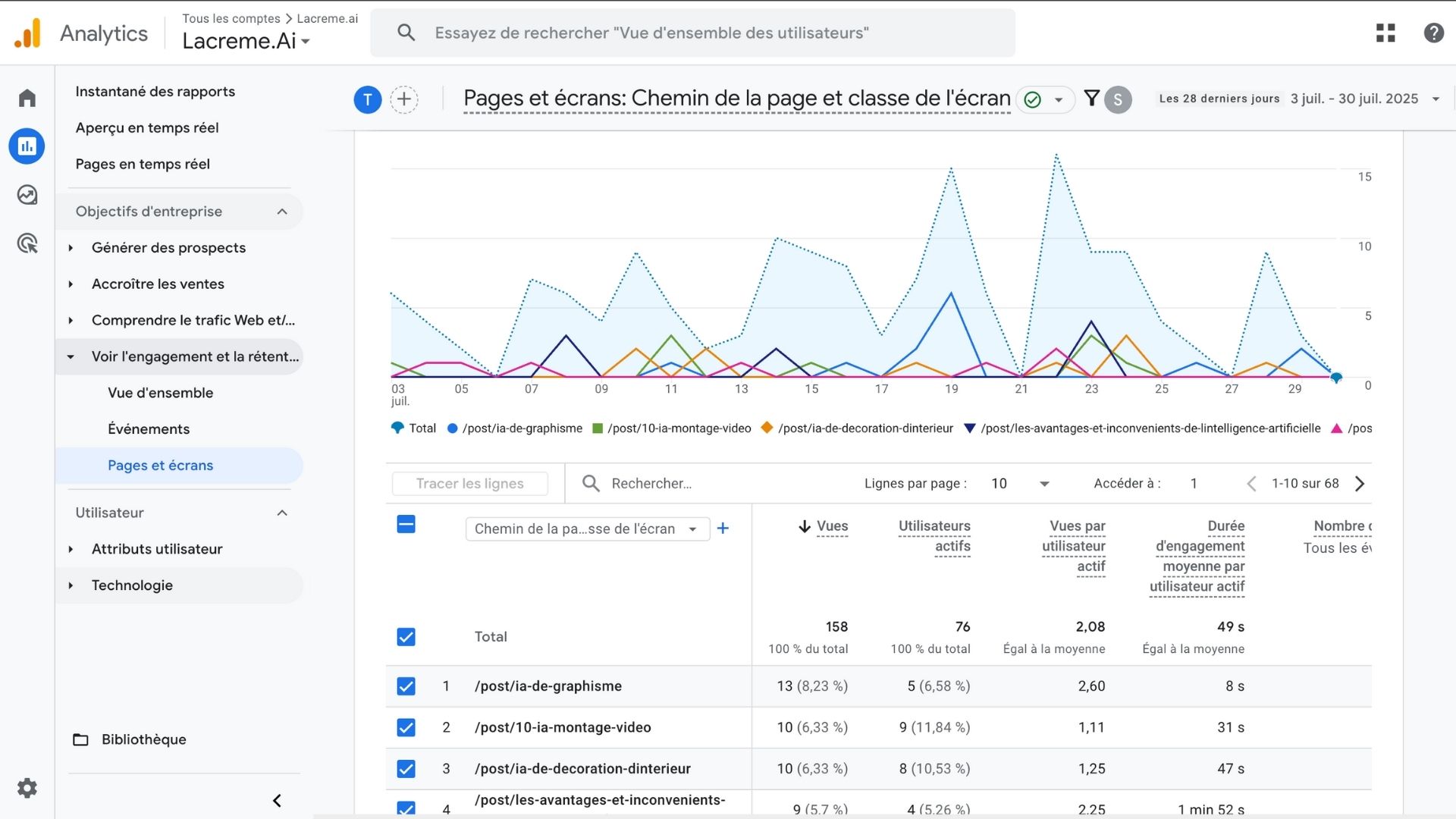
필터를 적용하면 다음을 확인할 수 있습니다:
그것이 전부가 아닙니다. 다음 항목도 확인할 수 있습니다:
AI의 영향을 파악하려면:
does not exactly match로 변경하세요(AI 제외).소스 / 평균 참여 시간 / 세션당 조회 페이지 수, AI: 약 2배 김, 약 2페이지, 기타: 약 54초, 약 1.7페이지
💡 AI에서 유입된 사용자는 사이트에 더 오래 머물고 콘텐츠를 더 많이 탐색합니다. 이러한 세분화 리포팅을 정기 대시보드로 구축하는 일은 대행사가 담당하는 전형적인 업무입니다. 프랑스 최고의 데이터 애널리틱스 대행사 10곳 비교 자료에서 이 추적을 처음부터 끝까지 구축하는 전문 업체를 소개합니다.
생성형 AI 최적화(GEO)의 필수 구성 요소입니다. GA4에서 수동으로 필터링하지 않고 이를 지속적으로 모니터링하려는 팀은 대개 전문 업체를 활용합니다. 프랑스 최고의 GEO 및 AI 가시성 대행사 10곳 비교 자료에 AI 인용을 대규모로 추적하는 업체를 정리했습니다.
인공지능에서 유입되는 방문자를 측정하는 일은 이제 필수적인 SEO 역량입니다.
Google Analytics와 간단한 방법 덕분에 사이트가 AI 답변에서 노출되는지 마침내 확인할 수 있습니다.

Google Analytics는 트래픽을 명시적으로 “AI”라고 표시하지 않습니다. 그러나 각 AI 어시스턴트는 링크를 열 때 고유한 도메인을 사용합니다(예: ChatGPT의 경우 chat.openai.com). 세션 소스를 기준으로 트래픽을 필터링하면 AI가 생성한 방문을 분리해 사이트에 미치는 영향을 측정할 수 있습니다.
분야, 권위, 콘텐츠 깊이에 따라 아직 AI 트래픽이 거의 없거나 전혀 없는 웹사이트도 있으며, 이는 정상입니다. 브랜드 언급을 늘리려면: • 정보 탐색형 검색어를 겨냥한 콘텐츠를 발행하세요 • 주제 권위를 강화하세요 • 내부 링크를 개선하세요 • 양질의 백링크를 확보하세요 • 페이지를 구조화해 AI가 쉽게 해석할 수 있도록 하세요(명확한 섹션, 스키마, FAQ, 정의) AI 가시성은 점진적으로 높아지며, 이는 장기적인 GEO 전략입니다.
반드시 그렇지는 않습니다. AI 도구는 다음을 기준으로 페이지를 추천합니다: • 관련성 • 최신성 • 권위 • 콘텐츠 명확성 • 검색 의도 일치 트래픽은 하나의 징후일 뿐입니다. AI 가시성을 정확히 파악하려면 다음 두 가지가 모두 필요합니다: • 애널리틱스 데이터(방문) • 언급 추적(AI가 사이트를 인용하는 빈도) 이 둘이 합쳐져 GEO 성과의 토대를 이룹니다.
 AI 콘텐츠 브리프 생성기
 FAQ 스키마 생성기
 AI 블로그 글 아이디어 생성기
 구조화 데이터 검사기
 대체 텍스트 검사기
 내부 링크 분석기
 백링크 챌린지
 AI 메타 설명 생성기
 AI 블로그 제목 생성기
 Google 색인 가능성 검사기
 AI 글 개요 생성기
 UTM 링크 생성기
 키워드 클러스터링 도구
 canonical 태그 검사기
 XML 사이트맵 생성기
 깨진 링크 검사기
 AI SEO 제목 생성기
 제목 점수 분석기
 검색 결과 미리보기
 리디렉션 검사기
 hreflang 생성기
 제목 구조 분석기
 HTTP 헤더 검사기
 Favicon 추출기
 SEO 트래픽·매출 예측 계산기
 SEO 예산 계산기
 순위 상승 시뮬레이터
 키워드 기회 점수 계산기
 GEO 콘텐츠 투자 계산기
 고객 생애 가치 계산기
 CTR 계산기
 AI 트래픽 가치 계산기
 AI 점유율(SOV) 계산기
 Gemini 순위 도구
 ROAS 계산기
 오가닉 트래픽 가치 계산기
 로컬 SEO ROI 계산기
 링크 빌딩 비용 계산기
 키워드 밀도 계산기
 고객 획득 비용 계산기
 글 1편당 비용 계산기
 이탈률 계산기
 AI 인용률 계산기
 LLM용 구조화 데이터 진단
 llms.txt 생성기
 사이트맵 검사기
 SERP 변동성 센서
 단어 카운터
 Schema 마크업 생성기
 키워드 리서치 도구
 SEO 손익분기점 계산기
 읽기 시간 계산기
 오가닉 트래픽 추정기
 ChatGPT 추천 트래픽 추정기
 AI 가시성 점수 계산기
 AI 가독성 검사기
 SearchGPT 준비도 검사기
 ChatGPT가 내 웹사이트를 추천하지 않는 이유
 URL 추출기
 웹페이지 Markdown 변환기
 robots.txt 생성기
 Open Graph 미리보기
 온페이지 SEO 점검
 LTV 대비 CAC 비율 계산기
 GEO ROI 계산기
 전환율 계산기
 AI 크롤러 접근 감사
 AI 검색 가시성 테스트
 페이지 용량 검사기
 URL 슬러그 생성기
 메타 태그 생성기
 이미지 압축기
 파비콘 생성기
 도메인 권위 검사기
 SERP CTR 계산기
 이커머스 SEO ROI 계산기
 콘텐츠 마케팅 ROI 계산기
 AI 비가시성 비용 계산기
 AI 개요 검사기
 robots.txt 검사기
 AI SEO 진단
 Perplexity 순위 검사기
 답변 엔진 최적화(AEO) 진단
 ChatGPT 가시성 체커
 백링크 분석 도구
 SEO 대 유료 검색 절감액 계산기
 SEO 점유율(SOV) 계산기
 SaaS SEO ROI 계산기
 백링크 ROI 계산기
 llms.txt 검증 도구
 LLM 인용 검사기
 GEO 진단
 SEO ROI 계산기
 키워드 가치 계산기
먼저 Sorank를 경험한 사람들
 “2년 동안 제 고객의 100%는 LinkedIn에서 왔습니다. 매일 게시물을 올리고, 댓글을 달고, DM으로 후속 연락을 하고… 알고리즘에 완전히 의존하는 방식이었습니다. SEO를 해야 한다는 것은 알았지만 늘 미뤘습니다. 시간이 오래 걸리고, 너무 기술적이며, 제 일이 아니라고 생각했기 때문입니다. Sorank와 함께 드디어 첫걸음을 내디뎠습니다. 4개월 만에 아무것도 게시하지 않고도 매달 15건의 오가닉 리드를 확보하고 있습니다. 아직 LinkedIn과 50 대 50은 아니지만, 자동 운영으로 성장하는 두 번째 리드 채널이 생겼다는 사실에 훨씬 마음이 놓입니다.”
 Valentin Thomy콜드메일 대행사“Sorank는 저희가 고객사에 제공하는 성과를 완전히 바꿔 놓았습니다. 이제 AI가 실제로 사용하는 키워드를 파악하고, 특정 경쟁사가 인용되는 이유를 이해하며, 이전에는 전혀 보지 못했던 기회를 발견합니다. 고객사는 더 빠른 순위 상승, AI 답변에서의 더 나은 가시성, 그리고 실행하는 모든 작업에 대한 더 명확한 ROI를 확인합니다.”
 Benjamin Rouxovirank.com
 “저는 마케터가 아니라 개발자입니다. 제 Shopify 테마는 입소문과 광고로만 팔리고 있었습니다. Sorank 덕분에 드디어 SEO를 어떻게 구조화하고 상위에 노출되는 글을 어떻게 써야 하는지 이해했습니다. 진단 결과 제품 페이지가 너무 느리다는 사실이 드러났습니다. 2개월 만에 오가닉 트래픽이 두 배가 되었고, 사람들이 Shopify 테마를 검색할 때 ChatGPT 답변에 등장하기 시작했습니다. 그 모든 것을 주당 약 2시간으로 해냈습니다.”
 Thème FullStackthemefullstack.com“Sorank는 저희 SEO 대행사의 운영 방식을 완전히 바꿔 놓았습니다. 모든 것이 한곳에 모이고 자동화되어 고객사마다 들이는 시간이 훨씬 줄었습니다. 예전에 몇 시간씩 걸리던 작업이 이제 몇 분이면 끝나고, 덕분에 드디어 사업 안에서 일하는 것을 멈추고 사업 위에서 일하기 시작할 수 있게 되었습니다.”
 Océane Bondismaison-leverage.com