Preferences
Privacy is important to us, so you have the option of disabling certain types of storage that may not be necessary for the basic functioning of the website. Blocking categories may impact your experience on the website. More information
Privacy is important to us, so you have the option of disabling certain types of storage that may not be necessary for the basic functioning of the website. Blocking categories may impact your experience on the website. More information

31 Google Business Profile post examples to copy: updates, offers and events by industry, with specs, buttons, data on what gets clicks and the mistakes to avoid.
In short
Google Business Profile posts are short updates, offers and events you publish on your profile in Google Search and Maps. The best examples lead with one concrete fact, use a real photo, add a title and end with one button. Below are 31 ready-to-copy posts, sorted by type and by industry.
Want to go further? Ask
Quick quiz
How should you get more local customers from Google?
Sorank matches your answers


Test it for 3 days on your own site and see where you stand on Google, ChatGPT and the other AIs.
Start 3-day free trial3 days free, then stop whenever you want. 90-day results guarantee, conditions apply.
A Google Business Profile post is a message you publish from your profile that shows on your listing in Google Search and Google Maps. It can hold text, photos or a video, and a button. Google offers three types: Update, Offer and Event.
According to Google's help page on creating and managing posts, you open your profile, select Posts, then Add post, and pick the type. Each type has its own required fields. That matters for your examples: an Offer without dates does not exist, and an Event without times shows as lasting 24 hours.
| Type | Required fields | Optional fields | Button | Use it for |
|---|---|---|---|---|
| Update | Description | Photo, video, button with link | Your choice (Book, Order online, Buy, Learn more, Sign up, Call now) | News, proof of work, tips, new products |
| Offer | Title, start and end dates, times | Description, photo, video, coupon code, link, terms and conditions | "View offer", added automatically | Discounts, bundles, first-visit deals |
| Event | Title, start and end dates, times | Description, photo, video, button | Your choice | Workshops, tastings, open days, launches |
Where do posts show? On mobile, in the Updates or Overview tab of your profile. On desktop, in the "From the owner" block. Google also tests "featured posts" that can appear in place of reviews; its help page says this is available in English for single-location food and drink businesses in the US, UK, Canada, Australia and New Zealand.
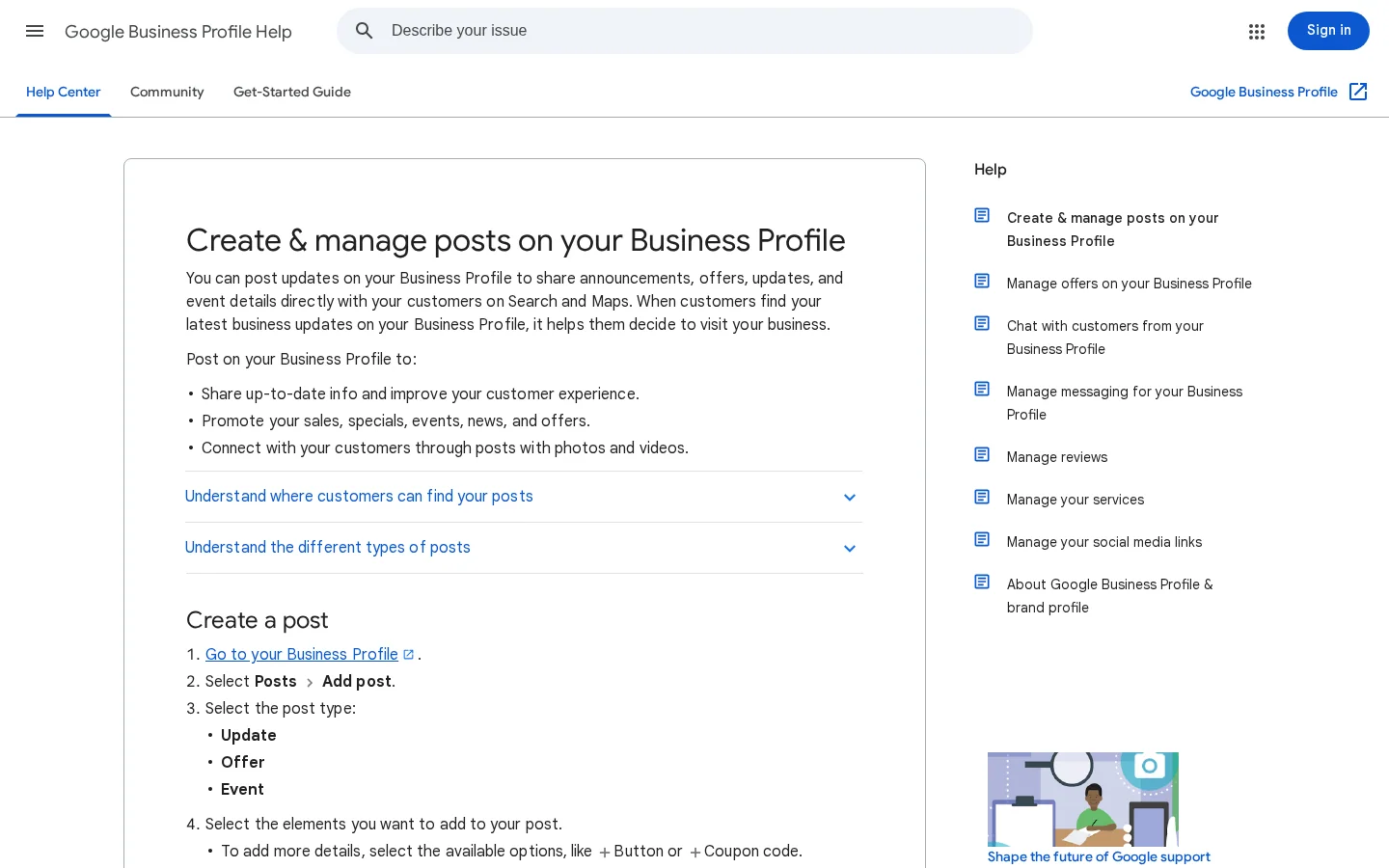
Posts no longer expire after 7 days. Google now archives posts older than 6 months unless a date range is set, which is the case for offers and events. You can schedule a post for a future date and set it to repeat weekly, monthly or on a custom rhythm. You can also publish the same post to several profiles at once.
After you click Post, each post has a status: Live (public on Search and Maps), Pending (still processing, or the profile is not verified) or Not approved (a content policy was broken; a question mark tells you which one). If your profile is not verified yet, start there: our guide to verifying your Google Business Profile lists every method.
For developers, the Business Profile API exposes the same logic under other names: STANDARD (Update), OFFER, EVENT and an older ALERT type, with button values BOOK, ORDER, SHOP, LEARN_MORE, SIGN_UP and CALL.
Posts drive clicks and conversions far more than they drive rankings. The best public data shows offers get the most clicks per post, while posting more often has a small weight in the local ranking. So write posts to convert people who already see your profile, not to climb the map.
Joy Hawkins and her team at Sterling Sky analysed 1037 Google posts across their clients' profiles. Offer posts averaged 3.06 clicks in the profile's own statistics, against 0.76 for plain updates. Posts about specials and discounts reached 6.04 clicks on average, the highest of all topics.
The same study gives four rules that shape every example in this guide:
Google posts: the numbers that matter
Sources: Sterling Sky (1037 posts); Whitespark Local Search Ranking Factors 2026
Sterling Sky also ran a ranking test in 2021: three small-town profiles got one keyword-focused post a week for nine weeks, with 441 keywords tracked per location. Their conclusion, in Joy Hawkins's words, was that posts "had no measurable impact on rankings in the local pack".
The experts agree. In the Whitespark Local Search Ranking Factors 2026 report (Darren Shaw, November 2025, 47 experts, 187 factors), "Frequency of Google Posts/Updates" ranks 148th for the local pack and "Keywords in Google Posts/Updates" 160th. The same report adds a new negative factor: keyword stuffing in posts, with a negative impact score of 38 and a suspension risk score of 51. To see what really moves the map, read our breakdown of local SEO ranking factors and their weight.
The takeaway: a post is a free ad in your Google Business Profile. It turns a visit into a call, a booking or a visit to the shop. Write it for a human, never for the algorithm.

A post that converts has five parts: a short title, a first sentence that states the fact, one real photo, one detail that proves it, and one button. Everything else is optional.
A post description can hold up to 1500 characters. Claire Carlile, in Whitespark's guide, notes that only the first 16 to 20 words show in the profile, and fewer on mobile. So the first sentence must carry the whole message: what, for whom, until when. Aim for 150 to 300 characters in total. A long post is not punished, it is just not read.
Write the first line like a headline:
Google's photo and video guidelines for Business Profiles set the limits below. Posts can hold up to 10 photos or videos shown as a carousel.
| Element | Limit | Our advice |
|---|---|---|
| Photo format | JPG or PNG | JPG for photos, PNG for images with text |
| Photo file size | 10 KB to 5 MB | Stay under 1 MB so it loads fast on mobile |
| Photo resolution | 720 x 720 px recommended, 250 x 250 px minimum | Keep the subject in the center: the crop changes between mobile and desktop |
| Video length | Up to 30 seconds | Show the result in the first 3 seconds |
| Video file size | Up to 75 MB | Vertical or square, filmed on a phone, is enough |
| Video resolution | 720p or higher | 1080p if your phone allows it |
| Description | 1500 characters | 150 to 300 characters, the key fact in the first 20 words |
Stock photo vs real photo in a Google post
Pick the button that matches the next step: Book for appointments, Order online for food and retail, Call now for urgent services (it uses your verified profile number), Learn more for content. Never type a phone number in the text: Google may reject a post whose number it cannot link to your business. Add tracking parameters to every link so you can measure the post in Google Analytics (see the measurement section).
TITLE (offer and event, under 60 characters):
[Benefit] for [who] until [date]

LINE 1 (the first 20 words, the only ones everyone reads):
[What] + [where or for whom] + [deadline or proof]

LINE 2 (one detail that proves it):
[Number, name, photo description, guarantee, real customer result]

LINE 3 (the next step):
[Book / Order / Call] + [how long it takes]

BUTTON: Book | Order online | Call now | Learn more | Sign up
LINK: https://www.example.com/page?utm_source=google&utm_medium=organic&utm_campaign=gbp-post
PHOTO: real, recent, subject centered, 720 x 720 px or moreAn update is the everyday post: news, proof of work, a tip, a new product. Updates get the fewest clicks per post, so each one must show something real. Swap the names, places and numbers for yours.
Update: plumber, job log
Burst pipe under a kitchen sink in Clifton this morning. We were on site in 50 minutes, replaced 1.2 m of copper pipe and checked the water pressure before leaving. Same-day callouts until 6 pm, Monday to Saturday.
Button: Call now. Photo: the new pipe, taken on site.
Update: bakery, new product
New this week: sourdough baked with rye from a farm 20 km away. Out of the oven at 7 am, usually gone by noon. Reserve a loaf online and pick it up on your way to work.
Button: Order online. Photo: the loaves on the counter.
Update: dentist, frequent question
"Does teeth whitening damage enamel?" Done under supervision, with the right gel concentration, it does not. Dr. Patel explains how we check your enamel before any session, and who should wait.
Button: Learn more (to the article on your site). Photo: the dentist in the treatment room.
Update: cleaning company, team
Meet Sara, who has led our office cleaning team for 3 years. She trains every new hire on the 42-point checklist we leave in each office after a visit. Ask for her team when you book.
Button: Book. Photo: Sara with the team, in uniform.
Update: garage, customer review
"They found the noise two other garages missed, and charged less than the quote." Thank you, Mark. A loose heat shield: 40 minutes of work. Free diagnosis for any strange noise this month.
Button: Book. Photo: the car on the lift.
Quoting a review works best when you already answer every review. If you don't, start with our method to respond to Google reviews with templates.
Update: pharmacy, new hours
From Monday, we open at 8 am instead of 9 am, every weekday. Prescriptions sent before 7 pm are ready the next morning. Free parking behind the building.
Button: Learn more. Photo: the shop front with the new hours sign.
Update: landscaper, before and after
This back garden in Didsbury, before and after: 3 days, new turf, a raised bed in reclaimed oak and drainage under the patio. Free quote within 48 hours, with a 3D plan.
Button: Book. Photos: 2 images in a carousel, before then after, same angle.
Update: restaurant, local award
We won "Best Neighbourhood Bistro" in the city food guide this year. Thank you to our regulars. The winning dish, slow-cooked lamb shoulder, stays on the menu all month.
Button: Book. Photo: the dish, not the trophy.
An offer is the post type with the most clicks. It needs a title, a start and end date and times; Google adds the "View offer" button. Fill in the coupon code and the terms: they answer the questions people would otherwise call you about.
Offer: hair salon
Title: 20% off your first cut and colour
Dates: 1 to 31 March, 9 am to 7 pm. Description: New to the salon? Get 20% off your first cut and colour with any of our 4 stylists. Free consultation and strand test included. Coupon: FIRST20. Terms: new clients only, one use per person, not combined with other offers.
Offer: car wash
Title: Wash and interior clean for $35
Dates: every weekday this month, 8 am to 6 pm. Description: Outside wash, vacuum, dashboard and windows in 40 minutes. Normally $45. Show this offer at the counter. Terms: cars and small SUVs, not vans.
Offer: restaurant
Title: Two-course lunch for $19, Tuesday to Thursday
Dates: 4 weeks, 12 pm to 2:30 pm. Description: Choose any starter and main from the lunch menu. Served in 30 minutes for people on a break. Book a table or walk in. Terms: dine-in only, drinks not included.
Offer: heating and air conditioning
Title: Air conditioning check before summer: $79
Dates: 15 April to 31 May. Description: Filter clean, gas pressure test and a written report in 45 minutes. Book early: June slots go fast. Coupon: COOL79. Terms: one unit per visit, within our service area.
Offer: gym
Title: Bring a friend, both get a free month
Dates: whole month of January. Description: Your friend signs up for 6 months, you both get one month free. No joining fee for them. Terms: the friend must be a new member.
Offer: independent bookshop
Title: Free delivery on orders over $30
Dates: 1 to 15 December. Description: Order online, we deliver in the city in 48 hours, gift wrapped if you ask. Coupon: BOOKS30. Link: the online shop with tracking parameters. Terms: city delivery only.
Warning
Hotels cannot publish Offer posts, and Google's posts content policy also forbids hotel posts that mention deals or discounts. Businesses in regulated sectors (alcohol, tobacco, gambling, financial services) can post, but not about the regulated products.
An event post promotes something on a precise date. It needs a title, start and end dates and times. Without times, Google shows it as a 24-hour event, which looks careless. Post it 2 to 3 weeks ahead, then post an update the day before.
Event: garden center
Title: Spring pruning workshop
Saturday 14 March, 10 am to 11:30 am. Description: Learn to prune roses and fruit trees with our head gardener. 12 places, tools provided, tea included. Button: Sign up.
Event: private school or nursery
Title: Open morning for September 2027 entry
Saturday 7 November, 9 am to 12 pm. Description: Visit the classrooms, meet the teachers and ask your questions about the admissions process. Tours every 30 minutes. Button: Book.
Event: coffee roaster
Title: Free tasting: 6 single-origin coffees
Friday 5 pm to 7 pm. Description: Meet our roaster, taste 6 coffees side by side and get 10% off any bag tasted that evening. No booking needed. Button: Learn more.
Event: bike shop
Title: Electric bike test day
Sunday 10 am to 4 pm. Description: Ride 8 electric models on a closed route. Bring ID, helmets provided. Our mechanics answer your questions about range and servicing. Button: Sign up.
Event: café
Title: Charity breakfast for the local food bank
Saturday 8 am to 11 am. Description: Every breakfast sold gives $3 to the food bank on Market Street. Bring a tin and get a free coffee. Button: Learn more.
The right post depends on what your customers need before they act: an urgent service needs speed and trust, a restaurant needs appetite, a lawyer needs credibility. This table gives the best angle per industry, then one example for each.
| Industry | Best post type | Angle that works | Button |
|---|---|---|---|
| Restaurant, café | Offer, Update | Dish of the week, off-peak deal | Order online, Book |
| Dentist, clinic | Update | Answer one patient question | Book |
| Lawyer | Update | Explain one change in the law | Learn more |
| Salon, spa | Offer, Update | Result photo plus price | Book |
| Plumber, electrician, heating | Update | Job log: problem, fix, delay | Call now |
| Retail shop | Update, Offer | New arrival, stock alert | Buy, Order online |
| Real estate agent | Update | New listing or recent sale | Learn more |
| Gym, yoga studio | Event, Offer | Free class, challenge | Sign up |
| Hotel | Update only | Local guide, new rooms, events nearby | Book |
| Garage | Update, Offer | Seasonal check, diagnosis | Book, Call now |
| Accountant | Update, Event | Deadline reminder | Book |
| Agency, B2B service | Update | Case study, new article | Learn more |
Update
Dish of the week: grilled sea bream with fennel and blood orange, $18. The fish arrives from the port every Tuesday, so it is on the menu until Saturday or until it runs out. Order for pick-up or book a table.
Update
Bleeding gums when you brush? It is often the first sign of gingivitis, and it is reversible if treated early. A cleaning and check-up takes 30 minutes. Evening appointments on Tuesdays and Thursdays.
Update
Selling a house with a tenant inside? You must respect the notice period in the lease, even after the sale. Our property team explains your options in a 20-minute first call. The full guide is on our site.
Update
Balayage on dark hair, done by Léa in 2 hours 30. From $140, including toner and blow-dry. Bring a photo of the colour you like: we tell you honestly if it suits your base.
Update
Fuse box replaced in a 1970s house in Leith today: old rewireable fuses out, new consumer unit with surge protection in. 6 hours, certificate issued the same day. Free quotes in the city.
Update
Back in stock: the waterproof hiking boots in sizes 38 to 46. 24 pairs only, the last batch sold out in 9 days. Reserve online and try them in the shop before paying.
Update
Sold in 12 days: 3-bedroom family house near the park, above the asking price. Thinking of selling in the area? We give a free valuation based on the last 20 sales on your street.
Event
Title: Free beginners' yoga class. Sunday 10 am to 11 am. No experience needed, mats provided, 15 places. Stay after the class to ask the teacher about the weekly schedule.
Update
The Christmas market opens on Friday, 5 minutes on foot from the hotel. Our reception desk has a free map of the best stalls and the times of the evening concerts. Ask for a room facing the square.
Update
Winter tyres fitted in 30 minutes, storage of your summer tyres included until April. Check your tread before the first frost: below 4 mm, grip drops on snow. Book a slot online.
Update
Self-employed? Your tax return is due on 31 January. Send us your documents before 10 January and we file on time, with a fixed fee agreed in advance. Book a 15-minute call to get the list of documents.
Update
How a local dental clinic doubled its online bookings in 6 months: the 3 pages we rewrote and the questions their patients typed into Google. Full case study on our blog.
For a B2B business, this last type of post is the easiest to keep up: every new article on your blog becomes a post. If you want more topics to recycle, our list of blog post ideas people search for gives you 35 formats.
A posting strategy is the type of content you repeat week after week. There are six that work for local businesses. Most profiles should mix two: one that sells (offers or events) and one that proves (job logs or reviews).
Principle: one offer live at all times, renewed each month. When to use it: restaurants, retail, salons, any business with margin to give. Advantages: the post type with the most clicks. Limits: trains customers to wait for discounts; impossible for hotels. Example: lunch deal in month 1, referral offer in month 2.
Principle: one post per real job, with a photo, the problem and the fix. When to use it: trades, home services, garages, cleaners. Advantages: shows competence and service area; content comes from your daily work. Limits: needs the team to take photos on site. Example: posts 1 and 24 above.
Principle: each post answers one question customers ask. When to use it: health, law, finance, any service people fear to get wrong. Advantages: builds trust, can link to a page of your site. Limits: fewer direct clicks; must be accurate and checked. Example: posts 3, 21 and 22.
Principle: events at your place or near it. When to use it: venues, shops, gyms, schools, hotels. Advantages: a date creates urgency; good for local press and links. Limits: each event takes work to organise. Example: posts 15 to 19.
Principle: each new article on your site becomes a short post with a Learn more button. When to use it: agencies, B2B, professional services. Advantages: zero extra writing; sends visitors to your site. Limits: only works if you publish articles regularly. Example: post 31.
Principle: a quote from a real review, an award, a milestone. When to use it: every business, once or twice a month. Advantages: reinforces what people already read in your reviews. Limits: the Sterling Sky data shows review posts got few clicks (0.71 per post), so never make it your only strategy. Example: posts 5 and 8.
| Strategy | Main goal | Effort | Clicks potential | Best for |
|---|---|---|---|---|
| Offer-led calendar | Sales | Low | High | Restaurants, retail, salons |
| Job log | Trust, service area | Medium | Medium | Trades, home services |
| Educational answers | Trust, expertise | Medium | Low to medium | Health, law, finance |
| Event and community | Visits on a date | High | Medium | Venues, gyms, schools |
| Repurposed blog content | Website visits | Low | Low to medium | Agencies, B2B |
| Social proof | Reassurance | Low | Low | All, as a complement |
Publishing takes 5 minutes once you have the text and the photo. The real work is planning a month ahead so you never post in a rush. Here is the method we recommend.
Publishing a Google Business Profile post in 6 steps
One post a week is a rhythm almost any team can hold. A simple monthly plan:
| Week | Post | Type |
|---|---|---|
| Week 1 | Offer of the month (live 4 weeks) | Offer |
| Week 1 | Proof of work or new product | Update |
| Week 2 | Answer to a frequent question | Update |
| Week 3 | Event or seasonal news | Event or Update |
| Week 4 | Review highlight or team | Update |
Pick your post topics from real searches: the words people type before choosing a local business are the same words your posts should use naturally. Our method for local keyword research gives you that list in under an hour.
Count your characters before you paste: the free word and character counter shows both. Read the first 20 words alone. If they don't say what the post is about, rewrite them.
Google's own statistics count clicks on the button, not what happens next. Tag the link so Google Analytics shows bookings and sales from each post:
https://www.example.com/book?utm_source=google&utm_medium=organic&utm_campaign=gbp-post&utm_content=offer-marchTip
Build these links without typos with our free UTM link builder: one campaign name for all posts, one utm_content value per post.
In the post form, turn on "Schedule this post" to choose the date and time, and use "Repeats" for weekly content like a dish of the week. If you manage several locations, you can publish to several profiles at once; adapt at least the first line and the photo to each place.
Agencies and chains often publish with the Business Profile API. A standard post with a Book button looks like this:
POST https://mybusiness.googleapis.com/v4/accounts/{accountId}/locations/{locationId}/localPosts
{
  "languageCode": "en-US",
  "summary": "Same-day boiler repair in Brighton: book before 11 am, we come today.",
  "callToAction": {
    "actionType": "BOOK",
    "url": "https://www.example.com/book?utm_source=google&utm_medium=organic&utm_campaign=gbp-post"
  },
  "media": [
    { "mediaFormat": "PHOTO", "sourceUrl": "https://www.example.com/photos/boiler-job.jpg" }
  ],
  "topicType": "STANDARD"
}
For an offer, set "topicType": "OFFER" and add an event object (title and schedule) and an offer object with couponCode, redeemOnlineUrl and termsConditions. The API returns a state: LIVE, PROCESSING or REJECTED.
Measure posts with two sources: the clicks on the button, and what those visitors do on your site. Views alone prove nothing. In the Sterling Sky data, an average offer post got 512 views but only 3.06 clicks in Google's statistics and 0.08 conversions in Google Analytics.
From view to conversion: the average offer post
Source: Sterling Sky, analysis of 1037 Google posts (Joy Hawkins)
Two lessons. First, the gap between Google's clicks and Analytics clicks shows how much is lost without tagged links. Second, at the scale of one post the numbers are tiny: judge your posts on a quarter, by type, never one by one.
utm_campaign=gbp-post in Google Analytics, broken down by utm_content.To put these numbers next to your Search Console and map data in one view, follow our guide to building a Google Business Profile dashboard. To estimate what one more booking a week is worth, try the local SEO ROI calculator.
Posts add fresh, owner-written facts to your profile, but they are not where AI models get most of their local recommendations. ChatGPT, Gemini and Google's AI Overviews build their answers from your profile data, your reviews, your website and what other sites say about you. Posts help when the same facts also live on your site.
So treat a post as the short version of a page. An offer post points to an offer page. An educational post points to a full answer on your blog. A job log points to the service page of that area. This way the fact exists in two places Google can read, and in a form an AI model can quote. Our guide to getting a local business recommended by ChatGPT and Gemini covers the other signals.
Writing those pages every week is the part most local businesses drop. Sorank's GEO optimization writes and publishes the articles on your site on autopilot, and AI mention tracking tells you when ChatGPT, Claude or Gemini cite your business.
Most failed posts break one of nine rules. Each mistake below comes with a way to spot it and a fix.
What it is: typing your number in the description. How to spot it: the post stays "Not approved" or disappears. Fix: remove the number and use the Call now button, which uses your verified profile number.
What it is: posts written as lists of keywords and town names ("best plumber Leeds plumber near me emergency plumber Leeds"). How to spot it: read the post aloud; if it sounds like a robot, it is stuffed. Fix: one natural mention of the service and the place. The Whitespark 2026 report gives this practice a suspension risk score of 51, and a suspended profile loses far more than a post. If it already happened, our guide to diagnosing and appealing a profile suspension walks you through the appeal.
What it is: an image from a photo bank. How to spot it: run it through a reverse image search; if it shows on other sites, it is stock. Fix: a real photo taken on your phone. In the Sterling Sky data, posts without stock photos got 5.6 times more clicks.
What it is: an update with no headline, or "HUGE SALE NOW". How to spot it: look at your posts list; anything without a bold line or written in capitals. Fix: a title under 60 characters in normal case, starting with the benefit.
What it is: an intro like "We are excited to announce". How to spot it: read only the first line of the post on your phone. Fix: put the what, the who and the deadline in the first sentence.
What it is: an event created with dates only. How to spot it: Google shows it as lasting 24 hours. Fix: edit the post and add the start and end times.
What it is: a hotel publishing an Offer, or a wine shop promoting the wine itself in a regulated market. How to spot it: the post is rejected with a policy question mark. Fix: hotels use Updates about local events and services; regulated businesses post about the place, the team and the events, not the product.
What it is: a Learn more button that drops people on the home page with no tag. How to spot it: in Google Analytics, profile traffic is lumped into "google / organic" with no detail. Fix: link to the exact page of the offer, tagged with UTM parameters.
What it is: 10 posts in one week, then silence for 6 months, after which posts are archived. How to spot it: the most recent post on your profile is several months old. Fix: schedule a month ahead with the Repeats option and keep one offer or event live at all times.
Checklist before you click Post
Pick the three examples above closest to your business: one offer, one update, one event. Take the photos today, write the first 20 words of each, tag the links and schedule them across the next three weeks. Then put a 15-minute slot in your calendar every Monday to prepare the next post.
Posts are one piece of your local presence, after the basics: categories, reviews, consistent business details, a good website. To check you have those right, go through our 30-point local SEO checklist, then come back to posts with a profile that converts the clicks they bring.
Once a week is a rhythm most businesses can hold, with one offer or event live at all times. Tests by Sterling Sky found posting has no measurable effect on local pack rankings, so regularity matters for your customers more than for the algorithm. Posts older than 6 months are archived unless they have a date range.
Offer posts. In Sterling Sky's analysis of 1037 posts, offers averaged 3.06 clicks against 0.76 for plain updates, and posts about specials and discounts reached 6.04 clicks. Adding a title and a real photo instead of a stock image also raised clicks sharply.
Avoid it. Google says posts with a phone number in the description may be rejected if the number cannot be verified as linked to the business. Use the Call now button instead: it dials the verified number of your profile.
We analyse your competitors, your website and your AI visibility to create a tailored content plan for free.
 Duplicate Content Checker
 Mobile-Friendly Test
 Website Speed Test
 Subdomain Finder
 Domain Age Checker
 CMS Detector
 Googlebot Simulator
 Nofollow Link Checker
 Meta Tag Checker
 Keyword Cannibalization Checker
 Keyword Intent Checker
 Keyword Extractor
 Google Ads Cost Calculator
 CPC Calculator
 Local Citation Finder
 Reddit Threads Finder
 Disavow File Generator
 Redirect Generator
 Canonical Tag Generator
 Passive Voice Checker
 Google Location Changer
 Google Review Calculator
 Google Review Link Generator
 Keyword Combiner
 Podcast Show Notes Generator
 AI Content Rewriter
 AI Text Humanizer
 ChatGPT Prompt Generator
 Twitter Thread Generator
 Tweet Generator
 Landing Page Copy Generator
 Google Ads Copy Generator
 Pinterest Pin Description Generator
 Anchor Text Generator
 Social Media Post Generator
 LinkedIn Post Generator
 Free AI Writer
 Review Response Generator
 LSI Keyword Generator
 YouTube Video Ideas Generator
 YouTube Tag Generator
 YouTube Description Generator
 Product Description Generator
 CTA Generator
 Blog Introduction Generator
 Conclusion Generator
 Hook Generator
 AI Content Brief Generator
 FAQ Schema Generator
 AI Blog Post Ideas Generator
 Structured Data Validator (Schema Validator)
 Alt Text Checker
 Internal Link Analyzer
 Backlink Challenge
 AI Meta Description Generator
 AI Blog Title Generator
 Google Indexability Checker
 AI Blog Outline Generator
 UTM Link Builder
 Keyword Clustering Tool
 Canonical Tag Checker
 XML Sitemap Generator
 Broken Link Checker
 AI SEO Title Generator
 Headline Analyzer
 SERP Preview Tool
 Redirect Checker
 Hreflang Tag Generator
 Heading Structure Analyzer
 HTTP Headers Checker
 Favicon Extractor
 SERP CTR Calculator
 SEO vs Paid Search Savings Calculator
 SEO Share of Voice Calculator
 SEO ROI Calculator
 SEO Traffic and Revenue Forecast Calculator
 SEO Budget Calculator
 SEO Break-Even Calculator
 SaaS SEO ROI Calculator
 ROAS Calculator
 Reading Time Calculator
 Ranking Gain Simulator
 Organic Traffic Value Calculator
 Organic Traffic Estimator and Website Traffic Checker
 LTV to CAC Ratio Calculator
 Local SEO ROI Calculator
 Link Building Cost Calculator
 Keyword Value Calculator
 Keyword Opportunity Score Calculator
 Keyword Density Calculator
 GEO ROI Calculator
 GEO Content Investment Calculator
 Ecommerce SEO ROI Calculator
 Customer Lifetime Value Calculator
 Customer Acquisition Cost Calculator
 CTR Calculator
 Cost Per Article Calculator
 Conversion Rate Calculator
 Content Marketing ROI Calculator
 ChatGPT Referral Traffic Estimator
 Bounce Rate Calculator
 Backlink ROI Calculator
 AI Visibility Score Calculator
 AI Traffic Value Calculator
 AI Share of Voice Calculator
 Cost of AI Invisibility Calculator
 AI Citation Rate Calculator
 llms.txt Validator
 AI Overview Checker and AI Overviews Rank Checker
 Robots.txt Checker
 AI SEO Audit
 LLM Readability Checker
 SearchGPT Readiness Checker
 Structured Data LLM Audit
 Website Crawlability AI Audit
 Why ChatGPT Is Not Recommending My Website
 Gemini Ranking Tool
 Perplexity Ranking Checker
 LLM Citation Checker
 Answer Engine Optimization Audit
 GEO Audit
 AI Search Visibility Test
 ChatGPT Visibility Checker
 llms.txt Generator
 URL Extractor
 Webpage to Markdown
 Sitemap Checker
 SERP Volatility Sensor
 Page Size Checker
 Word Counter
 Slug Generator
 Schema Generator
 Robots Generator
 OG Preview
 Meta Tags Generator
 Image Compressor
 Favicon Generator
 On-Page SEO Audit: SEO Checker and SEO Analyzer
 Backlink Analysis Tool
 Keyword Research Tool
 Domain Authority Checker
 “I tested Sorank on a real client site and it's insane. It does everything an agency would bill you $1500 a month for. It's going into production on that client now.”

 Guillaume Guersanguersanguillaume.com“We are an Ads agency and we wanted to get our SEO back on track once and for all. Sorank gave us a clear view of our site, helped us prioritize optimizations, and properly structure our content. The tool is easy to use, well designed for a team, and very practical for centralizing tracking without having to juggle multiple platforms. A very solid foundation to start fresh with our SEO.”
 Gaspard MadouiAds Agency
 “I just let the Sorank software do its thing, and now my DR is 25 and my page is ranking higher.”
 Lucas Flandrefoundertrace.fr“I specialized in GEO thanks to Sorank. The GEO Leaderboard allows me to show my clients their position vs competitors on ChatGPT. It’s a real commercial differentiator.”
 MélanieSEO Freelance“Great service, works well for our website and helps us understand how to improve it to rank better on Google and elsewhere. Congrats, keep going, I recommend it.”
 Hugo T.E-commerce merchant