Preferences
Privacy is important to us, so you have the option of disabling certain types of storage that may not be necessary for the basic functioning of the website. Blocking categories may impact your experience on the website. More information
Privacy is important to us, so you have the option of disabling certain types of storage that may not be necessary for the basic functioning of the website. Blocking categories may impact your experience on the website. More information

Your Google Business Profile is suspended? See the causes, the appeal steps, the proof Google accepts, and the checks that prevent a repeat suspension.


In short
A Google Business Profile suspension hides your listing from Search or Maps, or locks it so you cannot manage it. Most cases come from a guideline breach in the listing data, a problem with a user account that manages the profile, or an automated sweep after a change. Fix the data that broke the rule, file one appeal with proof that matches your public information, and avoid further edits while the appeal is pending.
Want to go further? Ask
Quick quiz
How should you get more local customers from Google?
Sorank matches your answers


Test it for 3 days on your own site and see where you stand on Google, ChatGPT and the other AIs.
Start 3-day free trial3 days free, then stop whenever you want. 90-day results guarantee, conditions apply.
Google's appeal help page says Google may suspend or disable Business Profiles that do not follow its guidelines. That page does not use the words "soft" and "hard". Practitioners do, so you will see both terms in forums and guides. A soft suspension usually means the listing still exists but carries a negative signal, is unverified, or is locked for editing. A hard suspension means the listing is removed from Search and Maps, and reviews can be lost with it.
The label that drives your next step is the one in Google's appeals tool, not the forum term. Read the notice, note the policy it names, and check the status in the tool before you change anything. The table maps common situations to the first action.
| What you see | Term used in forums | What it usually means | First action |
|---|---|---|---|
| Listing still shows, but is flagged, unverified or locked | Soft suspension | The listing exists, and a negative signal is active | Read the notice, then check the appeals tool |
| Listing gone from Search and Maps | Hard suspension | Google removed the listing from both surfaces | Check whether the status reads "Eligible for appeal" |
| Several listings on one account stop at once | Account-level problem | A user account or manager is restricted | Lift the account restriction in My accounts first |
| The notice names a violated policy | Manual suspension | Often follows a spam report, according to practitioners | Fix the named issue, then appeal |
Keep the notice email. It names the violated policy and links to it, which is the fastest way to find the rule you broke.
There is no single trigger, and Google does not publish how its automated checks work. The reported causes fall into four groups. You can check the first two yourself.
1. Guideline breaches in the listing data. This is the group you control. A name with keywords added, an address at a virtual office, hours that do not match the business, or two profiles for one location all break the guidelines. The checks in the next section cover each field.
2. Account problems. A profile belongs to a Google account. If that account is restricted, its listings can stop too. If only some listings on an account are suspended, look at the managers they share, because a manager on a suspended account can take a profile down with them. Google's appeal page says an account restriction must be lifted through the My accounts page before you appeal the profile.
3. Algorithmic sweeps. Practitioners call sweeps the most common cause and the hardest to troubleshoot. Reports say sensitive categories such as locksmiths and plumbers get hit more often. The notice does not tell you which attribute tripped the check, so you have to audit your data against the guidelines yourself.
4. Manual review after a report. A person may review a profile after a spam report. Google's appeal page does not describe that process, so assume a strict review in which your proof decides the outcome.
Diagnose in this order. Start with the data you control, then the account, and assume a sweep only when the data looks clean. Your last changes matter most, because suspensions are sometimes triggered by minor profile edits, as the next section explains.

Suspensions are not new, but trade press has reported a rise in both suspensions and reinstatements since 2025. In its March 2025 article, Search Engine Journal reports that Mike Blumenthal, a Google Business Profile product expert, says suspensions may follow algorithm updates and are sometimes triggered by minor profile changes. Google, according to that article, has given no explanation. The timeline below follows that coverage and two Search Engine Roundtable reports, including the May 2026 follow-up.
What the trade press reported
Sources: Search Engine Journal (Mike Blumenthal, March 21, 2025); Search Engine Roundtable (Barry Schwartz, September 29, 2025 and May 5, 2026)
One forum member reported five owners with suspended profiles: two reinstated, three still pending. Another said nearly every new profile they created was suspended within a couple of days, and each reinstatement came after an appeal with documentation and no change to the profile. Nobody has confirmed the cause.
The March 2025 article also advises against changing a listing while the situation is unclear. That is the article's advice, not a Google instruction. Your practical answer does not depend on the cause: keep your data clean, change it on purpose, and keep the account behind the profile secure.
Start from Google's guidelines, not from the notice, because the notice often names only the policy. Open the page and read the rule for each field below. The guidelines are the only written standard you can test against, and the reviewer compares your proof with them.
The name should match the real-world name on your signage and your registration. Remove taglines, store codes, phone numbers, URLs, hours, and the service, product or location words you added for search. Keyword stuffing is the classic trigger. A plumber's name followed by a city and "24/7" is a good example. Legal terms and special characters are accepted only when they belong to the real-world name, so check the guideline text before you add them.
P.O. boxes and mailboxes at remote locations are not acceptable, and virtual offices are not eligible. A co-working space works only when it has clear signage, receives customers during business hours, and is staffed by your team during those hours. The address field must not contain URLs or keywords.
Provide your regular customer-facing hours. A listing that shows 24 hours for a business that closes at night contradicts that rule. Some business types should not list hours at all, such as businesses that operate only by appointment. Hours that change with showtimes or class schedules do not belong in the field either.
Create one profile per location, whether the profiles sit in one account or several. Separate profiles are allowed for individual practitioners and for departments that operate as distinct entities, with different names and categories. A second profile for a storefront you already list is the duplicate the guidelines prohibit.
Use one profile for the central office, with a designated service area. Hide your address from customers. According to the guidelines, a service area generally should not stretch more than about two hours of driving from the base, although some businesses can justify a larger area.
Export your listing names and run a quick check on them. The pattern below flags phone numbers, URLs, "24/7" and superlatives. A match is a reason to read the name, not proof of a breach.
grep -Pi '\b\d{3}[-. ]?\d{3}[-. ]?\d{4}\b|https?://|www\.|24/7|\b(best|cheap|top)\b' listing-names.csvRun the same kind of check on your address and hours exports. Then compare each field with your registration and with the sign on your door.
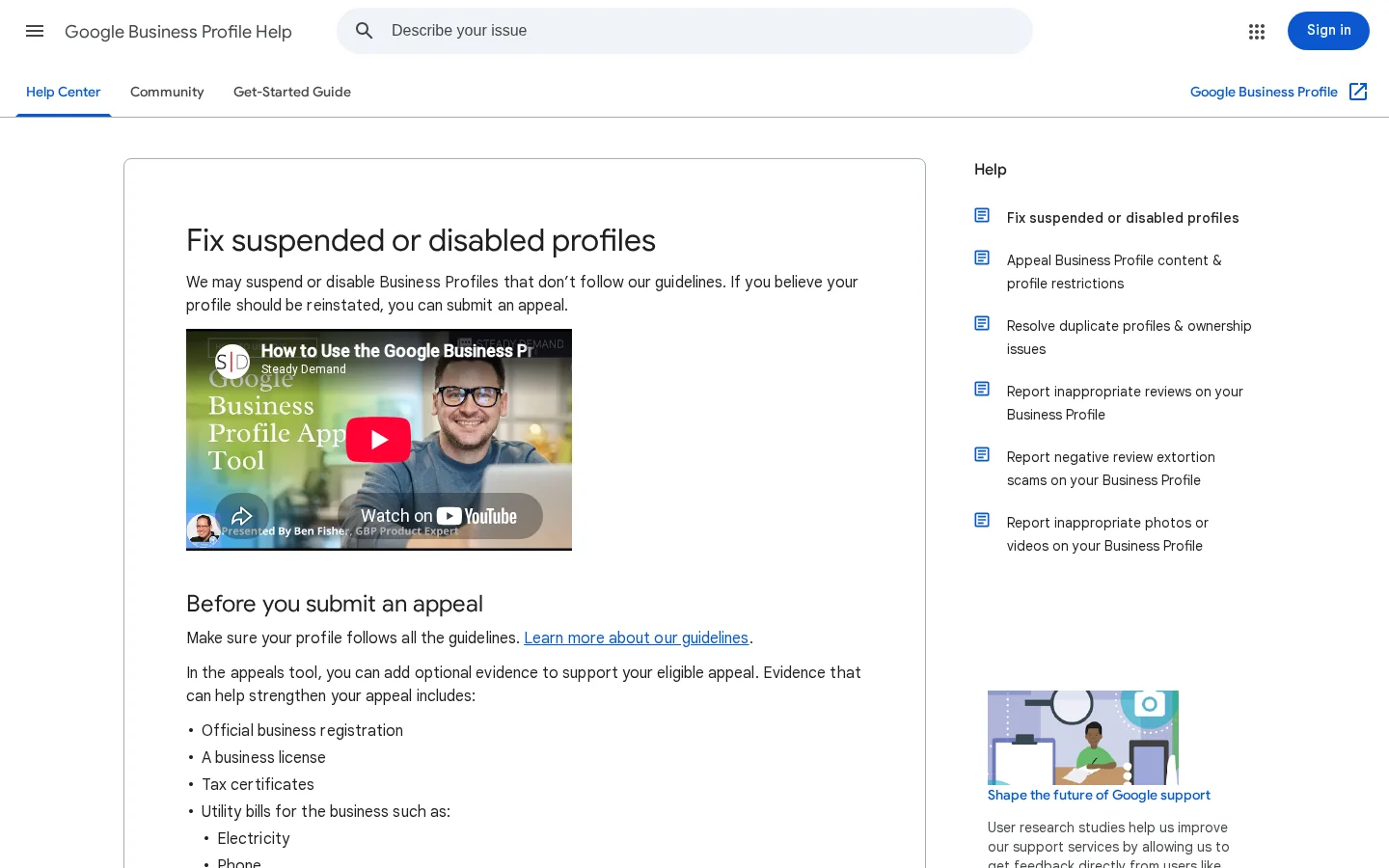
Google's appeal help page lists the steps in the appeals tool. Work through them in order, and keep the notice open, because it names the policy you are appealing. If the profile also needs verification, the verification guide covers the methods and the delays.
The appeal path in Google's tool
Read the status before you spend time on the evidence. The tool shows Submitted, Approved, Not Approved, Eligible for appeal, and Can't be appealed. If the status reads Can't be appealed, the appeal route is closed for that decision. Do not open a second profile to get around it.
Two numbers that shape your plan
Sources: Google Business Profile Help, "Fix suspended or disabled profiles"; Search Engine Journal (Mike Blumenthal, March 21, 2025)
Note
Some third-party guides describe a 60-minute window to upload proof once you start the reinstatement flow. The Google page we read does not state a time limit. Prepare your files before you open the tool, and do not count on a longer window.
Most owners only know the default path. Compare the four options below before you act, because one of them can make the situation worse.
| Option | Principle | Fits when | Main limit |
|---|---|---|---|
| Fix, then appeal once | Remove the breach, then file one appeal with proof | The data breaks a guideline | Only one appeal is allowed |
| Additional review | A second look, only after a denial | You have new proof after a denial | Google says it "may" review |
| Bulk appeal | One spreadsheet covers more than 10 profiles | Many locations are suspended together | Every Profile ID must be right |
| New listing | Start again from zero | Never, for the same business | Creates a duplicate and a new breach |
Fix, then appeal once. This is the default, and its advantage is that it follows Google's documented path. Remove the breach in the data, then file one appeal with proof that matches the public listing. For example, if the name carries "Best Plumber 24/7", restore the registered name and upload the registration and a utility bill for the same address.
Request an additional review. Google's help page says that only if your reinstatement request is denied may Google do an additional review to prove your eligibility. Bring new proof, not the same files. For example, if the first denial rejected a utility bill that spelled the street differently, the second request should include a corrected bill from the same provider.
Bulk appeal for many profiles. Google's help page covers appeals for more than 10 profiles. You tick the box in the evidence stage and attach a spreadsheet that lists each Profile ID with its evidence. The advantage is time, because one submission covers many locations. The risk is error: check every Profile ID against the profile before you upload, since a wrong ID attaches the wrong evidence to the wrong listing.
New listing. Google's help page says not to create a new Business Profile for the same business. The only advantage is speed. You lose the reviews attached to the old profile, and the new listing creates a duplicate, which is a breach in its own right. Do not choose this option.
The evidence has to prove two things: who you are and where you operate. Google's help page lists the documents it accepts. Each one must show the same business name and address as the profile.
Evidence to gather before you open the tool
The name and address must match on every document and on the listing after your fixes. A utility bill that reads "Suite 4" next to a profile that reads "Unit 4" can create doubt. Change the listing to match the paperwork, unless the paperwork itself is wrong and needs correcting first.
Write the explanation as a sequence: the rule the profile broke, what the listing said, what you changed and when, and which document proves the new state. Every sentence should point to a document. Keep it short, and avoid claims you cannot back with proof.
Next, decide whether to edit before you appeal. Practitioners advise against profile edits while an appeal is pending, because an edit can change the record the reviewer sees. Google does not state that rule. If a fix is needed, make it before you submit, so the record and your explanation agree.
Fix first, or appeal as it is?
Warning
Do not open a second profile, and do not change the business name to a different one to dodge a policy. Both moves create the duplicate and misrepresentation problems that the guidelines target, and they can turn a fixable suspension into a permanent one.
Most failed appeals repeat the same few mistakes. The table gives the quick reference, and the sections below explain each one.
| Mistake | Fastest test | Fix |
|---|---|---|
| Keywords in the business name | Compare the name with your registration and your storefront | Restore the real-world name, then move keywords into the description |
| Virtual office or P.O. box as the address | Look up the address on a map and check the co-working criteria | Move to a staffed location, or switch to a hidden-address service area |
| Hours that do not match the business | Compare the listed hours with the real opening times | Set regular customer hours and add holiday changes |
| Two profiles for one location | Search your name and city, and read every result | Merge or remove the duplicate |
| A manager on a suspended account | Check whether the stopped listings share one account | Lift the restriction in My accounts, then appeal |
| Documents that do not match | Read the registration, the bill, the website and the listing side by side | Align the sources, and correct a document only when it is wrong |
Prevention is a routine, not a one-time fix. Four habits cover most of the risk.
Keep the log in a spreadsheet with the date, the field, the old value and the new value. When a suspension appears, the log shows which change came first, and it turns your appeal explanation into a factual sequence.
Tip
Link each profile change to the traffic it affects. Sorank's GEO / SEO dashboard puts Google and AI traffic in one view, so a sudden drop after a change is easier to spot and to explain.
For the basics of the listing itself, read the Google Business Profile setup guide. If your listing also feeds AI answers, start with what to fix first for AI search.
Your next five actions
A suspension means Google has hidden your listing from Search or Maps, or locked it, because it may break the guidelines or because the account behind it is in doubt. Read the notice, find the policy it names, and check the status in Google's appeals tool before you change anything.
Google's appeal help page does not state a review time in the version we read. Trade press reported waits from about 5 days to nearly 5 weeks in 2025, so plan for weeks, not hours, and avoid unnecessary edits while you wait.
No. Google's help page says not to create a new Business Profile for the same business. A second profile creates a duplicate, which is a guideline breach in its own right. Fix the existing listing and appeal it.
We analyse your competitors, your website and your AI visibility to create a tailored content plan for free.
 AI Content Brief Generator
 FAQ Schema Generator
 AI Blog Post Ideas Generator
 Structured Data Validator (Schema Validator)
 Alt Text Checker
 Internal Link Analyzer
 Backlink Challenge
 AI Meta Description Generator
 AI Blog Title Generator
 Google Indexability Checker
 AI Blog Outline Generator
 UTM Link Builder
 Keyword Clustering Tool
 Canonical Tag Checker
 XML Sitemap Generator
 Broken Link Checker
 AI SEO Title Generator
 Headline Analyzer
 SERP Preview Tool
 Redirect Checker
 Hreflang Tag Generator
 Heading Structure Analyzer
 HTTP Headers Checker
 Favicon Extractor
 SERP CTR Calculator
 SEO vs Paid Search Savings Calculator
 SEO Share of Voice Calculator
 SEO ROI Calculator
 SEO Traffic and Revenue Forecast Calculator
 SEO Budget Calculator
 SEO Break-Even Calculator
 SaaS SEO ROI Calculator
 ROAS Calculator
 Reading Time Calculator
 Ranking Gain Simulator
 Organic Traffic Value Calculator
 Organic Traffic Estimator and Website Traffic Checker
 LTV to CAC Ratio Calculator
 Local SEO ROI Calculator
 Link Building Cost Calculator
 Keyword Value Calculator
 Keyword Opportunity Score Calculator
 Keyword Density Calculator
 GEO ROI Calculator
 GEO Content Investment Calculator
 Ecommerce SEO ROI Calculator
 Customer Lifetime Value Calculator
 Customer Acquisition Cost Calculator
 CTR Calculator
 Cost Per Article Calculator
 Conversion Rate Calculator
 Content Marketing ROI Calculator
 ChatGPT Referral Traffic Estimator
 Bounce Rate Calculator
 Backlink ROI Calculator
 AI Visibility Score Calculator
 AI Traffic Value Calculator
 AI Share of Voice Calculator
 Cost of AI Invisibility Calculator
 AI Citation Rate Calculator
 llms.txt Validator
 AI Overview Checker and AI Overviews Rank Checker
 Robots.txt Checker
 AI SEO Audit
 LLM Readability Checker
 SearchGPT Readiness Checker
 Structured Data LLM Audit
 Website Crawlability AI Audit
 Why ChatGPT Is Not Recommending My Website
 Gemini Ranking Tool
 Perplexity Ranking Checker
 LLM Citation Checker
 Answer Engine Optimization Audit
 GEO Audit
 AI Search Visibility Test
 ChatGPT Visibility Checker
 llms.txt Generator
 URL Extractor
 Webpage to Markdown
 Sitemap Checker
 SERP Volatility Sensor
 Page Size Checker
 Word Counter
 Slug Generator
 Schema Generator
 Robots Generator
 OG Preview
 Meta Tags Generator
 Image Compressor
 Favicon Generator
 On-Page SEO Audit: SEO Checker and SEO Analyzer
 Backlink Analysis Tool
 Keyword Research Tool
 Domain Authority Checker
 “I tested Sorank on a real client site and it's insane. It does everything an agency would bill you $1500 a month for. It's going into production on that client now.”

 Guillaume Guersanguersanguillaume.com“We are an Ads agency and we wanted to get our SEO back on track once and for all. Sorank gave us a clear view of our site, helped us prioritize optimizations, and properly structure our content. The tool is easy to use, well designed for a team, and very practical for centralizing tracking without having to juggle multiple platforms. A very solid foundation to start fresh with our SEO.”
 Gaspard MadouiAds Agency
 “I just let the Sorank software do its thing, and now my DR is 25 and my page is ranking higher.”
 Lucas Flandrefoundertrace.fr“I specialized in GEO thanks to Sorank. The GEO Leaderboard allows me to show my clients their position vs competitors on ChatGPT. It’s a real commercial differentiator.”
 MélanieSEO Freelance“Great service, works well for our website and helps us understand how to improve it to rank better on Google and elsewhere. Congrats, keep going, I recommend it.”
 Hugo T.E-commerce merchant