Preferences
Privacy is important to us, so you have the option of disabling certain types of storage that may not be necessary for the basic functioning of the website. Blocking categories may impact your experience on the website. More information
Privacy is important to us, so you have the option of disabling certain types of storage that may not be necessary for the basic functioning of the website. Blocking categories may impact your experience on the website. More information

Merge duplicate Google Business Profiles the right way: check eligibility, send the Maps request, keep your reviews, and know when to delete instead.

Tools

In short
Google has no merge button. You merge two Google Business Profiles by reporting one of them as a duplicate of the other on Google Maps, and Google reviews the request before it changes anything. This only works when both listings describe the same business, at the same address, with the same information. Google combines the reviews, but replies to reviews can be lost. If the extra profile was created by mistake and holds nothing you want, deleting it is often the simpler option.
Want to go further? Ask
Quick quiz
How should you get more local customers from Google?
Sorank matches your answers


Test it for 3 days on your own site and see where you stand on Google, ChatGPT and the other AIs.
Start 3-day free trial3 days free, then stop whenever you want. 90-day results guarantee, conditions apply.
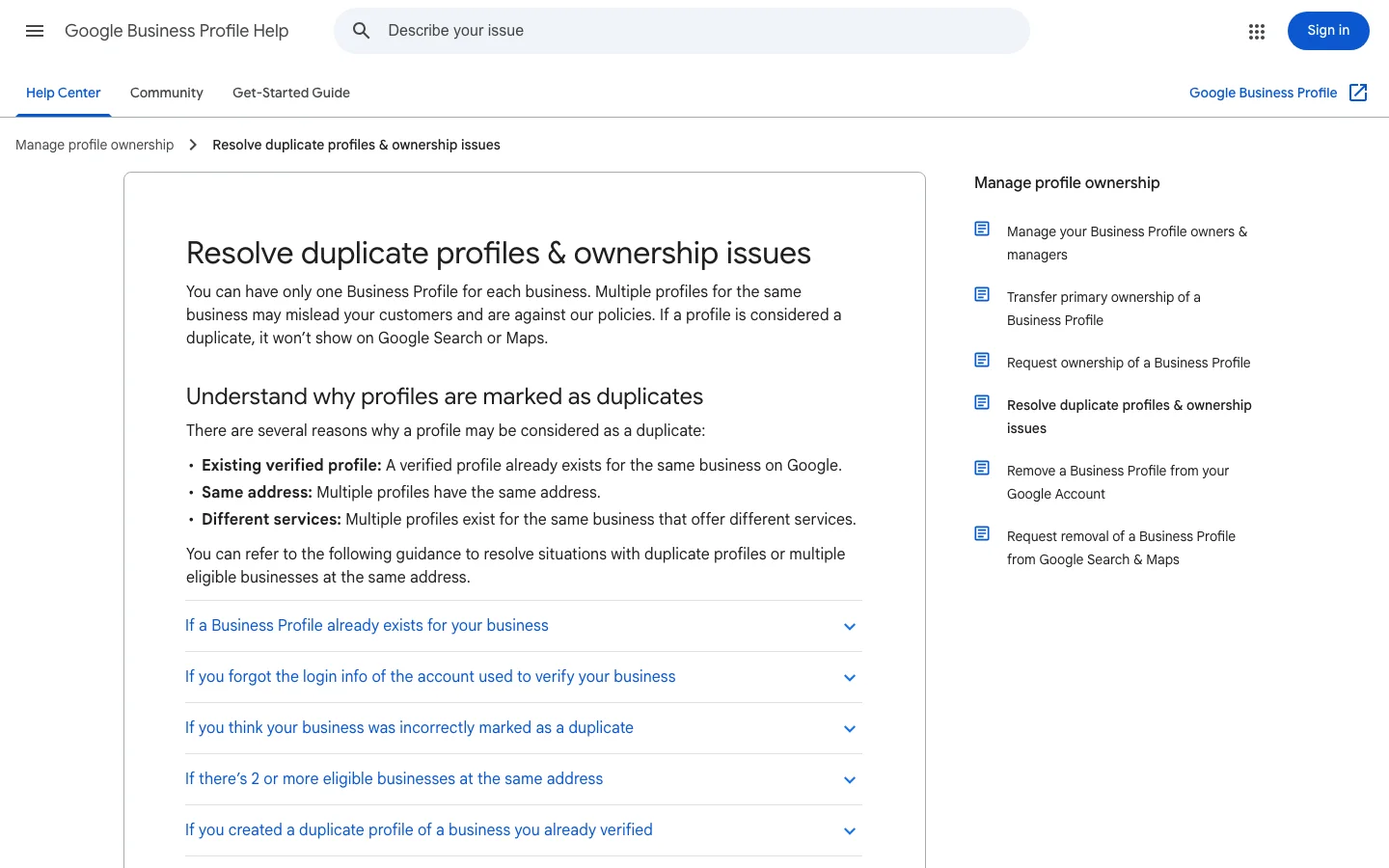
A duplicate splits your history in two. Reviews, photos and customer questions land on one listing, while new customers find the other one. Google's help page on this topic says that when a profile is considered a duplicate, "it won't show on Google Search or Maps." That is the worst case: a listing with good reviews that nobody can find.
Duplicates usually come from ordinary events. A former employee creates a profile from a personal account, and nobody remembers the login. An agency sets up a listing during a website project and then stops managing it. You move to a new street, and the old listing stays open. A customer suggests an edit on Maps that creates a second place next to the first one. Each case leaves you with two records and no clear owner.
Not every second profile is a duplicate. If you run a second branch at a different address, that branch deserves its own profile, and merging it would erase a real location. The right question is not "how many profiles do I have?" but "does each profile describe a place I actually operate, at its own address?"
Note
A second shop on another street, in another district or in another city is a second location, not a duplicate. Keep it.
Our guide to local listing management covers keeping every listing accurate over time. This article is narrower: the merge itself, from the eligibility check to the cleanup afterwards.
One bakery, two listings: before and after the cleanup
Google's wording is short, which is why people misread it. On its page titled "Resolve duplicate profiles & ownership issues", Google describes the process for when "2 or more Business Profiles for the same business exist on Maps." For a merge to succeed, "the profiles must represent the same business and should have the same info." Merge requests are made by reporting a suggestion on Google Maps, and "All merge requests are subject to review."
The rule behind this comes from Google's guidelines page. Google states that "There should only be one profile per business," and that you should not "create more than one page for each location of your business, either in a single account or multiple accounts." Those two sentences explain most merge decisions you will face: one business gets one profile, and one location gets one page.
Google does not publish a list of exceptions for merges, and the review is manual. That is why a clean request, with an honest and visible match between the two listings, matters more than a long explanation in the message box.
Merge the extra profile, or delete it?

Eligibility decides whether your request is accepted, and most failed requests fail here. Check every pair of listings against the list below before you open Google Maps. If one line is a clear no, stop. A request built on a wrong match wastes time, and it can confuse the reviewer.
Be strict with yourself. A name that differs by one word, such as "Bakery" and "Boulangerie" for the same shop, is a reason to check, not a reason to merge. Google asks for the same information, so the name, address, phone number and category should line up.
Eligibility check for each pair of listings
The last line needs a comment. Local SEO guides regularly report that Google refuses to merge a storefront with a service-area profile. Google's help page does not say that in so many words, so treat it as a warning, and ask support before you rely on a merge.
Warning
Do not merge listings to fix a rating. A merge combines the reviews, including the negative ones. Clean up the content you control first, then decide which profile to keep.
This is the process we recommend. It follows the route Google documents for duplicates on Maps, and it adds the checks that the help pages leave to you. It also keeps a record in case the reviewer asks questions.
The merge request, step by step
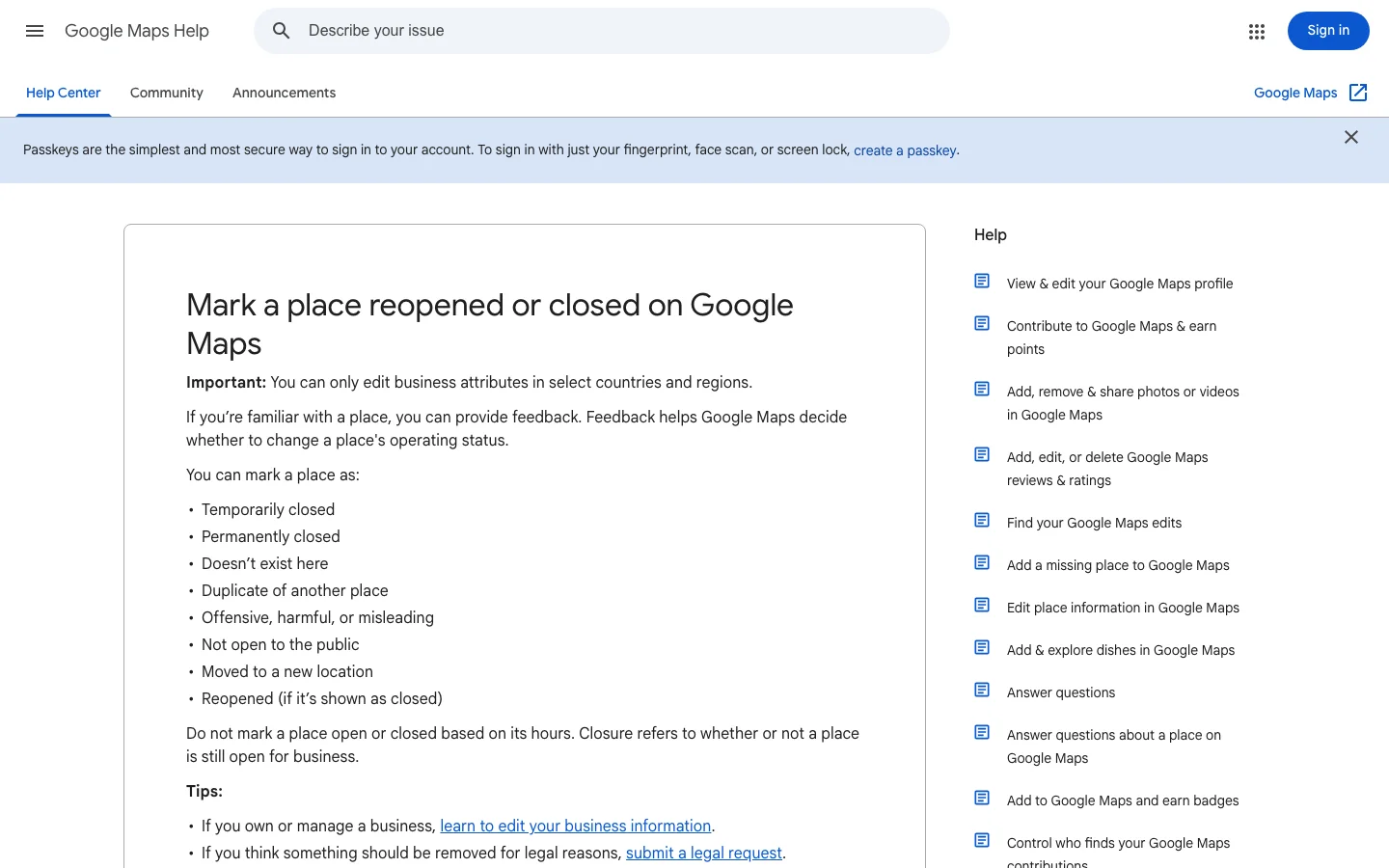
Google's Maps page does not explain how the matching place is picked, so make sure the profile you keep is visible on Maps before you start. If you mention it in a follow-up message, give its name and full address.
Example
A bakery has two listings. The owner created the first one years ago, and it has most of the reviews. A former employee created the second one, with a few reviews, a copy of the same phone number and the same street address. The owner keeps the first listing, copies the replies from the second one, compares the hours and submits the Maps request with both names and addresses written in the notes.
If you do not have a listing on Maps at all, you have no merge to do. Start with our guide on how to add your business to Google Maps instead.
A rejected request tells you something, even when the reason is not spelled out. Read the outcome again, check the facts you wrote down, and look for the mismatch. Fix what is wrong on your side, such as the hours or the phone number, and submit again only when you have changed something real. Sending the same request again, with the same evidence, does not change the outcome.
Four routes exist, and they are not interchangeable. Choose the one that matches what the two listings contain, not the one that feels fastest.
| Route | Best when | What happens | Main risk |
|---|---|---|---|
| Merge request on Google Maps | Two real listings for the same place, both with history | Google reviews the request, then combines the reviews | Replies to reviews may be lost, and the review takes time |
| Delete the duplicate | You created it by mistake and it holds nothing you want | The profile is removed, along with all its content | Nothing can be recovered from it afterwards |
| Ownership route | The duplicate belongs to someone who left, or to a former agency | Google handles it as an ownership issue, as described in its help article | Slower, and you need a clear account of who controls what |
| Keep both | The listings are different locations | Each listing stays as its own profile | Nothing merges, so you must keep both accurate |
The table makes one thing clear. A merge is the right answer only when the two listings are the same place. Deleting is right only when the extra profile has no value to you. Most people reach for delete first, and that is the mistake covered in the next sections.
Google's wording on reviews is precise: "When 2 profiles are merged, their reviews are combined, but replies to reviews may be lost." That sentence holds the two things you need to plan for. The reviews survive, and your replies may not.
Photos and posts are a gap. The help page does not say what happens to them during a merge, so do not assume that everything carries over. Before you send the request, download the photos you want to keep, copy the text of your recent posts, and note which image is your cover photo.
Open both profiles and copy every reply you have written, starting with the answers to complaints. Store the text in a document next to the date of each review. After the merge, check which replies survived, and post again the ones that were lost, word for word, so your answers stay consistent.
Keep the storefront, the interior and the team photos on the profile you keep. Outdated images can reappear after a merge, such as a closed sign, an old logo or a product that no longer exists. Check the photo gallery once the merge is visible, and remove anything that shows an old version of the business.
The profile you keep decides what customers see. Its website, hours, categories and description are the facts that Google, and AI assistants reading Google data, will repeat. If the other profile has a more accurate opening time, copy that fact across. Do not copy its wording or photos blindly.
Most failed merges come from four mistakes. Each entry below says what the mistake is, how to spot it before you submit, and how to fix it. Google's guidelines page is the reference for the first one.
What it is. Two listings for the same brand, but two addresses. A bakery with a second counter in another district, or a chain with two shops in one city, is the typical case.
How to spot it. The street number, the suite or the city differs. The phone numbers differ. Each listing collects reviews that mention a different neighborhood.
How to fix it. Do not submit anything. Keep both profiles, check that each has the right category and hours, and make sure each location has its own page on your website. Google's guidelines ask for one profile per location, and a merge would break that rule.
What it is. You remove the listing you believed was the duplicate, and it turns out to be the one with the reviews, the photos and the history that customers actually use.
How to spot it. Before you delete anything, compare the review count, the photo count and the creation date of each profile. Search the business as a customer would, and see which listing appears first.
How to fix it. Change the plan. Merge instead, or copy what you need before you delete. Google's help page warns that removing a duplicate removes all its content and linked managers, so the deletion cannot be undone from your side.
What it is. The profile you keep has old hours, an old phone number or a category that no longer fits, while the duplicate had the current information.
How to spot it. Compare the two listings field by field, including the holiday hours and the list of services. A difference you cannot explain is a signal to check with the owner.
How to fix it. Update the survivor, then check it on Google Maps from a logged-out browser. Confirm that the old phone number and the old opening times no longer appear in the description or in the Q and A.
What it is. Directories, booking sites and data feeds still show the old listing, so customers and AI assistants keep finding conflicting facts about your business.
How to spot it. Search your business name in a few directories and in an AI assistant. Read the phone number, address and hours in each answer.
How to fix it. Make the same facts identical everywhere, starting with the name, address and phone number, known as NAP. Our NAP guide explains why consistency matters, and our page on local citations explains which sources to fix first.
Real businesses rarely fit the simple case. The table below lists the situations we see most often and what to do with each one.
| Situation | What to do | Why |
|---|---|---|
| Two listings, same shop, same address | Merge request on Google Maps | This is the case the rule was written for |
| Storefront plus a service-area listing | Ask support before you submit anything | Local SEO guides report these merges are usually refused, and Google does not say so outright |
| Branch in another city | Keep both profiles | Each location needs its own profile |
| Listing created by a former agency | Use the ownership route | The question is who controls the profile, not whether the two match |
| Practitioner listing for a single person | Check case by case with support | Guides report that merges happen only in certain situations |
If you manage many locations, do not try to merge at scale. Audit each location first, write down the evidence for each match, and send the requests one at a time. Each request then stands on its own facts, and you can answer a reviewer's question quickly.
A merge is not the end of the job. Google's review takes time, and the listing you keep needs a few checks once the change appears on the map. Work through the steps below in order.
After the merge, the cleanup checklist
If the profile you kept is not verified, verify it now. Our guide on how to verify your Google Business Profile covers each method and the usual delays. Then run the local SEO checklist on the survivor, so the rest of the profile matches the work you just did.
Tip
Check the structured data on your own website too. Your LocalBusiness markup, written in JSON-LD (the format Google reads), should carry the same name, address and phone number as the profile you kept. The free structured data validator tests the markup of any page.
<script type="application/ld+json">
{
  "@context": "https://schema.org",
  "@type": "LocalBusiness",
  "name": "Example Bakery",
  "address": {
    "@type": "PostalAddress",
    "streetAddress": "12 Example Street",
    "addressLocality": "Lyon",
    "postalCode": "69001",
    "addressCountry": "FR"
  },
  "telephone": "+33400000000",
  "url": "https://www.example.com"
}
</script>
A mismatch on your own site sends mixed signals to search engines and to AI assistants, so compare each field in the markup with the profile you kept. Then keep monitoring. Our wider guide on local listing management covers the routine checks that stop duplicates from coming back.
If you want to see how ChatGPT, Claude or Gemini describe your business once the cleanup is done, our GEO optimization page explains how Sorank works on generative engine optimization, the work of getting a brand recommended by AI assistants.
Yes, but only when both listings describe the same business at the same address with the same information. Google has no merge button, so you report one listing as a duplicate of the other on Google Maps, and Google reviews the request.
Google's help page says the reviews are combined, but replies to reviews may be lost. Copy your replies before you submit, then check the merged profile and repost any reply that disappeared.
Delete it when you created it by mistake and it holds no reviews or history you want, because Google says removing a profile removes all its content. If it has real customer reviews or history, request a merge so they are combined.
We analyse your competitors, your website and your AI visibility to create a tailored content plan for free.
 AI Content Brief Generator
 FAQ Schema Generator
 AI Blog Post Ideas Generator
 Structured Data Validator (Schema Validator)
 Alt Text Checker
 Internal Link Analyzer
 Backlink Challenge
 AI Meta Description Generator
 AI Blog Title Generator
 Google Indexability Checker
 AI Blog Outline Generator
 UTM Link Builder
 Keyword Clustering Tool
 Canonical Tag Checker
 XML Sitemap Generator
 Broken Link Checker
 AI SEO Title Generator
 Headline Analyzer
 SERP Preview Tool
 Redirect Checker
 Hreflang Tag Generator
 Heading Structure Analyzer
 HTTP Headers Checker
 Favicon Extractor
 SERP CTR Calculator
 SEO vs Paid Search Savings Calculator
 SEO Share of Voice Calculator
 SEO ROI Calculator
 SEO Traffic and Revenue Forecast Calculator
 SEO Budget Calculator
 SEO Break-Even Calculator
 SaaS SEO ROI Calculator
 ROAS Calculator
 Reading Time Calculator
 Ranking Gain Simulator
 Organic Traffic Value Calculator
 Organic Traffic Estimator and Website Traffic Checker
 LTV to CAC Ratio Calculator
 Local SEO ROI Calculator
 Link Building Cost Calculator
 Keyword Value Calculator
 Keyword Opportunity Score Calculator
 Keyword Density Calculator
 GEO ROI Calculator
 GEO Content Investment Calculator
 Ecommerce SEO ROI Calculator
 Customer Lifetime Value Calculator
 Customer Acquisition Cost Calculator
 CTR Calculator
 Cost Per Article Calculator
 Conversion Rate Calculator
 Content Marketing ROI Calculator
 ChatGPT Referral Traffic Estimator
 Bounce Rate Calculator
 Backlink ROI Calculator
 AI Visibility Score Calculator
 AI Traffic Value Calculator
 AI Share of Voice Calculator
 Cost of AI Invisibility Calculator
 AI Citation Rate Calculator
 llms.txt Validator
 AI Overview Checker and AI Overviews Rank Checker
 Robots.txt Checker
 AI SEO Audit
 LLM Readability Checker
 SearchGPT Readiness Checker
 Structured Data LLM Audit
 Website Crawlability AI Audit
 Why ChatGPT Is Not Recommending My Website
 Gemini Ranking Tool
 Perplexity Ranking Checker
 LLM Citation Checker
 Answer Engine Optimization Audit
 GEO Audit
 AI Search Visibility Test
 ChatGPT Visibility Checker
 llms.txt Generator
 URL Extractor
 Webpage to Markdown
 Sitemap Checker
 SERP Volatility Sensor
 Page Size Checker
 Word Counter
 Slug Generator
 Schema Generator
 Robots Generator
 OG Preview
 Meta Tags Generator
 Image Compressor
 Favicon Generator
 On-Page SEO Audit: SEO Checker and SEO Analyzer
 Backlink Analysis Tool
 Keyword Research Tool
 Domain Authority Checker
 “I tested Sorank on a real client site and it's insane. It does everything an agency would bill you $1500 a month for. It's going into production on that client now.”

 Guillaume Guersanguersanguillaume.com“We are an Ads agency and we wanted to get our SEO back on track once and for all. Sorank gave us a clear view of our site, helped us prioritize optimizations, and properly structure our content. The tool is easy to use, well designed for a team, and very practical for centralizing tracking without having to juggle multiple platforms. A very solid foundation to start fresh with our SEO.”
 Gaspard MadouiAds Agency
 “I just let the Sorank software do its thing, and now my DR is 25 and my page is ranking higher.”
 Lucas Flandrefoundertrace.fr“I specialized in GEO thanks to Sorank. The GEO Leaderboard allows me to show my clients their position vs competitors on ChatGPT. It’s a real commercial differentiator.”
 MélanieSEO Freelance“Great service, works well for our website and helps us understand how to improve it to rank better on Google and elsewhere. Congrats, keep going, I recommend it.”
 Hugo T.E-commerce merchant