Preferences
Privacy is important to us, so you have the option of disabling certain types of storage that may not be necessary for the basic functioning of the website. Blocking categories may impact your experience on the website. More information
Privacy is important to us, so you have the option of disabling certain types of storage that may not be necessary for the basic functioning of the website. Blocking categories may impact your experience on the website. More information

Compare SE Ranking and Moz Pro on prices, plan limits, data accuracy and Domain Authority, then run a 14-day test on your own site before you pay.
In short
SE Ranking and Moz Pro are both SEO platforms for rank tracking, site audits, keyword research and backlink data, and they differ in their metrics, prices and plan limits. Choose SE Ranking for a broad toolset with a 14-day trial, or Moz Pro if your work relies on Moz's Domain Authority. Test both on the same keywords before you pay.
Want to go further? Ask
Quick quiz
Which kind of SEO tool is right for you?
Sorank matches your answers


Test it for 3 days on your own site and see where you stand on Google, ChatGPT and the other AIs.
Start 3-day free trial3 days free, then stop whenever you want. 90-day results guarantee, conditions apply.
Both tools cover the same core SEO jobs: they track where your pages rank, crawl a site for technical problems, research keywords and look at the links pointing to a domain. Because the feature lists look alike, the useful comparison is about how each tool answers the questions you ask every week. Start with those questions, not with the vendor's homepage.
Table 1 lists four common questions, where to look for the answer in each tool, and what to check during a trial. Use it as a checklist when you open both dashboards side by side.
| Question you ask | Where to look in SE Ranking | Where to look in Moz Pro | What to check in a trial |
|---|---|---|---|
| Did my pages move this week? | Rank tracking, per project | Rank tracking | Update frequency and the daily keyword cap |
| What is broken on my site? | Site audit report | Site crawl report | Whether issues are grouped and ranked by priority |
| Which keywords should I target? | Keyword research | Keyword Explorer | Whether volume and difficulty match your own tests |
| Who links to me, and how strong are they? | Backlink reports | Backlink reports | Whether the referring domains match a manual check of your top pages |
Rank tracking is only as useful as its update schedule and its location settings. Check whether you can choose a country, a device and, if you need it, a city. Then check how often positions refresh and how many keywords you can track each day, because that cap decides how many pages you can watch. For a wider view of the category, read our rank tracking guide.
Site audits differ more in their reports than in their crawlers. A useful audit groups each issue by type, shows the affected URLs and ranks the fixes by impact. Before you pay, open a sample project and sort the issues by count. The top three issues should be ones you can fix within a week, and if they are vague, the report is not doing its job.
Keyword tools show volume, difficulty and related terms. Backlink tools show the referring domains that link to you and how strong they are. Both categories are estimates built on each vendor's own data, so treat them as a way to build a shortlist, not as a final verdict. The data accuracy section below shows how to measure the gap between the two tools.
Price is the easiest number to compare and the easiest one to get wrong. Two things change what you pay: the billing period and the limits attached to each plan. Compare the price the vendor shows today, with the same billing period and the same currency, and write down the date you checked it.
SE Ranking's pricing page, checked on 22/11/2026, shows the Core plan at €87.20 per month on the annual toggle, against a €109.00 reference price. The Growth plan shows €188.00 per month on the annual toggle, against €235.00. Enterprise has no public price, only a call to sales. Both the Core and Growth plans offer a 14-day trial, and the page says no credit card is required. The FAQ adds that the trial includes up to 10 projects and 750 keywords tracked per day, which is less than the 2k a day on Core. Read the trial as a test of the workflow, not as a preview of the full plan.
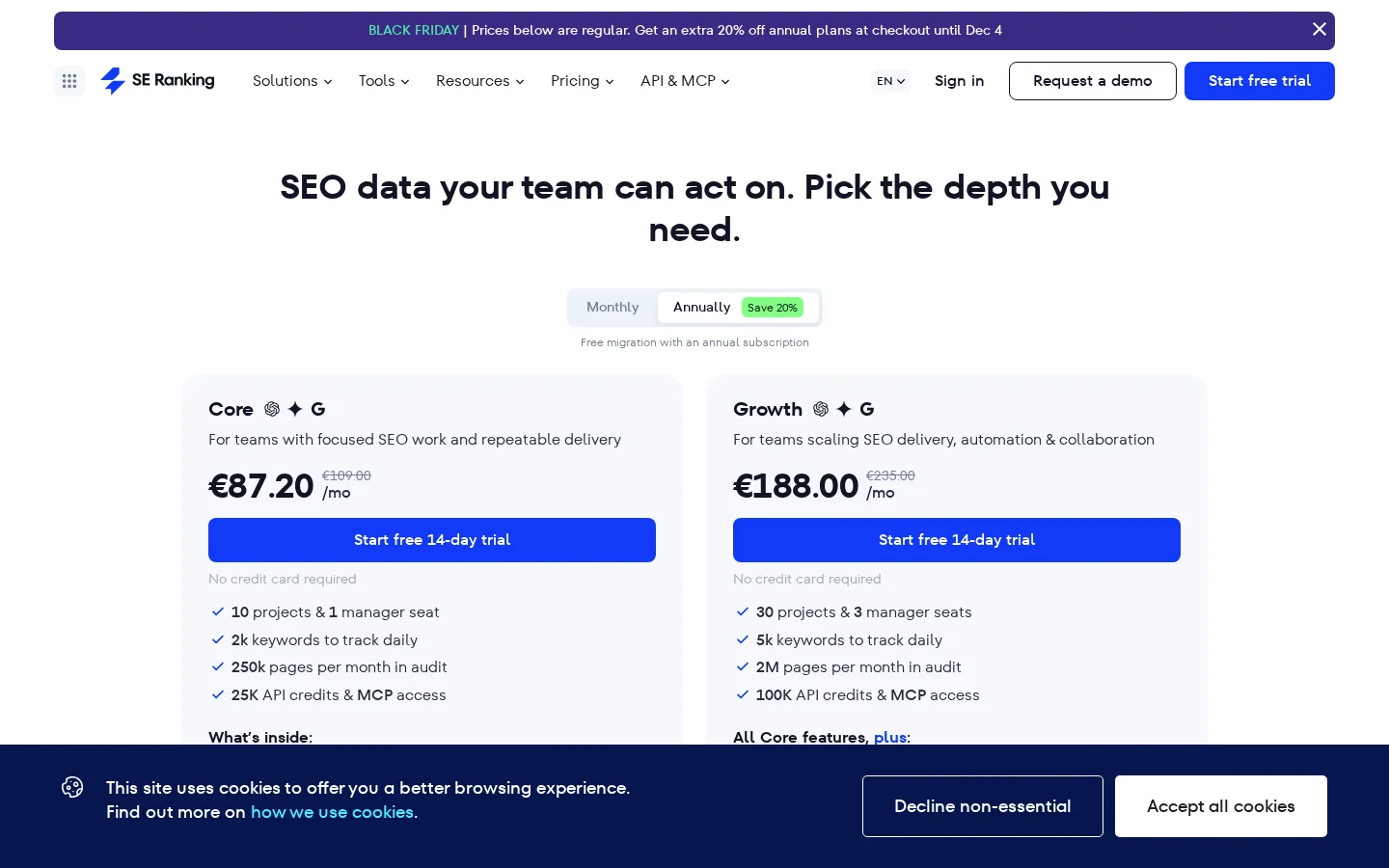
SE Ranking, Core plan at a glance
Source: SE Ranking pricing page, checked 22/11/2026
Moz Pro's prices are harder to pin down from one place. Review sites such as G2 and Capterra listed its plans in November 2026 at $49 (Starter), $99 (Standard), $179 (Medium) and $299 (Large) per month, and they report that annual billing costs less. Sources also disagree on the name of the top plan, which is Large in some and Premium in others. Check moz.com/pricing before you buy, and do not reuse a figure from a listing you read a few weeks ago.
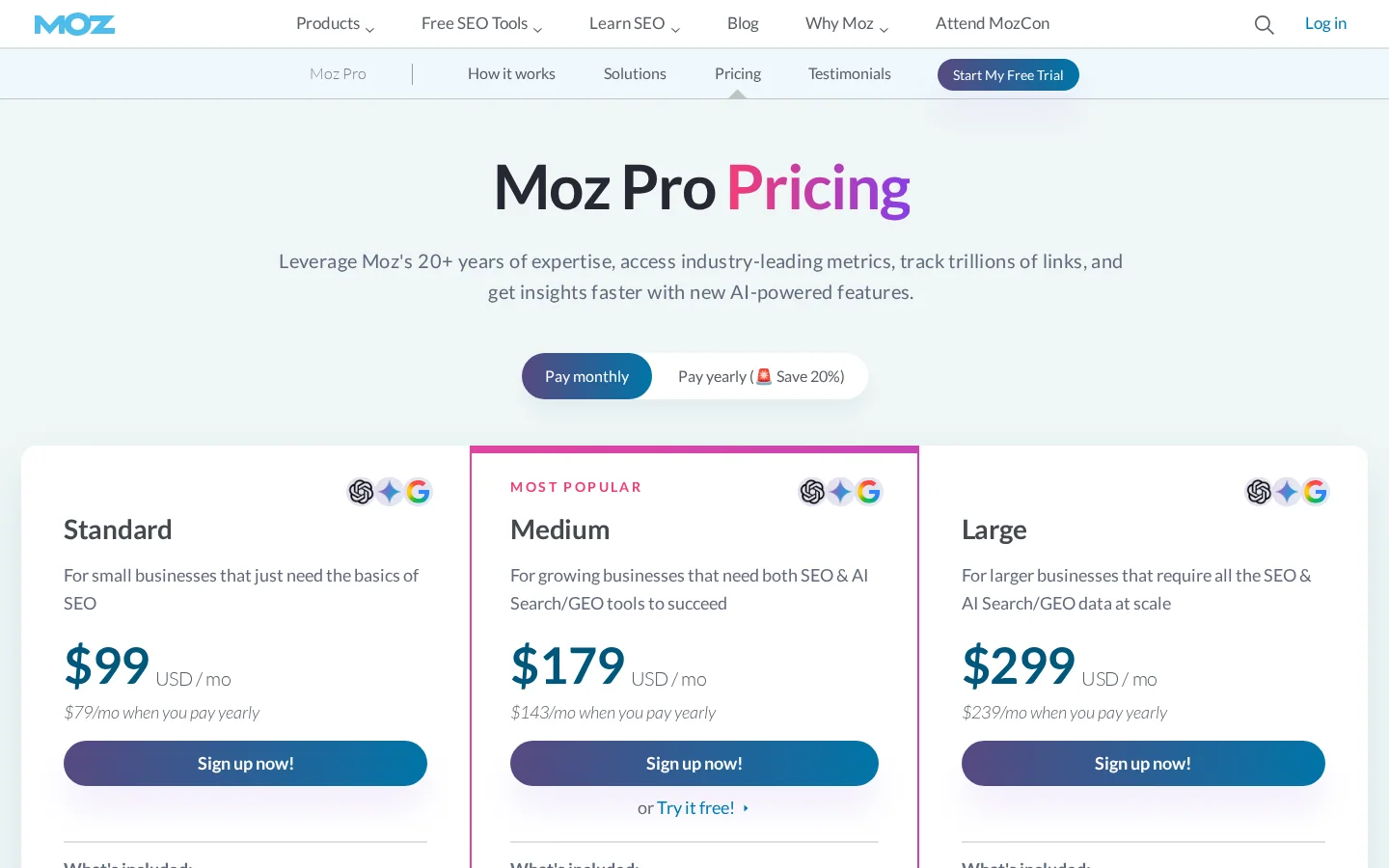
A 2023 comparison published by Scalenut, a content tool, lists SE Ranking's plans as Essential at $55, Pro at $109 and Business at $239 a month, and Moz Pro's Standard plan from $79. The current SE Ranking page shows Core, Growth and Enterprise instead, and the figures have moved. The article can still help you think about the categories, but its numbers are three years old.
Old comparisons fail in a predictable way. Plan names change, prices change and limits change, but the article keeps the table it wrote on the day it was published. Before you trust any figure, ask when it was checked and whether the vendor's own page confirms it.
Reading a comparison, before and after you check the vendor
Example
Imagine a freelancer who manages four client sites and about 150 keywords in total. That fits within the 10 projects on the Core plan. The limit that matters grows later, when you add more sites or track more keywords each day, so check the daily cap before the project count.
Keyword volume is an estimate. Each vendor builds it from its own panel and clickstream data, so SE Ranking and Moz Pro often show different numbers for the same term. That does not prove that one tool is wrong. It means you need a way to measure the distance between them and decide whether that distance changes what you publish. Our Ahrefs vs Moz accuracy article applies the same idea to another pair of tools, and the keyword volume entry explains what the figure does and does not tell you.
For each keyword, compute a gap score from the two volumes. A gap of 0 means both tools agree. A gap of 0.5 means one number is double the other. Use the formula below and write the result next to each keyword.
gap = |volume_seranking - volume_moz| / max(volume_seranking, volume_moz)Read the results in bands. Below 0.3, the two tools agree closely enough for most content decisions. Above 0.5, check the keyword in Google Search Console and in the live results before you commit a page to it. These thresholds are a working rule, not a standard, so adjust them to the risk you accept.
| Keyword | SE Ranking volume | Moz volume | Gap | What you do |
|---|---|---|---|---|
| Keyword 1 (from your list) | Your reading | Your reading | Formula result | Keep if below 0.3 |
| Keyword 2 (from your list) | Your reading | Your reading | Formula result | Check in Search Console if above 0.5 |
| Keyword 3 (from your list) | Your reading | Your reading | Formula result | Check in the live results if between 0.3 and 0.5 |
Choose 20 keywords from three groups: five head terms with high volume, ten mid-tail terms you could realistically rank for, and five long-tail queries with clear buying intent. Add at least two keywords you already rank for, because Search Console gives you a real click count to check against. Avoid testing only the terms that make one tool look good. Test the ones you would have to decide on.
Volume is also not the same as traffic. A term with high volume and a results page full of AI answers can send fewer clicks than its number suggests, so read the search results for each keyword before you use its volume to plan a page.
Moz's Domain Authority is a score from 1 to 100 that predicts how well a domain can rank compared with others. It is built from backlink data and other signals, and Moz presents it as a comparison tool rather than an absolute grade. Google does not use it as a ranking factor, which is the main reason to read it as a benchmark and nothing more.
Two link metrics, two indexes
Summary of the public definitions, not a test result
The two scores come from different indexes and formulas, so they never line up on the same site. A Domain Authority of 40 in Moz and a Domain Rating of 40 in Ahrefs do not describe the same strength. If you compare yourself with competitors, measure all of you with the same tool. The Domain Authority and Domain Rating entries explain each metric in more detail.
A higher authority score does not change what Google allows. Google's spam policies define link spam as the practice of creating links to or from a site primarily to manipulate search rankings. The same page lists buying or selling links for ranking purposes, exchanging money or goods for links, sponsored articles that pass ranking credit, and excessive link exchanges such as "link to me and I'll link to you". Paid links are acceptable when they carry the nofollow or sponsored attribute. You can read the exact wording in Google's spam policies.
If you want to know which links are safe to pursue, read our guides on backlink exchange and quality backlinks.
Warning
Raising a Domain Authority score by buying or trading links puts your site on the wrong side of Google's policy, even when the number goes up. Treat the score as the result of good links, never as a target to buy.
An audit is only useful when it tells you what to fix first. Check that each issue comes with a count, a list of affected pages and a priority. Internal links are a good test of that. Google says it uses links to find new pages to crawl, and that every page you care about should have a link from at least one other page on your site.
Google also says it can generally only follow a link that is an <a> HTML element with an href attribute, so links that depend on scripts may not be followed. Its guidance adds that good anchor text is descriptive, reasonably concise and relevant to the page it sits on, and it names "click here" as a bad example. Read the link best practices page once, then check your audit tool against those rules.
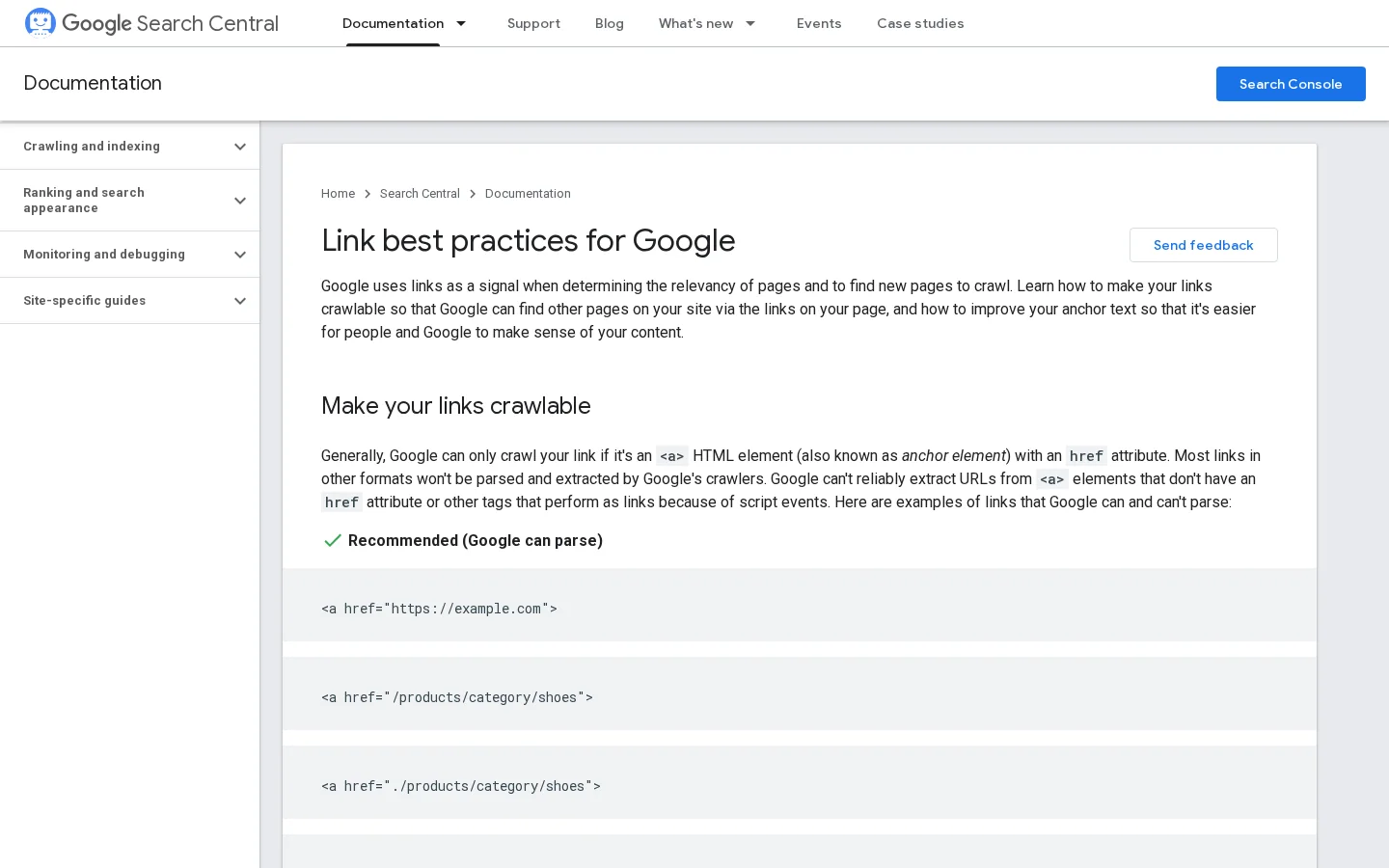
The anchor text is the easiest part to audit yourself. Export the HTML of your pages and search it for the generic phrases with the regular expression below. Run it in an editor or a command line tool that supports Perl-style regex, and read every match before you edit anything.
(?i)>\s*(click here|read more|here|this article)\s*<For a single page, use the free Internal Link Analyzer to audit its internal links without setting up a project. Check three things: whether the page receives a link from at least one relevant page, whether the anchors describe their targets, and whether any important page has no inbound internal link at all. Fix those orphan pages first, since they are the ones a crawler is least likely to reach. The broader plan is in our internal linking entry.
You can compare SE Ranking and Moz Pro in four ways. Each answers a different question, and most decisions need at least two of them. Table 3 at the end of this section puts them side by side.
This is the fastest method, and it costs nothing. You compare plan price, project count, daily keyword cap and trial length, then drop any tool that does not fit your budget. Its weakness is that it says nothing about data quality or how pleasant the tool is to use. For SE Ranking, the first numbers to test are the 10 projects and 2k daily keywords on Core, against your own client list.
Write down the 15 or so jobs you do each week, such as checking rankings by city, exporting a report for a client or finding broken internal links. Mark each tool as covered, partial or missing. This works well once you have three or more tools on the shortlist. It hides quality, though: a feature can exist and still be slow or hard to read. Our Ahrefs vs Moz Pro comparison uses the same kind of checklist, so you can reuse its structure.
This is the most useful method for a tool you will open every day. Start both trials on the same day, use the same domain and run the same routine for two weeks. SE Ranking offers a 14-day trial with no credit card. Its FAQ says the trial is capped at 10 projects and 750 keywords tracked per day, so a trial shows you the workflow but not the full load of a paid plan. Keep that gap in mind when you decide.
This is the most direct test of the numbers. Compare volumes and positions from each tool against the figures in Search Console, using the gap formula from the data accuracy section. It takes the most time, and positions depend on location and device, so a mismatch is not always a bug. Use this method when your content plan depends on volume.
| Method | Effort | Cost | Answers | Main limit |
|---|---|---|---|---|
| Read pricing and limits | Low | Free | Can I afford it, and does the plan fit my work? | Says nothing about data quality |
| Feature checklist | Medium | Free | Which jobs each tool covers | A feature can exist and still be slow |
| Trial on your own site | Medium | Free within the trial | How the tool fits your weekly routine | Trial limits are lower than paid plans |
| Accuracy test | High | Your time | How close the numbers are to Search Console | Positions vary by location and device |
Use this routine when you have time to test before you commit to an annual plan. It works with SE Ranking's 14-day trial. Check the Moz Pro trial terms on moz.com/pricing first, because the length and limits can differ.
The 14-day test in five steps
Set the columns of your comparison sheet once, so both exports fit the same structure:
keyword,seranking_volume,moz_volume,seranking_position,moz_position,gsc_clicksFill in one row per keyword, compute the gap score, and set it next to the Search Console clicks for the same term. After 14 days you will have the data to choose, along with a clear view of what the trial did not show you.
Most bad comparisons come from a few repeated errors. Each one is easy to spot once you know what to look for.
What it is: putting a Moz Domain Authority next to an Ahrefs Domain Rating and calling one site stronger. How to spot it: a report that ranks your site and your competitors across two different metrics. How to fix it: pick one metric, measure every site in it on the same day, and only then read the gap.
What it is: using a price table from an old article as if it were today's. How to spot it: plan names that no longer appear on the vendor's page, such as the Essential, Pro and Business plans in a 2023 review. How to fix it: open the pricing page on the day you buy, and write the date next to each figure in your notes.
What it is: setting a monthly price against an annual price, or euros against dollars. How to spot it: two numbers that look close, but a different billing line underneath. How to fix it: convert to one currency, use one billing period and note the annual discount separately. SE Ranking's page, for example, shows a discounted annual price next to a higher reference price.
What it is: choosing the tool with the longer list of features. How to spot it: a decision made before any test has run. How to fix it: test the three jobs you do most often, with the same site and the same keywords, and let those results decide.
Choose SE Ranking if you want a broad set of SEO modules, a trial you can run on a real site and clear project and keyword limits per plan. Choose Moz Pro if your team already reads Domain Authority, works from Moz's keyword data or has built its reporting around Moz. If neither fits, run the 14-day method above with a third tool on the shortlist.
Sorank works from a different reference. It shows the Ahrefs Domain Rating in your account, next to your Google clicks and AI visibility, in the Domain Authority Tracker. Use it if you want one place to follow your authority and your traffic together, rather than a second Moz score to read.
Before you pick one
Tip
Before you start any trial, run the free Domain Authority Checker on your site and on two competitors. Write the scores and the date down, so you have a baseline to measure against once the trial is over.
SE Ranking and Moz Pro overlap on most of the jobs you do each week, so the choice comes down to data, limits and fit. Read the pricing page on the day you buy, measure how far the two tools' numbers differ, and run both trials on the same site. If Semrush is also on your list, the Semrush vs Moz comparison covers the budget side of that decision.
Neither tool is better in every case. SE Ranking suits a broad toolset with a 14-day trial, while Moz Pro suits teams that work with Moz's Domain Authority and keyword data. Run both trials on the same keywords before you decide, because the right answer depends on your weekly tasks.
When checked on 22/11/2026, SE Ranking's pricing page listed its Core plan at €87.20 per month on annual billing. Review sites listed Moz Pro's entry plans from $49 to $99 per month, but Moz's own pricing page is the reference, and its prices change often.
Each vendor estimates volume from its own panels and data, so the two numbers rarely match. Measure the gap for your own keywords, and check the results against Search Console before you rely on a volume to plan a page.
We analyse your competitors, your website and your AI visibility to create a tailored content plan for free.
 Duplicate Content Checker
 Mobile-Friendly Test
 Website Speed Test
 Subdomain Finder
 Domain Age Checker
 CMS Detector
 Googlebot Simulator
 Nofollow Link Checker
 Meta Tag Checker
 Keyword Cannibalization Checker
 Keyword Intent Checker
 Keyword Extractor
 Google Ads Cost Calculator
 CPC Calculator
 Local Citation Finder
 Reddit Threads Finder
 Disavow File Generator
 Redirect Generator
 Canonical Tag Generator
 Passive Voice Checker
 Google Location Changer
 Google Review Calculator
 Google Review Link Generator
 Keyword Combiner
 Podcast Show Notes Generator
 AI Content Rewriter
 AI Text Humanizer
 ChatGPT Prompt Generator
 Twitter Thread Generator
 Tweet Generator
 Landing Page Copy Generator
 Google Ads Copy Generator
 Pinterest Pin Description Generator
 Anchor Text Generator
 Social Media Post Generator
 LinkedIn Post Generator
 Free AI Writer
 Review Response Generator
 LSI Keyword Generator
 YouTube Video Ideas Generator
 YouTube Tag Generator
 YouTube Description Generator
 Product Description Generator
 CTA Generator
 Blog Introduction Generator
 Conclusion Generator
 Hook Generator
 AI Content Brief Generator
 FAQ Schema Generator
 AI Blog Post Ideas Generator
 Structured Data Validator (Schema Validator)
 Alt Text Checker
 Internal Link Analyzer
 Backlink Challenge
 AI Meta Description Generator
 AI Blog Title Generator
 Google Indexability Checker
 AI Blog Outline Generator
 UTM Link Builder
 Keyword Clustering Tool
 Canonical Tag Checker
 XML Sitemap Generator
 Broken Link Checker
 AI SEO Title Generator
 Headline Analyzer
 SERP Preview Tool
 Redirect Checker
 Hreflang Tag Generator
 Heading Structure Analyzer
 HTTP Headers Checker
 Favicon Extractor
 SERP CTR Calculator
 SEO vs Paid Search Savings Calculator
 SEO Share of Voice Calculator
 SEO ROI Calculator
 SEO Traffic and Revenue Forecast Calculator
 SEO Budget Calculator
 SEO Break-Even Calculator
 SaaS SEO ROI Calculator
 ROAS Calculator
 Reading Time Calculator
 Ranking Gain Simulator
 Organic Traffic Value Calculator
 Organic Traffic Estimator and Website Traffic Checker
 LTV to CAC Ratio Calculator
 Local SEO ROI Calculator
 Link Building Cost Calculator
 Keyword Value Calculator
 Keyword Opportunity Score Calculator
 Keyword Density Calculator
 GEO ROI Calculator
 GEO Content Investment Calculator
 Ecommerce SEO ROI Calculator
 Customer Lifetime Value Calculator
 Customer Acquisition Cost Calculator
 CTR Calculator
 Cost Per Article Calculator
 Conversion Rate Calculator
 Content Marketing ROI Calculator
 ChatGPT Referral Traffic Estimator
 Bounce Rate Calculator
 Backlink ROI Calculator
 AI Visibility Score Calculator
 AI Traffic Value Calculator
 AI Share of Voice Calculator
 Cost of AI Invisibility Calculator
 AI Citation Rate Calculator
 llms.txt Validator
 AI Overview Checker and AI Overviews Rank Checker
 Robots.txt Checker
 AI SEO Audit
 LLM Readability Checker
 SearchGPT Readiness Checker
 Structured Data LLM Audit
 Website Crawlability AI Audit
 Why ChatGPT Is Not Recommending My Website
 Gemini Ranking Tool
 Perplexity Ranking Checker
 LLM Citation Checker
 Answer Engine Optimization Audit
 GEO Audit
 AI Search Visibility Test
 ChatGPT Visibility Checker
 llms.txt Generator
 URL Extractor
 Webpage to Markdown
 Sitemap Checker
 SERP Volatility Sensor
 Page Size Checker
 Word Counter
 Slug Generator
 Schema Generator
 Robots Generator
 OG Preview
 Meta Tags Generator
 Image Compressor
 Favicon Generator
 On-Page SEO Audit: SEO Checker and SEO Analyzer
 Backlink Analysis Tool
 Keyword Research Tool
 Domain Authority Checker
 “I tested Sorank on a real client site and it's insane. It does everything an agency would bill you $1500 a month for. It's going into production on that client now.”

 Guillaume Guersanguersanguillaume.com“We are an Ads agency and we wanted to get our SEO back on track once and for all. Sorank gave us a clear view of our site, helped us prioritize optimizations, and properly structure our content. The tool is easy to use, well designed for a team, and very practical for centralizing tracking without having to juggle multiple platforms. A very solid foundation to start fresh with our SEO.”
 Gaspard MadouiAds Agency
 “I just let the Sorank software do its thing, and now my DR is 25 and my page is ranking higher.”
 Lucas Flandrefoundertrace.fr“I specialized in GEO thanks to Sorank. The GEO Leaderboard allows me to show my clients their position vs competitors on ChatGPT. It’s a real commercial differentiator.”
 MélanieSEO Freelance“Great service, works well for our website and helps us understand how to improve it to rank better on Google and elsewhere. Congrats, keep going, I recommend it.”
 Hugo T.E-commerce merchant