Preferences
Privacy is important to us, so you have the option of disabling certain types of storage that may not be necessary for the basic functioning of the website. Blocking categories may impact your experience on the website. More information
Privacy is important to us, so you have the option of disabling certain types of storage that may not be necessary for the basic functioning of the website. Blocking categories may impact your experience on the website. More information

Compare MarketMuse and Frase on planning, drafting, pricing, AI visibility and cost per article, with a two-week test to pick the right tool for your team.
In short
MarketMuse is built around topic research, content planning and briefs. Frase is built around writing and optimizing a page against what already ranks. If your bottleneck is deciding what to write, look at MarketMuse first. If it is producing and improving pages, look at Frase, then test both on one real article before you pay.
Want to go further? Ask
Quick quiz
Which way of writing with AI is right for you?
Sorank matches your answers


Test it for 3 days on your own site and see where you stand on Google, ChatGPT and the other AIs.
Start 3-day free trial3 days free, then stop whenever you want. 90-day results guarantee, conditions apply.
On paper the two products overlap. Both mention keyword research, briefs, optimization scores and AI-assisted writing. The difference is where each one starts. Find the slowest step in your own process, and the choice mostly makes itself.
MarketMuse analyzes the topics your site already covers and compares that coverage with the sites that rank above you. It then proposes a plan: which topics to write about, which subtopics each article must include, and which existing pages overlap enough to merge. Its output is a set of planning documents and briefs. MarketMuse is now part of Siteimprove.ai. Its product page on the Siteimprove website, read on November 21, 2026, describes topic and competitor research, briefs and planning, turning a brief into a publish-ready draft, a WCAG accessibility check before publishing, and a view of how your content appears in Google and AI answer engines.
The practical effect is that MarketMuse helps you choose the next twenty articles and the order in which to write them. It answers the planning question more directly than the production question.
Frase starts from the page you are writing. Its editor reads the top results for a keyword, lists the questions and entities they cover, and scores your draft while you write. In its own comparison page, dated June 2026, Frase describes an AI writing assistant, a content editor with real-time SEO and GEO scoring, AI image generation, a Content Guard feature that watches pages through Google Search Console and drafts fixes, and AI search visibility tracking across ChatGPT, Perplexity, Google AI Overviews, Gemini and Claude. Those are Frase's claims about its own product, so test them yourself.
The practical effect is that Frase helps you produce and maintain pages faster. It answers the "how do I write and update this" question more directly than the planning question.
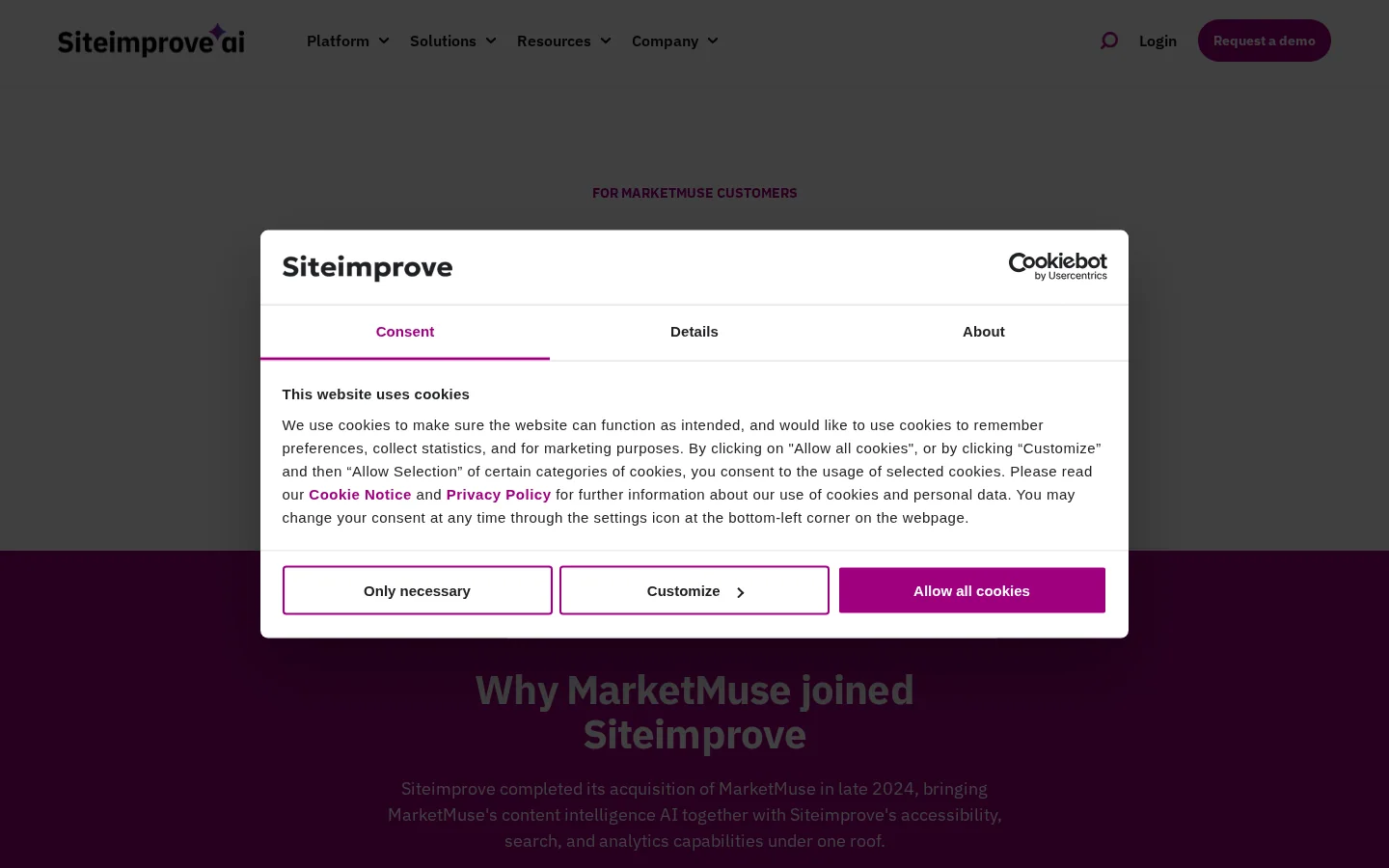
The capture above shows MarketMuse's product page as its owner publishes it. Keep that page in mind, because it does not match the description Frase gives of MarketMuse in its comparison page. Section 4 comes back to that disagreement.
Most buying mistakes come from judging a tool by its feature list instead of by the job it has to do. Split your content work into those three jobs, and you can test each tool on the one that slows you down. Each job below has its principle, its best use, its advantages, its limits and an example.
Principle. You list the subjects your site should cover, measure what you already rank for, and find the gaps against the sites that outrank you. The output is a set of topics, grouped by theme, with the subtopics each article must cover.
When to use it. Use this job when your site has no clear plan, when you are starting a new domain, or when you are about to commit budget to a quarter of articles.
Advantages. A plan stops you from writing three articles that answer the same question. It shows where competitors have a cluster you do not have, and it sets the order of work.
Limits. A plan is only as good as the data behind it. On a new domain, or in a niche with little search data, the gap list is noisy. A plan also writes nothing, so the bottleneck moves to production.
Example. Imagine a B2B site with forty pages. Its competitors cover eleven subtopics around invoicing that it does not cover at all. The plan groups those eleven under one pillar page and orders them by how many other subtopics each article unlocks.
Principle. The tool turns a brief into a first draft, using a model that writes from the research it has gathered. Your job is to check, edit and add what the model cannot know: your data, your customers and your product.
When to use it. Use it when you already know what to write and the writing is the slow part, for example when you publish every week with one writer.
Advantages. A draft that follows a good brief saves hours on structure and coverage. It also keeps a team working from the same outline.
Limits. A draft is a starting point. Google's guidance on AI-generated content says generative models predict likely word sequences rather than retrieve facts, so outputs can contain errors, and it asks for manual fact-checking before publication. The mistakes section covers how to do that check.
Example. You feed a brief with six subheadings into a writer. The draft covers all six, but the pricing figures in one section come from an older version of a product. Without a fact check, that error goes live under your name.
Principle. You take a page that already ranks, or used to rank, compare it with what the current results cover, and update its titles, sections, links and images. The better tools also watch pages over time and flag decay.
When to use it. Use it when you have many pages published one to three years ago. Traffic usually decays slowly, and a steady refresh cycle is cheaper than writing new articles from zero.
Advantages. A refresh starts from a page that already has links and history, so it is usually faster to win back positions than to start over.
Limits. Optimization can push a page toward the terms of the top results. If you copy the structure of the top three pages, you may end up with a page that looks like everyone else's. Use the tool to find gaps, not to write the page for you.
Example. A page about a product feature slips from position 4 to position 11 over six months. The refresh adds a section for a question that now appears in search results, and it fixes a broken link to a pricing page. Then you watch the position for four to six weeks before you judge the result.
| Job | Where each tool starts | Main limit |
|---|---|---|
| Planning topics and briefs | MarketMuse, its core focus | Produces no pages, so production still needs a team |
| Drafting and writing | Frase, its core focus | Drafts need fact checks and an editor |
| Maintaining existing pages | Frase's Content Guard and MarketMuse's visibility view, both per their own pages | A refresh still needs a reviewer who knows the topic |

Frase lists its plan prices on a public pricing page. MarketMuse does not. You can still compare the two fairly by working out what each plan costs per published article, which is the number that matters for a content budget.
Frase's pricing page, read on November 21, 2026, lists three paid plans with yearly billing: Starter at $39 a month, Professional at $103 a month and Scale at $239 a month. On an annual basis, that comes to $468, $1236 and $2868 a year. The same page lists what each plan includes per month, which is what the next calculation needs.
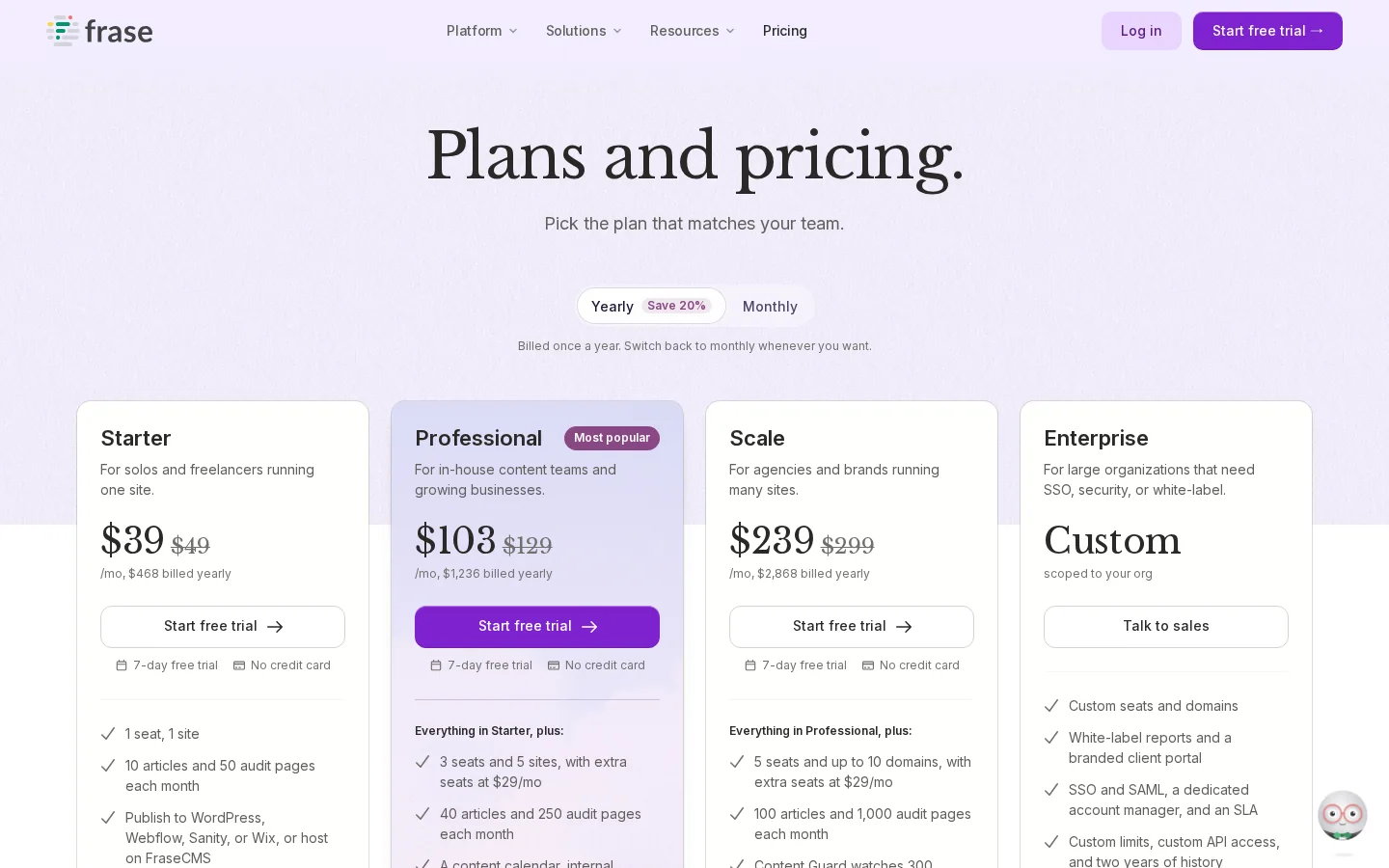
Articles included per month
Source: Frase pricing page, read November 21, 2026
Divide the plan price by the number of articles the plan includes. This is a rough measure, since it ignores audits, seats and extra usage, but it puts two products on the same scale.
cost per article = monthly plan price / articles included per month

Starter       $39 / 10   = $3.90
Professional  $103 / 40  = $2.58
Scale         $239 / 100 = $2.39
The numbers only work if you use the whole plan. A team that publishes ten articles a month on Scale pays $239 for ten articles, which is $23.90 each. The cheapest plan per article is the one you fill.
Example
A content lead publishes eight articles a month. On Starter, the plan covers ten articles, but she only writes eight, so the cost is $4.88 per article ($39 / 8). On Professional, the same eight articles cost $12.88 each ($103 / 8). The per-article figure moves more with real output than with the plan you choose on paper.
MarketMuse does not publish prices. Its product page points pricing questions to Siteimprove's help center or contact form, so the only reliable number is a written quote. Third-party comparisons quote older tiers, but the vendor does not confirm those figures, so do not budget from them. When you ask for a quote, ask what it counts: research queries, briefs, drafts, seats and sites. Then calculate the same cost per article, using the quote and the number of articles you plan to publish.
Note
Vendor prices change and pages move. The figures in this section were read on November 21, 2026. Check the Frase pricing page again before you put them in a budget.
Both products say they show how your brand appears in AI answers. Their pages do not agree on what MarketMuse does, so accept neither claim without a test.
Frase's comparison page says MarketMuse lacks AI search visibility tracking and GEO scoring. MarketMuse's own product page lists a view of how content appears in Google and AI answer engines. Both statements come from interested parties, and both can be partly true, since a visibility view can exist without the scoring Frase describes. Only a test settles it.
AI visibility, as each vendor describes it
Choose 20 prompts your buyers actually type into ChatGPT, Gemini, Claude or Perplexity. Include a category question, a comparison question and a problem question. Run each prompt, note whether your brand is named and which sources are cited, then repeat the run at least four times over a month, because answers change between runs. Calculate the share of answers that name your brand:
share of answers = answers that name your brand / total answers checkedCompare that share before and after you act on a tool's recommendations. A tracking tool shows the trend, but your own count is the proof that a change happened. For a fuller method, read the AI visibility audit guide.
Warning
Do not buy on a comparison page alone. A comparison is written by one of the two vendors and describes the other one, and that description can be out of date. Use the current product page, a trial and your own prompts.
Run both tools on the same article, with the same keyword, brief and reviewer, then score the two drafts on the same criteria. The test takes two weeks and a few hours of editing, which costs far less than a year on the wrong plan.
The two-week test
Start with a brief. A good content brief lists the reader, the search intent, the subtopics and the target length. Use the same brief in both tools, so the differences come from the tool and not from the input.
| Criterion | What to measure | Good sign |
|---|---|---|
| Factual errors | Wrong claims per draft after your fact check | No errors left after one edit pass |
| Subtopic coverage | Subtopics from the top three pages that the draft misses | Nothing the reader needs is missing |
| Edit time | Minutes from first draft to publishable version | Shorter in the tool you pick |
| Reviewer judgment | Would your reviewer publish the draft as it is? | Yes, or a short list of fixes |
Tip
If you want a third brief to compare against, the free AI content brief generator produces a full SEO brief from one keyword. Use it as a baseline, then check the output against the top three results yourself.
A plan of topics only helps if the articles link to each other in a way that search engines and readers can follow. Whichever tool you pick, the clusters it proposes have to become a real site structure, with links that exist in the pages.
A topic cluster groups articles around one pillar page and the subtopics that support it. Building clusters is a planning task, so a planning tool is the natural place to start. Frase's comparison page does not describe a cluster feature, so check the current product before you assume it has one. Sorank's topic cluster generator builds silos from keywords, and it runs an anti-cannibalization check while it builds them, not after you publish.
Google's guidance on crawlable links, read on November 21, 2026, says every page you care about should have a link from at least one other page on your site, placed in context. It describes good anchor text as descriptive, reasonably concise and relevant to the page it points to, and it suggests reading the anchor on its own to check that it is specific enough. A link in the pillar page looks like this:
<a href="/glossary-geo-seo/topic-cluster">topic cluster</a>| Anchor type | Example | When to use it |
|---|---|---|
| Exact match | topic cluster | Once per page, on the main target |
| Partial match | topic cluster planning | In lists of related links |
| Descriptive | how the subtopics are grouped under one pillar | Most links in the body text |
When two articles target the same query, search engines have to choose between them, and both can end up ranking lower. The fix is to merge them, or to give each one a different intent and link them with the anchor that matches each. The keyword cannibalization entry explains how to find the overlap. Sorank's content optimization feature, which its page describes as still in beta, also merges pages on the same topic into one more complete page, and it rewrites weak pages at the same address so existing links keep working.
The most expensive mistakes are choosing on the feature list, publishing drafts without checking facts, and trusting a score more than a reader. Each mistake below has a sign you can spot and a fix you can apply.
What it is. You read a comparison written by one vendor, then buy the tool it praises.
How to spot it. The comparison describes a rival's features in terms the rival's current page does not use. Frase's page says MarketMuse lacks AI writing and AI visibility tracking, while MarketMuse's own page describes a draft step and a visibility view.
How to fix it. Read the current product pages, ask for a written quote and run the two-week test. Let the test decide, not the comparison.
What it is. A draft goes live with numbers, product versions or names that nobody checked.
How to spot it. A figure in the draft has no source you can open, or the source is more than a year old. Product names, version numbers and prices are the first things to check, because they change most often.
How to fix it. Google's guidance on AI-generated content in Search, read on November 21, 2026, says generative models predict likely word sequences rather than retrieve facts, so outputs can contain errors, and that manual fact-checking is needed before publication. Trace each figure to its primary source, note its date, and delete anything you cannot verify.
What it is. You raise a draft's optimization score by adding terms, and the page reads worse.
How to spot it. The score rises while the text gets longer, repeats the same phrases and uses the words the top three pages use. Ask a reader who did not write it whether they would share it.
How to fix it. Treat the score as one signal among several. Add a term only when the reader needs the answer, and compare the top three results for search intent, not for keyword counts.
What it is. Two pages target the same query or subtopic, usually because two people planned them separately.
How to spot it. Search the query and see whether both pages appear, or whether one keeps swapping in and out of the results.
How to fix it. Merge the weaker page into the stronger one with a 301 redirect, or split the intent and link the two pages with descriptive anchors. The keyword cannibalization entry lists the checks in order.
What it is. Every internal link to one page uses the same exact keyword, so the pattern looks manufactured.
How to spot it. Export the anchor text of your internal links and count the identical ones. If one phrase covers most links to a page, you have the pattern.
How to fix it. Mix exact, partial and descriptive anchors, as in the table above. Google's guidance says to write as naturally as possible, to resist the urge to cram every keyword, and that keyword stuffing violates its spam policies. The internal linking strategy guide walks through a full plan.
Choose the tool that removes your slowest step, then confirm the choice with the two-week test. If planning is what slows you down, MarketMuse's product page describes the planning work you need. If you already have a plan and need pages written and refreshed, Frase's description of its editor and Content Guard fits better. Read each product page with your own list of needs in hand, because neither page settles the question for you.
Before you pay for either tool
If you want research, writing and refresh in one product, Sorank is built for that. Its content optimization feature checks titles, meta descriptions, links, images and structured data, then rewrites weak pages at the same address after you review the new version. Test it on a few pages before you rely on it, since its page describes the feature as still in beta.
Whichever tool you choose, judge it on three things: the cost per article you actually publish, the number of edits each draft needs, and the accuracy you are willing to put your name on.
Neither is better for every job. MarketMuse is built around topic research and planning, while Frase is built around writing and optimizing pages. Choose by the bottleneck in your workflow, and test both on one article before you pay.
Frase's pricing page lists Starter at $39 a month, Professional at $103 and Scale at $239, billed yearly. MarketMuse does not publish prices, so you need to request a written quote from Siteimprove.
MarketMuse's current product page describes turning a brief into a publish-ready draft, while Frase's comparison page says MarketMuse has no AI writing. The two pages disagree, so check the current product in a trial before you decide.
We analyse your competitors, your website and your AI visibility to create a tailored content plan for free.
 Duplicate Content Checker
 Mobile-Friendly Test
 Website Speed Test
 Subdomain Finder
 Domain Age Checker
 CMS Detector
 Googlebot Simulator
 Nofollow Link Checker
 Meta Tag Checker
 Keyword Cannibalization Checker
 Keyword Intent Checker
 Keyword Extractor
 Google Ads Cost Calculator
 CPC Calculator
 Local Citation Finder
 Reddit Threads Finder
 Disavow File Generator
 Redirect Generator
 Canonical Tag Generator
 Passive Voice Checker
 Google Location Changer
 Google Review Calculator
 Google Review Link Generator
 Keyword Combiner
 Podcast Show Notes Generator
 AI Content Rewriter
 AI Text Humanizer
 ChatGPT Prompt Generator
 Twitter Thread Generator
 Tweet Generator
 Landing Page Copy Generator
 Google Ads Copy Generator
 Pinterest Pin Description Generator
 Anchor Text Generator
 Social Media Post Generator
 LinkedIn Post Generator
 Free AI Writer
 Review Response Generator
 LSI Keyword Generator
 YouTube Video Ideas Generator
 YouTube Tag Generator
 YouTube Description Generator
 Product Description Generator
 CTA Generator
 Blog Introduction Generator
 Conclusion Generator
 Hook Generator
 AI Content Brief Generator
 FAQ Schema Generator
 AI Blog Post Ideas Generator
 Structured Data Validator (Schema Validator)
 Alt Text Checker
 Internal Link Analyzer
 Backlink Challenge
 AI Meta Description Generator
 AI Blog Title Generator
 Google Indexability Checker
 AI Blog Outline Generator
 UTM Link Builder
 Keyword Clustering Tool
 Canonical Tag Checker
 XML Sitemap Generator
 Broken Link Checker
 AI SEO Title Generator
 Headline Analyzer
 SERP Preview Tool
 Redirect Checker
 Hreflang Tag Generator
 Heading Structure Analyzer
 HTTP Headers Checker
 Favicon Extractor
 SERP CTR Calculator
 SEO vs Paid Search Savings Calculator
 SEO Share of Voice Calculator
 SEO ROI Calculator
 SEO Traffic and Revenue Forecast Calculator
 SEO Budget Calculator
 SEO Break-Even Calculator
 SaaS SEO ROI Calculator
 ROAS Calculator
 Reading Time Calculator
 Ranking Gain Simulator
 Organic Traffic Value Calculator
 Organic Traffic Estimator and Website Traffic Checker
 LTV to CAC Ratio Calculator
 Local SEO ROI Calculator
 Link Building Cost Calculator
 Keyword Value Calculator
 Keyword Opportunity Score Calculator
 Keyword Density Calculator
 GEO ROI Calculator
 GEO Content Investment Calculator
 Ecommerce SEO ROI Calculator
 Customer Lifetime Value Calculator
 Customer Acquisition Cost Calculator
 CTR Calculator
 Cost Per Article Calculator
 Conversion Rate Calculator
 Content Marketing ROI Calculator
 ChatGPT Referral Traffic Estimator
 Bounce Rate Calculator
 Backlink ROI Calculator
 AI Visibility Score Calculator
 AI Traffic Value Calculator
 AI Share of Voice Calculator
 Cost of AI Invisibility Calculator
 AI Citation Rate Calculator
 llms.txt Validator
 AI Overview Checker and AI Overviews Rank Checker
 Robots.txt Checker
 AI SEO Audit
 LLM Readability Checker
 SearchGPT Readiness Checker
 Structured Data LLM Audit
 Website Crawlability AI Audit
 Why ChatGPT Is Not Recommending My Website
 Gemini Ranking Tool
 Perplexity Ranking Checker
 LLM Citation Checker
 Answer Engine Optimization Audit
 GEO Audit
 AI Search Visibility Test
 ChatGPT Visibility Checker
 llms.txt Generator
 URL Extractor
 Webpage to Markdown
 Sitemap Checker
 SERP Volatility Sensor
 Page Size Checker
 Word Counter
 Slug Generator
 Schema Generator
 Robots Generator
 OG Preview
 Meta Tags Generator
 Image Compressor
 Favicon Generator
 On-Page SEO Audit: SEO Checker and SEO Analyzer
 Backlink Analysis Tool
 Keyword Research Tool
 Domain Authority Checker
 “I tested Sorank on a real client site and it's insane. It does everything an agency would bill you $1500 a month for. It's going into production on that client now.”

 Guillaume Guersanguersanguillaume.com“We are an Ads agency and we wanted to get our SEO back on track once and for all. Sorank gave us a clear view of our site, helped us prioritize optimizations, and properly structure our content. The tool is easy to use, well designed for a team, and very practical for centralizing tracking without having to juggle multiple platforms. A very solid foundation to start fresh with our SEO.”
 Gaspard MadouiAds Agency
 “I just let the Sorank software do its thing, and now my DR is 25 and my page is ranking higher.”
 Lucas Flandrefoundertrace.fr“I specialized in GEO thanks to Sorank. The GEO Leaderboard allows me to show my clients their position vs competitors on ChatGPT. It’s a real commercial differentiator.”
 MélanieSEO Freelance“Great service, works well for our website and helps us understand how to improve it to rank better on Google and elsewhere. Congrats, keep going, I recommend it.”
 Hugo T.E-commerce merchant