Preferences
Privacy is important to us, so you have the option of disabling certain types of storage that may not be necessary for the basic functioning of the website. Blocking categories may impact your experience on the website. More information
Privacy is important to us, so you have the option of disabling certain types of storage that may not be necessary for the basic functioning of the website. Blocking categories may impact your experience on the website. More information

AthenaHQ AI review: plans, the engines each one covers, and a practical test to check whether its AI visibility numbers are reliable before you pay.
In short
AthenaHQ is a paid platform that tracks whether AI assistants such as ChatGPT, Gemini and Claude mention your brand and which sources they cite. Its numbers come from sampled answers that change from run to run, so check your plan's engines, convert credits into runs and repeat the test before you trust a score.
Want to go further? Ask
Quick quiz
How should you use AI in your marketing?
Sorank matches your answers


Test it for 3 days on your own site and see where you stand on Google, ChatGPT and the other AIs.
Start 3-day free trial3 days free, then stop whenever you want. 90-day results guarantee, conditions apply.
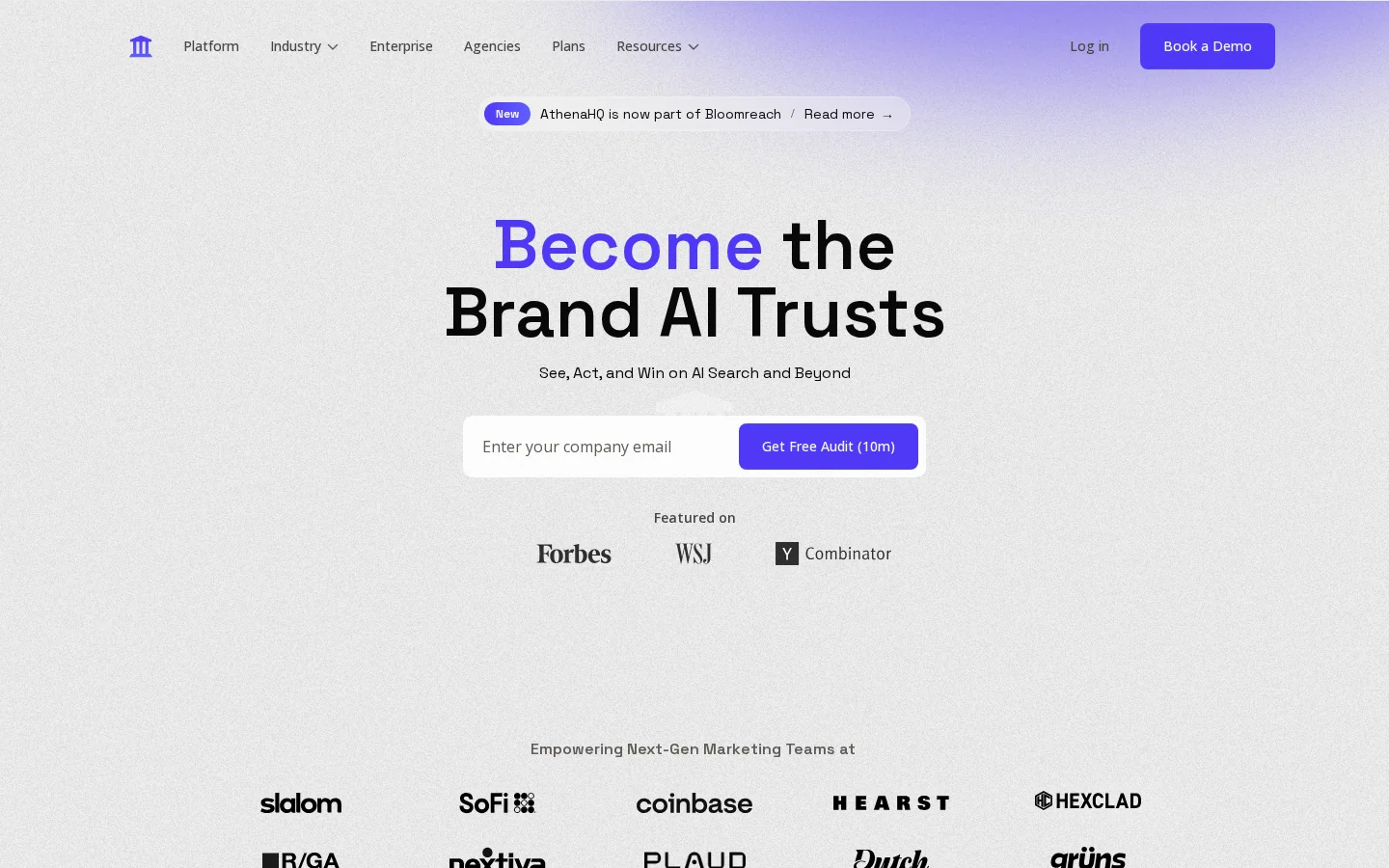
AthenaHQ is a generative engine optimization (GEO) platform. It sends a set of prompts to AI assistants on a schedule, stores the answers, and reports how often your brand is named, which pages the answers cite, and which competitors appear next to you. The homepage groups the product into brand visibility intelligence, source intelligence (citation source analysis and link building), competitor benchmarking and prompt tracking, with an executive dashboard on top.
The engine list depends on your plan, and it is the first thing to check. Essential, the free plan, covers ChatGPT, Perplexity, Google AI Overviews, Gemini and Copilot. Starter adds Google AI Mode, Claude, Grok, DeepSeek, Meta AI and Mistral. Enterprise is priced on request and includes Claude. If your buyers ask Claude or Grok, the free plan will not show you those answers.
| Engine | Essential (free) | Starter ($295 per month) |
|---|---|---|
| ChatGPT | Yes | Yes |
| Perplexity | Yes | Yes |
| Google AI Overviews | Yes | Yes |
| Gemini | Yes | Yes |
| Copilot | Yes | Yes |
| Google AI Mode | No | Yes |
| Claude | No | Yes |
| Grok | No | Yes |
| DeepSeek | No | Yes |
| Meta AI | No | Yes |
| Mistral | No | Yes |
The homepage says the product is built for Fortune 500 and enterprise marketing teams, and the feature list reflects that, with PR monitoring, crisis detection, persona targeting and an executive view. Those tools help if you run one brand across several markets. If you run one product in one country, you will mostly use the prompt tracking and the competitor view, so compare the price against those two features alone.
Our AthenaHQ review already goes through plans and credits. This guide asks a different question: whether the numbers AthenaHQ returns are reliable enough to base a budget on, and how to test that yourself.
An AI answer is one sample from a random process, not a measurement. The same prompt, sent to the same model, can return a different list of brands on the next run, sometimes in another order and with another number of brands. Conductor tested this in 2026 with 14000 API calls: 70 prompts across seven intent types and four engines (ChatGPT, Perplexity, Claude and Gemini), with 50 runs per cell and no conversation history carried between runs.
Consistency depended on the kind of question. Purchase prompts had the lowest brand overlap across runs at 40%, and comparison prompts reached 63%. Lead brand stability, meaning the same brand at the top of the list, ran from 30% on education prompts to 91% on comparison prompts. Gemini was the least consistent engine and returned the most brands per answer.
For a tracker, this means one answer tells you nothing, and a visibility rate means something only as an average over many runs. Position is even weaker. Google says AI Overviews and AI Mode can "display a wider and more diverse set of helpful links associated with the response", and that there are "no additional requirements to appear in AI Overviews or AI Mode, nor other special optimizations necessary" (Google Search Central, AI features and your website). The useful metric is presence across many answers, not a fixed place in a list.

On AthenaHQ's pricing page, Essential is free and includes 300 credits and a $25 free credit. Starter costs $295 per month and lists 3600 credits, with a $300 monthly free credit. Enterprise is custom. The page defines one credit as one AI response on Starter and Enterprise. It shows a 17% discount for annual billing but no annual price.
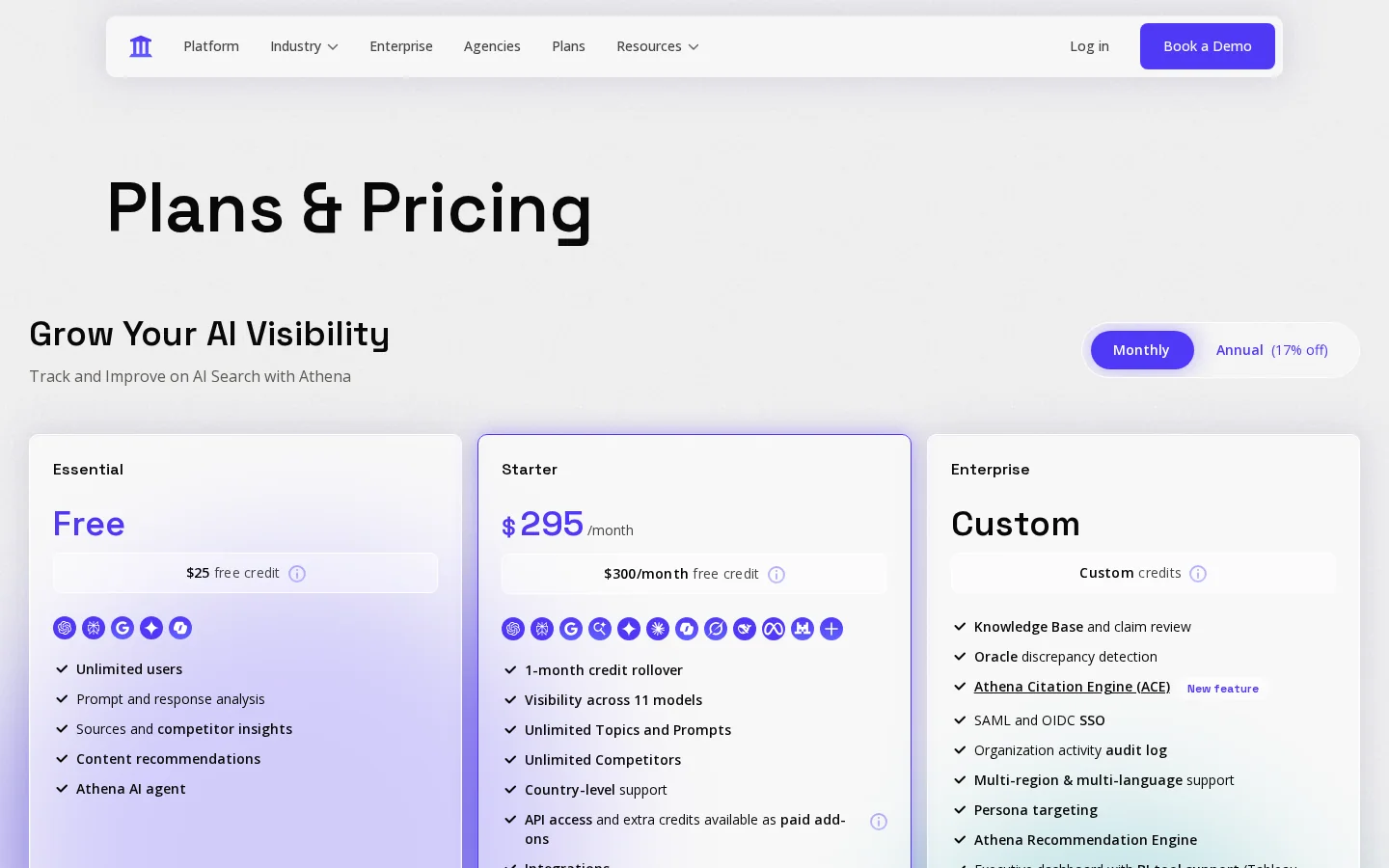
The monthly fee is not your real cost. The credits are. Starter also lists unlimited topics and prompts, so the number of prompts is not the limit. What limits you is how many answers the platform pulls. Take a modest test of 25 prompts on 4 engines, with 10 runs each. That is 25 times 4 times 10, or 1000 responses, which means 1000 credits. One test would use more than a quarter of the 3600 credits listed for Starter.
Starter plan at a glance
Sources: AthenaHQ pricing page (consulted November 2026); test size calculated by the author
Two details need a written answer before you rely on them. First, the page lists a $300 monthly free credit on Starter but does not explain how it relates to the $295 fee. Second, the page gives no refund or cancellation terms. It links to a terms of service, a master service agreement and a data processing agreement. Read them before you enter a card, and ask the sales team to confirm the free credit by email.
Warning
Essential includes 300 credits. If you track 10 prompts on 4 engines and run them every week, each run costs 40 responses, so the allowance lasts about 7 runs. Count your credits before you count your prompts.
The number to track is the appearance rate: the share of answers in which your brand is named. For one prompt, divide the answers that name you by all the answers you collected for that prompt. Then ask how much that rate would move if you ran the test again. That movement is the margin of error, and it is the part most dashboards leave out.
appearance rate = answers naming your brand / total answers
margin of error = 1.96 x sqrt(p x (1 - p) / n)
Here p is the appearance rate as a decimal and n is the number of answers. The formula is a normal approximation, so it is rough when n is small, but it is enough to show when a result is noise. Take a brand that appears in 40% of answers. With 10 runs, the margin is about 30 points either way, so the true rate could sit anywhere from 10% to 70%. With 50 runs, the margin falls to about 14 points. A dashboard that shows 40% after 10 runs tells you very little.
Three rules keep the reading honest. Count a brand once per answer, even if the answer names it twice. Never compare two readings taken on different prompt sets, because the prompts move the rate more than the brand does. And judge a trend over three months, not a jump between two weeks.
Tip
Our AI Visibility Score Calculator turns your prompt counts into an appearance rate and shows each formula, so you can check the result by hand before you trust it.
Sorank's AI mention tracking works on the same principle: you keep a set of prompts for one market and one language, and see a visibility rate per prompt and per model, along with the AIs that name you. If the term is new to you, the AI visibility score entry explains how these scores are built.
You have three realistic options: check the assistants yourself, use a dedicated tracker such as AthenaHQ, or read the AI traffic in your own analytics. Each one answers a different question, and none is complete alone. Most teams use the manual check to design the test and the tracker to repeat it.
The principle is simple: you type each prompt into ChatGPT, Gemini, Claude and Perplexity yourself and log the answers in a spreadsheet. Use it at the start, with five to ten prompts, to learn how your category is answered and which sources come up. The advantage is cost, since it is free, and you read the full answer with its context. The limits are time and repeatability. A manual test takes hours, your own history and location can change the answers, and few people run each prompt ten times. Example: a founder runs 8 prompts on 3 assistants every Monday and logs the date, the brands named and the domains cited.
The principle here is that the platform sends your prompts to the engines on a schedule, stores every answer and computes the rates. Use it once you trust your prompt list and need a monthly trend. The advantages are that repetition is automatic, history is kept, and competitors are measured on the same prompts. The limits are that you pay per response, the engine list depends on the plan, and the number of runs behind each rate is something you must ask about. Example: a marketing team on Starter tracks 30 buyer prompts across its chosen engines each month, then reads each prompt's rate against its margin of error.
The principle is to count visits that arrive from AI assistants in your analytics, usually by referrer. Use it when you already have traffic and want to know whether AI answers send people to your site. The advantage is that it is your own data, free and measured over time. The limits are real: many clicks from assistants arrive without a referrer, so the count is a floor, and it cannot tell you whether you were named without a click. Example: a content site sees AI referrals rise after publishing a comparison page, which is a signal worth testing, not proof. Our guide shows you how to measure AI referral visits in Google Analytics.
| Method | Cost | Repeatable | Shows mentions | Shows clicks | Best first step |
|---|---|---|---|---|---|
| Manual checks | Free, plus your time | Low | Yes | No | Five to ten prompts |
| Dedicated tracker | Paid, per response | High | Yes | No | A monthly trend on a fixed prompt set |
| Referral analytics | Free with your analytics | High | No | Yes | Confirm that AI traffic exists |
The fastest way to judge AthenaHQ, or any tracker, is to run the same small test yourself and compare the tracker's numbers with your hand count. If they agree within the margin of error, the tool measures what you think it measures. If they disagree, find out why before you pay. The steps below work with a manual test and do not need a paid plan.
The 5-step test
Write the prompts first, before you open any dashboard. Choose questions a buyer would type without your brand in them, such as "best tool to track AI visibility for a small SaaS" rather than "AthenaHQ alternatives". A prompt that contains a brand name tends to produce answers that repeat the names you typed, which inflates the rate and says little about buyers. Pull the prompts from sales calls, support tickets and the queries in your Search Console data.
Why 20 to 30 prompts? Each prompt is its own sample, so a single prompt can mislead you even with ten runs. With 25 prompts, ten runs each and four engines, you collect 1000 answers, and a bad result on one prompt stops driving the decision. Ten runs per prompt is the practical minimum for a readable margin, as the previous section showed. If the sheet takes too long, start with five prompts and add the rest in the second week.
Then compare. Calculate the appearance rate by hand for each prompt. If your number and the tracker's number for the same prompts differ by more than the margin, the tracker uses a different sampling method, a different prompt set or a different engine version. Ask the vendor which one, in writing.
Before you pay: the checklist
Most bad purchases come from reading a dashboard as if it were a census. The six mistakes below cost money most often, and each one has a check you can run this week.
One check or a controlled test
What it is: a single prompt, a single run, and a conclusion drawn from it. How to spot it: a score moves 20 points after one week, and the team changes its plans because of it. How to fix it: set ten runs per prompt, and treat any movement inside the margin of error as noise.
What it is: budgeting by the number of prompts and forgetting that each prompt runs on each engine many times. How to spot it: the allowance runs out in the second week, or the team drops engines to save credits. How to fix it: multiply prompts by engines by runs per month. Ten prompts on four engines, run weekly, is 10 times 4 times 4, or 160 responses a month, which is 160 credits on Starter's definition.
What it is: prompts such as "is AthenaHQ good" or "AthenaHQ vs Profound", which mostly measure how well an assistant knows the names you typed. How to spot it: the appearance rate is high on brand prompts and close to zero on category prompts, and the same few names keep coming back. How to fix it: report branded and unbranded prompts separately, and make decisions on the unbranded rate.
What it is: treating "first in the list" as a stable place. How to spot it: the same brand moves from first to fourth between two identical runs. Conductor's data shows that lists change often, especially on purchase prompts. How to fix it: report presence, the share of answers that name you, and ignore single positions.
What it is: buying Starter for Claude coverage nobody uses, or buying Essential and then finding that Claude is missing. How to spot it: your analytics show visits from one or two assistants, and most of the coverage you pay for sits idle. How to fix it: list the assistants your buyers name in interviews, check them against your referral data, and buy the plan that covers those engines. Referral data is incomplete, so do not rely on it alone.
What it is: comparing a rate from January, measured on 15 prompts, with a rate from March, measured on 40 prompts, and calling the difference a trend. How to spot it: the prompt count changed between two reports. How to fix it: freeze a core set of 20 prompts, report it every month, and report any additions separately.
AthenaHQ fits teams that already track brand health, have budget for an enterprise-style dashboard, and need several markets and competitors on one screen. It is a weaker first purchase for a founder who has not yet checked whether AI assistants send customers at all, because the manual test above answers that for free.
| Your situation | Likely fit |
|---|---|
| Several markets, with PR and reputation work | AthenaHQ on Starter or Enterprise |
| One product in one market, with a budget under $300 per month | A manual test first, then a cheaper tracker |
| Buyers who use Claude or Grok | Starter or higher, after checking each engine on the plan |
| Need to know if AI sends visits at all | Referral analytics, then the manual test |
| Want a monthly trend on a fixed prompt set | A dedicated tracker, with the prompt set frozen |
If you are comparing categories of tools rather than one brand, the guide to the best AI visibility tools lists them by the job they do, which is a better starting point than a single review.
This week, write 20 buyer prompts without any brand name, run each one ten times on the engines your buyers use, and calculate the appearance rate with its margin of error. Then put the checklist questions to AthenaHQ or to any other vendor, in writing. A tool that answers them clearly is easier to trust with a budget. A tool that cannot answer them is telling you something too.
It depends on your team. AthenaHQ suits multi-market brand teams that need PR monitoring and competitor views, and its Starter plan costs $295 per month. A founder with one product in one market should run a manual test for a few weeks before paying for any tracker.
Yes. The Essential plan is free and includes 300 credits, but it covers fewer engines than Starter and leaves out Claude. On Starter, one credit equals one AI response, so count your prompts, engines and runs before you rely on the free allowance.
The homepage says it covers today's top AI platforms, and the Starter plan lists ChatGPT, Perplexity, Google AI Overviews, AI Mode, Gemini, Claude, Copilot, Grok, DeepSeek, Meta AI and Mistral. Essential covers five of them, so check the list for your plan on the pricing page before you buy.
We analyse your competitors, your website and your AI visibility to create a tailored content plan for free.
 Website Value Calculator
 Website Accessibility Checker
 Google Analytics Checker
 Duplicate Content Checker
 Mobile-Friendly Test
 Website Speed Test
 Subdomain Finder
 Domain Age Checker
 CMS Detector
 Googlebot Simulator
 Nofollow Link Checker
 Meta Tag Checker
 Keyword Cannibalization Checker
 Keyword Intent Checker
 Keyword Extractor
 Google Ads Cost Calculator
 CPC Calculator
 Local Citation Finder
 Reddit Threads Finder
 Disavow File Generator
 Redirect Generator
 Canonical Tag Generator
 Passive Voice Checker
 Google Location Changer
 Google Review Calculator
 Google Review Link Generator
 Keyword Combiner
 Podcast Show Notes Generator
 AI Content Rewriter
 AI Text Humanizer
 ChatGPT Prompt Generator
 Twitter Thread Generator
 Tweet Generator
 Landing Page Copy Generator
 Google Ads Copy Generator
 Pinterest Pin Description Generator
 Anchor Text Generator
 Social Media Post Generator
 LinkedIn Post Generator
 Free AI Writer
 Review Response Generator
 LSI Keyword Generator
 YouTube Video Ideas Generator
 YouTube Tag Generator
 YouTube Description Generator
 Product Description Generator
 CTA Generator
 Blog Introduction Generator
 Conclusion Generator
 Hook Generator
 AI Content Brief Generator
 FAQ Schema Generator
 AI Blog Post Ideas Generator
 Structured Data Validator (Schema Validator)
 Alt Text Checker
 Internal Link Analyzer
 Backlink Challenge
 AI Meta Description Generator
 AI Blog Title Generator
 Google Indexability Checker
 AI Blog Outline Generator
 UTM Link Builder
 Keyword Clustering Tool
 Canonical Tag Checker
 XML Sitemap Generator
 Broken Link Checker
 AI SEO Title Generator
 Headline Analyzer
 SERP Preview Tool
 Redirect Checker
 Hreflang Tag Generator
 Heading Structure Analyzer
 HTTP Headers Checker
 Favicon Extractor
 SERP CTR Calculator
 SEO vs Paid Search Savings Calculator
 SEO Share of Voice Calculator
 SEO ROI Calculator
 SEO Traffic and Revenue Forecast Calculator
 SEO Budget Calculator
 SEO Break-Even Calculator
 SaaS SEO ROI Calculator
 ROAS Calculator
 Reading Time Calculator
 Ranking Gain Simulator
 Organic Traffic Value Calculator
 Organic Traffic Estimator and Website Traffic Checker
 LTV to CAC Ratio Calculator
 Local SEO ROI Calculator
 Link Building Cost Calculator
 Keyword Value Calculator
 Keyword Opportunity Score Calculator
 Keyword Density Calculator
 GEO ROI Calculator
 GEO Content Investment Calculator
 Ecommerce SEO ROI Calculator
 Customer Lifetime Value Calculator
 Customer Acquisition Cost Calculator
 CTR Calculator
 Cost Per Article Calculator
 Conversion Rate Calculator
 Content Marketing ROI Calculator
 ChatGPT Referral Traffic Estimator
 Bounce Rate Calculator
 Backlink ROI Calculator
 AI Visibility Score Calculator
 AI Traffic Value Calculator
 AI Share of Voice Calculator
 Cost of AI Invisibility Calculator
 AI Citation Rate Calculator
 llms.txt Validator
 AI Overview Checker and AI Overviews Rank Checker
 Robots.txt Checker
 AI SEO Audit
 LLM Readability Checker
 SearchGPT Readiness Checker
 Structured Data LLM Audit
 Website Crawlability AI Audit
 Why ChatGPT Is Not Recommending My Website
 Gemini Ranking Tool
 Perplexity Ranking Checker
 LLM Citation Checker
 Answer Engine Optimization Audit
 GEO Audit
 AI Search Visibility Test
 ChatGPT Visibility Checker
 llms.txt Generator
 URL Extractor
 Webpage to Markdown
 Sitemap Checker
 SERP Volatility Sensor
 Page Size Checker
 Word Counter
 Slug Generator
 Schema Generator
 Robots Generator
 OG Preview
 Meta Tags Generator
 Image Compressor
 Favicon Generator
 On-Page SEO Audit: SEO Checker and SEO Analyzer
 Backlink Analysis Tool
 Keyword Research Tool
 Domain Authority Checker
 “I tested Sorank on a real client site and it's insane. It does everything an agency would bill you $1500 a month for. It's going into production on that client now.”

 Guillaume Guersanguersanguillaume.com“We are an Ads agency and we wanted to get our SEO back on track once and for all. Sorank gave us a clear view of our site, helped us prioritize optimizations, and properly structure our content. The tool is easy to use, well designed for a team, and very practical for centralizing tracking without having to juggle multiple platforms. A very solid foundation to start fresh with our SEO.”
 Gaspard MadouiAds Agency
 “I just let the Sorank software do its thing, and now my DR is 25 and my page is ranking higher.”
 Lucas Flandrefoundertrace.fr“I specialized in GEO thanks to Sorank. The GEO Leaderboard allows me to show my clients their position vs competitors on ChatGPT. It’s a real commercial differentiator.”
 MélanieSEO Freelance“Great service, works well for our website and helps us understand how to improve it to rank better on Google and elsewhere. Congrats, keep going, I recommend it.”
 Hugo T.E-commerce merchant