Preferences
Privacy is important to us, so you have the option of disabling certain types of storage that may not be necessary for the basic functioning of the website. Blocking categories may impact your experience on the website. More information
Privacy is important to us, so you have the option of disabling certain types of storage that may not be necessary for the basic functioning of the website. Blocking categories may impact your experience on the website. More information

Frase vs Surfer SEO compared on scoring, research, editor, pricing and AI visibility, with what independent tests found and how to run your own test.
In short
Frase vs Surfer SEO is a choice between two content tools with different jobs. Surfer SEO grades one draft against the pages that already rank for a keyword. Frase covers more of the workflow, from research and briefs to drafting and AI visibility. Neither score reliably predicts rankings: an independent test of five tools found only weak correlations.
Want to go further? Ask
Quick quiz
Is SEO right for you, and how should you start?
Sorank matches your answers


Test it for 3 days on your own site and see where you stand on Google, ChatGPT and the other AIs.
Start 3-day free trial3 days free, then stop whenever you want. 90-day results guarantee, conditions apply.
Surfer SEO is an on-page optimization tool. You enter a keyword, it pulls the pages that rank for it, and it shows which terms, headings, length and structure those pages share. Your draft is then graded against that set. Frase starts earlier and finishes later. It researches the query, builds a brief, helps you write the draft, and then tracks how the page performs. If you already have a draft and want to bring it up to the current top results, Surfer is built for that job. If you do not yet know what to write or how to structure it, Frase covers more of the path.
Scoring tool or workflow tool?
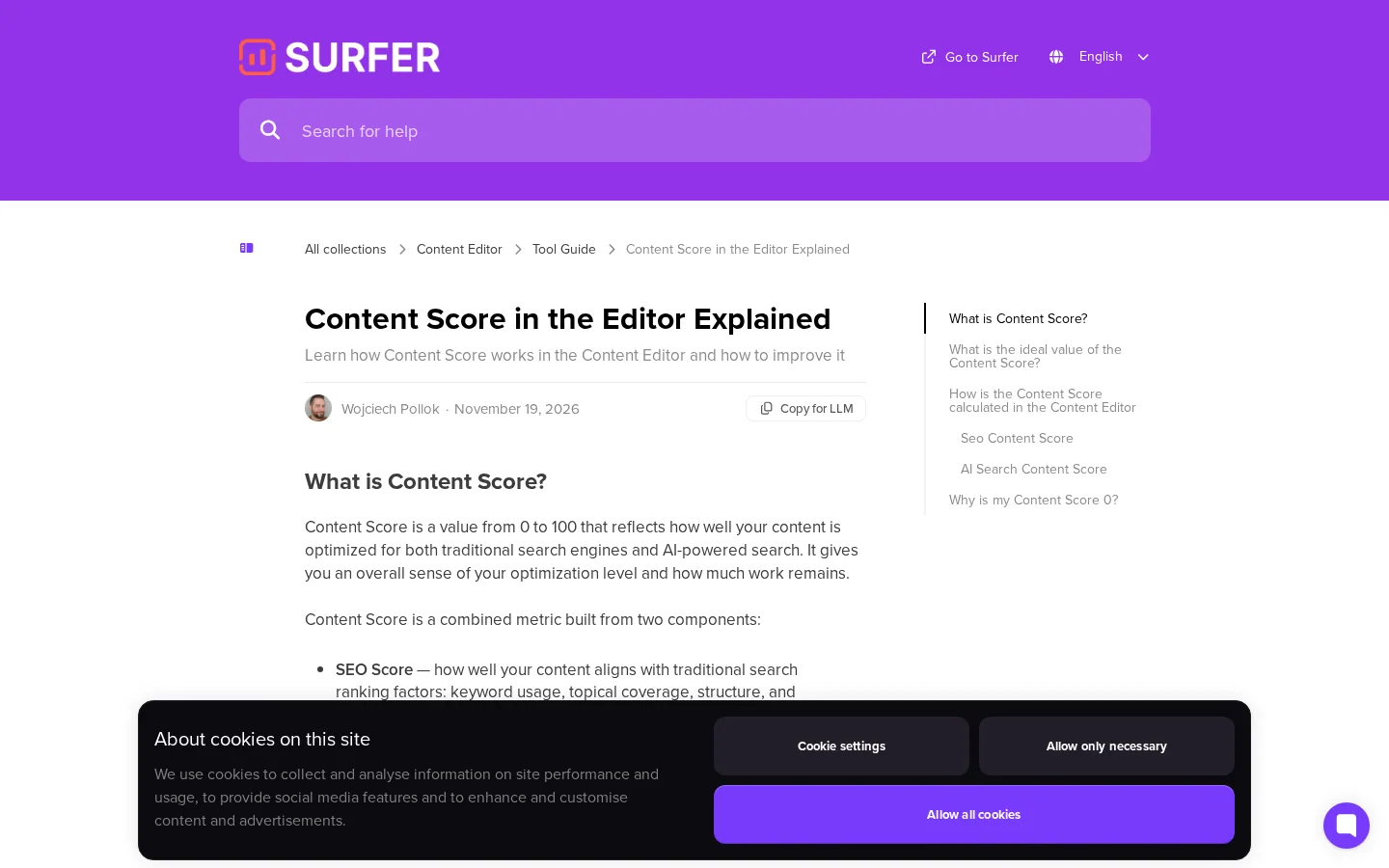
Surfer's Content Score runs from 0 to 100. In the Content Editor it combines an SEO Score for traditional search with an AI Search Score for AI-powered search, and both update as you type. Surfer's help center article on this, dated November 19, 2026, is the clearest public description of how the number is built, and you should read it before you put the score in a process. The editor is where Surfer earns its price: you see which terms are missing, where they belong and how far your draft sits from the guidelines at each step.
Frase's pitch is that research, briefing, drafting and scoring belong in one tool. Frase's own comparison page says it runs the whole content loop and fixes content as it decays. That is the vendor's claim, so test it on your own topics before you rely on it. If your bottleneck is turning research into a usable brief and a first draft, the research side matters more to you than the final score. If your bottleneck is making an existing draft more precise, Surfer's editor is the stronger tool in most comparisons.
Every content score combines a few ideas, even when the vendor does not publish the formula. In practice there are three methods: term coverage, structural coverage and AI readiness. Each answers a different question, and each has a failure mode you should know before you trust the number. Surfer's own documentation is the most explicit about its approach, and it sets out several rules you need to know before you use the score.
The score is relative. Surfer's help center says the Content Score is a value from 0 to 100 that reflects how well your content is optimized, and that it is measured against the competitors Surfer analyzed for that keyword, not against an absolute standard. The guidelines and the maximum score are calculated from your original draft, before your customizations. The same article says the score considers more factors than the audit lists, so a fix suggested in the guidelines does not always move the number. Read the Content Score article in Surfer's help center to see the exact rules before you build a process on it.
The principle. The tool collects the words and phrases that the top pages use for your query, then compares them with the words in your draft. It rewards you for covering the common ones and points to the ones you miss. It is the most concrete of the three methods and the one most people mean when they say "content score". The broader idea behind it is semantic SEO, which we cover in our glossary: a page that covers the vocabulary of a topic reads as relevant to the engine.
When to use it. Use term coverage when you have a finished draft and a query with a stable set of top results, such as a page on keyword research for a small team. It is fast, the feedback is specific, and a writer can act on it in an afternoon.
Advantages. The feedback is easy to explain, easy to check and easy to repeat across a team. You can see at a glance that a section never mentions a term that every top result uses.
Limits. The method rewards the presence of terms, not accuracy, originality or usefulness. A draft can cover most of the vocabulary and still answer the wrong question. Keyword stuffing can also raise the number while making the text worse. For the linguistic side, our guide to NLP SEO explains how engines read text and why meaning matters more than repetition.
Example. A hypothetical draft on keyword research uses 40 of the 50 terms that the top results share. The score looks healthy. But if the draft never explains how to choose between two candidate keywords, the missing ten terms are not the real gap. The gap is the decision the reader came to make.
The principle. The tool compares the skeleton of your page with the skeleton of the top results: the number of headings, the questions they answer, the sections they include and the length they reach. It checks whether your page is organized the way the results are organized.
When to use it. Use structural coverage when you outline a new page, or when a page has the right words in the wrong order. It is the most useful method at the planning stage, because it tells you what sections to write before anyone drafts a sentence.
Advantages. It turns a vague intent into a list of sections. A writer can start from it, and an editor can check it quickly.
Limits. Length targets pull pages toward the average length of the results, and that average is not always the right length. If the top results average 2000 words and your page is 900 words, the tool will say to expand it. But the query may be fully answered in 900 words, and the extra 1100 words will dilute the page. Before you add a section, ask which question the reader is still asking.
Example. The top results for a how-to query all open with a checklist and then a step-by-step section. Your draft opens with a long history of the topic. Structural coverage will flag the order and the missing checklist. That feedback is useful, even if the history stays in a shorter form further down.
The principle. Surfer's AI Search Score and Frase's GEO score both try to judge whether an AI system can extract and cite a page. Checks of this kind usually reward direct answers near the top, clear definitions, claims that are easy to attribute and sections that stand alone when quoted. Neither vendor presents these as a guarantee of citation, and the exact weights are not public.
When to use it. Use AI readiness on pages you want named in ChatGPT, Gemini, Claude or Perplexity answers. It matters most for definitional pages, comparison pages and guides that answer a question in its first lines.
Advantages. It pushes you to write the answer first, which helps human readers too. A clear first paragraph is good for both.
Limits. These scores are the vendors' models of AI systems, not the systems themselves. No tool publishes the exact way an AI system chooses its sources, so treat the score as a checklist for clarity. To see what the engines actually say about your brand, our guide to the AI visibility audit sets out the checks to run by hand.
Example. A glossary-style page that starts with three sentences of context and then gives the definition scores lower on AI readiness than a page that defines the term in its first sentence. Moving the definition up is the fix, and it costs nothing.
| Method | Question it answers | Main strength | Main limit |
|---|---|---|---|
| Term coverage | Does the draft use the vocabulary of the top results? | Fast and specific | Rewards mentioning terms, not accuracy |
| Structural coverage | Does the page skeleton match the results? | Good for outlines and planning | Length targets can pad a page |
| AI readiness | Can an AI system extract and cite the page? | Pushes answers to the top | Vendor models, not the AI systems |

Frase is stronger when the work starts before the draft: finding the set of queries that matter, choosing an angle and turning research into a brief a writer can use. Frase describes its briefs as research-backed and built in one click from the research, which is the vendor's claim. In the comparisons we read for this article, Frase's AI writer is described as more complete, while Surfer's AI features are described as limited to titles, headings and questions. Those are reviews, not controlled tests, so check the claim on your own topics.
If you write for an audience that needs a clear brief every time, the research step is where the time goes. A tool that gives you the top results, the questions people ask and a structure in one place saves more hours than a score that tells you to add three terms. For more on the drafting side of the process, our guide to SEO writing covers how to write for both readers and engines, and our article on AI content for SEO explains what Google says about machine-written pages.
Tip
Before you open either tool, write down the brief you would give a writer. If you do not have one, Sorank's free content brief generator builds a full SEO brief from a keyword, which gives you a baseline to compare with what each tool produces.
| Stage | Frase | Surfer SEO | What to test in a trial |
|---|---|---|---|
| Research and query set | Stronger, per Frase's claims and the reviews we read | Narrower, focused on the results for one query | Pick a query you already rank for and compare the query sets |
| Brief or outline | Research-backed, built from the research | Per-keyword brief and outline tabs | Give both briefs to the same writer and time the first draft |
| First draft | AI writer described as more complete | AI features described as limited to titles, headings and questions | Draft the same section in each tool and compare the edits you need |
| On-page scoring | SEO and GEO score side by side | Content Score with SEO and AI Search parts | Score the same final draft in both and check that the numbers agree with your own reading |
Surfer SEO is stronger when the draft already exists and you need precise guidance inside the editor. It shows the score, the terms, the heading structure and the gaps as you type. Its documentation separates the audit, the Content Audit and the SERP Analyzer, which show the SEO Score alone, from the Content Editor, which combines the SEO and AI Search parts. The reviews we read praise the granularity of its keyword guidance and the way it lets a team share a guideline without a login, although those are the reviewers' observations rather than documented features.
The loop below is how we would run Surfer on an existing page. The same order works with any scoring tool that compares your draft with the results for a query.
Five steps for one on-page pass
The loop is simple, and most of the value is in the first and last steps. Checking the results stops you from optimizing for the wrong page type. Logging the result stops you from treating a moving number as progress, a mistake we cover in the section on common errors below.
Frase's Starter plan was $39 a month billed yearly on its pricing page when we checked it on November 21, 2026. The Professional plan was $103 a month billed yearly. Those are the figures on the page that day, so check them before you budget, because plans change.
Frase's entry prices, billed yearly
Source: Frase pricing page, checked November 21, 2026
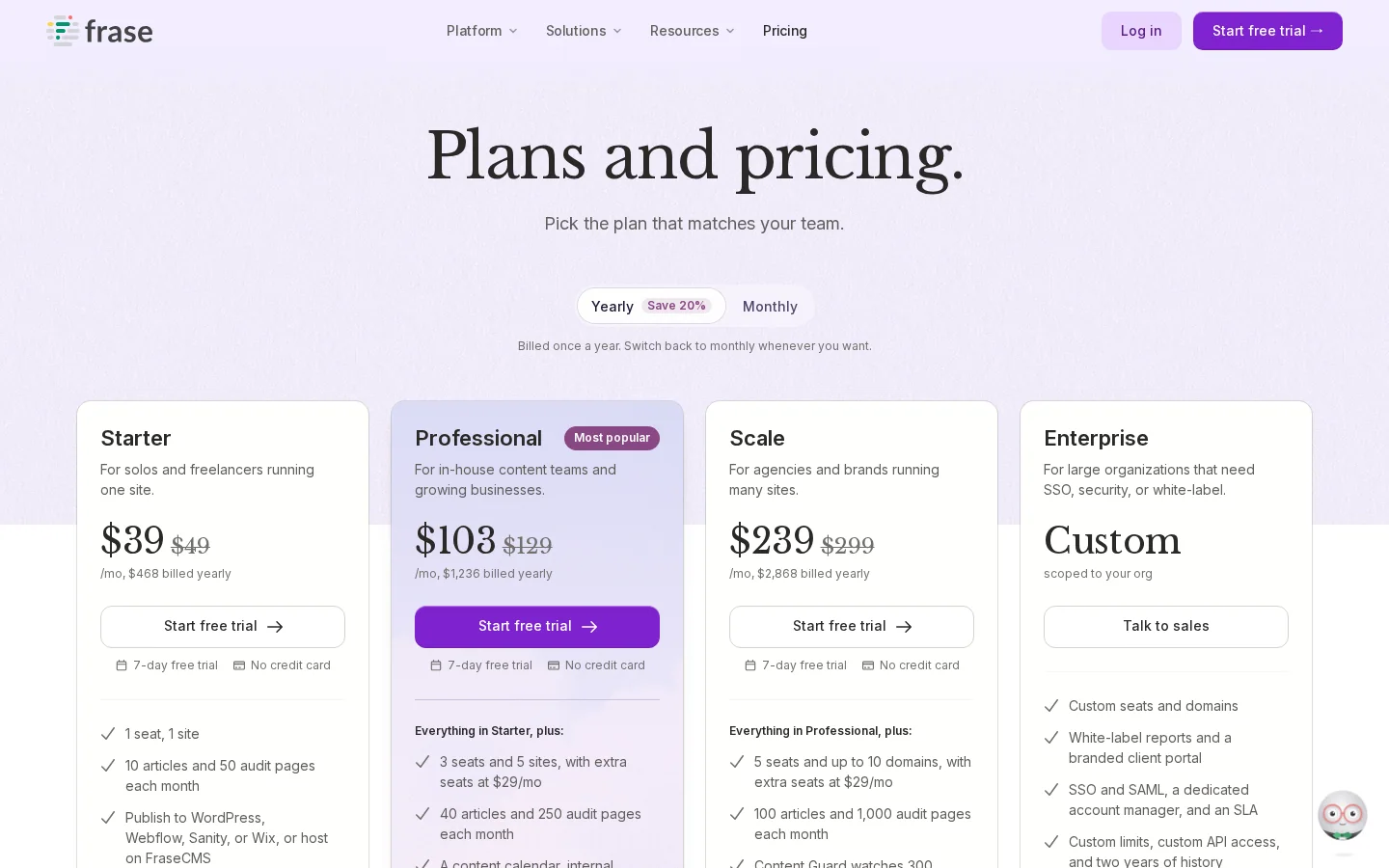
The headline price matters less than the limits. Each plan caps the things you will hit first when you publish at volume: articles per month, AI generations, audit pages, seats and sites. Read the limits on the plan you are considering, and check what happens when you go over, because some plans charge for extra usage.
We did not compare Surfer's prices in this article. The Surfer pricing page we checked on the same day redirected to a different domain and showed plans in euros that we could not match to the content editor plans, so any price we wrote down would be a guess. Ask Surfer for the current content editor plan and compare the limits against Frase's before you decide.
Check ownership too. Positive Group, a French group, acquired Surfer in October 2025, as Search Engine Journal reported on October 21, 2025. An acquisition does not change what a tool does today, but it is a reason to read the terms and the roadmap before you sign a long contract.
Three dates that matter for this comparison
Sources: Ahrefs, Search Engine Journal, Surfer help center
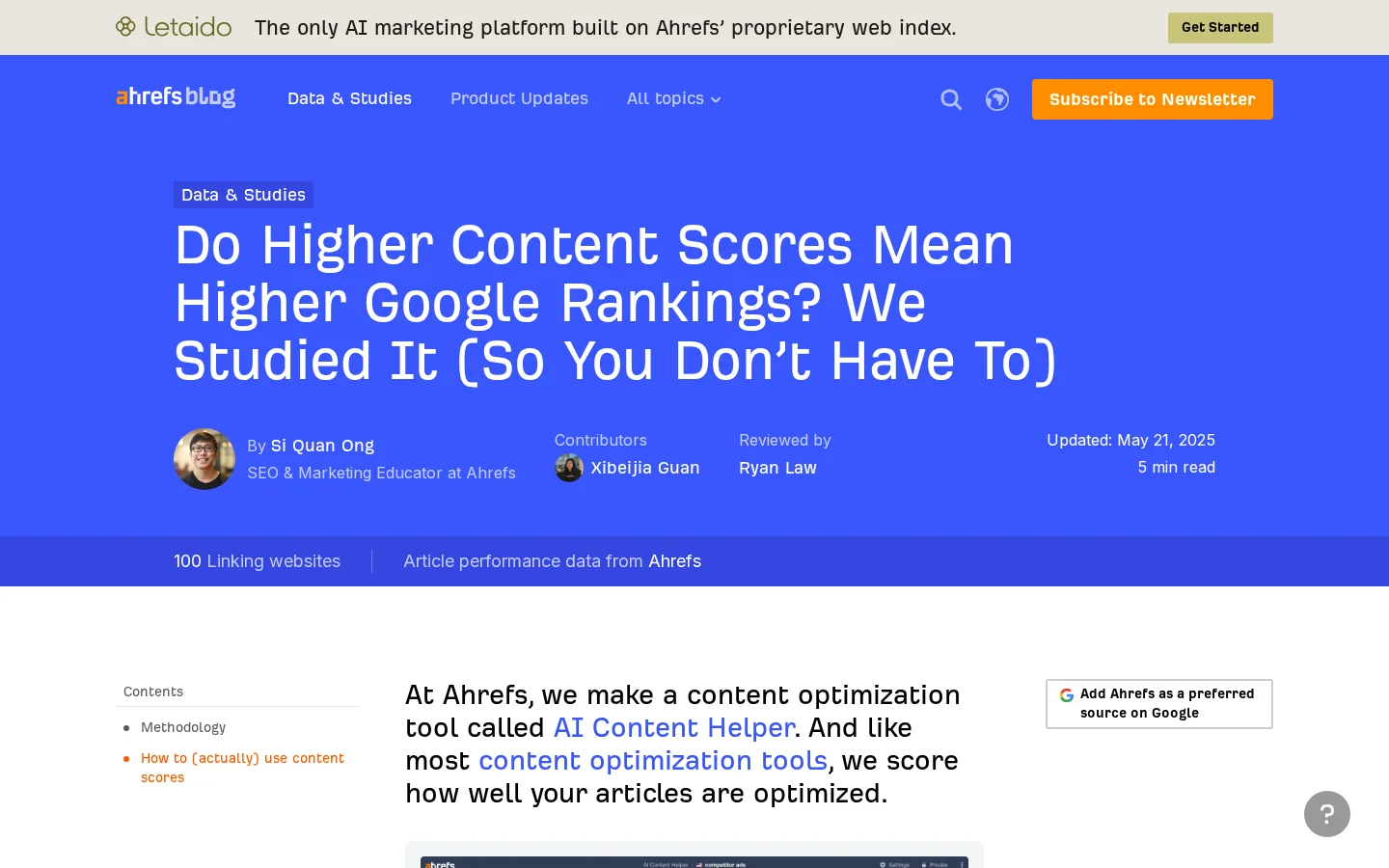
Not reliably. In a test of five content tools, including Surfer SEO and Frase, the correlations between the tools' scores and Google rankings were weak. Ahrefs ran the test and its own AI Content Helper was one of the five tools, so read it with that in mind.
The method is worth knowing. The author, Si Quan Ong, tested Surfer, Frase, NeuronWriter, Clearscope and Ahrefs' AI Content Helper on 20 random keywords. He scored the URLs on each keyword's results page, excluded tools that gave no score for Reddit, Quora or YouTube results, and computed the correlations within each keyword before averaging them across two correlation methods. The article reports that the correlations were weak everywhere. NeuronWriter and AI Content Helper did best, and Surfer, Frase and Clearscope were very weak. The article does not publish the coefficients in the text, only in a chart. Read the Ahrefs content score study, updated May 21, 2025, for the full method.
Warning
A high score does not guarantee a ranking. Use the score to find gaps in the draft, then judge the page by one question: does it answer the query better than the results above it? If the answer is no, a higher score will not change that.
The tools may have changed since the test was run, so the exact numbers are out of date. The lesson holds: the score measures how close your page is to a set of other pages, not how well it will rank. If you want to know whether a score helps your site, you need to measure it on your own pages.
A fair test compares two groups of pages under the same rules, with a fixed review window and a control group that gets no changes. The point is to separate the effect of the tool from the effect of time, seasonality and the work you would have done anyway. Set it up as follows.
A fair test in five steps
Keep one check on the score during the test. Use the keyword density as a sanity check, not a target. Density is the share of the words in a text that are the keyword, and you can calculate it with this formula:
keyword density (%) = occurrences of the keyword / total words in the text × 100Example
A 1200-word draft that uses the keyword 12 times has a density of 1 percent, because 12 divided by 1200, times 100, equals 1. A density of 1 percent is not a goal. It is a quick check that the keyword appears naturally, and nothing more.
Tip
Check the density in seconds with Sorank's free keyword density calculator before you open either editor. For the definition and why the old percentage rules no longer hold, see our keyword density glossary entry.
The most costly mistakes are writing for the score, comparing against results that do not match your page, reading a moving score as progress and paying for features you never use. Each one is easy to make and easy to fix once you can spot it.
What it is. You add terms until the meter turns green, even when the sentences start to read like a list of keywords.
How to spot it. The same term appears in several sections in a row, or a paragraph reads stiffly and says nothing new. Readers who skim will notice before the tool does.
How to fix it. Read each paragraph out loud. Delete any term that does not add a fact, an example or a decision. Use the score as a checklist of gaps, not as a goal you have to hit.
What it is. The guidelines come from the results for your query, and those results may have a different intent from your page. A product comparison cannot be scored like a guide.
How to spot it. The top results are a mix of forums, videos and tools while you are writing a guide, or the guidelines ask for terms that only product pages use.
How to fix it. Check the results before you trust the guidelines. If they do not match your page type, change the keyword or change the page so it fits the intent that does rank. A page that fits the wrong intent will not rise by adding terms.
What it is. The score is relative to the competitors analyzed for the keyword, and its maximum comes from your original draft. Both can change while you work, so a number can rise or fall without the page getting better or worse.
How to spot it. Your score drops after a rewrite that improved the reader's experience, or it rises after a change that did nothing for the page.
How to fix it. Record the score at each stage with its date. Judge the page by clicks and positions over several weeks, and by a reader who reads the whole page.
What it is. You buy a higher plan for the AI features and then use only the editor, or you pay for seats your team never logs into.
How to spot it. You open the tool once a month, or you never touch the research, brief or tracking tabs you were sold.
How to fix it. Map your work in five stages: research, brief, draft, optimize and track. Buy the tool that covers the stages you use, and check the plan limits for articles, seats and credits before you commit.
Before you pick a tool
Choose Surfer SEO if you already write and need precise guidance inside the editor. Choose Frase if the hard part is research, briefs and drafting in one place. If both are hard, run the test in the section above on the same pages before you pay for either.
| Your situation | Start with | Why |
|---|---|---|
| You have drafts and want term-level guidance | Surfer SEO | The editor and per-query guidelines are built for this job |
| You struggle to decide what to write | Frase | Research and briefs come before the draft |
| You want AI visibility in the same tool | Frase, then check the engines you care about | Frase places AI visibility in its tiers, per its own page, so confirm the coverage yourself |
| You manage many pages | Test both on the same pages | Plan limits and seats decide the cost at volume |
Sorank takes a different route for pages you have already published. Its content optimization module checks each published page, reads its Google traffic, and applies targeted fixes or rewrites at the same address. The module is in beta. If you want a wider view of the market before you decide, read our list of the best content optimization tools, which compares more options than these two.
Whatever you pick, run the test on your own pages. Your site's data will tell you more than any score, and more than any comparison, including this one.
Neither is better for every job. Surfer SEO is stronger for grading and tuning an existing draft against the top results, while Frase is stronger when research, briefs and drafting come first. Test both on the same pages before you pay for either.
Not reliably. An Ahrefs test of five content tools, including Surfer and Frase, found only weak correlations between scores and rankings. Use the score to find gaps, then judge whether the page answers the query better than the results above it.
On its pricing page, checked on November 21, 2026, Frase's Starter plan was $39 a month billed yearly and its Professional plan was $103 a month billed yearly. Prices change, so check the page and the plan limits before you buy.
We analyse your competitors, your website and your AI visibility to create a tailored content plan for free.
 Duplicate Content Checker
 Mobile-Friendly Test
 Website Speed Test
 Subdomain Finder
 Domain Age Checker
 CMS Detector
 Googlebot Simulator
 Nofollow Link Checker
 Meta Tag Checker
 Keyword Cannibalization Checker
 Keyword Intent Checker
 Keyword Extractor
 Google Ads Cost Calculator
 CPC Calculator
 Local Citation Finder
 Reddit Threads Finder
 Disavow File Generator
 Redirect Generator
 Canonical Tag Generator
 Passive Voice Checker
 Google Location Changer
 Google Review Calculator
 Google Review Link Generator
 Keyword Combiner
 Podcast Show Notes Generator
 AI Content Rewriter
 AI Text Humanizer
 ChatGPT Prompt Generator
 Twitter Thread Generator
 Tweet Generator
 Landing Page Copy Generator
 Google Ads Copy Generator
 Pinterest Pin Description Generator
 Anchor Text Generator
 Social Media Post Generator
 LinkedIn Post Generator
 Free AI Writer
 Review Response Generator
 LSI Keyword Generator
 YouTube Video Ideas Generator
 YouTube Tag Generator
 YouTube Description Generator
 Product Description Generator
 CTA Generator
 Blog Introduction Generator
 Conclusion Generator
 Hook Generator
 AI Content Brief Generator
 FAQ Schema Generator
 AI Blog Post Ideas Generator
 Structured Data Validator (Schema Validator)
 Alt Text Checker
 Internal Link Analyzer
 Backlink Challenge
 AI Meta Description Generator
 AI Blog Title Generator
 Google Indexability Checker
 AI Blog Outline Generator
 UTM Link Builder
 Keyword Clustering Tool
 Canonical Tag Checker
 XML Sitemap Generator
 Broken Link Checker
 AI SEO Title Generator
 Headline Analyzer
 SERP Preview Tool
 Redirect Checker
 Hreflang Tag Generator
 Heading Structure Analyzer
 HTTP Headers Checker
 Favicon Extractor
 SERP CTR Calculator
 SEO vs Paid Search Savings Calculator
 SEO Share of Voice Calculator
 SEO ROI Calculator
 SEO Traffic and Revenue Forecast Calculator
 SEO Budget Calculator
 SEO Break-Even Calculator
 SaaS SEO ROI Calculator
 ROAS Calculator
 Reading Time Calculator
 Ranking Gain Simulator
 Organic Traffic Value Calculator
 Organic Traffic Estimator and Website Traffic Checker
 LTV to CAC Ratio Calculator
 Local SEO ROI Calculator
 Link Building Cost Calculator
 Keyword Value Calculator
 Keyword Opportunity Score Calculator
 Keyword Density Calculator
 GEO ROI Calculator
 GEO Content Investment Calculator
 Ecommerce SEO ROI Calculator
 Customer Lifetime Value Calculator
 Customer Acquisition Cost Calculator
 CTR Calculator
 Cost Per Article Calculator
 Conversion Rate Calculator
 Content Marketing ROI Calculator
 ChatGPT Referral Traffic Estimator
 Bounce Rate Calculator
 Backlink ROI Calculator
 AI Visibility Score Calculator
 AI Traffic Value Calculator
 AI Share of Voice Calculator
 Cost of AI Invisibility Calculator
 AI Citation Rate Calculator
 llms.txt Validator
 AI Overview Checker and AI Overviews Rank Checker
 Robots.txt Checker
 AI SEO Audit
 LLM Readability Checker
 SearchGPT Readiness Checker
 Structured Data LLM Audit
 Website Crawlability AI Audit
 Why ChatGPT Is Not Recommending My Website
 Gemini Ranking Tool
 Perplexity Ranking Checker
 LLM Citation Checker
 Answer Engine Optimization Audit
 GEO Audit
 AI Search Visibility Test
 ChatGPT Visibility Checker
 llms.txt Generator
 URL Extractor
 Webpage to Markdown
 Sitemap Checker
 SERP Volatility Sensor
 Page Size Checker
 Word Counter
 Slug Generator
 Schema Generator
 Robots Generator
 OG Preview
 Meta Tags Generator
 Image Compressor
 Favicon Generator
 On-Page SEO Audit: SEO Checker and SEO Analyzer
 Backlink Analysis Tool
 Keyword Research Tool
 Domain Authority Checker
 “I tested Sorank on a real client site and it's insane. It does everything an agency would bill you $1500 a month for. It's going into production on that client now.”

 Guillaume Guersanguersanguillaume.com“We are an Ads agency and we wanted to get our SEO back on track once and for all. Sorank gave us a clear view of our site, helped us prioritize optimizations, and properly structure our content. The tool is easy to use, well designed for a team, and very practical for centralizing tracking without having to juggle multiple platforms. A very solid foundation to start fresh with our SEO.”
 Gaspard MadouiAds Agency
 “I just let the Sorank software do its thing, and now my DR is 25 and my page is ranking higher.”
 Lucas Flandrefoundertrace.fr“I specialized in GEO thanks to Sorank. The GEO Leaderboard allows me to show my clients their position vs competitors on ChatGPT. It’s a real commercial differentiator.”
 MélanieSEO Freelance“Great service, works well for our website and helps us understand how to improve it to rank better on Google and elsewhere. Congrats, keep going, I recommend it.”
 Hugo T.E-commerce merchant