Preferences
Privacy is important to us, so you have the option of disabling certain types of storage that may not be necessary for the basic functioning of the website. Blocking categories may impact your experience on the website. More information
Privacy is important to us, so you have the option of disabling certain types of storage that may not be necessary for the basic functioning of the website. Blocking categories may impact your experience on the website. More information

Online review statistics with sources: how often people read reviews, the star rating they need, the reply rate that counts and how to measure your own.
In short
Online review statistics are measured figures on how consumers read, trust and write reviews. In the 2026 BrightLocal survey of 1002 US adults, 97% read reviews for local businesses, 68% want at least four stars, and 47% will not use a business with fewer than 20 reviews. Use them as benchmarks for your own listings.
Want to go further? Ask
Quick quiz
How should you get more local customers from Google?
Sorank matches your answers


Test it for 3 days on your own site and see where you stand on Google, ChatGPT and the other AIs.
Start 3-day free trial3 days free, then stop whenever you want. 90-day results guarantee, conditions apply.
Almost every consumer reads reviews before using a local business, and the bar for a good rating keeps rising. The most current large survey on this topic is the Local Consumer Review Survey from BrightLocal, published February 11, 2026, based on 1002 US adults. It found that 97% of consumers read reviews for local businesses, and 41% say they always do, up from 29% in 2025. Those two numbers say the same thing from two sides: reviews are no longer optional reading, and the habit is getting stronger every year.
The survey was run online with US adults, so its sample reflects the US market. If your customers are in France, Canada or the UK, treat these figures as a direction, not as a measurement of your own market. The fastest way to get a local number is a single question on your receipt or follow-up email: "Where did you read about us before you came?" Count the answers for a month and you have a figure you can defend.
These numbers matter for local SEO, because the same profile that shows your reviews is the one where people find your address, hours and phone number. A strong review profile supports the visit that comes after the search.
Local review habits in 2026
Source: BrightLocal, Local Consumer Review Survey 2026 (1002 US adults, published February 11, 2026)
Note
Many roundup articles on this topic repeat figures from 2017 to 2022 with no year attached. Before you quote a number, open the original report, check its publication year and its sample, and quote only what it says.
Every review statistic has four parts you should check before you use it. The first is the source: is it a primary survey run by a research team, or a blog that summarizes another blog? The second is the year, because review habits moved fast between 2020 and 2026. The third is the sample: how many people, in which country, and which age group. The fourth is the exact question. "Read reviews" and "always read reviews" are different numbers, and mixing them is the most common mistake in articles on this topic.
A quick check: if a page gives a percentage without naming the survey, a year and a sample size, do not use it in your own content. Use the primary report instead, or skip the number.
Consumers read reviews often, Google is still the main place they read them, and AI tools now sit between the reviews and the buyer. Each of these changes what your review program should do.
In the 2026 BrightLocal survey, 71% of consumers used Google to read reviews, down from 83% in 2025. A 12-point drop in one year is large. It does not mean Google matters less: most people still start there. It means that other sources, and the AI answers described below, now take a part of the attention that used to go only to Google's list of reviews.
For your business, the practical rule is simple. Keep your Google profile complete and active first, because it is still the biggest source. Then check the other places your customers might look for your category, and make sure the same name, address and phone number appear everywhere.
BrightLocal reports that 45% of consumers used ChatGPT or another generative AI tool for local recommendations in 2026, up from 6% in 2025. That makes AI the third most popular source in the survey. The same survey found that 40% trust AI platforms for business recommendations, and 82% read AI-generated review summaries.
This changes what a review is worth. An AI summary reads the text of your reviews, not only the stars. A buyer who never opens your profile may still read a sentence like "fast, friendly, parking is tricky" that an AI wrote from ten of your reviews. The content of your reviews, and the topics they repeat, now shape the answer as much as the average does. For more on how review sites feed these answers, read how G2, Trustpilot and Google reviews shape what ChatGPT suggests.
If you want to know whether AI tools name your business when buyers ask about your category, AI mention tracking from Sorank records the answers from ChatGPT, Claude and Gemini on a regular schedule, so you see when your brand appears and when a competitor replaces it.
Use of AI tools for local recommendations
Source: BrightLocal, Local Consumer Review Survey 2026
Most consumers want a business rated at least four stars, and the group that wants 4.5 stars or more has nearly doubled in a year. A 4.0 average is the floor for a large share of buyers, and 4.5 is the line for a third of them.
In the 2026 survey, 68% of consumers require four stars or more, up from 55% in 2025. Only 31% will use a business rated 4.5 stars or more, up from 17% in 2025, and 10% require five stars. The gap between those figures tells you where the risk is. A business sitting at 4.2 is still in the consideration set for most buyers, but it is outside the set for the readers who filter at 4.5.
The average rating is one number, and it hides the spread behind it. Two businesses can both show 4.4 stars: one has mostly 4s and 5s, the other has a split between 5s and 1s. The second one loses buyers who filter on the share of good reviews, even though the average looks fine. So look at the distribution as well as the average.
The share of reviews rated 4 or 5 stars is the number to track. It tells you how many of your reviews clear the threshold most buyers apply.
Because the average is a plain mean, a single bad review has a visible effect when your count is small. The formula is simple:
average_rating = sum_of_all_star_ratings / number_of_reviewsTake a business with 20 reviews, all five stars. The sum is 100 and the average is 5.0. One new one-star review makes the sum 101 across 21 reviews:
(100 + 1) / 21 = 4.81The average drops by almost a fifth of a star from a single review. That is why a 5.0 profile with few reviews is fragile, and why the next section matters: volume protects the average from one bad day.
Example
A bakery with 9 reviews in the last 90 days, averaging 4.6, has a clear pace. A bakery with 60 reviews from three years ago, averaging 4.8, looks strong but shows no recent activity. Buyers who look for recency see the second one as a risk.
Consumers look at the count and the age of your reviews before they weigh the average. A high rating with a handful of old reviews can lose to a lower rating with many recent ones, because the first one gives the buyer little to check.
The 2026 survey gives you the thresholds to track. 47% will not use a business with fewer than 20 reviews, 74% look for reviews written in the last three months, and 32% look for reviews from the last two weeks, up from 20% in 2025.
| Metric (BrightLocal 2026) | Figure | What it means for you | Your action |
|---|---|---|---|
| Consumers who read reviews for local businesses | 97% | Almost everyone checks, so an empty profile is visible | Keep the profile complete and reply to new reviews |
| Consumers who require 4 stars or more | 68% | Below 4.0 you lose a large share of buyers | Track the share of reviews rated 4 or 5 stars |
| Consumers who look for reviews from the last three months | 74% | Old reviews carry less weight than recent ones | Measure your review pace every month |
| Consumers who will not use a business with fewer than 20 reviews | 47% | Volume works as a threshold, not a bonus | Set 20 reviews as the first target |
| Consumers who look for reviews from the last two weeks | 32% | For a third of buyers, very recent reviews matter | Ask for reviews every week, not once a year |
Pace is the number of reviews you receive per month, measured over a recent window. A 90-day window smooths out holidays and one-off events. Count the reviews from the last 90 days and divide by three:
review_pace_per_month = reviews_in_last_90_days / 3A business with 9 reviews in the last 90 days has a pace of 3 per month. If the number falls to 1 per month for two quarters in a row, your review request process has stopped, even if the average looks stable. The pace is the early warning.
Most consumers expect a business to reply to its reviews, and a profile where the owner replies to every review sends a visible signal before anyone reads the text. Replying is one of the few review actions you control completely.
In the 2026 BrightLocal survey, 89% of consumers expect business owners to respond to reviews, and 80% are likely to use a business that responds to all of its reviews. Those two figures make the reply rate a trust signal that buyers see right on the page. For the mechanics of replying on Google, read How to Respond to Google Reviews.
What consumers expect from owners who reply
Source: BrightLocal, Local Consumer Review Survey 2026
A good reply has three parts: it thanks the person by name, it refers to one specific detail from their review, and it gives a next step if there is one. The specific detail matters most. It shows a future reader that the reply is written for this review and not pasted from a template.
Example
"Thanks, Maria. Glad the cold brew was right for you. We are opening a Saturday pickup window from next month, so you can order ahead next time."
For a negative review, reply to the fact, not to the person. Acknowledge what happened in one or two sentences, explain what you changed if you did change something, and offer a channel outside the public thread for the details. Never share the customer's order, booking or personal data in your reply, even to correct a false claim. Never offer a discount in exchange for a changed rating, because that counts as an incentive under the rules covered later in this article.
The compliant ways to collect reviews all ask every customer, with no reward and no filter. Each one reaches a different group, and each has a different limit. Choose the one that fits how your customers actually leave your business, and read the two methods to avoid as clearly as the others. For a longer plan, see getting more Google reviews.
Open review request vs review gating
The principle is a short link to your review form, sent to every customer after the visit. Use it when you run a local business with a Google profile and a steady flow of customers, and you want the least setup. The advantage is that it takes the customer one tap. The limit is that the link mostly reaches people who already want to write a review, so volume grows slowly. Example: a bakery texts the link to customers who pay by card and includes it on the paper receipt.
The principle is a message sent a set number of days after the experience, to everyone on a list. Use it for e-commerce, appointments and any business that holds contact details with consent. The advantage is that it scales and can be automated. The limits are timing and consent: send after the experience, not during it, and never text someone who has opted out. The list must include every customer, not a selection. Example: an email two days after delivery, with the same wording for every order.
The principle is a QR code that opens the same review form, placed where the customer is still in the room. Use it for physical stores, clinics and service counters. The advantage is that the request arrives at the peak of the experience. The limits are visual clutter and customers who do not want to scan codes in public. Make sure the code opens the same form you send by link, not a different page with a rating filter. Example: a dentist puts a card at reception with the QR code and a one-line request.
The principle is displaying reviews on your website, usually from a third-party widget. Use it to build trust on your pages. The advantage is that visitors see real feedback without leaving the page. The limits are technical and factual. Google's documentation says that a business showing reviews of itself is ineligible for the star review feature on LocalBusiness or Organization markup, including reviews embedded through third-party widgets. A widget is useful for visitors, but it will not produce stars in search results. Also show all the reviews the widget collects, not a selection of the best ones.
Incentives mean offering a payment, discount or free item in exchange for a review. Gating means asking only customers you expect to be happy, or sending people to a review form only after they give a high score in a private survey. Google's Maps user-generated content policy prohibits both. It also prohibits offering an incentive for revising or removing a negative review. Use the open request methods instead, because Google says fake engagement "is not allowed and will be removed," and a removed review helps nobody.
| Method | Who it reaches | Allowed on Google | Main limit |
|---|---|---|---|
| Direct review link | Customers who already want to write | Yes | Slow volume growth |
| Email or SMS request | Everyone on a consented list | Yes, if sent to all customers | Timing and consent rules |
| QR code at the counter | Customers in the room | Yes, if it opens the same form | Clutter and reluctance to scan |
| Review widget on your site | Website visitors | Shown to visitors, but no star markup | No stars in search results |
| Incentives or gating | Only selected customers | No | Policy breach and loss of trust |
You can measure the figures in this article for your own business in an afternoon, with an export and a spreadsheet. The goal is not a report for its own sake. It is a monthly snapshot that shows whether your pace, rating and reply rate are moving in the right direction.
The five-step review audit
average_rating       = sum_of_all_star_ratings / number_of_reviews
share_4_plus         = reviews_with_4_or_5_stars / total_reviews
reply_rate_90d       = replies_in_last_90_days / reviews_in_last_90_days
review_pace_per_month = reviews_in_last_90_days / 3
Tip
Add a date column and paste the four numbers into a new row each month. One snapshot tells you where you are. Twelve snapshots tell you whether your review process works, which is the only question that matters for the next quarter.
Once the numbers are in one place, decide which one is the weakest. In most small businesses it is the reply rate, because it costs nothing to fix. The second weakest is usually the pace, which depends on a request process you set up once and run every week.
Most review mistakes come from three habits: quoting old numbers, choosing who gets asked for a review, and marking up reviews in a way Google does not accept. Each one is easy to fix once you can spot it.
What it is: putting a figure from 2017 or 2021 into a 2026 article or a sales deck, without a date. How to spot it: the number has no year, the link goes to a roundup article instead of the original survey, or the URL contains an older year. How to fix it: go back to the original report, use its own year, and drop the figure if you cannot find the source. Old numbers still circulate because each roundup copies the one before it.
What it is: sending the review link only to customers who said they were happy in a private survey, or hiding the request from customers who had a problem. How to spot it: your satisfaction survey has a question like "would you recommend us?" and only the "yes" answers get the review link. How to fix it: send the same request to every customer. Keep the private survey if you want feedback, but do not connect it to the review request. Google's Maps policy prohibits selectively soliciting positive reviews.
What it is: "Leave a review and get 10% off your next visit," or a free item for a five-star rating. How to spot it: the offer appears in your email, on a card or in your staff script. How to fix it: remove the reward from every message and replace it with a plain request. Staff should ask every customer in the same words, and should never ask for a specific rating.
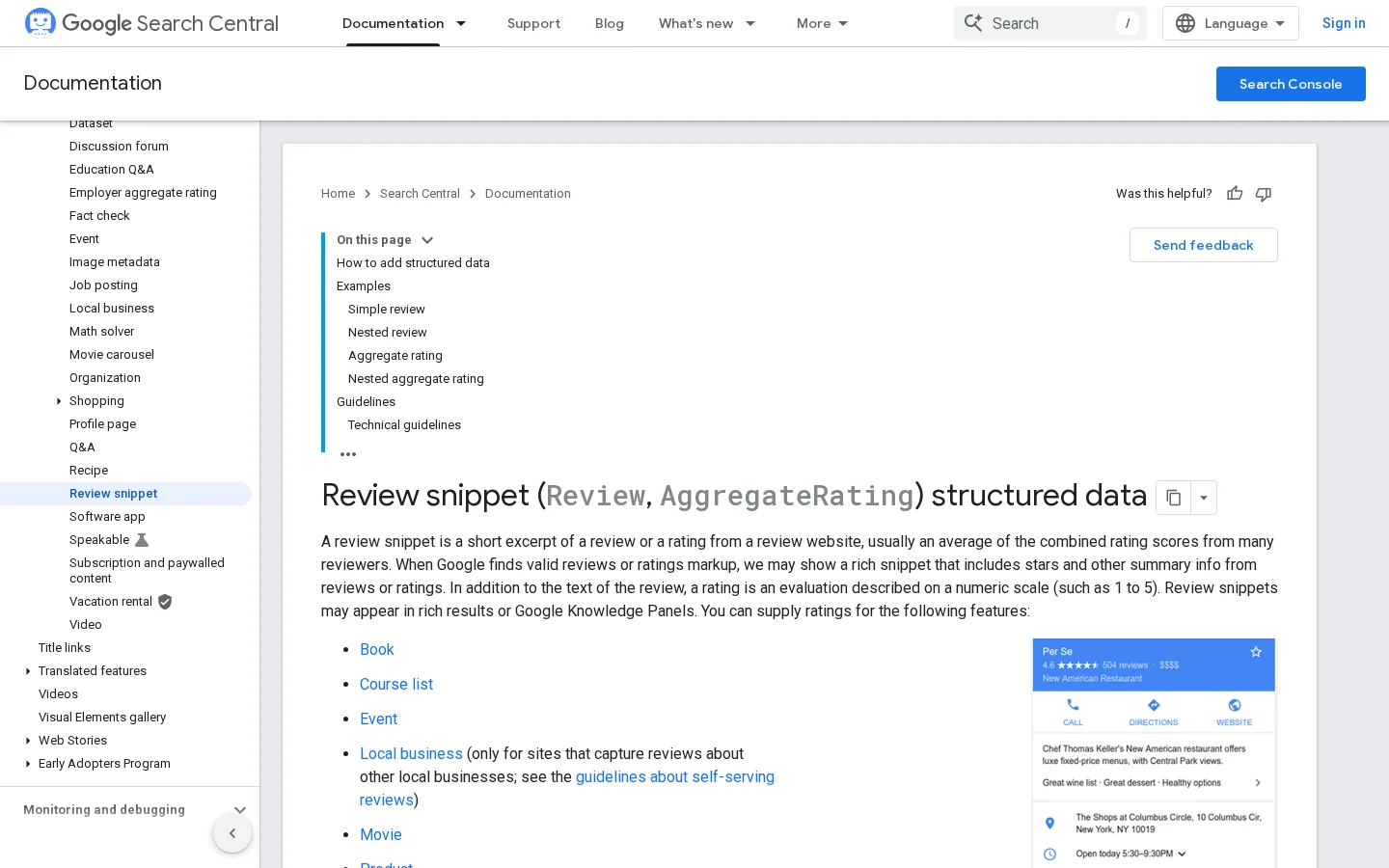
What it is: adding aggregate rating markup to your own business page, often generated by a review widget. How to spot it: the homepage or contact page contains a block like the one below, with the business as the reviewed item. How to fix it: remove the review markup from your LocalBusiness or Organization block. Google's documentation says that businesses reviewing themselves are ineligible for the star review feature. The reviews stay useful on the page for visitors; they just do not produce stars in search.
{
  "@context": "https://schema.org",
  "@type": "LocalBusiness",
  "name": "Example Bakery",
  "aggregateRating": {
    "@type": "AggregateRating",
    "ratingValue": "4.8",
    "reviewCount": "112"
  }
}
The block above is the wrong pattern for a business's own profile. Google's review snippet documentation describes which properties are required for review markup, and it says that the star feature is not available for self-serving reviews on LocalBusiness pages. For the markup itself, see review schema.
What it is: sending a legal letter to a reviewer to get a post removed, or showing only the reviews that are not negative while presenting them as your full set. How to spot it: a demand letter sent to a customer after a negative post, or a page that says "our reviews" with a visible filter that hides low ratings. How to fix it: use the platform's report process for a review that breaks its policy, and read how to remove a negative Google review for the steps. The US trade rule covered in the next section treats unfounded legal threats, intimidation and false public accusations aimed at preventing a review or getting it removed as a violation, and it treats a claim that displayed reviews are "most or all" reviews as misleading when negative ones are hidden on the basis of their rating.
What it is: reporting a 4.7 average every month and assuming the profile is healthy. How to spot it: the number of reviews last month is zero or one, and nobody noticed. How to fix it: track the pace and the reply rate next to the average, using the formulas earlier in this article.
In the US, a federal trade rule bans fake and bought reviews, insider reviews and review suppression, and Google's Maps policy adds its own limits on incentives and gating. Both rules can apply to the same business at the same time, so the safe approach is to follow the stricter of the two.
The US rule is the Trade Regulation Rule on the Use of Consumer Reviews and Testimonials. It was published in the Federal Register on August 22, 2024 (89 FR 68077), and its text is in 16 CFR Part 465 at the Legal Information Institute of Cornell Law School. The table below summarizes the sections that matter most for a local business.
| Provision | What it covers | What it means for you |
|---|---|---|
| 16 CFR 465.2 | Fake or false consumer reviews and testimonials, including writing, buying or procuring them from staff | Never publish or request reviews that misstate who wrote them or what experience they describe |
| 16 CFR 465.4 | Buying positive or negative consumer reviews | Do not pay anyone to post a review in either direction |
| 16 CFR 465.5 | Insider consumer reviews and testimonials | Reviews from owners, managers, employees and their relatives are covered here, and Google also treats them as a conflict of interest, so staff should not post them as customers |
| 16 CFR 465.7 | Review suppression: threats or intimidation aimed at preventing or removing a review, and misleading claims about hidden negative reviews | Never threaten a reviewer, and never claim your displayed reviews are all of them while hiding the negative ones |
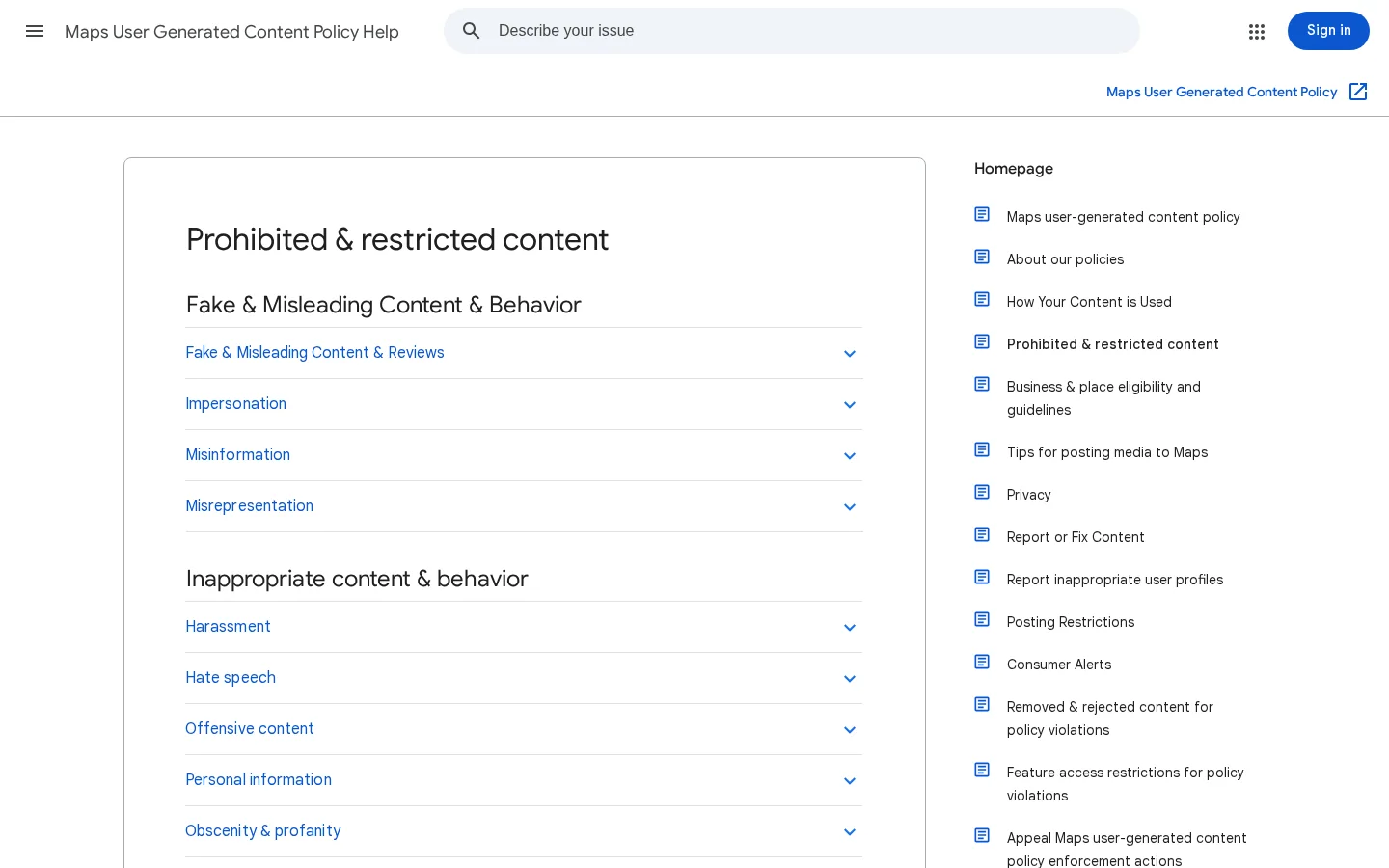
Google's Maps user-generated content policy sets the platform rules. It says that fake engagement "is not allowed and will be removed," and it prohibits incentives, review gating, reviews based on a conflict of interest, and posts on a competitor's listing meant to undermine it. The policy page links to a "Report or Fix Content" section for other problems. The flagging steps shown on the page are for personal information posted without consent.
Before you send a review request
Start with the two numbers you can change fastest: your reply rate and your review pace. Both depend on routines you set up once and run every week, not on luck or a campaign. The checklist below turns the rules in this article into a short routine you can give to whoever handles your profile.
Your weekly review routine
Once the routine is running, look at the wider picture. A review program is one part of how people find and trust a business, and it works best alongside the rest of your reputation work. The steps in online reputation management cover what to do when the signals disagree, such as a strong profile with weak mentions on other sites.
According to BrightLocal's 2026 Local Consumer Review Survey, 47% of consumers will not use a business with fewer than 20 reviews, so 20 is a practical first target for a local business. Consumers also look at recency, since 74% look for reviews written in the last three months.
In the same 2026 survey, 68% of consumers require four stars or more, up from 55% in 2025. A smaller group, 31%, requires 4.5 stars or more. Track the share of your reviews rated 4 or 5 stars, not only the average.
Not on Google. Its Maps user-generated content policy prohibits offering incentives such as payment, discounts, free goods or services for a review, including for revising or removing a negative one. Send the same review request to every customer instead.
We analyse your competitors, your website and your AI visibility to create a tailored content plan for free.
 Duplicate Content Checker
 Mobile-Friendly Test
 Website Speed Test
 Subdomain Finder
 Domain Age Checker
 CMS Detector
 Googlebot Simulator
 Nofollow Link Checker
 Meta Tag Checker
 Keyword Cannibalization Checker
 Keyword Intent Checker
 Keyword Extractor
 Google Ads Cost Calculator
 CPC Calculator
 Local Citation Finder
 Reddit Threads Finder
 Disavow File Generator
 Redirect Generator
 Canonical Tag Generator
 Passive Voice Checker
 Google Location Changer
 Google Review Calculator
 Google Review Link Generator
 Keyword Combiner
 Podcast Show Notes Generator
 AI Content Rewriter
 AI Text Humanizer
 ChatGPT Prompt Generator
 Twitter Thread Generator
 Tweet Generator
 Landing Page Copy Generator
 Google Ads Copy Generator
 Pinterest Pin Description Generator
 Anchor Text Generator
 Social Media Post Generator
 LinkedIn Post Generator
 Free AI Writer
 Review Response Generator
 LSI Keyword Generator
 YouTube Video Ideas Generator
 YouTube Tag Generator
 YouTube Description Generator
 Product Description Generator
 CTA Generator
 Blog Introduction Generator
 Conclusion Generator
 Hook Generator
 AI Content Brief Generator
 FAQ Schema Generator
 AI Blog Post Ideas Generator
 Structured Data Validator (Schema Validator)
 Alt Text Checker
 Internal Link Analyzer
 Backlink Challenge
 AI Meta Description Generator
 AI Blog Title Generator
 Google Indexability Checker
 AI Blog Outline Generator
 UTM Link Builder
 Keyword Clustering Tool
 Canonical Tag Checker
 XML Sitemap Generator
 Broken Link Checker
 AI SEO Title Generator
 Headline Analyzer
 SERP Preview Tool
 Redirect Checker
 Hreflang Tag Generator
 Heading Structure Analyzer
 HTTP Headers Checker
 Favicon Extractor
 SERP CTR Calculator
 SEO vs Paid Search Savings Calculator
 SEO Share of Voice Calculator
 SEO ROI Calculator
 SEO Traffic and Revenue Forecast Calculator
 SEO Budget Calculator
 SEO Break-Even Calculator
 SaaS SEO ROI Calculator
 ROAS Calculator
 Reading Time Calculator
 Ranking Gain Simulator
 Organic Traffic Value Calculator
 Organic Traffic Estimator and Website Traffic Checker
 LTV to CAC Ratio Calculator
 Local SEO ROI Calculator
 Link Building Cost Calculator
 Keyword Value Calculator
 Keyword Opportunity Score Calculator
 Keyword Density Calculator
 GEO ROI Calculator
 GEO Content Investment Calculator
 Ecommerce SEO ROI Calculator
 Customer Lifetime Value Calculator
 Customer Acquisition Cost Calculator
 CTR Calculator
 Cost Per Article Calculator
 Conversion Rate Calculator
 Content Marketing ROI Calculator
 ChatGPT Referral Traffic Estimator
 Bounce Rate Calculator
 Backlink ROI Calculator
 AI Visibility Score Calculator
 AI Traffic Value Calculator
 AI Share of Voice Calculator
 Cost of AI Invisibility Calculator
 AI Citation Rate Calculator
 llms.txt Validator
 AI Overview Checker and AI Overviews Rank Checker
 Robots.txt Checker
 AI SEO Audit
 LLM Readability Checker
 SearchGPT Readiness Checker
 Structured Data LLM Audit
 Website Crawlability AI Audit
 Why ChatGPT Is Not Recommending My Website
 Gemini Ranking Tool
 Perplexity Ranking Checker
 LLM Citation Checker
 Answer Engine Optimization Audit
 GEO Audit
 AI Search Visibility Test
 ChatGPT Visibility Checker
 llms.txt Generator
 URL Extractor
 Webpage to Markdown
 Sitemap Checker
 SERP Volatility Sensor
 Page Size Checker
 Word Counter
 Slug Generator
 Schema Generator
 Robots Generator
 OG Preview
 Meta Tags Generator
 Image Compressor
 Favicon Generator
 On-Page SEO Audit: SEO Checker and SEO Analyzer
 Backlink Analysis Tool
 Keyword Research Tool
 Domain Authority Checker
 “I tested Sorank on a real client site and it's insane. It does everything an agency would bill you $1500 a month for. It's going into production on that client now.”

 Guillaume Guersanguersanguillaume.com“We are an Ads agency and we wanted to get our SEO back on track once and for all. Sorank gave us a clear view of our site, helped us prioritize optimizations, and properly structure our content. The tool is easy to use, well designed for a team, and very practical for centralizing tracking without having to juggle multiple platforms. A very solid foundation to start fresh with our SEO.”
 Gaspard MadouiAds Agency
 “I just let the Sorank software do its thing, and now my DR is 25 and my page is ranking higher.”
 Lucas Flandrefoundertrace.fr“I specialized in GEO thanks to Sorank. The GEO Leaderboard allows me to show my clients their position vs competitors on ChatGPT. It’s a real commercial differentiator.”
 MélanieSEO Freelance“Great service, works well for our website and helps us understand how to improve it to rank better on Google and elsewhere. Congrats, keep going, I recommend it.”
 Hugo T.E-commerce merchant